AWS CloudFormation gives developers and systems administrators an easy way to create and manage a collection of related AWS resources, provisioning and updating them in an orderly and predictable fashion.
You can use AWS CloudFormation’s sample templates or create your own templates to describe the AWS resources, and any associated dependencies or runtime parameters, required to run your application. You don’t need to figure out the order in which AWS services need to be provisioned or the subtleties of how to make those dependencies work. CloudFormation takes care of this for you. Once deployed, you can modify and update the AWS resources in a controlled and predictable way allowing you to version control your AWS infrastructure in the same way as you version control your software.
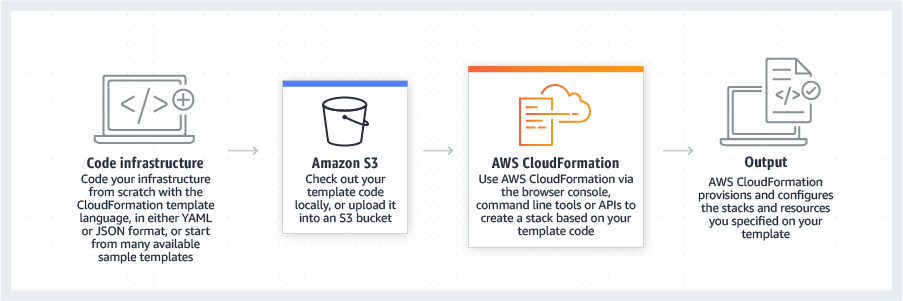
You can deploy and update a template and its associated collection of resources (called a stack) via the AWS Management Console, CloudFormation command line tools or APIs. CloudFormation is available at no additional charge, and you pay only for the AWS resources needed to run your applications.
To use AWS CloudFormation, you simply:
Supports a Wide Range of AWS Resources – AWS CloudFormation supports many AWS resources, allowing you to build a highly available, reliable, and scalable AWS infrastructure for your application needs. Today AWS CloudFormation supports:
Easy to Use – CloudFormation makes it easy to organize a collection of AWS resources you want to deploy and lets you describe any dependencies or special parameters that can be passed in at runtime. You don’t need to figure out the order in which AWS services need to be provisioned or the subtleties of how to make the dependencies work. CloudFormation takes care of this for you. You can use one of the many CloudFormation sample templates -- either verbatim or as a starting point -- or create your own.
AWS CloudFormation comes today with the following ready-to-run sample templates:
No Need to Reinvent the Wheel – A template can be used repeatedly to create identical copies of the same stack (or to use as a foundation to start a new stack). You can capture and control region-specific infrastructure variations such as Amazon EC2 AMIs, as well as Amazon Elastic Block Store (EBS) and Amazon RDS snapshot names.
Transparent and Open – Templates are simple JSON formatted text files that can be placed under your normal source control mechanisms, stored in private or public locations such as Amazon S3 and exchanged via email. AWS CloudFormation allows you to "open the hood," to see exactly which AWS resources are used to create a stack. You retain full control and have the ability to modify any of the AWS resources created as part of a stack.
Declarative and Flexible – To create the infrastructure you want, you enumerate what AWS resources, configuration values and interconnections you need in a template and then let AWS CloudFormation do the rest with a few simple clicks in the AWS Management Console, via the command line tools or by calling the APIs. You won’t have to recall the details of how to create and interconnect the respective AWS resources via their service APIs; AWS CloudFormation does this for you. You also don’t need to write a template from scratch if you prefer to start with one of the many sample templates that come with AWS CloudFormation.
Customized via Parameters – Parameters allow you to customize aspects of your template at runtime, when the stack is built. For example, the RDS database size, EC2 instance types, database and webserver port numbers can be passed to AWS CloudFormation when a stack is created. You can also use a parameterized template to create multiple stacks that may differ in a controlled way. For example, your Amazon EC2 instance types, Amazon CloudWatch alarm thresholds and Amazon Relational Database Service (Amazon RDS) read-replica settings may differ between AWS regions if you receive more customer traffic in the US than in Europe. You can use template parameters to tune the settings and thresholds in each region separately and still be sure that the application is deployed consistently across the regions.
Integration Ready – AWS CloudFormation publishes progress events through the AWS Simple Notification Service (SNS). This allows you to track stack creation and deletion progress via e-mail, and integrate with other processes programmatically.
No Extra Charge – AWS CloudFormation is available at no additional charge. You will be billed only the normal rates for the AWS resources that are created by AWS CloudFormation and used by your application.
There is no additional charge for AWS CloudFormation. You pay for AWS resources (e.g. EC2 instances, Elastic Load Balancers, etc.) created using AWS CloudFormation in the same manner as if you created them manually.
In order to avoid having you sign up individually for all services supported by AWS CloudFormation, we automatically sign you up for all these services when you sign up for AWS CloudFormation. This makes it easy for you to use the AWS CloudFormation sample templates without having to manually check that you are enabled for the respective AWS services. With all AWS services, you only pay for what you use, as you use it; there are no minimum fees and no required upfront commitments.
A template is a JSON (Javascript Object Notation) formatted text file that describes the AWS infrastructure needed to execute an application or service along with any inter-connection between them. Templates concisely capture resource relationships, such as EC2 instances that must be associated with an Elastic Load Balancer, or the fact that an EBS volume must be in the same EC2 Availability Zone as the instance to which it is attached. The template can be parameterized to enable a single template to be used for many infrastructure deployments that have different configuration values, such as how many instances to spin up for the application. Templates also provide output properties that can be used to easily communicate configuration or the results of deploying the template back to the user. For example, when instantiated, a template may provide the URL of the Elastic Load Balancer endpoint the customer should use to connect to the newly instantiated application. All AWS resources in a template are identified using logical names, allowing multiple stacks to be created from a template without fear of naming collisions between AWS resources.
You provide the template to the CreateStack operation in the AWS Console, the command line tool or API. There is no need to register the template with AWS CloudFormation beforehand. AWS CloudFormation retains a copy of the stack template so you can use the AWS Management Console, the command line tools or the APIs to look up the precise resource configurations that were applied during stack creation.
A template has the following high level JSON structure:
{
"Description" : "A text description for the template usage",
"Parameters": {
// A set of inputs used to customize the template per deployment
},
"Resources" : {
// The set of AWS resources and relationships between them
},
"Outputs" : {
// A set of values to be made visible to the stack creator
},
"AWSTemplateFormatVersion" : "2010-09-09"
}
The following template is a simple example that shows how to create an EC2 instance:
{
"Description" : "Create an EC2 instance running the Amazon Linux 32 bit AMI."
"Parameters" : {
"KeyPair" : {
"Description" : "The EC2 Key Pair to allow SSH access to the instance",
"Type" : "String"
}
},
"Resources" : {
"Ec2Instance" : {
"Type" : "AWS::EC2::Instance",
"Properties" : {
"KeyName" : { "Ref" : "KeyPair" },
"ImageId" : "ami-3b355a52"
}
}
},
"Outputs" : {
"InstanceId" : {
"Description" : "The InstanceId of the newly created EC2 instance",
"Value" : { "Ref" : "Ec2Instance" }
}
},
"AWSTemplateFormatVersion" : "2010-09-09"
}
The collection of resources that result from instantiating a template is known as a stack. A stack is created by supplying a template and any required parameters to the AWS CloudFormation service. Based on the template, the service determines what AWS resources need to be created and in what order. The order is determined by the dependencies specified between the resources declared in the template. Some of these dependencies are implicit, for example, in order to associate an EBS volume with an EC2 instance, the name of the EBS volume must be passed to the instance. For that to happen, the EBS volume must be created first so that it is given a name or identifier. In other cases, the dependency is explicit. For example, if an application is deployed using an Auto Scaling group and needs to access an Amazon Relational Database Service instance, the database instance must be created before the EC2 instances are created. In this case the template author can define a dependency between the resources, ensuring one is created before the other.
Stacks are created, updated and deleted using the AWS CloudFormation service. During stack creation, AWS CloudFormation records the mapping from the logical name given in the template (e.g. ‘myServer’) to the actual name of the resource that is instantiated (e.g. EC2 instance name ‘i-19d3ac161’). The stack creation status and resource name mappings are available via a simple API. In addition, AWS CloudFormation tags EC2 resources, such as instances and EBS volumes, with the stack name.
Stacks are updated by supplying a template that contains the desired configuration of all of the resources in your stack. You can modify properties of the existing resources in your stack to react to changes in your environment or new application requirements. For example, you can change the alarm thresholds on your AWS CloudWatch alarms or update the AMI running on an instance in your stack. AWS CloudFormation takes care of rolling that changes through the different resources in your stack. In many cases, the changes will be made without impacting your running application, however, if a change cannot be made dyanmically (such as updating the AMI on an EC2 instance), AWS CloudFormation will create a new resource and rewire it into the stack, deleting the old resource once the service is sure that the full update will be successful.
A stack will either be created or updated in its entirety or rolled back if it cannot be fully instantiated or modified. During stack creation, for debugging purposes, the rollback operation can be disabled and manually initiated at a later time.
AWS CloudFormation can be easily accessed through the AWS Management Console, which gives you a point-and-click, web-based interface to deploy and manage stacks. You can create, delete and update an application from inside the AWS Management Console in a few simple steps. AWS CloudFormation also provides a simple set of APIs that are easy to use and highly flexible. For a full list of the available AWS CloudFormation APIs, please see the AWS CloudFormation API Reference Guide. Some of the most commonly used APIs and their functionality are listed below:
AWS CloudFormation is integrated with the Amazon Simple Notification Service (Amazon SNS), allowing you to receive notifications as the creation, update and deletion of the stack progresses. In addition to providing you with status, this also allows other programs to become aware of events within CloudFormation and respond or even participate in the stack configuration process.
The AWS CloudFormation template is designed to leverage your existing experience with AWS. Each resource has a set of parameters with names that are identical to the names used to create the resources through their native API. The following template snippet shows how you define an Amazon EBS Volume. The logical name of the volume in the template is "myVolume", and its type is "AWS::EC2::Volume" The properties will look very familiar if you have used EBS volumes previously.
"myVolume" : {
"Type" : "AWS::EC2::Volume",
"Properties" : {
"Size" : "10",
"SnapshotId" : "snap-7b8fd361",
"AvailabilityZone" : "us-east-1a"
}
}
AWS CloudFormation provides a number of helper scripts that can be deployed to your EC2 instances. These scripts provide a simple way to read resource metadata from your stack and use it to configure your application, deploy packages and files to your instance that are listed in your template, and react to stack updates such as changes to the configuration or updates to your application.
The following scripts are available:
The CloudFormation scripts can be used standalone or in conjunction with CloudInit, a feature available on the Amazon Linux AMI and some other Linux AMIs. For more details of bootstrapping applications and updating configuration see the AWS CloudFormation whitepapers
The best way to get started with AWS CloudFormation is to work through the Getting Started Guide, which is included in our technical documentation. Within a few minutes, you will be able to deploy one of the sample templates and start creating your own infrastructure configurations.
Your use of this service is subject to the Amazon Web Services Customer Agreement.