Amazon Elastic Transcoder (beta)

Try Amazon Elastic Transcoder

Transcode up to 20 minutes of content each
month for free. Read more.


Amazon Elastic Transcoder is video transcoding in the cloud. It is designed to be a highly scalable, easy to use and a cost effective way for developers and businesses to convert (or “transcode”) video files from their source format into versions that will playback on devices like smartphones, tablets and PCs.

What's New with Amazon Elastic Transcoder

We are excited to announce seven new enhancements to Amazon Elastic Transcoder that make it easier for you to encode and deliver your content to a wider set of video devices and players. These new features are included in our standard pricing and can be accessed using the Amazon Elastic Transcoder API and management console.

  • HTTP Live Streaming (HLS) support lets you create videos that play on compatible players for Apple iOS, Android devices, set-top boxes and web browsers. With HLS support, you can now easily deliver your content without a streaming server — just point your users to the video in Amazon S3 or Amazon CloudFront. [See more]
  • WebM support lets you transcode content into VP8 video and Vorbis audio for playback in browsers, like Firefox, that do not natively support H.264 and AAC. [See more]
  • MPEG–2 TS output container support lets you output transport streams that are commonly used in broadcast systems. [See more]
  • Multiple outputs per job make it easy to create different renditions of the same content. Instead of having to create one transcoding job per rendition, you can now create a single job to produce multiple renditions. For example, with a single job you can create H.264, HLS and WebM versions of the same video for delivery to multiple platforms. [See more]
  • Automatic video bit rate optimization takes the guesswork out of choosing the right bit rate for your video content. With this feature, Amazon Elastic Transcoder will automatically adjust the bit rate in order to optimize the visual quality of your transcoded output. [See more]
  • Enhanced aspect ratio sizing and policies make it easier to resize your content to your output frame size. You can use these new settings in transcoding presets to precisely control scaling, cropping, matting and stretching options to get the output that you expect regardless of how the input is formatted. [See more]
  • Integration with Amazon S3 permissions and storage options lets you set permissions on your output files from within Amazon Elastic Transcoder. Your files are then created with the right permissions in-place, ready for delivery to end-users. [See more]

Amazon Elastic Transcoder manages all aspects of the transcoding process for you transparently and automatically. There’s no need to administer software, scale hardware, tune performance, or otherwise manage transcoding infrastructure. You simply create a transcoding “job” specifying the location of your source video and how you want it transcoded. Amazon Elastic Transcoder also provides transcoding presets for popular output formats, which means that you don’t need to guess about which settings work best on particular devices. All these features are available via service APIs and the AWS Management Console.

Like other Amazon Web Services, there are no contracts or monthly commitments for using Amazon Elastic Transcoder — you simply pay based on the minutes you need to transcode, and resolution of the content transcoded.

Get Started with
AWS for Free

Amazon Elastic Transcoder's Free Tier includes up to 20 minutes of transcoding each month.


This page contains the following categories of information. Click to jump down:

Amazon Elastic Transcoder Functionality

Traditionally, transcoding has been complex for customers in three significant ways. First, customers need to buy and manage transcoding software, which can be expensive and challenging to maintain and configure. Second, producing transcoded output for different kinds of devices often involves trial and error to find the right transcoding setting that play properly and look good to the end user. This trial and error process wastes compute resources. Third, traditional encoding solutions don’t scale up and down with customers’ business needs. Instead, with traditional solutions, customers need to guess how much capacity to provision ahead of time, which inevitably means either wasted money (if they provision too much and leave capacity underutilized) or delay to their business (if they provision too little and need to wait to run their encoding jobs).

With Amazon Elastic Transcoder, developers simply use the web-based console or APIs to create a transcoding job that specifies an input file, the transcoding setting, and output files. This eliminates these three complexities: First, there is no need to buy, configure or manage underlying transcoding software. Second, Amazon Elastic Transcoder has pre-defined presets for various devices that remove the need to find the right settings for different devices through trial and error. The system also supports custom presets, which let customers tune output to specific transcode requirements such as a unique size or bit rate needs. Finally, Amazon Elastic Transcoder automatically scales up and down to handle customers’ workloads, eliminating wasted capacity and minimizing time spent waiting for jobs to complete. It also enables customers to process multiple files in parallel and organize their transcoding workflow using a feature called transcoding pipelines. With Amazon Elastic Transcoder’s pipelines feature, customers set up pipelines for these various scenarios and ensure that their files are transcoded when and how they want, thus allowing them to seamlessly scale for spiky workloads efficiently. For example, a news organization may want to have a “high priority” transcoding pipeline for breaking news stories, or a User-Generated Content website may want to have separate pipelines for low, medium, and high resolution outputs to target different devices.

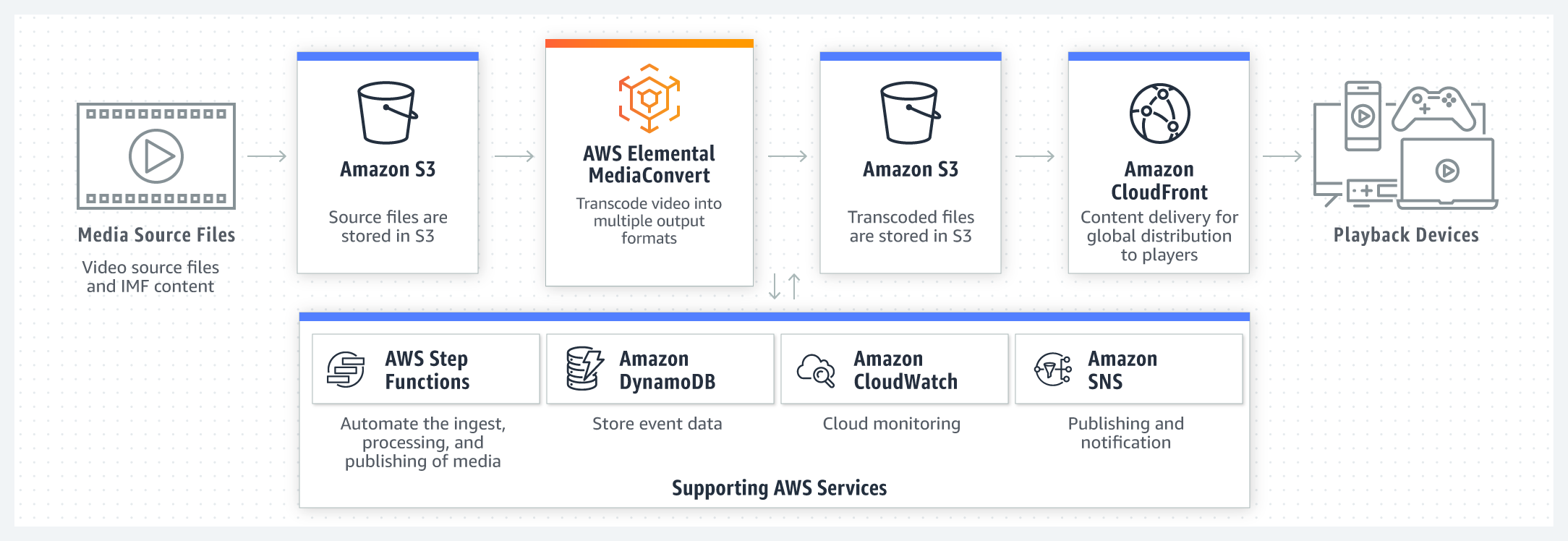
Amazon Elastic Transcoder is built using the scalability and flexibility of other Amazon Web Services. It runs your transcoding jobs using the Amazon Elastic Compute Cloud (Amazon EC2). Amazon EC2’s scale allows you to complete large transcoding jobs quickly and reliably. Amazon Elastic Transcoder is built to work with content you store in Amazon Simple Storage Service (Amazon S3), so you have durable and cost effective storage for huge libraries, or small ones. You can even get notified about the status of your transcoding jobs via Amazon Simple Notification Service (Amazon SNS).

Amazon Elastic Transcoder features an AWS Management Console and service APIs so you can integrate transcoding into your own applications and services.

To use Amazon Elastic Transcoder, you:

  • Create a transcoding pipeline that specifies the input Amazon S3 bucket, the output Amazon S3 bucket, and an AWS Identity and Access Management (IAM) role that is used by the service to access your files.
  • Create a transcoding job by specifying the input file, output files, and transcoding presets to use (you can choose from a set of pre-defined transcoding presets – for example 720p - or create your own custom transcoding preset.) Optionally, you can specify thumbnails and job specific transcoding parameters like frame rate and resolution.

While you have transcoding jobs running on Amazon Elastic Transcoder, you can:

  • Automatically receive status of your transcoding jobs via notifications.
  • Query the status of transcoding jobs.
  • Manage your transcoding jobs by stopping, starting or canceling them.

Service Highlights

Easy to Use — Amazon Elastic Transcoder is designed to be easy to use. You can get started by using the AWS Management Console, or the service APIs. System transcoding presets make it easy to get transcoding settings right the first time. We provide pre-defined presets to create video files that will play on a wide range of devices (like smartphones or tablets), as well as presets to create video files that are optimized for playback on a specific device (like the Amazon Kindle Fire HD or Apple iPhone 4S). You can also create segmented files and playlists for delivery using the HLS protocol to compatible devices. Developers building applications that need transcoding can use the AWS SDKs for Java, .NET, Node.js, PHP, Python and Ruby.

Elastically Scalable — Amazon Elastic Transcoder is designed to scale seamlessly with your video transcoding workload. Amazon Elastic Transcoder is architected to handle large volumes of video files and large file sizes. Transcoding pipelines enable you to perform multiple transcodes in parallel. Amazon Elastic Transcoder leverages other Amazon Web Services like Amazon S3, Amazon EC2, Amazon DynamoDB, Amazon Simple Workflow (SWF) and Amazon Simple Notification Service (SNS) to give scalability and reliability.

Cost Effective — Amazon Elastic Transcoder uses a content duration-based pricing model: you pay based on the length, in minutes, of the video you are transcoding. For example, if your transcoded output is 30 minutes in duration, you will pay for 30 minutes of transcoding. With Amazon Elastic Transcoder, there are no minimum transcoding volumes, monthly commitments, or long term contracts.

Managed — Amazon Elastic Transcoder enables you to focus on your content rather than on managing transcoding software in a distributed cloud-based environment. The service takes care of scaling and operating the system, and manages the process of keeping codecs up to date. Combined with our API and SDKs, this makes it easy for you to build media solutions that use Amazon Elastic Transcoder.

Secure — Your content is under your control: your assets are in your own Amazon S3 buckets, which you give us access to through IAM roles. This makes it simple to fit seamlessly into your current security and identity framework without giving up control. In building Amazon Elastic Transcoder, we made use of security best practices gained by building other Amazon Web Services. For more information about security on AWS, please refer to the AWS Security Center. For more information on compliance, including MPAA best practices, please refer to AWS Compliance.

Seamless Delivery — Using Amazon Elastic Transcoder, Amazon S3 and Amazon CloudFront, you can store, transcode and deliver your content. By setting the S3 permissions for your CloudFront distribution in Amazon Elastic Transcoder, it is now a simple one step process to transcode content with Amazon Elastic Transcoder and deliver the multiple output videos via progressive download or HLS streaming with CloudFront.

AWS Integration — Amazon Elastic Transcoder provides an important media building block for creating end-to-end media solutions on AWS. For example, you can use Amazon Glacier to store master content, Amazon Elastic Transcoder to transcode masters to renditions for distribution stored in Amazon S3, and stream these renditions at scale over the Internet using Amazon CloudFront.


Pricing

Pay only for what you use. There is no minimum fee. Our charges are based on the duration, in minutes, of your output content and whether it is standard definition (SD) or high definition (HD) resolution. High definition (HD) video (defined as having a resolution greater than or equal to 720p) costs twice as much to transcode as SD. Our charges do not include any costs that you incur for storing your input or output files in your Amazon S3 buckets, or any transfer fees if your Amazon S3 buckets exist in regions other than where the transcoding job is submitted. For more information on Amazon S3 charges, including costs for transferring your content out of AWS, please see Amazon S3 Pricing. If your job fails to transcode for some reason, our policy is to not charge you unless the number of job failures becomes excessive.

Free Usage Tier

To help you test Amazon Elastic Transcoder, the first 20 minutes of SD content (or 10 minutes of HD content) transcoded each month is provided free of charge. Once you exceed the number of minutes in this free usage tier, you will be charged at the prevailing rates. We do not watermark the output content or otherwise limit the functionality of the service, so you can use it and truly get a feel for its capabilities. For more information, please refer to AWS Free Usage Tier.

Regional Pricing Per Minute

Prices for transcoding operations in Japan are inclusive of Japan consumption tax.

Pricing Examples

  1. A 10 minute source file in US West (Oregon) transcoded to an SD output will cost 10 x $0.015 = $0.15.
  2. A 10 minute source file in US East (N. Virginia) transcoded to an HD output will cost 10 x $0.030 = $0.30.
  3. A 10 minute source file in EU (Ireland) transcoded to one SD and one HD output will cost (10 x $0.017) + (10 x $0.034) = $0.51.
Inactive pipelines: $1.00 per month

Detailed Description

Amazon Elastic Transcoder offers the following features to make video transcoding easy, scalable and inexpensive.

  • Transcoding pipelines: Transcoding pipelines allow customers to setup and run transcoding workflows in parallel. For example, you could set up a pipeline for transcoding short content and another for transcoding long content, or you could assign different pipelines for different resolutions or storage location. You can create up to four transcoding pipelines in Amazon Elastic Transcoder. If you require more than four transcoding pipelines, please contact us using this form.
  • Transcoding jobs: Transcoding jobs do the work of transcoding a video file from one format into others. You can use one job to create multiple output files of different bit rates and formats from a single input file. For example, one job could create renditions consisting of different resolutions and bit rates of the same input file. When you create a job, you specify the information that Amazon Elastic Transcoder needs to perform the transcoding: which file to transcode, what to name the transcoded output files and which presets to use. Transcoding jobs run inside a transcoding pipeline, so you can have more than one job running at once within your AWS account. You can have up to 1,000 active jobs per pipeline at any time. If you require this limit to be increased, please contact us using this form.
  • System transcoding presets: Amazon Elastic Transcoder provides a set of transcoding presets that removes the guesswork out of figuring out the right transcoding settings for different devices. You can choose from presets that will create output that plays on any device, or from presets that target specific devices. For maximum compatibility, choose a “breadth preset” that will create output that plays on a wide range of devices. For optimum quality and file size, choose an “optimized preset” that will create output for a specific device or class of devices.
  • Custom transcoding presets: The transcoding presets that we supply cater to most devices and platforms, but some customers may need to create specific presets for a particular output target. Using custom presets, you can customize an existing transcoding preset and use it across all your pipelines in your AWS account within a region. You can create up to 50 custom transcoding presets in Amazon Elastic Transcoder. If you require more transcoding presets, please contact us using this form.
  • Automatic video bit rate optimization: With the auto video bit rate setting, Amazon Elastic Transcoder will automatically adjust the bit rate in order to optimize the visual quality of your transcoded output. The result is that you get video files that look great but have better compression than if you had selected a single bit rate for the entire file.
  • Monitoring and Management: You can view the status of your transcoding pipelines and jobs through the AWS Management Console or the Amazon Elastic Transcoder APIs. You can also control your pipelines and jobs by stopping, starting or canceling them.
  • Notifications: Amazon Elastic Transcoder uses Amazon Simple Notification Service (SNS) to notify you about transcoding events. You can be notified when your transcoding job starts, when it completes, if there is a warning, and if there is an error condition.
  • Thumbnails: Amazon Elastic Transcoder can generate thumbnails of your output video for you. You can set the size of the thumbnails, aspect ratio and other parameters including how many thumbnails you would like to have generated. Generating multiple thumbnails is useful if you want to add chapter markers, provide a visual scan function or simply choose the most representative thumbnail for your content.
  • Formats: Amazon Elastic Transcoder supports transcoding to the following output formats:
    • Audio codecs: AAC and Vorbis.
    • Video codecs: H.264 and VP8.
    • Container types: MPEG-4, MPEG-2 Transport Stream (TS) and WebM.
    Typically, you would transcode to an MP4 container comprising of H.264 video and AAC audio, an MPEG-2 TS container comprising of H.264 video and AAC audio, or a WebM container comprising of VP8 video and Vorbis audio. For input, we support most common media formats including 3GP, AVI, DivX, FLV, MPEG-2, MP4, MXF, OGG, VOB, and WebM.
  • HTTP Live Streaming (HLS): Amazon Elastic Transcoder enables you to create HLS segmented filesets and playlists. You can specify an input file and Amazon Elastic Transcoder can create a set of segmented output renditions at different resolutions and bit rates, and a corresponding M3U8 playlist files all stored in Amazon S3. You can then use Amazon CloudFront to deliver these to players that implement HLS like Apple iOS devices, Android devices and browser-based players.
  • Progressive download of on-demand media: You can store the original versions of your media content in Amazon S3 and configure an Amazon CloudFront download distribution for progressive download of your video and audio files. Frequently accessed media files are cached at the edge to help you scale and give your viewers the best possible performance.
  • Advanced Settings: You can override defaults or automatic job and preset parameters using advanced settings. For example, you may wish to force a specific output frame rate, rotation or set a specific H.264 or VP8 profile level.
  • Multiple Regions: Amazon Elastic Transcoder is available in six AWS regions: US East (N. Virginia), US West (Oregon), US West (N. California), EU (Ireland), Asia Pacific (Singapore) and Asia Pacific (Tokyo).

Amazon Elastic Transcoder Limits

Amazon Elastic Transcoder has several default limits: the default number of Transcoding pipelines is four; the default number of Active Jobs per pipeline is 1,000; the maximum number of multiple outputs is 30; and the default number of Custom Presets is 50. If these limits are insufficient for your needs, please contact us. We will evaluate and respond to your request within two days.

Getting Started

The best way to understand Amazon Elastic Transcoder is to review the Getting Started Guide, part of our Technical Documentation. Once you are ready to start using Amazon Elastic Transcoder, you can use the AWS Management Console or Amazon Elastic Transcoder APIs.


Intended Usage and Restrictions

Your use of this service is subject to the Amazon Web Services Customer Agreement.


Diagram: How Amazon Elastic Transcoder Works

Amazon Elastic Transcoder: How it Works


Announcements
New Amazon Elastic Transcoder How-To Videos
Watch new how-to videos and archived webcasts here.

New Amazon Elastic Transcoder Features
Read Jeff's Barr's Blog Post on the new features for Amazon Elastic Transcoder introduced on 5/16/2013 here.

Introducing Amazon Elastic Transcoder
Read Jeff's Barr's Blog Post on Amazon Elastic Transcoder here.

©2013, Amazon Web Services, Inc. or its affiliates. All rights reserved.