AWS Cloud Financial Management
Announcing the public preview of AWS FinOps Agent
Today, AWS announces the public preview of AWS FinOps Agent, an agentic AI solution that investigates cost anomalies to root cause and answers cost questions for engineers across your organization, in the tools they already use.
FinOps, short for financial operations, brings finance, engineering, and business teams together to maximize the business value of cloud investments through shared financial accountability and data-driven tradeoffs between cost, speed, and quality. FinOps is shifting from periodic, dashboard-driven reviews toward continuous workflows that engineering, finance, and FinOps teams run together. That shift requires specialized cost expertise, execution at scale across many accounts and workloads, and integration with the tools engineering teams already use. AWS FinOps Agent is designed to address each of these. It brings specialized cost expertise to engineering, finance, and FinOps practitioners, and fits the way your teams already work inside Jira and Slack. It also runs on the cadence the work demands: on a recurring schedule, when an anomaly is detected, or whenever an engineer asks a cost question. It draws on AWS Cost Explorer, Cost Anomaly Detection, Cost Optimization Hub, and Compute Optimizer, so its answers reflect the same data your central FinOps team relies on.
Early customers including Workday, AVIV Group, Convera, and Mitre 10 are using AWS FinOps Agent to move cloud financial management from reactive monthly reviews to scheduled, event-driven operations, investigating cost anomalies before they compound and putting cost answers directly in engineers’ hands.
Investigate Cost Anomalies Faster than Ever Before
The faster your teams can investigate cost anomalies, the faster they can determine whether those anomalies reflect positive business signals, like growth in a new workload, or opportunities to optimize your environment. A Cost Anomaly Detection alert tells you something changed. AWS FinOps Agent takes the next step automatically: it correlates the cost change with AWS CloudTrail events — the record of who changed what and when across your AWS environment, identifies the change that drove the spike, and produces an investigation summary with the likely root cause and the responsible owner (see Figure 1). Optionally, the agent can deliver the findings by opening a Jira ticket or posting to a Slack channel (see Figure 2), so the engineer who owns the resource gets the context and can decide what to do next. To focus the agent on what matters most, you can include a filter in your automation prompt, for example, only investigating anomalies above a specific dollar threshold, so your team’s attention stays on the highest-impact changes.
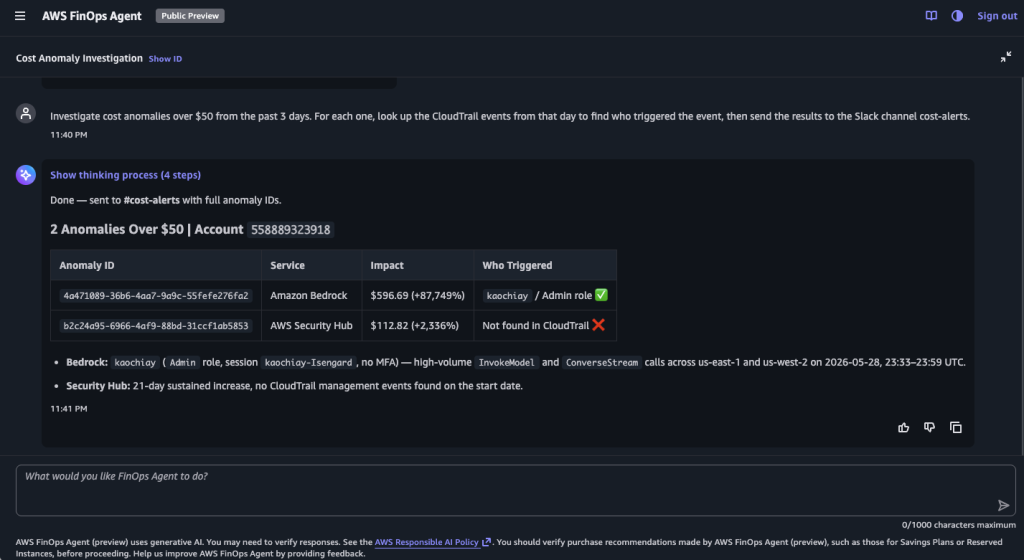
Figure 1 – FinOps Agent Cost Anomaly Investigation

Figure 2 – FinOps Agent Slack Channel Message
Put Cost Answers in the Hands of Every Engineer
AWS FinOps Agent lets engineers ask cost questions in natural language and get answers using your actual cost and usage data (see Figure 3). An engineer can ask, “Why did my AWS cost go up last month?” and get a response that identifies the cost changes, the contributing services, and the underlying usage drivers. To tailor the agent to your organization, you can upload context files such as account-to-owner mappings, team definitions, tagging conventions, and review cadences. The agent can leverage this context to interpret questions in your organization’s terms, for example resolving “What’s the cost of Team X?” to the specific accounts that team owns. Engineers get answers at the moment they need them, and your FinOps team can spend that time on strategic work.

Figure 3 – Cost Questions in Natural Language
What Ships in Public Preview
The public preview includes:
- Event-triggered cost anomaly investigation. Configure the agent to listen for AWS Cost Anomaly Detection events and produce a consolidated investigation report, delivered to Jira or Slack.
- Cost inquiry in natural language. Ask cost questions about your workloads and get answers using your cost and usage data.
- Recurring cost reporting. Schedule recurring cost reports (e.g., daily, weekly, monthly) rendered in a downloadable, presentation-ready format in HTML, PDF, or PPT.
- Optimization opportunities in one place. Pull recommendations from AWS Cost Optimization Hub and AWS Compute Optimizer, and summarize them into a Jira ticket so the engineering team can pick up the work in the tool they already use.
- Context files and memory. Upload organization-specific context files. The agent applies them to its answers and remembers your preferences across sessions.
Getting Started
AWS FinOps Agent is available in public preview today. Here’s how to set it up.
How to create your first agent
- Create an agent. Sign in to the AWS Management Console, switch to the US East (N. Virginia) (us-east-1) Region, open the AWS FinOps Agent Console page, and create your first agent (see figure 4)

Figure 4 – Create an Agent
2. Complete the one-click IAM role setup. Provision the customer-managed roles the agent uses to read your cost, usage, and operational data.
3. Connect Jira and Slack (optional). Configure Jira space keys and Slack channels so the agent can create tickets and post messages.
4. Confirm the agent is created. Review your agent configuration in the AWS FinOps Agent Console.
5. Open the web application. From the AWS FinOps Agent Console page, open the agent’s web application to start interacting with it.
6. Upload your initial context (optional). In the web application, add an account-to-owner mapping and any organization-specific instructions (known exceptions, prioritization rules, review cadence).
7. Run your first query. Ask in natural language, for example, “List the top 10 cost drivers last month and group them by Region,” or “Investigate any cost anomaly over $1,000 in the data platform accounts and open a Jira ticket with root causes.”
8. Set up your first event-triggered cost anomaly detection automation. Ask the agent to “listen for AWS Cost Anomaly Detection events, investigate each anomaly for root cause, and post the findings to the #finops-anomalies Slack channel.” From that point on, anomalies are investigated and posted to the channel without manual triage.
Customer success stories
Early customers are using AWS FinOps Agent to run recurring cost reviews, cost anomaly response, and engineer follow-through as continuous operations.
Workday
Workday is the enterprise AI platform for HR, finance, and IT. The AI Platform Infrastructure team runs Workday’s AI platform on AWS.
“Our AI platform runs across many AWS accounts, and two things eat our team’s time: chasing down cost outliers before they become budget problems, and building the monthly cost reports our leadership reviews. The AWS FinOps Agent helps us do both in one place for our AWS environments. It surfaces potential cost anomalies with the context we need to act on them, and it produces the trend and spend views we used to assemble by hand. What used to take our team hours of manual dashboard work each month now starts from a natural-language interface. That combination of anomaly detection and reporting in one place is why the agent has quickly become a core part of our cloud operations, not just another tool to maintain.”
Serjesh Sharma, Manager, Software Development Engineering, Workday.
Mitre 10
Mitre 10 is New Zealand’s largest home improvement retailer. Its platform engineering team is responsible for building and operating the AWS platform that underpins the company’s retail technology, while also managing cloud cost visibility and governance.
“Our platform engineering team plays a dual role. We build and operate the shared AWS platform that other teams run their applications on, and we’re also accountable for how we manage cloud spend. Historically, recurring cost reviews, anomaly investigations, and optimization checks competed directly with reliability and improvement work.
What the AWS FinOps Agent introduces for us is the ability to define cost investigation and review workflows once, and have those checks run continuously in the background. Activities like identifying anomalies, spotting unused resources, or preparing regular cost insights no longer rely on someone remembering to run them. Instead, relevant findings are surfaced when there’s something that genuinely warrants attention.
For a lean platform team, shifting from manual effort to ongoing, contextual cost insights is a meaningful force multiplier.”
Eduard Kleynhans, Platform Engineering Manager, Mitre 10 New Zealand.
Convera
Convera is a global leader in commercial payments operating in a regulated financial services environment.
“The challenge in our FinOps program is not the big optimizations — it is catching the small, unintended cost changes developers introduce before they compound. The AWS FinOps Agent handles that end-to-end: it detects the anomaly, investigates what changed, and creates a Jira ticket to the engineering team that owns the resource, so the right engineer sees it instead of a shared queue that nobody watches. For a fast-moving engineering organization, that closed-loop workflow is the difference between reactive monthly reviews and continuous cost governance.”
Ramesh Singaraj, Infrastructure Engineering and Operations Leader, Convera.
AVIV Group
AVIV Group operates leading digital real-estate marketplaces across France, Germany, and Belgium. Its centralized FinOps team supports hundreds of AWS accounts spanning different business units plus multiple additional shared services.
“Our FinOps team supports hundreds of AWS accounts across different business units, and as we move from a purely centralized model to a hybrid model, our local teams take on more of their own cost work. The hardest part of that transition is that engineer questions such as the difference between on-demand and Savings Plan pricing, how a spend projection was calculated, why a cost anomaly fired, all route back to our small central team before the resource owners can act. The AWS FinOps Agent answers those questions directly for the engineer, grounded in our own account-to-business-unit context. That lets our central team spend its time on chargeback logic, optimization strategy and leadership reporting, rather than on the per-question back-and-forth. For a small FinOps team enabling a large organization, that is exactly the leverage we need to be as effective as possible.”
Jordi Espasa, FinOps Director, AVIV Group.
Availability and pricing
You can try AWS FinOps Agent today in the US East (N. Virginia) Region. The agent itself runs in the US East (N. Virginia) Region, and it can manage costs across AWS Regions and accounts when set up in the management account. During the preview period, you can use the AWS FinOps Agent at no charge, with a monthly usage limit. Standard charges apply for other AWS Services used in connection with the AWS FinOps Agent.
Conclusion
AWS FinOps Agent investigates cost anomalies the moment they appear and routes findings to the owner automatically. It also puts cost answers directly in the hands of every engineer, so they can understand their cloud spend without leaving the tools they already use. Over time, the agent will expand to more FinOps capabilities, including cost analysis for AI workloads. Together, these capabilities help customers run cloud cost management as a continuous practice across both their FinOps and engineering teams.
To learn more, visit AWS FinOps Agent (preview) and explore the User Guide.