AWS Compute Blog
Category: Technical How-to
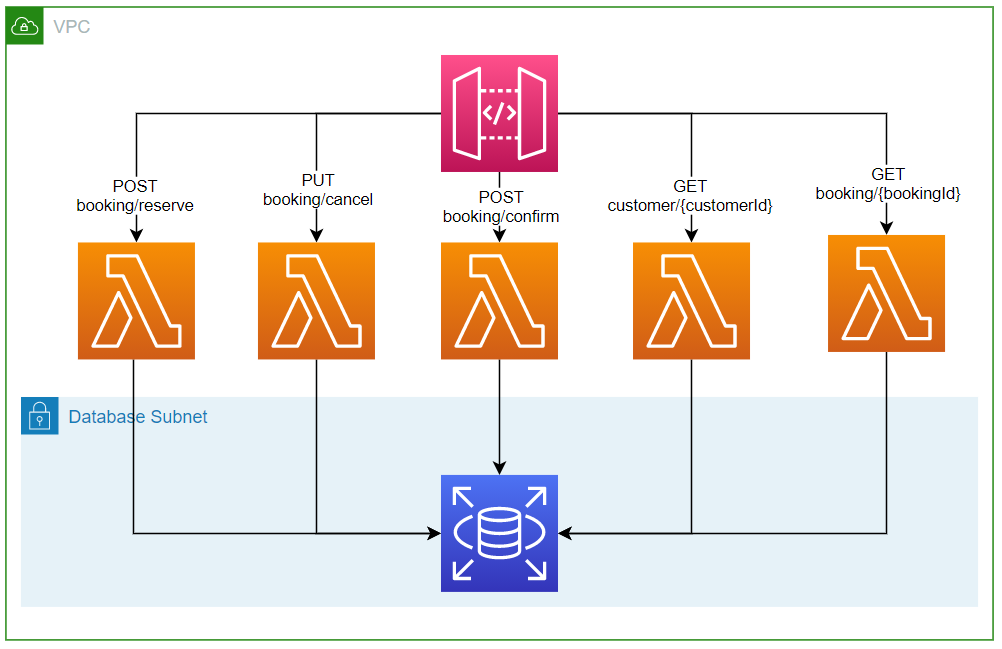
Migrating a monolithic .NET REST API to AWS Lambda
This blog post shows the required considerations for migrating a .NET Core REST API to AWS Lambda. You can now start to look at your existing code base and make an informed decision whether Lambda is for you. With the right abstractions and configuration, you can migrate a .NET Core API to Lambda compute with copy and paste.
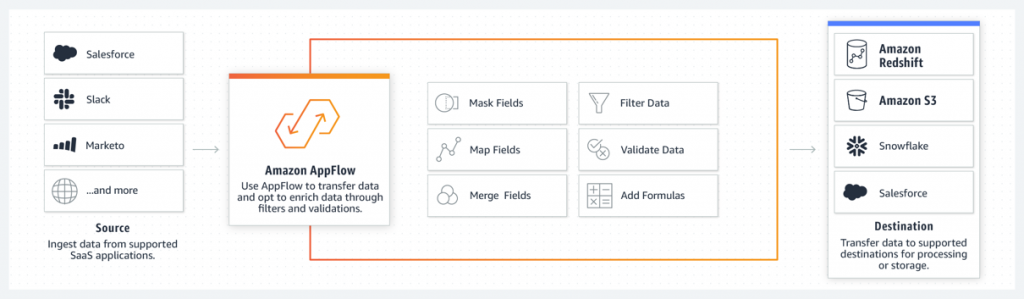
Building custom connectors using the Amazon AppFlow Custom Connector SDK
This blog post shows how to extend the Amazon AppFlow service to move data between SaaS endpoints and custom APIs. You can now build custom connectors using the Amazon AppFlow Custom Connector SDK.
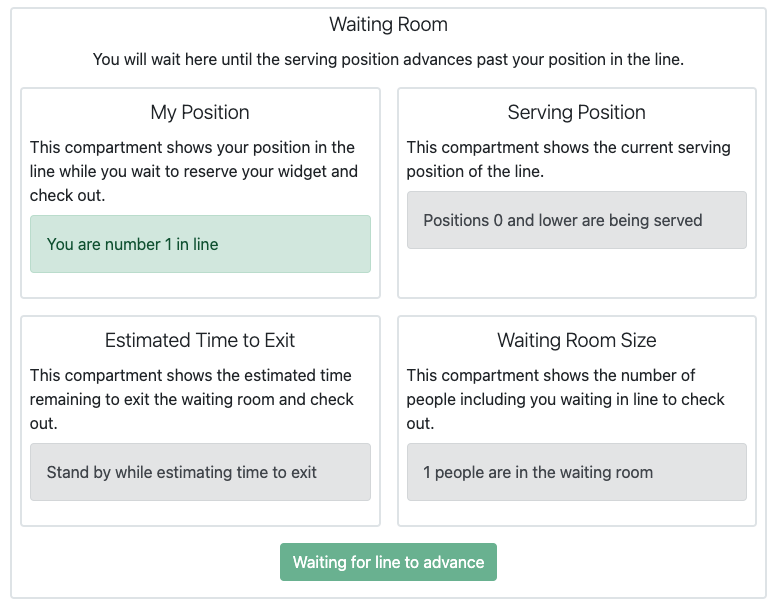
Introducing AWS Virtual Waiting Room
The AWS Virtual Waiting Room solution is available today at no additional cost, provided as open source under the Apache 2 license. It supports customized integration with any front-end application via a variety of integration techniques.

Creating computing quotas on AWS Outposts rack with EC2 Capacity Reservations sharing
This post is written by Yi-Kang Wang, Senior Hybrid Specialist SA. AWS Outposts rack is a fully managed service that delivers the same AWS infrastructure, AWS services, APIs, and tools to virtually any on-premises datacenter or co-location space for a truly consistent hybrid experience. AWS Outposts rack is ideal for workloads that require low latency […]
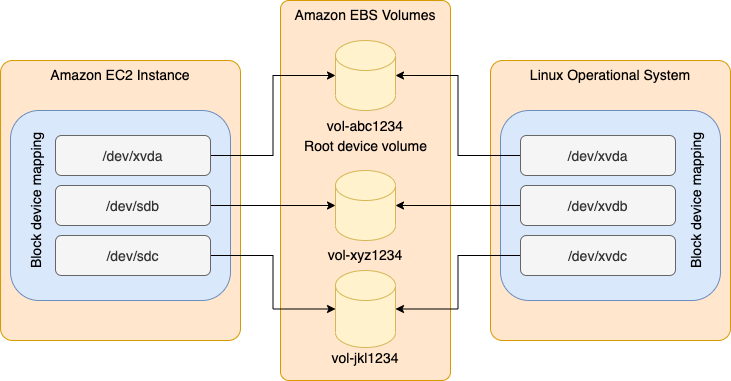
How to mount Linux volume and keep mount point consistency
This post is written by: Leonardo Azize Martins, Cloud Infrastructure Architect, Professional Services Customers often use Amazon Elastic Compute Cloud (Amazon EC2) Linux based instances with many Amazon Elastic Block Store (Amazon EBS) volumes attached. In this case, device name can vary depending on some facts, such as virtualization type, instance type, or operating system. […]

Expanding Your EC2 Possibilities By Utilizing the CPU Launch Options
This post is written by: Matthew Brunton, Senior Solutions Architect – WWPS To ensure our customers have the appropriate machines available for their workloads, AWS offers a wide range of hardware options that include hundreds of types of instances that help customers achieve the best price performance for their workloads. In some specialized circumstances, our […]

Migrating AWS Lambda functions to Arm-based AWS Graviton2 processors
AWS Lambda now allows you to configure new and existing functions to run on Arm-based AWS Graviton2 processors in addition to x86-based functions. Using this processor architecture option allows you to get up to 34% better price performance. This blog post highlights some considerations when moving from x86 to arm64 as the migration process is […]
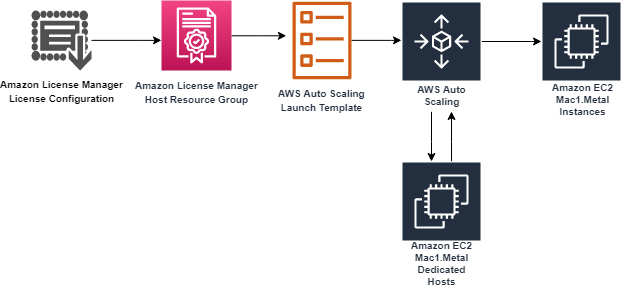
Implementing Auto Scaling for EC2 Mac Instances
Amazon Elastic Compute Cloud (Amazon EC2) is a web service that provides secure, resizable compute capacity in the cloud. The introduction of Amazon EC2 Mac now enables macOS based workloads to run in the AWS Cloud. These EC2 instances require Dedicated Hosts usage. EC2 integrates natively with Amazon CloudWatch to provide monitoring and observability capabilities. In order to best […]

Insulating AWS Outposts Workloads from Amazon EC2 Instance Size, Family, and Generation Dependencies
This post is written by Garry Galinsky, Senior Solutions Architect. AWS Outposts is a fully managed service that offers the same AWS infrastructure, AWS services, APIs, and tools to virtually any datacenter, co-location space, or on-premises facility for a truly consistent hybrid experience. AWS Outposts is ideal for workloads that require low-latency access to on-premises […]
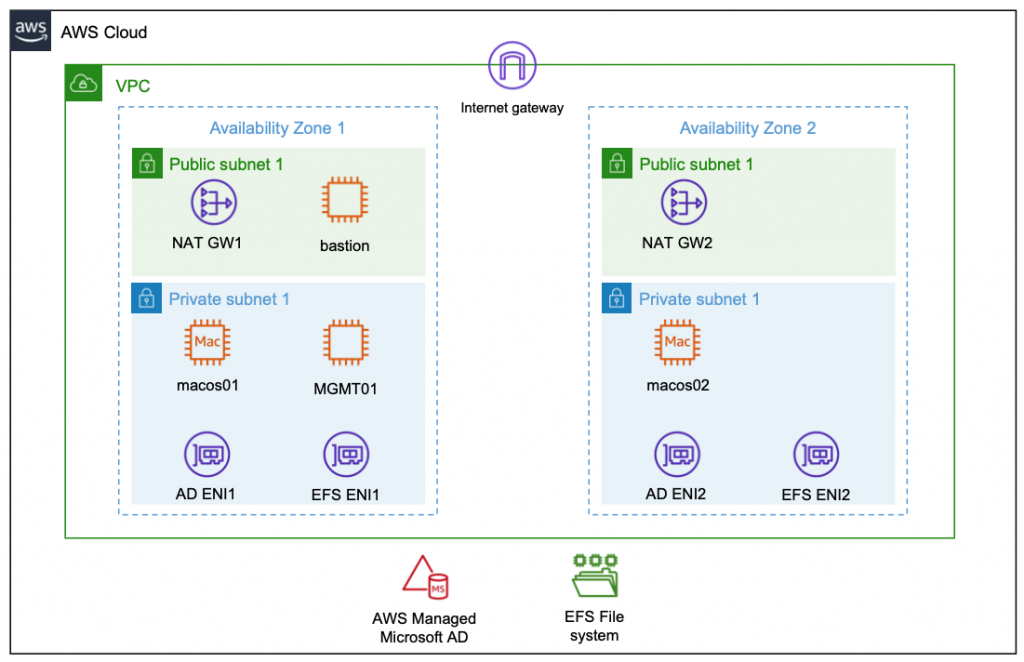
Setting up EC2 Mac instances as shared remote development environments
This post is written by: Michael Meidlinger, Solutions Architect In December 2020, we announced a macOS-based Amazon Elastic Compute Cloud (Amazon EC2) instance. Amazon EC2 Mac instances let developers build, test, and package their applications for every Apple platform, including macOS, iOS, iPadOS, tvOS, and watchOS. Customers have been utilizing these instances in order to […]