Amazon EC2 Reserved Instances
Why EC2 Reserved Instances?
Amazon EC2 Reserved Instances (RI) provide a significant discount (up to 72%) compared to On-Demand pricing and provide a capacity reservation when used in a specific Availability Zone. To learn how to buy an RI, visit the Amazon EC2 Reserved Instance Getting Started page.
Benefits
Save money and maintain flexibility
RIs provide you with a significant discount (up to 72%) compared to On-Demand instance pricing. You have the flexibility to change families, OS types, and tenancies while benefitting from RI pricing when you use Convertible RIs.Reserve capacity
RIs can provide a capacity reservation, offering additional confidence in your ability to launch the number of instances you have reserved when you need them.How it works
EC2 RIs provide a discounted hourly rate and an optional capacity reservation for EC2 instances. AWS Billing automatically applies your RI’s discounted rate when attributes of EC2 instance usage match attributes of an active RI.
If an Availability Zone is specified, EC2 reserves capacity matching the attributes of the RI. The capacity reservation of an RI is automatically utilized by running instances matching these attributes.
You can also choose to forego the capacity reservation and purchase an RI that is scoped to a region. RIs that are scoped to a region automatically apply the RI’s discount to instance usage across AZs and instance sizes in a region, making it easier for you to take advantage of the RI’s discounted rate.
Amazon EC2 RI instance types
With RIs, you can choose the type that best fits your applications needs.
- Standard RIs: These provide the most significant discount (up to 72% off On-Demand) and are best suited for steady-state usage.
- Convertible RIs: These provide a discount (up to 66% off On-Demand) and the capability to change the attributes of the RI as long as the exchange results in the creation of Reserved Instances of equal or greater value. Like Standard RIs, Convertible RIs are best suited for steady-state usage.
RI features
The following summarizes features of all RIs.
- Provide a significant discount compared to running instances On-Demand.
- Can apply to usage across all Availability Zones in an AWS region, or can provide a capacity reservation when assigned to a specific Availability Zone.
- Are offered under three upfront payment options to provide you with payment flexibility at the point of purchase.
- Can be shared between multiple accounts within a consolidated billing family.
Standard and Convertible RI features
The Details table below summarizes the differences between Standard and Convertible RIs.
Details
|
Characteristic
|
Standard
|
Convertible
|
|---|---|---|
|
Terms (avg. discount off On-Demand)
|
1yr (40%), 3yr (60%) |
1yr (31%), 3yr (54%) |
|
Change Availability Zone, instance size (for Linux OS), networking type
|
Yes (Using ModifyReservedInstances API and console) |
Yes (Using ExchangeReservedInstances API and console) |
|
Change instance families, operating system, tenancy, and payment option
|
|
Yes |
|
Benefit from Price Reductions
|
|
Yes
|
RI attributes
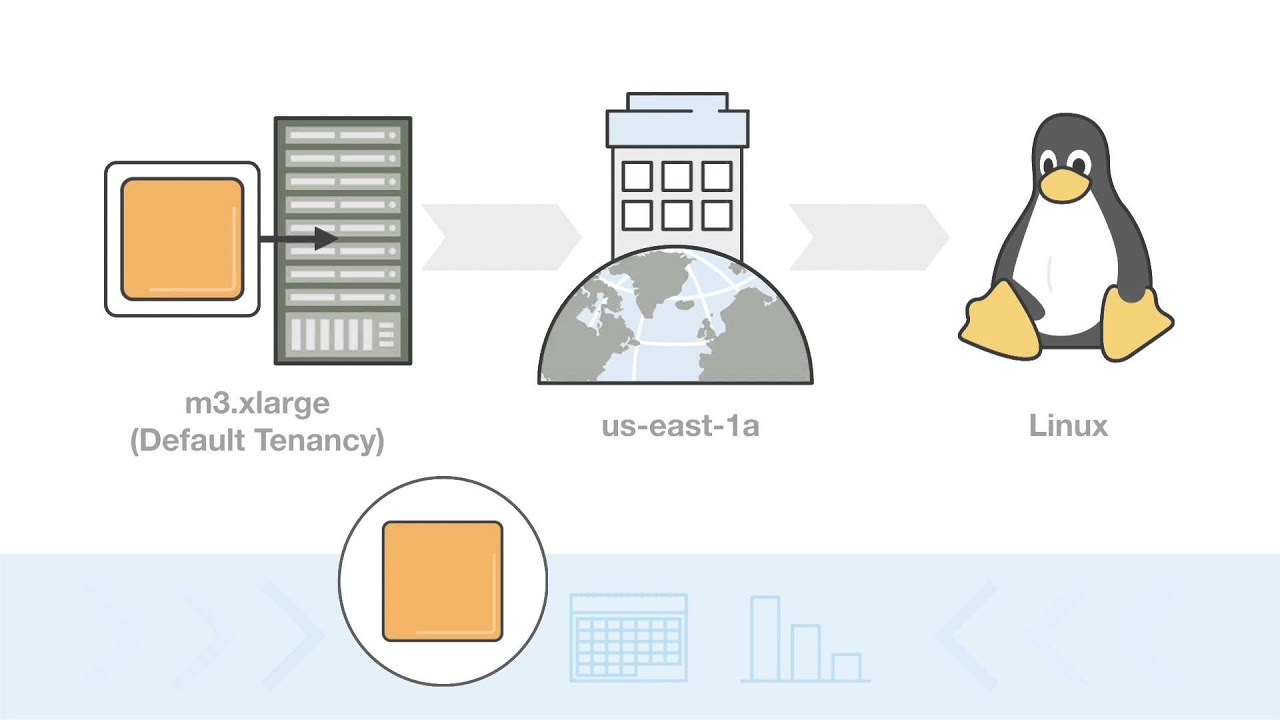
When the attributes of the RI match the attributes of a used instance, the discount of the RI is applied and the capacity reservation is utilized. These attributes are:
- Instance type: Instance types comprise varying combinations of CPU, memory, storage, and networking capacity. For example, m4.2xlarge.
- Platform description: RIs can be purchased for Amazon EC2 instances running Linux/UNIX, SUSE Linux, Red Hat Enterprise Linux, Microsoft Windows Server, and Microsoft SQL Server platforms.
- Tenancy: If you are using instances with a default tenancy, purchase default tenancy Reserved Instances. If you are using dedicated instances, purchase Reserved Instances with a tenancy of dedicated.
- Availability Zone (optional): By selecting an Availability Zone, the RI you purchase will provide a capacity reservation and a discount for the use of instances in the selected Availability Zone. When an Availability Zone isn’t specified, the RI discount will apply to a running instance of any size (within the same family) in the region. As an example, let’s say you own an m4.2xlarge Linux/UNIX RI with default tenancy in US East (N.Virginia). Then this RI’s discounted rate can automatically apply to two m4.xlarge instances in us-east-1a or four m4.large instances in us-east-1b.
Standard and Convertible RI attributes
- Offering class: There are two classes of RIs: Convertible and Standard. Convertible RIs can be exchanged for different Convertible RIs of equal or greater value.
- Term: AWS offers Standard RIs for 1-year or 3-year terms. Reserved Instance Marketplace sellers also offer RIs often with shorter terms. AWS offers Convertible RIs for 1-year or 3-year terms.
- Payment option: You can choose between three payment options: All Upfront, Partial Upfront, and No Upfront. If you choose the Partial or No Upfront payment option, the remaining balance will be due in monthly increments over the term.
Pricing
Visit the Amazon EC2 Pricing page to view RI pricing. If you purchase a large number of RIs in an AWS region, you will automatically receive discounts on your upfront fees and hourly fees for future purchases of RIs in that AWS region. RIs are sold by third-party sellers on the Reserved Instance Marketplace, who occasionally offer even deeper discounts at shorter terms.
How to buy a reserved instance
Visit the Amazon EC2 Reserved Instance Getting Started page to learn more about how to purchase the right Amazon EC2 Reserved Instance.
Marketplace
Reserved Instance Marketplace allows other AWS customers to list their Standard RIs for sale. Third-party Standard RIs are no different from the Standard Reserved Instances purchased directly from AWS except they are often listed at lower prices and shorter terms. To learn more about how to buy a Standard Reserved Instance from AWS or from third-party sellers, visit the Amazon EC2 Reserved Instances Getting Started page. To learn more about selling your Reserved Instances on the Reserved Instance Marketplace, visit the Amazon EC2 Reserved Instance Marketplace. Note: EC2 Reserved Instances are only transferrable in accordance with the requirements of the RI Marketplace provided on the AWS website and cannot otherwise be transferred.