Containers
Amazon EKS introduces enhanced network policy capabilities
Today, we are excited to announce the expansion of native network policy support in Amazon EKS to include both Admin Policies and Application Network Policies. With these additional policies, Cluster Administrators (e.g. platform or security teams) can set cluster-wide security rules for their clusters to enhance the overall network security for their Kubernetes workloads.
In addition, Namespace Administrators (e.g. application teams) can now control pod traffic to external resources using domain names as filters. This approach replaces the need to maintain lists of specific IP addresses (which frequently change) or broad CIDR ranges (which often conflict with corporate security policies), instead enabling the creation of a trusted list of external website and services that pods are allowed to access. You can think of this as a “permitted destinations” list for your cluster’s outbound traffic.
Standard Kubernetes Network Policies in a cluster allow you to implement a virtual firewall, segmenting network traffic inside a cluster. These policies let you create rules that govern both incoming (ingress) and outgoing (egress) traffic. You can restrict communication based on several parameters, including pod labels, namespaces, IP ranges (CIDR), and specific ports.
An example of this type of network policy is shown below:
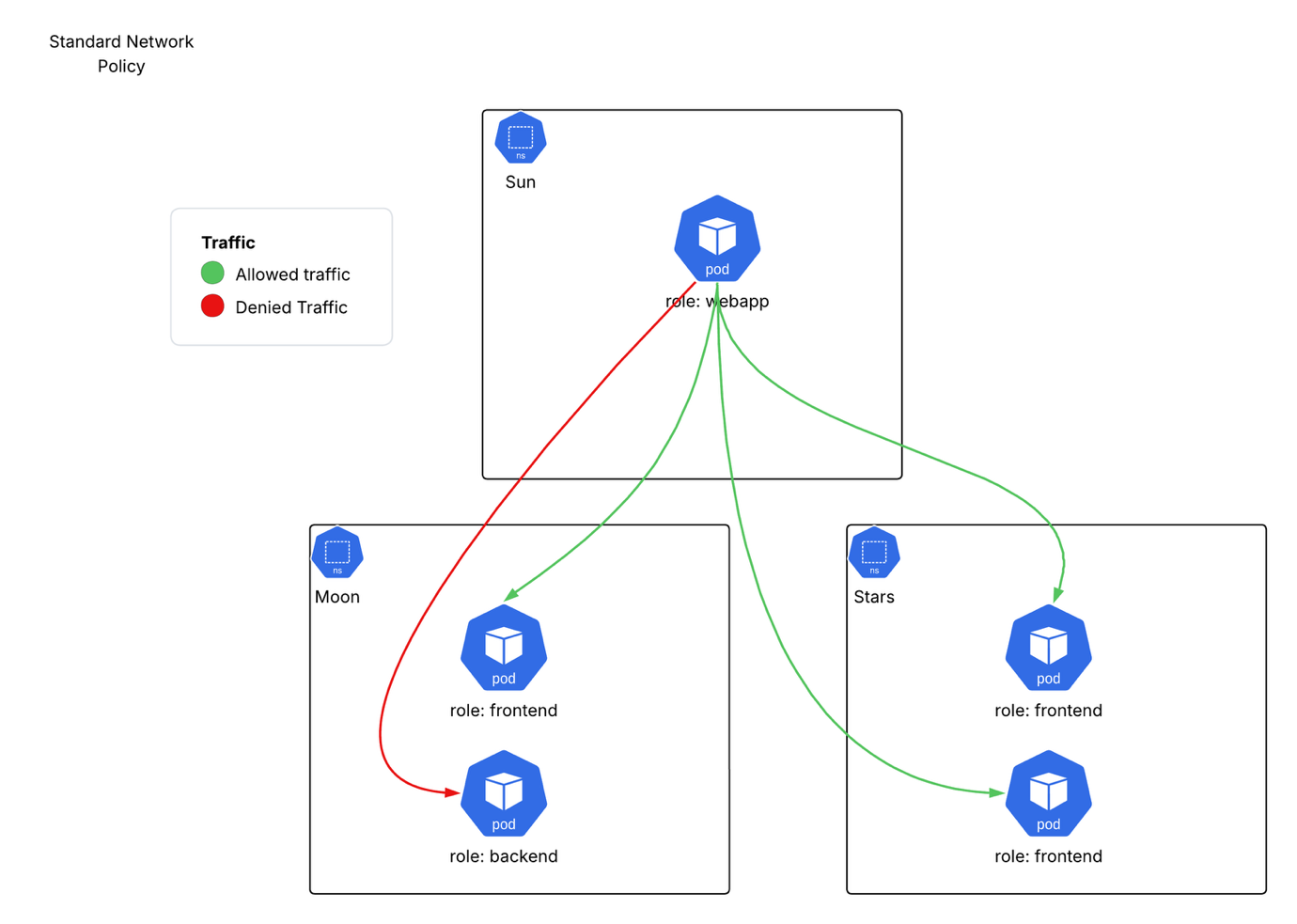
In the above policy, outbound traffic from webapp pods in the sun namespace is restricted.
The policy applies to: Pods with the label role: webapp in the sun namespace. Allowed outbound traffic:
- To pods with the label
role: frontendin the moon namespace on TCP port 8080 - To pods with the label
role: frontendin the stars namespace on TCP port 8080 - Blocked traffic: All other outbound traffic from webapp pods is implicitly denied.
This results in the following traffic flows:
While Network Policies do improve upon Kubernetes’ default “allow all” communication setup, they have some important limitations:
- They can only control traffic within individual namespaces, not across the entire cluster
- There is no explicit “deny” rule in a network policy.
- The purpose of Network Policies is to let application owners control who can communicate with their applications by restricting network traffic flows.
In other words, standard Network Policies work well when each application team manages their own security rules, but they weren’t built for situations where you need:
- Cluster-wide security rules
- The ability to override someone else’s security settings
- A hierarchy of rules where some policies take priority over others
This makes them less suitable for organizations that need centralized security control or more complex security arrangements.
What are Admin Network Policies?
Admin Network Policies are designed to let a cluster administrator centrally manage traffic isolation for all EKS workloads in a cluster regardless of the namespace that they run in, to align with their organizational security requirements.
Amazon EKS with the Amazon VPC CNI now supports two types of cluster-wide network policies using a single CustomResourceDefinition (CRD) object : Admin Tier and Baseline Tier.
If you are operating an EKS Auto Mode cluster you can, in addition, utilize domain name filtering to allow traffic to destinations using their domain names.
As per the Kubernetes documentation the Kubernetes Admin network policy is evaluated as shown:
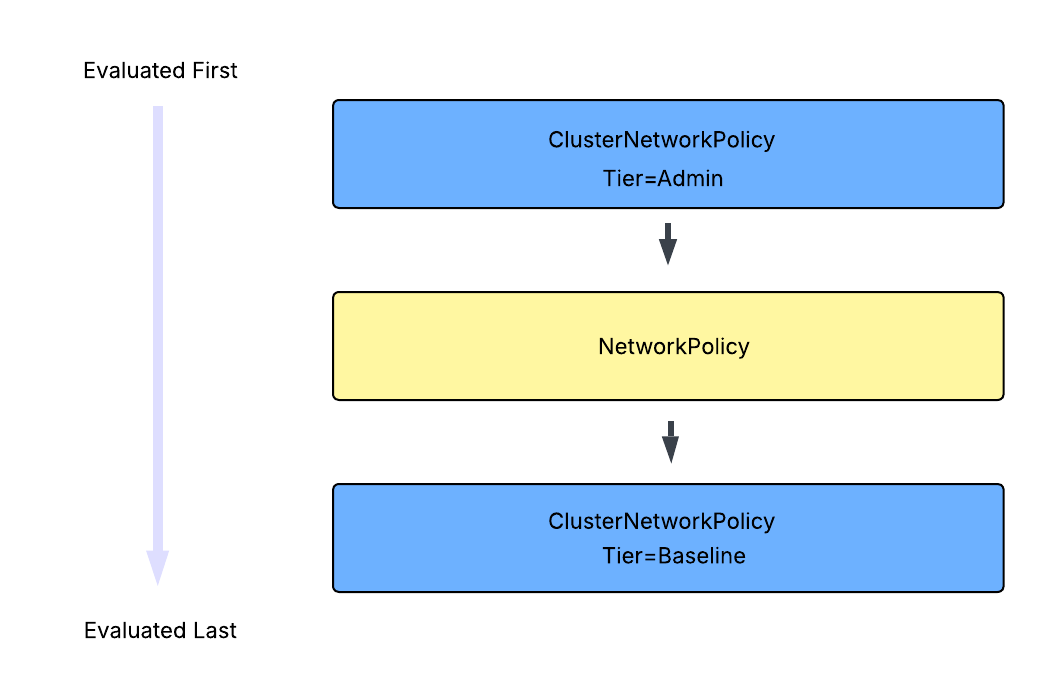
What this means is that Admin Tier policies are evaluated first and cannot be overridden. Once the Admin Tier policies have been evaluated then standard NetworkPolicies are used to execute the network segregations desired by the namespace or application owner. Finally, the Baseline Tier rules that describe default connectivity for cluster workloads, which CAN be overridden by developer NetworkPolicies if needed, are enforced.
The following scenario demonstrates the policy evaluation hierarchy:
- Admin tier says: “No external internet access” (Cannot be overridden).
- Developer creates
NetworkPolicysaying: “Allow internet access” (Gets blocked by Admin rule). - Baseline tier says: “Allow internal communication” (Can be overridden by Network Policies).
Admin Policy examples
The following examples illustrate common use cases for Admin Network Policies:
Use Case 1: Isolate sensitive workloads
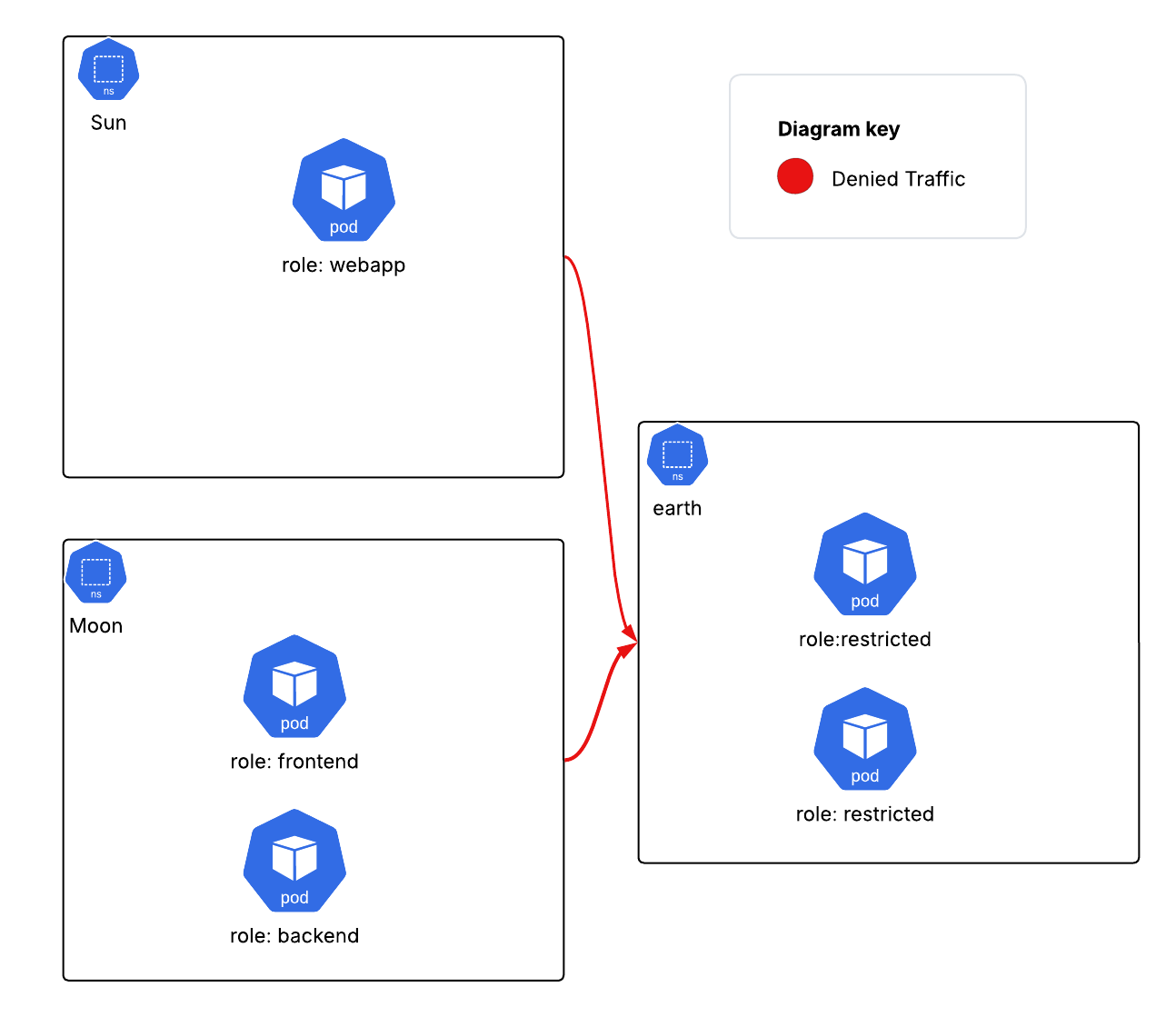
Isolate namespaces at a cluster level. For example, if you have a sensitive workload, you may want to explicitly block any cluster traffic from other namespaces from entering the sensitive workload namespace.
This results in blocking all traffic to that namespace from the other namespaces as shown:
Use Case 2: Enforce centralized monitoring access
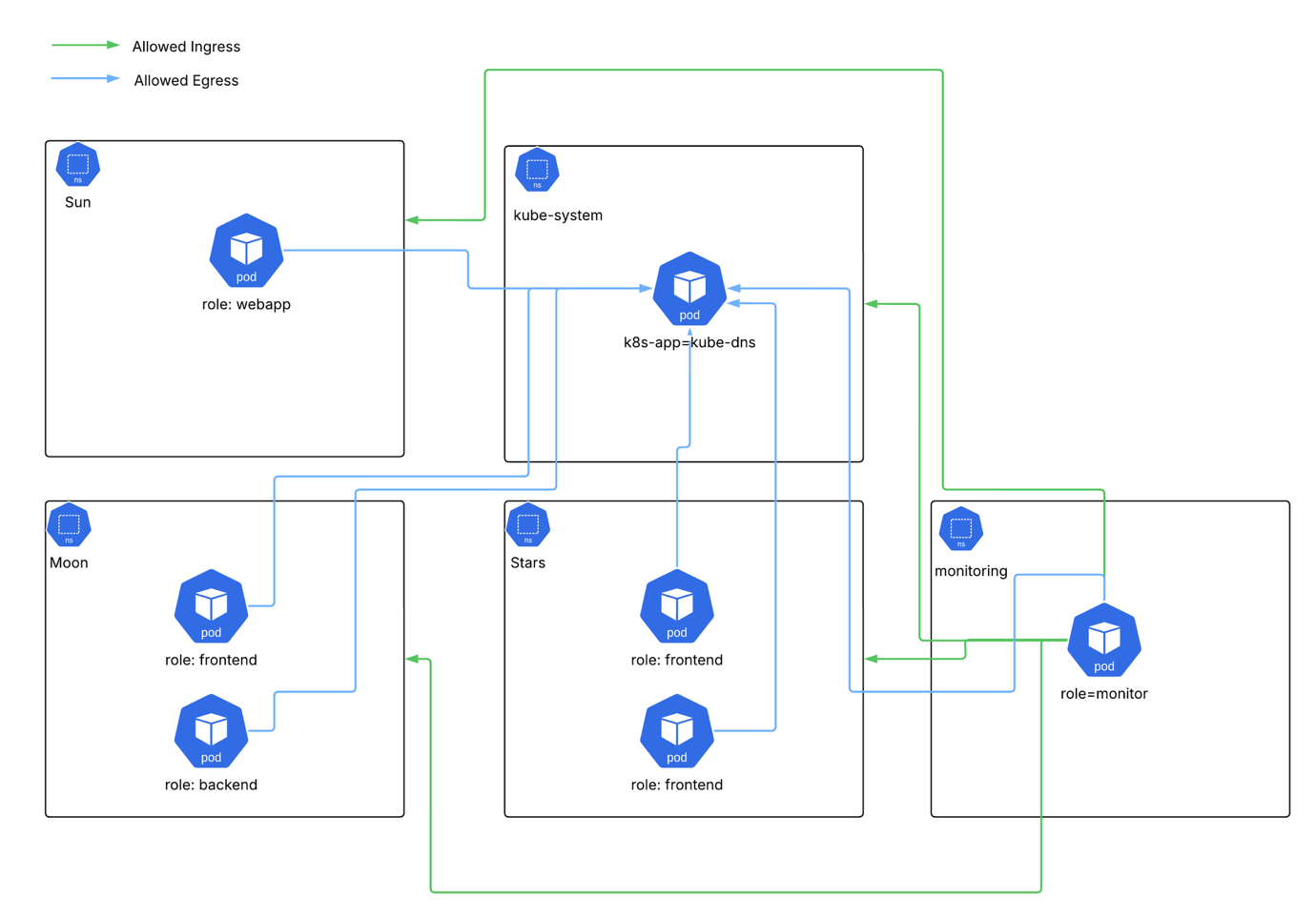
- Enforce access for your centralized monitoring solutions to all namespaces so that local network policies don’t inadvertently block your visibility of workloads.
- Explicitly allow egress from all namespaces to
kube-dnsrunning in thekube-systemnamespace on standard EKS clusters.
You could write a Network Policy to achieve this as shown:
This enforces all namespaces to accept incoming traffic from the monitoring namespace and to allow egress to pods labelled as kube-dns that reside in the kube-system namespace resulting in the following traffic flows:
What are Application Network Policies?
Application Network Policies help control network traffic in Amazon EKS Auto Mode clusters by merging traditional network policies with DNS filtering into a single, namespace-aware Custom Resource Definition (CRD). This is particularly useful when you need to control how pods connect to resources outside your EKS cluster – for example, allowing pods to access only specific domain names.
How are Application Network Policies different from regular Network Policies?
Standard Network Policies operate at layers 3 & 4 of the OSI model which restricts you to using IP blocks and port numbers to control traffic destinations, but Application Network Policies also operate at layer 7 of the OSI model and let you filter traffic based on Fully Qualified Domain Names (FQDNs). This means they are ideal to manage egress from your Pods in the following types of scenarios:
Cloud to On-Premises Communication
Instead of maintaining lists of IP addresses, you can simply use domain names (FQDNs). When IP addresses change behind the scenes, your policies continue to work without requiring updates. For example, just use “internal-api.company.com” rather than specific IP addresses.
SaaS Service Access
Many SaaS providers regularly change their IP addresses, making IP-based filtering impractical. Application Network Policies solve this by letting you create rules using domain names instead. For example:
Application Network Policy example
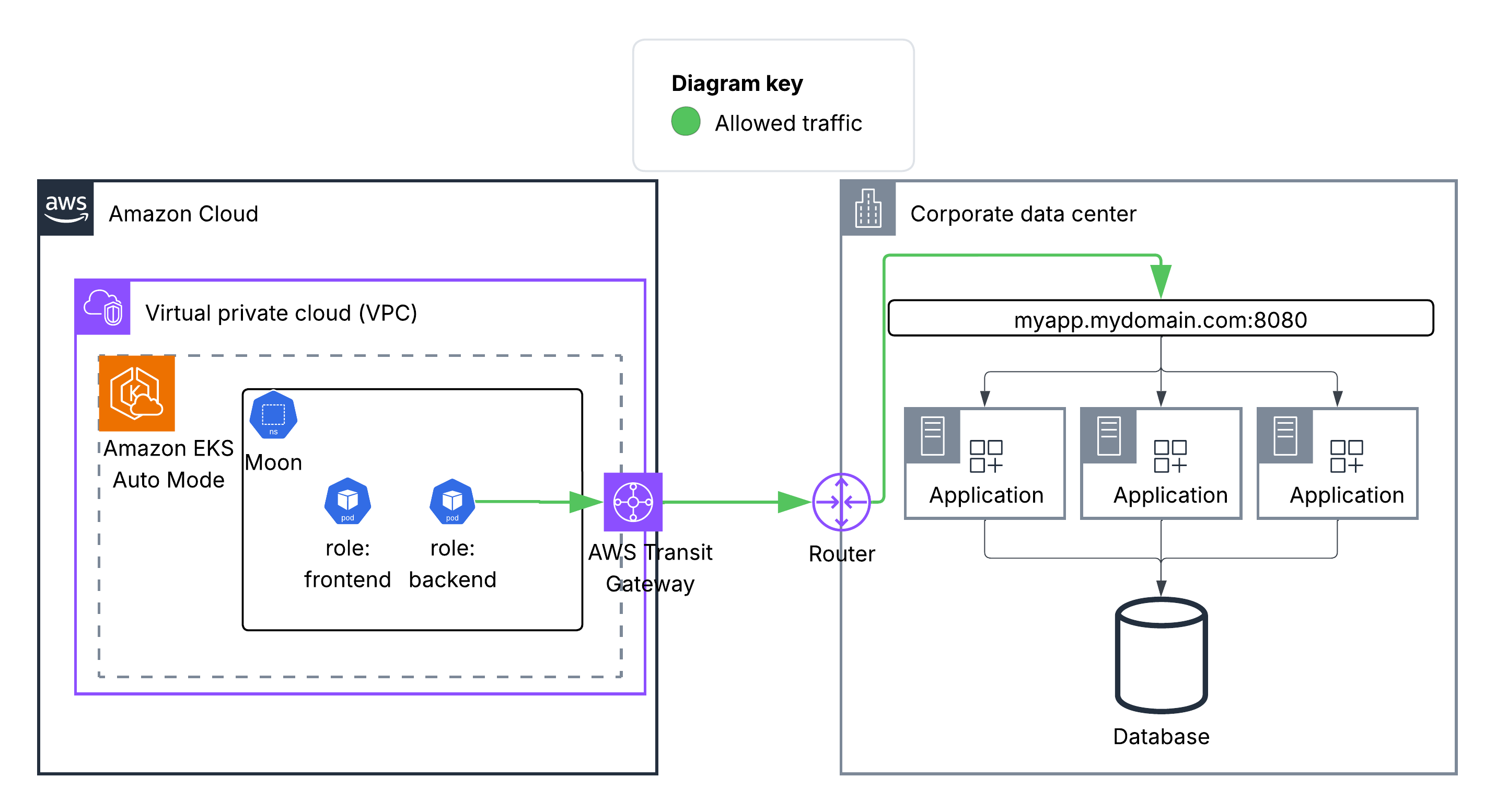
Your application deployed in your EKS Auto Mode cluster needs to communicate with an on-premises application in your data center which is behind a load balancer with a DNS name.
You could write an Application Network Policy to achieve this as shown
At the Kubernetes network level, this would allow egress from any pods in the “moon” namespace labelled with role: backend to connect to the domain name myapp.mydomain.com on TCP port 8080 as shown below. You would also need to set up the network connectivity to egress your VPC (potentially via an AWS Transit Gateway) and access into your Corporate Datacenter.
Conclusion
We are excited to announce new native networking controls available for your Amazon EKS clusters. Now you can apply networking controls natively within Amazon EKS at the cluster level and filter outbound access using FQDNs at both the cluster level and at the namespace level in your Amazon EKS Auto Mode clusters.
To get started with these new network controls, verify the following requirements:
- Your cluster needs to be running Kubernetes version 1.29 or later to use these features.
- You can use these controls in new EKS clusters, with support for existing clusters to follow in the coming weeks.
- To use
ClusterNetworkPolicyin standard EKS clusters please ensure you are running v1.21.1 of the Amazon VPC CNI plugin. - If you are running EKS Auto Mode (v1.29 or newer) you will be able to use both
ClusterNetworkPolicyandApplicationNetworkPolicy(which is exclusive to Auto Mode). DNS-based policies are only supported in EKS Auto Mode-launched EC2 instances.
To enable Network Policies on standard EKS clusters and apply Admin controls, refer to the AWS documentation. To enable Network Policies on EKS Auto Mode clusters, refer to the AWS documentation here.
About the authors
 Liz Duke is a Principal Specialist Solutions Architect (SSA) for Containers at Amazon Web Services (AWS). Since joining AWS in 2018, she has focused on helping customers design secure, scalable, cloud-native container workloads. Passionate about both security and containers, Liz is known for bringing deep technical expertise and clear guidance to teams modernizing their applications on AWS.
 Lukonde Mwila is a Senior Product Manager at AWS in the Amazon EKS team, focusing on networking, resiliency, and operational security. He has years of experience in application development, solution architecture, cloud engineering, and DevOps workflows.