Containers
Simplify Kubernetes cluster management using ACK, kro and Amazon EKS
As organizations expand their adoption of Kubernetes for a growing number of use cases, so does the number of operational processes that are related to the provisioning and operations of the Kubernetes clusters. The process of creating a cluster, bootstrapping it with the organization-specific add-ons, and then managing it over time is complex and error-prone. Typically, these tasks involve using a mixture of disjointed Infrastructure as Code (IaC) pipelines, Kubernetes manifests, and Helm charts, which usually leads to extended time for creating new clusters, increased operational overhead to manage clusters, and higher risk of failure or downtime.
In this blog post, we show how to create and manage a fleet of Amazon Elastic Kubernetes Service (Amazon EKS) clusters using Kube Resource Orchestrator (kro), AWS Controllers for Kubernetes (ACK), and Argo CD. These tools allow you to implement a GitOps-based cluster management solution to increase productivity and improve consistency and standardization by using the Kubernetes API for end-to-end operations.
Solution overview
ACK is a tool that lets you manage AWS resources directly from Kubernetes using familiar declarative YAML constructs – it is a collection of Kubernetes custom resource definitions (CRDs) and custom controllers working together to extend the Kubernetes API and manage AWS resources on your behalf. Once an ACK service controller is installed, a Kubernetes user may create a Custom Resource (CR) corresponding to one of the resources exposed by the controller for creating an AWS resource.
In the solution depicted in this blog post, we use ACK controllers to create the AWS resources needed for an EKS cluster. By doing that, we enable cluster management through the Kubernetes API and eliminate the need to use a separate IaC tool and build a separate pipeline for this use case. Additionally, this approach allows to build a GitOps flow for cluster management using tools like Argo CD.
That said, there are several challenges involved in this approach:
- To create an EKS cluster, you need to provision several AWS resources, including a virtual private cloud (VPC), subnets, route tables, NAT gateways, a cluster IAM role, a node IAM role, and the EKS cluster itself.
- These AWS resources have dependencies on one another. For example, the VPC needs to be created before the subnets, and the cluster IAM roles must be created before the EKS cluster itself. To account for these dependencies, you need to apply the CRs in a specific order. First, you apply the CRs for the cluster IAM roles and wait for them to sync. Then, you can apply the CRs for the EKS cluster itself. This ensures the necessary prerequisites are in place before creating the cluster.
- Additionally, you need to extract the generated fields from the CRs and use that information as input for the dependent CRs. For example, you must extract the VPC ID from the VPC CR and then provide that as an input to the Subnet CR.
Given the interdependencies and ordered requirements highlighted earlier, it’s clear that creating the EKS cluster’s AWS resources by applying the corresponding Custom Resources (CRs) necessitates a well-orchestrated approach.
kro (which we’re pronouncing “crow”) provides an abstraction layer that handles all of the dependency and configuration ordering of your resources, and then creates and manages the resources you need. kro ResourceGraphDefinition (RGD) concept provides an easy way to create a Custom Resource Definition (CRD) that encapsulates all the AWS and Kubernetes resources required for a fully functioning cluster (e.g. VPC, Subnets, IAM roles, EKS cluster, etc). RGD allows the kro controller to keep track of resource dependencies and to apply resources accordingly. With kro, you can use Common Expression Language (CEL) to extract generated fields from resources (e.g. vpcID in case of VPC CR) and pass that on to other resources.
The following diagram depicts the solution architecture:
- ACK controllers are used for creating the AWS resources.
- kro orchestrates the ACK resources creation and dependency.
- Argo CD is used as a GitOps controller which will bootstrap the management cluster, provision the workload clusters and the corresponding add-ons.
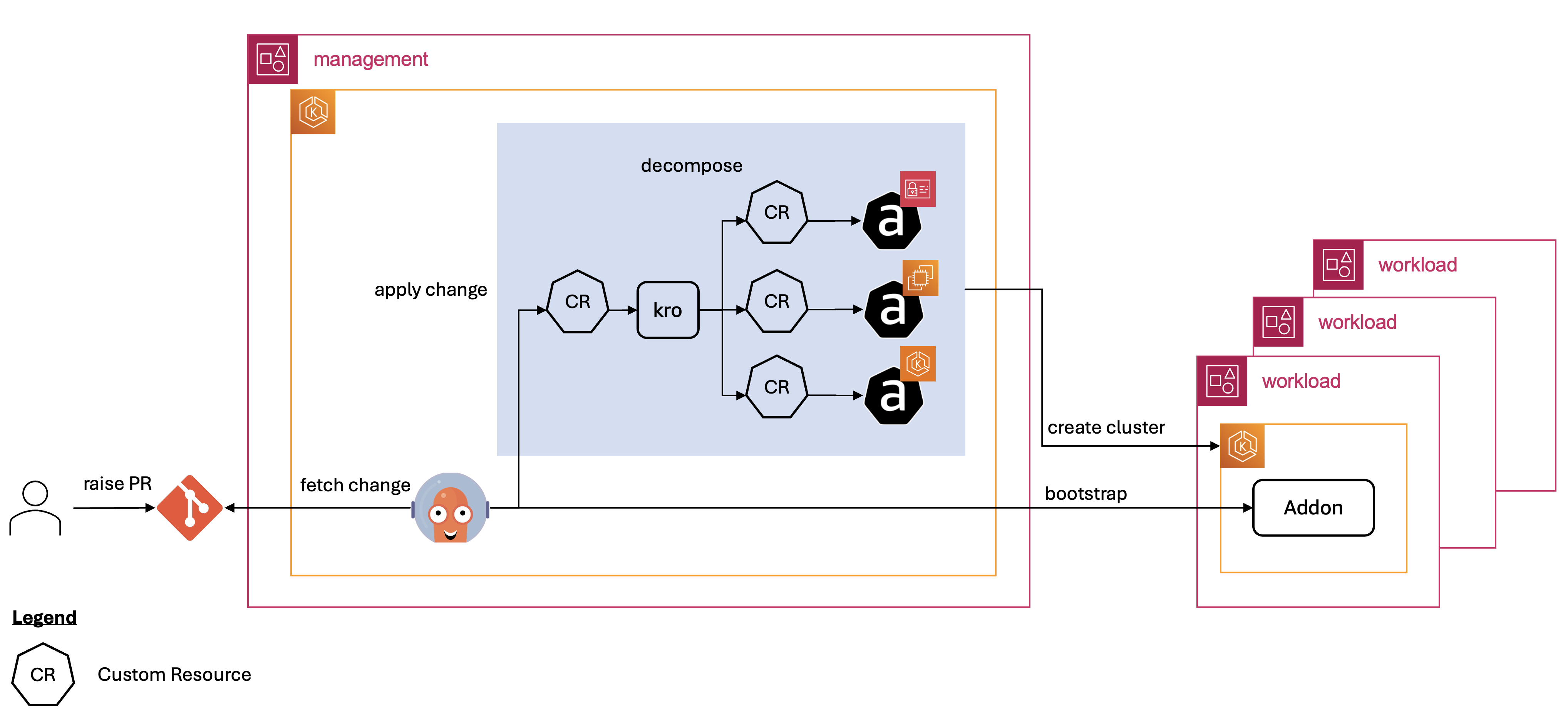
In this solution, we use Amazon EKS Capabilities that provide a fully managed experience for ACK, kro and Argo CD. It eliminates the need for installation, maintenance, and scaling of these tools.
In the following sections, we explain the key parts of the solution.
Creating ResourceGraphDefinitions that encapsulate AWS resources to create EKS clusters.
The ResourceGraphDefinition CRD is a fundamental building block in kro. It provides a way to define, organize, and manage interconnected sets of Kubernetes resources as a single, reusable unit. kro uses a human-friendly, readable, and OpenAPI-compatible syntax for defining RGD. At the top, we have the section schema that specifies the interface of the new CRD defined by the RGD. Then, we have the section resources that specifies the resources that need to be applied by kro when an instance of that RGD is created in the cluster.
Let’s look into the RGD for an EKS cluster to better understand the concept.
For more details about this syntax, refer to Simple Schema in kro documentation.
One of the kro capabilities is composing any Kubernetes resources that can be admitted to your cluster within an RGD. This includes incorporating instances of other existing RGDs, allowing for creating a hierarchy of RGDs.
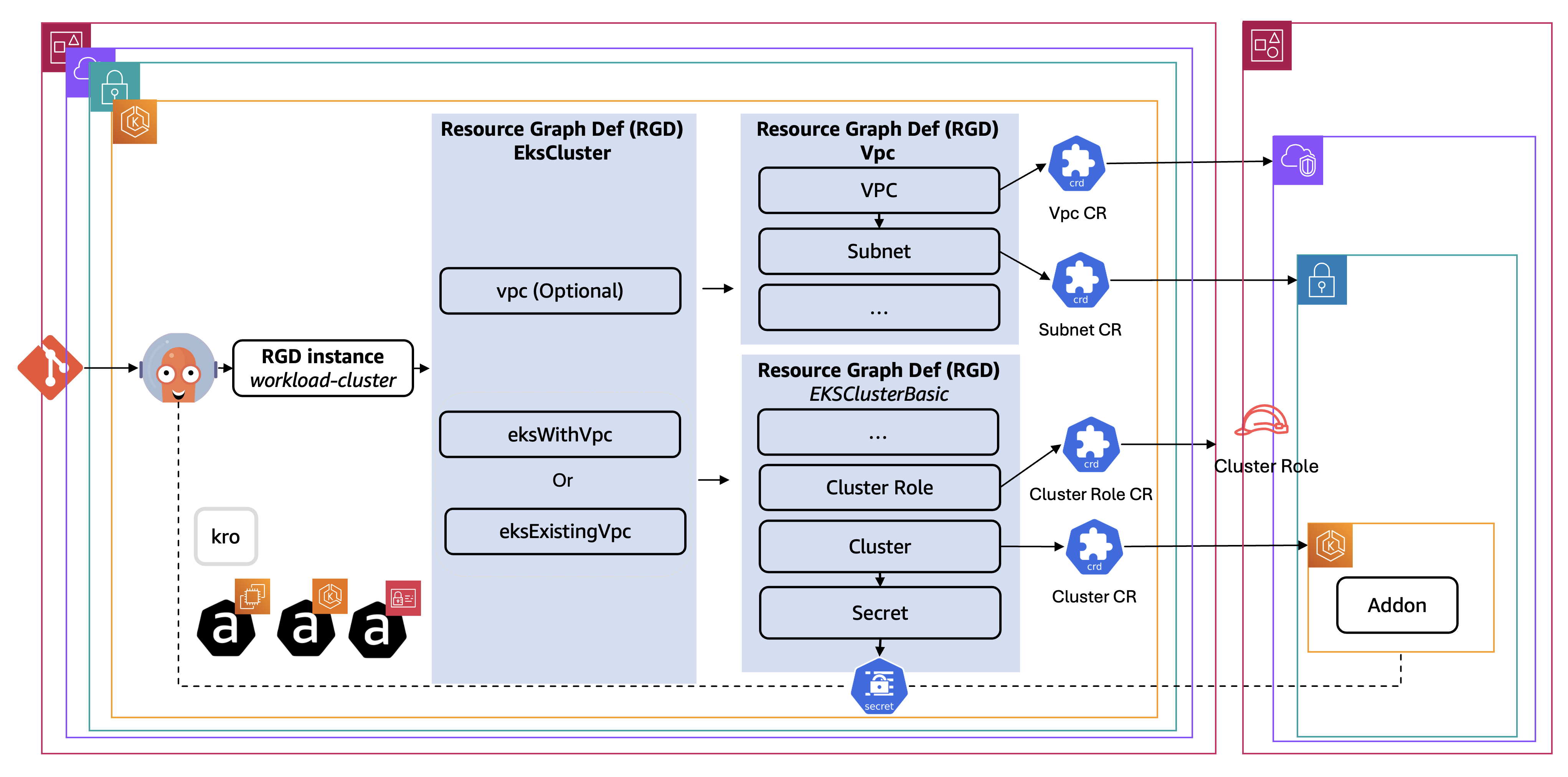
EKS clusters require a VPC and other networking resources as their hosting infrastructure. There are two common scenarios: creating an EKS cluster in an existing VPC or creating an EKS along with the VPC that hosts it.
To support these two scenarios, we create three separate RGDs – one for the networking resources (VPC, Subnets, etc.) called Vpc, and one for the EKS cluster itself called EksClusterBasic, and lastly an overarching RGD called EksCluster that is composed of instances of the Vpc and EksClusterBasic RGDs. The RGD EksCluster is used for creating the EKS cluster in the two scenarios — its composed resources are optionally rendered using includeWhen based on the input fields values as follows:
- If the user set the input field
vpc.createtotrue, only the resourcesvpc(of kindVpc) andeksWithVpc(of kindEksClusterBasic) are rendered. The input fields for the resourceeksWithVpcare populated from the status field of the resourcevpc. - If the user set the input field
vpc.createtofalse, only the resourceeksExistingVpc(of kindEksClusterBasic) is rendered. The input fields for resourceeksExistingVpc(e.g. VPC ID, Subnets ID, etc.) are populated from the input fields of the RGD instance.
The following diagram depicts RGDs structure:
The following is a simplified extract of the manifest for the EksCluster RGD (the overarching RGD):
Using CEL expressions to extract generated fields
Within the RGD, we utilize Common Expression Language (CEL) expressions to extract the generated fields values from a Custom Resource (CR), and feed it as an input to other dependent CR.
The following manifest snippet demonstrates how CEL expressions are used within the RGD. In this example, a CEL expression is used to extract the VPC ID from the VPC CR, and then that value is fed as input to the InternetGateway CR.
CEL expressions in kro also serve to derive resource dependencies. The CEL expression provided in this example indicates that the InternetGateway CR depends on the VPC resource, leading the kro controller to create the topological order accordingly, meaning the VPC resource will be created first and its ID will be available for the dependent InternetGateway resource
Creating cross-account AWS resources using ACK
AWS recommends using a multi-account strategy and AWS Organizations to help isolate and manage your business applications and data. Therefore, it is important to have the ability to configure the ACK controllers in the management cluster/account, so they can create the workload cluster resources in a different account (workload account). To achieve that, we leverage IAM Role Selectors that uses a cluster-scoped CRD to dynamically map IAM roles to namespaces and resources using Kubernetes label selectors.
The following diagram illustrates how the ACK works cross account. The key steps are as follows:
- An ACK CR is created in a specific namespace. The ACK controller monitoring the corresponding CRs detects the new CR.
- The ACK controller identifies the IAM role that corresponds to the namespace where the ACK CR resides based on the applied IAMRoleSelector CRs.
- The ACK controller assumes the identified IAM role, which may be in a different AWS account.
- With the assumed IAM role, the ACK controller can now call the AWS API to create the resource in the workload account.
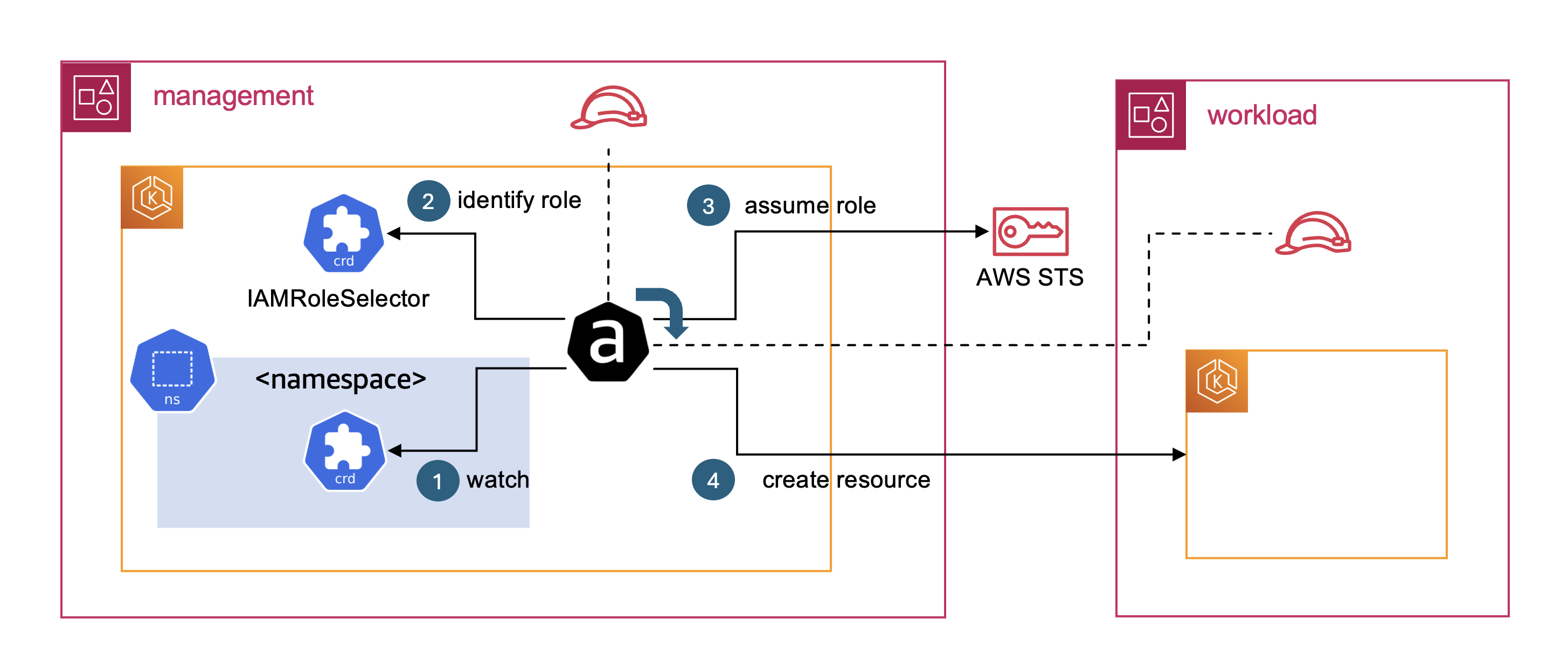
To use this mechanism for creating a workload cluster cross account, we create a namespace for the workload cluster in the management cluster (this is where all the ACK resources related to the cluster are created). We create an IAMRoleSelector that maps the namespace to the IAM role that are used for creating the cluster resources. This IAM role exists in the target account, where the workload cluster is created.
The following snippet depicts the structure of the IAMRoleSelector CR:
apiVersion: services.k8s.aws/v1alpha1
kind: IAMRoleSelector
metadata:
  name: workload-cluster1-namespace-config
spec:
  arn: arn:aws:iam::112234567890:role/ack
  namespaceSelector:
    names:
    - workload-cluster1
Based on the previous configuration, the ACK controllers assume the IAM role arn:aws:iam::112234567890:role/ack to sync the ACK resources in the workload-cluster1 namespace.
The IAM role associated with the ACK controllers in the management cluster must be granted the necessary permissions to assume the IAM roles in the various workload accounts. Additionally, the trust policies of the IAM roles in the workload accounts must be configured to allow the IAM role from the management account to assume them.
Bootstrapping workload cluster with add-ons
With Argo CD, we can use the ApplicationSets controller for enabling greater flexibility and automation in managing Argo CD applications. The ApplicationSets controller allows users to use a single Kubernetes manifest to target multiple Kubernetes clusters with Argo CD. This streamlines the process of deploying Argo CD applications across various clusters, simplifying the management of complex, multi-cluster environments.
To install add-ons on the workload clusters, an Argo CD ApplicationSet resource is applied for each add-on. The ApplicationSet uses the Cluster Generator to dynamically generate Argo CD Applications for deploying the add-on across the various workload clusters.
For the Cluster Generator to create an Application for a given add-on that target a workload cluster, we need to register the workload cluster as a remote cluster in Argo CD running in the management cluster. This activity involves creating a Secret with workload cluster details as outlined in the EKS capabilities documentation.
In this solution, the Secret is created as part of the RGD EksClusterBasic resource. The server field is populated with the workload cluster ARN.
The IAM role assumed by the Argo CD controller needs to be granted access to the workload cluster. The recommended approach is to use EKS access entries to associate a set of Kubernetes permissions with the IAM identity. In this solution, we include the required EKS access entry in the RGD EksClusterBasic resource as depicted in the following snippet:
Granting IAM permissions to add-ons
Some add-ons, such as the External Secrets Operator, require specific IAM permissions to function properly. To grant those permissions by using EKS Pod Identity (the recommended mechanism for granting IAM permissions to a pod), we need to create an IAM policy, an IAM role, and an association between the add-on ServiceAccount and the IAM role. In this solution, we use the ACK controllers for creating the mentioned resources.
The IAM setup must be completed before the add-on is installed, otherwise the add-on pods may crash. One way to achieve that is including the add-ons EKS Pod Identity resources in the RGD EksClusterBasic resource.
Putting It All Together
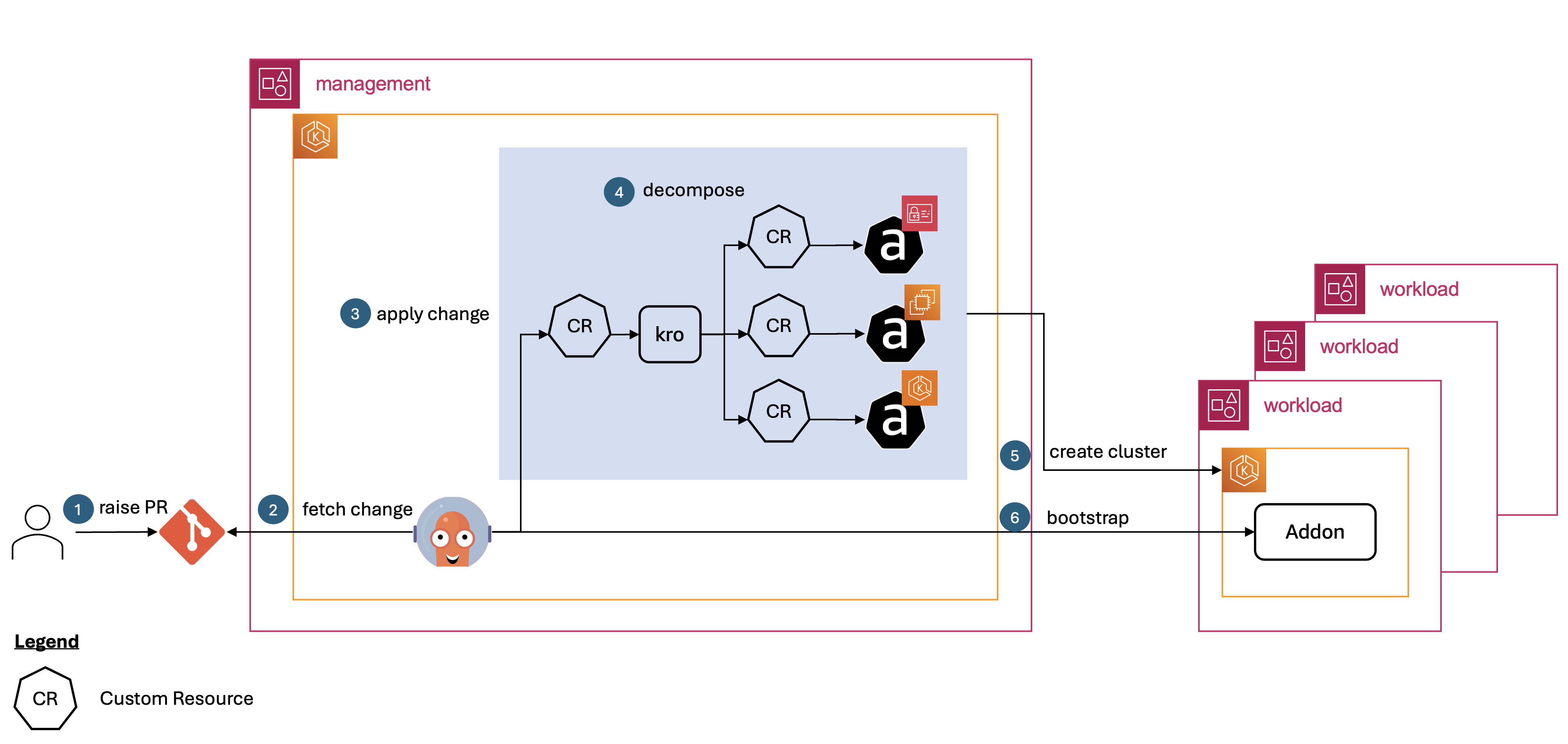
Let’s revisit the solution architecture (see the following diagram) and walk through the steps involved in creating a workload cluster.
Step 1: The developer raises a pull request (PR) with the manifest of the workload cluster (RGD instance), specifying the name of the cluster, the Kubernetes version, the add-ons required, and other relevant details.
Step 2-3: Argo CD fetches the cluster RGD instance and applies it to the management cluster.
Step 4: The kro controller decomposes the cluster RGD instance into individual ACK resources (custom resources), and applies those to the management cluster in the right order. This includes creating a Secret with the cluster details that Argo CD expects to be able to sync into the target workload cluster.
Step 5: The ACK controller then assumes a role in the workload account and creates the corresponding AWS resources (e.g., EKS cluster, VPC, IAM roles).
Step 6: The Argo CD ApplicationSets generates Argo CD Applications for every add-on enabled that is enabled for the cluster. These Applications are then used to install the required add-ons in the workload cluster.
Source code
The implementation of the solution outlined in this blog post is available in this repository. Follow the steps in the README file to experiment with the solution in your own environment.
Conclusion
In this blog post, we have shown how kro, combined with infrastructure controllers like ACK, and Argo CD, allows for standardizing the provisioning and bootstrapping of clusters through a single Kubernetes API, and implementing a GitOps-based cluster management solution. This eliminates the need for using a mixture of Infrastructure as Code (IaC) pipelines and the Kubernetes API for that purpose.
We explained several key features of kro that were instrumental in this implementation:
- Providing a simple schema for creating new custom resources (CRs).
- Allowing for managing dependencies between resources.
- Supporting Common Expression Language (CEL)-based expressions for conditions and passing values from one resource to another.
These capabilities of kro enable a more streamlined and maintainable approach to managing the provisioning and bootstrapping of Kubernetes clusters, compared to relying on a combination of IaC pipelines and direct Kubernetes API interactions. We have also demonstrated ACK cross account capability, and how it enables multi-account strategy for Kubernetes clusters.
It’s important to note that kro project is in active development and not yet intended for production use. The ResourceGraphDefinition (RGD) CRD and other APIs used in this project are not yet solidified and are highly subject to change.
About the authors
 Islam Mahgoub is a Senior Solutions Architect at AWS with over 15 years of experience in application, integration, and technology architecture. At AWS, he helps customers build new cloud-centered solutions and modernize their legacy applications using AWS services. Outside of work, Islam enjoys walking, watching movies, and listening to music.
 Kumudhan is a DevOps Consultant at AWS Professional Services, based in Switzerland. He is passionate about helping customers adopt process and services that increase their efficiency with AWS Cloud. When not working, he likes to travel, play cricket and music.
 Markos Kandylis was a Senior DevOps Consultant with AWS Professional Services. He enjoys building automation and cloud-native platforms that help customers modernize and operate scalable environments, with a strong focus on Amazon EKS and Kubernetes. His interests include DevOps, GitOps, infrastructure as code, open-source technologies, and platform automation.
 Ramesh Mathikumar is a Principal Consultant within the Global Financial Services practice. He has been working with Financial services customers over the last 25 years. At AWS, he helps customers succeed in their cloud journey by implementing AWS technologies every day.
 Sébastien is a Senior Specialist Solutions Architect at AWS, where he has been driving customer success since 2019. He brings deep expertise in AWS container solutions and cloud-native technologies, with a particular focus on Kubernetes, AI/ML systems, and large-scale distributed architectures. Throughout his tenure, Sébastien has partnered with organizations across diverse industry segments in EMEA and France, helping them adopt container technologies and implement best practices for modern cloud infrastructure.