AWS Cloud Operations Blog
Essential security controls to prevent unauthorized account removal in AWS Organizations
When AWS member accounts are compromised, attackers can remove them from your organization, disabling all governance controls. In this post, you’ll learn how to protect your AWS environment from account compromise leaving your AWS Organization using layered security controls, including service control policies, secure account migration, and centralized root access management.
AWS secures the infrastructure that runs the cloud, while you’re responsible for securing your workloads and data in the cloud. To do so, AWS Organizations includes security controls that prevent unauthorized account removal and maintain governance across your accounts.
We will cover four controls: preventing unauthorized account removal with a Service control policy (SCP), establishing break-glass procedures for legitimate migrations, transferring accounts directly between organizations, and disabling root access for member accounts.
Prerequisites
For this post, you must be familiar with AWS Organizations and multi-account strategy concepts. You must have access to the AWS Organizations management account with permissions to:
- Create and attach service control policy —
organizations:CreatePolicy,organizations:AttachPolicy - Manage organizational units —
organizations:CreateOrganizationalUnit,organizations:MoveAccount - Enable centralized root access management —
iam:EnableOrganizationsRootCredentialsManagement
Design your organizational unit (OU) structure for security and flexibility
If your business model requires regularly allowing member accounts to leave the organization such as managed service providers, resellers, or organizations with high account turnover, then you should design your OU structure with this workflow in mind from the start.
Consider creating dedicated OUs for different account lifecycle stages (onboarding, active, off-boarding) and apply the DenyLeaveOrganization SCP only to OUs containing accounts that should remain under long-term governance. This approach secures your core infrastructure and simplifies migration for short-lived accounts.
Create a hierarchical OU structure that balances security controls with operational flexibility. Apply the DenyLeaveOrganization SCP to your production and development OUs to protect critical workloads, while maintaining a separate transition OU without this restriction for controlled account migrations.
Recommended OU architecture
- Production OU: Apply the DenyLeaveOrganization SCP to prevent accounts running production workloads from leaving your organization
- Development OU: Apply the same SCP to maintain governance over development and testing environments
- Transition OU: Keep this OU free from the DenyLeaveOrganization SCP to serve as a controlled staging area for accounts preparing to leave the organization
When an account needs to leave your organization for legitimate business reasons, your management account can move it to the Transition OU, where the leave operation for member account becomes possible. This creates a clear approval workflow and maintains visibility throughout the migration process.
Please note that the management account can remove member accounts from the organization, so if there’s no legitimate need for member accounts to leave on their own, you don’t need to implement the Transition OU approach for leave accounts.
For detailed guidance on organizing and managing your OU structure, follow AWS best practices for managing organizational units with AWS Organizations.
Implement a service control policy that denies leave organizations actions
To prevent member accounts from leaving your organization, implement an SCP that denies the organizations:LeaveOrganization and action for member accounts. This preventative control ensures accounts remain within your governance framework, keeping your security controls and organizational policies in place.
Create an SCP using AWS Management Console
1. Sign in to the AWS Organizations console with your management account.
2. In the navigation pane, choose Policies.
3. Choose and enable service control policies.
4. Choose Create policy.
5. Enter a policy name, e.g., “DenyLeaveOrganization”.
6. In the policy editor, enter the following JSON:
{
"Version": "2012-10-17",
"Statement": [
{
"Effect": "Deny",
"Action": "organizations:LeaveOrganization",
"Resource": "*"
}
]
}
7. Click Create policy.
Create the SCP using AWS CLI
Run the following command to create the policy.
aws organizations create-policy \
--name DenyLeaveOrganization \
--type SERVICE_CONTROL_POLICY \
--description "Prevents member accounts from leaving the organization" \
--content '{"Version":"2012-10-17","Statement":[{"Effect":"Deny","Action":"organizations:LeaveOrganization","Resource":"*"}]}'
Note the policy ID from the output for use in the next step.
2. After creating the policy, apply the DenyLeaveOrganization SCP to your Production and Development OUs while keeping the Transition OU unrestricted.
Attach the SCP to your OUs using AWS Management Console
- Navigate to AWS Organizations.
- Select the target OU , Production or Development.
- Choose the Policies tab.
- Choose Attach and select the ‘DenyLeaveOrganization’ policy.
- Repeat for each OU that requires the policy.
Attach the SCP to your OUs using AWS CLI
- Attach the policy to your target OUs using the policy ID from the creation step:
aws organizations attach-policy --policy-id p-xxxxxxxx --target-id r-xxxx - Verify the policy attachment:
aws organizations list-targets-for-policy --policy-id p-xxxxxxxx - Repeat for each OU that requires the policy.
This control blocks leave attempts at the API level through the console, CLI, or SDK. For best practices of protecting your management account, refer to the documentation.
Please note that SCPs don’t apply to the management account and only affect member accounts in the organization. This is why protecting your management account with the strongest possible security controls – including MFA, restricted access, temporary credentials only, and comprehensive monitoring is essential.
Document break-glass procedures
If you need to allow specific accounts to leave the organization during account migrations, mergers, acquisitions, or divestitures, establish a formal process with documented approval workflows and technical mechanisms.
Choose the appropriate break-glass mechanism for your scenario: When an account needs to leave your organization, move it from its current OU to the Transition OU through your standard change management process. Once in the Transition OU, the account can execute the leave operation without the DenyLeaveOrganization SCP restriction. This approach maintains security controls on all active accounts without requiring you to temporarily remove SCPs from your entire organization root.
Establish a documented exception process for member account departures
Member accounts leaving your organization independently – outside of the secure invitation-based migration process – should be treated as exceptions requiring formal approval. Each exception request must include clear business justification explaining why the account cannot use the standard organization-to-organization transfer process, along with review and approval from security and IT administration teams to validate alignment with security and governance policy requirements.
Document this exception in your security baseline, explicitly noting that the Transition OU exists solely for temporary account staging during approved migrations where the standard invitation-based transfer cannot be used. This documentation establishes accountability, creates an audit trail for compliance reviews, and ensures that exceptions to your security controls are intentional, justified, and time-bound.
Securely migrate accounts during mergers and acquisitions
During mergers, acquisitions, or organizational consolidations, AWS Organizations supports secure, direct account transfers between organizations- preventing accounts from becoming standalone. The destination organization’s management account sends an invitation to the migrating account. When accepted, the account transitions seamlessly from the source to the destination organization without ever operating outside organizational governance. Service control policies (SCPs), logging, and monitoring apply continuously throughout the migration, maintaining security posture and creating complete audit trails via AWS CloudTrail.
This invitation-based approach addresses most legitimate migration use cases while preventing the security gaps that occur when accounts operate independently. Management accounts don’t need to manually remove member accounts – the invitation process handles transitions automatically. After migration, validate that appropriate policies apply, update IAM policies with the correct organization ID, and review billing configurations, tax settings, and Reserved Instances transfers. For detailed guidance, refer to the AWS Organizations User Guide on account migration.
Eliminate root access vulnerabilities in member accounts
Root user credentials in member accounts represent the highest level of privileged access in your AWS environment. Since the 2025 launch of AWS Centralized Root Access Management, newly created member accounts no longer have root credentials by default – this is now the standard behavior for all new accounts in your organization. Newly created member accounts are automatically provisioned without root credentials, eliminating the need for post-provisioning security measures like configuring multi-factor authentication
For existing accounts created before this default took effect, removing long-lived root credentials is quick and straightforward. AWS Centralized root access management lets you delete root credentials – including passwords, access keys, signing certificates, and MFA devices across your entire organization directly from the management account. You don’t need to sign in to each member account individually.
This centralized approach maintains consistent security across member accounts. It also reduces operational overhead by removing the vulnerability gap between account creation and security configuration. For detailed guidance on implementing centralized root access management, refer to centrally managing root access for member accounts for more information.
Delete root credentials using the AWS Management Console
- Open the IAM console using the management account.
- In the navigation pane under Access Management, choose root access management.
- If centralized root access management has not yet been enabled, a banner or prompt will appear at the top of the page.
- Choose Enable to activate it. If no such prompt appears, the feature is already enabled in your organization. Once enabled, the page displays your organizational structure with member accounts.
- Select an account and review the Root user credentials panel on the right. For any account that still has active root credentials, choose Delete root credentials to remove them.
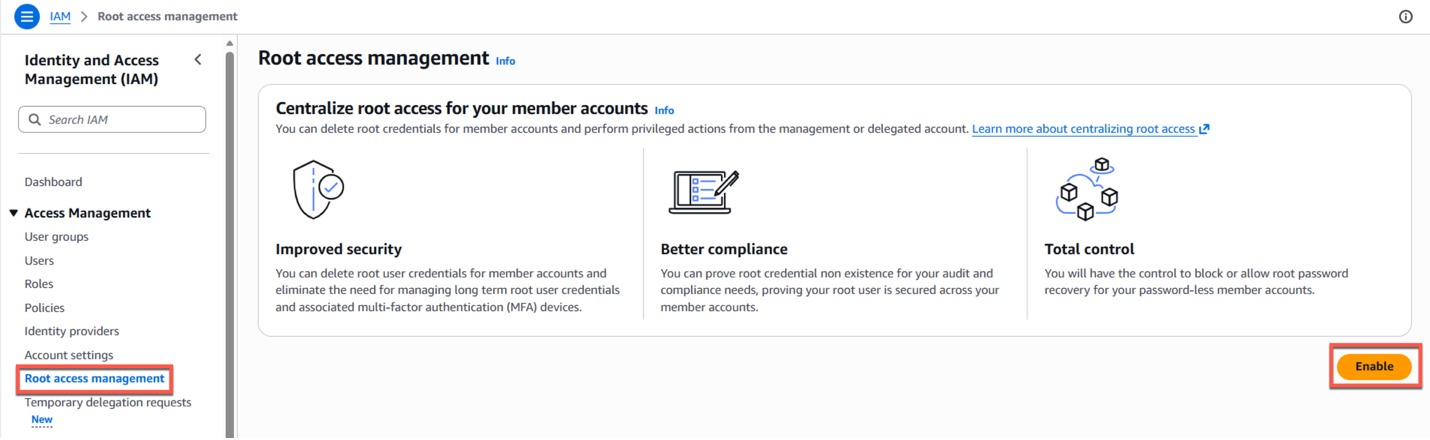
Image 1: Root access management
Enable centralized root access management using the AWS CLI
- Enable centralized root access management by running the following command (safe to run even if already enabled – returns current feature state), aws iam enable-organizations-root-credentials-management
- Verify enabled features to confirm the configuration, aws iam list-organizations-features
- Review the output to confirm successful enablement. If the feature has been enabled, you’ll see the below:
{
"OrganizationId": "o-xxxxxxxxxxxx",
"EnabledFeatures": [
"RootSessions",
"RootCredentialsManagement"
]
}
If the feature has not yet been enabled, aws iam list-organizations-features will return an empty EnabledFeatures array as shown here.
{
"OrganizationId": "o-xxxxxxxxxxxx",
"EnabledFeatures": []
}
Conclusion
Protecting your AWS Organizations from account compromise requires layered security controls that balance protection with operational flexibility. The DenyLeaveOrganization service control policy blocks unauthorized account removal and maintains continuous governance oversight. The invitation-based account migration capability across organizations supports legitimate business needs like mergers, acquisitions, and consolidations, without creating security gaps. Eliminating root access through AWS Centralized Root Access Management removes the highest-privilege pathway that could bypass your security controls.
These controls prevent compromised credentials from removing accounts from your organization, keep service control policies and logging active during migrations, and to ensure that security incidents remain containable within your governance framework, so you can detect, respond to, and remediate issues faster.
Start by designing your OU structure, document your break-glass procedures, then apply the DenyLeaveOrganization SCP and enable AWS Centralized Root Access Management. Regularly review your OU structure, audit exception requests, and monitor for unauthorized access attempts through AWS CloudTrail. Treat account governance as a critical security control to keep your AWS environment secure, compliant, and aligned with your business objectives. For more service control policy examples and templates, explore the AWS SCP Examples GitHub repository.