- AWS Solutions Library›
- Guidance for Automated Setup for Amazon Elastic VMware Service
Guidance for Automated Setup for Amazon Elastic VMware Service
Overview
This guidance demonstrates how to accelerate cloud adoption for VMware workloads by automating the deployment of Amazon EVS environments. Infrastructure and VMware administrators can leverage automated provisioning of essential AWS services, including VPCs, Route 53, and Transit Gateway, eliminating complex manual configurations. By implementing AWS best practices through infrastructure as code, organizations can quickly establish production-ready VMware environments in the cloud while reducing deployment time, minimizing configuration errors, and streamlining their migration journey.
Benefits
Deploy production-ready VMware Cloud Foundation environments using automated CloudFormation templates. Eliminate weeks of manual configuration while maintaining full control over your VMware architecture and operational processes.
Extend your on-premises data center to AWS without IP address changes using AWS Direct Connect or Site-to-Site VPN and AWS Transit Gateway. Preserve existing network configurations and operational workflows while gaining cloud scalability and resilience.
Leverage Infrastructure as Code to automate complex networking and VMware stack provisioning. Free your IT teams from repetitive configuration tasks to focus on strategic business initiatives and innovation.
How it works
Service mapping and deployment
This reference architecture shows customers' on-premises VMware deployment and their Amazon Elastic VMware components in AWS.
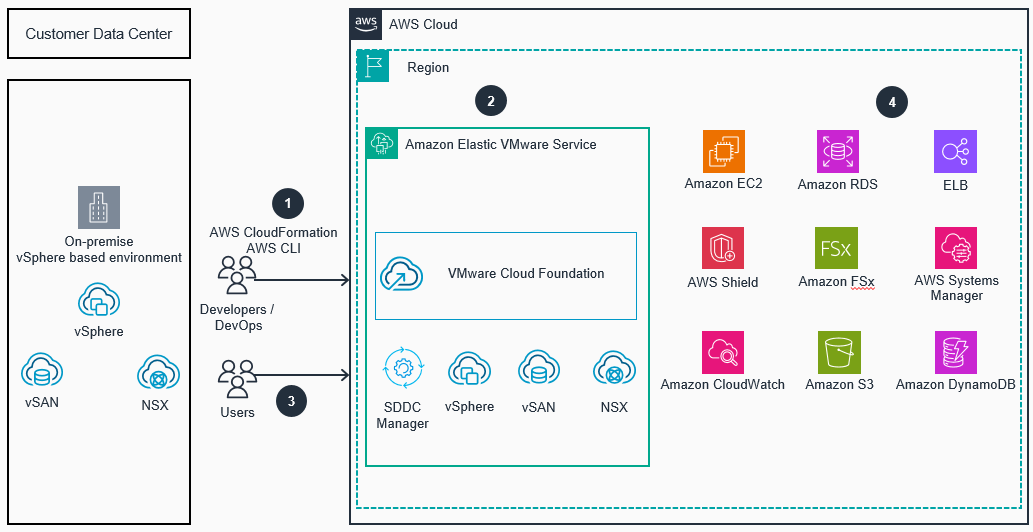
External Network access to Amazon EVS service
This reference architecture shows setting up network access to Amazon EVS via AWS Direct Connect and AWS Transit Gateway services.

Internal components connectivity and network topology
This reference architecture shows internal connectivity and network topology of Amazon Elastic VMware Service components.
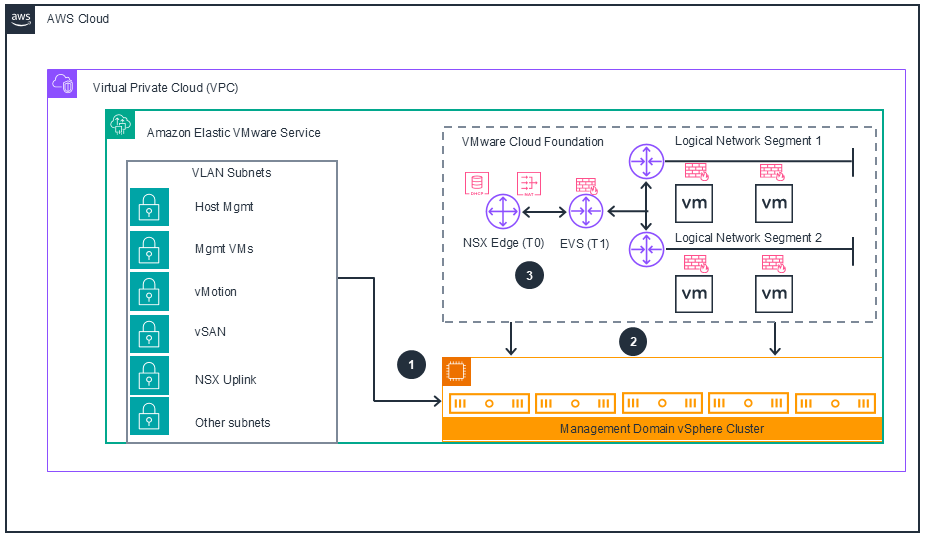
Deploy with confidence
Ready to deploy? Review the sample code on GitHub for detailed deployment instructions to deploy as-is or customize to fit your needs.
Disclaimer
The sample code; software libraries; command line tools; proofs of concept; templates; or other related technology (including any of the foregoing that are provided by our personnel) is provided to you as AWS Content under the AWS Customer Agreement, or the relevant written agreement between you and AWS (whichever applies). You should not use this AWS Content in your production accounts, or on production or other critical data. You are responsible for testing, securing, and optimizing the AWS Content, such as sample code, as appropriate for production grade use based on your specific quality control practices and standards. Deploying AWS Content may incur AWS charges for creating or using AWS chargeable resources, such as running Amazon EC2 instances or using Amazon S3 storage.
Did you find what you were looking for today?
Let us know so we can improve the quality of the content on our pages