AWS for SAP
Announcing AWS Console for SAP Applications: a unified experience to register and manage your SAP Applications on AWS
Today, we are announcing the availability of AWS Console for SAP Applications, a new centralized management experience that provides SAP customers an application-centric view to register and manage their SAP HANA-based applications running on AWS. The console offers a unified dashboard to view your registered SAP applications, understand your landing zone setup, and gain visibility into the resources consumed by your SAP workloads. From the application details page, customers can view application topology, associated resources, and perform management operations including application-aware start/stop, automated validation of SAP workload configurations, and scheduled operations.
The console also provides convenient access to documentation, SAP-specific AWS services, and best practices from the SAP Lens of the AWS Well-Architected Framework.
Console Overview
SAP applications are critical for managing core business processes from finance to supply chain and AWS provides a robust foundation for running these applications. Previously to manage SAP workloads on AWS, SAP administrators either use programmatic APIs or navigate through general-purpose AWS management consoles that served a broad range of enterprise applications. While these options provided all the necessary functionality, the user experience wasn’t tailored to the unique workflows and operational patterns of SAP environments — such as getting a consolidated view of your SAP landscape.
The AWS Console for SAP Applications addresses this by delivering a purpose-built, SAP-native management experience. It provides an intuitive dashboard view of your SAP landscape, application-aware navigation that reflects how SAP teams think about their systems, and a streamlined interface for performing common SAP management operations — without needing to remember API syntax or navigate across multiple consoles.
Key Capabilities
The AWS Console for SAP Applications is organized into three main areas: a landing page that serves as your entry point to AWS’s SAP capabilities, a centralized dashboard that provides a landscape overview of your SAP environment, and an application details page where you can manage individual SAP applications. Let’s walk through each of these.
Landing Page
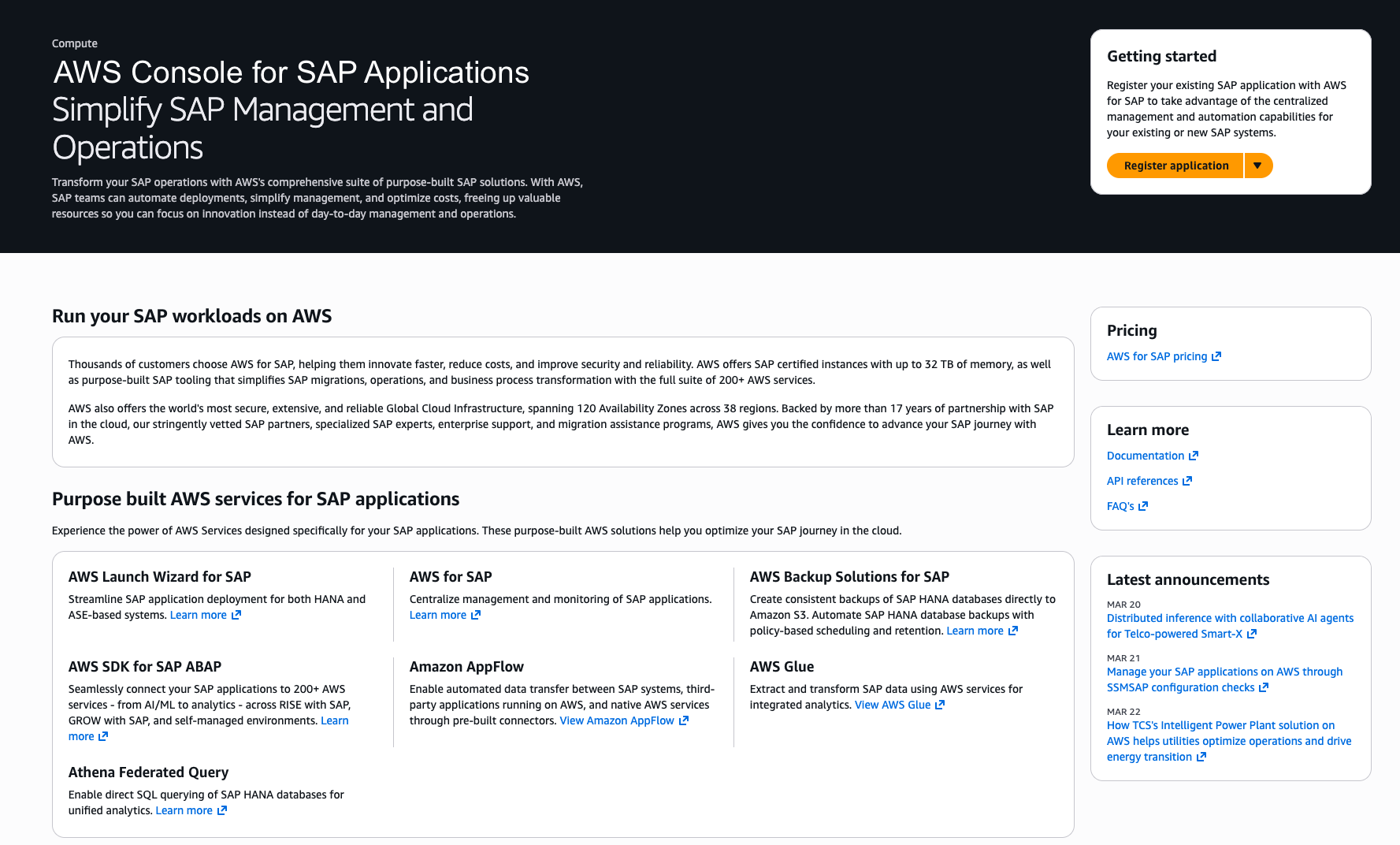
The landing page serves as your entry point to the AWS Console for SAP Applications — providing a quick path to register your SAP applications and a centralized view of all purpose-built AWS services and common use cases for running SAP workloads on AWS.
Centralized Dashboard
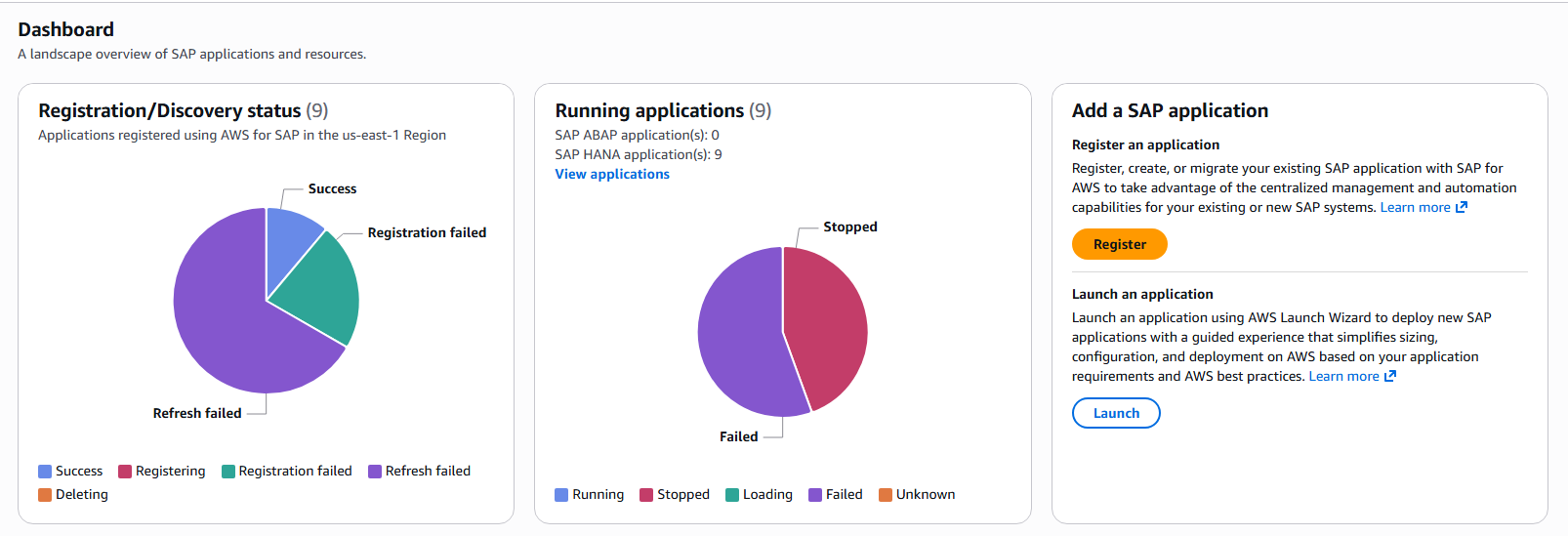
The AWS Console for SAP Applications dashboard provides a landscape overview of all your SAP applications and resources at a glance. From the dashboard, you can immediately see:
- Registration/Discovery status: A visual summary of all applications registered with AWS Systems Manager for SAP in your region, including their registration state (Success, Registering, Registration failed, Refresh failed, or Deleting).
- Running applications: A real-time view of your SAP application fleet, showing how many SAP ABAP and SAP HANA applications are running, stopped, loading, failed, or in an unknown state.
- Register or Launch new applications: Quick-access entry points to register an existing SAP application or launch a new one using AWS Launch Wizard for SAP.
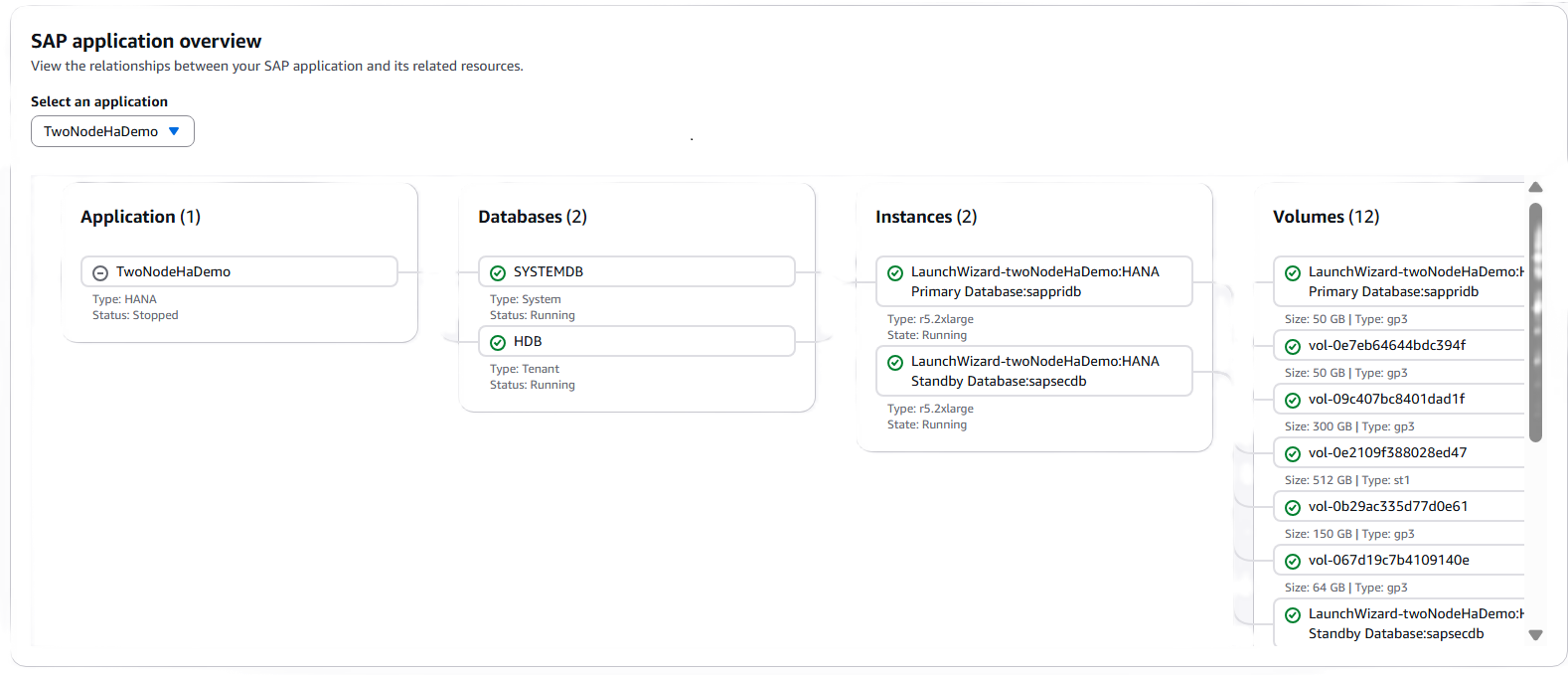
- SAP Application Overview and Topology: SAP application overview is another powerful feature of the dashboard. It visualizes the relationships between SAP applications and its related resources in an intuitive topology view. This topology view enables SAP administrators to quickly understand the full stack of resources supporting an application.
- AWS Resources by Availability Zone: The dashboard provides a detailed breakdown of Amazon resources used for SAP applications across availability zones.

- Operations Summary: The dashboard also provides operation summary listing recent operations performed against your registered applications.
Application Management
The Applications page lists all registered SAP applications with key details giving SAP administrators a quick overview of their SAP landscape.
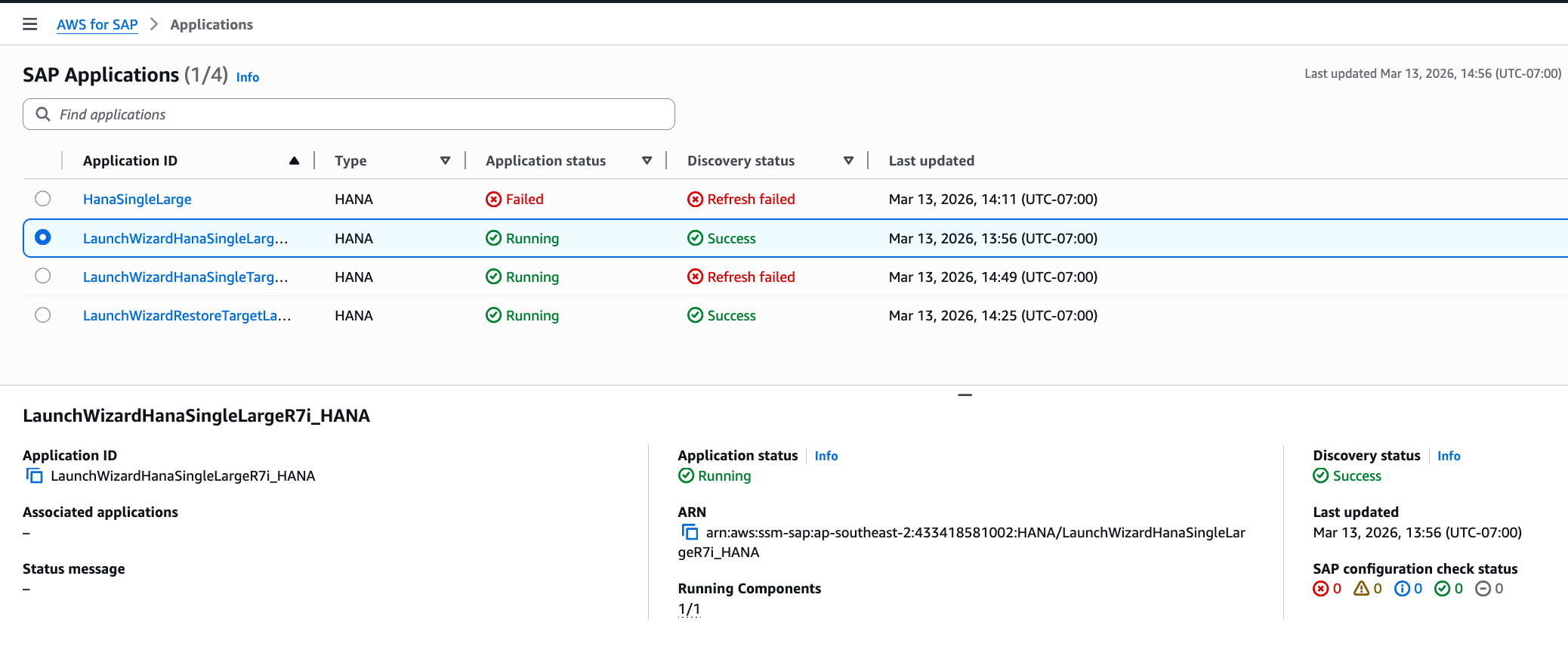
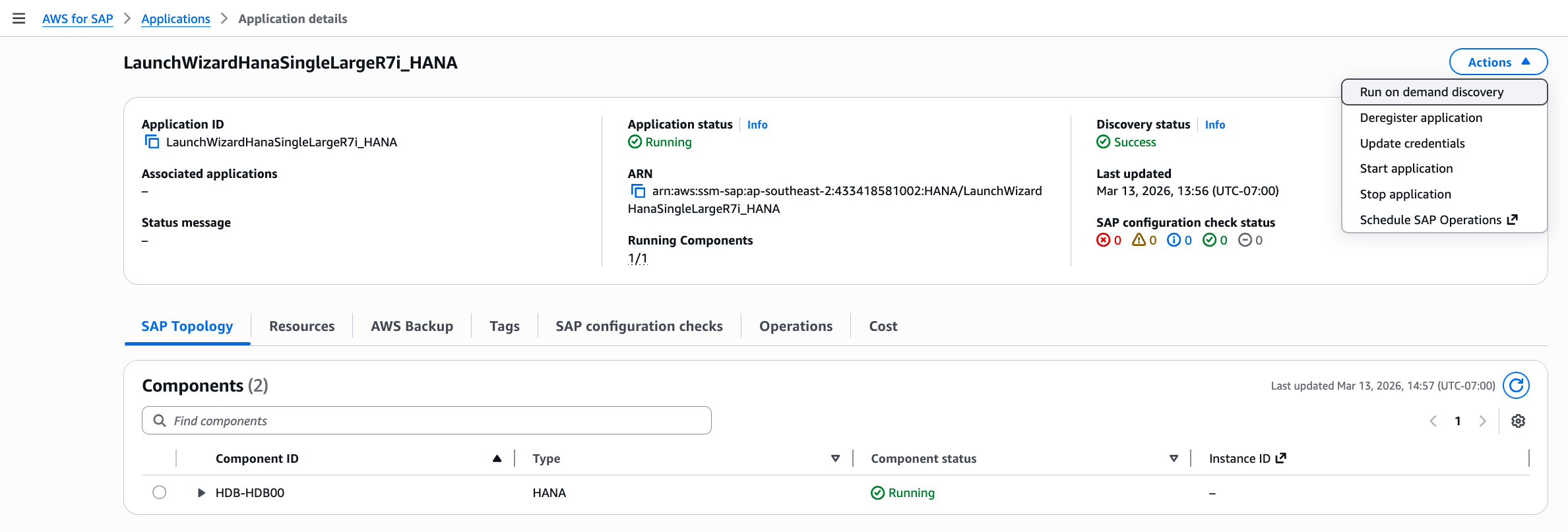
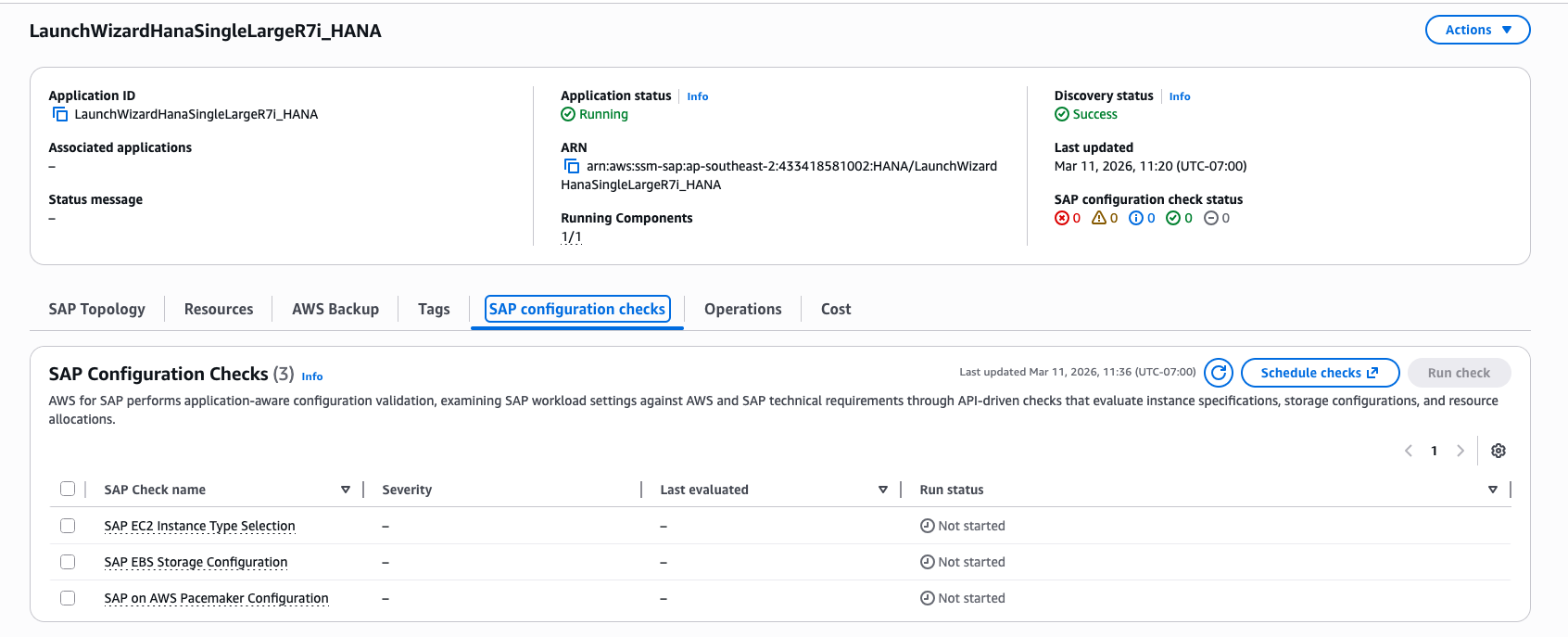
Selecting an individual application opens the Application details page, which provides comprehensive information about your SAP application organized across intuitive tabs — SAP Topology, Resources, AWS Backup, Tags, SAP Configuration Checks, Operations, and Cost. Together, these tabs give you a complete picture of your application’s components, underlying infrastructure, data protection status, configuration posture, operational history, and cost footprint — all in one place.
From the Actions menu, administrators can perform key management operations directly from the console:
- Run on-demand discovery: AWS Console for SAP Applications automatically refreshes your application metadata on an hourly basis after registration. However, if you’ve made changes to your application — such as adding or removing a node — you can use this action to immediately fetch the latest application information without waiting for the next scheduled refresh.
- Start / Stop application: Application-aware start and stop operations that gracefully handle SAP application components in the correct order
- Update credentials: Update SAP application credentials used for monitoring
- Deregister application: Remove an application from AWS Systems Manager (SSM) for SAP management
- Schedule SAP Operations: Set up recurring operational tasks using Amazon EventBridge, enabling you to automate routine operations such as scheduled start/stop of SAP applications
How to get started
Here are easy steps to get you started with AWS Console for SAP Applications:
- Navigate to the console: Open the AWS Management Console and search for “AWS for SAP”
- Register your SAP application: Click Register application to register your existing SAP HANA/ABAP application with AWS Systems Manager for SAP. You can also register applications programmatically using the AWS Systems Manager for SAP APIs.
- Explore the Dashboard: Once registered, your applications will appear on the dashboard with their registration and discovery status. The dashboard provides an at-a-glance view of your entire SAP landscape on AWS.
- Manage your applications: Select any registered application to view its topology, resources, backup status, configuration checks, operations, and costs. Use the Actions menu to perform application-aware operations like start, stop, and on-demand discovery.
- Enable Configuration Checks: Navigate to the SAP Configuration Checks tab and run checks to validate your SAP workloads against SAP Lens of AWS Well-Architected Framework.
- View Backup logs: Use the AWS Backup tab to monitor SAP HANA database backups and Recovery points
Customers can also use AWS Systems Manager for SAP APIs to programmatically register applications and perform all management operations, enabling integration with existing automation workflows and CI/CD pipelines.
Availability and Pricing
The AWS Console for SAP Applications is available in all AWS Regions where AWS Systems Manager for SAP is supported. There is no additional charge for using the console itself.
Conclusion
AWS Console for SAP Applications is a purpose-built, SAP-native management experience that brings together landscape visibility, application management, backup monitoring, configuration validation, and operational automation into a single place. The console enables SAP administrators to move away from fragmented tooling and manage their SAP HANA-based applications on AWS the way they think about them — as applications, not infrastructure.
Get started today by registering your SAP applications in the AWS console for SAP Applications. For detailed guidance, visit the AWS System Manager for SAP documentation and API reference guide.