AWS Compute Blog
Announcing Lambda MicroVMs: serverless compute environments with VM-level isolation and near-instant startup
We recently announced the launch of AWS Lambda MicroVMs, a new serverless compute primitive that provides VM-level isolation, near-instant startup performance, and state retention. You can now give each user or job their own execution environment to securely run just-in-time code – either user or AI generated – without managing virtualization infrastructure or choosing between isolation, speed, and state retention. Lambda MicroVMs are powered by Firecracker virtualization, the technology underpinning AWS Lambda. You can use Lambda MicroVMs to build data analytics applications, AI sandboxes, vulnerability scanners, and interactive development environments.
Evolution of serverless compute
When we launched AWS Lambda in 2014, the premise was simple: give developers a way to run code without thinking about servers. Upload a handler, configure a trigger, and let the service handle infrastructure provisioning, scaling, patching, and availability. Over the past decade, Lambda has grown to process tens of trillions of requests each month for over 1.5 million customers. Under the hood, those invocations run inside a Lambda-managed Firecracker microVM – a lightweight virtual machine that combines hardware-level virtualization and near-instant startup speed. With Lambda SnapStart, we used Firecracker’s snapshotting capabilities to accelerate startup times by resuming execution environments from pre-initialized snapshots (carrying memory and disk state) rather than cold-booting them.
Today, a growing class of applications need to run code supplied by users or AI agents just-in-time – and need Firecracker’s core capabilities directly: hardware isolation, near-instant startup, and state retention over extended periods. Achieving this today often requires building custom infrastructure that diverts teams from core application development. We’ve been hearing this theme from customers across use cases and industry verticals:
- Interactive code environments like browser-based IDEs, notebooks, and vibe-coding platforms need to deploy and execute user-generated code in per-user environments that start within seconds and retain state – like installed packages, generated files, and running processes – across interactions.
- Data analytics platforms run user-supplied or LLM-generated queries and notebooks in isolated environments that retain large working sets over long durations – such as an 8-hour workday – with the ability to resume quickly after periods of inactivity.
- AI coding assistants and agents run LLM-generated code iteratively, while retaining context between iterations, and rapidly launching and shutting down environments to evaluate alternative code paths, such as for reinforcement learning.
- IT security scanners execute vulnerability assessments in compute environments that are strongly isolated from one another, can scale to handle bursts of concurrent scan requests, and support elevated operating system privileges.
- CI/CD platforms need ephemeral, isolated build and test environments that start quickly and can be discarded after each run.
Introducing Lambda MicroVMs
Now, with AWS Lambda MicroVMs, developers can directly use the isolation, speed, and state snapshotting of Firecracker MicroVM as a primitive, while keeping the serverless simplicity of AWS Lambda. Lambda MicroVMs provide these key capabilities.
- Snapshot-based, near-instant startup: To optimize startup speed, MicroVMs are launched from MicroVM images, which are pre-initialized Firecracker snapshots of your application’s memory and disk state. When you create a MicroVM image, the service executes your Dockerfile, initializes your application, and snapshots the MicroVM. Lambda starts MicroVMs from this snapshot with your dependencies loaded.
- Direct HTTPS connectivity: Each MicroVM exposes a dedicated HTTPS endpoint for inbound connectivity to individual ports. You can connect to applications running within your MicroVM using standard HTTPS clients, WebSocket connections, or gRPC – exactly as you would with a container or VM.
- Lifecycle control with state retention: Lambda MicroVMs allow you to control the lifecycle of each execution environment, enabling you to support interactions that last a few minutes to sessions that span 8 hours.
- Vertical and horizontal scaling: Each MicroVM starts with a configurable baseline — 2 GB memory and 1 vCPU by default (up to 8 GB and 4 vCPUs), with CPU allocated in a 2:1 ratio to memory. From that baseline, MicroVMs scale vertically by up to 4x automatically, meeting peak resource demands for each user or session without any action on your part. MicroVMs also scale horizontally — you can launch several hundred within a minute during traffic spikes. For details on service limits, refer to Lambda service quotas.
- Internet and VPC access: By default, Lambda MicroVMs support outbound connectivity to the public internet without additional configuration. For private VPC connectivity to resources such as databases or internal APIs, you can use a Lambda Network Connector (LNC). LNC is a new Lambda resource that provides managed, configurable network connectivity between your MicroVMs and your private VPC.
Building with Lambda MicroVMs
Lambda MicroVMs introduces two core resource types: a MicroVM image – a versioned artifact containing your runtime environment and application code, and MicroVMs – individual instances launched on demand from a MicroVM image.
Let’s make this concrete with an example. You are a cloud architect building a data analytics application which under the hood, manages compute environments to generate insights for data analysts within your organization. Analysts load multi-gigabyte datasets and generate visualizations in sessions that last hours with idle gaps when they switch to other tasks. When analysts return, they expect to pick up exactly where they left off. Here’s how you can use MicroVMs for this workload:
Step 1: Define your environment
Write a Dockerfile that installs your data science stack. This runs once at MicroVM image build time – every analyst’s MicroVM starts with these dependencies already loaded. This Dockerfile builds a notebook server that accepts code execution requests, runs them in-process (so state accumulates across requests), and returns results. Your customer-facing UI calls this notebook server for each analyst.
Next, package and upload your application artifacts and Dockerfile to S3.
With these in place, create a MicroVM image:
When you create a MicroVM image, Lambda executes your Dockerfile, starts your application, and takes a Firecracker snapshot of the fully initialized environment with the libraries imported, and notebook server listening. Every MicroVM launched from this image skips this initialization step, and provides near-instant startup.
Step 2: Launch a MicroVM when an analyst starts their session
Once your MicroVM image is ready, you can start a new MicroVM for each analyst session. The idle policy encodes your business logic: auto-suspend after 5 minutes of inactivity, retain the suspended state for up to 8 hours (covers a full workday), and auto-resume when the analyst’s next request arrives. Within seconds, the analyst has a dedicated environment with their own filesystem, and a dedicated HTTPS endpoint.
When a data analyst submits a query, it is submitted as an HTTPS request to their assigned MicroVM. You can test this using curl on the MicroVM endpoint.
Notice that you can separate the build-time IAM role from the execution-time IAM role for finer-grained control over each tenant’s permissions.
Step 3: Suspend and resume during idle periods
After 5 minutes of inactivity, the MicroVM is automatically suspended based on the configured idle policy. When the MicroVM is suspended, its memory and disk state is preserved.
Two hours later, the analyst returns and sends the next query. The MicroVM auto-resumes within seconds. The memory and disk state are restored exactly as the analyst left them – no re-computation or re-loading required.
Analysts can also suspend and resume their MicroVMs directly using the APIs.
Step 4: Connect to private data sources
If your data lives in a private VPC, for example, Amazon Redshift clusters or RDS databases, you can use a Lambda Network Connector (LNC) to give your analysts MicroVMs access to this data. Create a network connector once:
Then, reference it when starting a MicroVM. Re-use network connectors across all MicroVMs that share the same network configuration.
Now, your organization’s analysts can query private databases directly from their notebook environment.
Step 5: Cleaning up
To stop incurring charges, terminate any running MicroVMs and delete unused resources.
To recap, with MicroVMs we build an image once, launch isolated MicroVMs per user or job, interact over HTTPS, suspend when idle, and terminate when done. This pattern applies broadly, across use cases. For instance, an IT security platform scanning customer repositories has similar requirements: an isolated environment per scan, the ability to run with elevated operating system privileges, and rapid horizontal scaling to hundreds of concurrent scans. Similarly, an AI coding assistant needs per-developer sandboxes that retain installed packages and generated files across iterative code-write-test cycles, with suspend/resume preserving context when developers switch tasks. In each case, the workflow is the same.
Building MicroVMs with Agent Toolkit for AWS
In the previous section, we demonstrated Lambda MicroVMs core API operations. You can also use your preferred Agentic development tools to start developing with Lambda MicroVMs. Simply install the AWS Lambda MicroVMs skill from the Lambda MicroVMs console, or use the Agent Toolkit for AWS.
To get started in the AWS Lambda console, choose the highlighted button to access the MicroVMs agent instructions as in Figure 1:
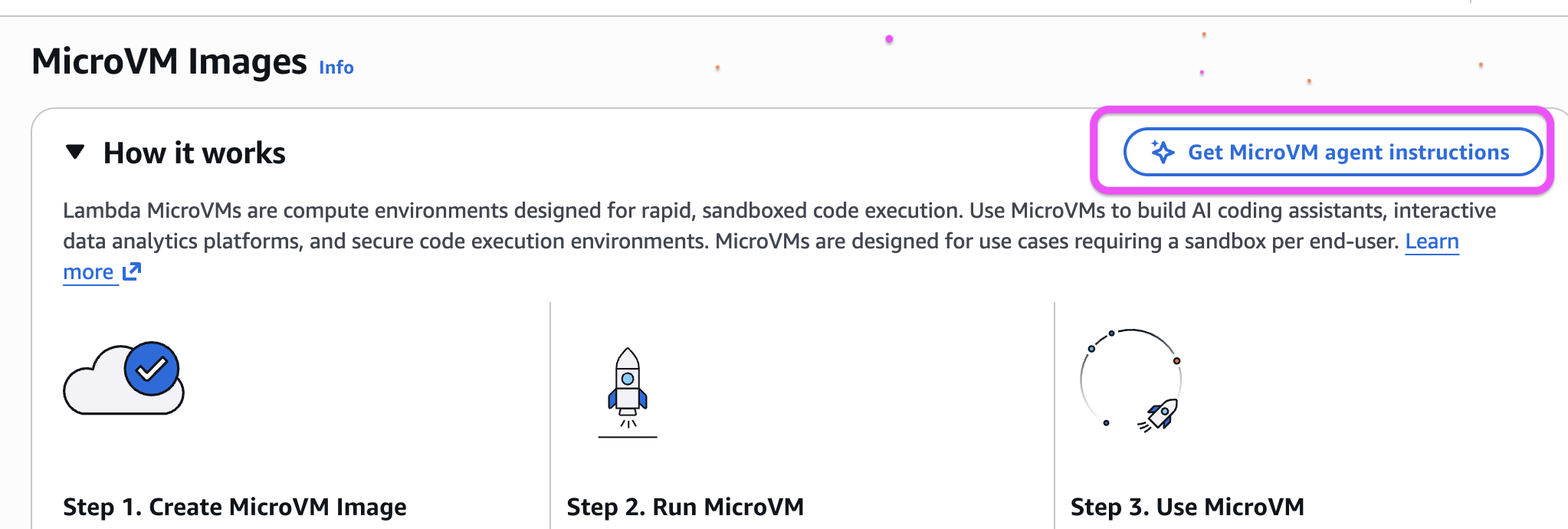
Figure 1: Access MicroVM agent instructions
Next, copy the agent installation instructions and paste it in your terminal to begin developing.
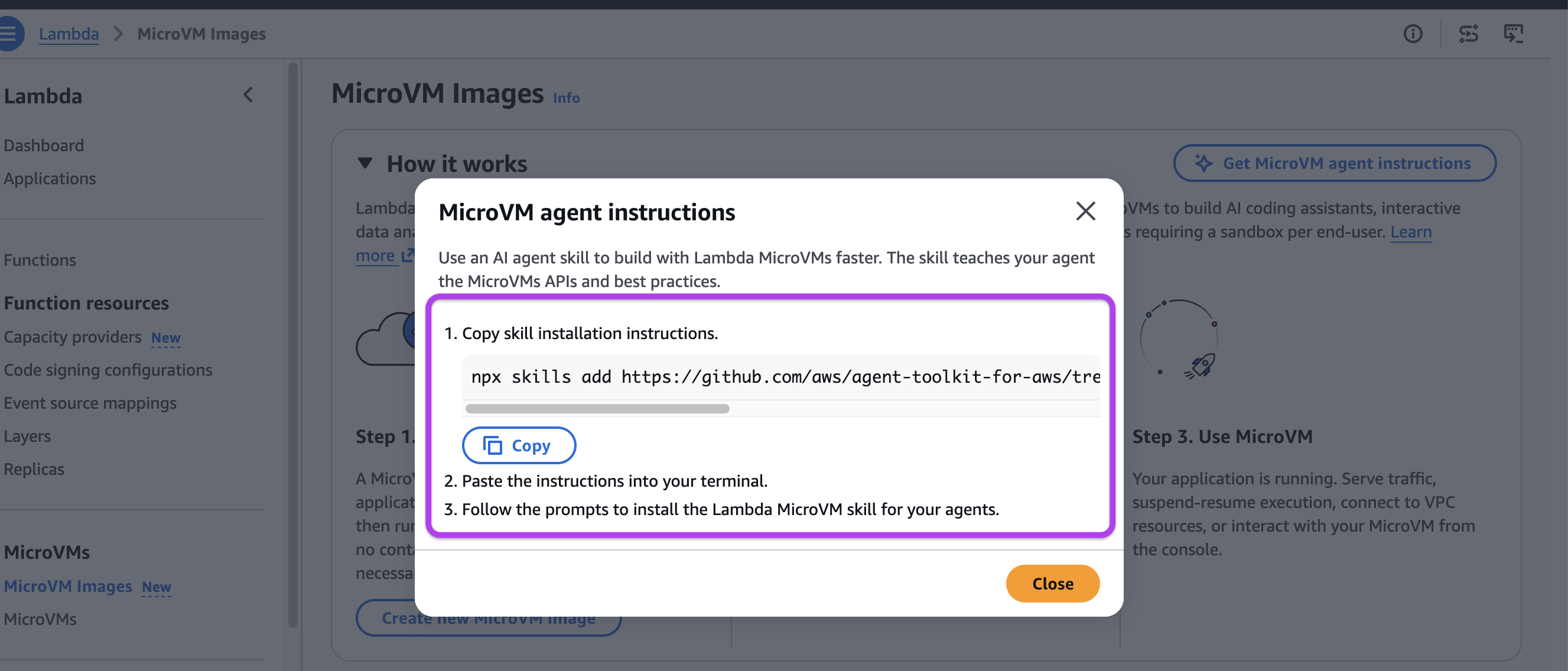
Figure 2: Copy agent instructions
The following screenshot demonstrates the skill in action in an AI coding assistant. Using the skill, the coding assistant agent generates a detailed plan to build the analytics notebook solution, executes the plan, and validates correct execution.
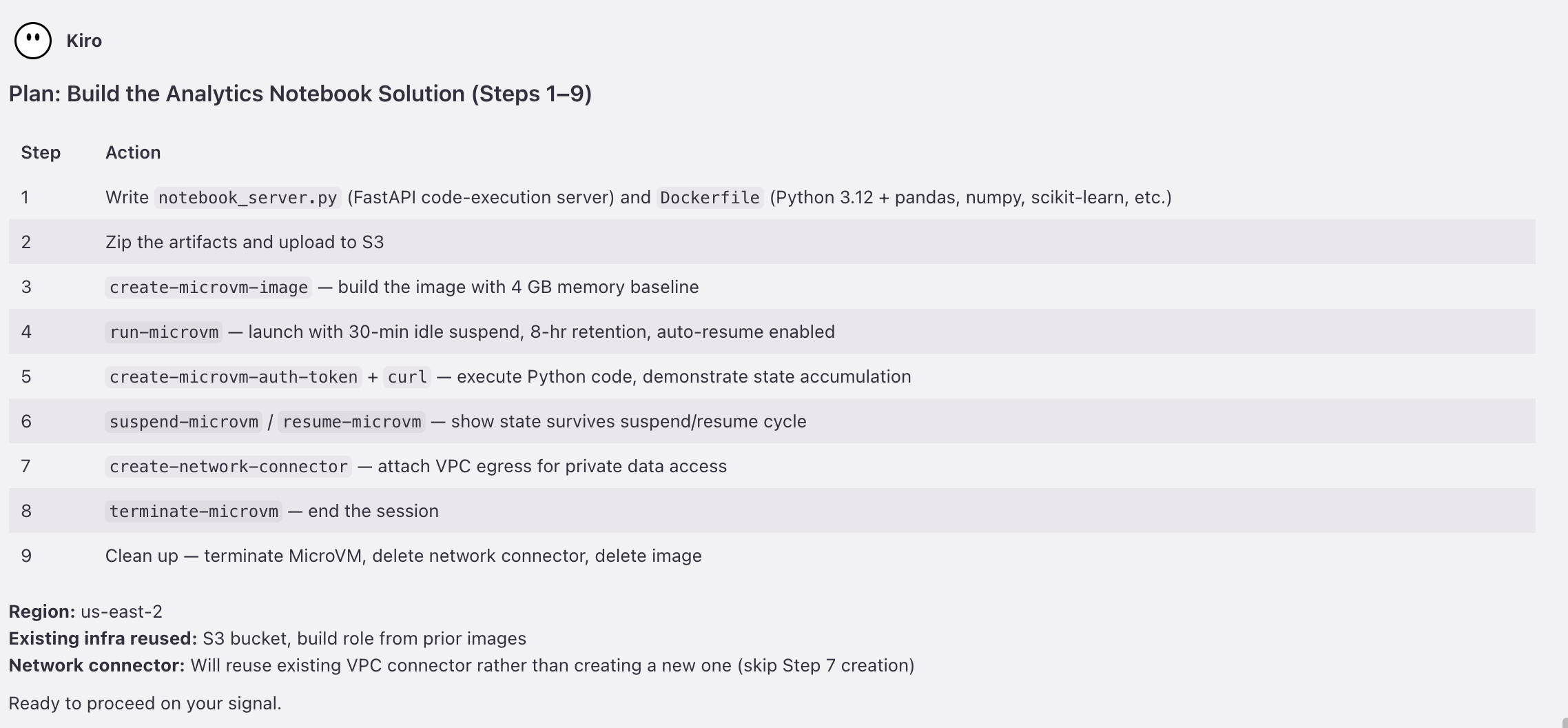
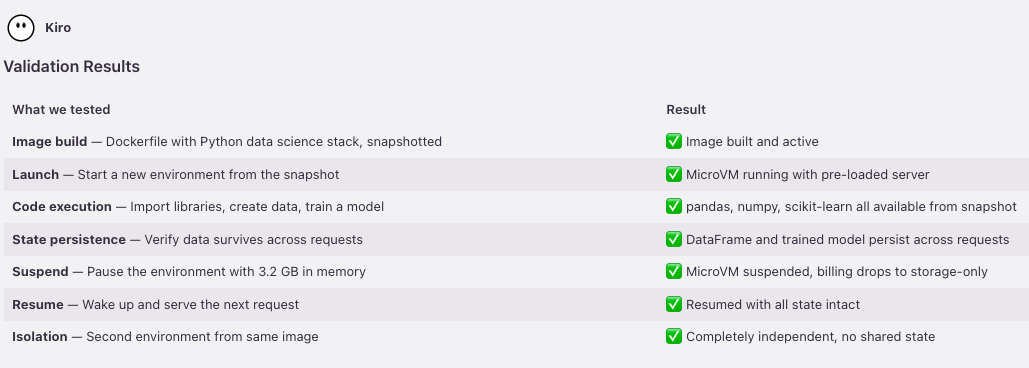
Figure 3: Agent-driven development with MicroVMs
Lambda MicroVMs as sandboxes for Claude Managed Agents
You can also use AWS Lambda MicroVMs as a managed sandbox provider for Claude Managed Agents self-hosted sandboxes. This pattern keeps the orchestration within your Anthropic environment, which hosts the agent loop and Claude model, but moves tool execution into AWS Lambda MicroVMs, so the agent’s code, filesystem, and network egress never leave the infrastructure you control. You control the execution environment – what is installed, what network access is available, and what resources the agent can reach. For integration details, refer to the Lambda MicroVMs developer guide.
Snapshot compatibility considerations
Lambda MicroVMs are started from snapshots of pre-initialized memory and disk state. This has a few implications for how you build applications:
Uniqueness: Content generated and retained within a MicroVM image is shared across all MicroVMs started from that image. To maintain uniqueness for content such as unique IDs, secrets, or random seeds, generate these values after each MicroVM is started. If your application code uses OpenSSL, use the AWS-provided base container image from public.ecr.aws/lambda/microvms:al2023-minimal to build your MicroVM image.
Ephemeral credentials and network connections: Credentials and connections established during MicroVM image creation – or before a MicroVM is suspended – may expire or terminate by the time the MicroVM starts or resumes. Design your application to refresh these credentials and re-establish connections on startup. AWS SDK clients re-establish connections automatically in most cases.
Lambda MicroVMs provides lifecycle hooks that are executed when a MicroVM is started or resumed. Use these hooks to restore uniqueness and to re-establish network connections or ephemeral credentials. For more details, refer to the Working with snapshots section in the Lambda MicroVMs developer guide.
Pricing
Lambda MicroVMs pricing comprises compute, snapshots, and data transfer (at standard AWS rates, including data transferred to your VPC). You have two cost management levers: baseline-plus-consumption billing and idle-suspension. With baseline-plus-consumption billing, your bill tracks closer to your actual resource usage rather than peak resource usage. You configure your MicroVM’s baseline resource allocation to match your workload’s average resource utilization – not peak. During peak activity, your MicroVM can vertically scale up to 4x of the configured baseline automatically and resource usage above the baseline is only billed during active use. You configure the baseline by setting memory, and CPU is allocated in a 2:1 memory-to-CPU ratio – the default is 2GB / 1vCPU, with a corresponding peak of 8 GB / 4 vCPU. Supported baseline and peak values are shown in Figure 4.
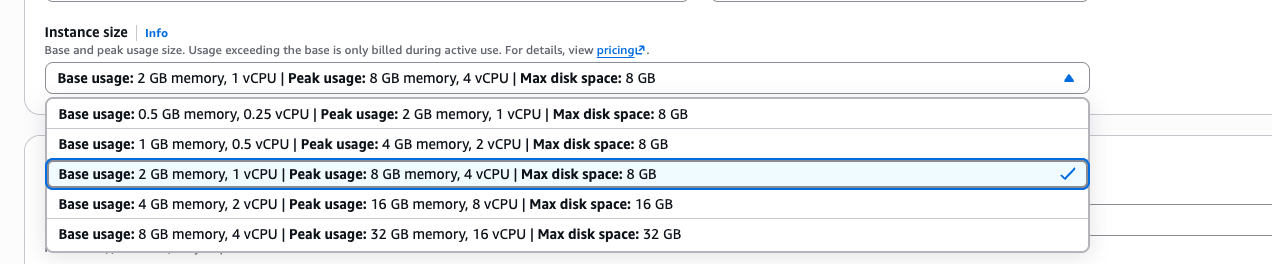
Figure 4: Baseline and peak resource configuration
During extended idle periods, you can suspend your MicroVM to preserve memory and disk state at storage-only rates, resuming near-instantly when needed – no compute charges while suspended. For full pricing details, see AWS Lambda pricing.
Conclusion
Lambda MicroVMs extends the serverless compute model beyond invocation-based functions to long-running, stateful environments that execute code supplied by end users or AI. Development teams can focus on core application development while Lambda provides secure isolation and near-instant startup performance. Whether you’re building an AI coding assistant, an interactive development platform, an IT security platform, or a data analytics workload, the pattern is the same: define your environment in a Dockerfile, build a MicroVM Image once, launch isolated MicroVMs on demand, interact over HTTPS, and terminate when done.
To get started, visit the AWS Lambda MicroVMs developer guide or start building with the MicroVMs agent skill, available through the AWS Lambda console.