AWS Compute Blog
New: Enhanced AssetState dimension for AWS Outposts capacity metrics on Amazon CloudWatch
Today, we are releasing an expanded format of our Amazon CloudWatch dimensions for AWS Outposts capacity metrics. The existing CloudWatch metrics, AvailableInstanceType_Count, UsedInstanceType_Count, InstanceTypeCapacityAvailability, and InstanceTypeCapacityUtilization for Outposts, can now be grouped using the new AssetState dimension with values: Active, Isolated, or Retiring. In this post, we describe what’s changing and how you can use this dimension to improve your capacity monitoring.
What’s changing
Previously, an Outpost could be moved to one of these asset states following an AWS maintenance action, either by an on-site visit or by a remote network update. These state transitions are triggered by control plane operations and previously were not surfaced in customer-facing metrics. This could lead to incorrect or misleading capacity counts.
With this enhancement, you can group the metrics by the dimension to distinguish capacity between production-ready resources and capacity temporarily offline for maintenance.
Introducing the new AssetState dimension
This new dimension adds more visibility into the state of your first-generation and second-generation Outpost racks and servers. The values show the internal state of the AWS Outposts hardware and describe the current working state of the Outpost. These new values are:
- ACTIVE – The Outpost is production-ready and can launch instances.
- ISOLATED – The server or asset within the Outpost was taken offline and is temporarily unavailable.
- RETIRING – The compute asset is not available for use. This state is used when a replacement part is needed.
The new AssetState dimension can be used for creating Amazon CloudWatch alarms for better monitoring, visibility, and alerting of AWS Outposts capacity.
Example metrics output
5 Server/Assets: 4 Active, 1 Isolated, 3 Active used, 1 Isolated used:
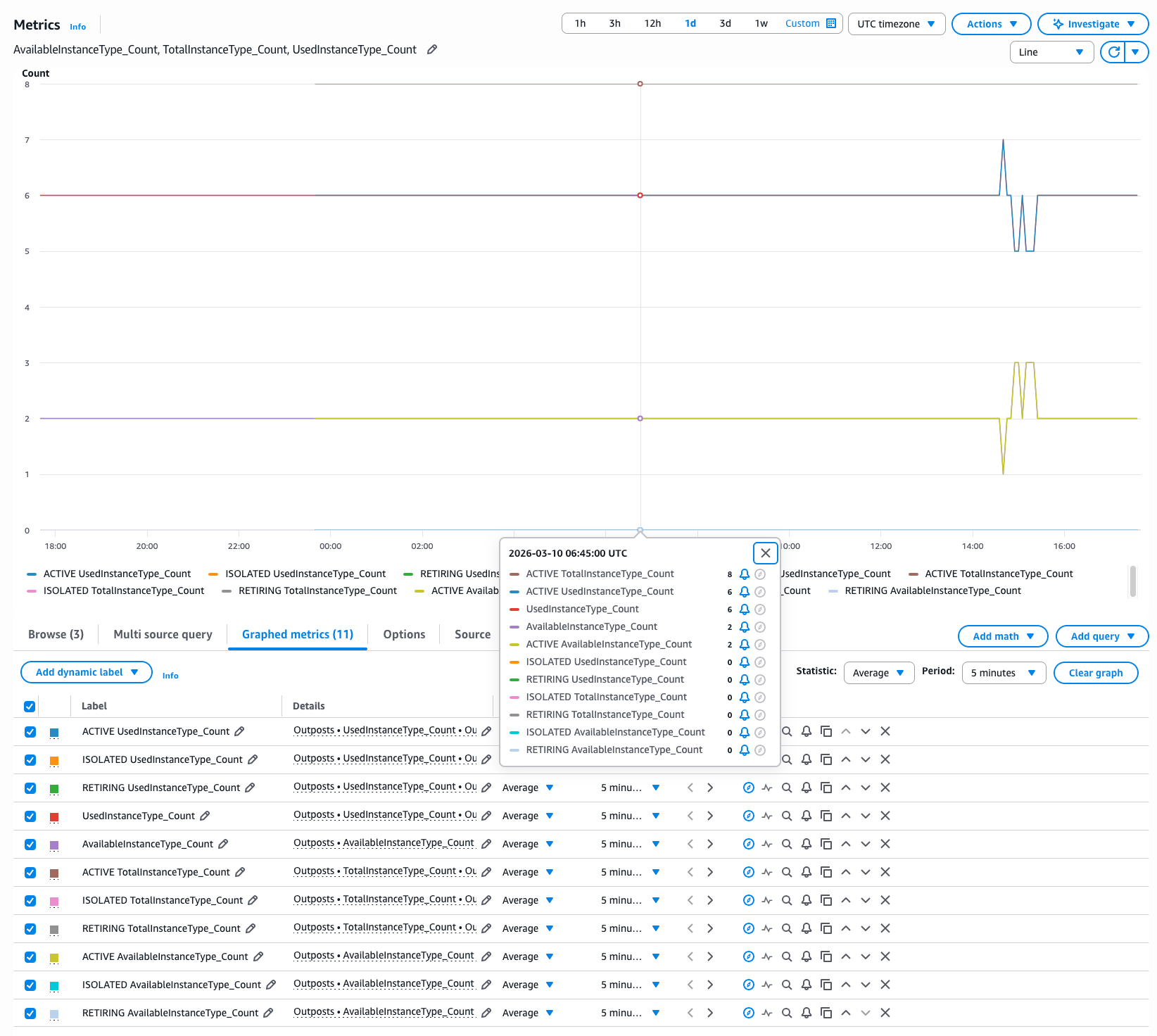
You can now accurately monitor your AWS Outposts capacity and set CloudWatch alarms that reflect available capacity with near real-time visibility.
Integration with CloudWatch on Outposts
This enhanced dimension is fully integrated with CloudWatch on Outposts, so you can monitor your local AWS Outposts infrastructure with the same observability tools you use in AWS Regions.
With the new AssetState dimension, you can create more precise CloudWatch alarms on your Outpost that trigger only on capacity status changes (ACTIVE/ISOLATED/RETIRING). This is particularly valuable if you run mission-critical workloads on Outposts and need accurate, real-time visibility into your on-premises capacity.
Availability
These new metrics are enabled by default and available to all AWS Outposts customers at no additional cost in all AWS Regions where AWS Outposts is offered.
Conclusion
The new AssetState dimension gives AWS Outposts customers clear visibility into the different hardware states of Active, Isolated, or Retiring. This visibility helps you maintain accurate capacity counts and create more precise CloudWatch alarms.
To learn more about CloudWatch metrics for AWS Outposts, refer to the Outposts monitoring documentation. For information about CloudWatch on Outposts and local monitoring capabilities, visit the CloudWatch on Outposts documentation.