AWS Compute Blog
Simplify network segmentation for AWS Outposts racks with multiple local gateway routing domains
AWS now supports multiple local gateway (LGW) routing domains on AWS Outposts racks to simplify network segmentation. Network segmentation is the practice of splitting a computer network into isolated subnetworks, or network segments. This reduces the attack surface so that if a host on one network segment is compromised, the hosts on the other network segments are not affected. Many customers in regulated industries such as manufacturing, health care and life sciences, banking, and others implement network segmentation as part of their on-premises network security standards to reduce the impact of a breach and help address compliance requirements. Some AWS services also have network requirements that specify certain IP ranges to be used for endpoints, and may or may not support customers bringing their own IP pool (also called CoIP routing, see How to choose between CoIP and Direct VPC routing (DVR) modes on AWS Outposts rack for more information). Customers want the flexibility to use both routing modes (CoIP and DVR) on the same logical Outpost. With this new feature, AWS Outposts racks now support multiple LGW routing domains to meet subnetwork isolation and cloud service network requirements in an on-premises environment. For example, a leading automotive company deploys latency-sensitive manufacturing workloads on Outposts racks in a multi-AZ architecture for resiliency. This feature provides traffic separation between routing domains and enables both customer-owned IP (CoIP) and direct VPC routing (DVR) modes on the same logical Outpost.
In this post you will learn how to use multiple LGW routing domains on Outposts racks and considerations for implementation.
Overview
With the introduction of multiple LGW routing domains on Outposts, you can now create multiple routing domains and associate one or more VLANs with each routing domain. This allows you to integrate your Outposts rack into your existing on-premises network schema. Each LGW routing domain will have a unique LGW Virtual Interface (VIF) Group and an LGW Route Table, enabling logical network traffic isolation. You can have a mix of up to 10 active routing domains with route tables using either DVR or CoIP routing mode, and you can make changes to these routing domains as needed in a self-service fashion allowing for network flexibility as architectures are updated over time. These settings can be found in the AWS Outposts console under the Networking tab in the menu.
The following diagram shows an example of 3 VPCs, each with at least 1 subnet on the Outpost rack, and each VPC corresponds to its own routing domain. Each routing domain can then be associated with one or more VLANs, and one or more VPCs. You can only associate a VPC to one LGW routing domain per Outpost.
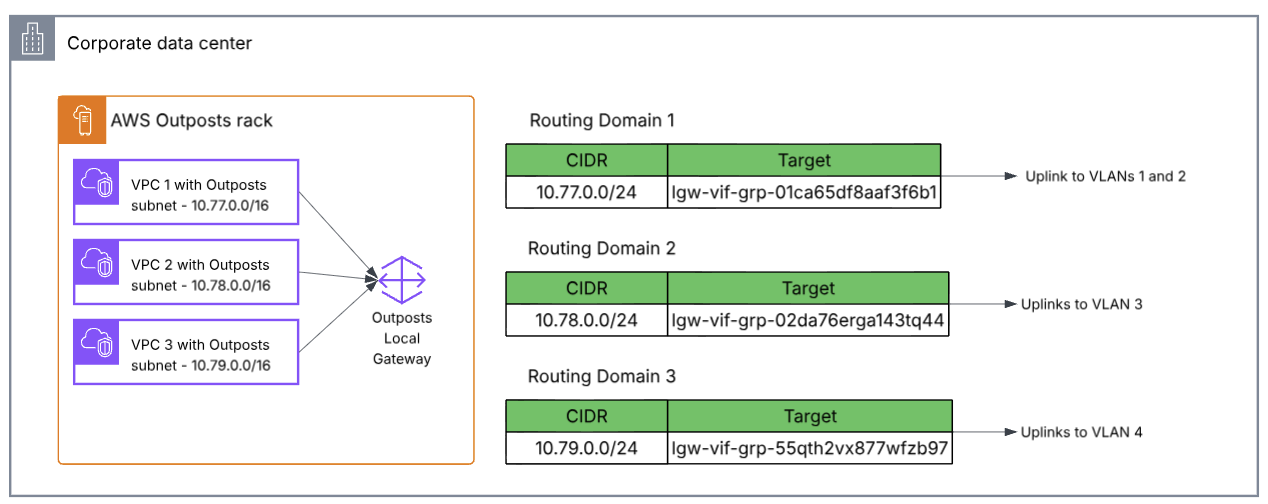
Figure 1 – Architecture diagram showing 3 routing domains
Walkthrough
Before creating a LGW routing domain, first you’ll need to create an LGW VIF group and an LGW route table. A local gateway routing domain is the association of a local gateway route table and local gateway VIF group. Each VIF group can be associated with one or more VLANs, but a route table can only be associated with one VIF group.
To create a LGW VIF Group, navigate to the AWS Outposts console, go to LGW virtual interfaces groups, and select Create VIF group. Enter your VIF details which include BGP and VLAN routing information, you must create 4 LGW VIFs per VIF group.
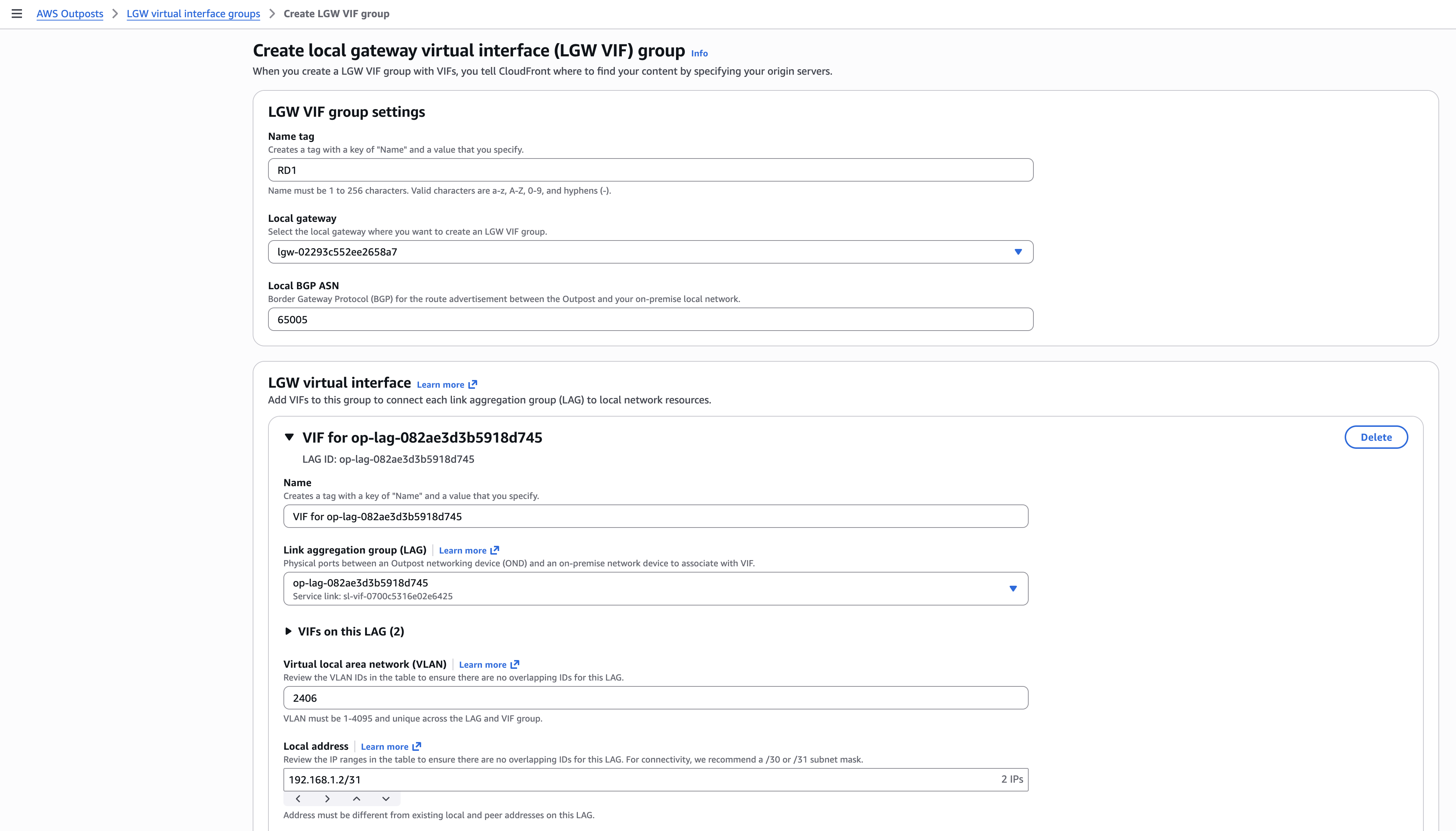
Figure 2 – Creating VIF group for RD1 routing domain
After creating your VIF group, create a LGW route table. You’ll have the option to use Direct VPC Routing (DVR) or Customer-owned IP address pool (CoIP) routing. If CoIP routing is selected, you’ll have the option to enter your CIDR before creating. A LGW route table’s routing mode cannot be changed after creating. However, you can disassociate a LGW route table from a VIF group and attach a new route table if you need to change the routing mode of a VIF group.
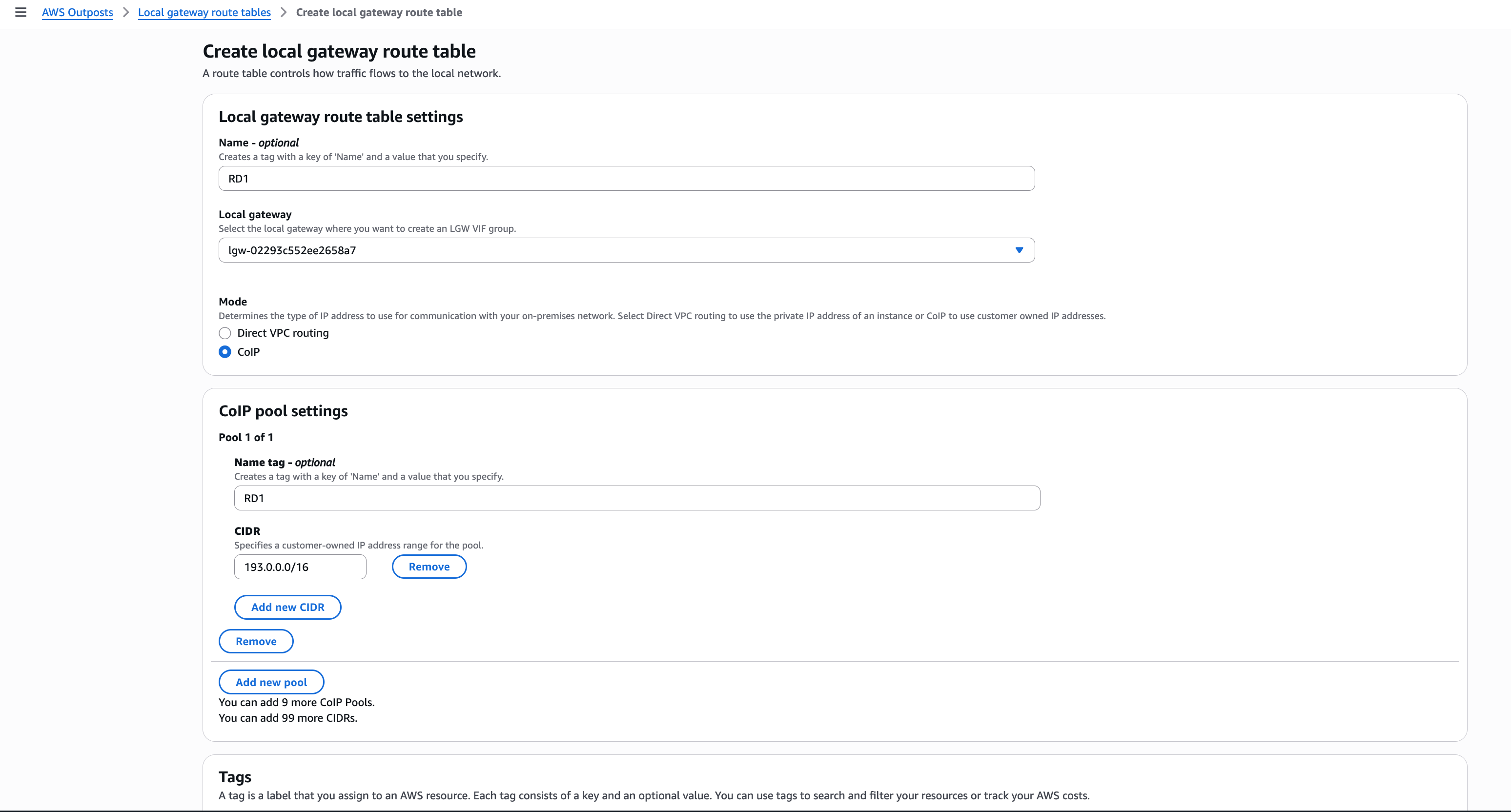
Figure 3 – Creating LGW route table for RD1 routing domain
After you’ve created your LGW route table and VIF group, you can proceed to the final step which is to create your LGW routing domain where you will associate the LGW route table and VIF group.

Figure 4 – Creating LGW routing domain for RD1
You can view and create up to 10 active routing domains through the AWS Outposts console under the Networking tab.
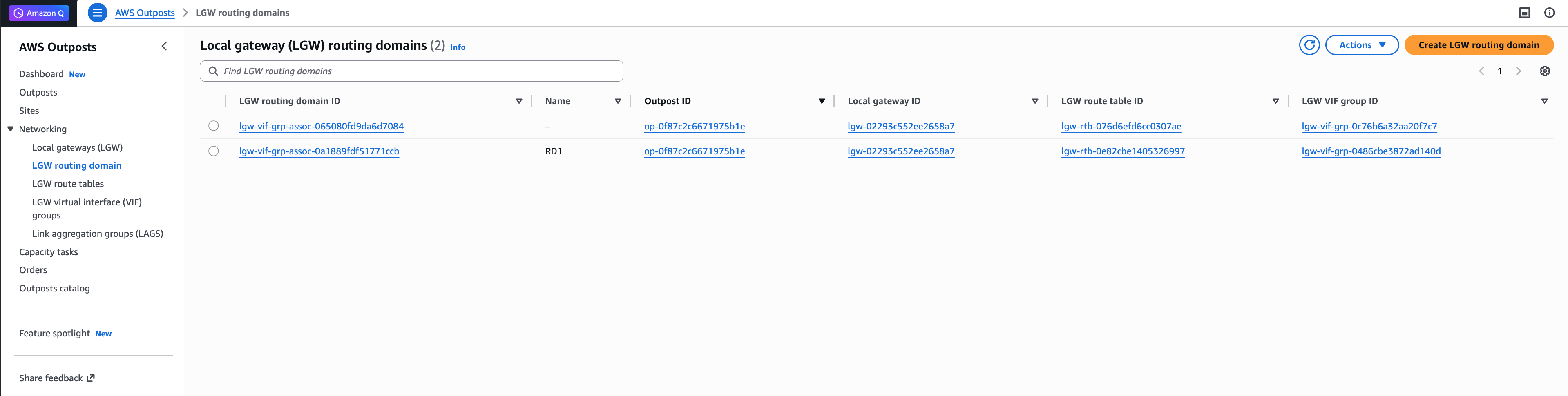
Figure 5 – Local Gateway (LGW) routing domains
Considerations
- Multiple LGW routing domains feature is only available on second-generation Outposts racks.
- Avoid overlapping IP addresses across subnetworks and local routing domains as those can create IP routing conflicts.
- A VIF group can only be associated to one LGW route table/routing domain at a time. A routing domain is the association of a VIF group and LGW route table.
- LGW routing domain will allow for logical local network traffic isolation, however all traffic will still travel across your local gateway Link Aggregation Control Protocol (LACP) Link Aggregation Group (LAG) to uplink into your on-premises network.
- Additional network isolation can be achieved through Virtual Routing and Forwarding (VRF) on Cisco platforms or Routing Instances on Juniper equipment, providing logical separation of routing tables and enabling secure multi-tenancy within the same physical infrastructure.
- You can only associate a VPC to one LGW routing domain per Outpost. You can self-serve to change VPC association as needed. Multiple on-premises VLANs can be connected to a single routing domain.
Conclusion
This post demonstrated how to configure multiple local routing domains on Outposts racks to integrate into your on-premises network. For more information see LGW routing domains section in the AWS Outposts user guide. Reach out to your AWS account team to learn more about Outposts racks network configuration options.
In addition to multiple LGW routing domains, we have also announced several updates to Outposts in the past week to help you meet digital sovereignty and local data processing needs. To learn more, read the following announcements:
To discuss Outposts with an expert on any of these topics, submit this form.