AWS Contact Center
Reduce testing time by up to 90%: Introducing native testing and simulation for Amazon Connect
Introduction
Contact center administrators face a persistent challenge: efficiently testing and validating contact flows without disrupting live operations. Traditional approaches—manually calling systems, building custom validation tools, or investing in third-party solutions—are time-consuming and expensive. Large enterprises often allocate significant annual budgets to automated testing tools alone, while manual validation can require days or weeks of effort for each change. As Amazon Connect evolves with advanced AI capabilities, having an efficient testing strategy becomes even more critical for maintaining service quality and customer satisfaction.
Today, we’re excited to announce general availability access to Amazon Connect’s native call simulation capabilities. This built-in testing solution dramatically reduces validation time and effort while boosting confidence in your contact center design. The new feature enables you to automatically test your contact center workflows without external tools or manual phone testing, allowing your team to focus on innovation and delivering exceptional customer experiences.
What you’ll learn
This post demonstrates how to leverage Amazon Connect’s new testing capabilities to automate contact center validation. You’ll discover how to:
- Configure test cases using the intuitive visual designer
- Create test scenarios that mirror natural customer interactions
- Execute automated tests and analyze results for continuous improvement
Testing framework overview
Amazon Connect’s testing and simulation framework provides a comprehensive solution for validating contact center experiences through an intuitive visual interface. Unlike traditional testing approaches that rely step by step guides and complex transitions, this framework uses natural, user-friendly concepts that mirror how customers actually interact with contact centers.
Event-driven test model
The framework’s core uses an event-driven model that aligns with natural cause-and-effect reasoning. Rather than requiring deep technical knowledge of contact flow implementation, you describe tests in terms of “when X happens, do Y.” For example: “When the IVR plays ‘Press 1 or say agent to speak with an agent,’ the customer should press 1 or say agent.”
This approach leverages three intuitive concepts:
- Observations: Complete interactions that include expected system events and corresponding actions
- Events: Specific behaviors you expect from the system (prompts, bot messages, Lambda function calls)
- Actions: What the testing framework should simulate in response (customer input, attribute validation, resource mocking)
The event-driven model delivers significant benefits: non-technical team members can easily understand and create tests, QA teams require minimal training, and the framework maintains technical precision while keeping the process accessible.
Visual test designer interface
The designer provides a canvas-based interface where you visually construct test scenarios using interaction groups. Each interaction group represents a complete sequence of expected behaviors and simulated actions, making it easy to visualize your test flow at a glance. This visual approach reduces the learning curve, allowing team members to create tests without understanding the underlying technical implementation details.
Testing analytics and dashboards
Amazon Connect provides dedicated testing and simulation dashboards accessible through Analytics and Optimization > Dashboards and Reports > Test and Simulation Dashboard. These dashboards offer comprehensive insights into test execution history, including:
- Summary metrics showing overall test success rates
- Breakdowns of failure types to identify common issues
- Execution duration metrics for performance analysis
- Date range filtering to track improvements over time
Creating test cases
Building effective test cases involves three major steps: configuring basic test settings, designing the test flow with interaction groups, and defining specific behaviors to observe and simulate.
Configuring test settings and parameters
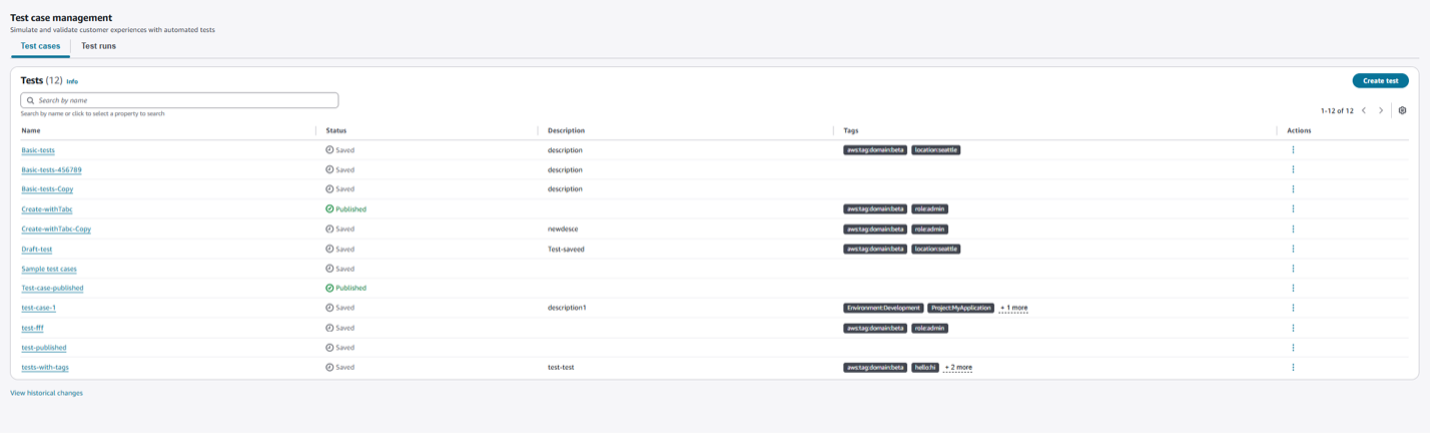
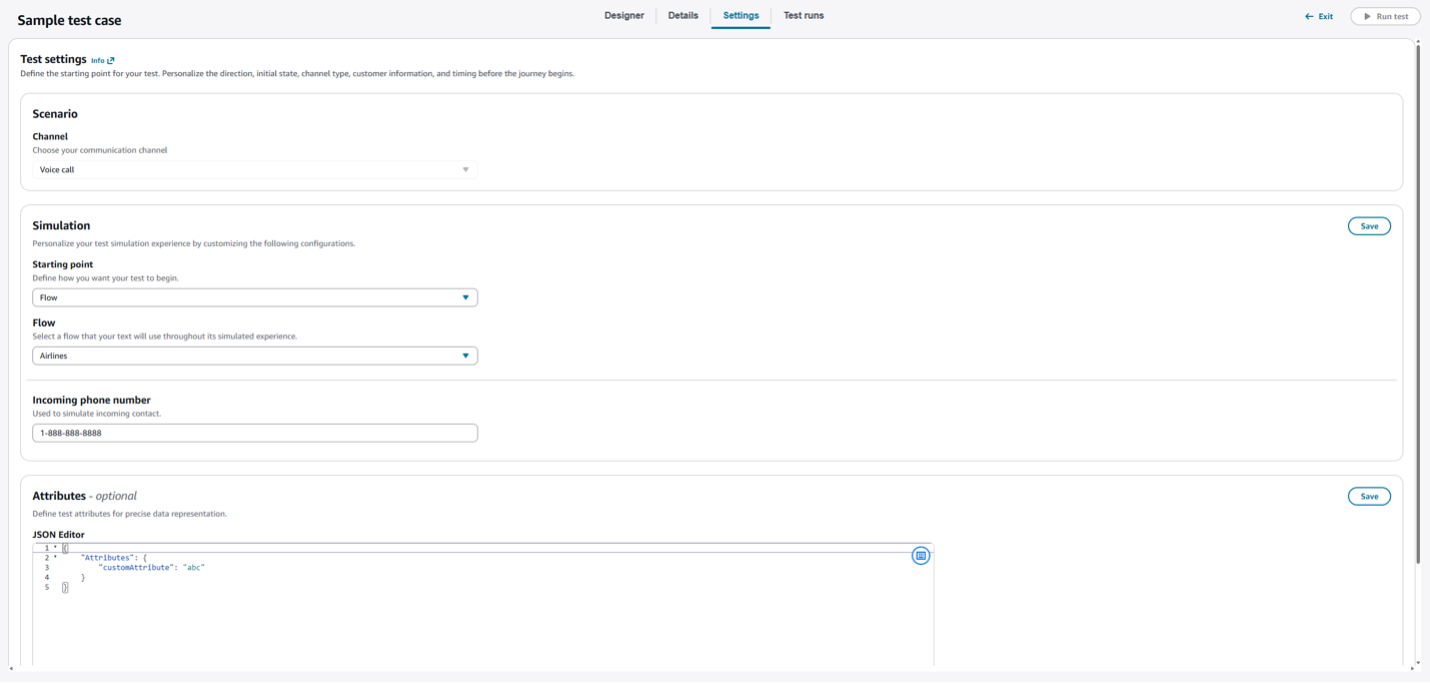
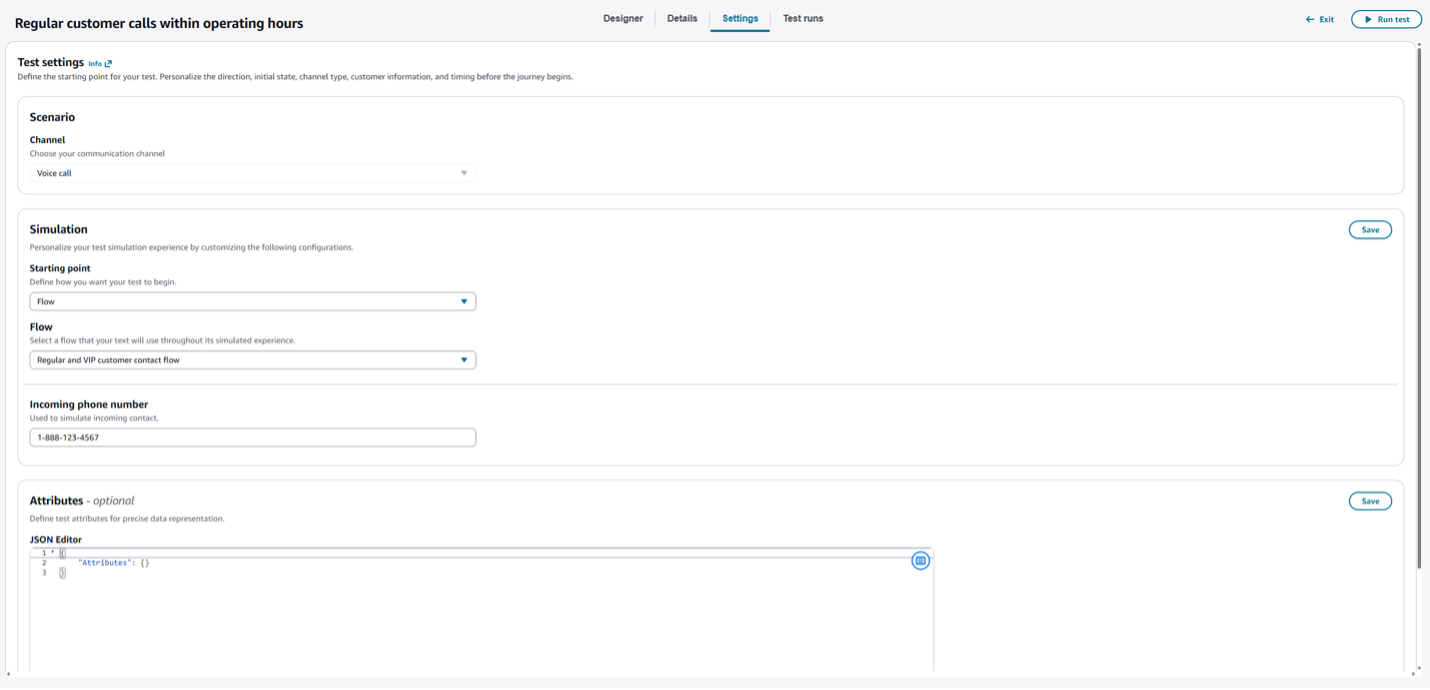
Create a new test case by clicking Create Test in the test case management page. In the Settings tab, configure:
- Starting point: Specific contact flow or phone number
- Channel: Voice
- Incoming phone number: Simulated caller identification
- Contact attributes: User defined contact attributes like profile information
Building interaction groups
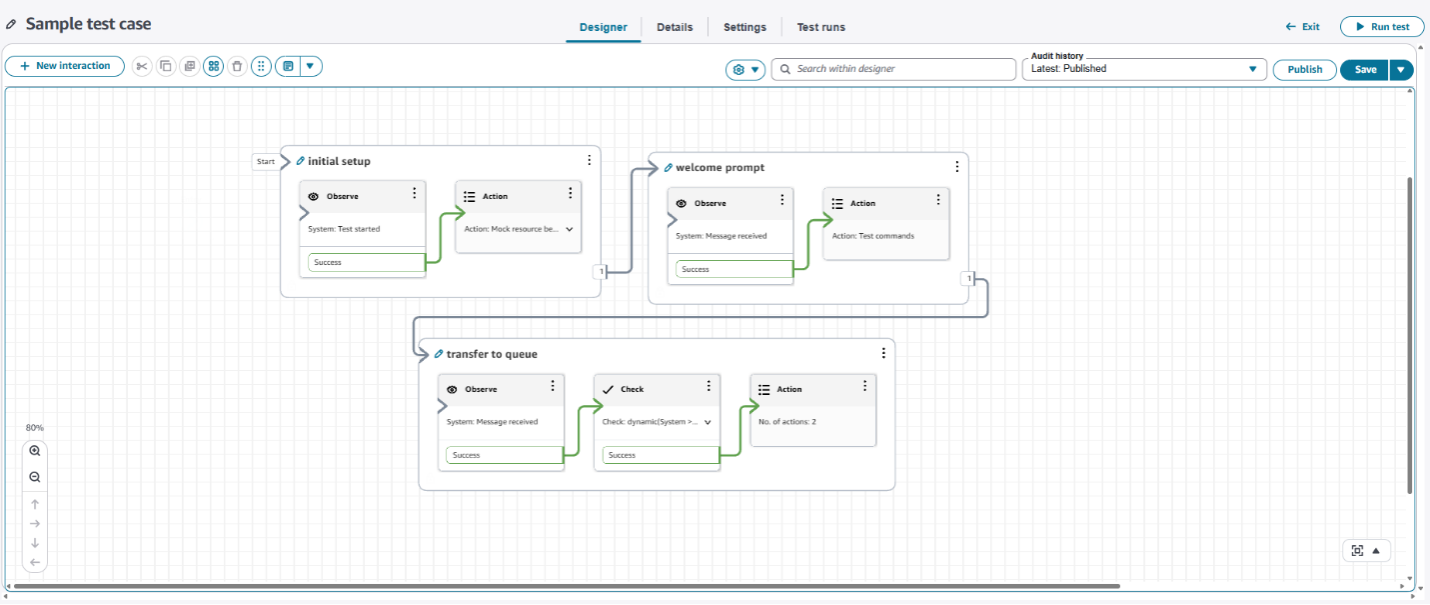
In the Designer tab, build your test flow using interaction groups. Each group represents a moment where you expect something to happen and need to validate or respond to that event. Add interaction groups using the + New Interaction button, then connect them to define your complete test case flow.
Setting up observation, check, and action blocks
Each interaction group contains up to three block types:
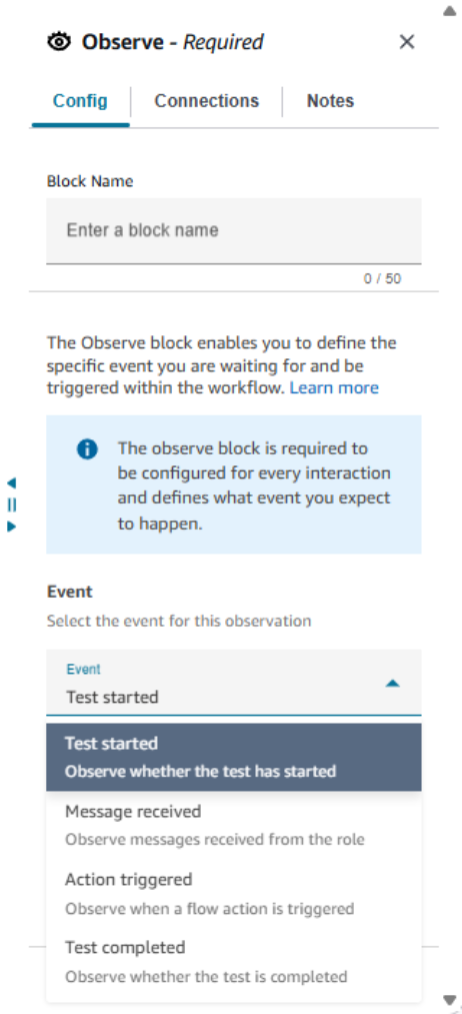
Observe Block (Required): Defines expected system events like “Test started,” “Message received,” or “Action triggered.” For message-based observations, choose between:
- Contains matching: Checks if actual message contains specified text (exact match)
- Similarity matching: Uses intelligent comparison for semantic similarity (semantic match)
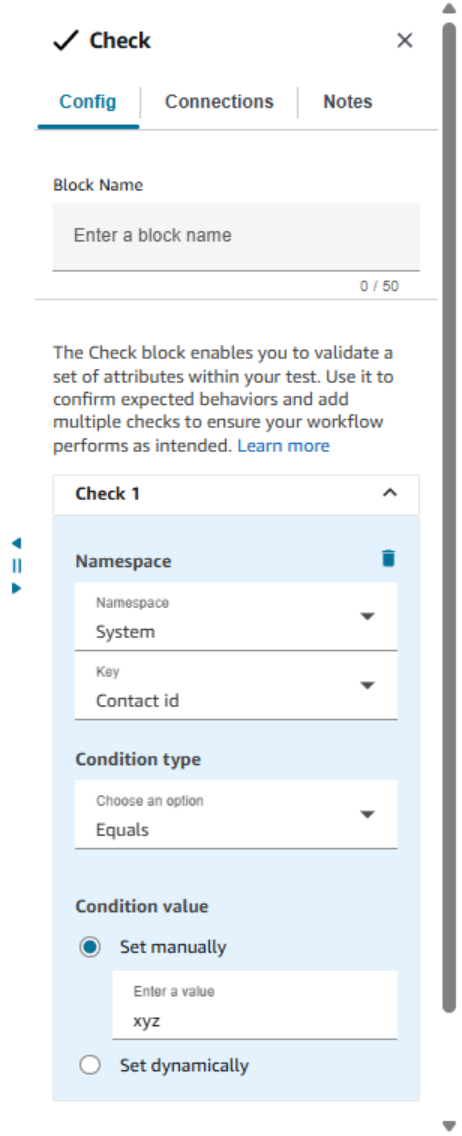
Check block (optional): Validates those specific attributes contain expected values at that point in the contact journey. Configure attribute validations by specifying namespace (e.g. System, User defined, or Segment Attributes), attribute key, and expected value.
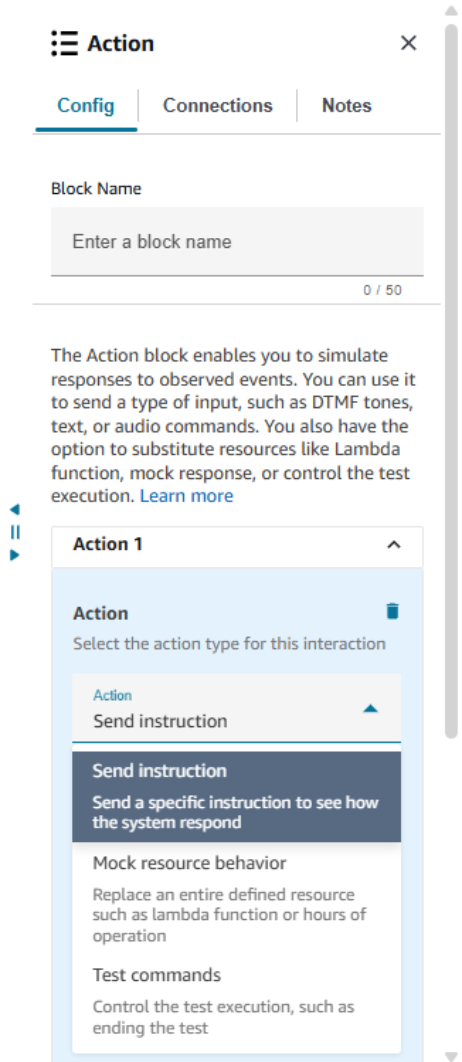
Action block (optional): Defines what the framework should simulate in response to observed events:
- Mock resource behavior: Replace responses from Lambda functions or substitute resources like Hours of Operation, Queues, or Lex bots
- Send instruction: Simulate customer input (DTMF tones, text utterances, call disconnect)
- Test commands: Provide utilities like logging attributes or ending tests
Testing self-service and queue experiences: a practical example
Testing contact center flows ensures your customers receive consistent, reliable experiences. This section walks through testing a common scenario: an existing customer calling during business hours to reach an agent.
The customer experiences
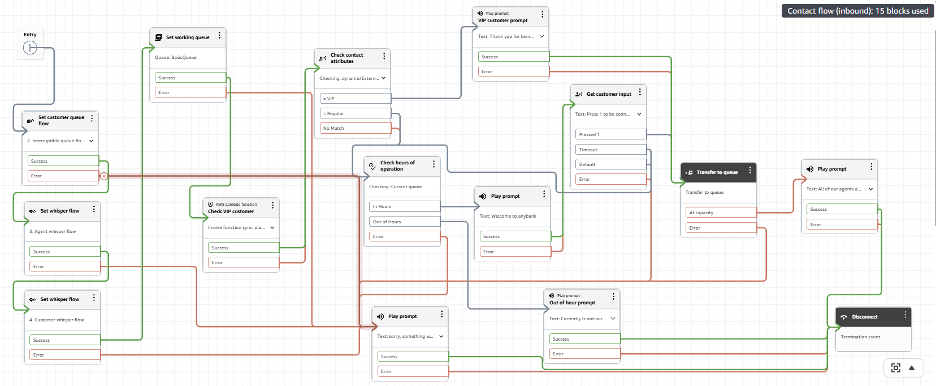
In this example, your contact center flow works as follows:
- A Lambda function verifies the customer’s type using incoming phone number.
- The system plays a welcome prompt asking customers to press 1 to reach an agent.
- After receiving input, customers hear a confirmation message.
- The system places customers in a queue with hold music until an agent is available.
Building your test case
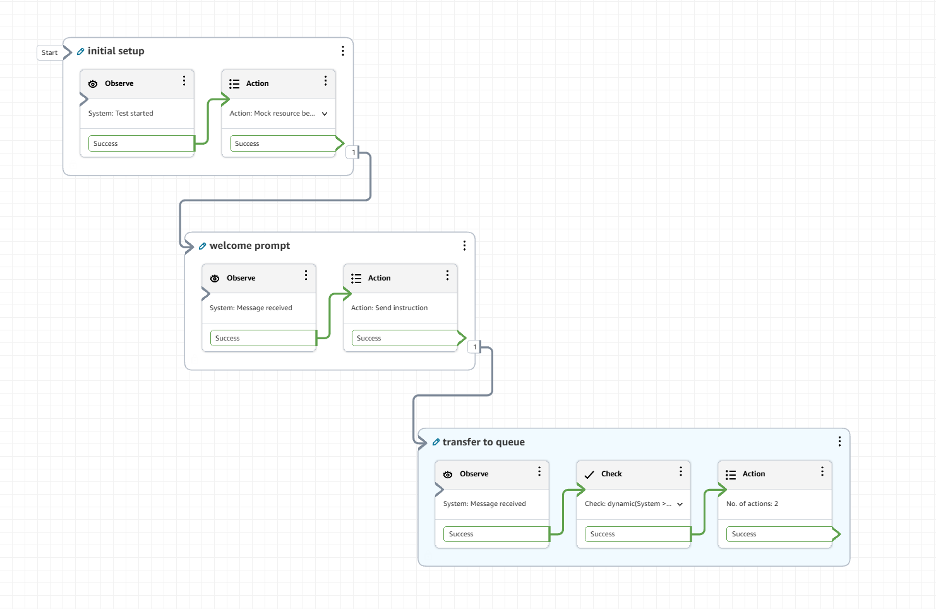
Create a test case with three interaction groups to validate this experience.
Configure the test setting
Select the contact flow you want to simulate and enter an incoming phone number as the identity of the customer.
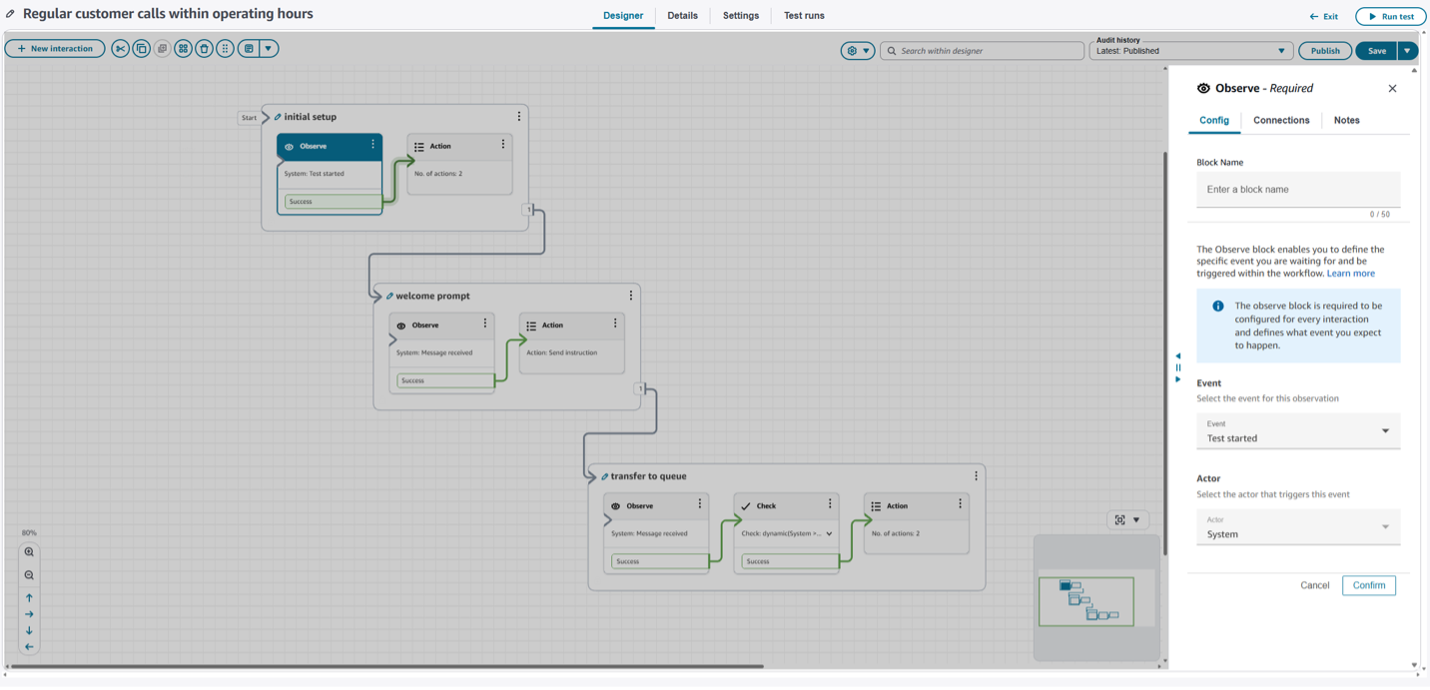
Interaction group 1: Test initialization
This group handles test setup and hours of operation overrides.
Observe block: Select “Test started” as the event type, which executes immediately when your test begins.
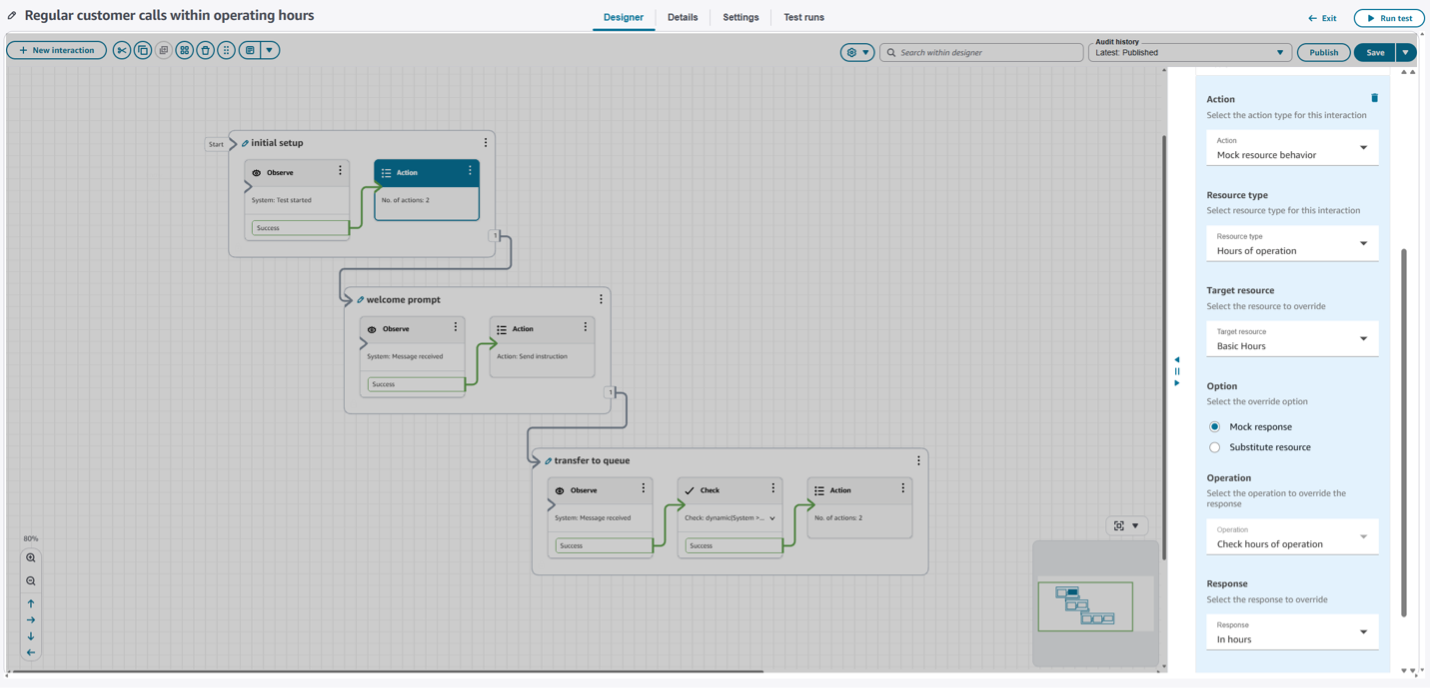
Action block: Configure an override for your Hours of Operation resource. This ensures your test runs as if it’s during business hours, regardless of when you execute it. Select your flow’s Hours of Operation resource and mock the response to be “in hours” when check hours of operation is invoked in the flow or specify a replacement resource that’s always open.
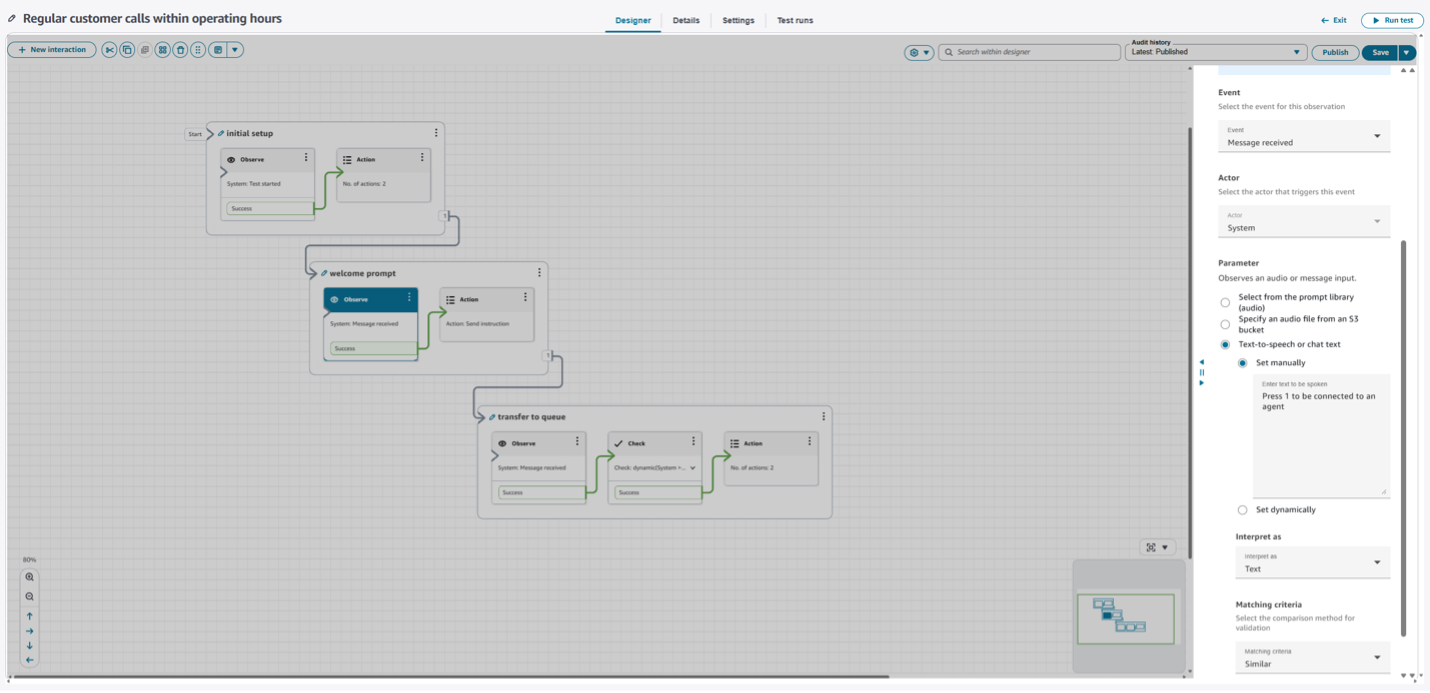
Interaction group 2: Welcome prompt validation
This group validates the welcome prompt and simulates customer input.
Observe block:
- Event type: “Message received”
- Actor: “System” (default, since the prompt originates from your contact flow)
- Expected text: “Press 1 to be connected to an agent”
- Matching criteria: “Similar”
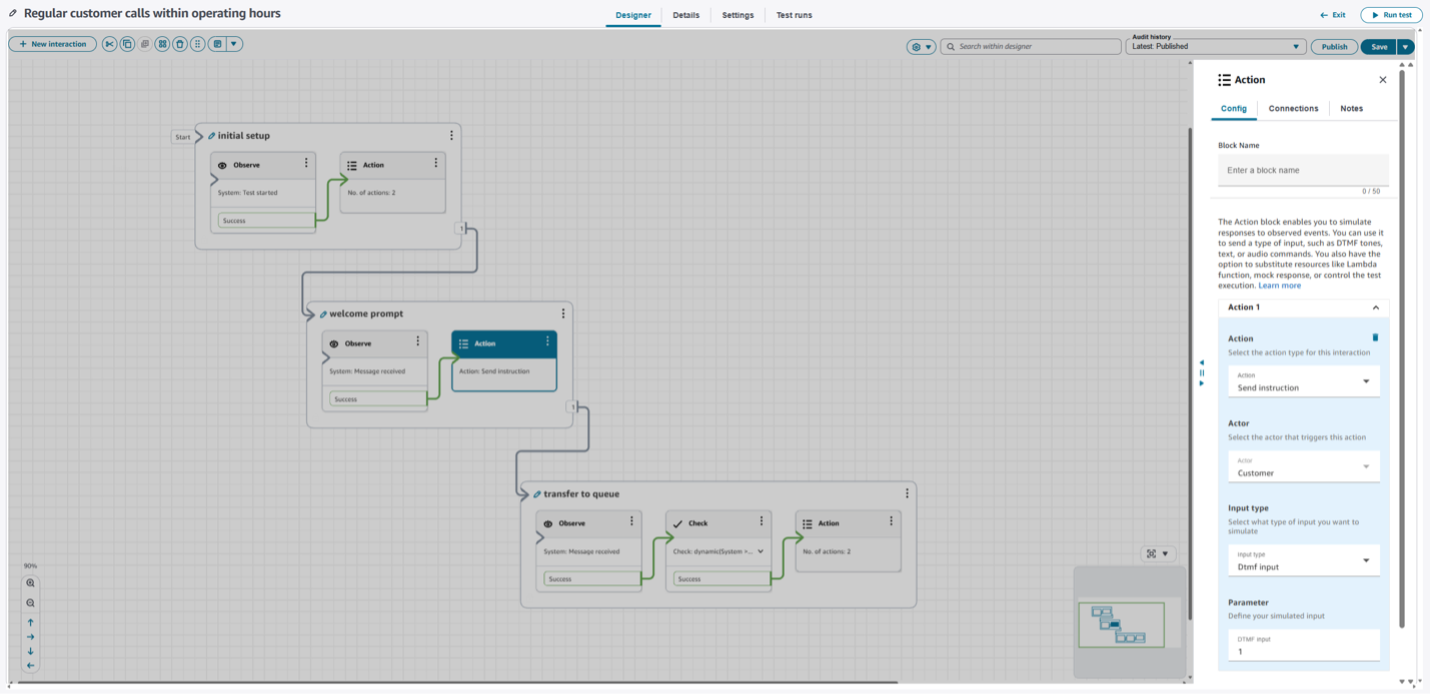
Action block: Configure a “Send instruction” action to simulate the customer pressing 1:
- Response type: “DTMF Input”
- Input value: “1”
Interaction group 3: Queue validation
This group validates queue placement and concludes the test.
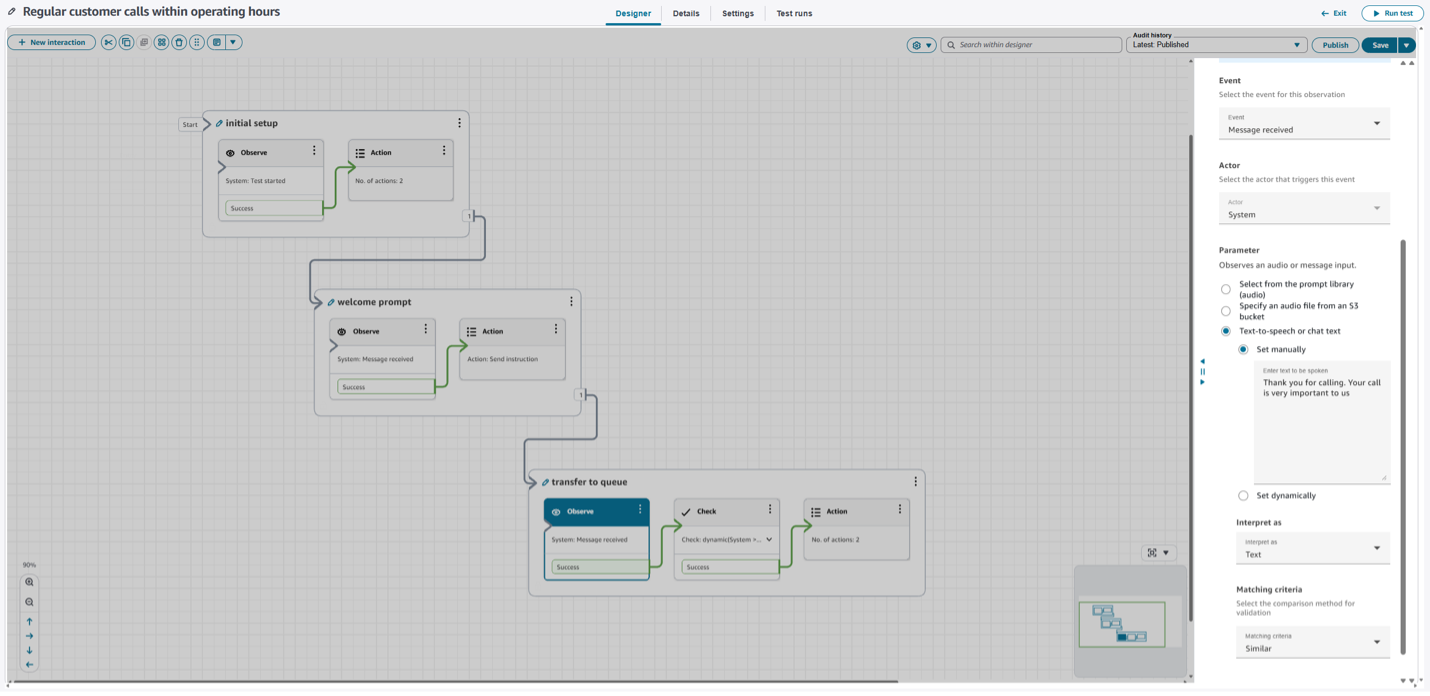
Observe Block: Specify the expected confirmation message: “Thank you for calling. Your call is very important to us and will be answered in the order it was received.”
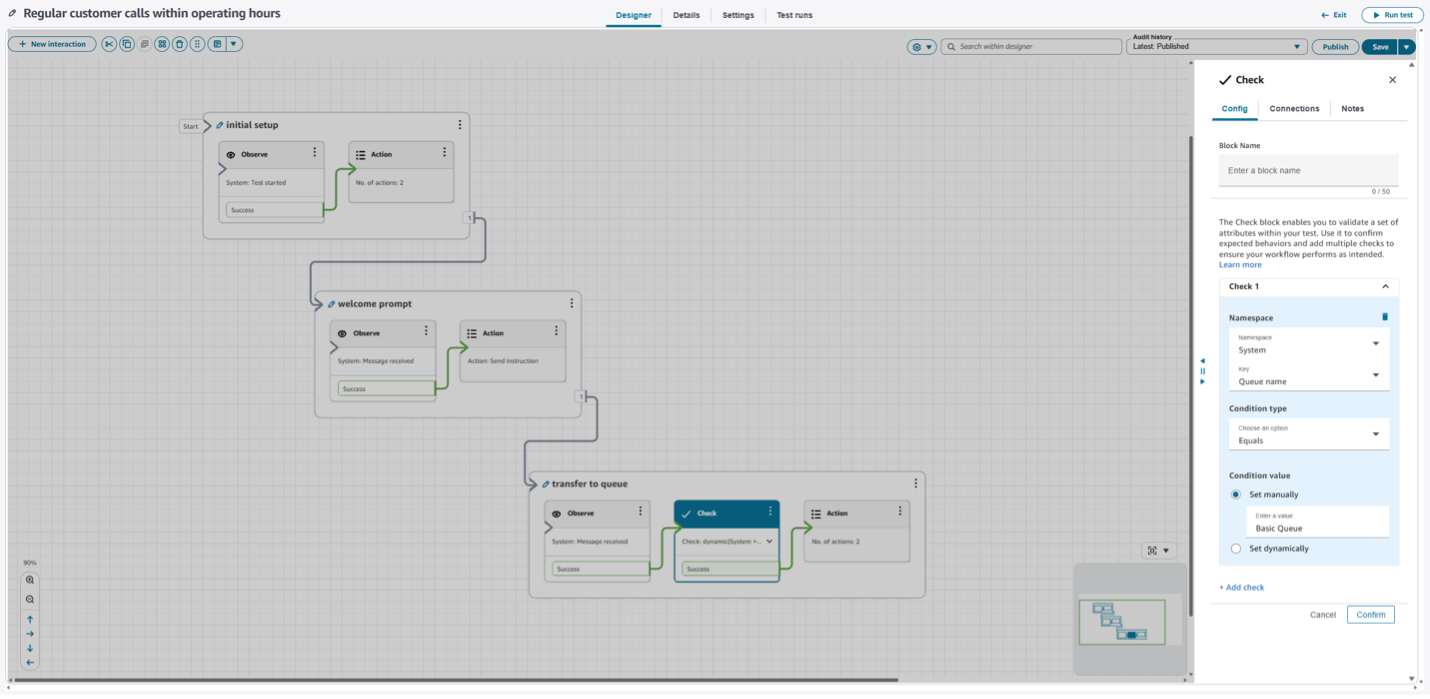
Check block: Validate correct queue placement by checking the System namespace’s “Queue Name” attribute against your expected value (for example, “Agent Queue”).
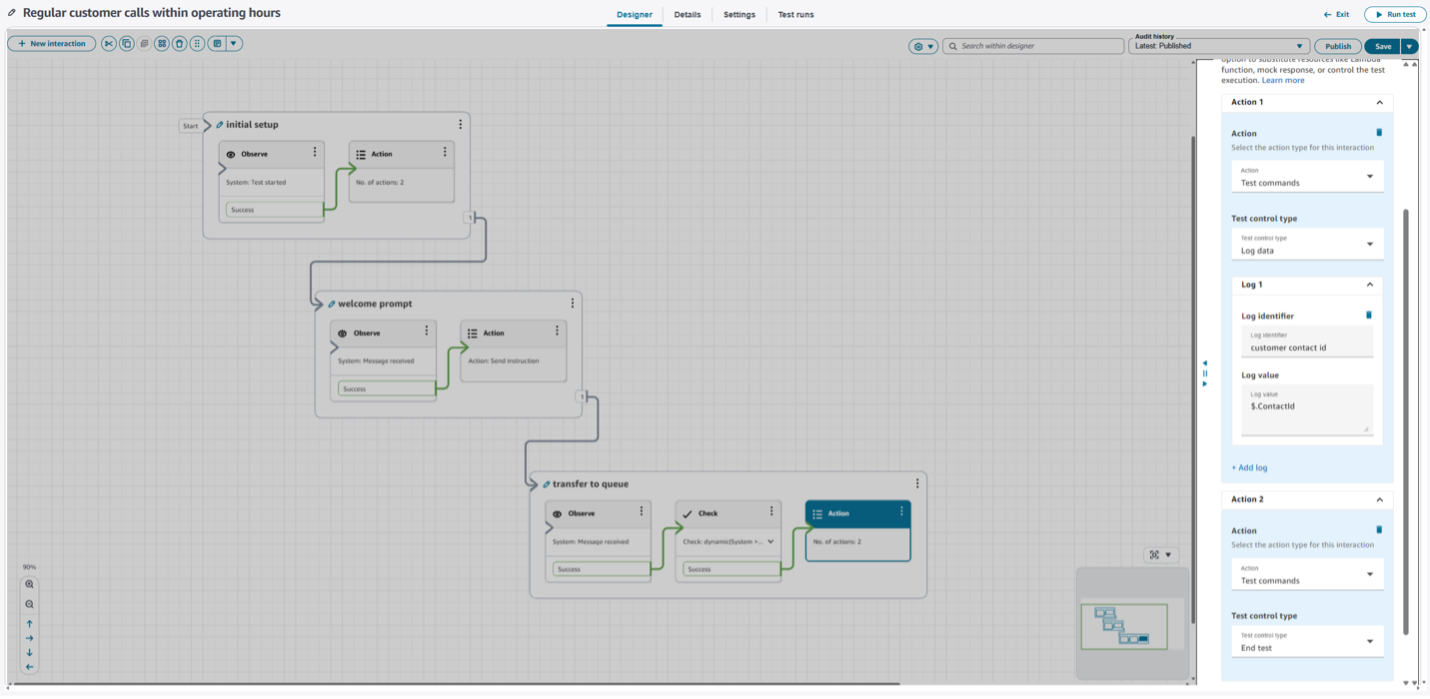
Action block: Add two “Test commands” actions:
- Log data: Capture relevant attributes for analysis in test execution details
- End test: Conclude the test case execution
Executing your test
After configuring all interaction groups, ensure the 3 interaction groups are connected in sequence. Save and publish your test case to make it ready for execution.
Executing and analyzing tests
Running test cases
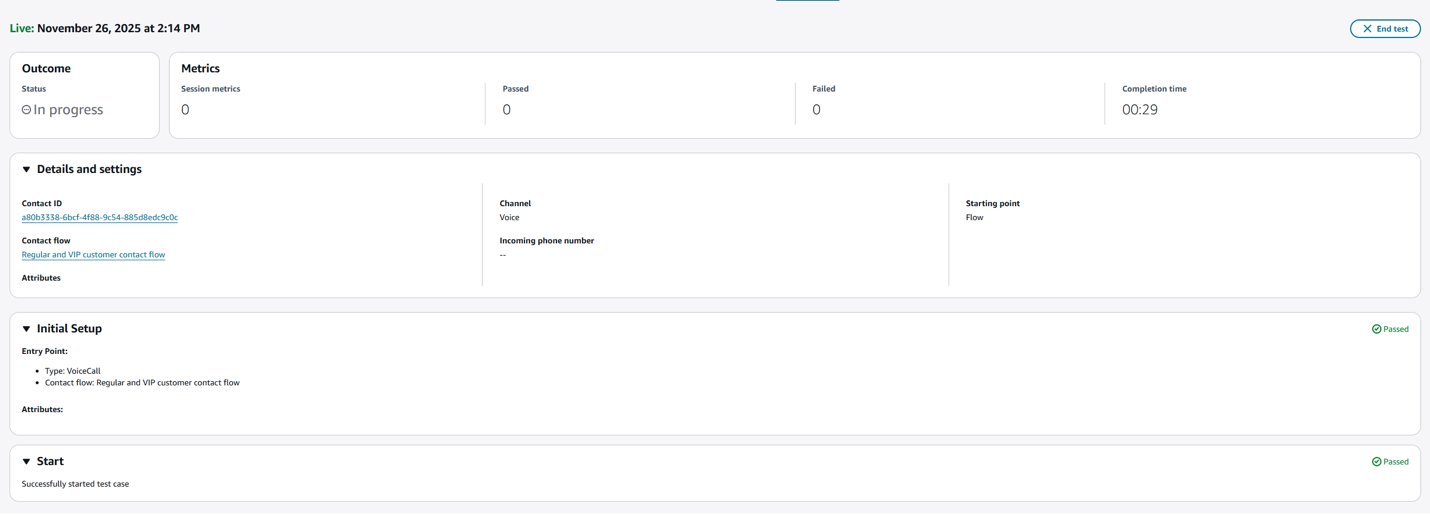
Execute tests directly from the test designer using the Run test button, or from the test case management page for batch execution. Amazon Connect supports up to five concurrent test executions per instance, with additional tests queued automatically. This allows you to test primary changes and get results before executing regression tests that may take longer.
Monitoring and reviewing results
Monitor test progress in real-time through the Test Runs tab. Detailed result pages provide comprehensive views including:
- Session metrics summarizing overall test performance
- Interaction group completion rates and pass/fail statistics with total simulation time
- Detailed test execution steps including initial setup, test initiation, interactions, and test completion
- Granular visibility into each observe block, check block, and action block execution
Troubleshooting failed tests
When tests fail, detailed result pages clearly identify which specific interaction or block failed. You can see:
- Expected versus actual events for failed observe blocks
- Attribute validation details for failed check blocks
- Action failure reasons and attempted operations
- Complete audio recordings and transcriptions (when enabled)
Getting started
Best practices
- Organization: Use clear, descriptive test names like “Regular Customer – Business Hours – Agent Transfer.” Leverage tags to categorize tests by feature area, customer type, or priority level.
- Resilience: Use semantic matching for prompts when possible to tolerate minor wording changes. Override time-dependent resources to ensure consistent test execution regardless of when tests run.
- Focus: Prioritize critical customer journeys first: agent transfers, common self-service scenarios, and after-hours experiences. This ensures your most crucial functionality is always validated.
- Integration: Incorporate testing into deployment processes. Run relevant test cases before deploying contact flow changes to catch issues before they impact customers.
Example test scenarios
- After-hours testing: Configure tests to simulate calling outside business hours, validating appropriate closed messages and callback options.
- Self-service validation: Create tests that simulate customers navigating IVR menus, providing account information via DTMF or speech, and reaching expected outcomes.
- Authenticated customer experiences: Test differentiated treatment for authenticated customers, including priority queue placement and specialized agent routing.
- Callback scenarios: Validate callback options during high wait times, including number collection and confirmation processes.
Conclusion
Amazon Connect’s native call simulation capabilities transform how you validate and maintain contact center experiences. These capabilities enable you to quickly create comprehensive test cases, execute them on-demand or as part of deployment processes, and gain insights that drive continuous improvement.
Start exploring these testing capabilities in your Amazon Connect instance today. Begin with critical test cases for your most important customer journeys, expand coverage over time, and leverage testing dashboards to track progress and identify optimization opportunities.
For detailed documentation and implementation guidance, visit the Amazon Connect Administrator Guide and Amazon Connect API Reference.