Containers
Deep dive into Amazon EKS certificate authority rotation
Every connection to the Kubernetes API of an Amazon Elastic Kubernetes Service (Amazon EKS) cluster relies on Transport Layer Security (TLS) certificates to secure connectivity. These certificates are signed by the cluster’s certificate authority (CA), which establishes trust between all connecting systems and the API server. When a client runs kubectl, when ArgoCD reconciles a deployment, when a kubelet on a worker node reports status, each of these connections authenticates against the API server using certificates that trace back to the cluster’s CA. This is how Kubernetes works: The CA is the root of trust for the entire cluster.
Like any certificate, CAs have a finite lifetime. When a CA reaches the end of its validity period, the certificates it signed can no longer be validated. Systems that depend on those certificates lose their ability to connect. CA rotation is the process of replacing the CA before this happens, transitioning the cluster to a successor CA while maintaining connectivity for all components throughout.
Amazon EKS clusters created since launch in 2018 have CAs with a 10-year validity period, and clusters from that era are now approaching the point where CA rotation activities should begin.
With this launch, Amazon EKS provides a managed CA rotation lifecycle with automated safeguards that preserve cluster availability throughout the rotation process. You keep control to act on your own timeline. CA rotation is a shared responsibility. AWS automatically handles the components it manages on your behalf. You are responsible for updating the components that only you can reach, such as your continuous integration and continuous delivery (CI/CD) pipelines, workstations, and worker nodes that are not managed by AWS. The sections that follow break down what this looks like in practice.
A successful CA rotation means two things: Your cluster remains available (AWS safeguards keep it available), and all of your components maintain connectivity throughout the transition. The first is guaranteed by AWS. The second depends on you completing your side. This post walks through what that looks like end to end.
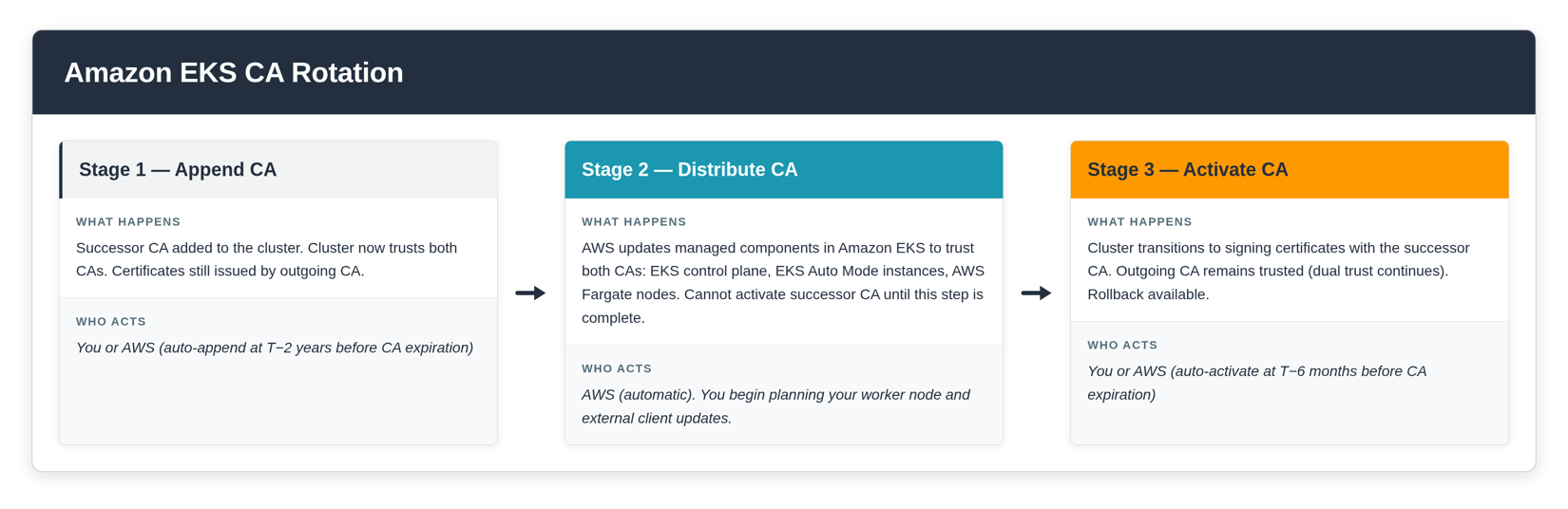
What AWS handles for you
AWS manages the following automatically during CA rotation:
AWS managed components in Amazon EKS. The control plane, EKS Auto Mode, and AWS Fargate are updated to trust the successor CA (the new CA that will replace the outgoing one) without any action from you. These components are fully managed by AWS in Amazon EKS and will maintain connectivity throughout the rotation lifecycle regardless of when CA activation occurs. CA activation is when the cluster transitions to signing new certificates with the successor CA.
Automated safeguards. AWS provides safeguards that preserve your EKS cluster’s availability:
- If you do not append a successor CA on your own timeline, AWS will automatically append one for the cluster as the outgoing CA (the CA currently in use that is being replaced) approaches expiration.
- The successor CA cannot be activated until AWS has completed distributing it to all AWS managed components in EKS.
- If you do not activate the successor CA yourself, AWS will auto-activate it before the outgoing CA expires.
- CA rollback is available after activation. If you discover connectivity issues with your own components, you can revert to the outgoing CA. CA rollback re-activates the outgoing CA as the signing authority and is self-service.
Distribution is the process by which AWS updates managed components (control plane, EKS Auto Mode, AWS Fargate) to recognize and trust both the outgoing and successor CAs simultaneously. Once distribution is complete, these components will maintain connectivity regardless of which CA is signing. You can track distribution progress through the API.
Notifications. AWS notifies you at each stage of the rotation lifecycle through AWS Health and email. Each notification tells you what happened, what action (if any) is required from you, and where your cluster is in the rotation timeline.
These safeguards mean your cluster will not become unavailable because of an expiring CA. However, safeguards alone do not constitute a successful rotation. A successful rotation is one where your cluster remains available and all of your components (worker nodes, CI/CD pipelines, workstations) maintain connectivity throughout. That requires your participation.
Shared responsibility
CA rotation in Amazon EKS is a shared responsibility.
What AWS handles: AWS manages the rotation lifecycle and automatically updates all AWS managed components in EKS (control plane, EKS Auto Mode, AWS Fargate) to trust the successor CA. No action is needed from you for these components.
What you handle: You are responsible for updating the worker nodes that you manage (managed node groups, Karpenter-controlled nodes, self-managed nodes, and hybrid nodes). You must also update external clients such as kubeconfig files, CI/CD pipelines, and GitOps controllers to trust the successor CA before it is activated.
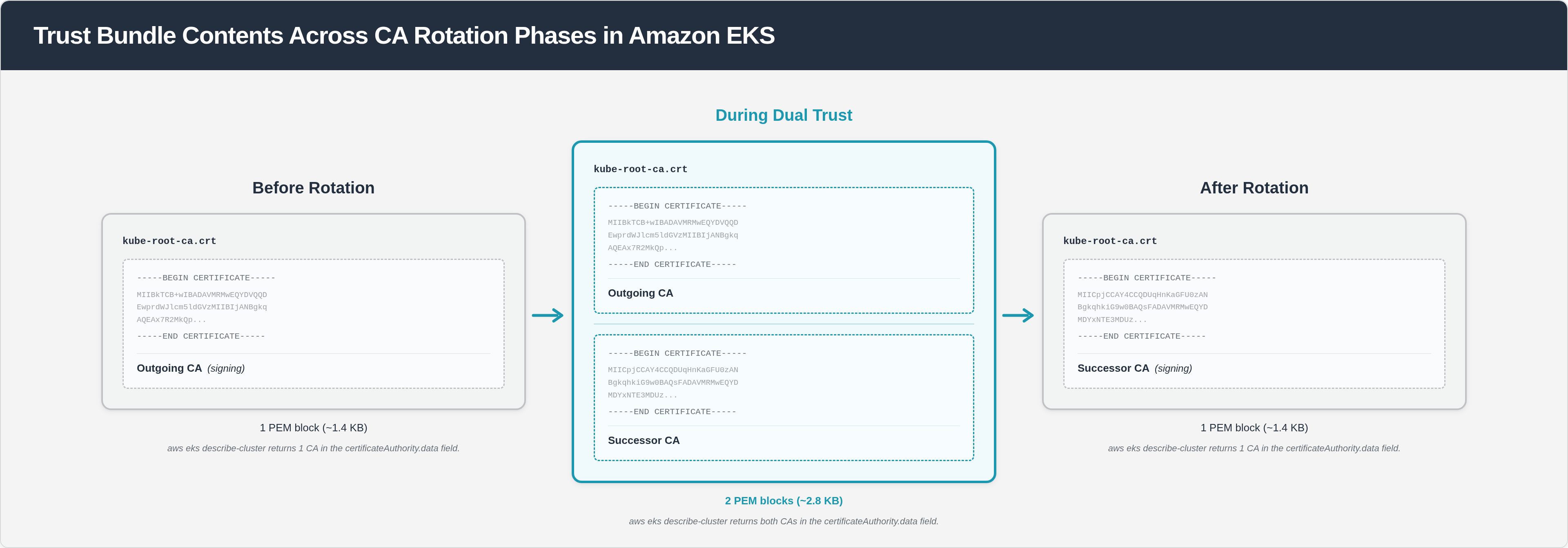
Note: During the dual trust period, your cluster’s trust bundle contains two CAs (approximately 2.8 KB combined, or approximately 1.9 KB with gzip compression). For worker nodes where custom user data is provided in EC2 launch templates, verify that your total user data does not exceed the EC2 user data limit of 16 KB. If your user data is close to this limit, consider compressing your user data content using gzip to reduce size. See the EC2 user data documentation for more information.
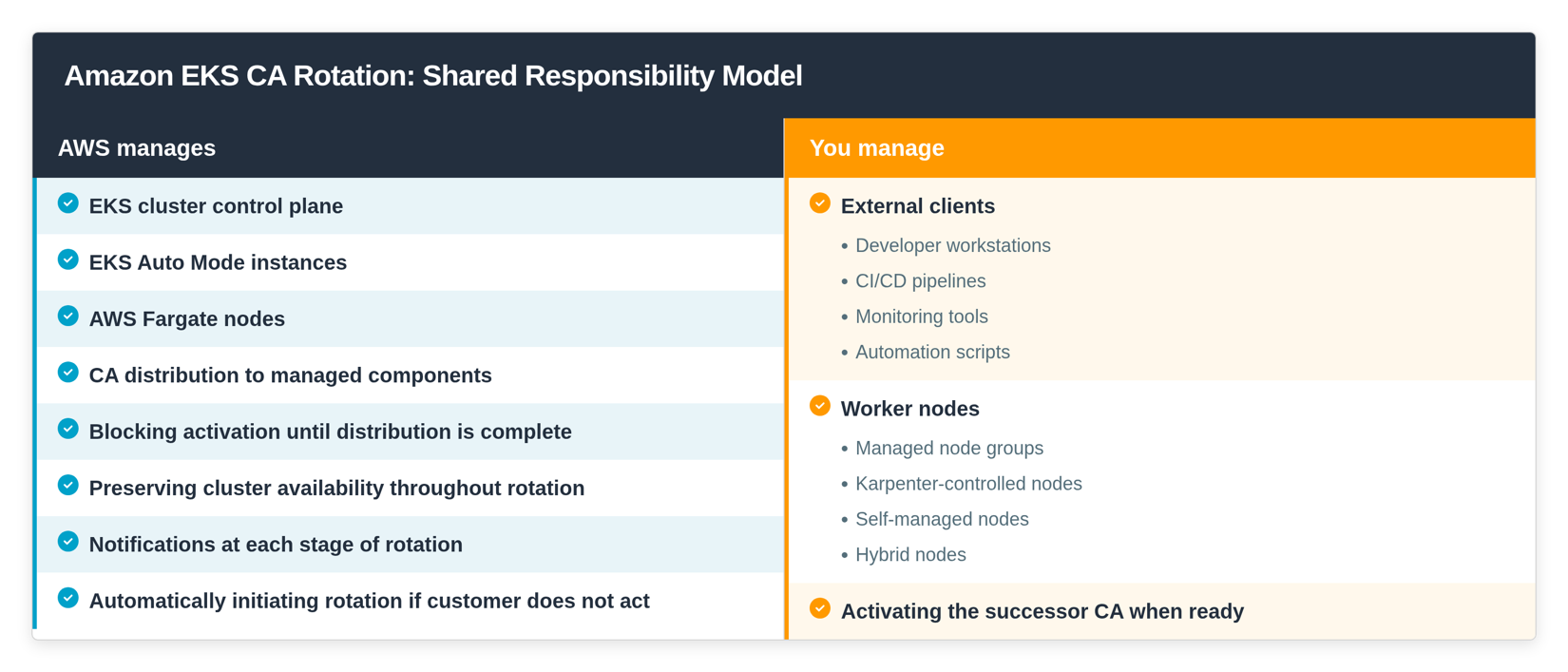
This applies regardless of your cluster configuration. Even if your cluster’s data plane is fully managed by AWS (EKS Auto Mode or AWS Fargate), you still have external clients that connect to the API server from outside the cluster. Workstations, CI/CD pipelines, GitOps controllers, and any system that uses a kubeconfig to communicate with the API server are external clients that only you can update. AWS has no mechanism to reach into these systems and modify their trust configuration.
The dual trust period is designed for this. The dual trust period is the window between appending a successor CA and retiring the outgoing CA, during which your cluster trusts both CAs simultaneously. This means components can be updated incrementally because the cluster accepts certificates signed by either CA. You do not need to coordinate all changes at once. You choose when to activate based on your confidence that your components are ready, and you set the pace that works for your team.
The following diagram shows how your cluster’s trust bundle changes across the rotation lifecycle.
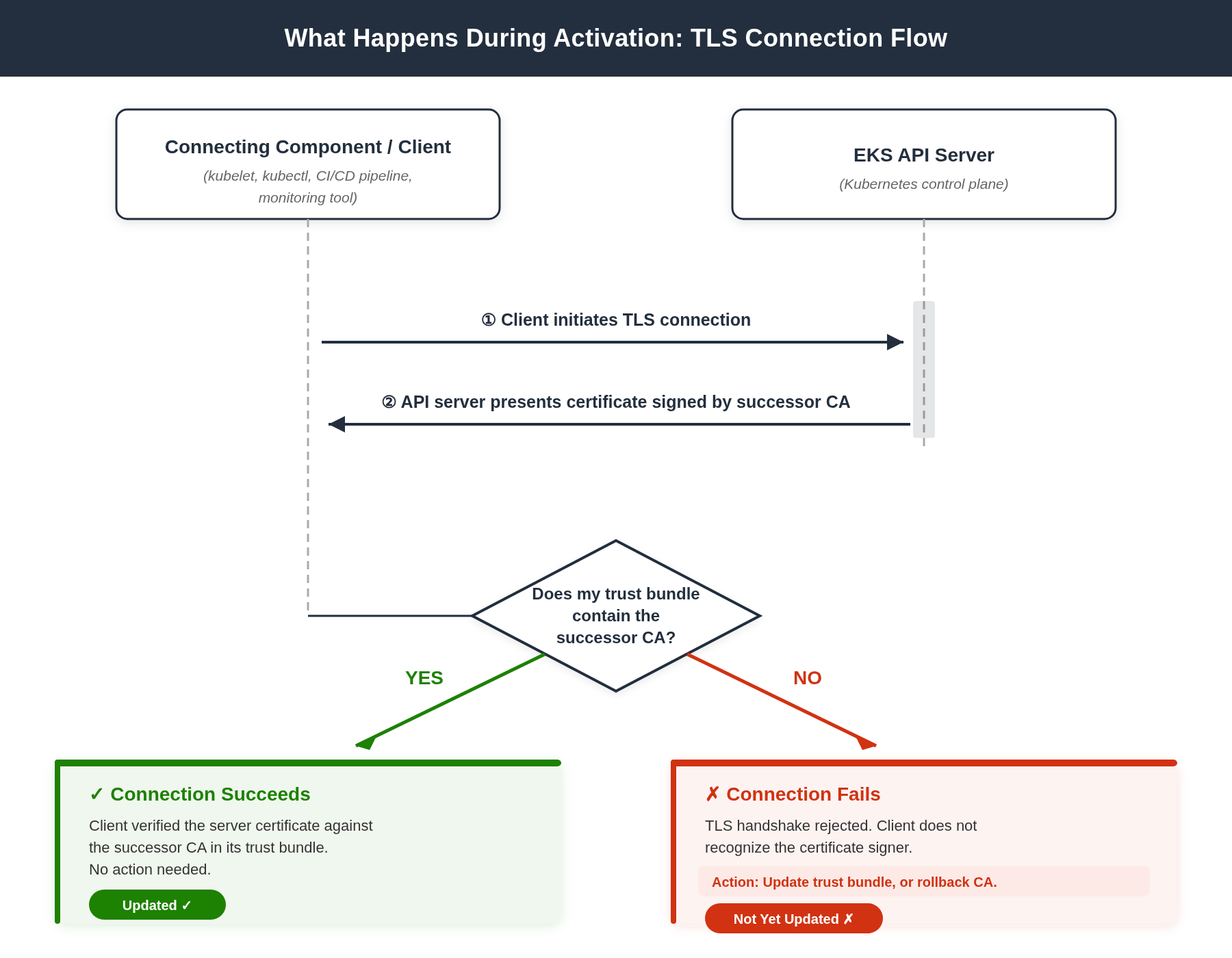
The following diagram shows what happens at the TLS level when a connecting component reaches the API server after the successor CA is activated.
The scenario
For this walkthrough, we use the following cluster configuration:
- Cluster:
payments-prodinus-west-2. - Managed node groups:
frontend-mng(stateless web tier) andapi-mng(API services). - Karpenter NodePool:
batch-processing(data jobs, drift detection enabled, disruption budget of 10% per week). - External clients: ArgoCD running outside the cluster for GitOps reconciliation, and the platform team using kubectl from their workstations.
This cluster’s CA was created in 2019 and expires in 2029. AWS has automatically appended a successor CA for the cluster and distribution to AWS managed components in EKS is complete. The platform team is now responsible for updating their managed node groups, verifying Karpenter will cycle their batch nodes, and updating ArgoCD and their workstations to trust the successor CA.
If you want to initiate rotation yourself ahead of the automatic timeline, you can append a successor CA at any time:
In this walkthrough, AWS has already appended the successor CA, so we proceed from the distribution complete stage.
Walking through the rotation lifecycle
Check current CA status
Start by reviewing the CAs on your cluster:
The response shows two CAs on the cluster. The outgoing CA (7f3a9b21-4c8e-3d2a-b5f1-9e8c7a6d5b4f) has signingStatus: IN_USE, meaning it is currently the CA signing certificates for the cluster. The successor CA (e4d82c56-1a7b-4f3e-9d6c-2b8a5e4f1c3d) has signingStatus: NOT_USED, meaning it has been appended but is not yet signing. Both show distributionStatus: COMPLETE, which confirms that AWS managed components in EKS now trust both CAs. The cluster is in the dual trust period.
Update your kubeconfig
Update your local kubeconfig so your workstation trusts both CAs:
This retrieves the latest CA trust data (which now includes both the outgoing and successor CAs) and updates your kubeconfig. After activation of the successor CA, your kubectl commands will continue to work without further changes.
For ArgoCD, update the cluster secret that stores the CA data. Retrieve the updated trust bundle:
Use this value to update the caData field in your ArgoCD cluster secret. After this update, ArgoCD will trust both CAs and maintain connectivity after activation of the successor CA.
Replace managed node groups
Trigger a rolling update on each managed node group. New nodes bootstrap with the updated CA trust data automatically:
The rolling update replaces nodes one at a time. New nodes pick up the current trust bundle from the cluster (which includes both CAs) during bootstrap. Existing workloads are rescheduled onto the new nodes. Make sure you have Pod Disruption Budgets configured for critical workloads to control how pods are evicted during the replacement.
Karpenter-controlled nodes
The batch-processing NodePool has drift detection enabled. Karpenter will detect that nodes are running with outdated CA data and cycle them within its configured disruption window.
Verify that your disruption budget allows all nodes to be replaced before the activation date. With a 10% weekly budget and 50 batch nodes, full replacement takes approximately 10 weeks. If that timeline is tighter than the window between now and activation, you can either increase the budget temporarily or manually cordon and drain nodes to accelerate replacement:
Karpenter will launch a replacement node that bootstraps with the updated CA trust data.
Staying informed: Notifications and situational awareness
CA rotation is not always a single uninterrupted task. Competing priorities come up. Team members change. Weeks pass between steps. Throughout this process, AWS keeps you informed and gives you the tools to check where you are at any point.
Notifications are event-based. AWS sends a notification through AWS Health and email at each stage of the lifecycle: when a successor CA is appended, when distribution completes, when auto-activation is approaching, and when activation occurs. Each notification includes your cluster’s full rotation timeline so you can see what has happened, where you are, and what is ahead. You do not need to track this manually.
The API is designed for situational awareness. If you want to check where your cluster is in the rotation process at any time, query the CA status:
This tells you: The successor CA is not yet activated, and distribution is complete (your turn to act). Auto-activation is scheduled for September 2028, and the successor CA has a 5-year validity period (expires 2031). For teams managing multiple clusters, you can script this across your fleet to identify which clusters are in rotation, which are awaiting your action, and which are approaching auto-activation deadlines.
Activate the successor CA
Once your managed node groups are replaced, Karpenter has cycled your batch nodes, and your external clients are updated, activate the successor CA:
After activation of the successor CA, the cluster signs new certificates with the successor CA. The successor CA has a 5-year validity period, resetting the rotation clock for your cluster. Verify connectivity:
If the command succeeds, your kubeconfig trusts the successor CA and connectivity is healthy. Run the same verification for ArgoCD by checking that its sync operations continue.
CA rollback
If you discover connectivity issues with a component after activation of the successor CA, you can use CA rollback to revert to the outgoing CA:
CA rollback reverts signing to the outgoing CA and is self-service. After rollback, the API server presents certificates signed by the outgoing CA again. Components that had not been updated will reconnect automatically through the kubelet retry loop. You retain the full dual trust period to fix the issue and re-activate when ready.
CA rollback is available after the first activation. It is not available after final auto-activation (45 days before CA expiration).
You can check whether rollback is available at any time:
Conclusion
CA rotation is infrastructure lifecycle management. AWS provides the managed lifecycle and automated safeguards that keep your cluster available throughout the process. You retain control over when and how you update your own components, with the dual trust period giving you time to coordinate across teams without pressure.
Notifications keep you informed at every stage. You always know what has happened, what is required from you, and what is coming next, without needing to track the lifecycle manually.
A successful rotation is one where both sides are complete: AWS has updated managed components, and you have updated your worker nodes and external clients. The safeguards keep your cluster available regardless. The dual trust period and CA rollback give you time and a safety net to get your side done confidently.
For the full step-by-step reference, shared responsibility breakdown, and FAQ, see the Amazon EKS CA rotation documentation.