.NET on AWS Blog
Reimagining Windows Forms Applications with Kiro and Blazor
In this post, we will show how we used Kiro, an AI-powered IDE (Integrated Development Environment) from AWS, to simplify the process of transforming a Windows Forms application into a modern ASP.NET Core Blazor web application.
Windows Forms has been a cornerstone of .NET desktop development since 2002, making it easy to build graphically rich Windows applications using the features in Visual Studio. Millions of line-of-business applications run on this framework, handling everything from inventory management to customer relationship tracking. Windows Forms continues to be supported, and enterprises continue to build new applications using the open-source implementation in modern .NET versions. However, some of these powerful applications are hampered by Windows Forms limitations: they require Windows, need local installation, and cannot be accessed remotely without additional infrastructure. For many enterprises, evolving business needs are driving a shift from Windows desktop applications to web-based development in a cloud-first world.
ASP.NET Core Blazor provides an ideal migration target for Windows Forms applications. The Blazor Server hosting model uses C# and .NET just like Windows Forms, which means existing business logic can often transfer directly. Blazor’s component model maps naturally to Windows Forms form-based architecture, and the server-side rendering model maintains the stateful programming paradigm that Windows Forms developers understand.
Migrating to Blazor delivers immediate benefits: cross-platform access through any web browser, simplified deployment without client installations, and the ability to host on cloud infrastructure like AWS.
The challenge
The path from Windows Forms to Blazor has some challenges; you need to build a new application from the ground up, which can be a huge undertaking. Despite sharing a common language and framework, the two technologies differ completely in how they render UI, manage state, and handle user interaction. Windows Forms relies on a rich, event-driven desktop control library with direct access to system resources. Blazor operates within the stateless request-response nature of the web, rendering HTML and CSS instead of native OS controls. This means that UI code rarely transfers as-is — you must reimagine the forms as components, data bindings need to be reworked, and desktop-specific patterns like modal dialogs, drag-and-drop, and direct file system access must be replaced with web-friendly alternatives. For large applications with years of accumulated UI logic tightly coupled to Windows Forms controls, this can represent a significant and daunting undertaking.
The solution
In the following sections, we will show how Kiro bridges that gap by guiding the transformation of a sample Open source Windows Forms bug tracking application, MiniBug, into a modern web application that uses Blazor.
MiniBug is a lightweight issue and task tracking application built with Windows Forms. It allows users to create projects, track bugs with priorities and statuses, manage tasks, and export data to CSV. While functional, it shows the challenges many organizations face with desktop software.
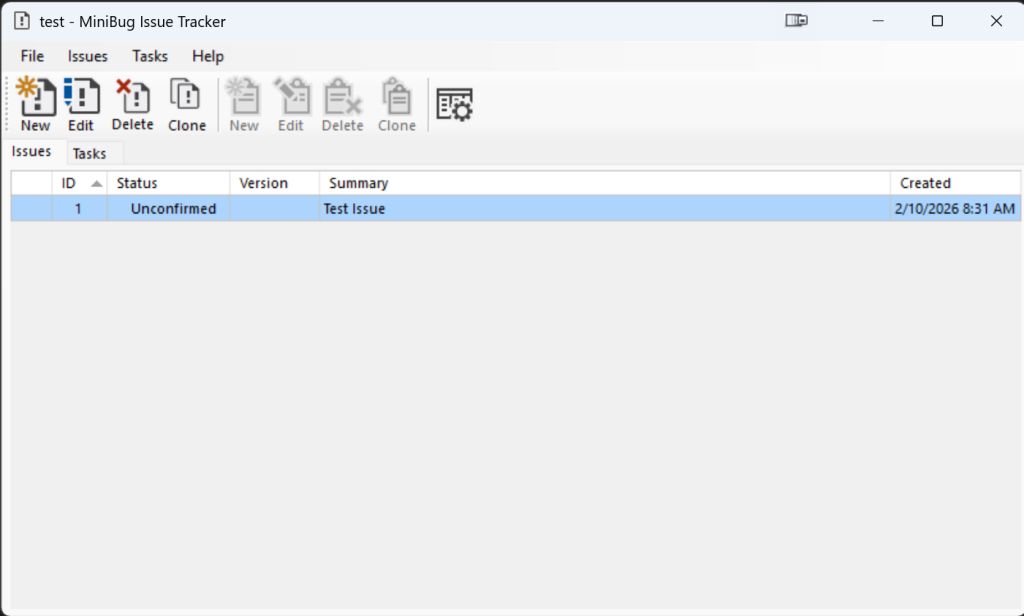
Figure 1: MiniBug Main Form screen and user interface
Introducing Kiro for spec-driven development
Kiro is an AI-powered IDE that emphasizes spec-driven development. Rather than generating code immediately, Kiro guides developers through a structured process: defining requirements, creating a technical design, and then generating an implementation plan with discrete tasks. At each step, you have the opportunity to review and adjust the output, either manually or through additional prompting.

Figure 2: Spec-driven development in Kiro
This approach is particularly valuable when tackling large, complex efforts—like refactoring Windows Forms applications. Depending on the scope, these projects can involve extensive development work spanning UI redesign, business logic migration, and architectural changes. By taking an iterative approach grounded in well-defined specifications, developers maintain meaningful checkpoints and oversight throughout the process while still leveraging AI to accelerate delivery.
This is the approach taken in this blog post. Instead of attempting to convert the entire application at once, Kiro helped us decompose the work into manageable pieces with clear acceptance criteria. We used Kiro’s spec-driven development workflow combined with Claude Opus 4.5 for this migration.
The prompt: Setting up for success
The first step is to clone the MiniBug repo by opening a terminal and running the following command.
git clone https://github.com/RickZeeland/MiniBug-2.git
Next you can download Kiro from https://kiro.dev/ once installed launch Kiro and File > Open Folder and open the folder where you cloned MiniBug.
First, select spec-driven development mode — this means that when you issue a prompt, Kiro will begin building out your requirements, design, and finally produce a task list. It moves between these phases with your input, ensuring you’re satisfied with the output at each stage before progressing to the next.

Figure 3: Kiro IDE Prompt and model selection
We began with the following prompt.
Breaking down the prompt
The prompt begins by establishing a role: “You are an expert software engineer.” This simple framing sets expectations for the quality and depth of analysis you want Kiro to bring to the task. Next, the source application details point Kiro to the existing codebase and explain what to analyze. By specifying the folder location and summarizing the application’s purpose, we give Kiro the context it needs to understand the system before attempting to transform it.
The target application details eliminate ambiguity about the technical stack. We specify Blazor Server as the hosting model, .NET 10 as the framework, and Bootstrap for styling with separate CSS files. The output folder directive ensures the new project lands in the right location.
Scope and constraints act as guardrails. The prompt explicitly states that the new application must replicate core functionality while excluding Windows Forms-specific features like form transitions. This distinction matters because it prevents Kiro from attempting to recreate UI patterns that don’t translate to web applications.
The structure section guides architecture decisions. By requesting separation of business logic into a class library referenced by the Blazor UI project, we ensure the migration produces clean, maintainable code rather than a monolithic translation.
Finally, the Completion Criteria define what “done” looks like. Full business logic coverage, passing unit tests, and Selenium validation provide measurable outcomes that confirm the migration succeeded.
Because of the non-deterministic nature of generative AI and how these large language models work, the exact output you receive from Kiro during your run might vary slightly from what we got back during ours. That said, since we’re all starting from the same prompt, the results may still deviate but the structure and intent should remain the same.
Step 1 – Generating requirements
After submitting our prompt, Kiro analyzed the Windows Forms source code and generated a requirements document. Here’s how this phase unfolded.
1.1 Starting the spec workflow
We select Spec rather than vibe coding and pasted our prompt into the chat, and Kiro began analyzing the source code. Kiro will immediately began building out the requirements based on this prompt, if you select vibe coding for this in some cases Kiro will detect the task as ideal for spec driven development and prompt you if you want to create a spec instead.
1.2. What Kiro generated
The final requirements document organized functionality into 10 logical requirement groups:
| Requirement | Purpose |
| Project Data Model | Define core entities (Project, Issue, Task) and their properties |
| Project Persistence | JSON serialization with round-trip validation |
| Project Management | Create, open, edit projects with recent projects tracking |
| Issue Management | CRUD operations with auto-incrementing IDs and timestamps |
| Task Management | CRUD operations with auto-incrementing IDs and timestamps
Similar CRUD operations for task items |
| Data Grid Display | Sortable columns, status indicators, multi-select |
| Issue Filtering | Show/hide closed issues, text search |
| CSV Export | Export to CSV using CsvHelper library |
| User Interface Layout | Bootstrap 5, modals, toast notifications |
| Application Architecture | Clean separation between Core and Blazor projects |
1.3 Requirements and Acceptance Criteria
Each requirement included specific acceptance criteria. Here’s an example from the Issue Management requirement.
### Requirement 4: Issue Management
**User Story:** As a user, I want to create, edit, delete, and clone issues,
so that I can track bugs and problems.
#### Acceptance Criteria
1. WHEN a user creates a new issue, THE Issue_Service SHALL assign the next
available ID from IssueIdCounter and increment the counter
2. WHEN a new issue is created, THE Issue_Service SHALL set DateCreated and
DateModified to the current timestamp3. WHEN an issue is edited, THE Issue_Service SHALL update DateModified to
the current timestamp
4. WHEN a user deletes one or more issues, THE Issue_Service SHALL remove
them from the project's Issues dictionary
Notice the precise language: “SHALL,” “WHEN,” “IF/THEN.” This structured format reduces ambiguity. Later, these criteria translate directly into test cases—if an acceptance criterion states “SHALL assign the next available ID,” there will be a corresponding test verifying exactly that behavior.
1.4 Fine Tuning and Finalizing Requirements
At this stage, we made some adjustments to our requirements via prompts to strengthen the acceptance criteria around the Blazor design, specifically ensuring that no native Windows Forms components were recreated in Blazor and that common web design elements were used instead. Once satisfied, we chose Move to design phase to lock in the requirements and advance. The requirements document remained editable throughout—we could return and refine it if the design phase revealed any gaps.

Figure 4: Move to design phase
Step 2 – Technical design
Kiro analyzed our requirements and proposed a clean architecture with two projects: a MiniBug.Core class library containing all domain models and business logic, and a MiniBug.Blazor project for the web UI. This separation wasn’t arbitrary—it directly addressed the Architecture requirement which specified that core logic should have no dependencies on UI frameworks.
The original MiniBug Windows Forms application followed a common pattern: business logic mixed directly into form code-behind files. The MainForm.cs file alone contained 2,500+ lines handling everything from grid population to JSON serialization to recent projects management.
MiniBug-Blazor/
├── MiniBug.Core/ # Domain models, services, no UI dependencies
│ ├── Models/ # Project, Issue, TaskItem
│ ├── Enums/ # Priority and Status enumerations
│ └── Services/ # ProjectService, IssueService, TaskService
├── MiniBug.Blazor/ # Web application
│ ├── Pages/ # Razor pages for routing
│ └── Components/ # Reusable UI components
└── MiniBug.Core.Tests/ # Unit and property-based tests
Let’s review some of the design decisions Kiro made when building the design document. Up to this point, we haven’t had to write any code ourselves—everything has been automated, with the exception of tuning the prompts for requirements and design.
When you open design.md, you’ll find the design laid out around Clean Architecture principles, split across two projects: MiniBug.Core for UI-agnostic business logic and MiniBug.Blazor for presentation. The design uses the Repository Pattern to abstract data access through services like IProjectService and IIssueService, which expose IReadOnlyDictionary for reads and explicit mutation methods for writes. Dependency injection promotes loose coupling by consuming core services via interfaces, while the Result Pattern (OperationResult<t>) wraps outcomes for explicit success/failure handling instead of relying on exceptions. The document also includes a comprehensive error-handling table that maps conditions to user-friendly messages and defines 13 formal correctness properties intended to become property-based tests using FsCheck—providing stronger guarantees than example-based testing alone.
Once you approve the design, select Move to Implementation plan or provide a prompt to that effect.

Figure 5: Move to implementation
Step 3: Implementation planning
Kiro then transformed the design into an actionable task list. Each task references specific requirements for traceability and includes checkpoints at strategic points for validation. You’ll also notice tasks marked as optional by default—such as property-based tests—though you have the option of changing any of them to required. Keeping them optional allows you to move faster toward an MVP without sacrificing the ability to add them back later.
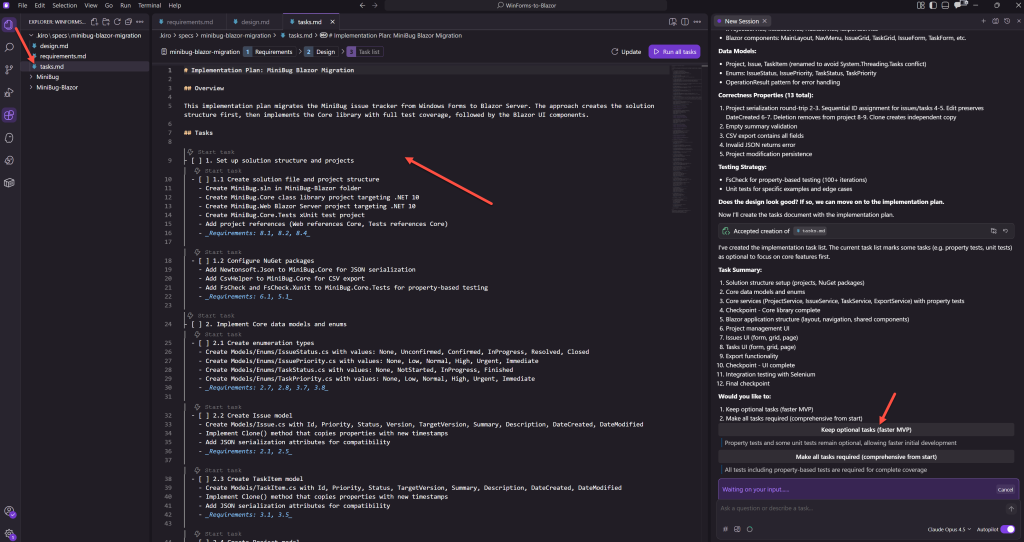
Figure 6: Implementation plan
The implementation plan follows a bottom-up approach across 12 major phases, starting with solution setup and core data models, progressing through core services and into the Blazor UI layers, and culminating with integration testing. Several key decisions shape this plan: build and test the core library before any UI work begins, ensuring the business logic is solid before building on top of it; strategic checkpoints at specific phases provide pause points to validate progress and catch issues early. The plan maintains a parallel structure for issues and tasks to keep the codebase predictable, traces every subtask back to specific requirements for auditability, and uses Selenium for end-to-end integration testing to catch wiring problems that unit tests alone would miss.
Step 4: Executing the plan
With the spec complete, we instructed Kiro to execute the tasks. Kiro worked systematically through each task, writing code, running tests, and moving to the next item only after validation passed. In our example, after multiple runs the average time to execute the plan by Kiro was 1 hour.

Figure 7: Execute the plan
Step 5: Running the application
Upon completion of all tasks, Kiro delivered a fully functional Blazor application that successfully preserved all original functionality while introducing the advantages of web-based access.
While we expect the final output from Kiro to build and run seamlessly, minor issues might require your attention. Begin by attempting to build and run the application as delivered. If you encounter build errors or runtime issues that you’re uncertain how to resolve, simply describe the problem to Kiro using natural language to receive tailored recommendations. You can also instruct Kiro directly to investigate and resolve these issues on your behalf, streamlining the troubleshooting process.

Figure 8: Final Blazor application running in browser showing issue grid
Results
The migration transformed a tightly coupled Windows Forms desktop application into a modern, testable Blazor web application with clean architectural boundaries. The original application’s 2,500+ lines of mixed UI and business logic in a single file were split into distinct Core and Blazor projects, making the codebase maintainable and allowing business logic and UI to evolve independently. The solution includes property-based tests, unit tests, and Selenium end-to-end tests for comprehensive coverage. The new Blazor interface replaces Windows Forms controls with responsive Bootstrap components that work across devices and browsers without requiring client installation.

Figure 9: Final architecture diagram
Next steps
The MiniBug-Blazor application provides a foundation for further enhancements and adding new functionality to the project. Before, this would have been more limited with Windows Forms and a legacy .NET version, but with a modern application and Kiro it’s possible to tackle these complex tasks
The process of re-imagining the MiniBug application as a functional Blazor application is the first stage in the process. By moving away from .NET Framework and Windows Forms, it allows for the building of a more modern application—something that was challenging before. Some of the enhancements that can be made are:
Cloud deployment
- Deploy to AWS Elastic Beanstalk or AWS App Runner for centralized hosting with built-in scaling and monitoring
- Containerize the application for consistent deployment across environments
Database modernization
- Replace file-based JSON storage with Amazon DynamoDB for true multi-user concurrent access
- Leverage the existing
IProjectServiceinterface as a clean abstraction point—no UI changes required
Authentication and multi-tenancy
- Integrate Amazon Cognito for user management and secure authentication
- Enable fine-grained access control to projects and issues across teams
Real-time collaboration
- Add SignalR for live updates as team members create, edit, or resolve issues
- Enable presence indicators showing who’s viewing or editing items
Additional integration opportunities
- Expose the Core library through REST APIs for mobile apps or third-party integrations
- Add CLI tools that consume the same business logic without code duplication
- Integrate with notification services for issue assignments and status changes
Conclusion
We showed that legacy application modernization no longer requires choosing between speed and quality. Kiro’s spec-driven approach provides structure while automating code generation and testing. Three factors drove success: structured workflows that prevented scope drift, comprehensive testing including property-based tests that validated correctness, and clean architectural separation that created a maintainable foundation rather than simply translating desktop to web code.
AI-assisted development combined with rigorous specifications changes the economics of modernization. What once required dedicated teams and months of work, now move significantly faster, often with more consistent attention to quality metrics—test coverage, architectural separation, and requirement traceability.
Meaningful productivity gains emerge not from AI adoption alone, but from thoughtfully combining the right AI tools, models, and techniques for the problem at hand.
To explore how Kiro can accelerate your modernization projects, visit kiro.dev.