Migration & Modernization
AWS Transform for migrations now supports localization for 13 languages
Organizations running migration projects don’t always operate in a single shared language. Migration teams span geographies, and the people closest to the workloads are often the ones who understand dependencies, business context, and operational risk. They need to work in the language they’re most comfortable with. Today, we’re announcing local language support for the AWS Transform migrations workflow.
What we launched
You can now change the display language in AWS Transform to any of the following 13 languages:
- English (US)
- English (UK)
- Deutsch (German)
- Español (Spanish)
- Français (French)
- 日本語 (Japanese)
- Bahasa Indonesia (Indonesian)
- Italiano (Italian)
- Português (Portuguese)
- 한국어 (Korean)
- 中文 简体 (Chinese Simplified)
- 中文 繁體 (Chinese Traditional)
- Türkçe (Turkish)
This localization applies to the AWS Transform migrations workflow, including discovery, planning, landing zone, network migration, rehost, and containerization for physical and virtual servers (VMware, Hyper-V, KVM, and others).
How it works
To switch your display language, choose the Settings icon in the top-right corner of the AWS Transform console, then select your preferred language from the Language menu. The change takes effect immediately across the web application interface for the migrations workflow.
This means your team members can interact with the conversational interface, review job plans, manage approvals, and work through migration tasks in their preferred language without toggling between AWS Transform and a translation tool.
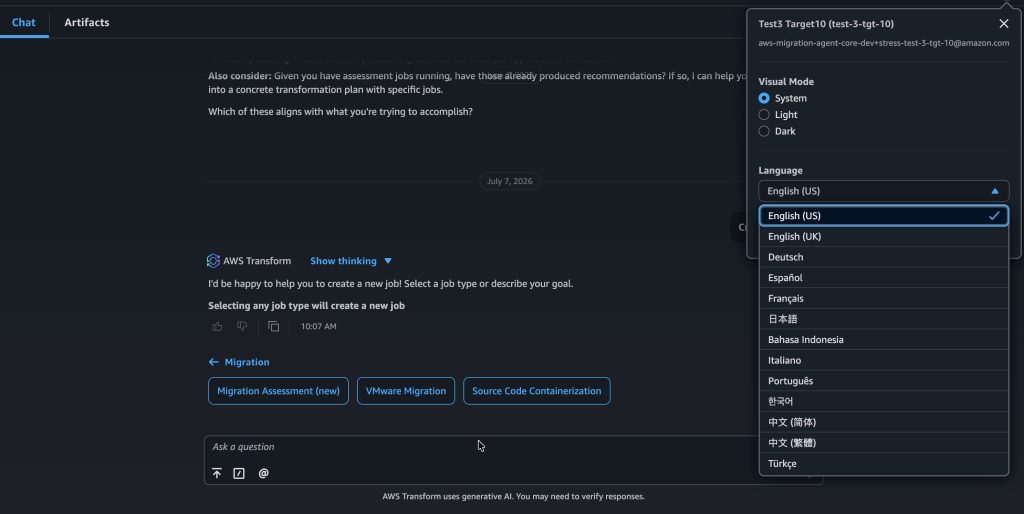
Figure 1: You can change the display language of the web application by choosing the Settings icon in the top right corner and selecting your preferred language from the Language menu.
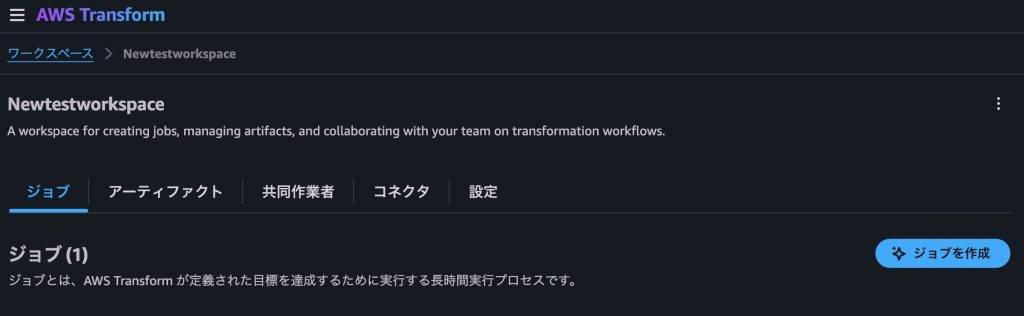
Figure 2: Example of changing language settings to Japanese
Why this matters
AWS Transform is a conversational service — you interact with it through natural language to plan and execute migrations. That experience works best when you can read, respond, and make decisions in the language you think in. Until now, the interface was English-only, which created friction for teams in Japan, Korea, Latin America, and other regions where English isn’t the primary working language.
With this update, migration engineers can review task descriptions, respond to prompts, and navigate wave plans without mentally translating between their working language and the tool. The entire migrations workflow — from data ingestion through network conversion — is now accessible in the language your team operates in day-to-day.
Get started
If you’re already using AWS Transform for migrations, open the console and try the language settings today. If you’re new to AWS Transform, visit the AWS Transform documentation to learn how the service helps you plan and execute workload transformations using natural language.
Currently, only AWS Transform for migrations supports language localization.