Maintaining consistent resource tagging across development teams is one of the most common challenges we hear from customers. Without consistent tags, cost allocation reports become unreliable, attribute-based access controls (ABAC) fail to enforce permissions correctly, and automated operations skip untagged resources leaving teams unable to track spend, meet compliance requirements and respond adequately to incidents. Security and Center of Excellence (CoE) teams define tag structures and standards, but implementation depends on individual teams translating these policies into their Terraform configurations and modules. Organizations also face ongoing challenges as tag policies evolve and require continuous compliance validation.
In this post, you’ll learn how security teams, CoE teams, and practitioners can collaborate by validating tag compliance during development before resources reach production.
AWS Organizations provides a solution to the above challenge through centralized tag policy enforcement. AWS Organizations lets you define company-wide Tag Policies that apply to all AWS accounts across your organization. Tag policies help you standardize tags across resources. When you apply a tag policy to your account, you can’t create resources with non-compliant tags for the selected resource types. The HashiCorp Terraform AWS Provider added this capability in v6.22. You’ll learn how to implement this feature through the following steps:
- Configure an AWS Organizations tag policy using Terraform
- Enable tag enforcement in the Terraform AWS provider
- Build a reusable tagging Terraform module
- Write unit tests that validate against live organizational policies
The sample code for this implementation is available in the aws-samples repository. Please make sure to review and harden these configurations before using them in a production environment.
Prerequisites
Before you start, you need the following:
- Terraform version 1.8.0 or later.
- Terraform AWS provider version 6.22.0 or later.
- AWS credentials with sufficient permissions, including the ListRequiredTags AWS Identity and Access Management (IAM) permission.
- Tag policies enabled in your AWS Organizations management account.
Configuring Tag Policies with Terraform
With the prerequisites in place, you’re ready to configure tag policies using Terraform. The latest version of the Terraform AWS provider lets you add policies of type TAG_POLICY targeting specific resource types using the aws_organizations_policy resource. The following Terraform configuration snippet creates a tag policy that requires the Owner tag key on Amazon CloudWatch log groups:
resource "aws_organizations_policy" "example" {
   name = "tag-policy-example"
   content = jsonencode({
     "tags" : {
       "Owner" : {
         "tag_key" : {
           "@@assign" : "Owner"
         },
         "report_required_tag_for" : {
           "@@assign" : [
             "logs:log-group"
           ]
         }
       }
     }
   })
   type = "TAG_POLICY"
}
Next, you need to specify which AWS accounts the policy should target. The aws_organizations_policy_attachment resource handles this configuration. You can extract the Organizational Unit (OU) ID from the management account and use it as the target for the policy attachment. The following configuration attaches the policy to the root of your organization:
data "aws_organizations_organization" "current" {}

resource "aws_organizations_policy_attachment" "example" {
   policy_id = aws_organizations_policy.example.id
   target_id = data.aws_organizations_organization.current.roots[0].id
}
After you run terraform apply, you should see the tag policy applied to your account with the specified targets (in this case, the entire OU).
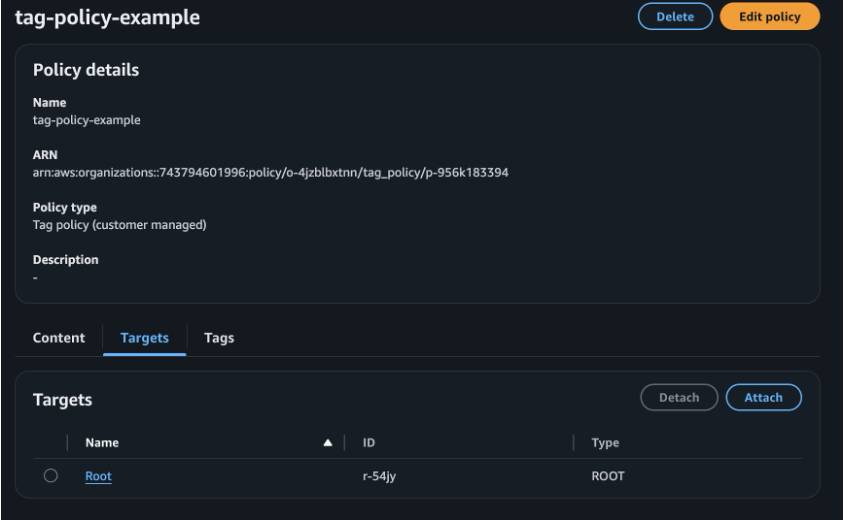
Figure 1: Organizational tag policy scope in the AWS Console
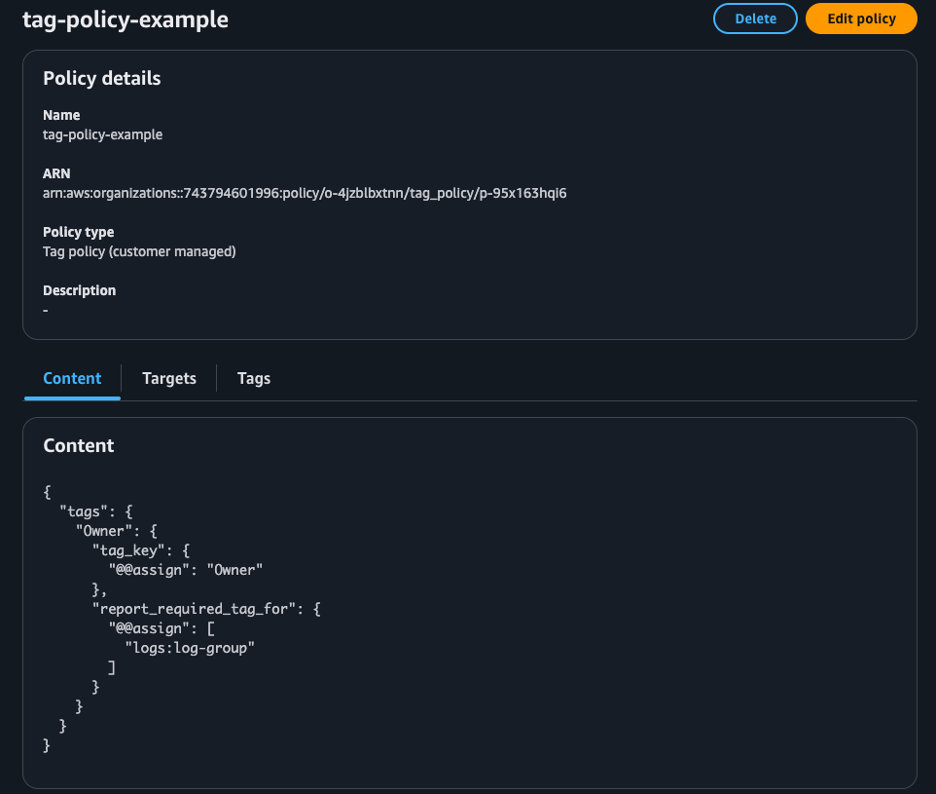
Figure 2: Tag policy with policy details in the AWS Console
The report_required_tag_for property uses AWS service-specific resource type identifiers. In this example, logs:log-group maps to the aws_cloudwatch_log_group resource. For a complete mapping of tag resource types to Terraform resource types, see the Terraform AWS Provider Tag Policy Compliance guide. For detailed tag policy syntax and advanced configuration options, see the AWS Organizations Tag Policies documentation.
Enforcing Tag Policies Compliance in Terraform
With the tag policy in place, you can enable enforcement in your Terraform configurations. The Terraform AWS provider offers a simple one-line configuration via the tag_policy_compliance parameter to validate resources against organizational tag policies during terraform plan and terraform apply operations.
The following code shows the basic setup. Refer to the example repository (2-testing-policy/main.tf) for the full configuration.
provider "aws" {
   tag_policy_compliance = "error"
}

resource "aws_cloudwatch_log_group" "example" {
   name              = "required-tags-demo"
}
In this example, the log group has no tags. The configuration also doesn’t pass default tags using the provider block, which is a common approach to add tags across all resources provisioned in a Terraform configuration. With this configuration and the tag policy in place, running terraform plan against one of the accounts in the OU produces the following error:
Plan: 2 to add, 0 to change, 0 to destroy.

 │ Error: Missing Required Tags - An organizational tag policy requires the following tags for aws_cloudwatch_log_group: [Owner]
This example demonstrates tag policy enforcement with a single configuration line in your Terraform provider block.
Best practices
Now that you understand how tag policy enforcement works, let’s explore best practices for implementing it in your organization. For general best practices on working with tag policies, see the AWS Organizations tag policies best practices documentation. For Terraform-specific implementation, consider the following:
- When you introduce tagging policies in your organization, start with
tag_policy_compliance set to warning. This lets you and your development teams identify infrastructure workflows that don’t comply with the standards.
- For enabling the
tag_policy_compliance setting in your provider configuration at scale, use the TF_AWS_TAG_POLICY_COMPLIANCE environment variable. The environment variable provides two advantages over the provider argument:
- You can enable or disable enforcement without modifying existing configuration
- You can set different behavior per environment (warning in development, error in production)
- When you set both the environment variable and provider argument, the provider argument takes precedence.
- To ensure consistency of tag implementation, leverage a Terraform module that can help developers implement the required tag consistently.
- Ensure your tag module is always up to date and aligned with your organization’s tag policy. Periodically test your tag module against live tag policy.
In the next section, we will dive deeper into these best practices.
Streamline the developer experience
Development teams often struggle to comply with organizational tag policies because tracking every tagging requirement manually is error prone. A Terraform module that sets the necessary tags provides a good starting point. The following example shows how to implement this approach. The complete module code is present in the repository (3-tag-module/modules/tags).
locals {
   required_tags = {
     Owner = coalesce(var.owner, data.aws_caller_identity.current.account_id)
   }
}

output "tags" {
   description = "Merged tags with required Owner tag"
   value       = merge(var.additional_tags, local.required_tags)
}
The module automatically sets the Owner tag to the account ID when not explicitly provided. This ensures teams can use this module consistently across their configurations. Development teams complete two steps:
- Invoke the module
- Reference the module’s tags output in any resources or modules that use a tags input
The following example invokes the tagging module and applies the output to a resource:
provider "aws" {
   tag_policy_compliance = "error"
}

module "tags" {
   source = ".././"
}

resource "aws_cloudwatch_log_group" "example" {
   name              = "compliant-log-group"
   tags              = module.tags.tags
}
When the developer runs terraform plan, the module handles the required tags and passes them to the target resources being deployed. With the module’s defaults, the module adds the Owner tag to the provisioned resource even when the developer doesn’t pass a specific value for the owner input variable. This approach ensures compliance with required tagging standards while minimizing developer effort.
Test driven tag compliance in Terraform
With the tagging module in place, the next step is ensuring it remains accurate as your tag policies evolve. The reusable tag module helps development teams stay compliant, but you need to validate the module itself with tests. Without tests, module updates might silently drift from the actual tag policy. Terraform’s built-in test framework makes this straightforward. Tests run against the module’s planned output without creating real infrastructure, giving you early feedback with minimal overhead.
Terraform test files use the .tftest.hcl extension and live in a tests directory alongside your module. Each file has one or more run blocks, with each run block setting a command (plan or apply), optional variable overrides, and assert blocks that validate outputs. A provider block lets you set provider configuration for the test context. You can set the attribute tag_policy_compliance = “error” so that a missing required tag fails the test immediately.
With the tag key Owner in mind, we can build test scenarios such as:
- Validate the module output with an explicit value set for Owner
- Validate the module output when no input value is provided for the variable Owner
- Validate the module output contains all required tags
The following test file demonstrates how to validate tag values using Terraform’s built-in test framework. For full test suite, please refer to repository (3-tag-module/modules/tags/tests)
provider "aws" {
   tag_policy_compliance = "error"
   region                = "us-east-1"
}

run "test_with_explicit_owner" {
  command = plan

  variables {
     owner = "test-team"
     additional_tags = {
       Environment = "test"
     }
  }

  assert {
     condition     = output.tags["Owner"] == "test-team"
     error_message = "Owner tag should be set to test-team"
  }

  assert {
     condition     = output.tags["Environment"] == "test"
     error_message = "Environment tag should be set to test"
  }
}
Because the tests only validate module outputs and data source reads, there’s no need to provision real infrastructure, keeping the tests fast and cost-free.
Running the tests
To start the test, ensure you’re authenticated into an AWS account and run terraform init in the root directory of the module. Once all modules are initialized, run terraform test:
$terraform test

tests/tags.tftest.hcl... in progress
   run "test_with_explicit_owner"... pass
   run "test_with_default_owner"... pass
   run "test_required_tags_present"... pass
 tests/tags.tftest.hcl... tearing down
 tests/tags.tftest.hcl... pass

Success! 3 passed, 0 failed.
These tests validate that the module correctly handles both explicit and default Owner tag values, ensuring compliance with your organizational tag policies.
Risk of test scenario drift
Though the tests run successfully, they have a blind spot. The tests are only aware of the hardcoded tag keys in the module or tests. When the team who owns the compliance policies updates the policy to include new required tags, the tests won’t catch it, leading to plan failures for development teams who use the tag module. For example, assume the CoE adds another tag key called Environment as required with some allowed values. Now if you run the same Terraform test scenario, it will pass even though the Environment tag is not present. This demonstrates the risk of test drift. Your tests pass, but your module no longer complies with the actual organizational policy, leading to failures when developers use it. Full example available in the repository directory (4a-configure-policy-updated/policies/).
Dynamic tag compliance test
To solve the test drift problem, you need a dynamic approach. Instead of hardcoding expected tags, the test can read the live organizational policy and derive its assertions from that. This way, if the policy changes, the test automatically reflects it. To do this, you need to know the organization root ID and policies attached to it. This requires you to be on a management account or a delegated administrator account.
In a Terraform test, you can instruct the run block to execute another helper module. The helper module creates supporting resources for the test. We create a helper module called setup as a subdirectory under the tests directory. The setup module uses data source to list all tag policies attached to that account or the OU and fetch the full content of each policy. The module also parses the JSON content of every tag policy from the data source output and extracts the @@assign under each tag_key block, which reflects the actual tag keys. Full example available in the repository (4b-tag-module-test-driven/modules/tags/tests/setup).
# Retrieve all tag policies from target account + root
locals {
   all_policy_ids = distinct(concat(
     data.aws_organizations_policies_for_target.account.ids,
     data.aws_organizations_policies_for_target.root.ids,
   ))
}

data "aws_organizations_policy" "tag_policy" {
   count     = length(local.all_policy_ids)
   policy_id = local.all_policy_ids[count.index]
}

locals {
   # Parse all tag policies
   all_policies = [for p in data.aws_organizations_policy.tag_policy : jsondecode(p.content)]

   # Extract actual tag keys from policies
   required_tags = length(local.all_policies) > 0 ? flatten([
     for policy in local.all_policies : [
       for tag_name, tag_config in lookup(policy, "tags", {}) :
         lookup(lookup(tag_config, "tag_key", {}), "@@assign", tag_name)
     ]
   ]) : []
}

output "policy_content" {
   value = [for p in data.aws_organizations_policy.tag_policy : p.content]
}

output "has_policies" {
   value = length(data.aws_organizations_policy.tag_policy) > 0
}

output "required_tag_keys" {
   value = local.required_tags
   description = "List of all required tag keys from tag policies"
}
With the setup module in place, you can write an integration test that reads the current tag policy and derives assertions dynamically. Using Terraform’s provider aliasing feature, you can specify which account or AWS profile to use for specific operations in the tests. The test uses an AWS provider with a local profile called management and an alias set to management. This way the setup module runs against the management account, retrieving the necessary details to identify the current tag policies that are applied, while the actual tests can use the default provider associated to the account you’re targeting for resource provisioning.
provider "aws" {
   tag_policy_compliance = "error"
}

provider "aws" {
   profile = "management"
   alias   = "management"
}

run "setup" {
   providers = {
     aws = aws.management
   }

  command = plan

  module {
     source = "./tests/setup"
   }
}

run "test_tag_key_policy_compliance" {
   command = plan

  variables {
     owner = "compliance-test"
   }

  assert {
     condition     = run.setup.has_policies
     error_message = "Prereq: Should be able to read tag policies from organization"
   }

  assert {
     condition     = alltrue([for required_key in run.setup.required_tag_keys : contains(keys(output.tags), required_key)])
     error_message = "Tags must include all required keys from tag policy: ${join(", ", run.setup.required_tag_keys)}"
   }
}
The introduction of the helper module requires you to run terraform init again before terraform test. Once you re-run terraform test, it provides immediate feedback that the Environment key is missing from the required tags:
tests/tags.tftest.hcl... in progress
   run "setup"... pass
   run "test_tag_key_policy_compliance"... fail

 │ Error: Test assertion failed
 │
   . . .

 │ Tags must include all required keys from tag policy: Environment, Owner
 ╵
 tests/tags.tftest.hcl... tearing down
 tests/tags.tftest.hcl... fail

Failure! 1 passed, 1 failed.
Tag policies evolve and your CoE team can update the required tags or accepted tag values based on the organizational changes. As a module author, you can stay ahead of policy changes by scheduling your tests to run automatically on your Continuous Integration (CI) tool on a cadence (nightly or weekly) pulling the live policies with each run. When your CoE adds a new required tag such as CostCenter, the test execution catches the failure and notifies you of the changes. This notification prompts you to update the module, release a new version, and notify consumers to upgrade.
Cleaning up
To avoid incurring future charges, clean up the resources you created in this walkthrough. Navigate to the directory where you deployed the tag policy and run terraform destroy. This command removes the tag policy and its attachment to your OU.
Conclusion
In this post, you learned about a layered approach to tag policy enforcement in your infrastructure provisioning workflow using Terraform. This post covered AWS Organizations tag policies, the tag_policy_compliance Terraform provider setting, a reusable tagging module that automatically applies required tags, and a test-driven approach that dynamically validates against your organizational policies. This approach validates tag compliance during development, closing the gap between policy definition and implementation. By reading live tag policies at test time, your Terraform modules automatically stay synchronized with organizational requirements, eliminating manual updates when policies change.
To get started, check out the sample repository with the complete working examples with dynamic tests. For the latest policy updates, see the Terraform AWS Provider Tag Policy Compliance guide, and the Terraform test documentation. For additional information about AWS Organizations tag policy enforcement for Infrastructure as Code, see the Enforce “Required tag key” with IaC doc page.