Networking & Content Delivery
Zero-trust networking for agentic AI with Amazon VPC Lattice
Your most sensitive data—patient records, financial data, classified documents—lives in a private Amazon Virtual Private Cloud (Amazon VPC) with no internet access, and for good reason. That network isolation is a deliberate security posture, not an oversight. The problem is that your AI agents need to reason over that data, and traditional networking approaches force you to choose between connectivity and isolation.
In this post, you learn how to use Amazon VPC Lattice to connect your AI agents to isolated data with zero trust connectivity. Zero trust means every request is verified regardless of network location. You configure VPC Lattice to authenticate and authorize every request before it reaches your data, so agents can access isolated VPCs without breaking network isolation. Beyond connectivity, VPC Lattice enforces which HTTP methods an agent can use at the network layer. VPC Lattice can restrict a read-only agent to GET requests, blocking POST, PUT, and DELETE before requests reach the backend, regardless of what the agent’s code attempts. This walkthrough uses a healthcare example: a clinical AI assistant built with Strands Agents and Amazon Bedrock. The agent queries an Electronic Health Record (EHR) Fast Healthcare Interoperability Resources (FHIR) API in a private VPC. This pattern applies to financial services, government, and many other regulated industries.
Note: The architecture and implementation described in this post are illustrative. They demonstrate how to apply VPC Lattice capabilities to a representative use case and have not been validated in a production clinical environment. Before deploying in production, conduct your own security review and validation appropriate to your regulatory and compliance requirements.
The challenge: AI agents and isolated data
Consider a healthcare system with the following architecture:
- Account A (AI Workloads): Hosts the clinical AI agent on Amazon Elastic Kubernetes Service (Amazon EKS), with internet access for invoking Amazon Bedrock foundation models. A Model Context Protocol (MCP) server in this account wraps clinical data queries as tools the agent can call.
- Account B (Clinical Data): Contains the EHR system’s FHIR API backed by an Amazon Aurora PostgreSQL-Compatible Edition database. This VPC has no internet gateway, no Network Address Translation (NAT) gateway, and no public subnets—by design.
The AI agent must query patient records, retrieve lab results, and search clinical notes to answer physician questions. But the data VPC is intentionally unreachable from the internet. Traditional approaches to bridge this gap introduce complexity and risk:
- VPC peering makes the entire network accessible to the peer, violating least-privilege principles.
- AWS Transit Gateway requires additional routing configuration and doesn’t provide application-layer authentication.
- AWS PrivateLink follows a one-to-one model—each consumer VPC requires its own endpoint per provider service, which quickly becomes unmanageable as the number of data sources grows. VPC Lattice supports a one-to-many and many-to-many model: one service network connects many consumers across accounts and VPCs with no per-consumer configuration required. The default quota supports up to 500 VPC associations per service network, adjustable through Service Quotas.
The architecture requires a solution that connects these accounts securely, authenticates every request at the application layer, and maintains a full audit trail—without modifying the data VPC’s isolation posture.
Overview of the solution
With Amazon VPC Lattice, you connect services across VPCs and AWS accounts without IP-based routing. Instead of managing routes, security groups, and peering connections, you define logical services and VPC Lattice handles connectivity, authentication, and encryption.
The following figure shows the architecture for this solution.
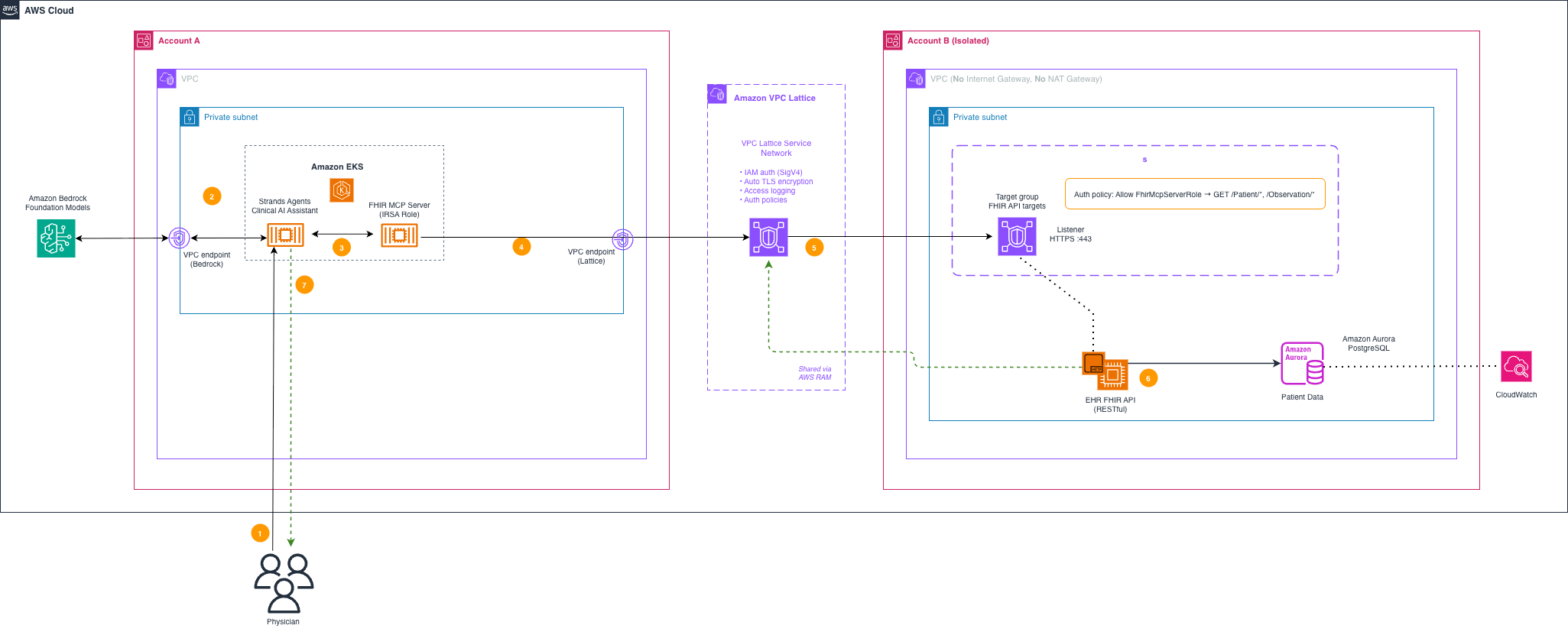
Figure 1: Clinical AI agent accessing isolated EHR data through VPC Lattice
Figure 1 illustrates the following data flow:
- Physician query: A physician asks the clinical AI assistant a question about a patient.
- Foundation model reasoning: The Strands Agents agent invokes Amazon Bedrock through a VPC endpoint using AWS PrivateLink to reason about the query and determine which clinical data it requires.
- MCP tool call: The agent calls the FHIR MCP server, which runs as a pod in the same Amazon EKS cluster.
- Signed request: The MCP server signs the outgoing HTTPS request using AWS Signature Version 4 (SigV4) with the pod’s IAM role credentials. The server then sends the signed request to the VPC Lattice service endpoint.
- VPC Lattice routing: VPC Lattice validates the SigV4 signature against the auth policy and encrypts traffic with TLS. It then routes the authenticated request to the FHIR API target in Account B.
- Audit and response: The FHIR API returns patient data. VPC Lattice Access Logs capture the full interaction—source principal, timestamp, HTTP status, and bytes transferred. The logs deliver to Amazon CloudWatch Logs or Amazon S3 for HIPAA audit retention. For details on available log fields, see VPC Lattice access log contents.
- Clinical answer: The agent synthesizes the clinical data into a response for the physician.
How VPC Lattice differs from AWS PrivateLink
You might ask: Amazon Bedrock already uses PrivateLink for private connectivity—why not use PrivateLink for the EHR data too? These services solve different problems:
- PrivateLink (VPC endpoints): Connects your VPC to a service endpoint privately. While commonly used to access AWS-managed services such as Amazon Bedrock, Amazon S3, or Amazon DynamoDB, you can also publish your own services through PrivateLink. However, you must place each custom service behind a Network Load Balancer—adding infrastructure overhead, cost, and re-architecture effort for every service you want to expose.
- VPC Lattice: Connects your services to each other across VPCs and accounts. It provides IAM-based authentication, automatic TLS, service discovery by name, and centralized access policies—without requiring you to deploy network load balancers or manage endpoint services for each data source.
In this architecture, PrivateLink handles agent-to-Amazon Bedrock. VPC Lattice handles agent-to-your-data. Together they create a private AI architecture with no public routing dependencies.
How VPC Lattice helps you secure this architecture
Zero trust authentication with IAM
You attach auth policies to services and service networks. Every request from the MCP server to the FHIR API must present valid IAM credentials. The auth policy specifies exactly which principal—the MCP server’s EKS pod IAM role—can invoke the service. Network location is irrelevant: even if traffic can reach the service, your auth policy blocks it without a matching Effect: Allow statement. This helps you meet HIPAA requirements to demonstrate that only authorized systems access protected health information (PHI).
| Important: VPC Lattice with AWS_IAM auth requires every outgoing HTTP request to be signed using AWS Signature Version 4 (SigV4) with service name vpc-lattice-svcs. Unsigned requests receive a 403 response regardless of network configuration or auth policy content. Step 5 of the implementation walkthrough shows how to add SigV4 signing to your Strands agent. |
Automatic TLS encryption
When you use VPC Lattice-generated domain names, VPC Lattice provisions TLS certificates and helps encrypt traffic between services. This frees you from certificate lifecycle management and key rotations. For custom domain names, you provide your own certificate through AWS Certificate Manager (ACM).
Cross-account sharing with AWS Resource Access Manager (AWS RAM)
Use AWS Resource Access Manager (AWS RAM) to share the FHIR API service in Account B to Account A. Account A’s VPC then associates with the service network. The MCP server immediately discovers and calls the FHIR API by its assigned service DNS name—no peering, no route table changes, no modifications to Account B’s isolated VPC.
Comprehensive audit logging
When configured, VPC Lattice access logs capture detailed information about each request: source principal, destination service, timestamp, response code, and bytes transferred. You send these logs to Amazon CloudWatch Logs or Amazon Simple Storage Service (Amazon S3) for retention. This helps support your HIPAA compliance efforts by providing the access audit trail required for systems handling PHI, removing the need to build custom logging infrastructure.
Preserving network isolation
The EHR VPC in Account B retains its isolated posture—no internet-facing routes of any kind. VPC Lattice connectivity doesn’t require internet-facing routes. The VPC associates with the service network and registers its FHIR API as a target—the isolation boundary remains intact.
Implementation walkthrough
The following steps walk you through configuring VPC Lattice for multi-account agent connectivity.
Prerequisites
Before beginning, confirm the following prerequisites are in place:
- Two AWS accounts: Account A for AI workloads, Account B for clinical data
- An Amazon EKS cluster in Account A with the AWS Gateway API Controller installed
- A FHIR API deployed in Account B’s private VPC
- Account A—IAM permissions to install the AWS Gateway API Controller on EKS, create a VPC Lattice service network, and configure pod identity or IAM Roles for Service Accounts (IRSA) for the Strands Agents pod
- Account B—IAM permissions to create VPC Lattice services and target groups, configure auth policies, and create AWS Resource Access Manager (AWS RAM) shares
- AWS Command Line Interface (AWS CLI) configured with credentials for both accounts
- Python 3.9 or later with Strands Agents installed (
pip install strands-agents)
Step 1. Create the service network and register the FHIR API service
In Account B, create the VPC Lattice service network and register the FHIR API as a service within that network. This establishes the foundation for connectivity between accounts. Each sub-task below configures a specific component. Complete them in order. Set --auth-type AWS_IAM on all resources; the default type is NONE, which passes traffic unauthenticated and bypasses the access controls protecting PHI.
Step 1.1. Create the service network with IAM auth
Step 1.2. Register the FHIR API service
Step 1.3. Create the target group
Step 1.4. Create the HTTPS listener
Step 1.6. Associate Account B’s VPC with the service network
Step 2. Configure security groups for VPC Lattice traffic
VPC Lattice delivers traffic to your target from its link-local address range (169.254.0.0/16, reserved for use within a single network segment). The FHIR API’s security group in Account B must permit inbound HTTPS from this range. Without this rule, VPC Lattice health checks fail and no traffic reaches the FHIR API, even with a correctly configured auth policy. AWS recommends referencing the VPC Lattice managed prefix lists in your security group rules rather than hardcoding the CIDR range. AWS maintains these prefix lists and keeps them current automatically.
Step 3. Apply auth policies
The following auth policy restricts the clinical AI agent to read-only access on FHIR patient and observation resources. Scope the Deny statement to the specific MCP server role to avoid inadvertently blocking other services on the same service network:
Apply the policy to the service:
A separate clinical documentation agent that writes lab results uses a different policy scoped to POST on a single resource type. This demonstrates graduated access controls: the query agent reads, the documentation agent writes, and neither exceeds its designated scope.
Step 4. Share the service network and associate the consumer VPC
After configuring the service network and auth policies in Account B, share the service network to Account A. Then associate the consumer VPC. Account A’s AI workload can immediately discover and connect to the FHIR API service over a private, authenticated path—no public routes required. AWS RAM supports multi-account resource sharing. It removes the need for VPC peering and complex routing changes. The consumer VPC association establishes the routing path—VPC Lattice routes requests from Account A’s subnets to the registered FHIR service. Traffic flows over the AWS backbone and remains encrypted in transit. Complete sub-tasks 4.1 and 4.2 in order before testing end-to-end connectivity.
Step 4.1. Share the service network to Account A
In Account B, share the service network to Account A using AWS RAM:
If your accounts are in the same AWS Organizations unit, AWS RAM accepts the share automatically. Otherwise, Account A must accept the AWS RAM invitation before proceeding.
Step 4.2. Associate the consumer VPC
In Account A, associate the AI workload VPC with the shared service network:
After the association is complete, the MCP server resolves the FHIR API by its service DNS name. Make sure the VPC in Account A has DNS support and DNS hostnames active. These are on by default in new VPCs but are required for the Lattice DNS name to resolve correctly.
Step 5. Configure SigV4 signing and deploy the Strands agent
Sign every request to a VPC Lattice service with AWS_IAM auth using Signature Version 4 with service name vpc-lattice-svcs. The following Strands Agents implementation adds SigV4 signing to the FHIR MCP client using the pod’s IAM Roles for Service Accounts (IRSA)-provided credentials. EKS Pod Identity is the newer, recommended alternative to IRSA and works identically from the application’s perspective.
The AWS Gateway API Controller on the EKS cluster registers the MCP server pod’s Kubernetes service account with IRSA, so boto3.Session() automatically resolves the FhirMcpServerRole credentials—no additional configuration needed in the application code.
Note: For long-running agent processes, ensure your application refreshes SigV4 credentials before they expire. IRSA and EKS Pod Identity credentials obtained through the pod’s projected service account token are temporary (typically valid for 1–12 hours depending on your configuration). The boto3 SDK handles credential refresh automatically when you call get_credentials() before each request, as shown in the _signed_headers() function above. Avoid caching credentials across requests—instead, retrieve fresh credentials for each signing operation to prevent authorization failures during extended agent sessions.
Step 6. Verify the setup
After completing Step 5, confirm the setup is working before integrating with your application. Run the following commands from Account A.
- Verify the VPC association status is ACTIVE:
- Send a signed test request to confirm end-to-end connectivity (expect 200; a 403 indicates a missing or incorrect SigV4 signature; a 503 indicates no healthy targets):
Cleanup
Warning: These steps immediately terminate connectivity between Account A and the FHIR API in Account B. Confirm that no production workloads depend on this connectivity before proceeding.
To avoid ongoing charges, remove resources in the following order after testing:
- In Account A, delete the VPC-to-service-network association:
aws vpc-lattice delete-service-network-vpc-association --service-network-vpc-association-identifier <account-a-association-id> - In Account B, delete the VPC-to-service-network association:
aws vpc-lattice delete-service-network-vpc-association --service-network-vpc-association-identifier <account-b-association-id> - In Account B, delete the AWS RAM resource share to revoke Account A’s access:
aws ram delete-resource-share --resource-share-arn <resource-share-arn> - Delete the HTTPS listener from the FHIR service. (Deleting the service in the following step removes associated listeners automatically, but AWS recommends explicit deletion.)
- Delete the auth policy from the FHIR service:
aws vpc-lattice delete-auth-policy --resource-identifier <fhir-service-id> - Delete the service-network-service association.
- Delete the VPC Lattice service.
- Delete the target group.
- Delete the service network.
- Remove the inbound security group rule permitting traffic from 169.254.171.0/24 on port 443.
- Delete the FHIR MCP Server pod and associated Kubernetes resources in Account A:
kubectl delete deployment fhir-mcp-server -n <namespace> - Delete the Amazon EKS cluster in Account A if it was created for this walkthrough:
aws eks delete-cluster --name <cluster-name> - Delete the FHIR API in Account B (steps depend on your FHIR API implementation and deployment method).
- Warning: This action permanently deletes all data in the Aurora PostgreSQL database. Delete the Amazon Relational Database Service (Amazon RDS) cluster in Account B:
aws rds delete-db-cluster --db-cluster-identifier <cluster-id> --final-db-snapshot-identifier <snapshot-name>(or use--skip-final-snapshotif you do not need to retain the data).
- Warning: This action permanently deletes all data in the Aurora PostgreSQL database. Delete the Amazon Relational Database Service (Amazon RDS) cluster in Account B:
Further considerations
- Amazon Bedrock AgentCore Gateway (generally available) connects to private FHIR APIs using VPC Lattice resource gateways without you deploying a custom MCP server. This provides the same zero trust connectivity with less operational overhead for teams that don’t require a custom agent runtime.
- VPC Lattice is a HIPAA Eligible Service. Before processing PHI, confirm your organization has an active Business Associate Agreement (BAA) with AWS. The technical controls in this post complement, but don’t replace, the BAA requirement.
- VPC Lattice is a Regional service. For disaster recovery, replicate the service network and FHIR API targets in a secondary Region and use Amazon Route 53 health checks to fail over the agent’s traffic.
- Use IAM condition keys such as resource tags in auth policies to restrict agent access based on data sensitivity. For example, you can permit queries on de-identified data broadly while limiting access to identified PHI to specific roles
Conclusion
Amazon VPC Lattice lets you connect AI agents to your most sensitive data without compromising the network isolation you’ve spent years building. In this post, you saw how a clinical AI agent securely queries a FHIR API in a private VPC — using Strands Agents (open source) and Amazon Bedrock — with no public exposure and no changes to the data account’s security posture.
With VPC Lattice handling zero-trust authentication, automatic TLS encryption, cross-account service sharing via AWS RAM, and access logging to Amazon CloudWatch Logs, your security and networking teams get the controls they need while your AI teams get the connectivity they need — without opening tickets, punching holes in firewalls, or standing up new infrastructure. The result: you can move faster on AI initiatives without re-litigating your network security decisions.
Further reading
- Amazon VPC Lattice User Guide
- Control access to VPC Lattice services using auth policies
- Authenticating requests with AWS Signature Version 4 for VPC Lattice
- Amazon Bedrock AgentCore Gateway documentation
- Strands Agents (open source)
- AWS Gateway API Controller for Amazon EKS
- Share your VPC Lattice entities with AWS RAM
About the authors

Jason Stinson
Jason is a Solutions Architect at Amazon Web Services based in Denver, Colorado, where he helps organizations build secure, intelligent infrastructure at the intersection of networking, security, and AI. He’s driven by curiosity around cloud and agentic AI patterns, emerging AI security challenges, and what it takes to deploy autonomous workloads responsibly. Outside of work, Jason enjoys cycling, traveling, and spending time with family.