AWS Cloud Operations Blog
Simplify AWS Control Tower governance with enhanced AWS CloudFormation Hooks
Introduction
Organizations using AWS Control Tower to govern their multi-account environments face a persistent challenge: when AWS CloudFormation deployments fail due to proactive control violations, teams receive minimal information about why the failure occurred or how to fix it. This lack of visibility leads to:
- Delayed deployments as developers struggle to understand cryptic error messages
- Increased troubleshooting time spent investigating compliance failures
- Reduced confidence in proactive control enforcement
AWS Control Tower customers can now gain unprecedented visibility into proactive control enforcement with the new AWS CloudFormation Hook Invocation Summary console page. This enhancement provides detailed execution logs and troubleshooting guidance that help organizations reduce deployment failures while accelerating compliance issue resolution.
What are AWS Control Tower proactive controls?
Proactive controls are optional controls implemented with AWS CloudFormation hooks and managed by AWS Control Tower. Unlike detective controls that identify issues after deployment, proactive controls work as preventive guardrails that:
- Validate resource configurations before creation – Evaluate CloudFormation templates during the deployment process
- Enforce organizational policies at deployment time – Block non-compliant resources from being provisioned
- Provide immediate feedback – Give developers and administrators instant visibility into policy violations
- Prevent compliance drift – Stop security and governance issues before they occur
When a CloudFormation deployment violates a proactive control, the hook prevents the resource from being created and provides feedback about the violation. This shift-left approach to governance helps organizations maintain compliance while reducing the cost of remediation.
The AWS CloudFormation Hook invocation summary
The CloudFormation Hook Invocation Summary console page transforms how teams interact with proactive controls by providing comprehensive visibility into hook execution.
Accessing the console
To view hook execution details:
- Open the AWS CloudFormation console
- Choose Invocation Summary from the left navigation panel
- Review detailed information about hook executions, including status, duration, and error messages
Real-world scenario: CT.S3.PR.1 – Amazon S3 bucket public access control
This walkthrough demonstrates how proactive controls work and how the AWS CloudFormation Hook Invocation Summary console helps identify and resolve violations for CT.S3.PR.1 – S3 Bucket Public Access Control. This control checks whether your Amazon Simple Storage Service (Amazon S3) bucket has a bucket-level Block Public Access (BPA) configuration.
Prerequisites
- An existing AWS Control Tower environment set up
- Access to an AWS account within your AWS Control Tower organization
- Permissions to deploy AWS CloudFormation templates
Enabling the proactive control
First, let’s enable the CT.S3.PR.1 – S3 public access control:
- Navigate to the AWS Control Tower console
- Click on Control Catalog under the Controls tab
- Search for control: CT.S3.PR.1 – “Require an Amazon S3 bucket to have block public access settings configured”
- Choose the Control actions and select Enable
- Choose the organizational units where you want to apply this control
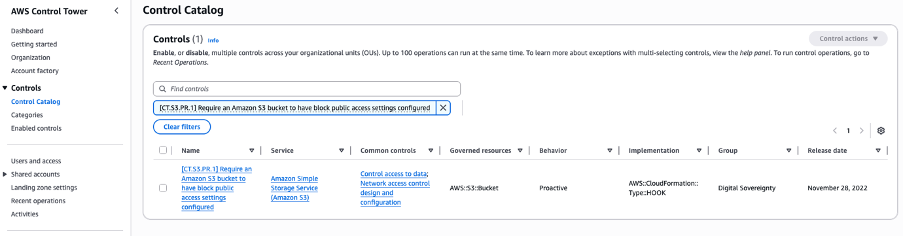
Figure 1- Control Catalog page with filtered result for CT.S3.PR.1 control

Figure 1.2- Control Catalog page with filtered result for CT.S3.PR.1 control
Once enabled, this control will evaluate all S3 buckets created via AWS CloudFormation in the target account(s) of the OU where the control is enabled to ensure they have proper public access block settings configured.
Testing the “Fail” scenario
Now let’s create a stack that violates the control. Deploy this CloudFormation template:
Resources:
  S3Bucket:
    Type: AWS::S3::Bucket
    Properties:
      PublicAccessBlockConfiguration:
        BlockPublicAcls: false
        BlockPublicPolicy: false
        IgnorePublicAcls: false
        RestrictPublicBuckets: false
Outcome:
The stack creation will fail with the error: “The following hook(s) failed: [AWS::ControlTower::Hook]”
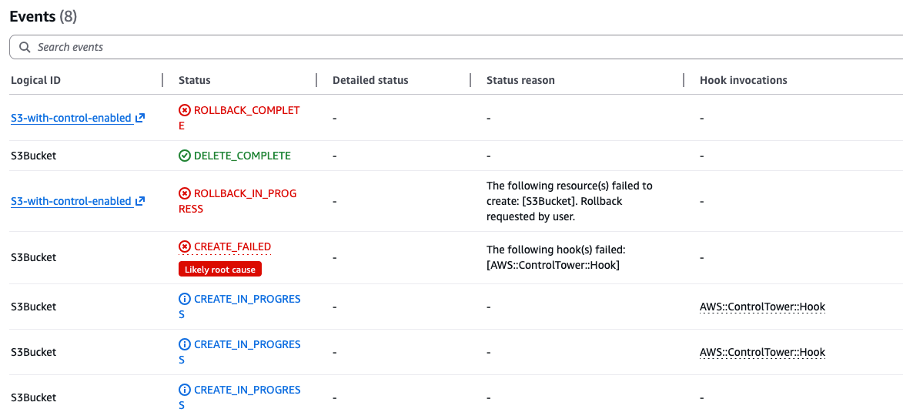
Figure 2- AWS CloudFormation stack events showing the failed hook execution
Viewing the Hook execution details
To understand why the deployment failed:
- Open the AWS CloudFormation console and navigate to your failed stack
- Choose the failed invocation from Invocation Summary on the left to see detailed root cause
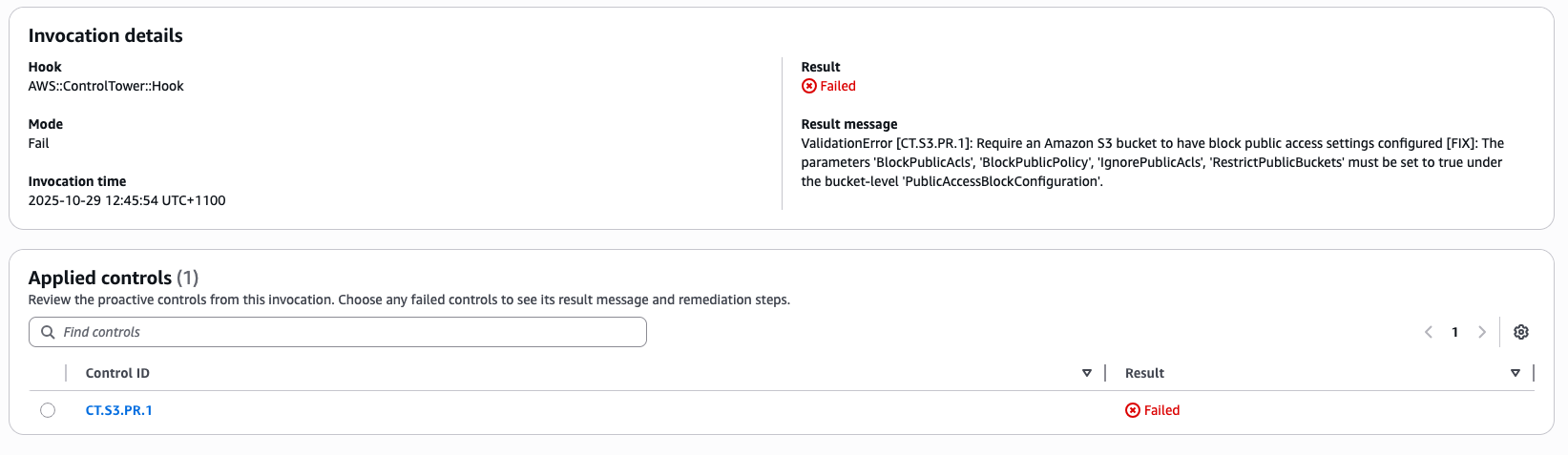
Figure 3- Invocation ID page showing failed invocation details
This detailed error message indicates:
- Which control failed –
CT.S3.PR.1 - What is the requirement –
block public access settings - How to fix it –
set all four parameters to true
Testing the “Pass” scenario
Now, let’s fix the template and deploy a compliant version:
Resources:
  S3Bucket:
    Type: AWS::S3::Bucket
    Properties:
      PublicAccessBlockConfiguration:
        BlockPublicAcls: true
        BlockPublicPolicy: true
        IgnorePublicAcls: true
        RestrictPublicBuckets: true
Outcome:
The stack creation succeeds! In the CloudFormation events, you’ll see: “Hook invocations complete. Resource creation initiated”
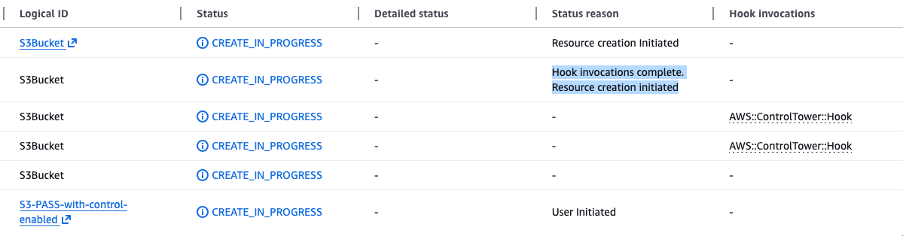
Figure 4- AWS CloudFormation stack events showing the hook execution status
When you check the Invocation Summary, you’ll see: – Hook status: PASS

Figure 5-Invocation summary page showing invocation result as “Pass”
Impact: This proactive control prevents accidental exposure of Amazon S3 buckets to the public internet, protecting sensitive data from unauthorized access before the resource is even created.
Conclusion
In this post, we walked through a practical example of enabling and testing proactive controls and explored the AWS CloudFormation Invocation Summary page. This improved visibility into hook executions marks an important step forward in cloud governance, making it easier to uphold security and compliance standards while empowering developers to stay productive.
For more information about AWS Control Tower and proactive controls, visit the AWS Control Tower documentation.