Networking & Content Delivery
Migrate from Static Routing to Dynamic BGP Routing on AWS Site-to-Site VPN
Introduction
AWS Site-to-Site (S2S) VPN is a fully managed service that enables you to establish secure connections between your on-premises networks and AWS using IP Security (IPSec) tunnels. When configuring these connections AWS Site-to-Site (S2S) VPN offers two routing options: static and dynamic routing with Border Gateway Protocol (BGP). While static routing offers simplicity for basic use cases, dynamic BGP routing provides significant advantages for production environments requiring high availability and automatic failover capabilities.
Static routing works well for straightforward scenarios—such as when you have a single VPN connection with no redundancy requirements or a simple network topology with minimal route changes. However, static VPN configurations may require manual intervention on your on-premises gateway during tunnel failures. In this post, I walk you through the process of migrating from static routing to dynamic BGP on AWS Site-to-Site VPN. You learn the benefits of dynamic routing, understand when each routing method makes sense for your architecture, and follow step-by-step instructions to perform the migration while minimizing disruption to your network connectivity.
Choosing the Right Routing Model: Static vs. Dynamic BGP
Before diving into the migration process, it is important to understand which routing model best fits your needs. While this blog focuses on migrating to BGP, the right choice depends on your specific requirements.
Comprehensive Comparison
| Aspect | Static Routing | Dynamic BGP Routing |
| Setup Complexity | Simple initial configuration | Requires BGP knowledge and configuration |
| Route Management | Manual updates required for changes | Automatic route propagation |
| Route Limits Inbound | Up to 100 static routes from a customer gateway device to S2S VPN connection on a virtual private gateway (VGW) or transit gateway (TGW) | Up to 100 routes from customer gateway device to a S2S VPN connection on a VGW and 1000 routes on a TGW |
| Route Limits Outbound | Up to 1000 static routes from a S2S VPN connection on a virtual private gateway (VGW) or transit gateway (TGW) to a customer gateway device | Up to 1000 routes advertised from a S2S VPN connection on a VGW and up to 5000 from a S2S VPN connection on a TGW to a customer gateway device |
| Failover | Manual intervention needed | Automatic detection and failover |
| Troubleshooting | Straightforward, predictable paths | More complex, requires BGP expertise |
| Bandwidth | Single tunnel active at a time | ECMP support for tunnel aggregation (If terminated on Transit Gateway or Cloud WAN Core network) |
| Best For | Small, stable networks | Dynamic, multi-site environments |
| VPN Concentrator | Not supported | Supported |
Why Migrate to Dynamic Routing
While static routing works well for simple, stable networks, dynamic routing using BGP becomes essential as your infrastructure evolves. BGP automatically propagates routes to your VPC route tables, detects tunnel failures and fails over without manual intervention, and enables ECMP for higher bandwidth by aggregating multiple tunnels on Transit Gateway. For organizations managing multiple sites or anticipating growth, these automation capabilities significantly reduce operational overhead while improving network reliability.
When Static Routing Makes Sense
Static routing remains the right choice for certain scenarios:
- Policy-Based VPN: In this scenario Static routing is essential to ensure local traffic selectors precisely match AWS configurations, preventing connection drops caused by security association (SA) mismatches.
- Small, Stable Networks: If you’re connecting a single branch office with a very limited routes that rarely change, static routing provides a straightforward solution without unnecessary complexity.
- Predictability Requirements: Some environments prioritize knowing exactly which path traffic takes over automation. Static routes provide complete control and eliminate concerns about unexpected route changes.
BGP Considerations and Challenges
While BGP offers significant advantages, it’s not without trade-offs:
- Expertise Requirements: Your team needs to understand BGP fundamentals—AS numbers, route advertisements, BGP attributes, and session states. This knowledge is essential for both initial setup and ongoing operations.
- Monitoring Complexity: BGP sessions require active monitoring. You’ll need to track session states, route advertisements, and potential flapping. Unlike static routes that either work or don’t, BGP introduces more variables to watch.
- Troubleshooting Depth: When issues arise, BGP troubleshooting involves examining route selection, AS path attributes, BGP timers, and session logs. This is more involved than verifying static route entries.
- Security Configuration: BGP requires proper security measures including MD5 authentication for session protection and route filtering to prevent unwanted route advertisements. These add configuration steps but are essential for production environments.
- Initial Time Investment: Migrating to BGP means updating documentation, training team members, and establishing new operational procedures. This upfront investment pays dividends over time but requires planning.
Prerequisites
Before beginning the migration, ensure your setup meets these requirements:
- An existing AWS Site-to-Site VPN connection using static routing
- A customer gateway device that supports BGP
- The BGP Autonomous System Number (ASN) for your network
- Administrative access to your AWS environment
- Administrative access to your customer gateway device
Scenario Overview
In this section, we work with the following setup where the Site-to-Site VPN connection is terminated on a transit gateway which can be seen in Figure 1:
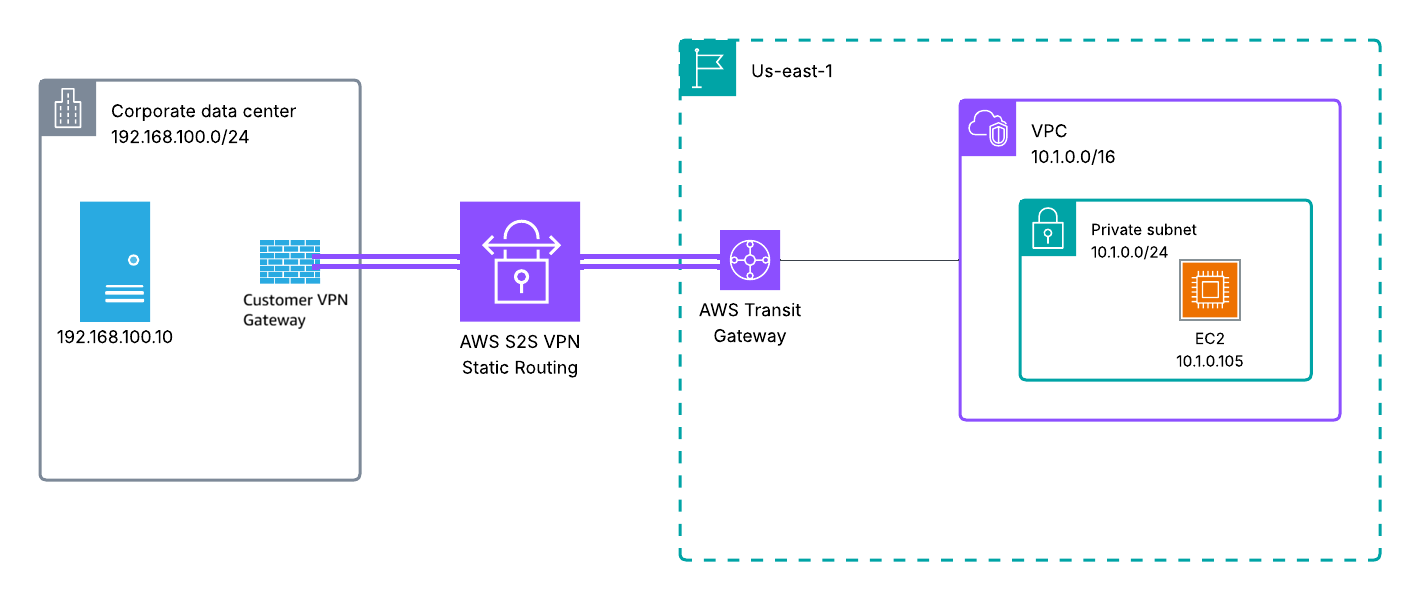
Figure 1: Current Site-to-Site VPN Connection between corporate data center and AWS
Current Environment:
- Existing AWS Site-to-Site VPN connection using static routing terminated in a Transit Gateway
- Customer gateway device: This can be any generic device which meets the requirements for AWS Site-to-Site VPN.
- VPC CIDR: 10.1.0.0/16
- On-premises network: 192.168.100.0/24
- Two VPN tunnels configured to the Palo Alto Firewall
- Static routes configured in:
- AWS route tables pointing to the Transit gateway
- VPN Gateway routing table pointing to AWS VPC
The process for Cloud WAN is similar to transit gateway. We will discuss Site-to-Site VPN attachment to VGW in a separate section.
Migration Steps
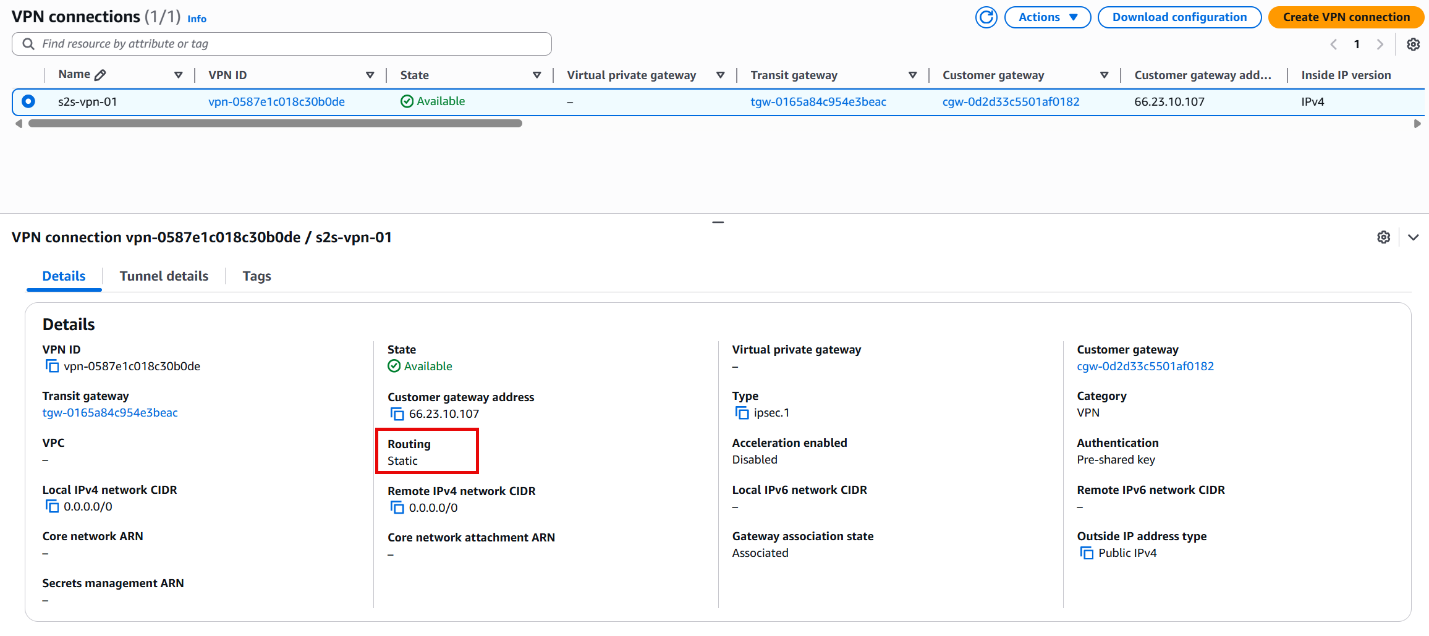
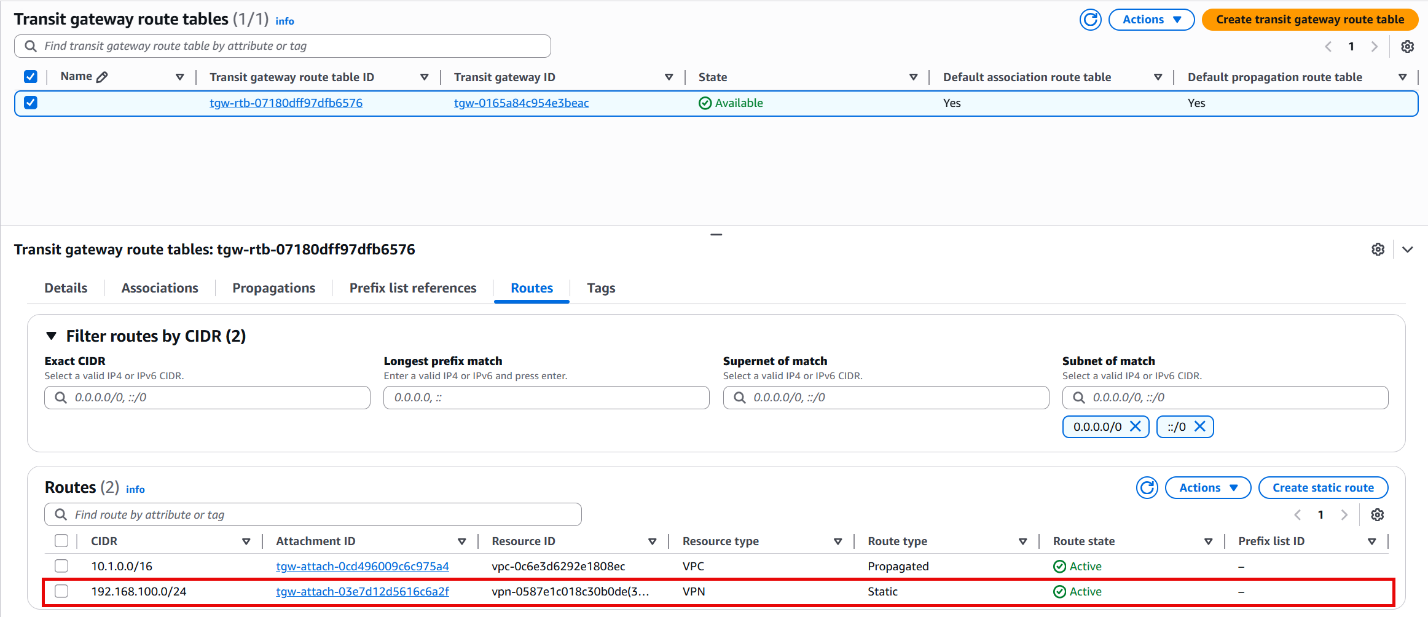
- Verify and Document Current Configuration
- Document your existing static routes and VPN configuration
- Note your existing customer gateway IP address and configuration
- Record all VPC CIDR ranges and on-premises networks that need to communicate
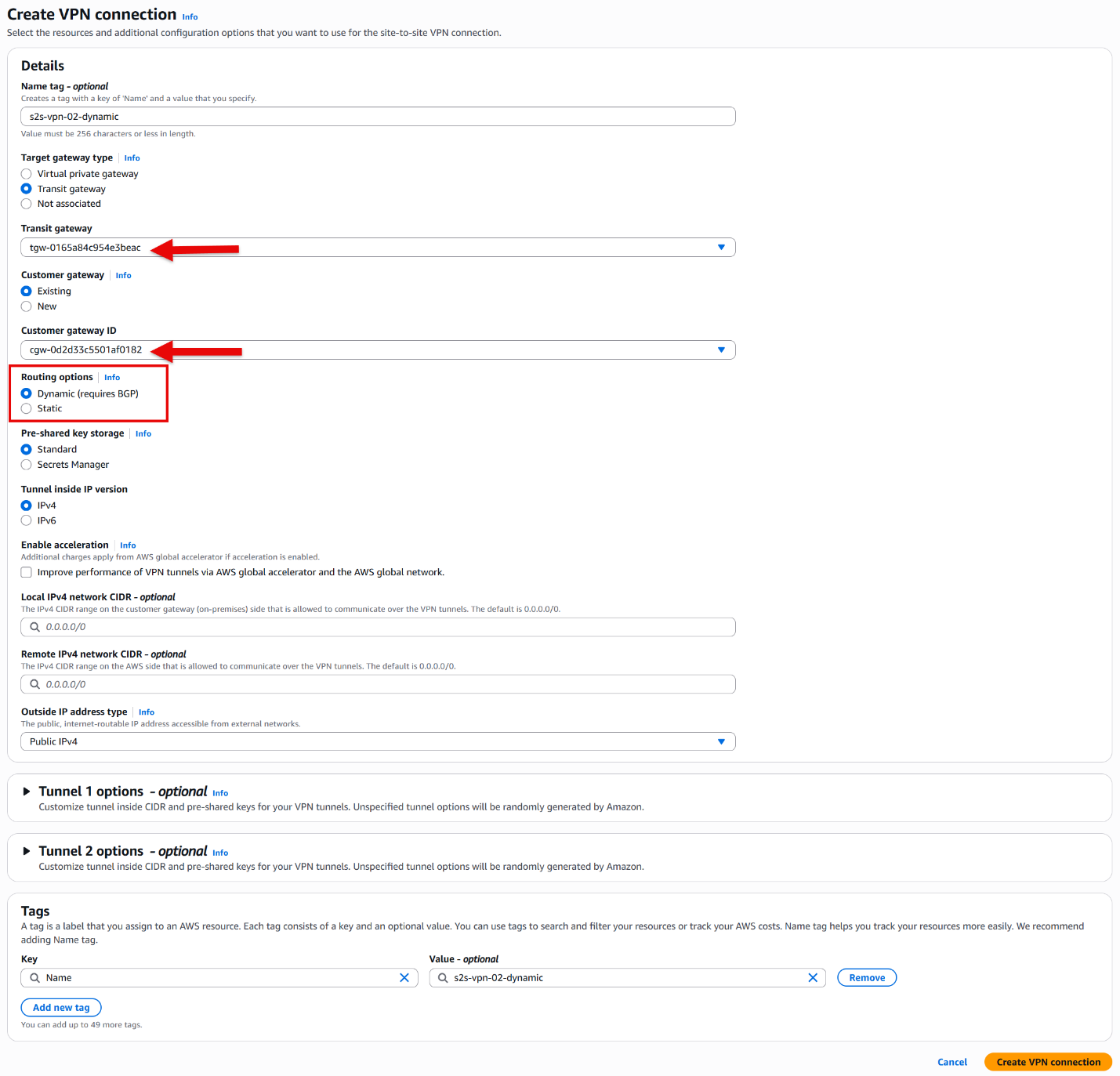
- Create New Dynamic VPN Connection:
- Navigate to the VPC Console > Site-to-Site VPN connections
- Click “Create VPN connection”
- For “Target gateway type” select Transit gateway and from the drop-down list select the same transit gateway as the current static VPN connection
- Select the same customer gateway used by your static VPN (ensure your customer gateway has the correct ASN)
Note: If your current customer gateway doesn’t have the correct ASN configured, you’ll need to create a new customer gateway with the appropriate ASN.
- Choose “Dynamic (requires BGP)” for routing options
- Create the connection
- Download and Apply Configuration:
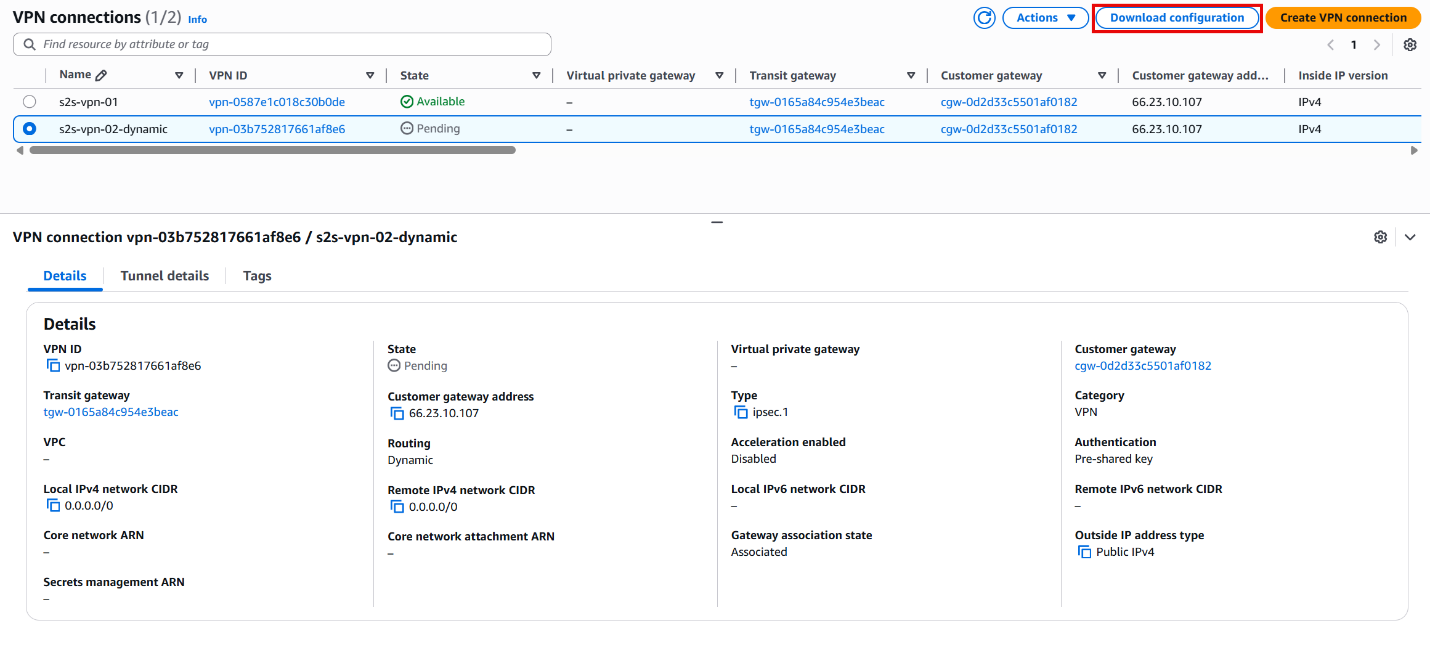
- Download the configuration file for your device platform
- Apply the new configuration to your on-premises VPN gateway
- Ensure you configure both tunnels for redundancy
- Verify BGP Session Establishment
- Ensure the BGP session on both tunnels is established.
- You can verify that under Tunnel state, in the details column, as can be seen in the following figure.
- Confirm the Transit gateway attachment status for the new Site-to-Site VPN is “Associated”
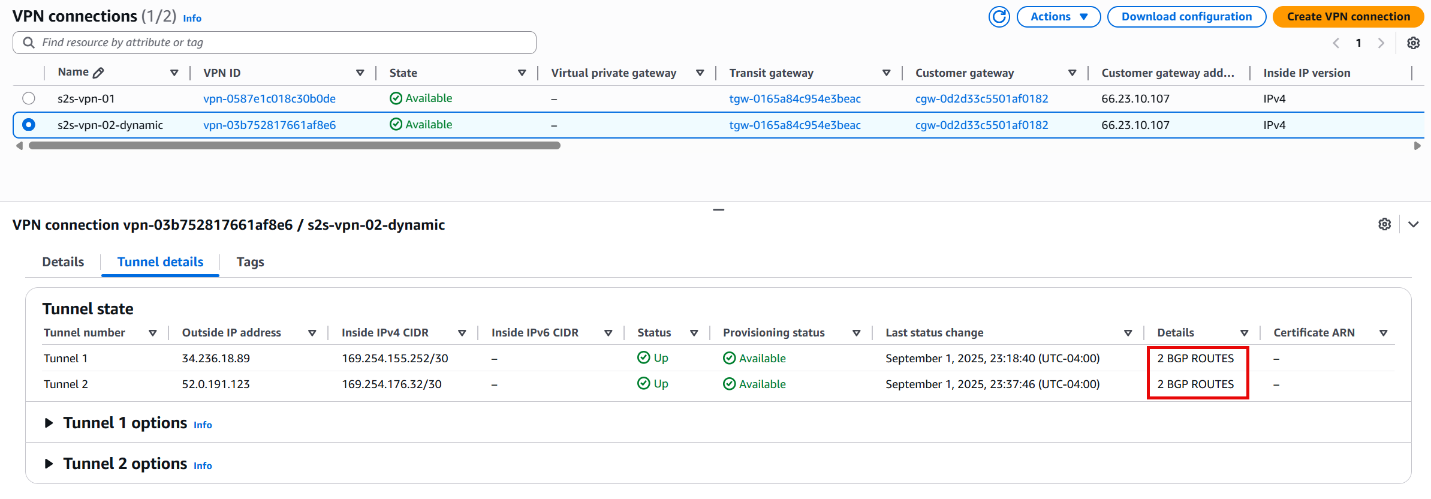

Figure 2 illustrates the interim architecture where both VPN connections are active. Note that the static S2S VPN connection retains priority over the dynamic BGP connection and remains the active path.
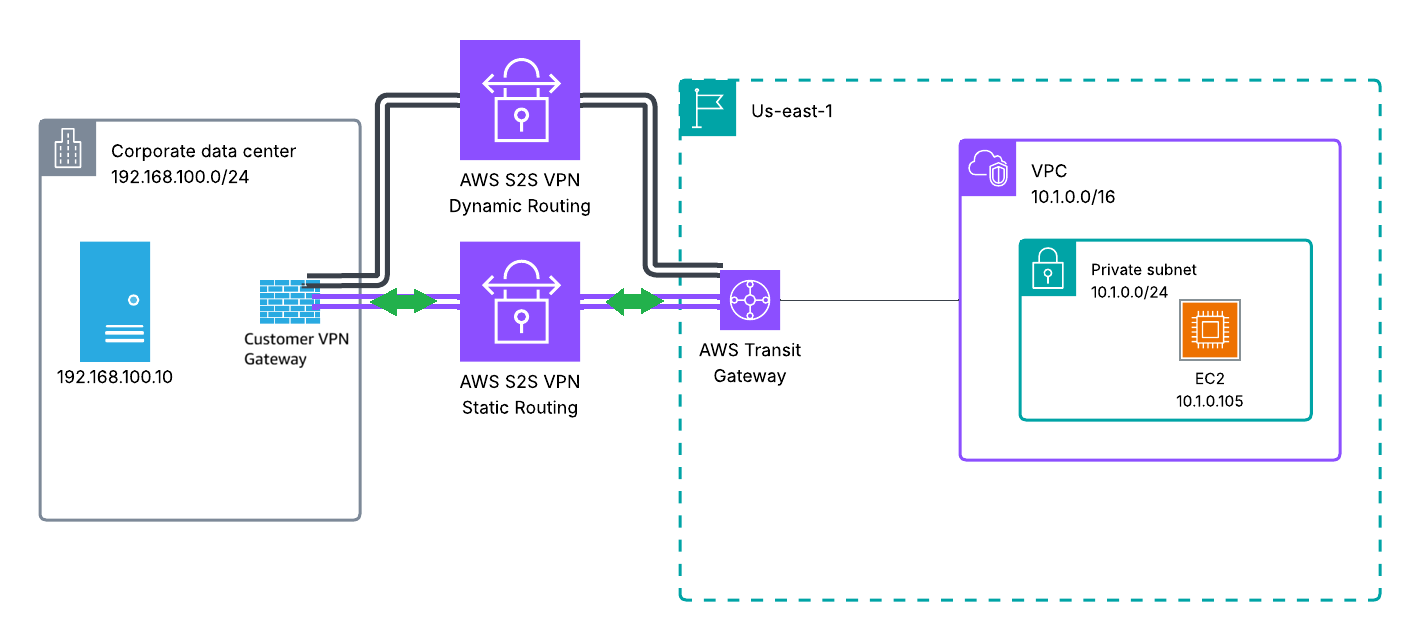
Figure 3. Architectural diagram with one static and one dynamic Site-to-Site VPN Connection
- Transition from Static to Dynamic Routing
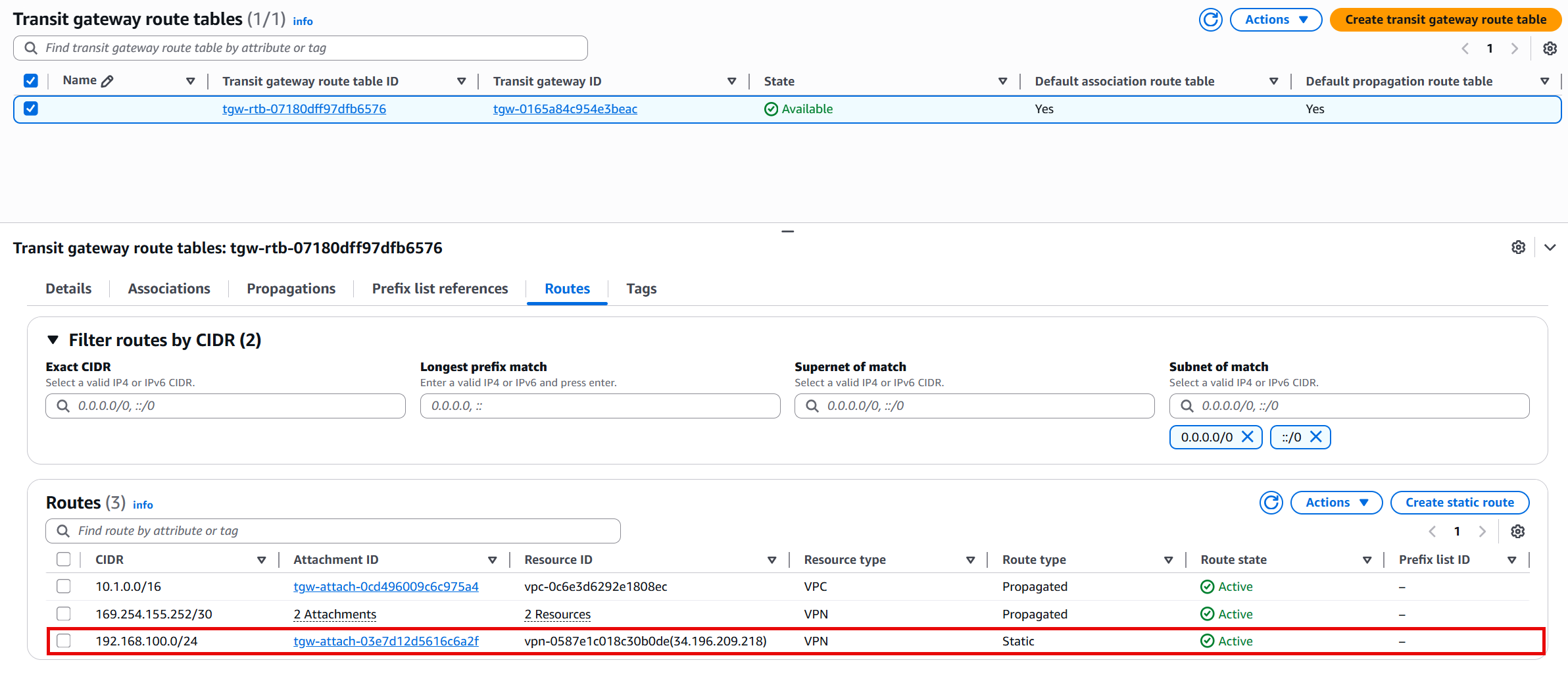
- Verify BGP routes are visible and received through the new tunnel
- Note that static routes take priority over BGP routes for the same prefix (please refer to How route priority works documentation for more information)
Cutover and Testing
- Remove the static route(s) from both the Transit gateway route table and on-premises VPN gateway.
- Verify the routes are propagated through the dynamic BGP routing
- Test connectivity to ensure traffic flow over the new tunnels
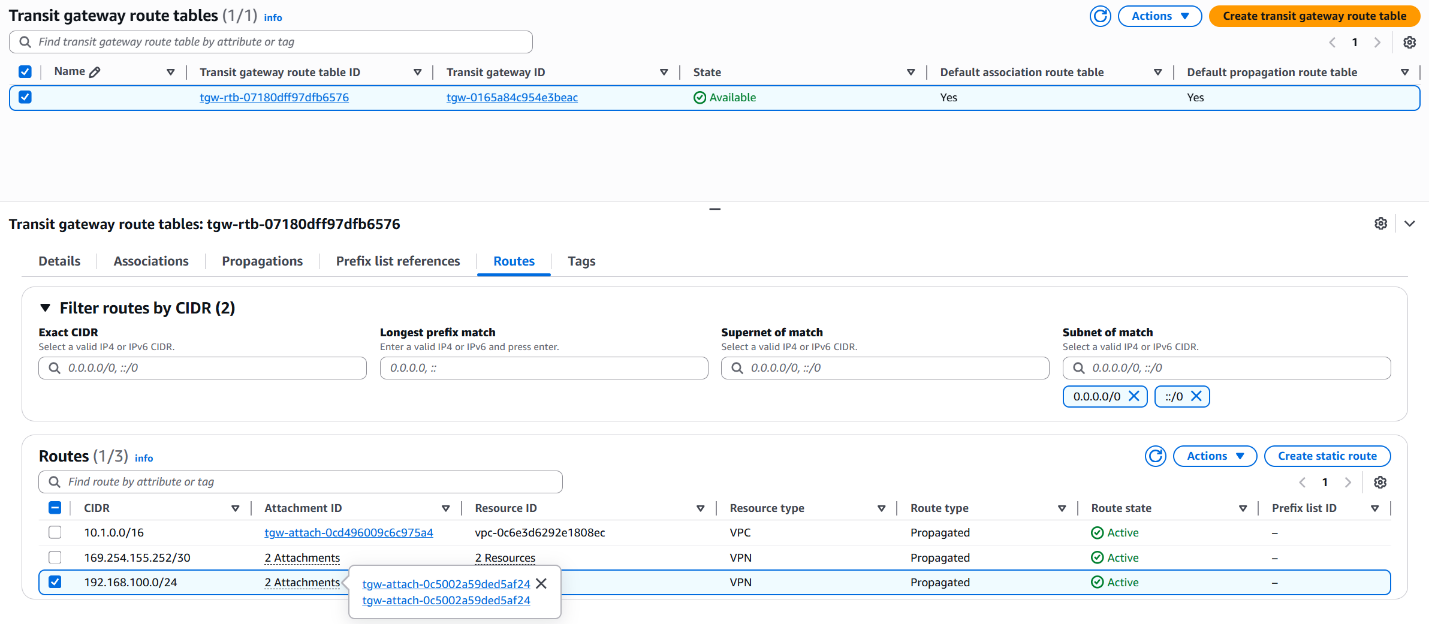
Figure 4. All routes are propagated through the new tunnel over BGP routing table
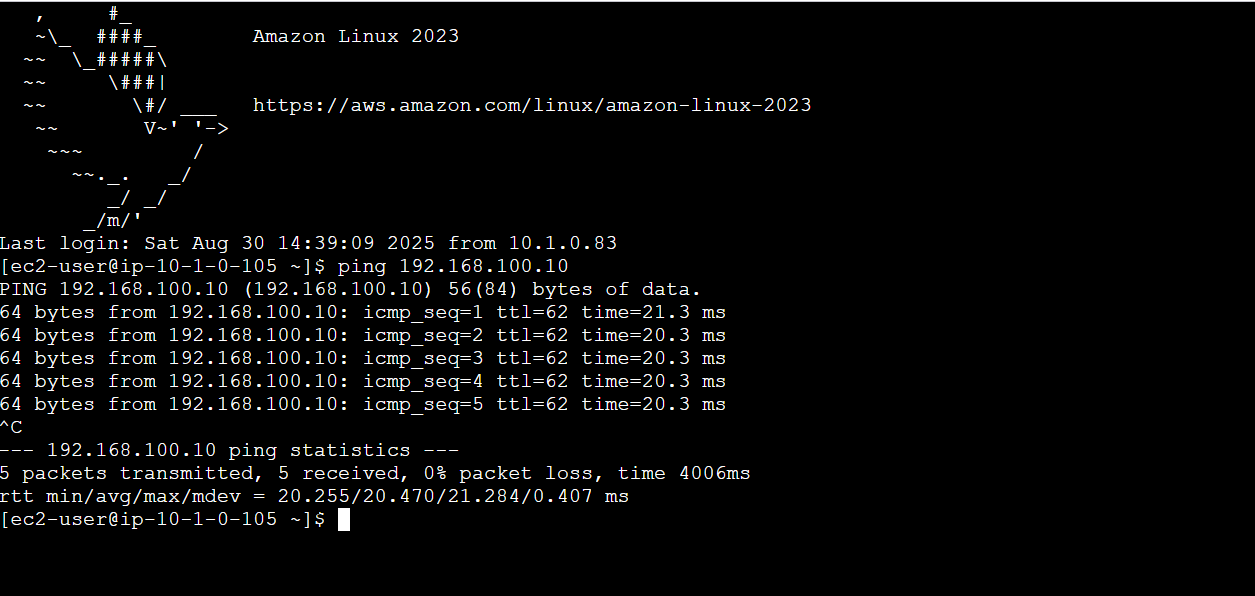
Figure 5. Connectivity from an EC2 instance to the on-premises server
- Disable Static route VPN connection on your on-premises VPN gateway.
- Test the connectivity again to ensure traffic flow.
- If successful, delete the static route VPN connection on AWS and on-premises VPN gateway.
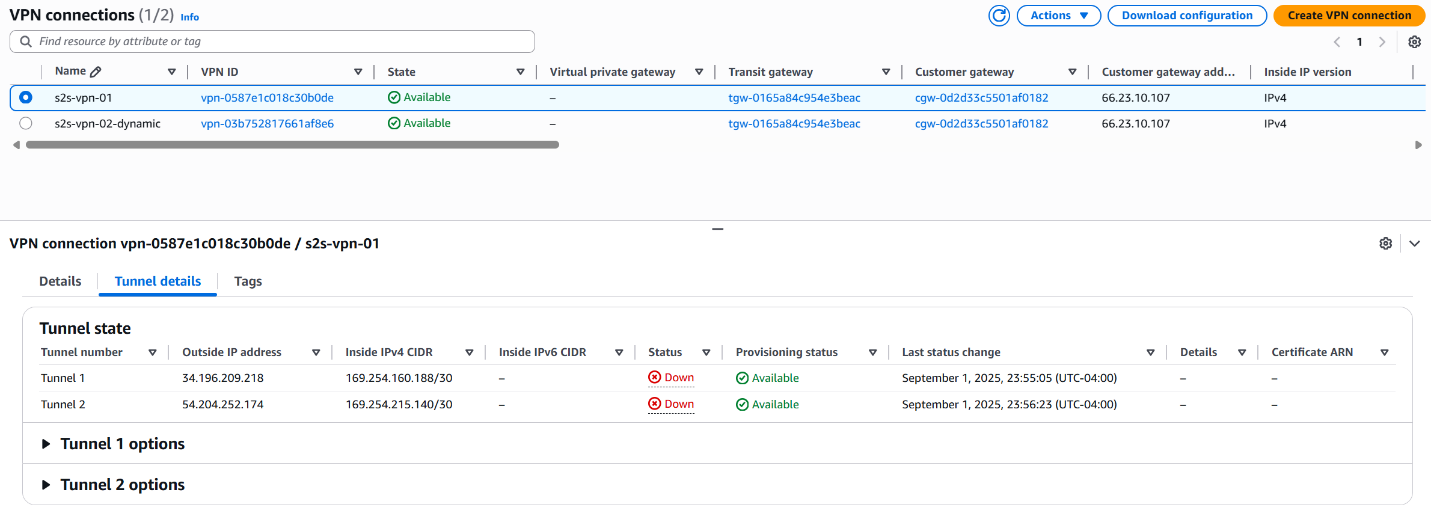
Figure 6. Disabled VPN Connection with Static Routing
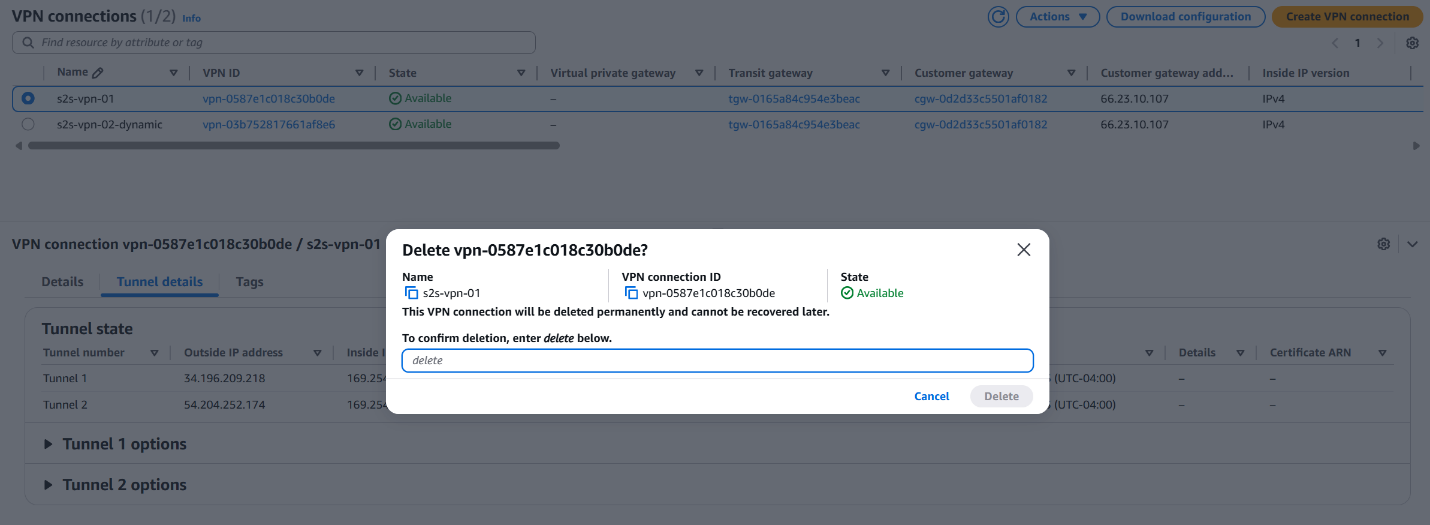
Figure 7. Delete VPN Connection with Static Routing
The following diagram demonstrates the final architecture with a S2S VPN connection using dynamic routing.
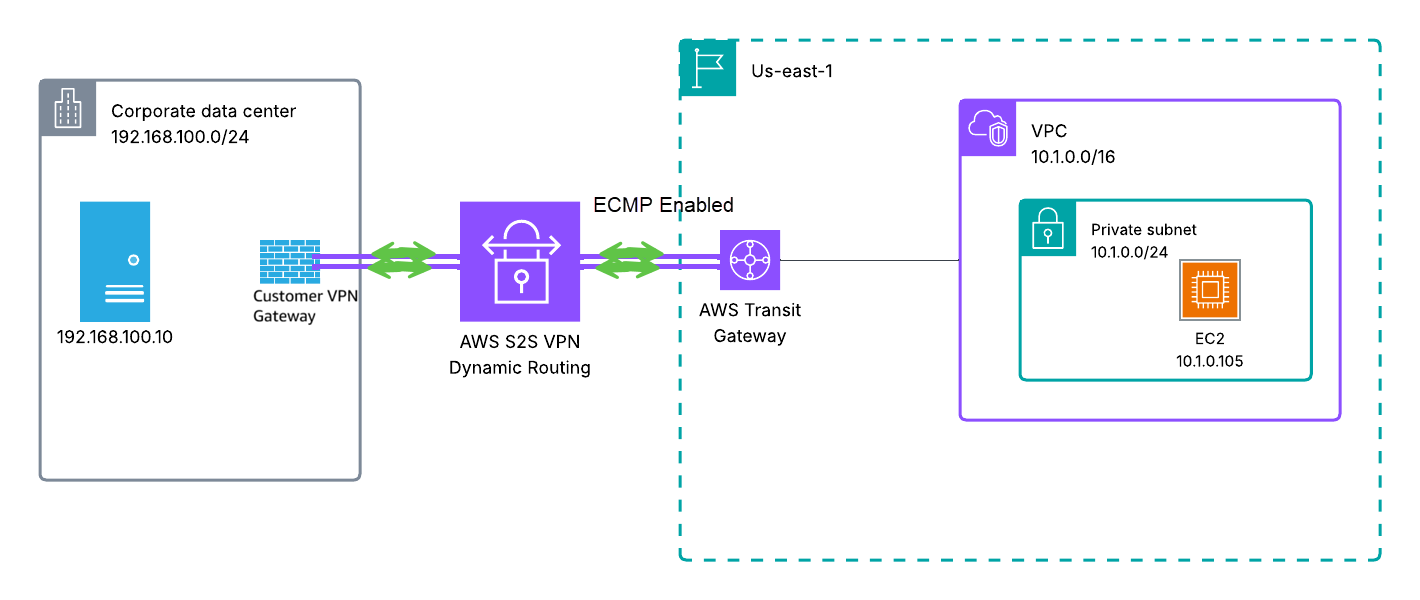
Figure 8. Final architecture with a S2S VPN connection using dynamic BGP routing
VPN Connection Terminated in Virtual Private Gateway (VGW)
When operating an AWS Site-to-Site VPN connection that terminates on a Virtual Private Gateway (VGW) with static routing, it’s important to understand that you cannot add a second Site-to-Site VPN connection with dynamic (BGP) routing from the same customer gateway while maintaining the existing static routing connection (you’ll need to create a new customer gateway with the correct ASN if your current one wasn’t configured with correct ASN). To transition from static to dynamic routing in this scenario, you must delete the current Site-to-Site VPN connection and create a new one configured with dynamic routing. You can enable route propagation for your route table to automatically propagate Site-to-Site VPN routes. This approach requires careful planning, as deleting the active VPN connection will interrupt connectivity between your on-premises network and your VPC. We recommend scheduling this migration during a planned maintenance window to minimize business impact. Please refer to below migration steps.
In this section, we work with the following setup where the Site-to-Site VPN connection is terminated on a virtual private gateway which can be seen in Figure 9:
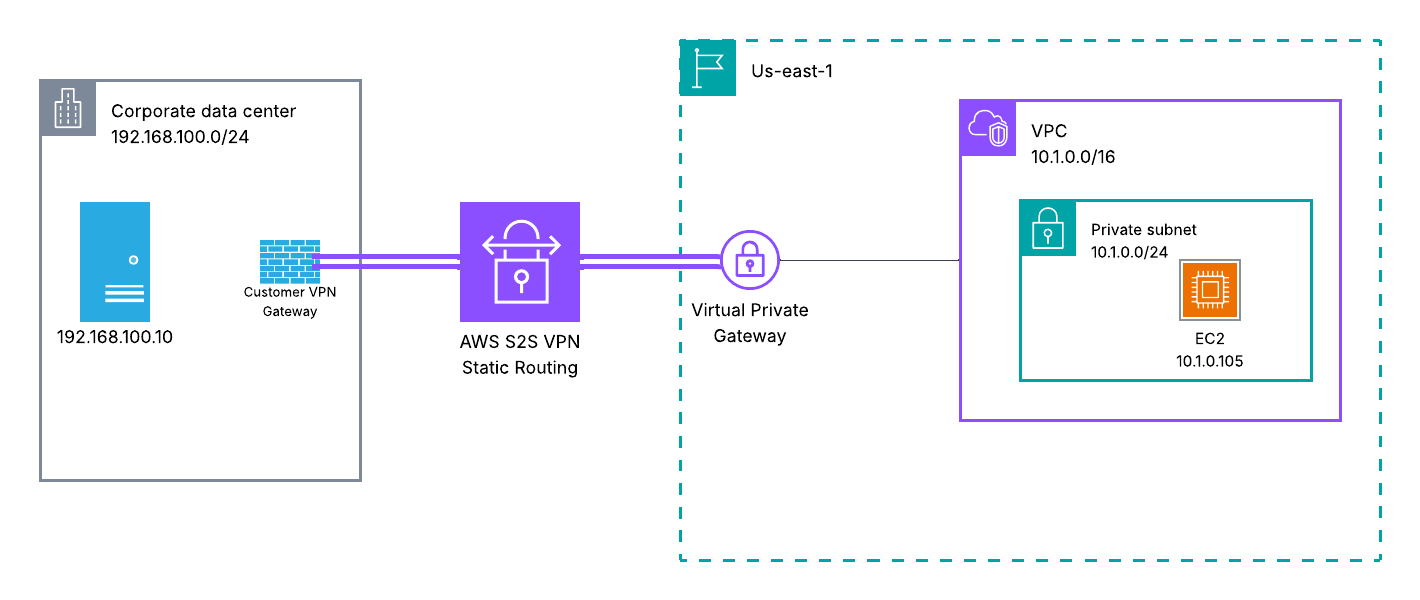
Figure 9. Site-to-Site VPN architecture terminated on a VGW with static routing
Key Differences: VGW vs TGW/Cloud WAN Migration
The migration process for VPN connections terminated on a Virtual Private Gateway differs from Transit Gateway or Cloud WAN in one critical way: you can’t run both connections at the same time. VGW only supports one Site-to-Site VPN connection per customer gateway, which means you have to delete your existing static VPN before creating the dynamic one. You won’t be able to test the new BGP connection beforehand.This creates a mandatory downtime window. Plan for a maintenance window and communicate it to stakeholders in advance.The route propagation works differently too. VGW uses route propagation to automatically add BGP-learned routes to your VPC route tables. TGW handles this through route table associations and propagations at the attachment level.If something goes wrong, you can recreate the static VPN connection using your documented configuration. Keep in mind this will extend your downtime, so document everything carefully before you start.
Migration Steps
- Verify and Document Current Configuration
- Document your existing static routes and VPN configuration
- Note your existing customer gateway IP address and configuration
- Record all VPC CIDR ranges and on-premises networks that need to communicate
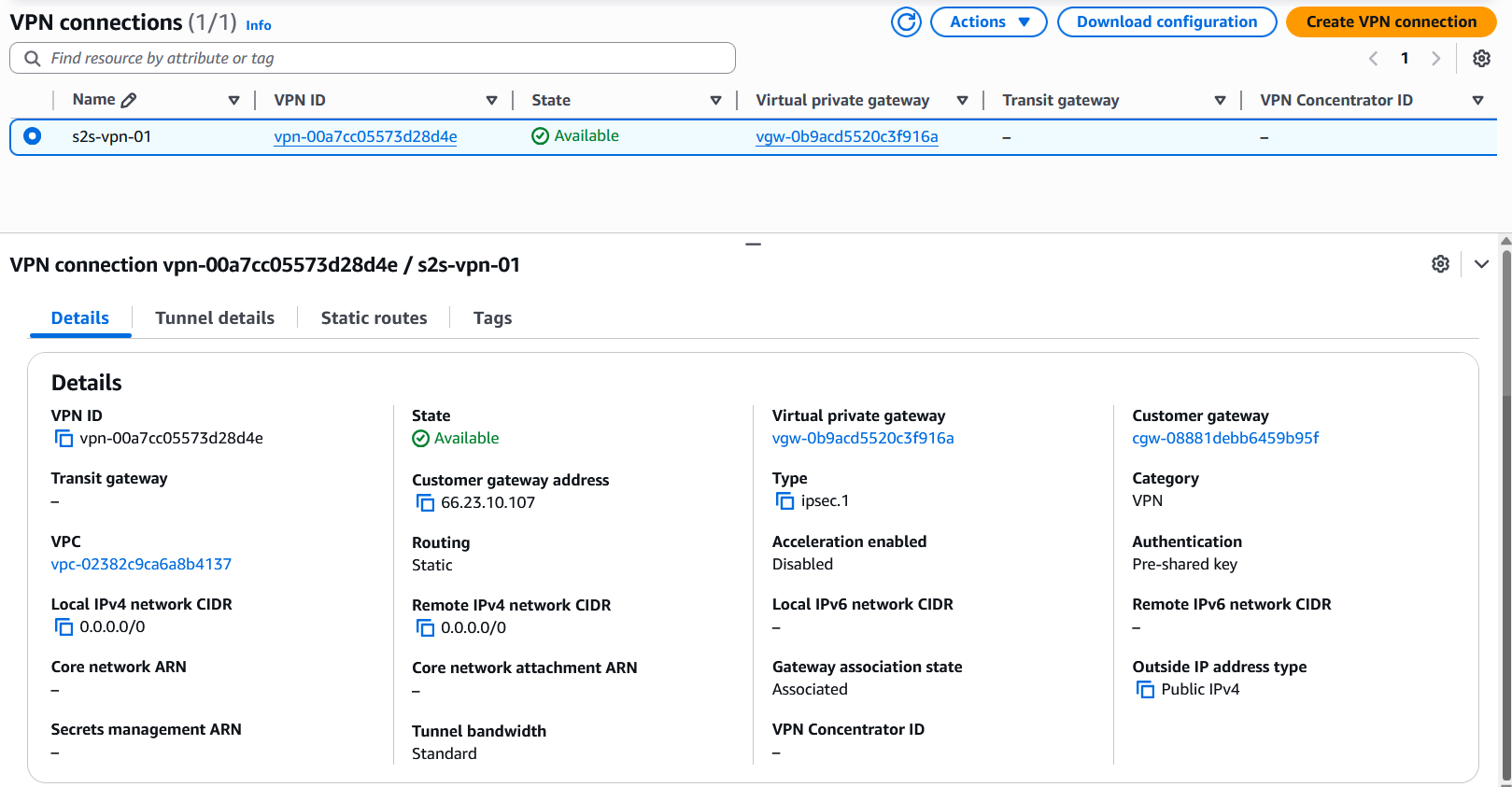
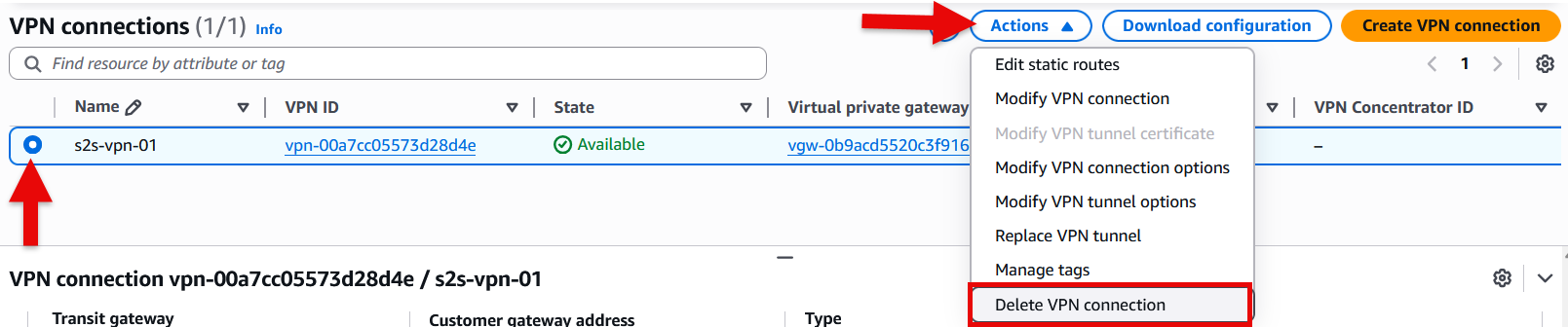
- Delete the Current Site-to-Site VPN Connection with Static Routing
- Select the current VPN connection with static routing
- From the action menu, select “Delete VPN connection”
- In the pop-up menu, type delete to confirm connection deletion then select delete button
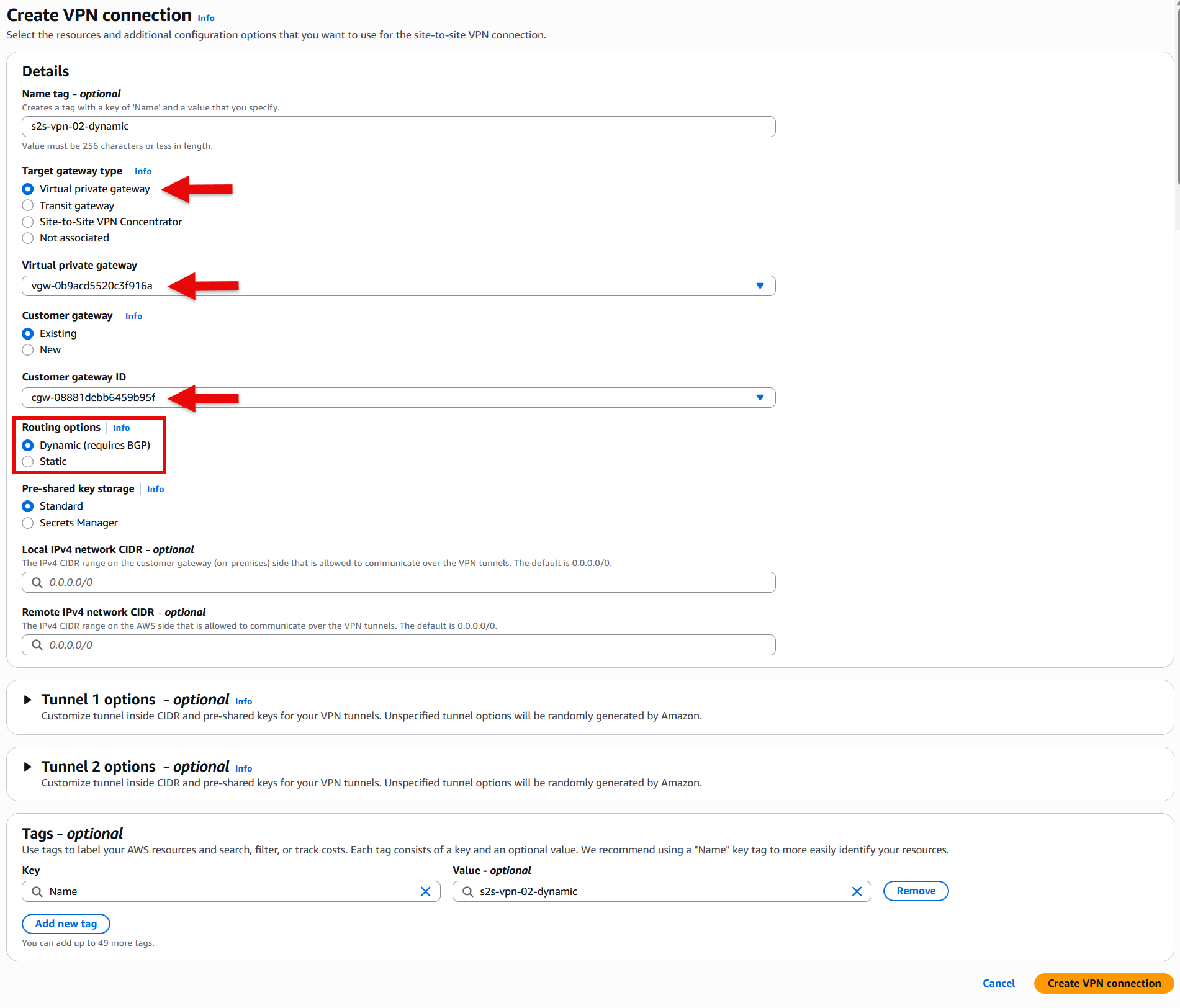
- Create New Dynamic VPN Connection:
- Navigate to the VPC Console > Site-to-Site VPN connections
- Click “Create VPN connection”
- For “Target gateway type” select Virtual private gateway and from the drop-down list select the your virtual private gateway (VGW)
- Select the same customer gateway used by your static VPN (ensure your customer gateway has the correct ASN)
- Choose “Dynamic (requires BGP)” for routing options
- Create the connection
- Download and Apply Configuration:
- Download the configuration file for your device platform
- Apply the new configuration to your on-premises VPN gateway
- Ensure you configure both tunnels for redundancy
- Verify BGP Session Establishment
- Ensure the BGP session on both tunnels is established.
- You can verify that under Tunnel details tab.
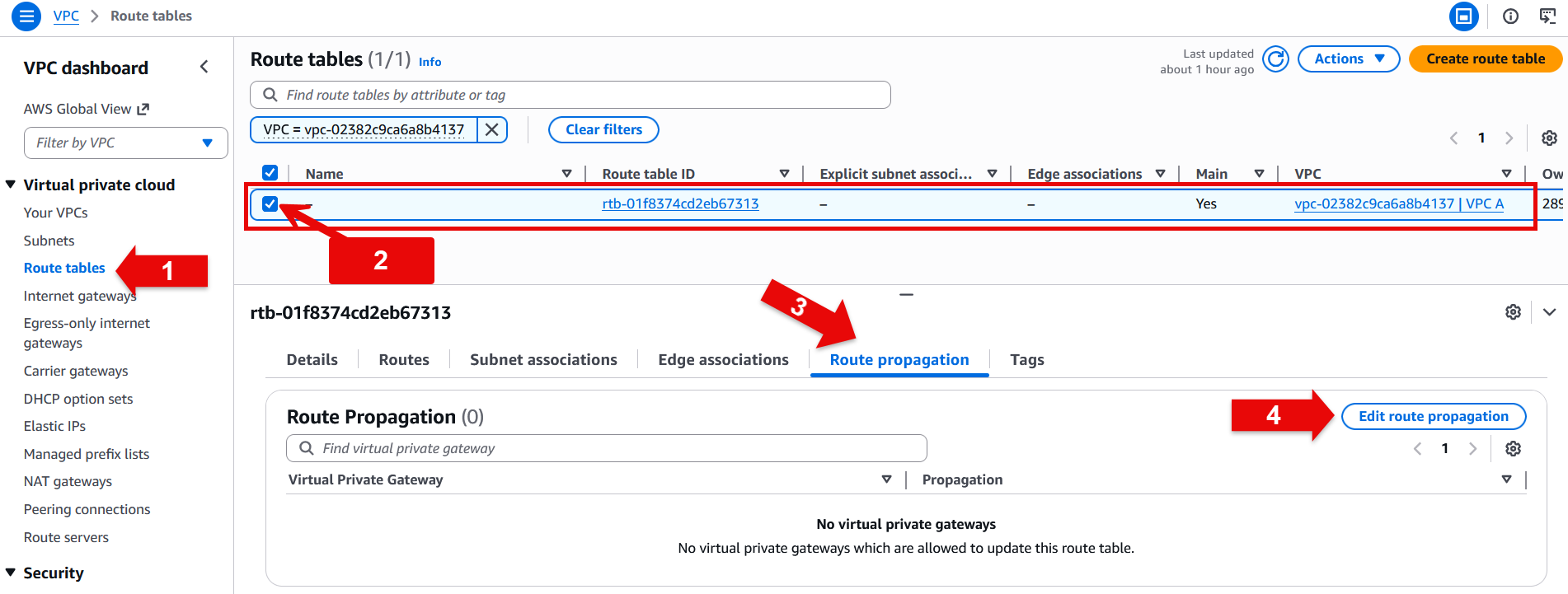
- Ensure route propagation is enabled
- Navigate to Route tables under VPC dashboard
- Select your route table
- Under route propagation tab select Edit route propagation button
- Select the enable check box next to the target virtual private gateway (VGW)
- Choose save
Testing
- Test connectivity to ensure traffic flow over the newly created tunnel
Considerations
VPN Connection Terminated on Cloud WAN
For VPN connections terminated on AWS Cloud WAN, the migration process follows the same Transit Gateway approach with a few key differences. You create a new Site-to-Site VPN connection with dynamic routing, then create a Cloud WAN attachment and connect it to the same segment as your existing Site-to-Site VPN with static routing. Once you verify that the BGP connection is established and routes are being propagated correctly to your Cloud WAN segment, you can safely remove the static routes and the old Site-to-Site VPN connection with static routing.
Summary
In this blog we walked you through migrating an AWS Site-to-Site VPN connection from static routing to dynamic routing using BGP. Key benefits of this migration include automatic failover, route propagation, and more flexible routing options. By following these steps, you can enhance your network connectivity between AWS and your on-premises environment with minimal disruption. For additional hands-on experience with Site-to-Site VPN migration, refer to the Migrate to Dynamic VPN with BGP Workshop.