AWS Compute Blog
Accelerate CPU-based AI inference workloads using Intel AMX on Amazon EC2
This post shows you how to accelerate your AI inference workloads by up to 76% using Intel Advanced Matrix Extensions (AMX) – an accelerator that uses specialized hardware and instructions to perform matrix operations directly on processor cores – on Amazon Elastic Compute Cloud (Amazon EC2) 8th generation instances. You’ll learn when CPU-based inference is cost-effective, how to enable AMX with minimal code changes, and which configurations deliver optimal performance for your models.
Many organizations find that CPU-based inference is more suitable for their production Artificial Intelligence/Machine Learning (AI/ML) workloads after evaluating factors like cost, operational complexity, and infrastructure compatibility. As more organizations deploy AI solutions, improving how models run on standard CPUs has become a critical cost control strategy for workloads where CPU inference provides the right balance of performance and economics.
IDC, a global market intelligence and advisory firm, projects that worldwide AI spending will reach $632 billion by 2028, growing at a 29% compound annual growth rate from 2024, with inference costs representing a significant portion of operational expenses. Deloitte, a leading professional services firm specializing in technology consulting and research, forecasts that inference – the running of AI models – will make up two-thirds of all AI compute by 2026, far exceeding initial training costs. This makes optimizing AI/ML inference on CPU crucial for controlling long-term AI/ML operational expenses.
At the core of AI inference workloads are matrix multiplication operations – the mathematical foundation of neural networks that drives computational demand. These matrix-heavy operations create a performance bottleneck for CPU-based inference, resulting in suboptimal performance for AI/ML workloads. This creates three key challenges for organizations: balancing cost optimization with performance requirements, meeting real-time latency demands, and scaling efficiently with variable workload demands. Intel’s Advanced Matrix Extensions (AMX) technology addresses these challenges by accelerating matrix operations directly on CPU cores, making CPU-based inference competitive and cost-effective.
AMX capabilities and architecture
AMX supports multiple data formats including BF16 which preserves the range of 32-bit floating point operations in half the space, INT8 maximizes throughput when accuracy can be slightly compromised, and FP16 offers a balance between the two. This flexibility lets you match precision to your specific needs.
Introduced in 2023 with 4th Generation Intel Xeon Scalable processors, AMX consists of eight 1KB tile registers (specialized on-chip memory for matrix data) and a Tile Matrix Multiply Unit (TMUL – dedicated hardware for matrix calculations) that enables processors to perform 2048 INT8 operations or 1024 BF16 operations per cycle. These tile registers provide efficient matrix storage, reducing memory access overhead and improving computational efficiency for matrix operations central to neural networks. For real-world customer workloads, this translates to significantly faster inference times for transformer models, recommendation systems, and natural language processing tasks, while reducing the total cost of ownership through improved resource utilization and lower infrastructure requirements.
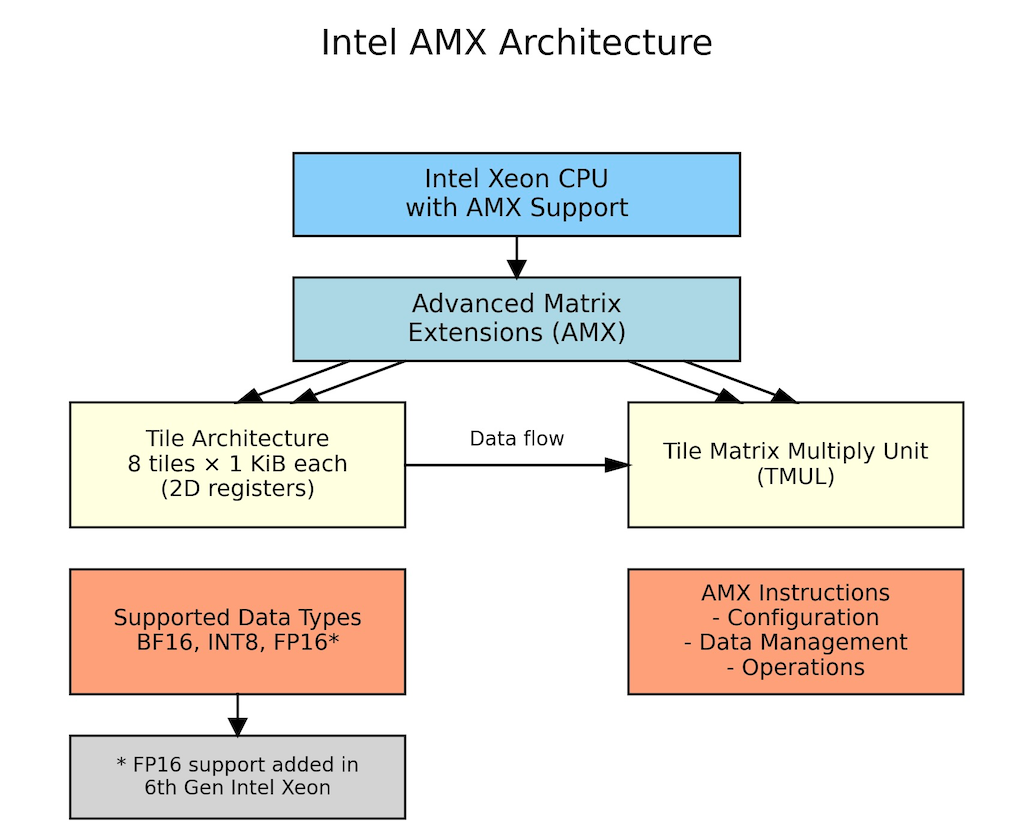
Figure 1: AMX Architecture showing AMX tile registers, processing units, and data flow within CPU core
Note: AMX operations, including tile setup and memory-to-tile data movement (which are handled automatically by the system), introduce small overhead that may outweigh benefits for smaller models or single-batch processing where insufficient matrix operations cannot amortize these costs, making batch size optimization critical for performance gains.
When to choose CPU inference with AMX
CPU inference with AMX acceleration benefits workloads including:
Batch processing and traditional ML: Content summarization, recommendation systems, and analytical workloads benefit from CPU’s cost efficiency and ability to handle sparse data structures and branching logic.
Small to medium-sized models: Models under 7B parameters and batch sizes of 8-16 samples achieve excellent performance through optimized threading, making CPUs ideal for applications like fraud detection and chatbots.
Variable demand workloads: E-commerce systems and applications with unpredictable traffic patterns can quickly scale CPU instances up or down based on demand, avoiding the fixed costs of dedicated accelerator hardware that sits idle during low-traffic periods.
Complex business logic: Applications like financial risk assessment and content moderation that need to combine ML predictions with business rules and conditional logic work well on CPUs, which handle mixed workloads better than specialized accelerators.
Implementation: AMX optimization with PyTorch
PyTorch, a popular open-source machine learning framework, includes built-in Intel optimizations through oneDNN (Intel’s Deep Neural Network library) that automatically use AMX when available. Setup requires installing dependencies and configuring environment variables for optimal performance.
Install dependencies
# Install transformers and torch
pip install torch transformers
Configure environment variables
These environment variables tell oneDNN library how to optimize your inference workload for AMX.
- Enable AMX instruction set (tells oneDNN to use AMX tiles for matrix operations):
export DNNL_MAX_CPU_ISA=AVX512_CORE_AMX - Optimize thread affinity (binds threads to CPU cores for better cache performance):
export KMP_AFFINITY=granularity=fine,compact,1,0 - Use all available CPU cores for parallel processing:
export OMP_NUM_THREADS=$(nproc) - Cache compiled kernels (avoids recompilation overhead on subsequent runs):
export ONEDNN_PRIMITIVE_CACHE_CAPACITY=4096 - Set default precision to BF16 (enables automatic AMX acceleration):
export ONEDNN_DEFAULT_FPMATH_MODE=bf16 - (Optional) Enable verbose logging to verify AMX activation:
export ONEDNN_VERBOSE=1
BF16 optimization example
With environment variables configured, implementing BF16 optimization requires minimal to no code changes. The following example demonstrates how PyTorch automatically leverages AMX tile registers for matrix operations when BF16 precision is used.
Note: This is a simplified example for demonstration purposes; adapt the code to your specific use case and requirements.
import torch
from transformers import AutoTokenizer, AutoModelForCausalLM
import time

# Load model and tokenizer from HuggingFace
model_name = "google/gemma-3-1b-it"

model_revision = "dcc83ea841ab6100d6b47a070329e1ba4cf78752"
tokenizer = AutoTokenizer.from_pretrained(
    model_name,
    revision=model_revision
)
model = AutoModelForCausalLM.from_pretrained(
    model_name,
    revision=model_revision
)
# Fix tokenizer padding issue for batch processing
if tokenizer.pad_token is None:
    tokenizer.pad_token = tokenizer.eos_token

# Enable BF16 precision for automatic AMX acceleration
model = model.to(dtype=torch.bfloat16)
model.eval()  # Set to inference mode

# Inference function with BF16 autocast
def run_optimized_inference(prompts):
    inputs = tokenizer(prompts, padding=True,
                      return_tensors="pt")  # Tokenize input

    with torch.no_grad():  # Disable gradients for inference
        with torch.amp.autocast('cpu',
                               dtype=torch.bfloat16):  # BF16 autocast
            outputs = model.generate(
                **inputs,
                max_length=100,     # Set maximum sequence length
                do_sample=False     # Use greedy decoding
            )
    return outputs

# Example usage with performance measurement
prompts = ["What are the benefits of cloud computing?"]
start_time = time.time()
results = run_optimized_inference(prompts)  # Run BF16-optimized inference
elapsed_time = time.time() - start_time
tokens_generated = len(results[0]) - len(tokenizer.encode(
    prompts[0]))  # Count new tokens

# Display results and performance metrics
print(tokenizer.decode(results[0], skip_special_tokens=True))
print(f"Latency: {elapsed_time*1000:.1f}ms, "
      f"Throughput: {tokens_generated/elapsed_time:.1f} "
      f"tokens/sec")
Performance benchmarks
To validate AMX performance benefits, we conducted benchmarks across multiple popular language models representing different use cases and model sizes.
Benchmarking methodology and environment
We tested two improvements: hardware generation advances (m8i vs m7i) and AMX optimization impact (FP32 vs BF16). This shows you both upgrade paths for your workloads.
- Models tested: BigBird-RoBERTa-large (355M), Microsoft DialoGPT-large (762M), Google Gemma-3-1b-it (1B), DeepSeek-R1-Distill-Qwen-1.5B (1.5B), Llama-3.2-3B-Instruct (3B), YOLOv5 (tested with 30 images at ~1200×800 resolution with 5 iterations for each image)
- Amazon EC2 instance types: m8i.4xlarge, m7i.4xlarge (8th & 7th gen general-purpose Amazon EC2 instances with 16 vCPUs and 64 GiB memory, both AMX-capable)
- Batch sizes: 1, 8, 32 (number of input samples processed simultaneously in a single inference call)
- Iterations: 5 runs per configuration
- Comparison types:
- Instance generation comparison (m8i vs m7i performance)
- AMX optimization impact (32-bit floating-point (FP32) vs Brain Floating Point 16 (BF16) on same instance)
- Optimizations: FP32 baseline vs BF16 AMX
- Framework: PyTorch 2.8.0 (which has built-in Intel optimizations)
- Region: AWS us-west-2
- Measurement methodology: In our benchmarks, ‘inference latency’ represents the complete model inference execution time including input tokenization and full sequence generation (for generative models) or complete forward pass (for non-generative models). Each measurement is the average of 5 iterations after warm-up iterations, excluding model loading time. We use this metric because AMX’s matrix multiplication acceleration improves performance throughout the complete forward pass.
Note: Throughout this blog, FP32 refers to the default 32-bit floating-point precision, while BF16 refers to Brain Floating Point 16-bit precision with AMX acceleration enabled.
Disclaimer: Performance results are based on internal testing and may vary depending on specific workloads, configurations, and environments.
Detailed result: BigBird-RoBERTa-large
This benchmark represents document classification, content summarization, and text analysis workloads typical in batch processing where high throughput is desirable and offline inference scenarios where strict latency requirements are not critical.
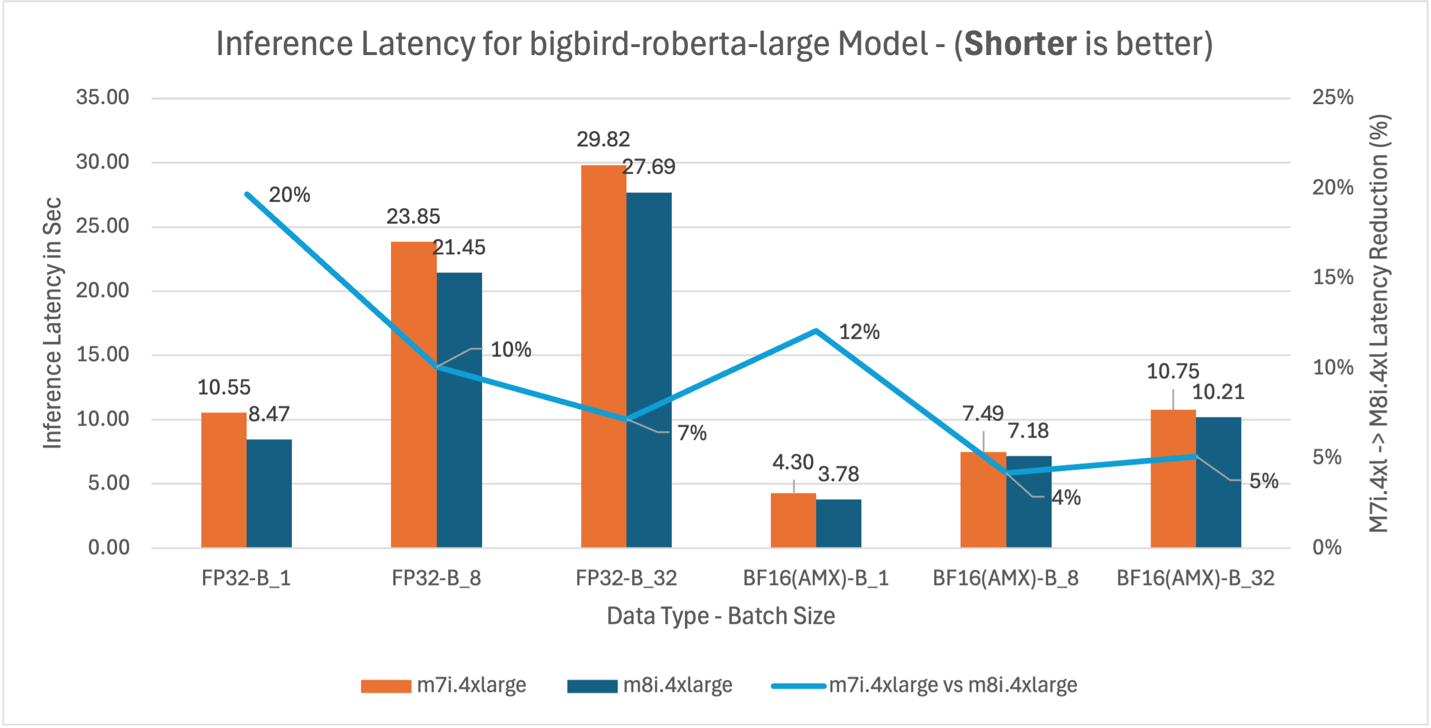
Figure 2: m7i.4xlarge vs m8i.4xlarge inference latency comparison for model BigBird-RoBERTa-large (355M parameters)
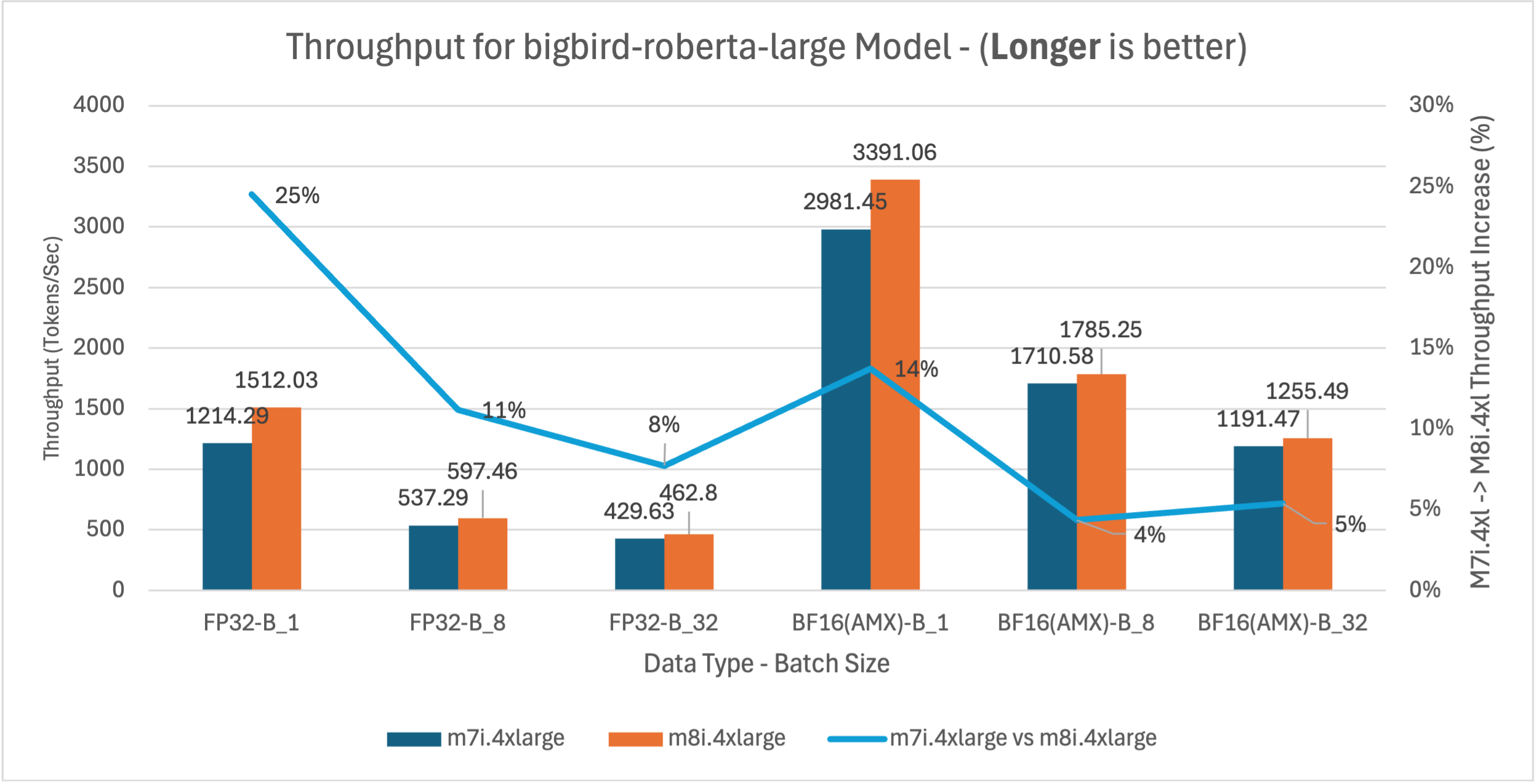
Figure 3: m7i.4xlarge vs m8i.4xlarge throughput comparison for BigBird-RoBERTa-large model across batch sizes 1, 8, and 32
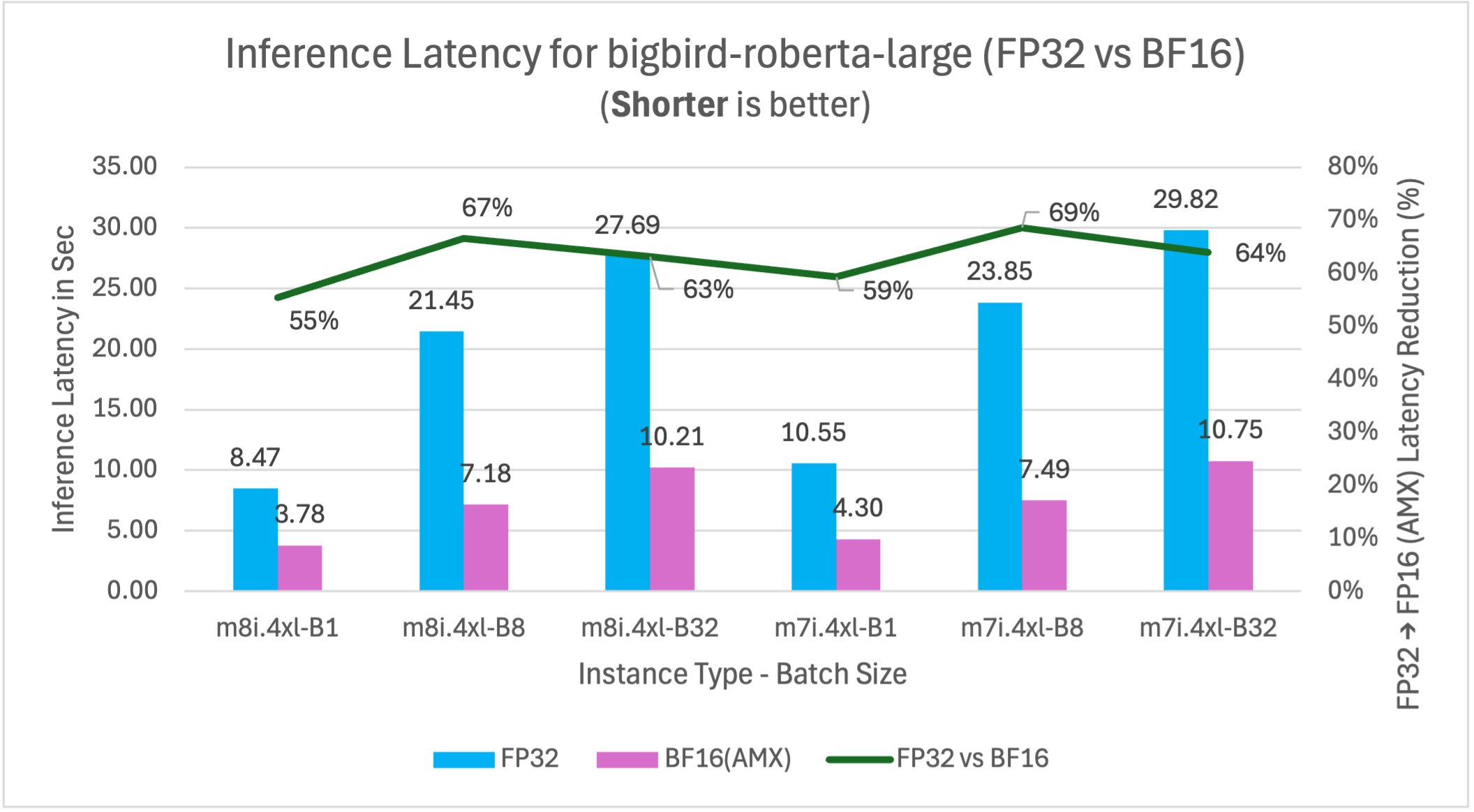
Figure 4: FP32 vs BF16 inference latency comparison for model BigBird-RoBERTa-large (355M parameters) on m7i.4xlarge and m8i.4xlarge instances across batch sizes
BigBird-RoBERTa-large model benchmarking demonstrates three key performance improvements. Figure 2 shows m8i hardware delivers 4-20% latency reduction across batch sizes compared to m7i for both FP32 and BF16 with AMX, providing immediate benefits without application changes. With AMX and BF16, performance gains decrease at higher batch sizes as AMX overhead exceeds benefits for smaller models like BigBird-RoBERTa-large. Figure 3 validates these improvements with corresponding 4-25% throughput gains, enabling better resource utilization for production applications. Figure 4 demonstrates that enabling AMX with BF16 optimization provides the most significant impact, reducing m8i latency by 55-67% compared to non-AMX FP32 baseline, enabling 2-3x higher processing capacity and reduced compute costs.
The analysis above demonstrates the methodology for interpreting benchmark results using BigBird-RoBERTa-large as a representative example. The remaining models (DialoGPT-large, Gemma-3-1b-it, DeepSeek-R1-Distill-Qwen-1.5B, and Llama-3.2-3B-Instruct) follow identical testing procedures and exhibit similar performance patterns, with variations primarily in the magnitude of improvements based on model size and architecture. The comprehensive analysis of five models and their performance implications are synthesized in the following section.
Benchmarking result for additional models
To validate AMX’s effectiveness across diverse AI workloads, we benchmarked five additional models representing different use cases and model sizes. Each model follows the same testing methodology described above, with performance patterns showing how AMX benefits vary based on model architecture, parameter count, and batch size.
DialoGPT-large (762M) – Conversational AI
This benchmark represents conversational AI, chatbots, and real-time dialogue systems where low latency and consistent response times are critical for user experience.
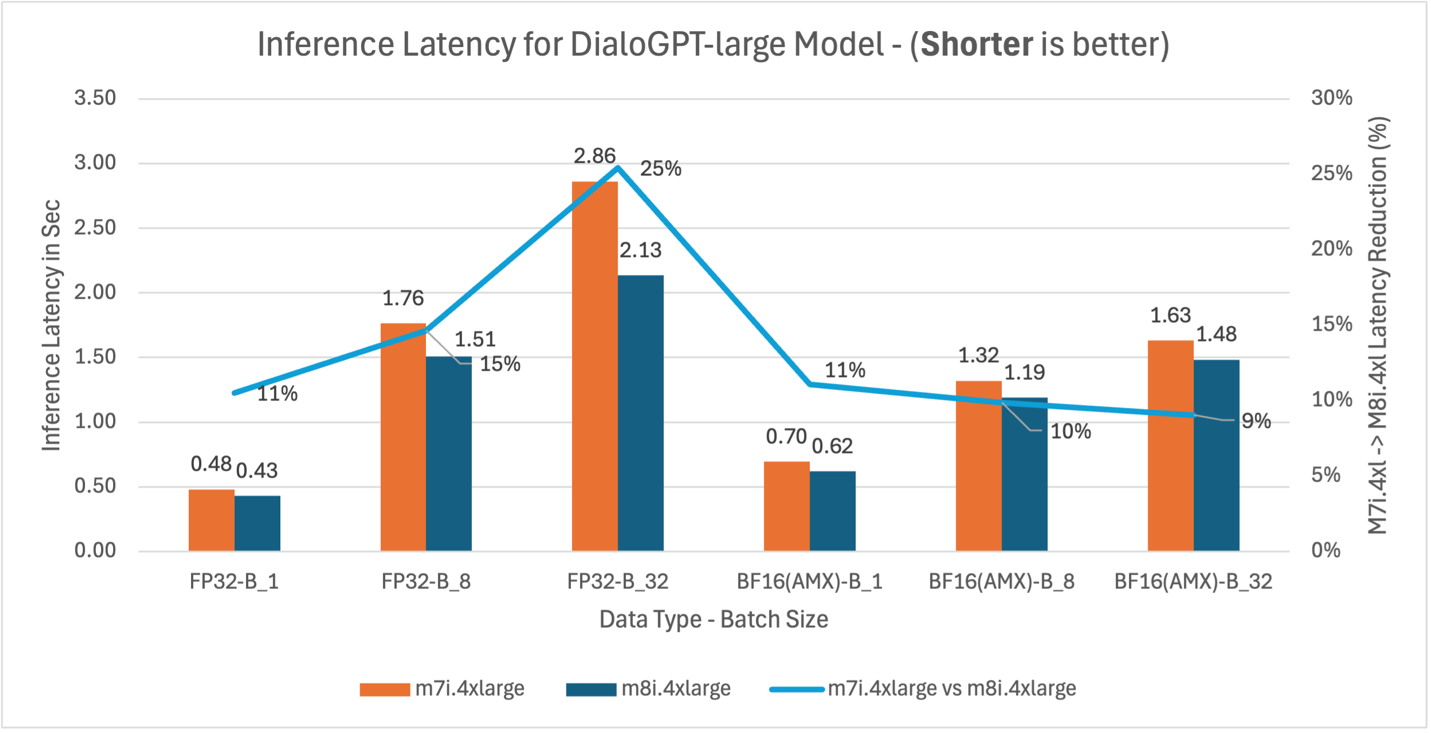
Figure 5: m7i.4xlarge vs m8i.4xlarge inference latency comparison for model DialoGPT-large (762M parameters)
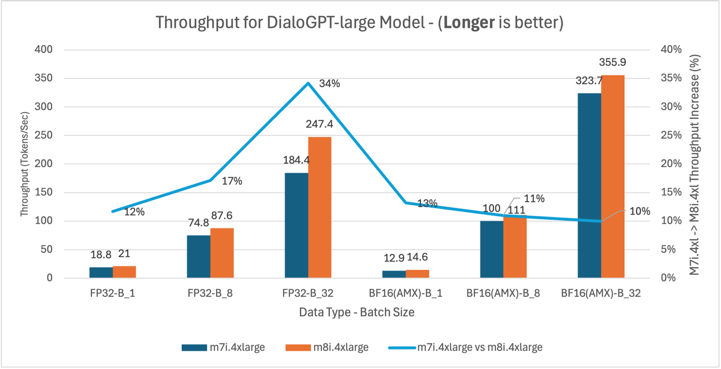
Figure 6: m7i.4xlarge vs m8i.4xlarge throughput comparison for DialoGPT-large model across batch sizes 1, 8, and 32
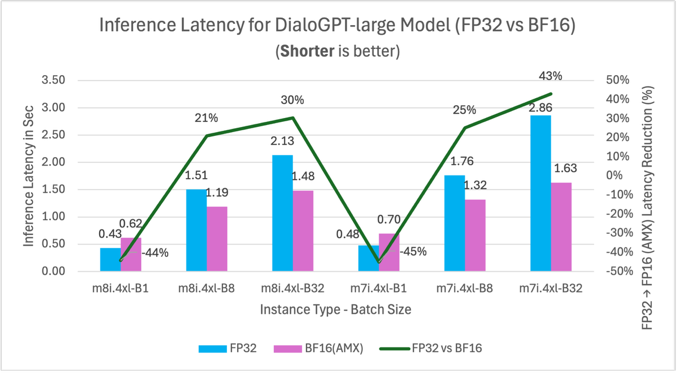
Figure 7: FP32 vs BF16 inference latency comparison for model DialoGPT-large (762M parameters) on m7i.4xlarge and m8i.4xlarge instances across batch sizes
Gemma-3-1b-it (1B) – General Purpose
This benchmark represents general-purpose language understanding tasks, content generation, and smaller model deployments suitable for cost-sensitive applications and variable demand workloads.
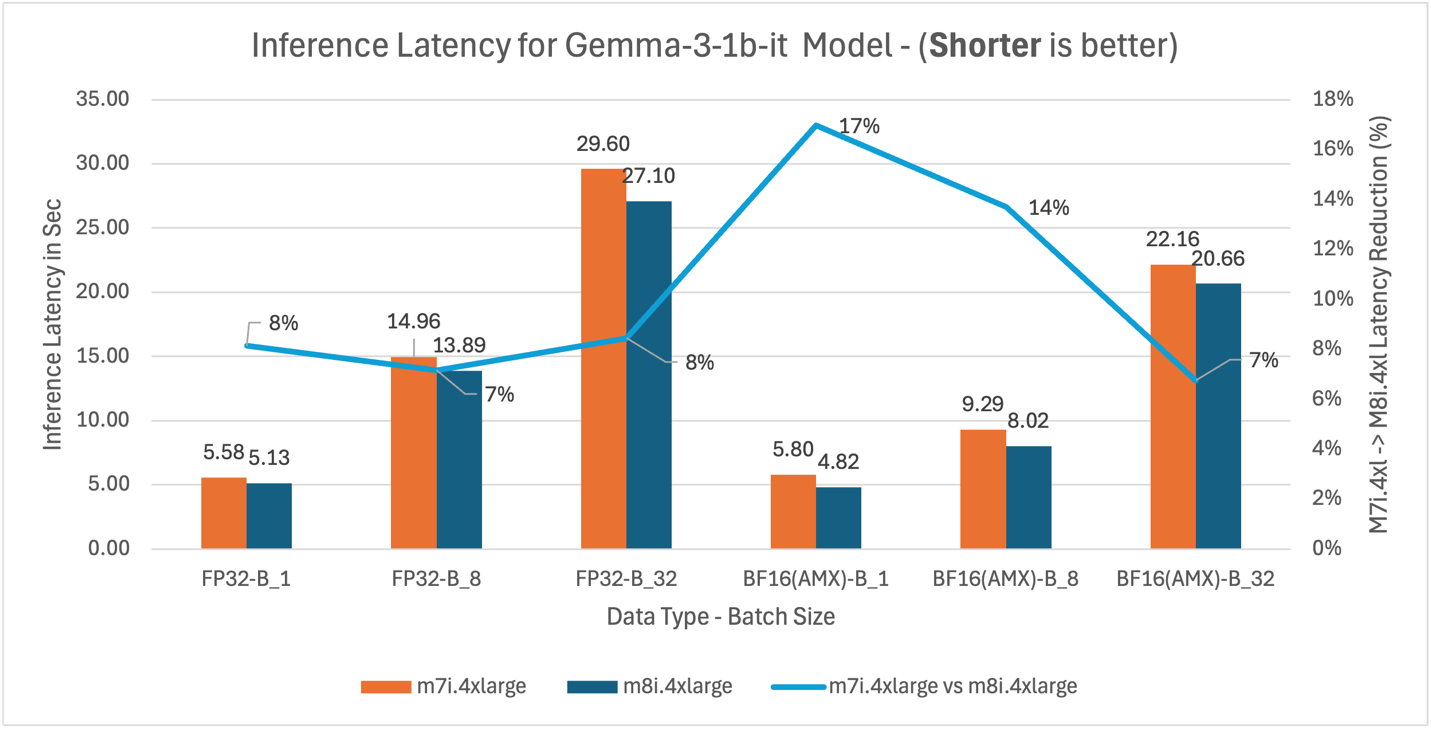
Figure 8: M7i.4xlarge vs M8i.4xlarge inference latency comparison for model Gemma-3-1b-it (1B parameters)
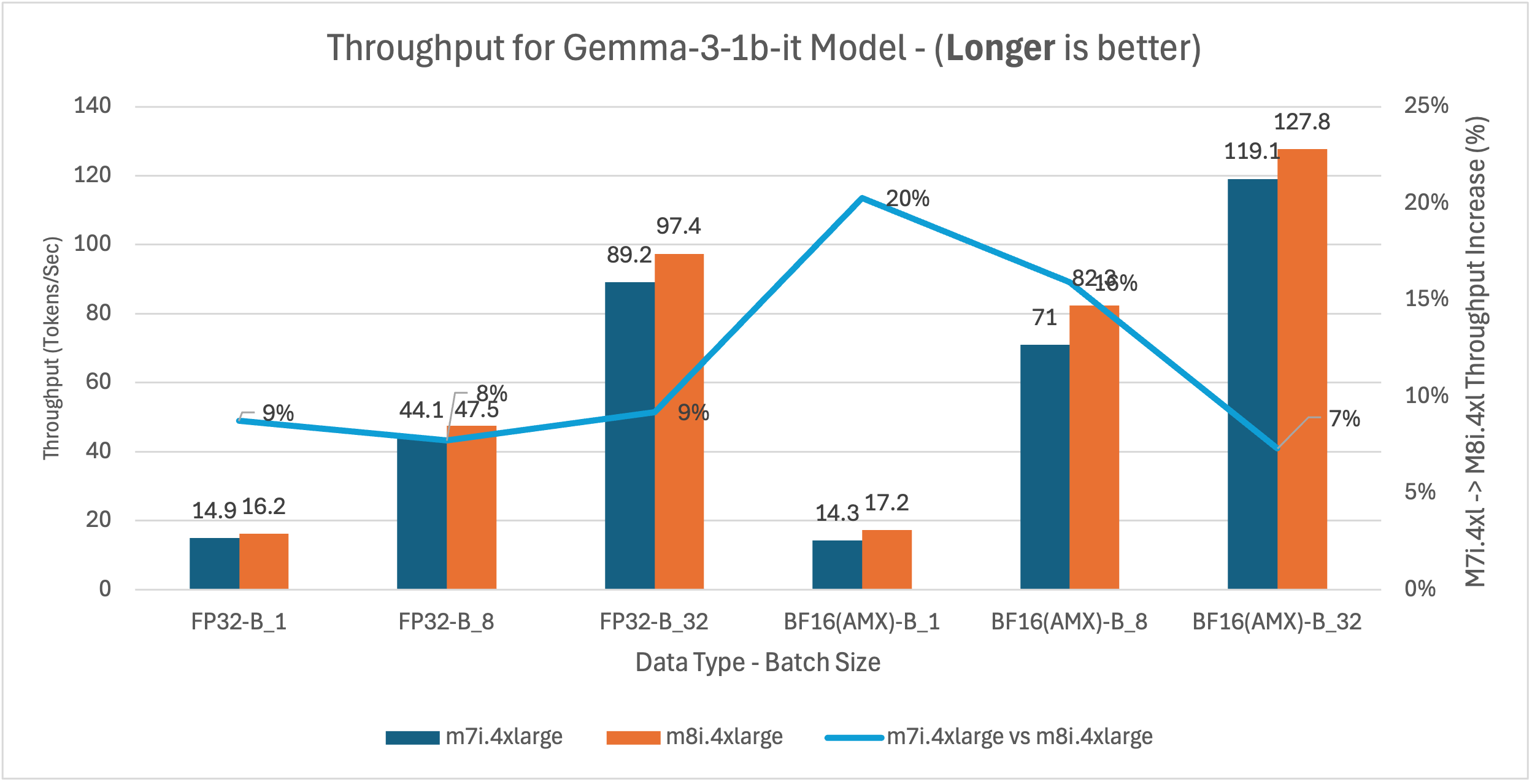
Figure 9: m7i.4xlarge vs m8i.4xlarge latency and throughput comparison for Gemma-3-1b-it across model batch sizes 1, 8, and 32
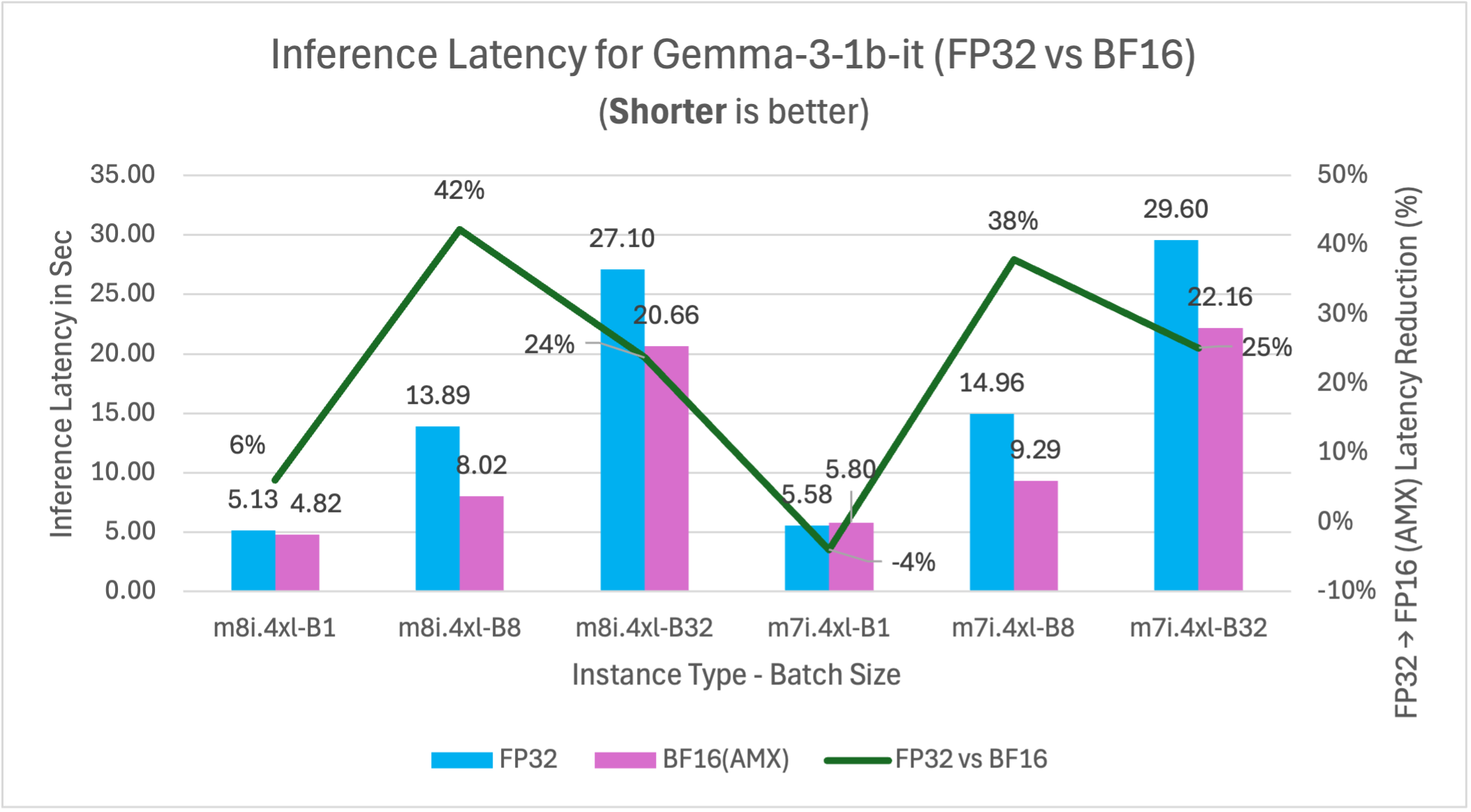
Figure 10: FP32 vs BF16 inference latency comparison for model Gemma-3-1b-it (1B parameters) on m7i.4xlarge and m8i.4xlarge instances across batch sizes
DeepSeek-R1-Distill-Qwen-1.5B (1.5B) – Reasoning
This benchmark represents reasoning and analytical workloads, including complex decision-making systems, financial analysis, and applications requiring sophisticated logic processing.
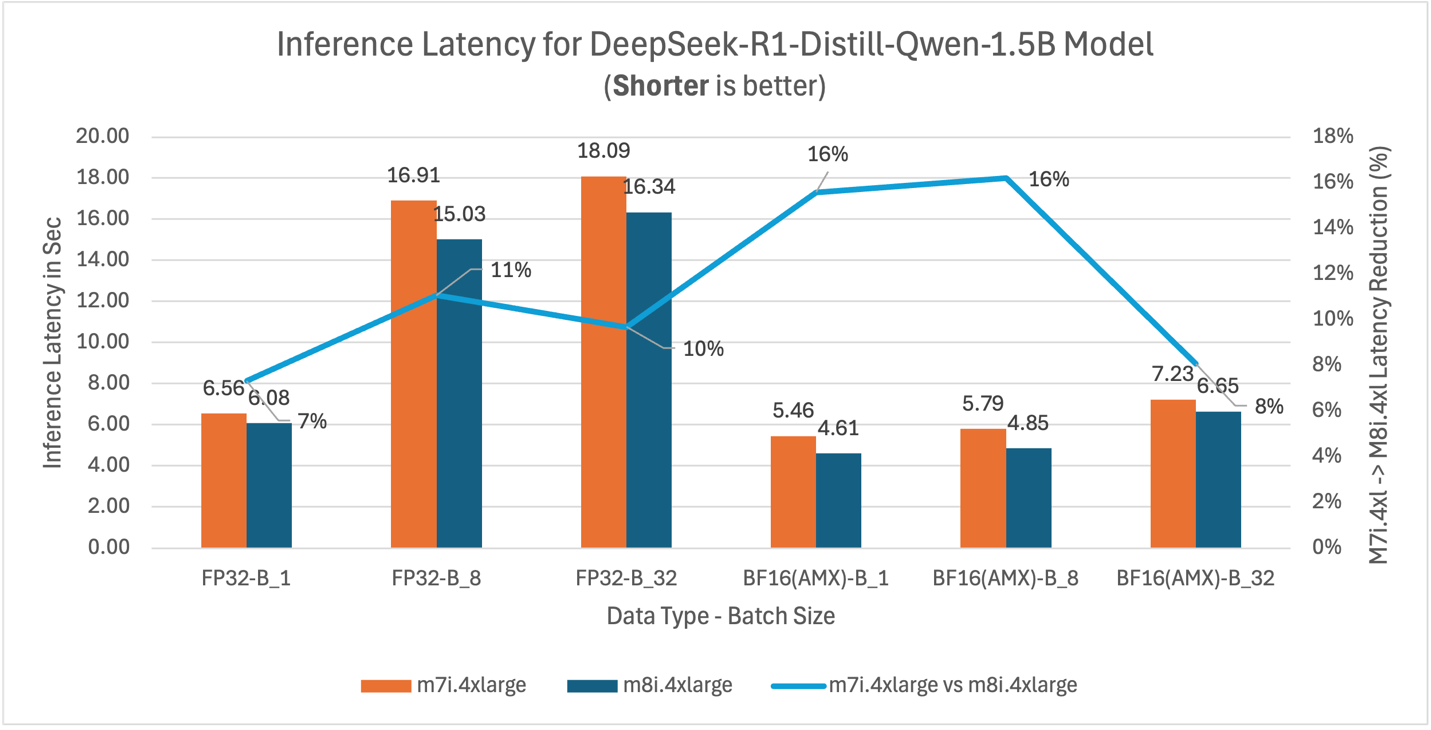
Figure 11: m7i.4xlarge vs m8i.4xlarge inference latency comparison for model DeepSeek-R1-Distill-Qwen-1.5B (1.5B parameters)
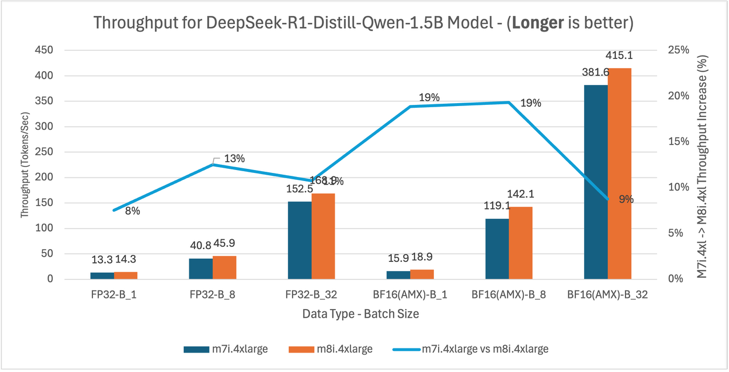
Figure 12: m7i.4xlarge vs m8i.4xlarge latency and throughput comparison for DeepSeek-R1-Distill-Qwen-1.5B model across batch sizes 1, 8, and 32
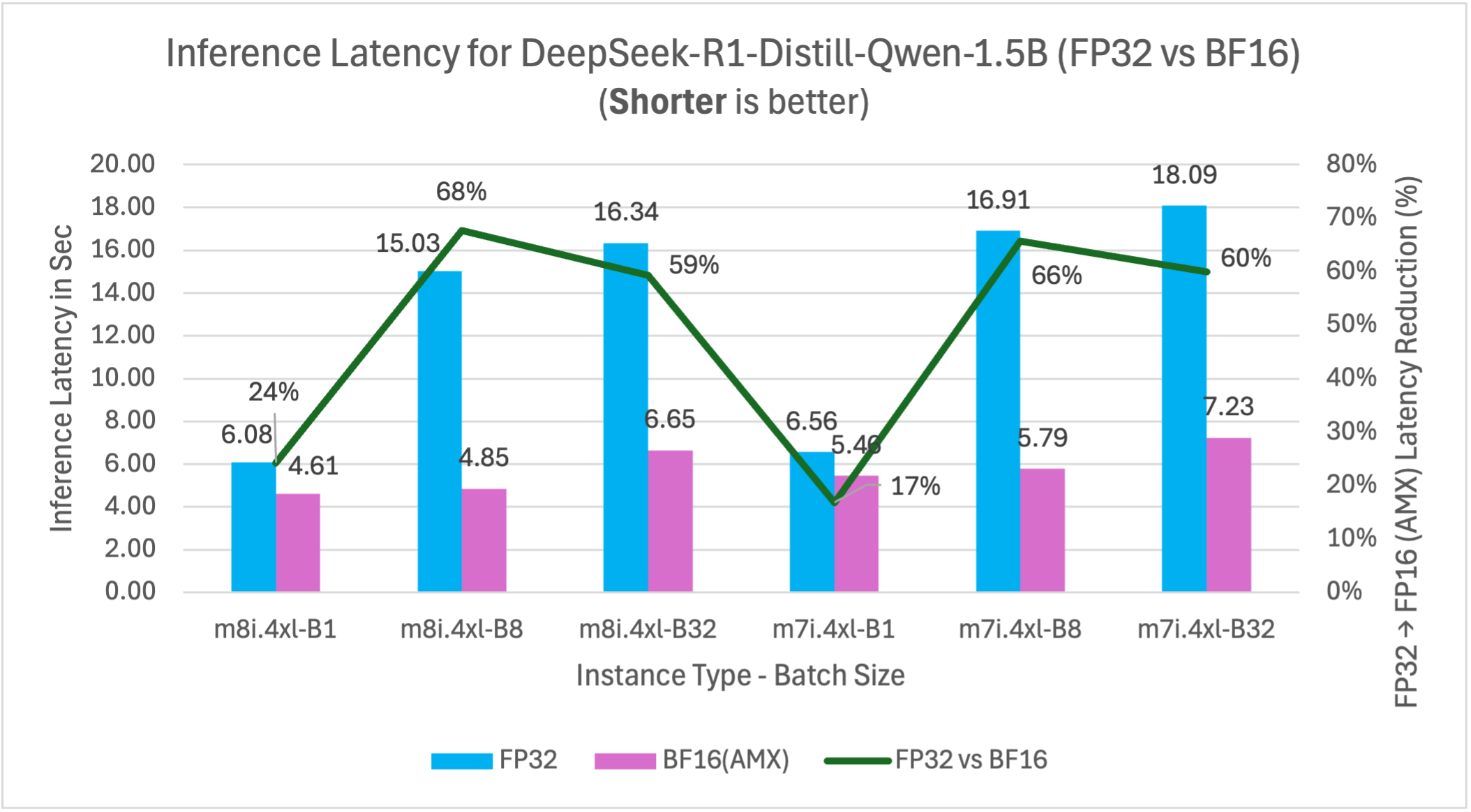
Figure 13: FP32 vs BF16 inference latency comparison for model DeepSeek-R1-Distill-Qwen-1.5B (1.5B parameters) on m7i.4xlarge and m8i.4xlarge instances across batch sizes
Llama-3.2-3B-Instruct (3B) – Large model
This benchmark represents larger model deployments for complex instruction-following tasks, advanced content generation, and applications requiring higher model capacity while maintaining cost efficiency.
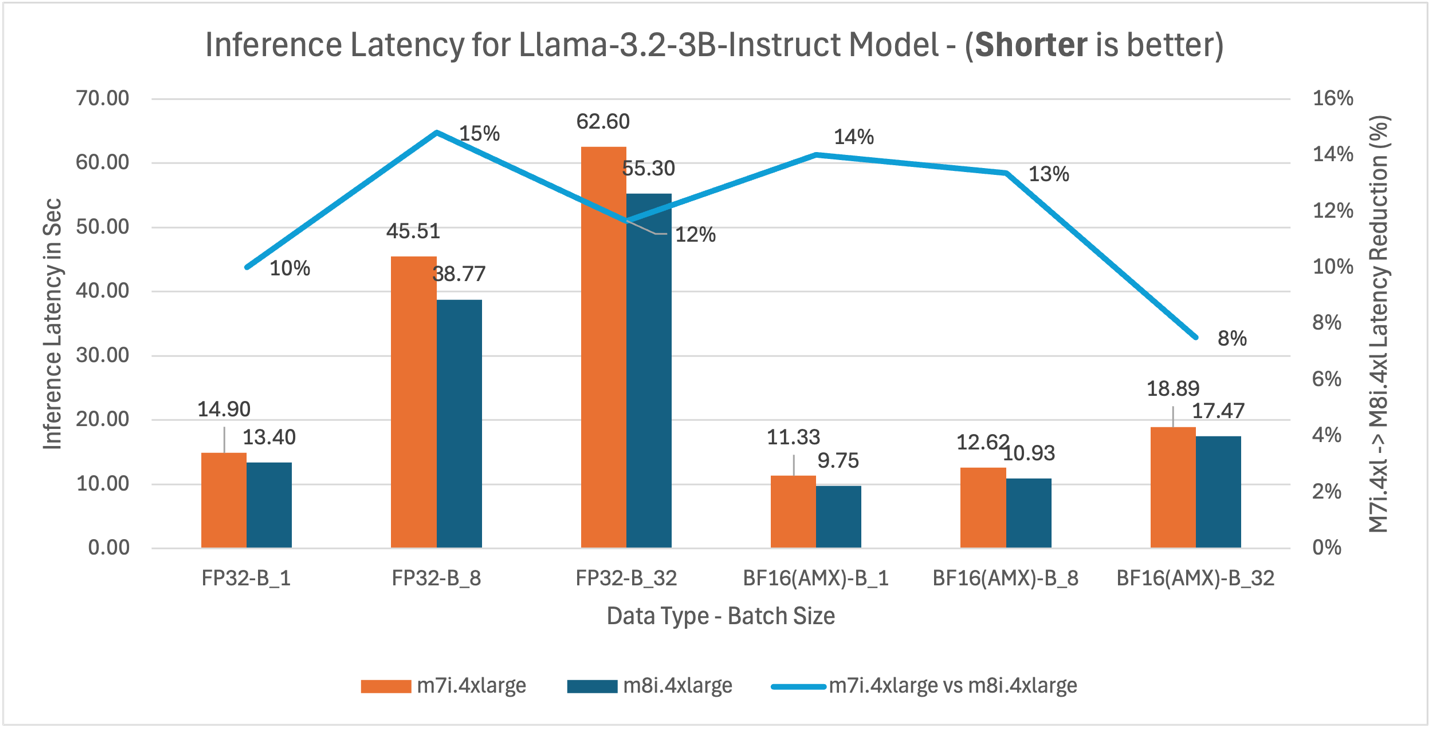
Figure 14: m7i.4xlarge vs m8i.4xlarge inference latency comparison for model Llama-3.2-3B-Instruct (3B parameters)
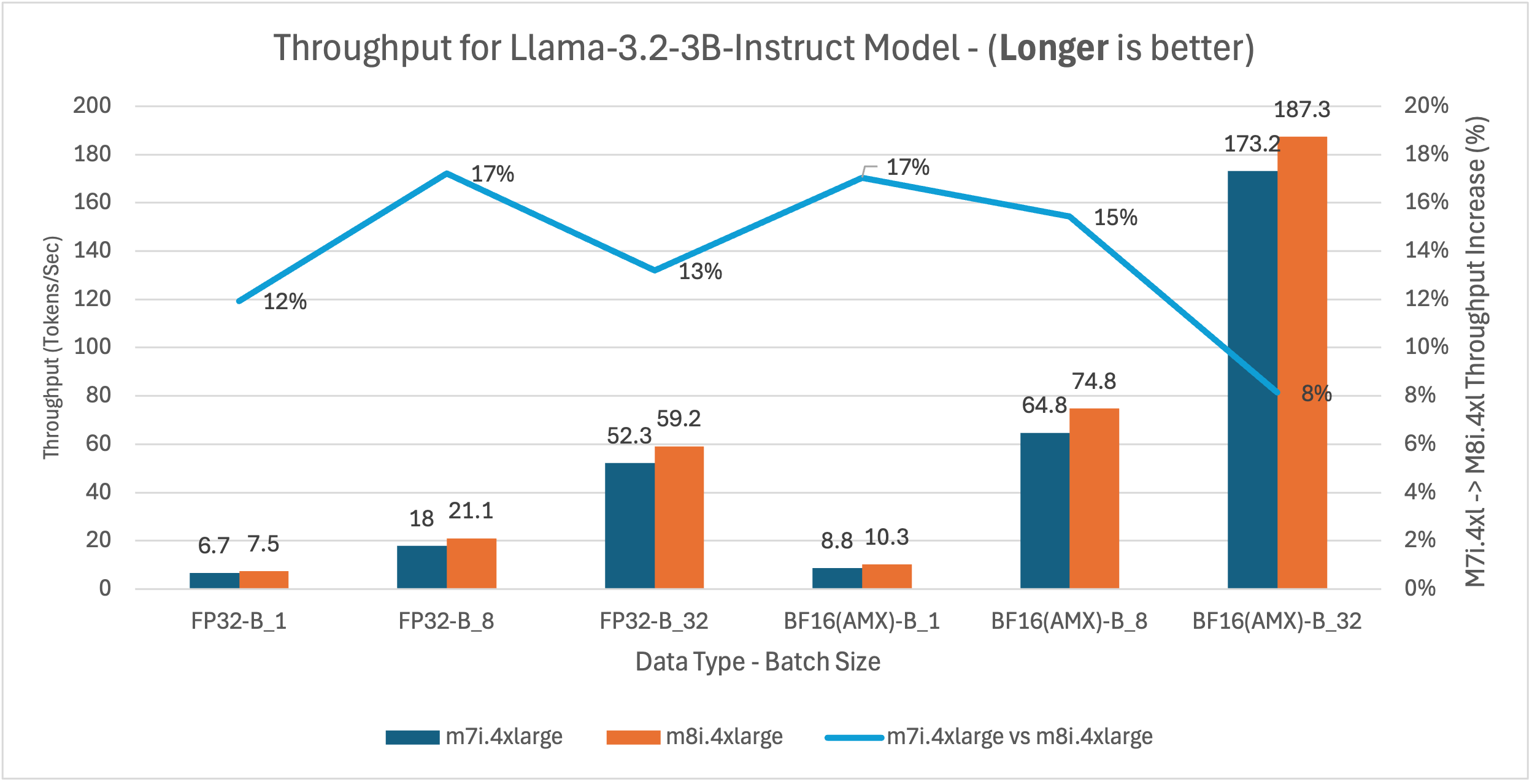
Figure 15: m7i.4xlarge vs m8i.4xlarge latency and throughput comparison for Llama-3.2-3B-Instruct model across batch sizes 1, 8, and 32
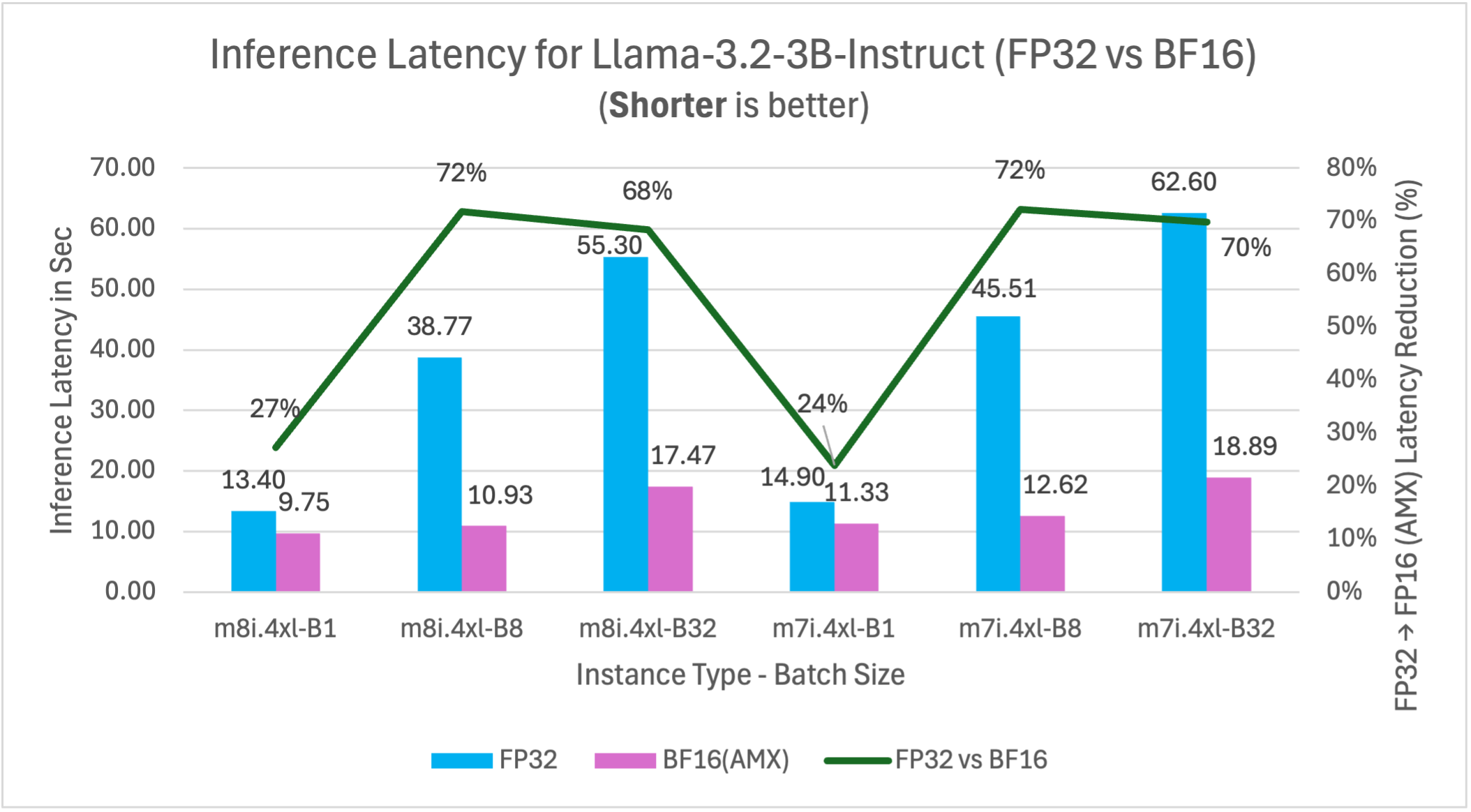
Figure 16: FP32 vs BF16 inference latency comparison for model Llama-3.2-3B-Instruct (3B parameters) on m7i.4xlarge and m8i.4xlarge instances across batch sizes
Yolov5 – Computer vision model
This benchmark represents computer vision workloads including object detection, image classification, and real-time video processing applications where consistent throughput is important for production deployments.
| Instance type | Inference latency in Sec (Processing time per image) |
Throughput (Image processed per sec) |
||
| FP32 | BF16 | FP32 | BF16 | |
| m8i.4xlarge | 0.034 | 0.029 | 29.23 | 34.63 |
| m7i.4xlarge | 0.038 | 0.031 | 26.39 | 32.28 |
| m8i improvement | 10.5% | 6.5% | 10.8% | 7.3% |
Key insights: m8i instances deliver 7-11% better performance than m7i across both precision formats. Combining hardware upgrade with AMX optimization, m8i with BF16 delivers up to 24% lower latency and 31% higher throughput compared to m7i with FP32.
Benchmark result summary
The detailed graphs above demonstrate consistent performance patterns across tested models. Key findings:
M8i vs M7i instance performance
m8i instances deliver 9-14% average and up to 20% better performance than m7i across the tested models through hardware advances: up to 4.6x larger L3 cache, higher base frequencies, up to 2.5x higher DDR5 bandwidth, and enhanced AMX execution with FP16 support.
| Model | Use Case | m8i average latency improvement* |
| BigBird-RoBERTa-large (355M) | Document analysis | 10% |
| DialoGPT-large (762M) | Conversational AI | 14% |
| Gemma-3-1b-it (1B) | General purpose | 10% |
| DeepSeek-R1 (1.5B) | Reasoning tasks | 11% |
| Llama-3.2-3B (3B) | Large model deployment | 12% |
| YOLOv5 | Computer vision | 9% |
* Average across all tested configurations (FP32 and BF16 at batch sizes 1, 8, and 32)
AMX acceleration impact (FP32 vs BF16)
BF16 precision with AMX delivers 21-72% performance improvements at batch sizes of 8 and above compared to FP32 baseline on the same instance type. These results compare FP32 vs BF16 performance on m8i.4xlarge, with performance gains varying by model size and batch configuration. Larger batch sizes show greater AMX benefits.
| Model | Latency improvement (%) | ||
| Batch 1 | Batch 8 | Batch 32 | |
| BigBird-RoBERTa-large | 55 | 67 | 63 |
| DialoGPT-large | – 44* | 21 | 30 |
| Gemma-3-1b-it | 6 | 42 | 24 |
| DeepSeek-R1 | 24 | 68 | 59 |
| Llama-3.2-3B | 27 | 72 | 68 |
* At batch size 1, DialoGPT-large’s autoregressive decoding generates tokens sequentially, producing many small matrix operations where AMX tile setup overhead exceeds the acceleration benefit. At batch sizes 8 and above, multiple sequences are processed in parallel, creating larger matrix operations that amortize this overhead and deliver 21-30% improvement.
Performance patterns by batch size
Larger models (1B+ parameters) show consistently better AMX performance across the tested batch sizes:
- Batch size 1: Mixed results – larger models show 6-27% improvement, smaller models may experience AMX overhead
- Batch size 8: Strong performance gains of 21-72% across the tested models, with larger models showing greater benefits
- Batch size 32: Significant improvements of 24-68% for most models, demonstrating AMX’s batch processing strength
Batch size optimization guidelines
AMX performance scales with batch size, with optimal range varies by model size. Performance saturates beyond batch 16 due to hardware limits including memory bandwidth and compute bottlenecks.
| Model Size | Performance Gain | Recommended Batch Size | Notes |
| <1B parameters | 21-67% | 8-32 | Batch 1 results vary by architecture* |
| 1-2B parameters | 42-68% | 4-16 | 6-24% gains even at batch 1 |
| 3B+ parameters | 27-72% | 1-8 | Benefits across batch sizes |
* Encoder models (BigBird) show 55% gains at batch 1; autoregressive models (DialoGPT) may experience overhead.
Combined performance benefits
When we combine AMX optimization with 8th generation instances (m8i), the performance improvements compound significantly. For example, Llama-3.2-3B-Instruct running with BF16 AMX on m8i instances can achieve up to 76% better performance compared to FP32 inference on m7i instances at optimal batch sizes (batch 8: m7i FP32 45.51s vs m8i BF16 10.93s = 76% improvement; batch 32: m7i FP32 62.60s vs m8i BF16 17.47s = 72% improvement).
Throughput scaling
Across the tested models, throughput (tokens/sec) increases proportionally with latency reduction. This consistent relationship demonstrates that AMX optimizations translate directly to improved inference efficiency.
Price-Performance Analysis: Gemma-3-1b-it Model
While m8i.4xlarge instances are priced slightly higher than m7i.4xlarge ($0.847 vs $0.806 per hour in us-west-2), they deliver superior price-performance. To illustrate the economic benefits, we analyzed cost per 1 million tokens using Gemma-3-1b-it as a representative example. M8i delivers up to 13% better price-performance over m7i through hardware generation advances, with both instances running BF16 AMX.
| Batch Size | Data Type | m7i.4xlarge | m8i.4xlarge | Price-Performance improvement | ||
| Throughput
(tokens/sec) |
$ per 1M token | Throughput
(tokens/sec) |
$ per 1M token | |||
| 1 | BF16(AMX) | 14.3 | $15.66 | 17.2 | $13.67 | 13% |
| 8 | BF16(AMX) | 71 | $3.16 | 82.3 | $2.86 | 9% |
| 32 | BF16(AMX) | 119.1 | $1.88 | 127.8 | $1.84 | 2% |
Combining the hardware upgrade with BF16 AMX optimization delivers up to 44% better price-performance compared to FP32 on m7i.
| Batch Size | m8i.4xlarge | m7i.4xlarge |
Price-Performance improvement |
||||
| Data Type | Throughput
(tokens/sec) |
$ per 1M token | Data Type | Throughput
(tokens/sec) |
$ per 1M token | ||
| 1 | BF16(AMX) | 17.2 | $13.67 | FP32 | 14.9 | $15.03 | 9% |
| 8 | BF16(AMX) | 82.3 | $2.86 | FP32 | 44.1 | $5.08 | 44% |
| 32 | BF16(AMX) | 127.8 | $1.84 | FP32 | 89.2 | $2.51 | 27% |
Key findings from the price-performance analysis:
- Combined optimization delivers up to 44% better price-performance: m8i with AMX and BF16 outperforms m7i with FP32 at batch size 8 – consistent with our batch size optimization guidelines where batch sizes of 4-16 deliver optimal results for 1B models like Gemma-3-1b-it, achieving $2.86 per 1M tokens for applications like chatbots and fraud detection.
- Larger batches maximize cost efficiency: Batch size 32 reduces costs further to $1.84 per 1M tokens, a 27% improvement over m7i FP32 – ideal for throughput-oriented workloads like content summarization and recommendation systems where latency requirements are flexible.
Production deployment recommendation
- BF16 AMX: Delivers 21-72% performance improvements at recommended batch sizes while maintaining model accuracy, making it suitable for production workloads including fraud detection systems, content moderation, and real-time recommendation engines
- Batch processing: Target batch sizes of 4-16 based on your use case – smaller batches (1-4) for latency-sensitive applications like chatbots, larger batches (8-16) for throughput-focused scenarios like document analysis and offline processing
- Instance selection: m8i instances provide consistent 9-14% performance improvements over m7i, delivering immediate ROI for existing CPU inference workloads without requiring application changes
- Model size consideration: Larger models (1B+ parameters) show better AMX utilization across batch sizes, making them ideal candidates for m8i deployment in complex reasoning and content generation applications
Conclusion and next steps
By using Intel AMX on Amazon EC2 8th generation instances, you can achieve substantial performance improvements for AI inference workloads. Our benchmarks demonstrate up to 72% performance improvements across popular language models, making CPU inference more competitive for batch processing, real-time applications, recommender systems, and variable demand workloads while delivering substantial cost savings through improved resource utilization.
Key takeaways:
- BF16 AMX optimization delivers up to 72% performance improvements across model sizes, with batch 8 showing 21-72% gains and batch 32 showing 24-68% gains
- Batch sizes of 4-8 provide optimal performance for most models—DialoGPT achieves 21% improvement in latency at batch 8, while Llama-3.2-3B achieves 72% improvement
- 8th generation instances deliver up to 14% performance improvements over m7i across the tested workloads
- Combined optimizations (m8i + BF16 AMX) can achieve compound performance improvements up to 76% in optimal configurations (vs m7i FP32), making CPU inference highly competitive for cost-sensitive applications
- M8i instances deliver up to 13% better price-performance vs m7i (lower cost per 1M tokens), based on our analysis of the Gemma-3-1b-it model
- Proper environment configuration is critical for AMX activation
You can implement these optimizations immediately. AMX hardware acceleration combined with PyTorch’s Intel-specific enhancements requires configuring environment variables while delivering substantial speed gains. Begin with BF16 optimization on your existing models, then explore INT8 quantization for additional gains.
Next steps:
- Launch an Intel based Amazon EC2 8th generation instance (m8i.4xlarge)
- Install PyTorch (includes built-in Intel optimizations)
- Configure AMX environment variables
- Measure performance improvements
- Scale your optimized inference workloads