AWS Compute Blog
Announcing 90-minute function timeout on AWS Lambda Managed Instances
AWS Lambda now supports a 90-minute function timeout for asynchronous and event source mapping (ESM) invocations on AWS Lambda Managed Instances (LMI), a capability of AWS Lambda. This is a 6x increase from the previous 15-minute limit. Customers running data processing, media transcoding, financial calculations, AI inference, and batch workloads can now use Lambda functions for jobs that require longer continuous execution, without re-architecting their applications. This also applies to invocations within Lambda durable functions, which use checkpoints to track progress and automatically recover from failures through replay, skipping completed work. When invoked asynchronously, a multi-step durable execution can run for up to 1 year.
Evolution of function timeout on Lambda
Lambda’s function timeout has increased over time, from 5 minutes at launch in 2014 to 15 minutes in 2018. As customers sought to use the simplicity of Lambda for data-intensive workloads, the 15-minute timeout limit forced architectural tradeoffs for applications where customers needed longer continuous execution time. Several patterns emerged:
-
Media processing: Speech-to-text transcription and video transcoding that routinely need longer than 15 minutes of continuous execution.
-
Financial calculations: Monte Carlo simulations, bond pricing, and portfolio risk analysis that are memory-intensive and often require longer than 15 minutes.
-
Data processing and ETL pipelines: Batch jobs processing multi-gigabyte datasets or aggregating data from external sources that exceed 15 minutes during peak volumes.
-
AI inference: Model testing and inference jobs (for example, reasoning tasks) that fit Lambda’s memory and CPU profile but exceed its timeout.
-
Web scraping and file transfer: Crawling external sites or pulling large file sets from vendors that exceed 15 minutes when sources respond slowly.
In each case, customers preferred Lambda’s simplicity but had to re-architect when jobs hit the 15-minute limit.
Fast forward to 2026, Lambda supports two form factors: functions (event-driven, 15-minute timeout), and MicroVMs for user or AI-generated just-in-time code (HTTP-driven, 8-hour duration). To allow customers to benefit from the simplicity of serverless compute with the flexibility and pricing model of EC2 for steady-state workloads, we extended the on-demand capacity mode of Lambda to add Lambda Managed Instances (LMI). With Lambda Managed Instances, you can process multiple concurrent requests per instance, access specialized compute configurations, and drive cost efficiency through EC2 pricing advantages, without managing infrastructure.
We also support Lambda durable functions (powered by the durable execution SDK) on both on-demand and LMI capacity modes. Durable functions provide application-level checkpointing and workflow-as-code: your code saves execution state using step() and wait() operations, and gracefully recovers from infrastructure failures by resuming from the last checkpoint rather than restarting from scratch. While a durable execution (the complete lifecycle of a durable function) can run for up to a year, each invocation was still limited to 15 minutes.
As customers onboard more workloads to serverless compute to benefit from its simplicity, they need longer continuous execution for data-intensive use cases like AI inference, media transcoding, scientific modeling, and financial calculations that do not fit Lambda’s 15-minute duration constraints. Today, we are extending the function timeout on Lambda Managed Instances to 90 minutes for asynchronous and ESM invocations. This includes invocations within a durable function, where a multi-step application can continue to run for up to 1 year when invoked asynchronously.
Activating 90-minute function timeout
You can now configure any Lambda function running on a Managed Instance with a timeout of up to 90 minutes (5,400 seconds) for async and ESM invocations. Synchronous invocations retain the existing 15-minute maximum. The function executes exactly as before: same runtime, same handler, same IAM execution role, same virtual private cloud (VPC) configuration. The only difference is that your function now supports longer continuous execution. Your initialization code (Init phase) is still limited to 15 minutes on Lambda Managed Instances.
To set the timeout, update your function configuration using the AWS CLI:
Or in AWS CloudFormation / AWS Serverless Application Model (AWS SAM):
You do not need to change any code. You can also update the timeout from the Lambda console under Configuration > General Configuration (Figure 1), or configure it through natural language prompts in your AI coding assistants (like Claude Code or Kiro) by installing the Agent Toolkit for AWS.
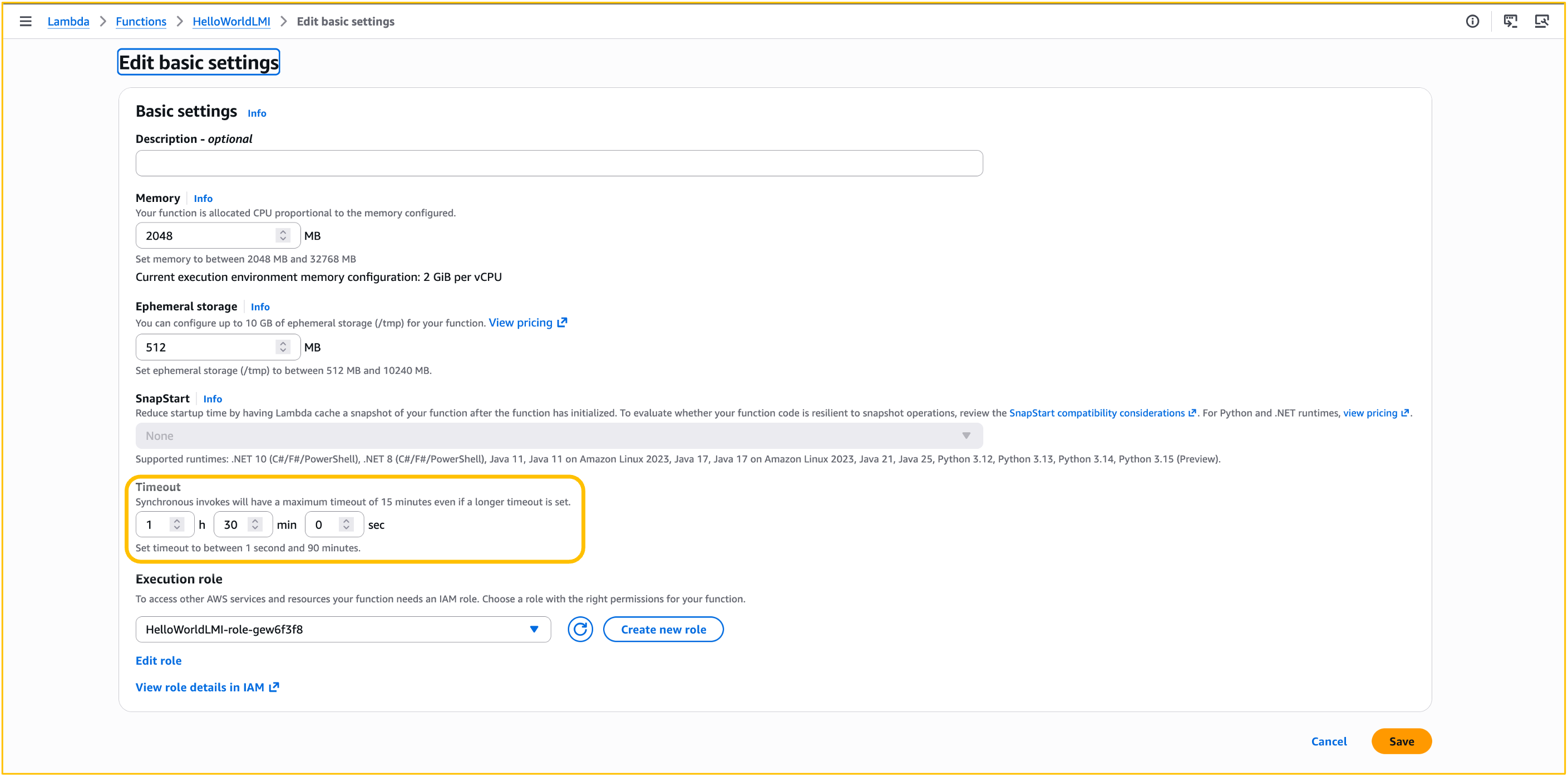
Figure 1: Configuring Lambda function timeout
The change takes effect on subsequent invocations after the function timeout is updated. For event source mappings, allow a few minutes for the new configuration to propagate. Your existing observability setup continues to work as expected: Amazon CloudWatch metrics, AWS CloudTrail, and AWS X-Ray capture the full invocation lifecycle without any changes. For details, see monitoring Lambda functions and monitoring durable functions.
There is no additional charge for using the 90-minute timeout. Standard Lambda Managed Instances pricing applies.
90-minute timeout and durable functions
The 90-minute function timeout and durable functions are complementary. The function timeout (--timeout) controls how long each individual invocation can run, while the durable execution timeout (ExecutionTimeout in --durable-config) controls the total elapsed time from execution start to completion. Durable functions use checkpoints to track progress and automatically recover from failures through replay, re-executing from the beginning while skipping completed work. With today’s launch, each asynchronous invocation in a durable function running on a Managed Instance can now execute for up to 90 minutes continuously, while the corresponding durable execution can run for up to 1 year. For synchronous and event source mapping invocations, both the invocation and the corresponding durable execution are limited to 90 minutes.
For idempotent jobs (for example, an ETL pipeline step triggered by SQS), the extended timeout alone might be sufficient. If the host fails, the message returns to the queue and a fresh invocation starts. For jobs where re-execution is expensive (for example, a 40-minute inference run already 30 minutes in), combine both. Enable durable functions to checkpoint periodically, so a failure at minute 35 resumes from the last checkpoint rather than restarting from zero.
Invocation behavior: asynchronous, event source mappings, and synchronous
Asynchronous invocations (up to 90 minutes): If the function fails or times out, Lambda applies your configured retry policy (up to two retries by default) and routes failed events to your dead-letter queue or on-failure destination.
Event source mappings (up to 90 minutes): For SQS, configure your queue’s visibility timeout to be at least six times the function timeout. This gives Lambda enough time to retry if a function is throttled while processing a previous batch. Lambda validates this at event source mapping creation time, but does not prevent subsequent changes to queue or function settings that might create a mismatch.
For Amazon Kinesis and Amazon DynamoDB Streams, configure the maximum batching window and parallelization factor to account for longer processing times per batch.
If your batch contains multiple records and you want to avoid re-processing the entire batch when one record fails, enable partial batch failure reporting. This is available for SQS, Kinesis, DynamoDB Streams, Amazon Managed Streaming for Apache Kafka (Amazon MSK), and self-managed Apache Kafka event source mappings. With partial batch failures enabled, only the failed records are retried, not the entire batch.
Note that invocations for Amazon MQ ESM and Amazon DocumentDB (with MongoDB compatibility) ESM remain limited to 15 minutes.
Synchronous invocations (15 minutes maximum): Synchronous invocations retain the existing 15-minute maximum timeout. If you set your function timeout to greater than 15 minutes and invoke it synchronously, Lambda continues to apply the 15-minute timeout. The GetFunctionConfiguration API reports the configured timeout value.
To see which event sources invoke Lambda functions synchronously or asynchronously, refer to Lambda documentation.
Considerations and best practices
Because your functions now support longer continuous execution, consider these best practices for components that might be ephemeral in nature, such as network connections and credentials.
Networking: Make sure idle connection timeouts on downstream services (RDS, Amazon ElastiCache, external APIs) accommodate the full function duration. If your function routes traffic through a NAT Gateway, send keep-alive packets to prevent idle connections from being dropped (350-second idle timeout). Respect DNS TTL values for external hostname resolution. The AWS SDK handles this automatically, but custom HTTP clients might cache DNS records beyond their TTL.
Credentials: If your function acquires temporary credentials or tokens, verify they remain valid for the full execution duration or refresh them in the background.
Idempotency: Lambda does not guarantee exactly-once processing. With longer-running functions, the window for retries and duplicate deliveries increases. You can use Powertools for AWS Lambda to implement idempotency in your function code so that operations like payments or database writes produce the same result even if executed more than once. If you use Lambda durable functions, steps have at-least-once execution semantics by default. The SDK skips completed steps during replay, but steps that fail before checkpointing may re-execute. You can use execution names as idempotency keys for durable functions.
Conclusion
The 90-minute function timeout on Lambda Managed Instances addresses one of the most common customer needs for building data-intensive applications on AWS Lambda. Data processing, media transcoding, AI inference, and financial computation workloads that exceed 15 minutes can now run on Lambda without code changes or architectural workarounds. We look forward to hearing from you if you need a longer timeout for synchronous invocations, or for the on-demand capacity mode, on our AWS Lambda Roadmap GitHub page.
To get started, update your function’s timeout configuration and deploy. For a step-by-step walkthrough, see Getting started with Lambda Managed Instances. For sample code demonstrating long-running functions with durable checkpointing, see durable functions examples. To learn more about AWS Lambda, visit aws.amazon.com/lambda.