AWS Compute Blog
Build high-performance apps with AWS Lambda Managed Instances
High-performance applications such as CPU-intensive processing, memory-heavy analytics, and steady-state data pipelines often require more predictable compute resources than standard AWS Lambda configurations provide. AWS Lambda Managed Instances (LMI) addresses this by letting you run Lambda functions on selected Amazon EC2 instance types while preserving the Lambda programming model. You can choose over 400 Amazon Elastic Compute Cloud (Amazon EC2) instance types from general purpose, compute optimized, or memory optimized instance families to match workload requirements. AWS Lambda continues to manage infrastructure operations such as instance lifecycle management, operating system patching, runtime updates, request routing, and automatic scaling. This approach gives your teams greater control over compute characteristics, EC2 pricing model and reduces operational overhead of managing servers or clusters.
In this post, you will learn how to configure AWS Lambda Managed Instances by creating a Capacity Provider that defines your compute infrastructure, associating your Lambda function with that provider, and publishing a function version to provision the execution environments. We will conclude with production best practices including scaling strategies, thread safety, and observability for reliable performance.
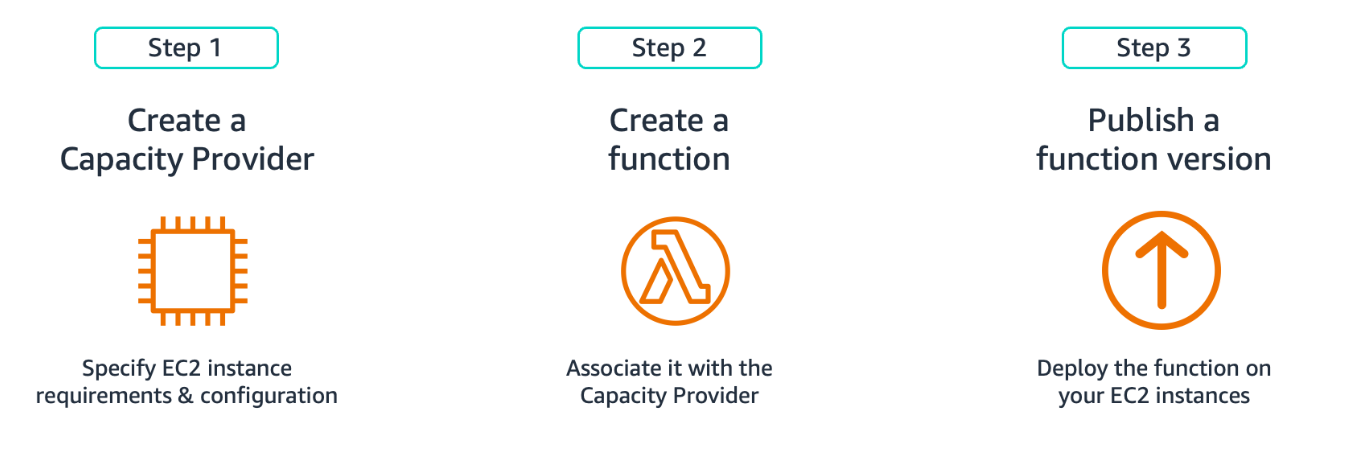
Figure 1. Creating Function on LMI
Creating Capacity Providers
A Capacity Provider defines the infrastructure blueprint for running LMI functions on Amazon EC2. It specifies instance types, network placement, and scaling behavior. To create a Capacity Provider, you need two parameters: an IAM role (Capacity Provider Operator Role) granting Lambda permissions to launch and manage instances and your VPC configuration with subnets and security groups. Create this role in your account with the AWSLambdaManagedEC2ResourceOperator managed policy following the Principle of Least Privilege (granting only the minimum permissions necessary).
This command creates a Capacity Provider with instance types and scaling configuration:
This command returns a Capacity Provider ARN that you’ll use to create your LMI function. Your functions behavior depends on four main configurations in the capacity provider:
Instance selection
Lambda currently supports three Amazon EC2 instance families (.large and up): C (compute optimized) for CPU-heavy work, M (general purpose) for balanced workloads, and R (memory optimized) for large datasets. Choose x86 (Intel/AMD) or ARM (Graviton) architectures. If you don’t specify instance types, Lambda defaults to appropriate instances based on your function’s memory and CPU configuration. This is the recommended starting point unless you have specific performance requirements. When you need more control, use AllowedInstanceTypes to specify only the instance types that Lambda can use or use ExcludedInstanceTypes to exclude specific types while allowing all other instance types. You can’t use both parameters together.
VPC and networking
Configure multiple subnets across Availability Zones. Lambda creates a minimum Amazon EC2 fleet of three instances distributed across your configured Availability Zones to maintain availability and resiliency. Egress traffic from functions, including Amazon CloudWatch Logs, transits through the Amazon EC2 instance’s network interface in your Amazon Virtual Private Cloud (Amazon VPC). As functions send logs and metrics to CloudWatch, you will need internet access through a NAT Gateway or VPC endpoints with AWS PrivateLink for Amazon CloudWatch. This only affects egress traffic; function invoke requests don’t flow through your VPC. Security groups attached to your instances should allow only the traffic your function code needs. With LMI, configure VPC once at the Capacity Provider level instead of per function, simplifying management for multiple LMI functions. Standard Lambda functions continue to use their own VPC configurations. This Capacity Provider VPC configuration applies only to LMI functions.
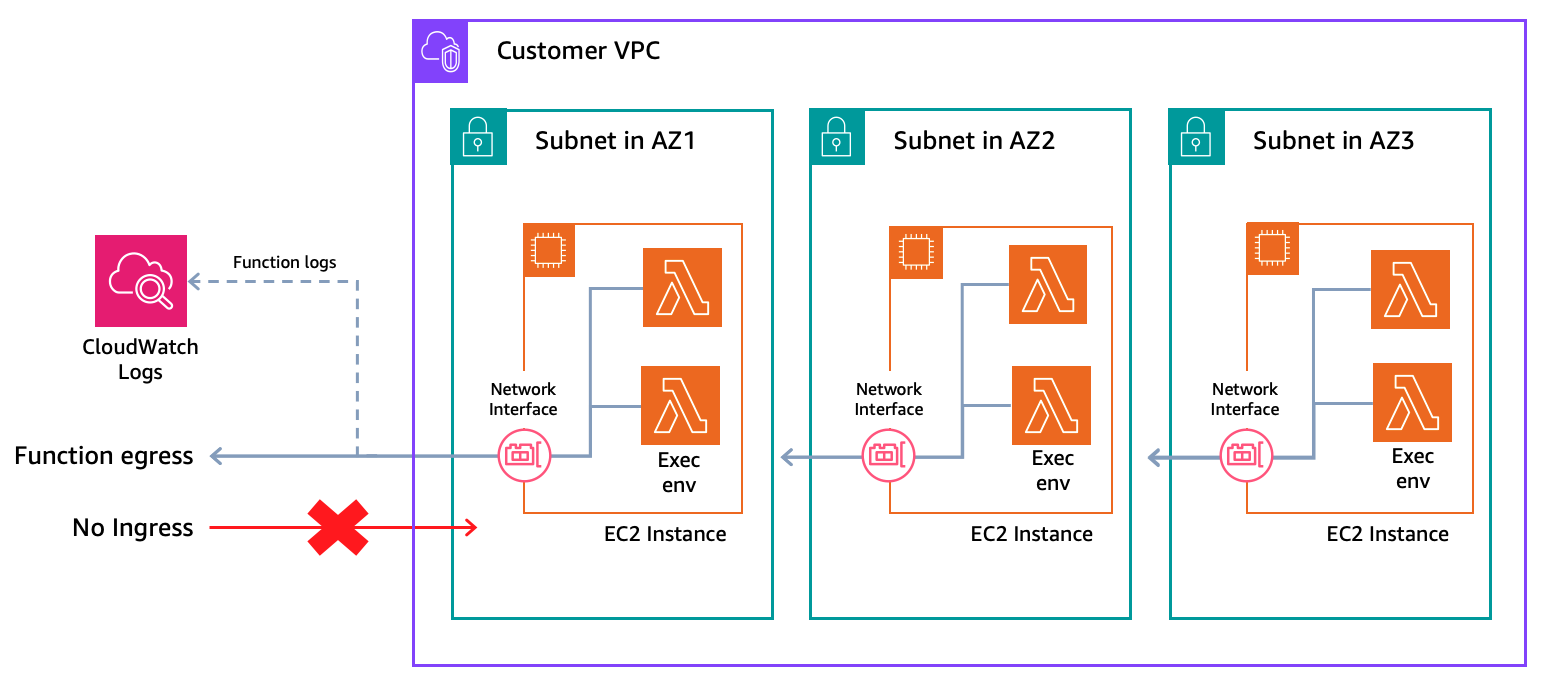
Figure 2. LMI Networking
Scaling configuration
Set MaxVCpuCount to cap compute capacity and control costs. New invocations throttle when you reach this limit until capacity frees up. Lambda monitors CPU utilization and scales instances automatically. Choose automatic scaling mode where Lambda tunes thresholds based on load patterns, or manual mode where you set a target CPU utilization percentage. Multiple functions can share the same Capacity Provider to reduce costs through better resource utilization, though you might want separate providers for functions with different performance or isolation requirements.
Security
Lambda encrypts Amazon Elastic Block Store (Amazon EBS) volumes attached to EC2 instances with a service-managed key by default. You can provide your own AWS Key Management Service (AWS KMS) key for encryption. Place instances in private subnets with restrictive security groups for enhanced security.
Creating Lambda Managed Instance Functions
You create an LMI function similarly to creating a standard Lambda function. You package your code, set your runtime, assign an execution role, and configure memory. The difference is specifying a CapacityProviderConfig to tell Lambda which Capacity Provider to use and how to size each execution environment. Specify CapacityProviderConfig during function creation with the Capacity Provider ARN and configure two execution environment settings. ExecutionEnvironmentMemoryGiBPerVCpu sets the memory-to-vCPU ratio (2:1, 4:1, or 8:1) based on your workload type and PerExecutionEnvironmentMaxConcurrency defines how many concurrent requests share each execution environment. This table shows how memory and vCPU allocation maps across supported execution environment ratio.
| 2:1 Ratio(Compute optimized) | 4:1 Ratio(General purpose) | 8:1 Ratio(Memory optimized) | |||
| Memory (GB) | vCPU(s) | Memory (GB) | vCPU(s) | Memory (GB) | vCPU(s) |
| 2 | 1 | 4 | 1 | 8 | 1 |
| 4 | 2 | 8 | 2 | 16 | 2 |
| 6 | 3 | 12 | 3 | 24 | 3 |
| 8 | 4 | 16 | 4 | 32 | 4 |
| 10 | 5 | 20 | 5 | ||
| 12 | 6 | 24 | 6 | ||
| 14 | 7 | 28 | 7 | ||
| 16 | 8 | 32 | 8 | ||
| … | … | ||||
| 32 | 16 | ||||
Function Memory-to-CPU configuration
Set the function’s memory size (up to 32 GB for LMI) and ExecutionEnvironmentMemoryGiBPerVCpu ratio. The default ratio is 2:1. A 2:1 ratio map to compute optimized instances for CPU-intensive tasks like video encoding, 4:1 map to a general purpose for balanced workloads, and 8:1 maps to a memory optimized instances for large in-memory datasets or caching. You must set memory in multiples of the ratio. LMI requires a 2 GB minimum as execution environments need sufficient memory to handle multiple concurrent requests. LMI supports up to 32 GB memory per execution environment.
Multi-Concurrency settings
LMI supports multiple concurrent invocations sharing the same execution environment, reducing cost per invocation by maximizing vCPU utilization. This is particularly effective for I/O-bound workloads, where invocations waiting on database queries or API calls yield vCPU usage to other invocations during idle periods. Lambda defaults to max concurrency per execution environment based on your runtime: Node.js (64 per vCPU), Java, and .NET (32 per vCPU), Python (16 per vCPU). Use PerExecutionEnvironmentMaxConcurrency to set a lower limit based on your workload’s resource needs. Decrease it if you’re experiencing memory pressure or CPU contention. When environments reach their configured max concurrency, new invocations throttle until capacity frees up at the execution environment level. This table captures the maximum concurrency per vCPU for each supported programming language.
| Language | Default Max Concurrency |
| Node.js | 64 per vCPU |
| Java | 32 per vCPU |
| .NET | 32 per vCPU |
| Python | 16 per vCPU |
This command creates a Lambda function and associates it with your Capacity Provider:
Publishing Lambda Managed Instance Functions
Important: publish a function version before invoking an LMI function. Publishing triggers Lambda to provision Amazon EC2 instances and initialize execution environments, so that the configured baseline capacity is ready before you start invoking. Expect a brief delay before your code goes live as Lambda provisions and launches Amazon EC2 instances. With LMI, execution environments pre-warm after publishing and remain invoke-ready, without cold starts for published versions. Standard Lambda environments initialize on first invoke (cold starts).
This command publishes a Lambda function version and provisions capacity:
After publishing, the function works with standard invocation methods including direct invokes, event source mappings, and service integrations with Amazon API Gateway, Amazon Simple Storage Service (Amazon S3), Amazon DynamoDB Streams, and Amazon EventBridge.
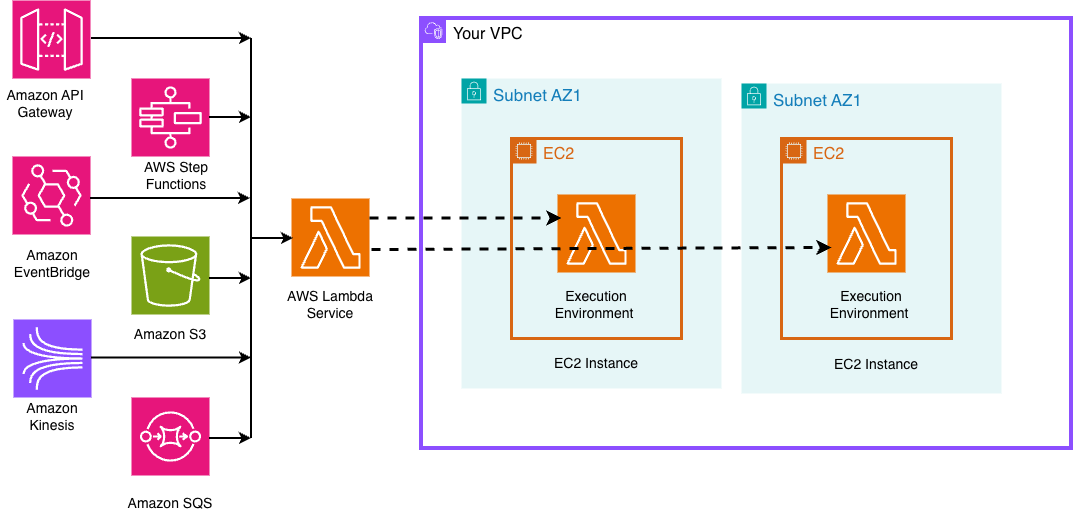
Figure 3. LMI Invocation from event sources
Scaling LMI Functions
Lambda monitors CPU utilization at Capacity Provider level. When CPU utilization reaches the target threshold, Lambda automatically provisions additional EC2 instances, and creates more execution environments on those instances, up to the MaxVCpuCount limit you configured for your capacity provider. As demand decreases, Lambda consolidates workloads onto fewer EC2 instances. You can choose automatic scaling mode (Lambda adjusts thresholds based on your patterns) or manual mode (you set a target CPU percentage). Automatic mode works for variable traffic patterns or when getting started. Manual mode fits when you have predictable patterns and want precise control over scaling thresholds for cost optimization.
Min and max execution environments
Control scaling at the function level with min and max execution environments. The default minimum is 3 execution environments to maintain high availability across Availability Zones. Your total function concurrency equals the number of execution environments multiplied by PerExecutionEnvironmentMaxConcurrency. For example, with min set to 3 and PerExecutionEnvironmentMaxConcurrency of 10, you have provided capacity for 30 concurrent invocations. With max set to 20, you can scale up to 200 concurrent invocations with incoming traffic, based on CPU utilization or concurrency saturation per execution environment. Set max to cap total concurrency and prevent noisy neighbor issues when multiple functions share a Capacity Provider. LMI maintains a minimum number of execution environments with a minimum Amazon EC2 fleet, while standard Lambda scales to zero when idle. Set both min and max to 0 to deactivate a function without deleting it.
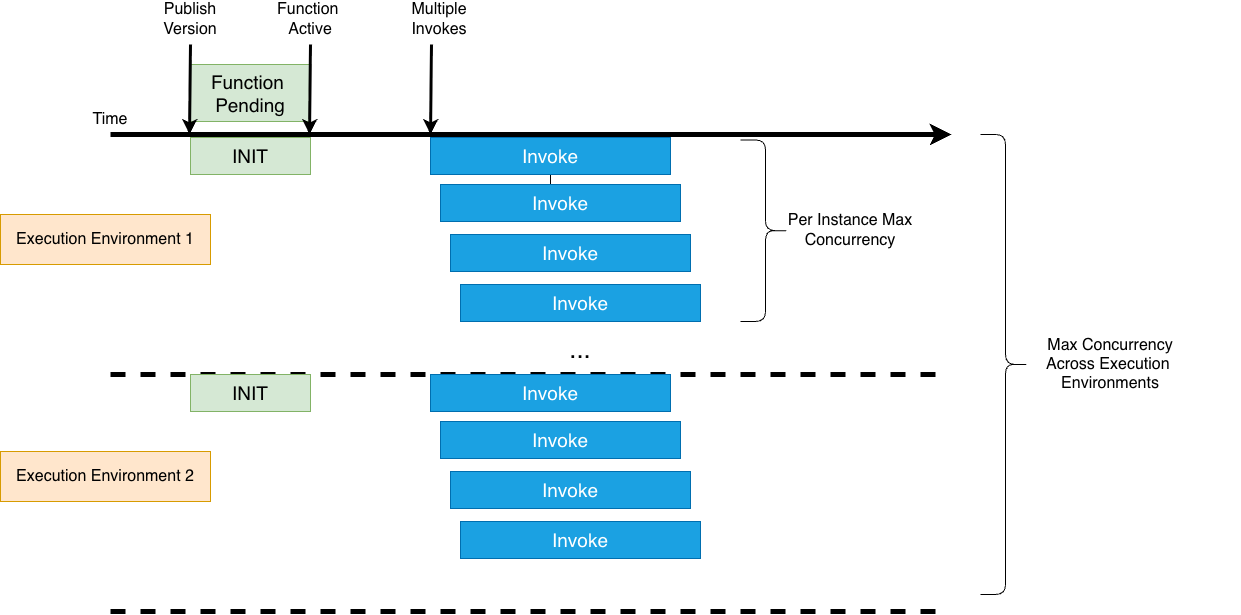
Figure 4. LMI Scaling
This command updates the minimum and maximum execution environments for your function:
We’ll cover scaling patterns and throughput optimization strategies in depth in a separate blog post.
Best Practices and Production Considerations
Thread Safety
Since LMI supports multiple invocations sharing execution environments, your code must be thread-safe. Code that isn’t thread-safe causes data corruption, security issues, or unpredictable behavior under concurrent load.
Thread safety essentials
Avoid mutating shared objects or global variables. Use thread-local storage for request-specific data. Initialize shared clients (AWS SDK, database connections) outside the function handler and verify that configurations remain immutable during invocations. Write to /tmp using request-specific file names to prevent concurrent writes.
Runtime-specific guidance
Java applications should use immutable objects, thread-safe collections, and proper synchronization. Node.js applications should use async context for request isolation. Python applications run separate processes per execution environment. So, focus on interprocess coordination and file locking for /tmp access.
Workload Optimization
I/O-bound workloads perform better with higher concurrency per environment. Use asynchronous patterns and non-blocking I/O to maximize efficiency. CPU-bound workloads get no benefit from concurrency greater than one per vCPU. Instead, configure more vCPUs per function for true parallelism for compute-heavy tasks like data transformation or image processing.
Testing
Validate your code under concurrent execution. Test with multiple simultaneous invocations to detect race conditions and shared state issues before production deployment. You can use LocalStack for local emulation of LMI. Learn more about LocalStack’s LMI support in their announcement blog.
Compatibility
Tools like Powertools for AWS work with LMI without code changes. However, if you’re reusing existing Lambda function code, layers, or packaged dependencies on LMI, test for thread safety and compatibility with the multi-concurrent execution model before production deployment.
Observability
LMI automatically publishes CloudWatch metrics at two levels: capacity provider (CPU, memory, network, and disk utilization across your Amazon EC2 fleet) and execution environment (concurrency, CPU, and memory per function). Monitor CPUUtilization to understand scaling headroom and right-size your MaxVCpuCount. Track ExecutionEnvironmentConcurrency against ExecutionEnvironmentConcurrencyLimit to catch throttling before it impacts users. Lambda publishes metrics at 5-minute intervals. Use CloudWatch alarms to stay ahead of capacity limits in production.
Conclusion
AWS Lambda Managed Instances combines serverless simplicity with compute flexibility, helping you run high-performance workloads with reduced operational complexity. You maintain the familiar programming model of Lambda while accessing the diverse instance types of Amazon EC2 and predictable pricing, making it well-suited for data processing pipelines, compute intensive operations and cost-sensitive steady-state applications.
Ready to get started with LMI? Deploy our Monte Carlo risk simulation example from GitHub to see LMI in action with a real compute-intensive workload. The sample includes complete infrastructure code and walks you through capacity provider configuration, function setup, and performance optimization.
We want to hear from you. Share your feedback, questions, and use cases on re:Post.