AWS Contact Center
Breaking Language Barriers: Real-Time Multilingual Support with Amazon Connect Chat Message Processing
Introduction
The Multilingual Support Challenge
In today’s global marketplace, contact centers face a critical challenge: providing exceptional customer service across multiple languages and dialects. Traditional approaches require hiring multilingual agents or creating language-specific queues, leading to:
- High Operational Costs: Recruiting and training multilingual agents is expensive and time-consuming
- Limited Scalability: Difficult to support new languages or dialects as business expands
- Inefficient Resource Allocation: Language-specific queues create bottlenecks and uneven workload distribution
- Extended Wait Times: Customers wait longer when routed to language-specific queues
- Reduced Agent Utilization: Multilingual agents may sit idle while other queues are overwhelmed
Introducing Amazon Connect Chat Message Processing for Real-Time Translation
Amazon Connect’s chat message processing feature enables real-time translation of customer conversations, allowing any agent to serve customers in any language. The solution intercepts chat messages, translates them using Amazon Translate, and delivers them in the recipient’s preferred language—all transparently within the conversation flow.
Key capabilities include
- Real-Time Bidirectional Translation
- 100+ Language Support
- Automatic Language Detection
- Sensitive Data Redaction
- Custom Message Processing via Lambda
High-Level Solution Benefits
- Cost Reduction: 60-80% savings on multilingual staffing
- Improved Customer Experience: Instant service in preferred language
- Increased Agent Productivity: 40-50% improvement in utilization
- Faster Time-to-Market: Support new languages without hiring delays
- Reduced Wait Times: Eliminate language-specific queue bottlenecks
- Enhanced Compliance: Built-in data redaction
Solution Architecture
Architecture Overview
The solution leverages Amazon Connect’s message processing capability with:
Core Components:
- Amazon Connect Instance
- Contact Flow with message processing
- AWS Lambda Function
- Amazon Translate
- Amazon Comprehend (Optional)
- Amazon DynamoDB (Optional)
- Amazon S3
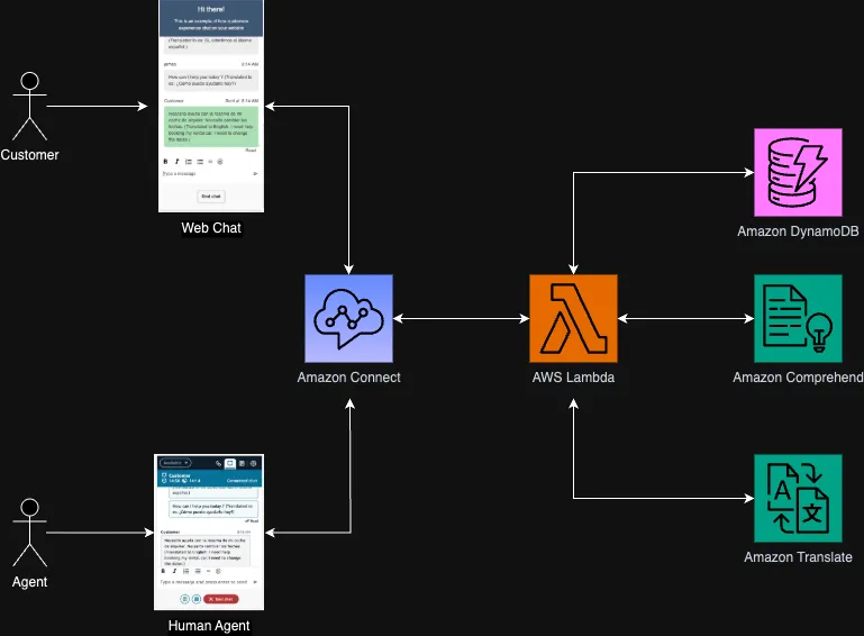
Message Processing Flow
- Customer sends message in native language
- Amazon Connect intercepts message
- Lambda receives message with metadata
- Lambda detects source language
- Amazon Translate converts to agent’s language
- Optional sensitive data redaction
- Translated message delivered to agent
- Agent responds in their language
- Lambda translates back to customer’s language
- Customer receives message in native language
- Both versions stored for compliance
Supported Languages
Amazon Translate supports 75+ languages including European, Asian, Middle Eastern, and Americas languages.
Deploy Solution Walkthrough
Prerequisites
- Active Amazon Connect instance with chat enabled
- AWS account with Lambda/IAM permissions
- Basic familiarity with Amazon Connect contact flows
- Python 3.9+ or Node.js 18+
Deployment Steps
Step 1: Run CloudFormation Template
This template provisions Amazon DynamoDB and AWS Lambda necessary for the solution. You can download the file from the GitHub directory. In addition, if you want to customize the Lambda function specific to your use case, you can update the .yaml file with your logic before creating the stack.
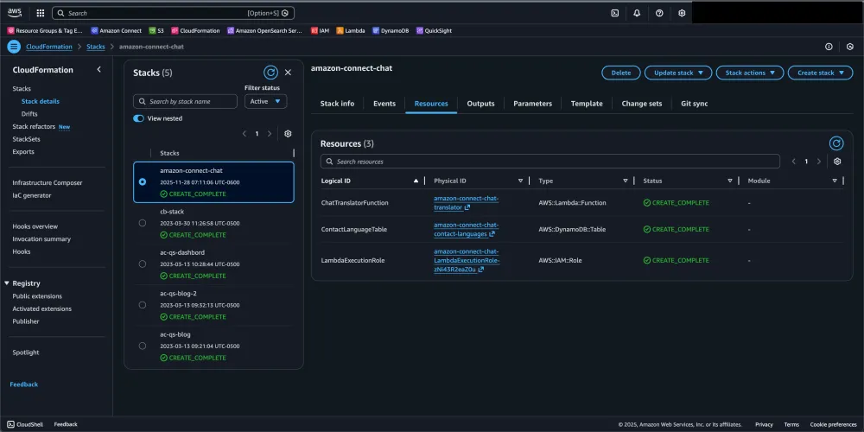
Step 2: Validate CFT Deployment
Validate the CloudFormation template runs successfully and has the following resources.
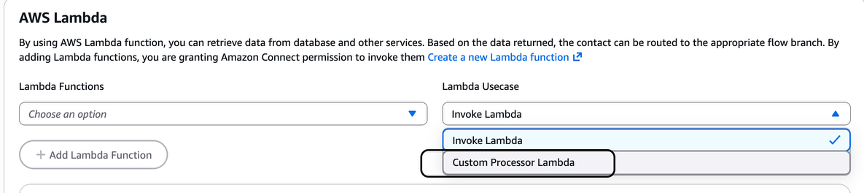
Step 3: Associate Lambda function
Associate the “Custom Processor” Lambda function to your Amazon Connect instance.
Step 4: Configure your Flow
You may download a sample flow from the GitHub directory or configure your existing flow.
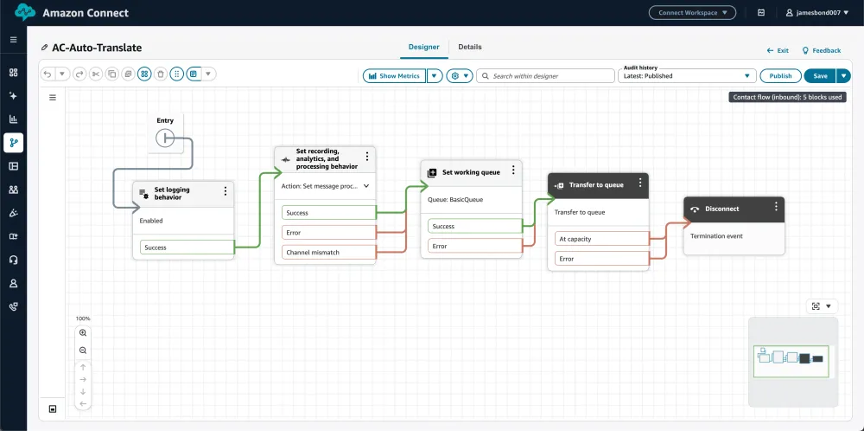
Step 5: Enable Message processor
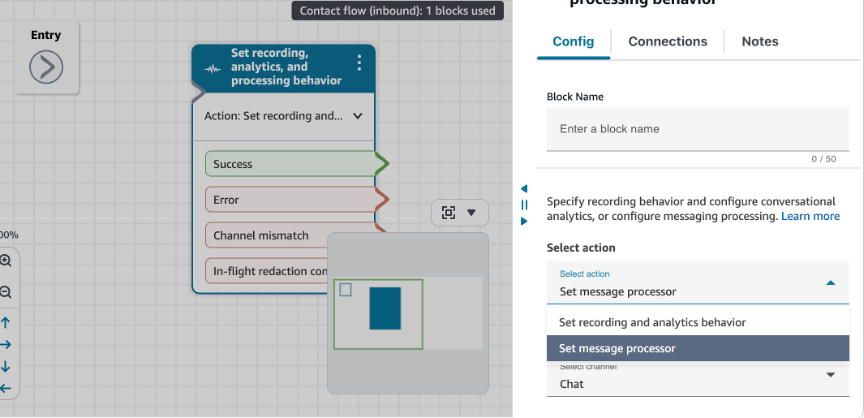
From the actions drop down of your Set recording and analytics and processing behavior block, choose “Set message processor”, for channel select “Chat”.
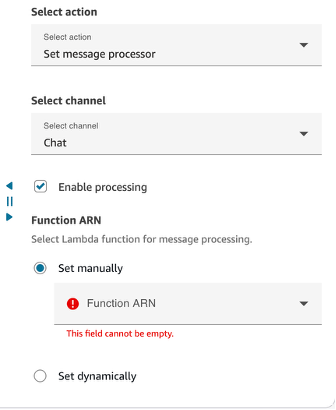
For the Function ARN, choose the Lambda function you associated in the earlier step.
Step 6: Test the Translation
- Use the Amazon Connect test chat interface
- Send a message in a non-English language (e.g., ‘Hola, necesito ayuda’)
- Verify the agent sees the translated message (e.g., ‘Hello, I need help’)
- Agent responds in English (e.g., ‘How can I assist you?’)
- Verify customer sees translated response (e.g., ‘¿Cómo puedo ayudarte?’)
- Check CloudWatch Logs for translation details and any errors
Advanced Features and Enhancements
Feature 1: Sensitive Data Redaction During Translation
Combine translation with PII redaction to protect sensitive information across languages:
<p>def lambda_handler(event, context):<br />chat_content = event.get('chatContent', {})<br />message = chat_content.get('content', '')<br />participant_role = chat_content.get('participantRole', '')</p><p># Detect and translate<br />customer_language = detect_language(message)<br />agent_language = 'en'</p><p>if participant_role == 'CUSTOMER':<br />translated_message = translate_text(message, customer_language, agent_language)</p><p># Apply redaction to translated message<br />redacted_message = redact_sensitive_data(translated_message)</p><p>return {<br />'status': 'PROCESSED',<br />'result': {<br />'processedChatContent': {<br />'content': redacted_message,<br />'contentType': 'text/plain'<br />}<br />}<br />}</p><p>def redact_sensitive_data(text):<br />"""Redact credit cards, SSN, etc. from translated text"""<br />import re<br /># Redact credit card numbers<br />text = re.sub(r'\b\d{4}[\s-]?\d{4}[\s-]?\d{4}[\s-]?\d{4}\b', '[CREDIT_CARD]', text)<br /># Redact SSN<br />text = re.sub(r'\b\d{3}-\d{2}-\d{4}\b', '[SSN]', text)<br /># Redact email<br />text = re.sub(r'\b[A-Za-z0-9._%+-]+@[A-Za-z0-9.-]+\.[A-Z|a-z]{2,}\b', '[EMAIL]', text)<br />return text</p>Feature 2: Professional Message Formatting
Enhance agent responses with professional formatting using Amazon Bedrock or other LLMs:
<p>import boto3</p><p>bedrock = boto3.client('bedrock-runtime')</p><p>def format_professionally(text, target_language):<br />"""Format agent response professionally using LLM"""<br />prompt = f"""Rewrite the following customer service message to be more professional<br />and courteous while maintaining the same meaning. Keep it concise.</p><p>Message: {text}<br />Target language: {target_language}</p><p>Professional version:"""</p><p>response = bedrock.invoke_model(<br />modelId='anthropic.claude-3-sonnet-20240229-v1:0',<br />body=json.dumps({<br />"anthropic_version": "bedrock-2023-05-31",<br />"max_tokens": 200,<br />"messages": [{<br />"role": "user",<br />"content": prompt<br />}]<br />})<br />)</p><p>result = json.loads(response['body'].read())<br />return result['content'][0]['text']</p>Feature 3: Language Preference Storage
Store customer language preferences in DynamoDB for consistent experience:
<p>import boto3</p><p>dynamodb = boto3.resource('dynamodb')<br />table = dynamodb.Table('CustomerLanguagePreferences')</p><p>def get_customer_language(customer_id):<br /> """Retrieve stored language preference"""<br /> try:<br /> response = table.get_item(Key={'customerId': customer_id})<br /> return response.get('Item', {}).get('language', 'auto')<br /> except:<br /> return 'auto'</p><p>def save_customer_language(customer_id, language):<br /> """Store language preference for future interactions"""<br /> table.put_item(Item={<br /> 'customerId': customer_id,<br /> 'language': language,<br /> 'lastUpdated': datetime.now().isoformat()<br /> })</p>Best Practices and Optimization
Translation Quality
- Handle idioms and context: Amazon Translate uses neural machine translation for context-aware translations
- Use custom terminology: Upload custom terminology for industry-specific terms (product names, technical jargon)
- Configure formality settings: Configure formality level (formal/informal) based on your brand voice
- Monitor quality regularly: Review translated conversations regularly and refine custom terminology
Performance Optimization
- Lambda Configuration: Use 512MB memory for optimal translation performance
- Caching: Cache language detection results for repeat customers
- Async Processing: For long messages, consider async translation with progress indicators
- Error Handling: Implement fallback to original message if translation fails
- Monitoring: Set up CloudWatch alarms for Lambda errors and high latency
Agent Training
- Explain how translation works and what agents will see
- Train on handling translation nuances and potential misunderstandings
- Provide guidelines for clear, simple language that translates well
- Establish escalation procedures for complex translation issues
- Share customer feedback on translation quality
Cost Management
- Amazon Translate: $15 per million characters
- Average chat: 500 characters = $0.0075 per chat
- 100,000 chats/month: ~$750/month translation cost
- Compare to: $50K+/month for multilingual agents
Monitoring and Analytics
Key Metrics to Track
- Translation Latency: Target < 1 seconds per message
- Translation Success Rate: Should be > 99%
- Language Distribution: Track which languages are most common
- Agent Satisfaction: Survey agents on translation quality
- Customer Satisfaction: Compare CSAT scores across languages
- Cost per Conversation: Monitor translation costs
- Error Rate: Track Lambda errors and translation failures
Clean Up
If you implemented this solution in a test environment by running the CloudFormation template provided:
- Delete CloudFormation stack
- Delete the Contact flow you have created.
Production Note: For production environments, follow your organization’s data retention and compliance policies before deleting any resources. Ensure all translated transcripts are archived appropriately.
Conclusion
Real-time translation with Amazon Connect’s message processing feature delivers game-changing results for contact centers serving multilingual customers:
Time Savings:
- Eliminate 6-12 months hiring cycle for new language support
- Reduce training time by 80% (no language-specific training needed)
- Deploy new language support in days, not months
- Agents handle 40-50% more conversations with unified queues
Cost Savings:
- 60-80% reduction in multilingual staffing costs
- Eliminate premium pay for multilingual agents
- Reduce recruitment and training expenses
- Translation costs: ~$0.0075 per chat vs. $50+ per multilingual agent hour
- Typical ROI: 75%+ in first year
Benefits to Contact Center Administrators
- Simplified Operations: Single queue for all languages eliminates routing complexity
- Improved Flexibility: Quickly adapt to changing customer demographics
- Better Resource Utilization: Agents work at full capacity regardless of language demand
- Enhanced Scalability: Support new markets without hiring delays
- Data-Driven Insights: Analytics across all languages for better decision-making
- Compliance Ready: Built-in PII redaction protects sensitive data across languages
Authors
- Ritesh Choudhary, Sr. WW Specialist SA, Amazon Connect
- Ankur Taunk, Sr. WW Specialist SA, Amazon Connect
- Binu Pazhoor, Sr. WW Specialist SA, Amazon Connect