Containers
AI-powered EKS migration assessment with Amazon Bedrock AgentCore
IAmazon Elastic Kubernetes Service (Amazon EKS) gives teams a scalable, Kubernetes-native way to run applications without managing the underlying infrastructure. For many organizations, moving applications to Amazon EKS is a clear next step in modernizing their environments.
Before any application moves, though, someone has to answer a basic question: is it ready? That means reading through the application’s code, mapping its dependencies, spotting anything that would block the move, and estimating the work involved. Doing this by hand is slow and hard to keep consistent. The time per application varies widely with its complexity, and different reviewers often reach different conclusions. It’s also easy to overlook things that only surface later, such as hardcoded configurations, stateful dependencies, or storage patterns that don’t map cleanly onto Kubernetes.
When you’re assessing tens or hundreds of applications running on virtual machines or other container orchestration platforms, a consistent, automated review scales in a way that manual effort can’t. It can handle the repetitive reading and pattern-matching quickly, so reviewers spend less time on boilerplate and more on the judgment calls that actually need a human.
In this post, we show you how to build a migration assessment agent using Amazon Bedrock AgentCore, a platform to build, connect, and optimize agents at scale with any framework or model. The agent is built with the Strands Agents SDK, an open source toolkit for building AI agents in a few lines of code.
The agent reads an application’s source code and container artifacts from source platforms such as OpenShift, Azure, on-premises or self-managed Kubernetes and produces a readiness score, a list of blockers ranked by severity, and a migration plan with architecture recommendations for Amazon EKS.
How this solution complements existing AWS migration services
AWS provides a broad set of migration services, and open source tools can assess readiness too. This solution complements them by adding AI-powered, application-level code analysis:
| AWS Service | What it provides | What this solution adds |
| AWS Migration Hub | Portfolio-level tracking, server discovery, migration workflow orchestration | Deep, code-level analysis of application readiness for Amazon EKS, complementing portfolio-level planning with per-application migration plans |
| AWS Application Discovery Service | Discovers servers, VMs, and network dependencies in on-premises data centers to help plan migrations | Extends discovery beyond infrastructure to application source code, container configurations, and runtime dependencies |
| AWS Transform | AWS Transform for Containers is an AI assistant that automatically packages your application into a secure, ready-to-run container on AWS | Provides EKS-specific migration readiness scoring, blocker identification, and end-to-end migration runbooks by analyzing existing container artifacts and Kubernetes manifests |
| Konveyor / Migration Toolkit for Applications (open source) | Rule-based analysis and questionnaires that flag issues and estimate migration effort. Strong for Java estates | Uses AI-based reasoning instead of a fixed rule set, runs natively on AWS with your code staying in your environment, and targets Amazon EKS end-to-end |
This agent goes a step further than infrastructure inventory: it reads the application’s source code. Using a foundation model (FM) on Amazon Bedrock, it understands what the code is doing and flags subtle blockers that discovery tools miss, such as local-filesystem state, platform-specific authentication, or session affinity assumptions.
Key capabilities:
- Contextual reasoning: The agent uses a foundation model on Amazon Bedrock to understand the meaning and intent behind an application’s code, not just keywords, so it can reason about migration readiness like an engineer would.
- Multi-platform source support: Assesses applications from supported source platforms: Red Hat OpenShift (Routes, DeploymentConfig, SCC), Azure (AKS, Service Bus, Pipelines), on-premises (WebSphere, JBoss, WebLogic), self-managed Kubernetes, and Docker Swarm.
- Complete infrastructure inventory: Documents the full current state (secrets, storage, networking, auth, messaging, databases, scheduled tasks) before recommending changes.
- Git repository integration: Point the agent at a Git URL and it clones, analyzes, and produces the assessment, no manual file upload needed.
- Chat-based follow-up: After the initial assessment, ask follow-up questions (“How many replicas?”, “What about ingress?”) and get instant context-aware answers.
- End-to-end in a single pass: From source code analysis through to a complete migration plan with effort estimates, generated autonomously by a single agentic workflow.
- Consistent and repeatable: Each application is assessed against the same best-practice criteria, alleviating variance across teams.
- Learns from past assessments: Amazon Bedrock AgentCore Memory helps the agent recall patterns from previous assessments, improving accuracy over time.
- Extensible tool architecture: Add new assessment capabilities by adding new @tool decorated Python functions. The Strands SDK handles registration and invocation automatically.
- Scales to portfolio-level: Amazon Bedrock AgentCore Runtime scales agent instances automatically. Assess hundreds of applications concurrently, each in its own isolated session.
Solution overview
The AI-powered migration assessment agent follows a structured workflow to analyze applications and produce migration readiness reports.
What the agent assesses
The agent performs a comprehensive assessment covering key aspects of application migration to Amazon EKS:
| Category | What it analyzes | Example findings |
| Application Code | Source code patterns, platform-specific dependencies | Hardcoded IPs, filesystem writes, WebSphere/JBoss/OpenShift-specific code |
| Secrets & Credentials | Secrets in config files, environment variables, Dockerfiles | 12 plaintext passwords found, recommends AWS Secrets Manager + External Secrets Operator |
| Storage & Volumes | NFS mounts, local paths, Docker volumes, capacity | /mnt/nfs/orders (shared, 1TB) → Amazon Elastic File System (Amazon EFS) with CSI driver |
| Networking & Ingress | Ports, protocols, load balancers, host networking, DNS | Host networking mode → ALB Ingress Controller + Kubernetes NetworkPolicy |
| Authentication & Authorization | LDAP, SAML/ADFS, OAuth, mTLS, certificates | On-premises LDAP → AWS Directory Service connector or Amazon Cognito federation |
| Messaging & Integration | IBM MQ, Kafka, RabbitMQ, SOAP, REST endpoints | IBM MQ (4 queues) → Amazon MQ or keep on-premises through AWS Direct Connect |
| Database & State | Oracle, PostgreSQL, Redis, Elasticsearch, session stores | Oracle RAC → Amazon Relational Database Service (Amazon RDS) for Oracle; Redis → Amazon ElastiCache |
| Upstream/Downstream Dependencies | Services this app calls and services that consume from it | Inventory service (on-premises, Phase 2) → needs hybrid connectivity through AWS Transit Gateway |
| Scheduled Tasks | Cron jobs, batch processing, periodic reports | 5 crontab entries → Kubernetes CronJob resources |
| Resource Sizing | CPU, memory, JVM heap, thread pools, connection pools | 4 CPU/16GB/4GB heap → 3 replicas, 1 CPU/2Gi each, HPA 3-10 |
| Container Security | Dockerfile best practices, privileged mode, root user | Running as root → non-root user + Pod Security Standards (restricted) |
| Observability | Current monitoring tools, logging, tracing | Splunk + Dynatrace → Amazon CloudWatch + AWS X-Ray + Fluent Bit |
| Platform-Specific | OpenShift Routes/SCC, Azure Pipelines/Service Bus, WebSphere JNDI | OpenShift Route → Kubernetes Ingress with ALB annotations |
Architecture
The following diagram shows the end-to-end architecture and data flow of the solution.
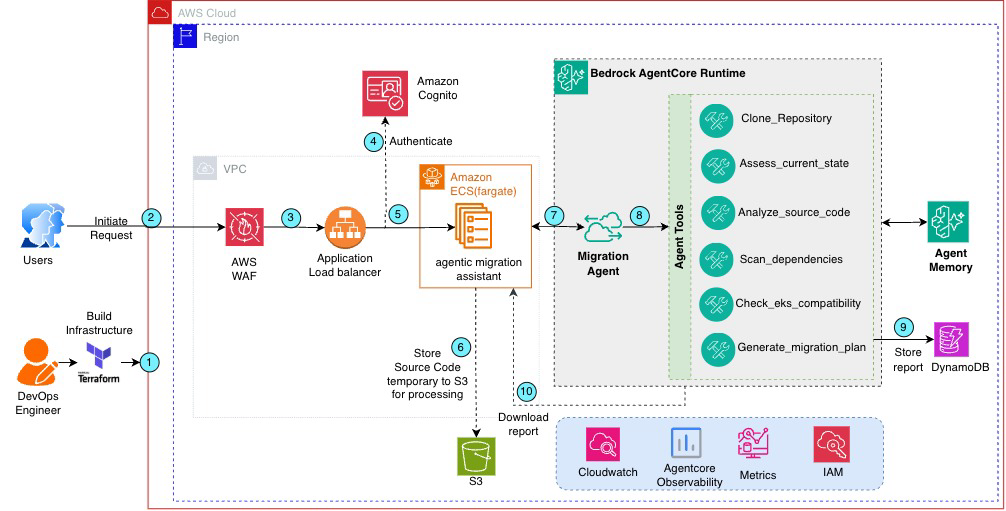
Figure 1: Solution architecture
Architecture flow
The following steps describe the solution workflow as shown in Figure 1:
- Infrastructure provisioning is fully automated using Terraform, providing a complete, repeatable setup of all required AWS resources through infrastructure as code (IaC).
- After the infrastructure is provisioned, you can access the frontend application using the Application Load Balancer (ALB) DNS name output by Terraform (terraform output), avoiding the need for manual endpoint configuration.
- User requests reach the ALB directly through its public DNS name. Optionally, you can front the ALB with an Amazon Route 53 alias record and an AWS Certificate Manager (ACM) certificate for a custom HTTPS domain. This isn’t provisioned by the included Terraform.
- Upload application artifacts or provide a Git URL. You access the UI hosted on Amazon Elastic Container Service (Amazon ECS) on AWS Fargate (behind an Application Load Balancer with AWS WAF protection and optional Amazon Cognito authentication). You either upload files directly to Amazon Simple Storage Service (Amazon S3), or provide a Git repository URL (public or private with a PAT token).
- Invoke the agent. The ECS task calls the AgentCore runtime using the AWS SDK with IAM/SigV4 authentication. The agent executes the following autonomous workflow when invoked:
- Repository clone (if Git URL provided) – The
clone_repositorytool clones the Git repository and uploads relevant files to Amazon S3. - Current state extraction – The
assess_current_statetool reads the artifacts and produces a complete infrastructure inventory. - Source code analysis – The
analyze_source_codetool scans for migration blockers across supported platforms. - Dependency scanning – The
scan_dependenciestool identifies stateful components and compatibility issues. - EKS compatibility check – The
check_eks_compatibilitytool validates against Amazon EKS best practices. - Plan generation – The
generate_migration_plantool synthesizes the findings into a scored report with runbook, persists it to Amazon DynamoDB for historical tracking, and deletes the uploaded source files from Amazon S3. - Large language model (LLM) synthesis – The foundation model reviews the tool outputs and generates a structured assessment with current state documentation and prioritized recommendations.
- Report delivery – The report is returned to the UI hosted on Amazon ECS for display, follow-up questions, and download as HTML or Markdown.
- Recommend – Reviewing AI-generated findings with a qualified engineer before making migration decisions.
- Repository clone (if Git URL provided) – The
AWS services used
The following table describes the AWS services used in this solution:
| Service | Role in solution |
| Amazon ECS on AWS Fargate | Hosts the UI with auto scaling and no server management |
| Application Load Balancer | Public endpoint for the UI with health checks and optional Cognito auth |
| AWS WAF | Protects ALB with rate limiting, XSS/SQLi protection, and known bad input blocking |
| Amazon Cognito (optional) | User authentication when custom domain + HTTPS is configured |
| Amazon Bedrock AgentCore Runtime | Hosts the assessment agent with session isolation, auto scaling, and managed infrastructure |
| Amazon Bedrock AgentCore Endpoint | Provides a stable invoke URL for the UI to call the agent |
| Amazon Bedrock AgentCore Memory | Short-term and long-term memory for session context and cross-assessment learning |
| Amazon Bedrock AgentCore Observability | Session traces, tool latency metrics, token usage, and CloudWatch dashboards |
| Amazon Bedrock (Foundation model) | LLM reasoning for analyzing artifacts and generating migration plans |
| Strands Agents SDK | Orchestrates agent workflow and manages tool registration and invocation |
| Amazon S3 | Stores application artifacts (source code, Dockerfiles, Docker Compose files) for analysis |
| Amazon DynamoDB | Persists assessment results and agent session state |
Technical implementation
This section covers the prerequisites and the steps to deploy, run, and test the assessment agent.
Prerequisites
Before you begin, verify you have the following:
- An AWS account with appropriate permissions.
- AWS Command Line Interface (AWS CLI) v2 installed and configured.
- Terraform >= 1.5.0 for infrastructure deployment.
- Python 3.11 or later.
- Docker (optional, only for local testing. AWS CodeBuild builds images on AWS)
- Access to Amazon Bedrock with a supported foundation model enabled in your AWS Region.
- An Amazon S3 bucket for storing application artifacts (created by Terraform).
Implementation
- Clone the repository:
- Open your terminal or command prompt.
- Navigate to the directory where you want to clone the repository.
- Run the following command to clone the repository into the local system.
- Update the Terraform variables file (
terraform.tfvars) with your environment values: - Deploy infrastructure using Terraform:
- Open your terminal or command prompt and navigate to the code repository.
- Use the
deploy.shto deploy the resources and end-to-end solution.
Testing the solution
After deployment, the Terraform output provides an ALB DNS endpoint that is immediately accessible from your browser:
Open this URL in your browser to access the application. To test the solution, submit your application artifacts through one of the following methods:
Method A: Upload files via UI (recommended for quick assessments)
Open the UI URL in your browser to access the application’s frontend interface.
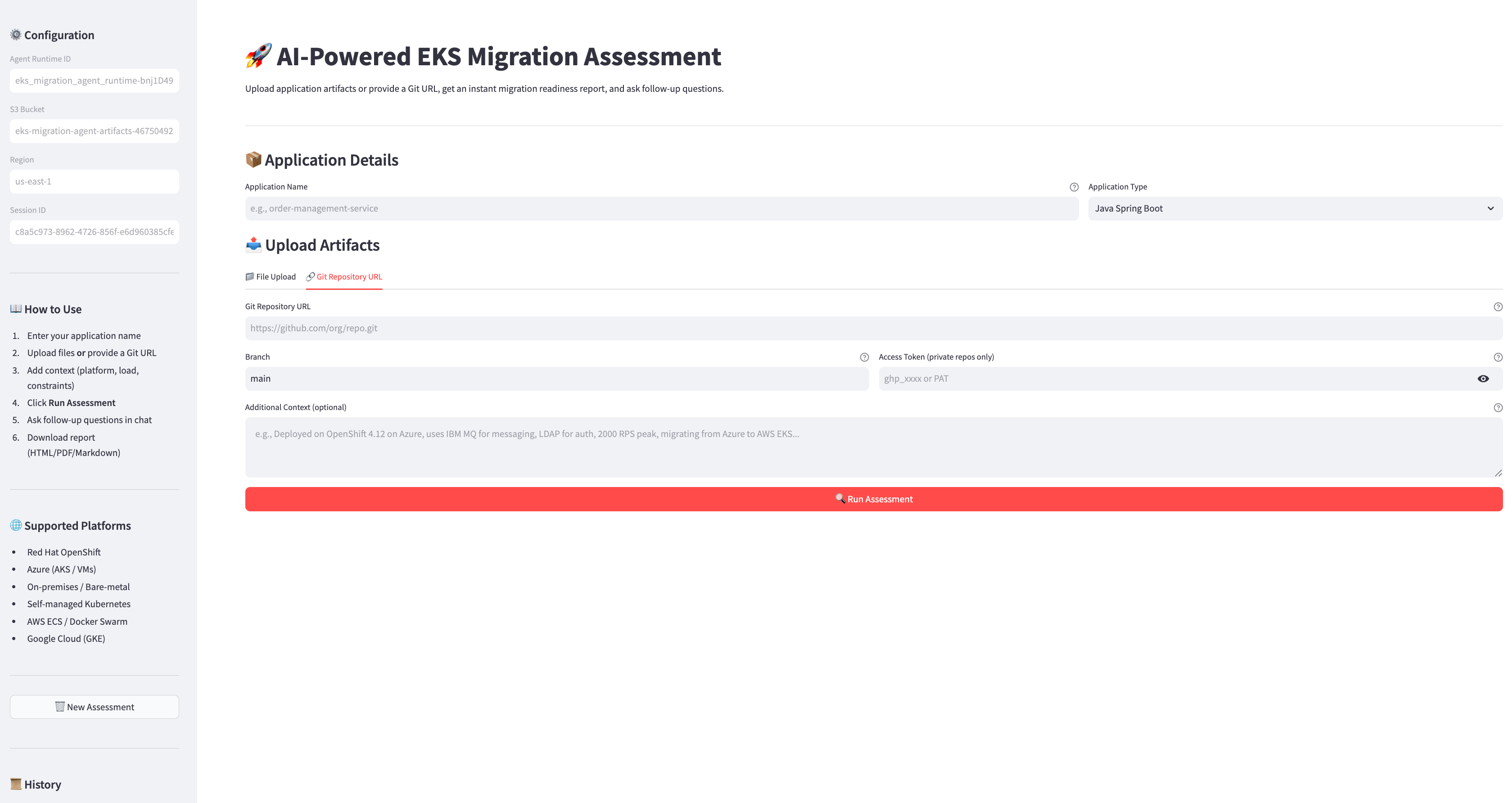
Figure 2: Manually upload source code
- Enter the application name:
order-management-service. - Select application type: Java EE/WebSphere.
- Choose the File Upload tab.
- Upload source code, Dockerfiles, configuration files, and dependency manifests.
- Add context: “Deployed on WebSphere 9.0, uses IBM MQ, LDAP auth, Oracle DB, 2,000 RPS peak”.
- Choose Run Assessment.
Method B: Provide Git repository URL (recommended for complete code base analysis)
The following figure shows the Git repository integration interface, where you enter the repository URL, branch name, and optional access token for private repositories.
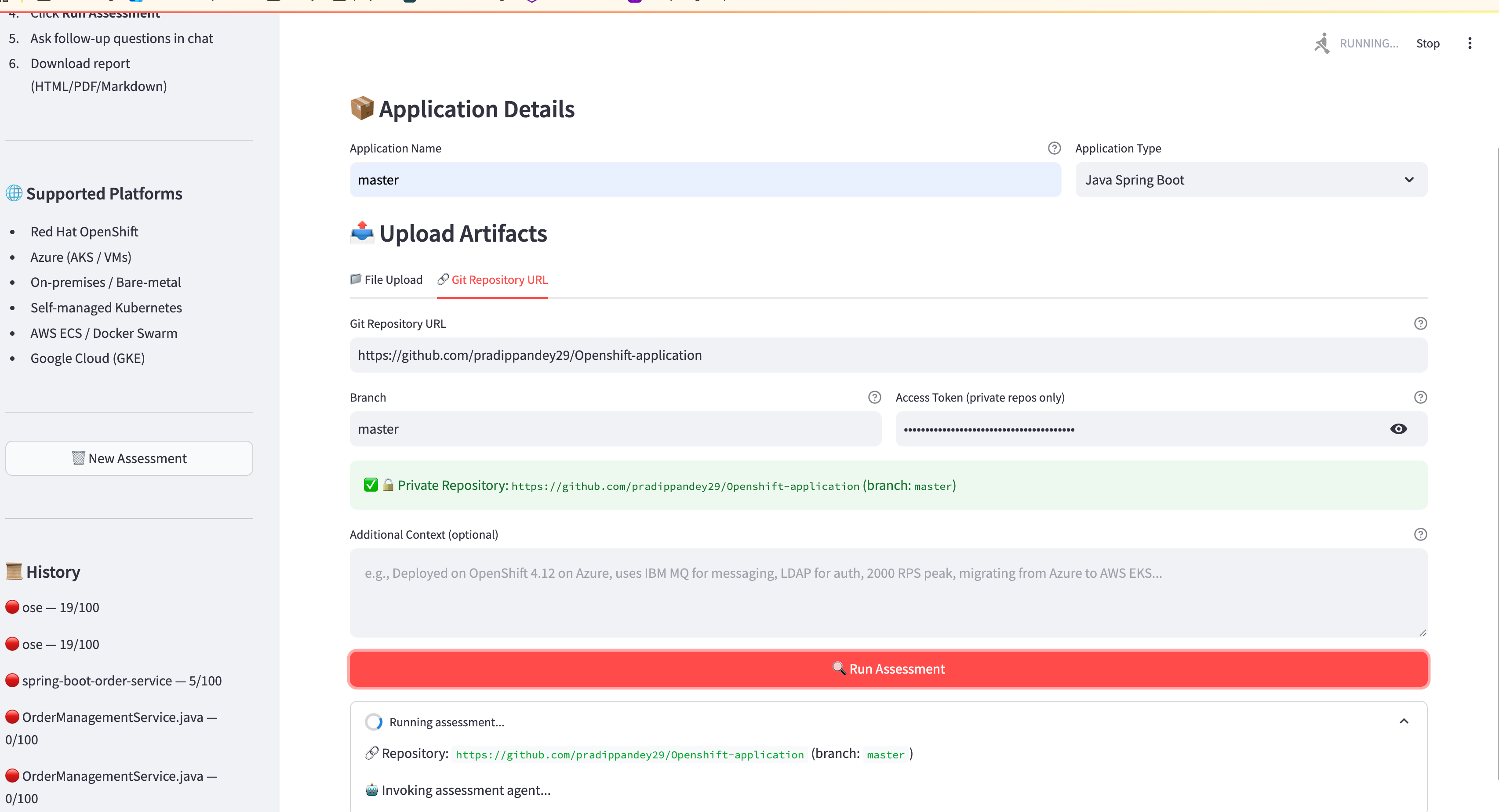
Figure 3: Integrate with GitHub repo
- Enter the application name: order-management-service.
- Choose the Git Repository URL tab.
- Enter the repository URL:
https://github.com/your-org/order-service.git. - Specify branch (default: main).
- For private repositories: enter a Personal Access Token (PAT) with repo read permission. The token is masked in the UI and not stored. It is used only for the clone operation.
- Add context about the deployment platform and constraints.
- Choose Run Assessment.
The agent clones the repository (with or without token), identifies analyzable files (source code, configs, Dockerfiles, manifests), and uploads them to Amazon S3. It then runs the full assessment pipeline and automatically deletes the source files from S3 after the report is saved to DynamoDB.
Security note: For private repositories, the PAT is transmitted through an IAM/SigV4 encrypted channel to AgentCore. It isn’t persisted in S3, DynamoDB, or logs. Source files are deleted immediately after assessment completes.
Method C: Direct S3 upload via CLI (recommended for CI/CD integration)
All three methods produce the same comprehensive assessment report. The tools analyze whatever files are available in S3 regardless of how they got there.
Review the assessment and ask follow-up questions
The agent produces a structured assessment report with two main sections:
Section 1: Current state assessment (documents what exists today)
The following figure shows the executive summary, which includes the overall readiness score, total issues by severity, and estimated migration effort.
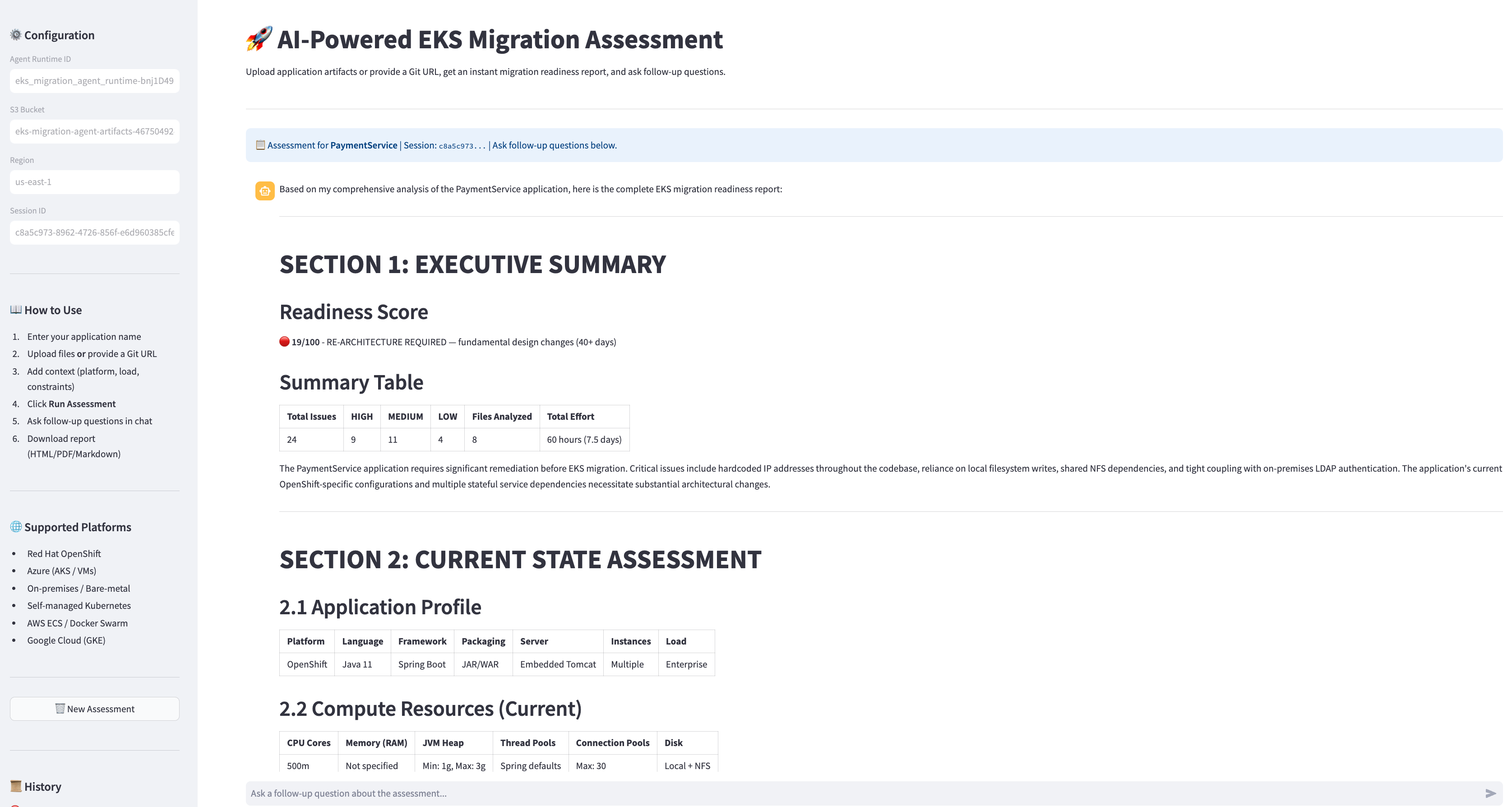
Figure 4: Executive summary report
Section 2: Migration assessment and recommendations
The following figure shows the current application profile, including compute resources, deployment configuration, secrets management, storage volumes, networking configuration, and authentication mechanisms.
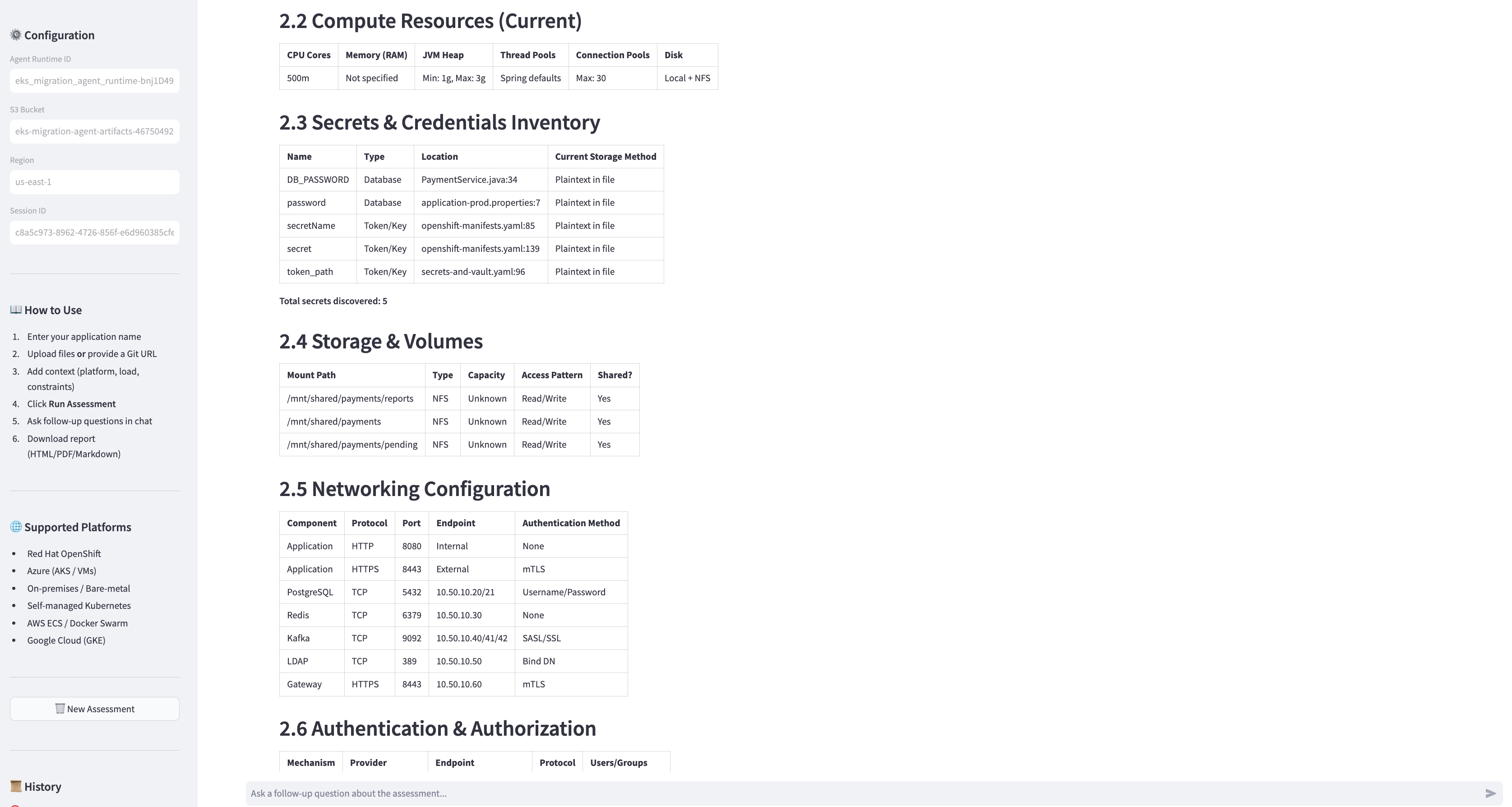
Figure 5: Migration assessment report
The following figure lists migration blockers and findings organized by severity level, with current state and recommended remediation.
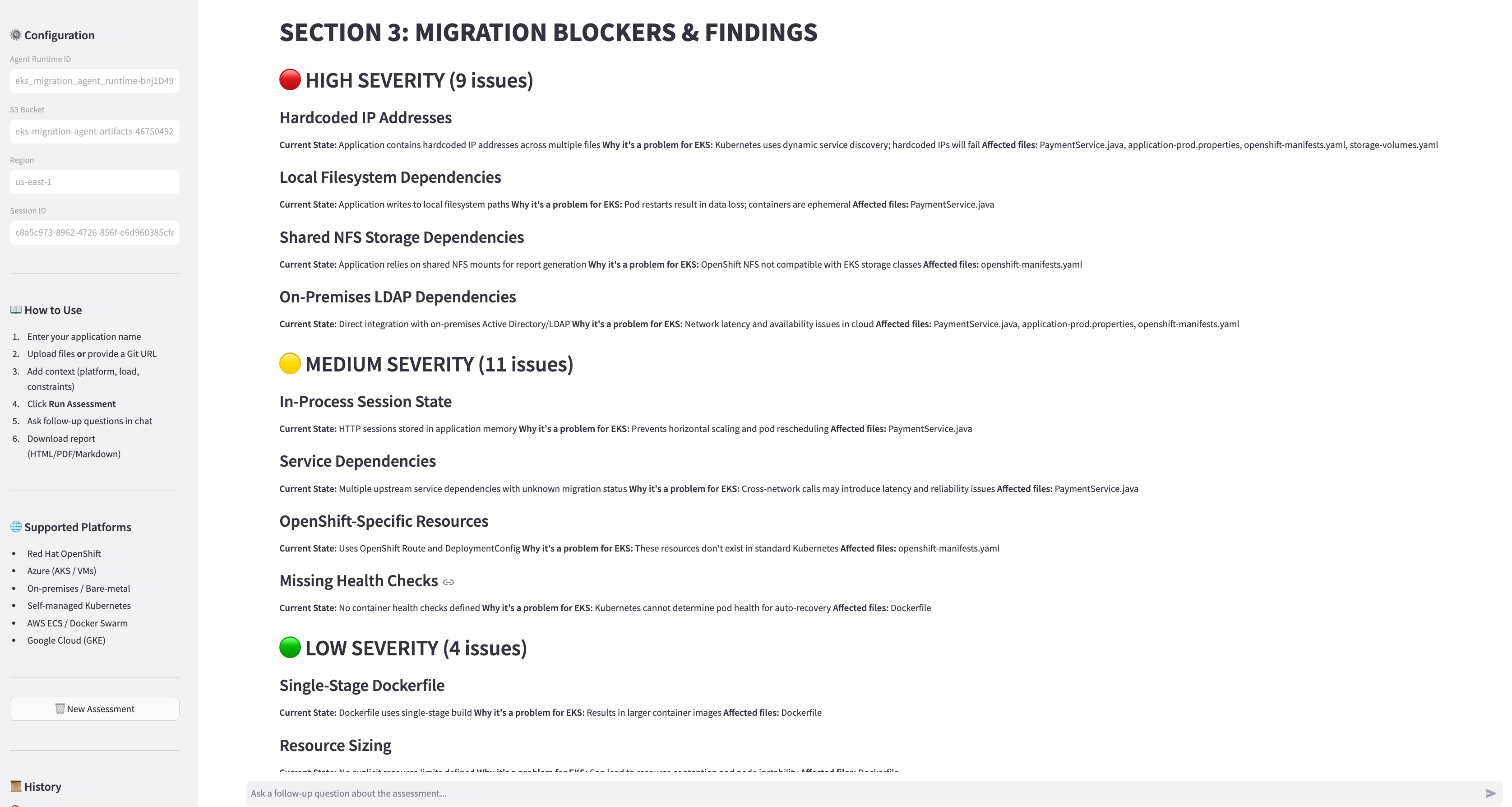
Figure 6: Migration blockers and findings
The following figure shows the recommended target state configuration for each component on Amazon EKS.
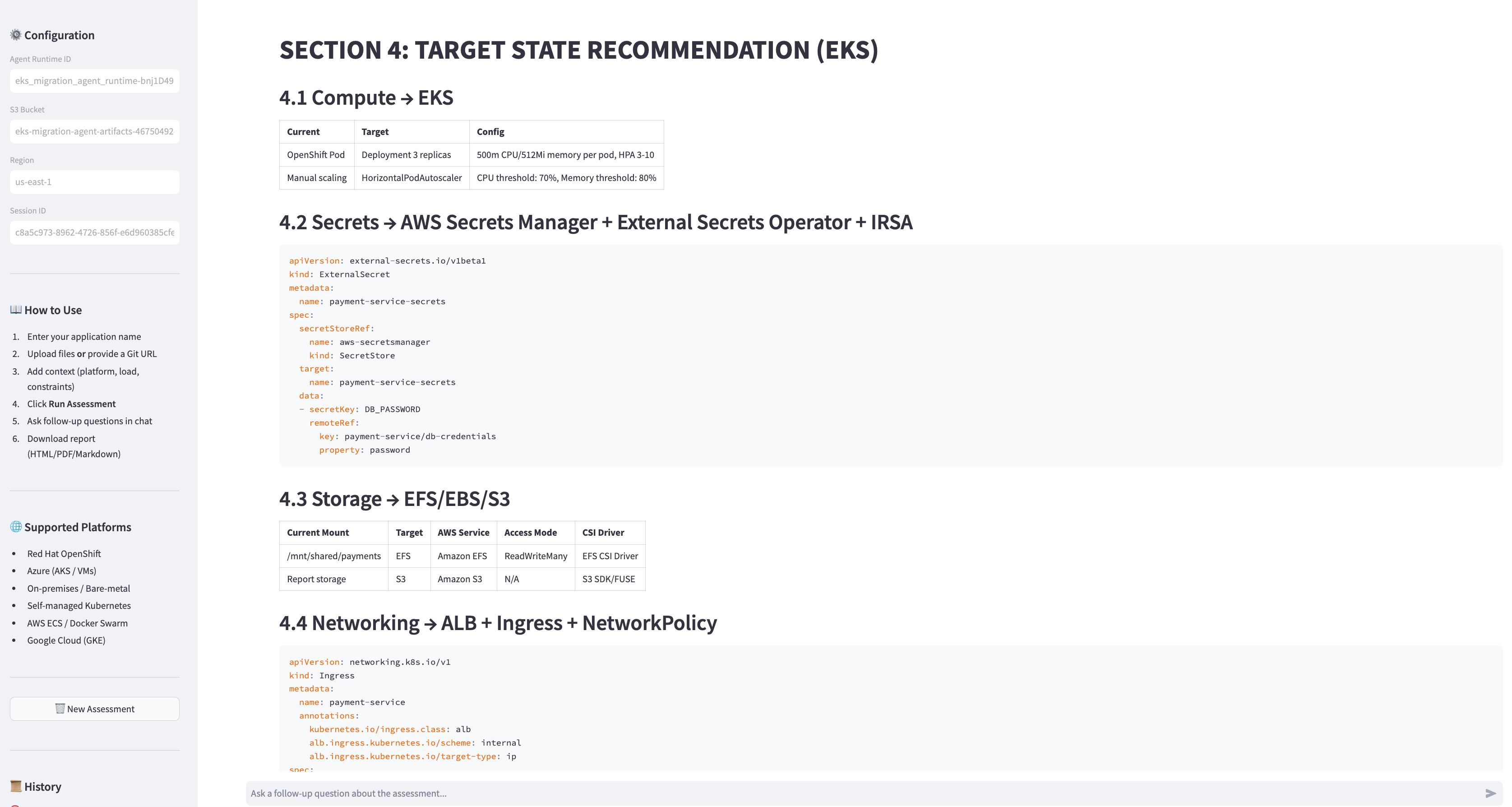
Figure 7: Recommendation
The following figure presents the phased migration timeline with estimated effort in hours and task dependencies.
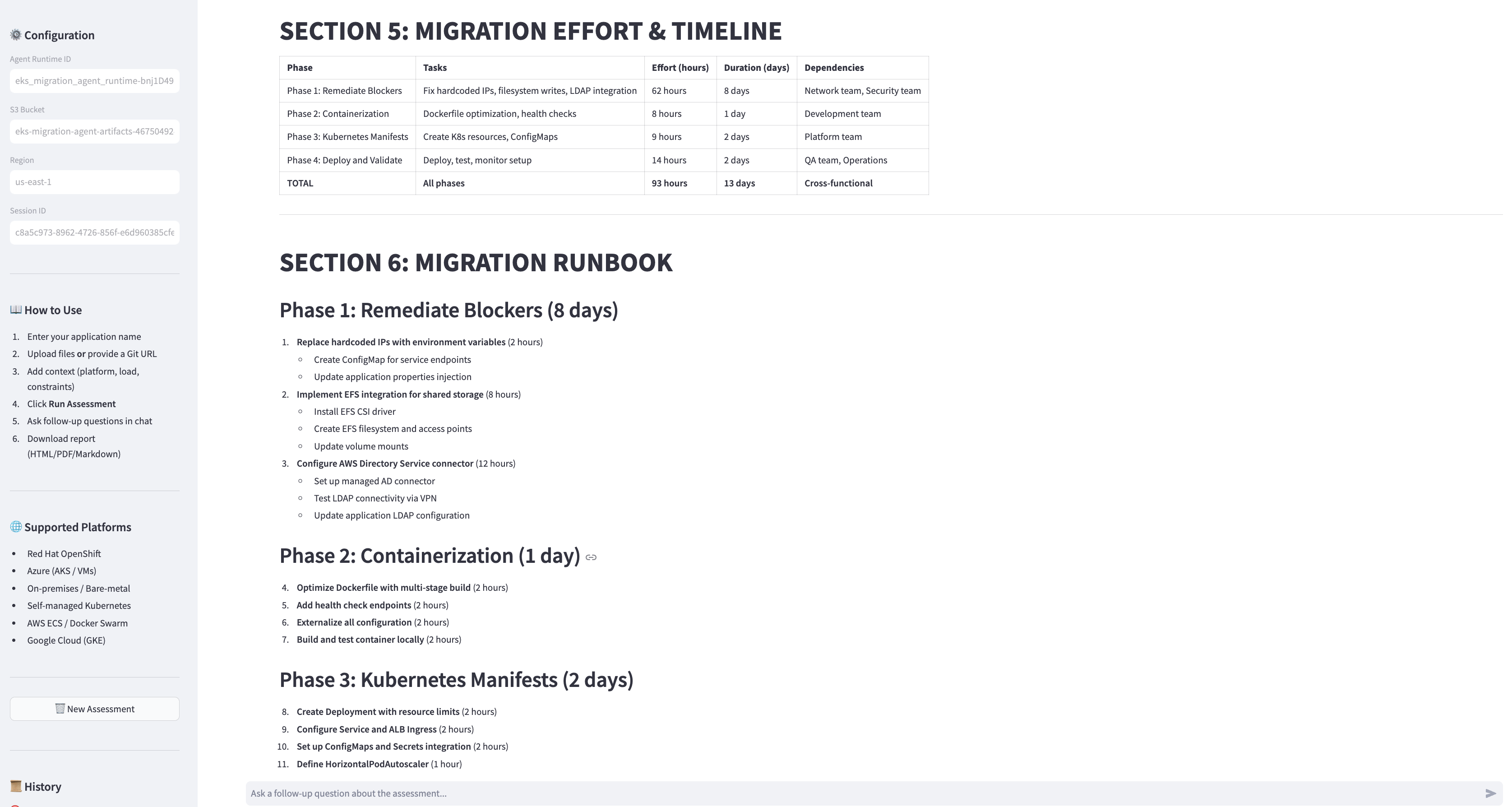
Figure 8: Migration timeline
The following figure summarizes the risk assessment, including impact ratings, probability, and mitigation strategies.
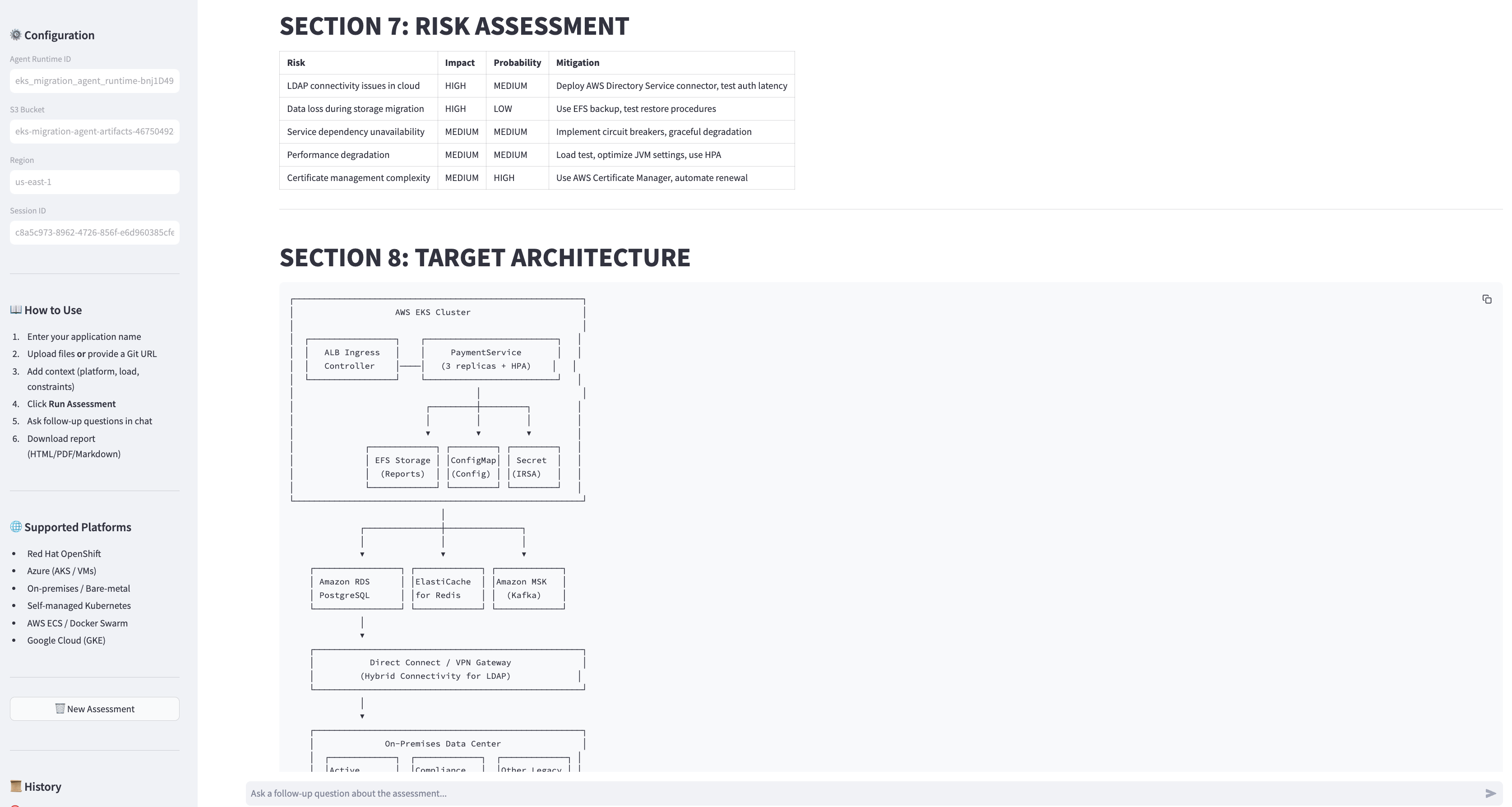
Figure 9: Risk assessment
After the report is displayed, you can ask follow-up questions in the chat interface:
- “How many replicas should I use for 2000 RPS?”
- “What about ingress and network policies?”
- “Show me the Kubernetes YAML for the deployment”
- “What is the hybrid connectivity architecture for IBM MQ?”
The agent answers from the assessment context without re-running the full analysis, providing instant responses.
Assessment report structure
The agent produces a comprehensive report with eight structured sections:
| Section | Contents |
| 1. Executive Summary | Readiness score (0–100), total issues by severity, files analyzed, total effort estimate |
| 2. Current State Assessment | Application profile, compute resources (CPU/memory/JVM heap), secrets inventory (count + storage method), storage & volumes (NFS/local paths), networking (ports/protocols/endpoints), authentication (LDAP/SAML/mTLS), messaging (IBM MQ/Kafka), databases, upstream/downstream dependencies with migration phases, scheduled tasks, monitoring tools |
| 3. Migration Blockers & Findings | Each finding with severity (HIGH/MEDIUM/LOW), current state, why it’s a problem for EKS, affected files |
| 4. Target State Recommendation | For each current component: the EKS equivalent with K8s YAML snippets (Deployment, Ingress, ExternalSecret, CronJob, NetworkPolicy, IRSA ServiceAccount) |
| 5. Migration Effort & Timeline | Phased effort breakdown with hours, days, and dependencies per phase |
| 6. Migration Runbook | Step-by-step tasks organized by phase (Remediate Blockers → Containerize → K8s Manifests → Deploy & Validate) |
| 7. Risk Assessment | Risks with impact, probability, and mitigation strategies |
| 8. Target Architecture | Text-based architecture diagram showing EKS cluster, managed AWS services, hybrid connectivity (Direct Connect/VPN), and observability stack |
This structured format helps each assessment produce consistent, actionable output across application complexity levels and source platforms.
Cost considerations
The following table provides estimated costs for running the assessment agent. Actual costs vary based on application complexity and Region.
| Component | Cost basis | Assumption per assessment | Estimated cost per assessment |
| Amazon Bedrock (Foundation Model) | Input and output tokens | ~150K input + ~15K output tokens | $0.15–$0.50 |
| AgentCore runtime | Compute time | ~2–5 minutes of agent runtime | $0.02–$0.05 |
| Amazon S3 | Storage and requests | <1 GB artifacts + a few hundred requests | < $0.01 |
| Amazon DynamoDB | Read/write capacity | On-demand, a few thousand read/writes | < $0.01 |
| Total per assessment | . | . | $0.18–$0.57 |
Monthly infrastructure costs (always-on):
| Component | Estimated monthly cost |
| ECS Fargate (UI, 2 tasks) | ~$30 |
| Application Load Balancer | ~$20 |
| NAT Gateway | ~$35 |
| AWS WAF | ~$6 |
| Amazon CloudWatch Logs | ~$5 |
| Total infrastructure | ~$96/month |
Note: Costs are estimates based on US East (N. Virginia) Region (us-east-1) pricing. Actual costs may vary by Region, usage patterns, and AWS pricing updates. Use the AWS Pricing Calculator for detailed estimates specific to your workload.
Cleanup
To avoid ongoing charges, remove the resources created during this walkthrough run:
Key benefits and outcomes
This solution demonstrates an AI-powered approach to automating migration assessments at scale. Key benefits include:
- Assessment speed – Can reduce per-application assessment time from days to minutes, allowing teams to evaluate large portfolios rapidly.
- Consistency – Each application is assessed against the same best-practice criteria, alleviating variance across teams and assessors.
- Deep code-level analysis – The foundation model on Amazon Bedrock reasons about application semantics, identifying blockers that are typically outside the scope of infrastructure-level discovery tools.
- Multi-platform support – Assesses applications from supported source platforms including Red Hat OpenShift, Azure, on-premises WebSphere/JBoss, self-managed Kubernetes, and Docker Swarm.
- End-to-end automation – From source code analysis through to a complete migration plan with effort estimates, generated autonomously in a single pass.
- Extensibility – Add new assessment capabilities by adding new @tool decorated Python functions. The Strands SDK handles registration and invocation automatically.
- Cross-assessment learning – Amazon Bedrock AgentCore Memory helps the agent recall patterns from previous assessments, improving accuracy over time.
Conclusion
In this post, we demonstrated how to deploy an AI-powered migration assessment agent using Amazon Bedrock AgentCore that automates the evaluation of applications for Amazon EKS migration readiness. The agent combines the reasoning capabilities of a foundation model on Amazon Bedrock with specialized assessment tools built using the Strands Agents SDK. This combination delivers consistent, comprehensive assessments in minutes rather than days.
With this approach, platform engineering and DevOps teams can:
- Scale assessments across large application portfolios without proportional staffing increases.
- Standardize evaluation criteria so every application is assessed against the same best practices.
- Accelerate migration timelines by identifying and prioritizing remediation work upfront.
- Reduce risk by catching hidden blockers early in the planning phase.
To get started, clone the repository and follow the deployment instructions. To learn more about building agents, visit the Amazon Bedrock AgentCore documentation. For Amazon EKS migration best practices, see the Amazon EKS documentation.