Containers
Announcing Amazon EKS Rollback for safe and reliable management of cluster upgrades
Today, we’re announcing Amazon EKS Version Rollback, a new capability that allows cluster administrators to safely roll back Kubernetes version upgrades on Amazon Elastic Kubernetes Service (Amazon EKS) clusters. With this feature, you can now confidently roll out new version upgrades across your EKS fleet with an additional safety net.
The release cycle of three minor versions annually requires you to regularly upgrade your clusters to maintain security and functionality. However, performing Kubernetes version upgrades can be challenging. New versions often introduce changes that can affect existing applications, such as feature additions, API deprecations, and internal component modifications. By design, open source Kubernetes doesn’t include the ability to roll back the Kubernetes control plane after an upgrade is complete. Without a native rollback path, many organizations adopted expensive mitigation strategies. These include blue/green deployments that double infrastructure costs, or manual snapshots of cluster state that consume significant engineering time, all to create a safety net that didn’t exist natively.
With Amazon EKS Version Rollback, you can now safely revert your Kubernetes control plane to a known good state if you discover issues after an upgrade. For clusters using EKS Auto Mode, the rollback capability extends to the data plane as well, providing comprehensive protection across your entire cluster. This capability provides two critical benefits. First, it gives you a reliable safety net for production upgrades and a way to meet regulatory requirements for disaster recovery plans. Second, it supports faster upgrades that strengthen your security posture, because rollback removes the reason to delay. As a result, teams upgrade proactively, spend less time running versions with known CVEs, and maintain compliance with frameworks that require supported, actively patched software. By providing a path to revert upgrades, EKS Version Rollback helps you stay current with the latest Kubernetes releases while maintaining operational reliability.
How EKS Version Rollback works
With version rollback, platform engineers and cluster administrators gain a safety net for in-place upgrades. If issues surface after upgrading, they can revert the cluster to the previous Kubernetes version within 7 days. EKS automatically scans your cluster for compatibility with the previous version using Amazon EKS Rollback Readiness Insights and surfaces any issues that could affect the safety of the rollback.
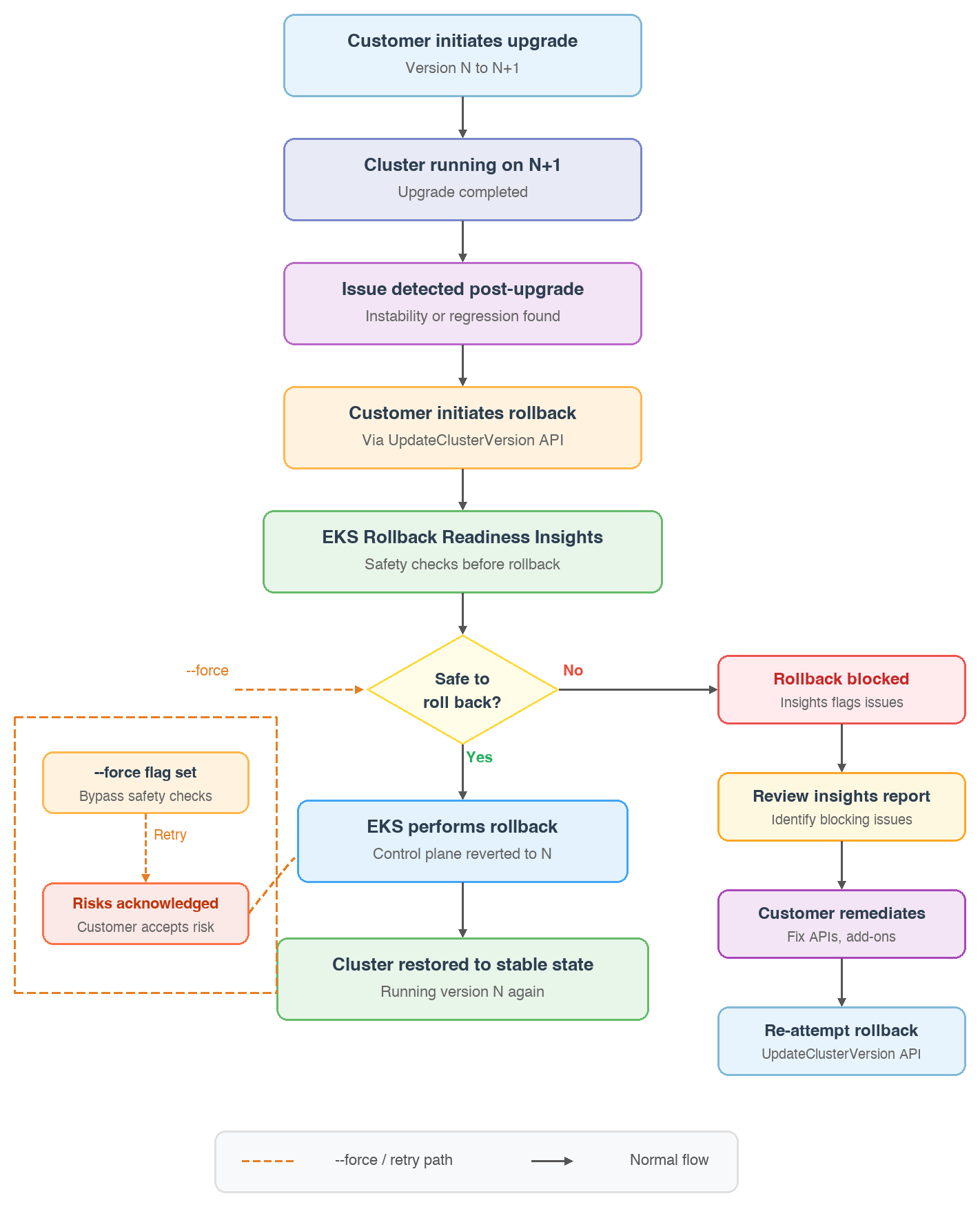
When you trigger a rollback, EKS performs comprehensive safety checks including:
- API compatibility: Validates that APIs used by your resources are compatible with the previous version.
- API field changes: Checks for incompatible API field usage between versions.
- Cluster health: Verifies no health issues that would prevent successful rollback.
- Kubelet version skew: Verifies worker nodes comply with Kubernetes version skew policy.
- Kube-proxy compatibility: Validates kube-proxy version compatibility.
- Add-on versions: Checks that installed EKS add-ons are compatible with the target version.
EKS Auto Mode rollback
The rollback experience described in the preceding sections applies to standard EKS clusters. The experience goes even further for clusters using Amazon EKS Auto Mode, which simplifies cluster operations by automatically managing infrastructure including compute, networking, and storage with built-in best practices. When you initiate a control plane rollback on an Auto Mode-enabled cluster, EKS automatically rolls back your Auto Mode worker nodes first, then proceeds with the control plane rollback. This verifies compliance with Kubernetes version skew policies throughout the rollback process.
The rollback honors your configured disruption budgets including NodePool disruption budgets and PodDisruptionBudgets (PDBs) to minimize impact on running workloads. The --force flag bypasses EKS Rollback Readiness Insights warnings and proceeds with the rollback even when potential compatibility issues are detected. However, --force does not override disruption budgets or pod-level disruption controls. These continue to be respected throughout the rollback process to keep workloads available.
For EKS Auto Mode clusters, version rollback validates:
- NodePool disruption budgets – Verifies Karpenter disruption budgets allow drift-based node replacement and aren’t set to block node disruption indefinitely.
- Pod disruption annotations – Checks for pods with the karpenter.sh/do-not-disrupt annotation that could delay node termination during rollback.
- PodDisruptionBudgets (PDBs) – Verifies that PDBs allow sufficient pod evictions and aren’t misconfigured (for example, maxUnavailable: 0) in ways that would block node disruption.
- Node disruption annotations – Identifies nodes with the karpenter.sh/do-not-disrupt annotation that would prevent node replacement during rollback.
These validations help confirm that the data plane rollback can proceed smoothly by identifying potential blockers before you initiate the rollback, giving you visibility into configurations that might delay or prevent the automated node replacement process.
If a rollback is taking longer than expected, or if you decide to address the issue through a different approach, you can cancel an in-progress rollback using the CancelUpdate API. This is useful when you want to apply a fix forward rather than wait for the rollback to finish, or when another critical update is blocked by the ongoing rollback operation. This capability is only available for Auto Mode rollback, because the node rollback phase can be a long-running operation (up to 7 days with conservative disruption budgets). Standard clusters without Auto Mode complete rollback quickly and do not have a cancellable phase.
To cancel a rollback, call the cancel-update API:
After it’s canceled, the cluster will return to an ACTIVE state at the version it was on when the rollback was initiated, and you can proceed with your next operation.
Scaling during rollback
Amazon EKS keeps your cluster responsive to workload demands even while a version rollback is in progress. Although EKS doesn’t support concurrent cluster updates, the service continues to scale your cluster’s control plane as needed during an active rollback operation. This means that if your cluster experiences increased API server load during the rollback window, EKS automatically scales the control plane infrastructure to meet demand. Your workloads are not impacted while the version revert is being processed.
Getting started with EKS Version Rollback
To initiate a rollback, you can use the existing UpdateClusterVersion API, AWS Command Line Interface (AWS CLI), Amazon EKS console, or other preferred tools.
Using the AWS CLI
The rollback process uses the same API you use for upgrades, but with the previous version specified:
Before initiating a rollback, review Rollback Readiness Insights in EKS Cluster Insights:
If Cluster Insights reports any errors (ERROR status), you must resolve those issues before proceeding with the rollback. Insights with PASSING, WARNING, or UNKNOWN status will not block the rollback.
Using the Amazon EKS console
In the Amazon EKS console:
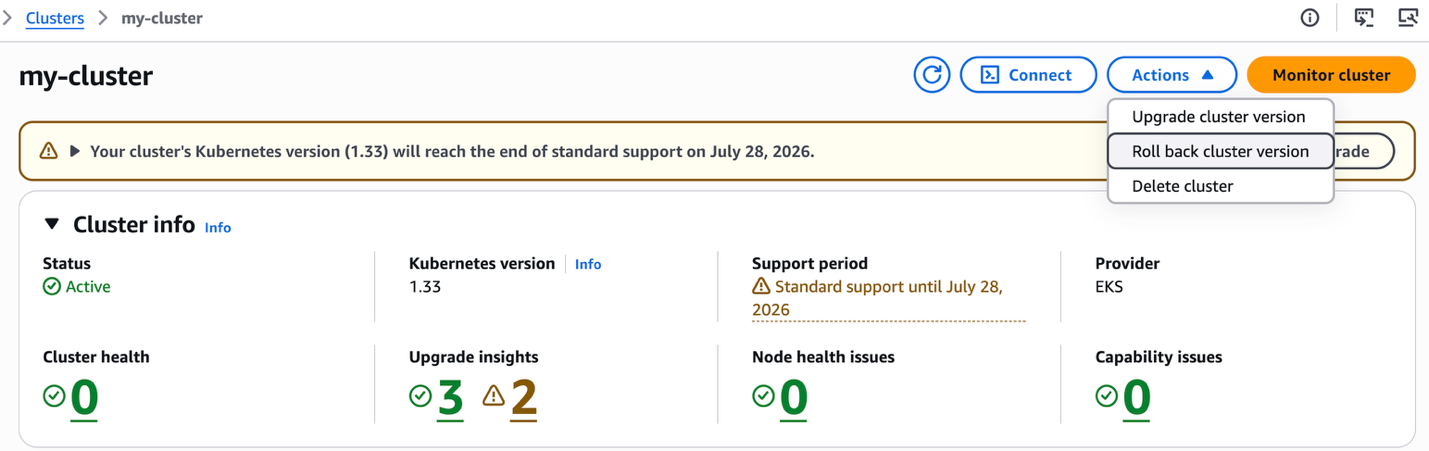
- Navigate to your cluster and choose the Actions menu.
- Choose Roll back Cluster version.
- Review Rollback Insights to identify any blocking issues.
- Select the target version and choose Initiate rollback.
- Confirm the rollback action.
Salesforce’s journey adopting EKS rollback
Amazon EKS has introduced Kubernetes version rollbacks for EKS clusters. This capability allows cluster administrators to revert a control-plane upgrade to the previous minor version at any point after an in-place upgrade is complete. This feature directly addresses the key unmitigated risk in the upgrade process.
Pre-conditions for rollback eligibility
The rollback feature’s most critical pre-condition is the version relationship between the control plane and the data plane (kubelet). After a node’s kubelet has been recycled to the upgraded version (N+1), reverting the control plane requires a corresponding rollback of the data plane.
This introduces a direct dependency on the current upgrade pipeline. That pipeline advances the control plane, add-ons, and data plane in a single continuous run with no bake period between stages.
Introducing a structured separation between control-plane and data-plane upgrades is therefore a prerequisite for making meaningful use of the rollback feature.
Recommended process: Staged upgrade with a control-plane bake period
To preserve the rollback window and reduce the scope of any post-upgrade regression, we recommend restructuring the upgrade sequence as follows:
- Add-on upgrade – Upgrade the managed add-ons to a version that is cross-compatible with N-1, N, and N+1 K8s versions. This verifies add-ons don’t become a blocking factor for either rollback or upgrade.
- Control-plane upgrade and bake – Upgrade the control plane to the target version and observe a bake period of approximately one week per environment. This window enables early detection of control-plane regressions before the data plane is upgraded to the new version.
- Data-plane upgrade – After the bake period, proceed with node recycling to upgrade the kubelet to the target version.
Note: An initial validation pass with matching control-plane and data-plane versions is recommended to surface regressions earlier in the cycle.
The recommended sequence is: control plane upgrade, then a one-week bake period, then data plane upgrade (node recycling).
In the event of a regression identified during or after the data-plane upgrade:
- Data-plane regression only: Roll back worker nodes to N-1 kubelet; the control plane remains at N.
- Both control plane and data plane regression: Roll back the data plane first (return kubelet to N-1), then initiate a control-plane rollback.
Benefits:
- This approach enables rapid control-plane rollout across the fleet (CP upgrades are fast), reducing exposure to EKS extended support charges.
- This keeps the rollback window open during the bake period, making incident response faster and lower risk.
Trade-offs:
- Adds time to complete a full upgrade cycle (control plane + data plane) across a fleet.
Example scenarios
Scenario 1: Clean rollback with no issues detected
Cluster upgraded from 1.30 to 1.31. Rollback insights show all PASSING. Administrator initiates rollback:
Scenario 2: Rollback blocked by insight errors
Cluster upgraded from 1.30 to 1.31. Data-plane nodes have already been recycled to kubelet 1.31. Rollback insights show ERROR for kubelet/kube-proxy version skew.

Resolution: recycle the affected nodes back to the 1.30 kubelet and roll back the kube-proxy to a compatible version, refresh insights, then retry the rollback.
Scenario 3: Attempting to roll back more than one version
Cluster was upgraded 1.29 to 1.30 to 1.31 and then rolled back to 1.30. Administrator attempts to roll back to 1.29:

Scope of rollback insights
Rollback Insights checks EKS managed add-ons (coredns, VPC CNI, kube-proxy). Self-managed add-ons like cluster-autoscaler are not automatically checked. We at Salesforce must maintain our own validation for self-managed add-on compatibility with the rollback target version.
Our Kubernetes upgrade process has been built, over multiple upgrade cycles across various versions, into a rigorous multi-stage program with extensive validation, bake periods, automated sign-offs, and staggered production rollouts. All of this was designed to compensate for one fundamental limitation: EKS did not support control-plane rollback.
The launch of EKS version rollbacks changes the risk calculus for Kubernetes upgrades fundamentally.
- A true safety net for production upgrades — if a post-upgrade issue surfaces across any stagger group, rollback is no longer off the table.
- Faster fleet-wide control-plane rollouts — by separating CP and DP upgrades with a bake window, the team can advance control-plane versions quickly across the fleet, reducing extended support cost exposure.
- Reduced regulatory risk — for regulated workloads, a documented and tested rollback path addresses compliance requirements for disaster recovery planning.
To take full advantage of the feature, we will need to make targeted pipeline changes: separating the control-plane and data-plane rollouts, introducing a bake window between CP and DP upgrade stages, and building a rollback-specific pipeline with rollback insights integration and appropriate guardrails.
The combination of our existing upgrade rigor and EKS version rollback support positions the team to upgrade across our large cluster fleet with greater confidence and reduced blast radius.
Considerations
Here are key considerations about this feature:
Rollback scope – Version rollback supports rolling back by one Kubernetes minor version (N to N-1). Multi-version rollbacks are not currently supported. You can only roll back if your cluster was upgraded to the current version through an in-place upgrade; clusters created at version N cannot roll back to N-1.
Supported versions – Version rollback is available for currently supported EKS versions. This verifies rollback support for all currently supported EKS versions at launch.
Rollback window and timeouts – You can initiate a rollback at any time after completing an upgrade within 7 days of upgrade, as long as the previous version remains supported by EKS. However, if you make changes that utilize new APIs or features from the newer version, you must revert those changes before rolling back.
By default, EKS allows a rollback operation up to 7 days to finish before marking it as failed. Additionally, the rollback insights that help you assess rollback readiness are only available for 7 days after an upgrade, so it’s important to evaluate and act within that window. However, if you manage your clusters using infrastructure-as-code (IaC) tools such as AWS CloudFormation or Terraform, which enforce their own operation timeouts (36 hours and 24 hours, respectively), a 7-day rollback window might cause conflicts with your automation pipelines.
To address this, you can specify a custom timeoutMinutes in the rollback request to define the maximum time EKS should attempt the rollback before failing the operation. With this, you can align EKS rollback behavior with your IaC tool’s timeout expectations:
Extended support – If you roll back to a version under extended support, your cluster will begin incurring extended support charges. Upgrading forward again to a version under standard support will stop extended support charges.
Worker node rollback – For Auto Mode clusters, EKS manages worker node rollback automatically. For Managed Node Groups, use the UpdateNodegroupVersion API to roll back worker nodes. Self-managed and hybrid nodes must be rolled back manually by the customer.
Fargate: Version rollback is not supported for AWS Fargate worker nodes. While you can roll back the control plane of a Fargate-based cluster, any Fargate pods running the same Kubernetes version as the pre-rollback control plane trigger the kubelet version skew insight with an ERROR status. This happens because the underlying infrastructure doesn’t support kubelet version downgrades independently of the API server. To work around this, delete the affected Fargate pods before initiating the rollback—or use --force to bypass the insight check—and new pods will launch with the rolled-back version once the control plane rollback is complete.
Add-on compatibility – You can roll back EKS add-ons manually by specifying the add-on version you want via the UpdateAddon API or through the EKS console. Cluster Insights will identify add-on compatibility issues that could affect rollback safety.
Safety checks – EKS Rollback Readiness Insights automatically validates your cluster against multiple safety predicates before allowing rollback, including API compatibility, feature gate compatibility, and version skew policies. Any errors must be resolved before proceeding with the rollback. It’s important to note that EKS Upgrade Insights cover known compatibility checks for standard Kubernetes and EKS components. Any custom add-ons, custom-built AMIs, or bespoke configurations are the customer’s responsibility to validate before an upgrade. Additionally, version rollback is designed as a safety net for post-upgrade issues, not as a routine upgrade workflow. For more details on what Upgrade Insights evaluate, see the EKS Cluster Insights documentation.
Now available
Amazon EKS Version Rollback is now available in all AWS Regions where Amazon EKS is available. For Regional availability, visit the AWS Regional Services page.
There are no additional charges for using version rollback.
To learn more, visit the Amazon EKS Version Rollback documentation in the Amazon EKS User Guide.
Give it a try in the Amazon EKS console and send feedback to AWS re:Post for EKS or through your usual AWS Support contacts.