Containers
Deep dive: Simplifying resource orchestration with Amazon EKS Capabilities
As organizations scale their Kubernetes operations, teams face mounting operational complexity. While teams focus on building and deploying applications, they must also maintain Kubernetes platform components like GitOps controllers and infrastructure orchestrators. This dual burden slows development velocity and diverts engineering resources from building features to operating platform tools.
Amazon Elastic Kubernetes Service (Amazon EKS) Capabilities address these challenges with a fully managed, Kubernetes-native tools for both Amazon EKS standard and EKS Auto Mode that runs in AWS-managed infrastructure.
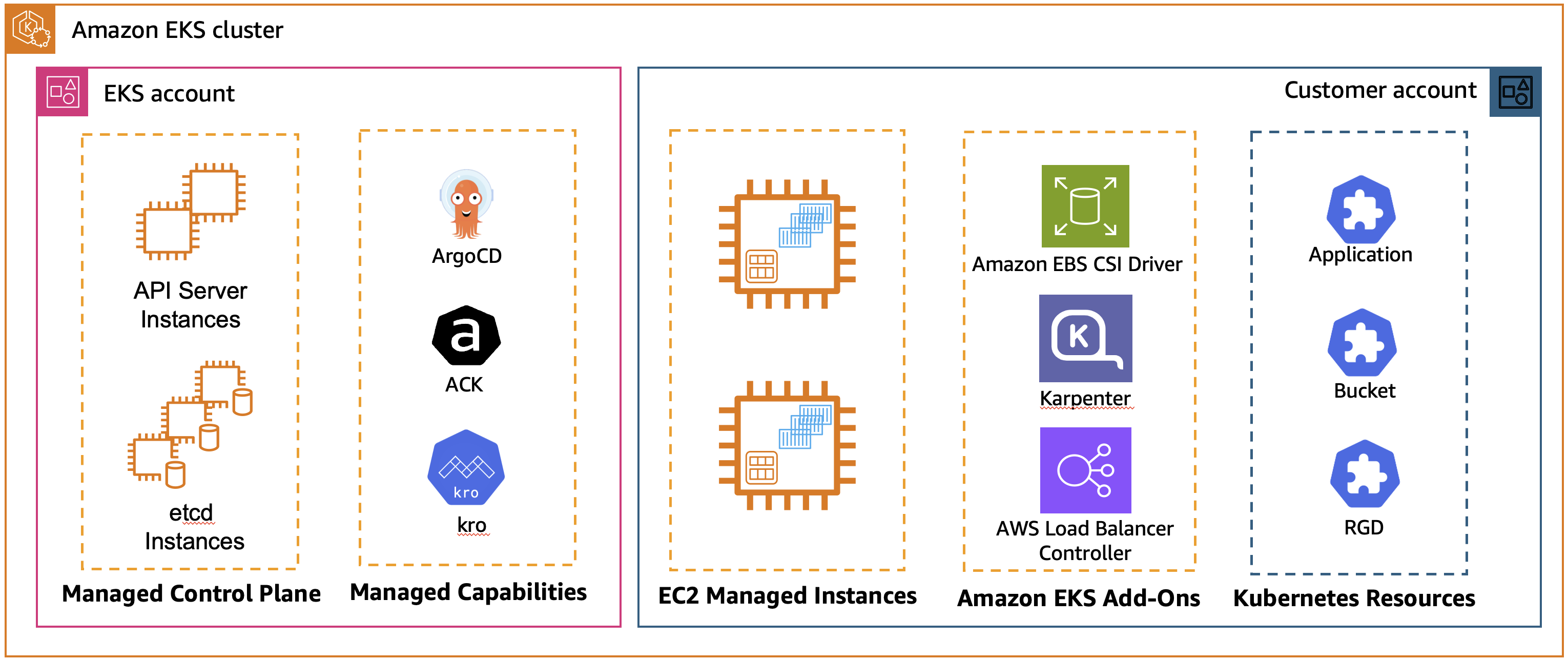
Figure 1: EKS Managed Capabilities with standard Amazon EKS cluster
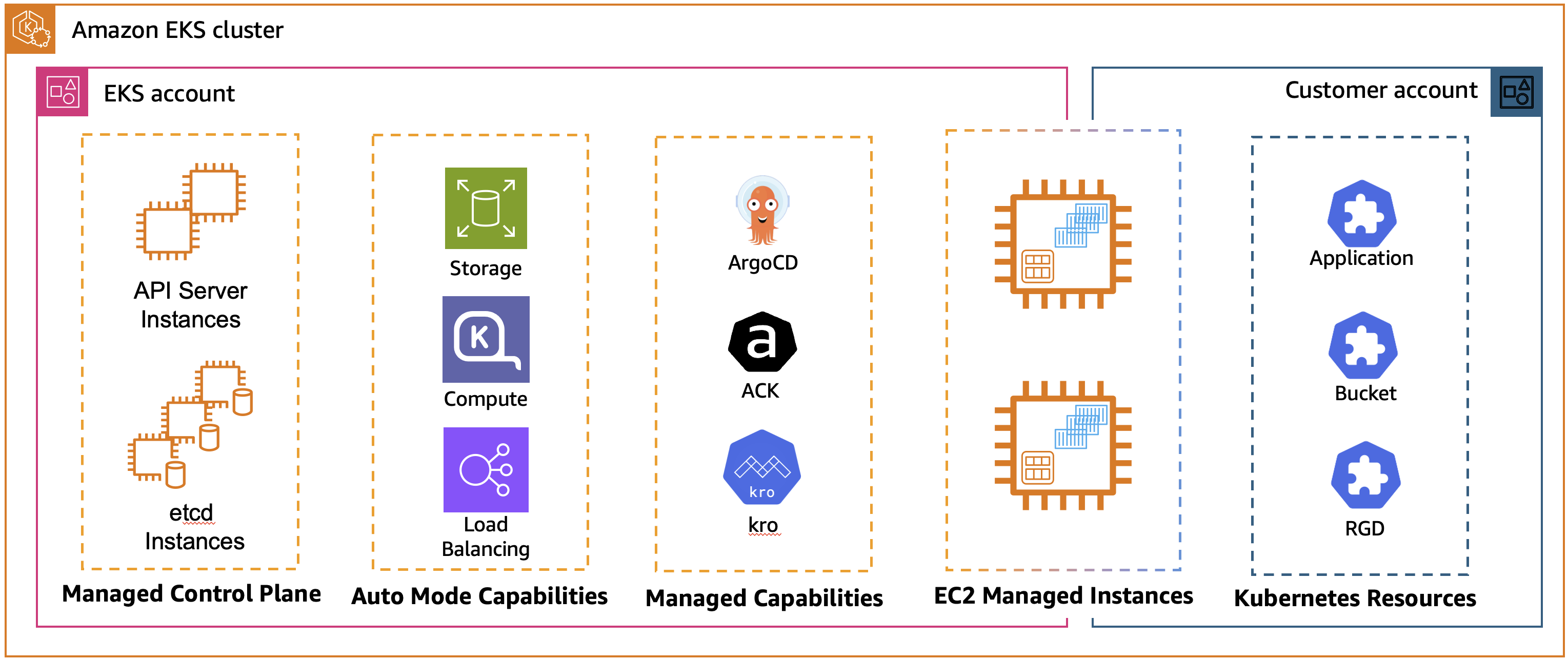
Figure 2: EKS Managed Capabilities with Amazon EKS Auto Mode cluster
Since the launch, three foundational capabilities are available: continuous deployment with Argo CD, AWS resource management through AWS Controllers for Kubernetes (ACK), and dynamic resource orchestration using Kube Resource Orchestrator (kro). This unified approach accelerates deployment velocity, enabling platform teams to support more applications while maintaining consistent security and compliance standards across all clusters.
This blog post focuses on ACK and kro capabilities. For a deep dive on Amazon EKS capability for Argo CD, check out Deep dive: Streamlining GitOps with Amazon EKS capability for Argo CD.
The Kubernetes Resource Model and EKS capabilities
The Kubernetes Resource Model provides a declarative framework where you define your desired state, and Kubernetes continuously reconciles the actual state with your intentions. ACK and kro extend this model in complementary ways: ACK enables the management of AWS resources using Kubernetes APIs, allowing you to create and manage Amazon Simple Storage Service (Amazon S3) buckets, Amazon Relational Database Service (Amazon RDS) databases, IAM roles and other AWS resources as if they were Kubernetes resources. kro enables you to create custom Kubernetes APIs that compose multiple resources into higher-level abstractions, which lets infrastructure teams define reusable patterns for common resource combinations. By combining kro and ACK you can compose both Kubernetes and cloud resources into unified abstractions. EKS Capabilities provides fully managed versions of both, enabling you to manage your entire infrastructure stack using native Kubernetes tooling.
EKS capabilities at-a-glance
- Eliminating Operational Overhead: Managing installations, upgrades, security patches, and monitoring of open source tools require specialized knowledge and ongoing maintenance. Many customers prefer to focus their engineering resources on building applications rather than becoming open source operations specialists, making fully managed solutions options.
- Simplifying Multi-Cluster Management: As Kubernetes adoption grows, organizations increasingly need to manage workloads across multiple clusters and regions. Traditional approaches require separate toolchains for application deployment (kubectl, Helm) and infrastructure provisioning (Terraform, AWS CloudFormation), creating friction and inconsistency.
- Accelerating Time to Value: EKS Capabilities combined with EKS Auto Mode gives you a deployment-ready cluster. Fully managed solutions reduce the learning curve and let teams focus on building applications rather than maintaining platform infrastructure.
Let’s get started with EKS Capabilities, use them for multi-cluster management, implement effective monitoring strategies, and apply best practices for production deployments.
Getting started with enabling ACK and kro capabilities
Enabling AWS Controllers for Kubernetes (ACK) and Kube Resource Orchestrator(kro) on your Amazon EKS cluster requires minimal configuration. You can complete the entire process through the AWS Command Line Interface (CLI), AWS Console, AWS APIs, or Infrastructure as Code (IaC) tools like Terraform, ACK and CloudFormation, while AWS manages the installation and lifecycle of the controllers in your cluster.
Prerequisites
Before you begin, set up the following:
- IAM permissions to create EKS cluster and manage EKS capabilities
- AWS Command Line Interface (AWS CLI) configured on your device
- eksctl, a CLI tool for creating and managing EKS clusters
- kubectl, a CLI tool to interact with the Kubernetes API server
Step by step guide:
- Let’s start with creating Amazon EKS cluster:
- Create an IngressClass to configure an Application Load Balancer
- Once the cluster is created, use the following user guides to create ACK and kro capabilities:
Note: ACK capability by default has no permissions to access Kubernetes resources, except CRDs that it manages. In this blog post we will use ACK CRD object to create a database, and it needs to read the password securely from the Kubernetes secret. To enable this, we need to attach an additional policy to the EKS Access Entry for ACK Capability.
- Get the capability role ARN:
- Associate the cluster secret viewer policy:
What happens behind the scenes
When you enable a capability, AWS installs and manages the capability controllers from AWS-managed infrastructure in EKS service-owned account separate from your cluster. The Custom Resource Definitions (CRDs) are installed in your cluster to enable you to create and manage resources. AWS handles all aspects of installation, upgrades, security patches, autoscaling, and monitoring through secure APIs that use IAM authentication. You benefit from a fully managed experience without any infrastructure to manage.
Declarative AWS Resources Management:
The foundational construct in kro is the ResourceGraphDefinition (RGD) that lets you create new Kubernetes APIs whose instances deploy multiple resources together as a single, reusable unit. Like any Kubernetes resource, an RGD has metadata, spec and status. Think of an RGD as a template that describes not just what resources you want to create, but how they relate to each other and how they should be managed as a cohesive unit.
An RGD consists of three main components:
- Metadata: Standard Kubernetes metadata (name, labels, etc.)
- Schema: Defines your new API – what users can configure and what status information they can view
- Resources: Specifies the Kubernetes resources to create, their dependencies, and how they reference each other
When you create an RGD in your cluster, kro automatically generates a new Custom Resource Definition (CRD). This means you’re not just deploying resources – you’re creating entirely new APIs that others can use to deploy complex infrastructure in a consistent, repeatable way. kro uses the all familiar Observe-Act-Reconcile k8s pattern to continuously look for events affecting the CRD and perform actions on them. kro controller:
- Watches for instances of the API you defined in your RGD
- Automatically manages the lifecycle of all resources specified in the RGD
- Handles dependencies between resources, creating them in the correct order
- Continuously monitors all managed resources and reconciles any drift
- Listens to events form the resources it manages
- Updates instance status based on the state of underlying resources
With kro, you can define k8s API’s using configuration rather than code – kro automatically generates the controller logic from your declarative RGD.
Complex application stacks orchestration:
Real-world applications are rarely simple. They’re composed of multiple tiers, services, and infrastructure components that need to work together seamlessly. kro excels at this through resource composition – building complex systems from simple, reusable components.
The key insight is that each component can itself be an RGD. You can compose RGDs together, creating higher-level abstractions that reference other RGD’s. Within an RGD, resources refer to each other using Common Expression Language (CEL). When one resource references fields from another such as ${dbinstance.status.endpoint.address} or ${redis.status.endpoint.address} kro automatically tracks these dependencies and creates a Directed Acyclic Graph (DAG). This graph determines the order in which resources must be created, updated, or deleted. kro validates this DAG to ensure there are no circular dependencies, guaranteeing a deterministic and safe deployment sequence.
These CEL expressions serve two purposes:
- Value Passing: They reference values from one resource and pass them to another
- Dependency Creation: They implicitly define the order in which resources must be created
For example:
${dbinstance.status.endpoint.address}– Gets the database endpoint${webapp.status.serviceName}– Gets the service name from a webapp resource${s3bucket.status.s3ARN.substring(13)}– Extracts the bucket name from an ARN
Not all resources are needed in every scenario. kro supports conditional resource inclusion using the includeWhen field as shown in the following example:
This resource will only be created if the user sets s3bucket.enabled: true in their instance. This allows you to create flexible RGDs that adapt to different use cases without requiring multiple versions.
Let’s look at a real-world example: a multi-tier voting application that demonstrates the full power of kro’s composition capabilities. This application includes:
- Vote App: Python/Flask frontend for casting votes
- Result App: Node.js dashboard for viewing results
- Worker App: Java service that processes votes from Redis to PostgreSQL
- RDS PostgreSQL: Database for storing voting results
- ElastiCache Serverless: Redis cache for vote queuing
- Ingress: AWS Load Balancer Controller with ALB for external access
The architecture of the application would look like this
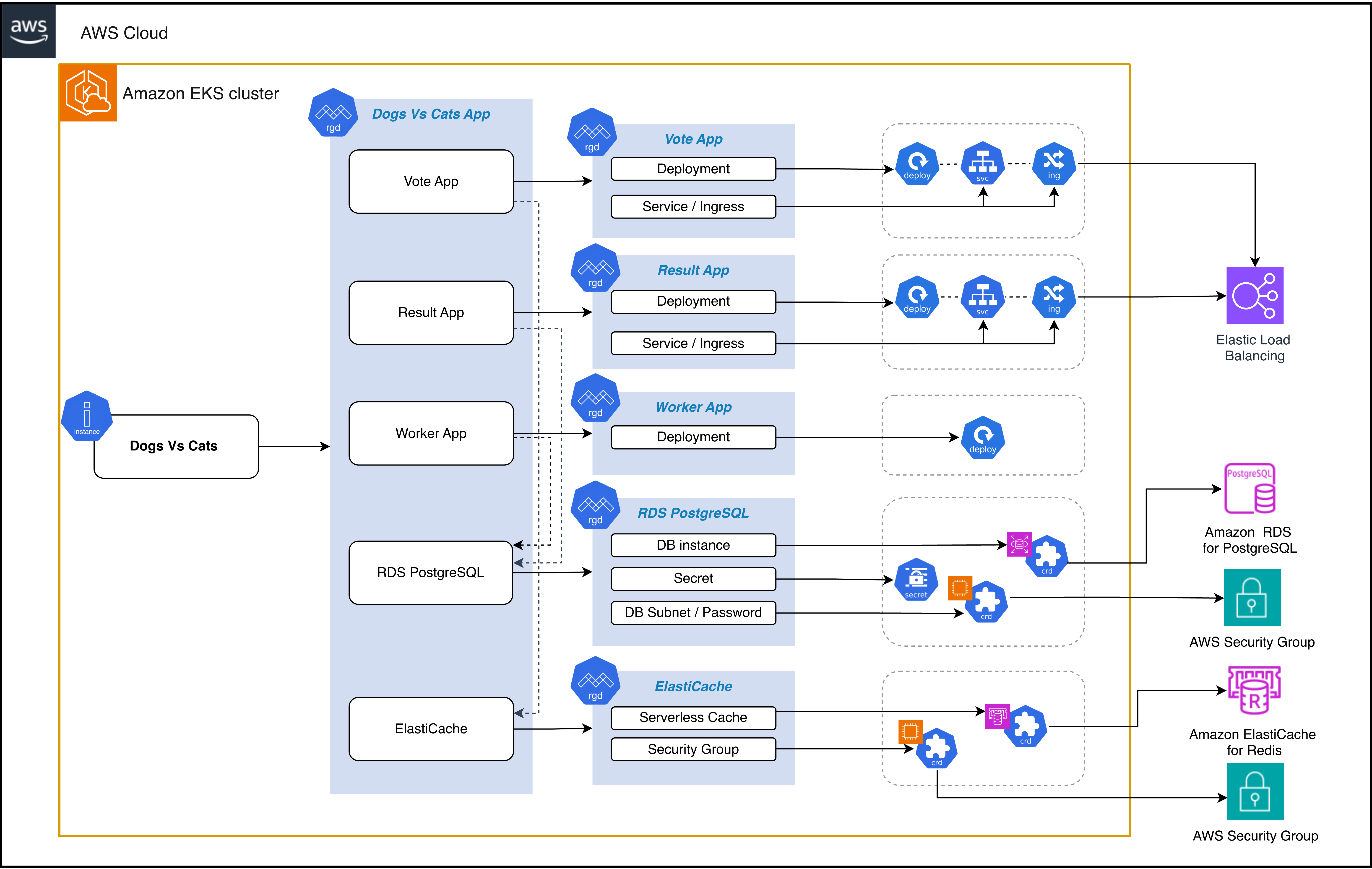
Figure 3: DogsvsCats application architecture and components
Solution walkthrough:
- Clone kro GitHub repository:
- Apply AWS infrastructure components:
- Apply Kubernetes app components
- Apply the main composed RGD
- Verify that RGDs are active:
Expected result:

The RGDs referenced here demonstrate several powerful patterns:
1. RGD chaining
Notice that postgres, redis, voteapp, resultapp, and workerapp are themselves RGDs. RGD chaining enables a building blocks approach to platform engineering. Instead of creating monolithic RGDs that define everything, you can decompose your platform into small, focused RGDs that each do one thing well.
2. Dependency chain
The dependency graph looks like this:
The worker app depends on both PostgreSQL and Redis. The vote app depends on Redis. The result app depends on PostgreSQL. The ingresses depend on their respective apps being ready. kro automatically infers dependencies from CEL expressions. You don’t specify the order – you describe relationships, and kro figures out the rest.
3. Status propagation
Please take a look at the schema’s status section:
Status information from all child resources automatically propagates up to the parent DogsvsCatsApp instance.
4. Ready conditions
Each resource has readyWhen conditions that tell kro when the resource is truly ready:
This ensures that dependent resources don’t start until their dependencies are fully provisioned and ready to use.
5. Simple schema syntax
The schema uses kro’s intuitive syntax:
This is much simpler than writing raw OpenAPI schemas, yet it’s fully compatible with Kubernetes CRD validation.
Once kro processes your RGD, it creates a new API in your cluster. Users create instances of this API to deploy resources in a consistent, controlled manner.
To deploy this complete application stack, create an instance as follows.
Replace vpcID and subnetID values with yours.
After the above yaml is deployed to your cluster the kro’s controller will:
- Create the CRD for PostgreSQL database and wait for it to be ready
- Create the CRD Redis cache and wait for it to be ready
- Apply server side for the vote, result, and worker applications and let the default Kubernetes controllers provision the k8s resources
- Continuously monitor all resources and reconcile any drift
It will take about 5 minutes to provision resources, you can check instance status periodically using following command:
Once an instance becomes Active, you can get the application URLs by running following commands:
Navigate to the vote URL to cast votes, then check the result URL to see the results.
Key considerations
Multi-cluster management
EKS Capabilities, combined with GitOps practices using Argo CD, provide a powerful framework for multi-cluster resource orchestration. By storing your RGD and instance manifests in Git repositories, you can use Argo CD’s multi-cluster support to deploy consistent infrastructure patterns across development, staging, and production environments. Each cluster can have managed ACK and kro capabilities enabled independently, with cluster-specific IAM roles that follow least-privilege principles for the resources deployed in that environment.
A key advantage of this approach is the ability to create environment-specific variations of your RGDs through parameter overrides while maintaining a single source of truth. For example, your development cluster might deploy smaller RDS instances (db.t3.micro) with reduced replica counts, while production uses larger instances (db.r6g.xlarge) with multi-AZ configurations—all from the same RGD template. This pattern promotes consistency while allowing for necessary flexibility. Because kro generates status information that propagates to parent resources, platform teams can build centralized dashboards that aggregate application health across all clusters, providing unified visibility into multi-cluster deployments without requiring custom integration code.
Monitoring and operations
Effective monitoring and observability are essential for operating EKS Capabilities in production environments. Since AWS manages the lifecycle of ACK and kro controllers, your monitoring focus shifts from controller health to the resources they manage. Use AWS CloudWatch Container Insights and Amazon Managed Service for Prometheus to collect metrics from your EKS clusters, including custom metrics from your RGD instances. Set up CloudWatch alarms for critical conditions such as failed resource provisioning, prolonged reconciliation times, or resources stuck in non-ready states. The status conditions exposed by both ACK and kro resources provide valuable signals—monitor these conditions to detect issues before they impact your applications.
For operational excellence, establish clear troubleshooting runbooks that use kubectl commands to inspect resource status and events. Use kubectl describe on your RGD instances to view the detailed status of all composed resources in one place and examine events with kubectl get events to identify provisioning failures or permission issues. Enable AWS CloudTrail logging for ACK operations to maintain an audit trail of all AWS resource changes made through Kubernetes. Consider implementing automated testing of your RGDs in non-production environments before promoting them to production, treating your infrastructure compositions with the same rigor as application code. Finally, establish policies around capability IAM role permissions, regularly reviewing and auditing them to ensure they follow the principle of least privilege and comply with your organization’s security requirements.
Cleanup
To avoid ongoing charges, make sure to delete the EKS cluster resources and all the other AWS resources created in your AWS account.
- Delete DogsvsCats application
- Delete EKS Capabilities
- Delete Amazon EKS cluster
Conclusion
Amazon EKS Capabilities represent a fundamental shift in how organizations manage cloud infrastructure alongside Kubernetes workloads. By providing fully managed ACK and kro capabilities, AWS eliminates the operational overhead of maintaining custom platform solutions, allowing teams to focus on delivering business value rather than managing infrastructure tooling. The declarative, Kubernetes-native approach unifies application deployment and AWS resource management under a single operational model, reducing complexity and cognitive load for development and platform teams.
The power of resource composition through kro, combined with ACK’s ability to provision AWS services, enables organizations to create reusable, organization-specific abstractions that encapsulate best practices and compliance requirements. Whether you’re deploying simple applications or complex multi-tier architectures, EKS Capabilities provides the building blocks to standardize and simplify your infrastructure management at scale. As you begin your journey with EKS Capabilities, start small with a single application or use case, validate your approach, and progressively expand to more complex scenarios. The combination of zero-maintenance managed services, powerful composition patterns, and deep AWS integration positions EKS Capabilities as a cornerstone of modern cloud-native platform engineering.
| Interested in hands-on experience about EKS? Register for a guided hands-on workshop |
For more information, see the following resources:
- Introducing kro: Kube Resource Orchestrator
- Kube Resource Orchestrator, From Experiment to Community Project
- Kubernetes Resource Orchestrator
- AWS Controllers for Kubernetes