Containers
Measuring developer experience on an Amazon EKS developer platform
Every deployment, rollback, incident, and merge on your Amazon Elastic Kubernetes Service (Amazon EKS) developer platform says something about developer experience, yet most platform teams never capture that signal. Without data, there’s no way to show whether an internal platform is improving your organization’s software delivery practices. According to the State of Platform Engineering Report Volume 4, 29.6 percent of platform teams aren’t measuring their platforms at all, and another 24.2 percent can’t tell whether their metrics have improved. That means more than half of all platform teams are either flying blind or collecting data they never turn into insights.
This blind spot creates an accountability gap that undermines your ability to prove the platform is worth the investment. When you don’t measure your platform, you can’t pinpoint bottlenecks or make evidence-based decisions about where to invest next. This matters because platform maturity directly affects delivery speed. According to research from Enterprise Strategy Group, 71 percent of leading platform adopters indicated that they significantly accelerated their time to market. That rate is more than double the 28 percent of less mature adopters. Teams that aren’t measuring have no way to claim that value or even know whether they’ve captured it.
So how do you measure the success of your platform? The industry has converged on an answer: DevOps Research and Assessment (DORA) metrics. According to the same State of Platform Engineering Report, DORA metrics are the most widely used measurement framework among platform teams, with 40.8 percent adoption. In this post you will learn what DORA metrics are and how to automate DORA metric collection using open source tooling on your Amazon EKS platform.
Understanding DORA metrics
The DORA team spent six years conducting industry research to identify the metrics that best predict software delivery performance. They distilled their findings into four key metrics that balance velocity and stability. The first two measure how fast you deliver, and the last two measure whether you deliver reliably.
Velocity metrics
Deployment Frequency: How often does your team release code changes to production? High deployment frequency, when implemented correctly, accelerates innovation through smaller and more manageable changes, provides quicker feedback loops, and improves developer experience through a more frequent sense of accomplishment.
Lead Time for Changes: How long does it take from the first code commit of a change to that change running successfully in production? This metric captures full pipeline efficiency: development time, code review, testing, and deployment. It’s a clear indicator of how much friction exists between a developer’s idea and its delivery to users.
Stability metrics
Change Failure Rate (CFR): What percentage of deployments result in degraded service? A failed change includes system outages, service degradation, manual rollbacks, or emergency patches. This indicates the quality of your delivery process and keeps deployment frequency honest, because shipping more only counts if it doesn’t break production.
Failed Deployment Recovery Time (FDRT): How long does it take to restore service after a failed deployment? This metric measures the resilience of your systems and the effectiveness of your incident response.
Performance benchmarks
Teams fall on the following spectrum for each metric:
| Metric | Low performers | Medium | High | Elite |
| Deployment Frequency | Once per month to once per 6 months | Once per week to once per month | Once per day to once per week | On demand (multiple/day) |
| Lead Time for Changes | 1–6 months | 1 week–1 month | 1 day–1 week | Less than 1 day |
| Change Failure Rate | 40% | 10% | 20% | 5% |
| Failed Deploy Recovery Time | 1 week – 1 month | Less than 1 day | Less than 1 day | Less than 1 hour |
Table 1: Software delivery performance levels (2024 Accelerate State of DevOps Report)
Note: The 2024 report places medium performers at a lower change failure rate (10 percent) than high performers (20 percent). This reflects the report’s published cluster data. Medium performers deploy less often but fail less often when they do.
Why DORA metrics matter for internal developer platforms (IDPs) on EKS
Amazon EKS provides the foundation for the practices that DORA metrics measure. Kubernetes-native capabilities like declarative deployments, rolling updates, and self-healing support the behaviors behind elite DORA performance.
Progressive delivery makes frequent deployments safe. With Kubernetes-native tools like Argo Rollouts, teams can run canary and blue/green deployments with automated rollback. These strategies let teams deploy more often without sacrificing stability.
A streamlined pipeline shortens lead time for changes. Tools like Argo Workflows orchestrate continuous integration and continuous delivery (CI/CD) from commit to production. In production, a GitOps controller such as Argo CD typically drives deployments. Amazon EKS Capabilities, a capability of Amazon EKS, includes a managed Argo CD capability that runs in the EKS control plane. AWS handles upgrades, high availability, and single sign-on (SSO), so teams spend less time operating the pipeline and more time shipping.
Self-healing shortens recovery. Kubernetes automatically restarts failed pods, maintains replica counts, and runs health checks. Combined with automated rollback, these behaviors reduce recovery time when a deployment fails.
The signals for measurement already exist. Deployments, rollouts, and pipeline runs all emit events that you can capture and correlate to calculate DORA metrics automatically.
Setting up measurement: The demo architecture
Measuring DORA metrics for an IDP on EKS requires connecting the events that already flow through your CI/CD and deployment tooling into a measurement engine. Here’s the demo architecture you deploy in this walkthrough:
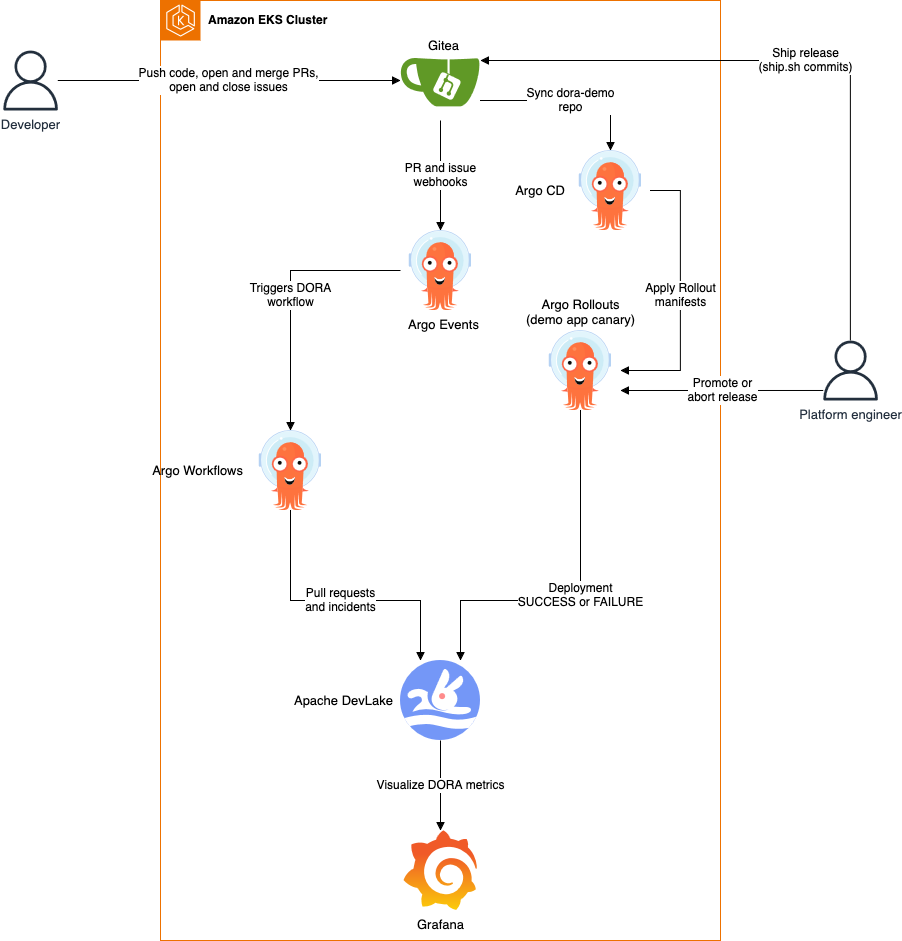
Figure 1: Demo architecture for measuring the success of developer platforms on Amazon EKS
In a production platform, each component plays the following role:
- Argo Events processes webhook events from Git repositories when code is pushed, pull requests are created or merged, and issues are opened or closed.
- Argo Workflows orchestrates measurement data collection and deployment event processing. Dedicated workflows track deployments, issues, and pull requests.
- Argo CD delivers every deployment through GitOps. A release is a commit to the application’s Git repository, and Argo CD syncs it onto the cluster.
- Argo Rollouts validates that deployments are successful using analysis runs and metric-driven decisions, reporting success or failure status.
- Apache DevLake serves as the core measurement engine, ingesting, analyzing, and calculating DORA metrics using the definitions published by the DORA research program.
- Grafana visualizes performance trends through purpose-built DORA dashboards.
Prerequisites
The following are necessary to deploy and try out this solution:
- An AWS account.
- AWS Command Line Interface (AWS CLI) configured on your device.
- eksctl, a CLI tool for creating and managing EKS clusters.
- kubectl, a CLI tool to interact with the Kubernetes API server.
- helm, a CLI tool for deploying packages on Kubernetes.
- kubectl-argo-rollouts, a kubectl plugin to interact with Argo Rollouts on the cluster.
- git.
- curl.
- jq.
Sample code: All the manifests and scripts referenced in this post live in this directory of the containers-blog-maelstrom repository. Clone the repository and change into this post’s folder before running anything:
Cost note: The walkthrough creates an EKS control plane, EKS Auto Mode compute (EC2 instances Auto Mode launches on demand), and Amazon Elastic Block Store (Amazon EBS) volumes. Run the Clean up section when you’re done to avoid ongoing charges.
Solution walkthrough
The walkthrough is split into a one-shot install plus four short exercises, one per DORA metric. Each exercise takes 3–5 minutes and drives events through the platform so DevLake has data to compute against.
1. Deploy the cluster and platform
You will bring up an EKS Auto Mode cluster, install all the platform components, seed Gitea with the demo repository, wire DevLake and Argo Rollouts together, and deploy the demo application. The platform records every new deployment automatically.
1a. Create the cluster and install the tooling on the platform. The scripts/install-platform.sh wrapper runs the setup scripts in order, printing a banner and duration for each stage. It creates the EKS Auto Mode cluster, then installs Argo CD, Argo Workflows, Argo Events, Gitea, Argo Rollouts, and DevLake with MySQL and Grafana. It seeds Gitea with the demo repository, connects DevLake to Gitea and Argo Rollouts, and deploys the demo application with Argo CD. The script end-to-end takes about 30 minutes.
Expected tail of the output:
The tunnels keep running in the background after the installer exits. Stop them with ./scripts/port-forward.sh stop, and reprint the logins at any time with ./scripts/get-credentials.sh.
The rest of this step is a short tour of what the installer set up, so you know where each piece of DORA data comes from.
1b. Explore the demo repository in Gitea. DevLake computes lead time for changes by joining deployment records to Git commits, so it needs a Git history to work from. The install script created a dora-demo repository under the gitea_admin user and pushed the demo’s manifests (a namespace, two services, and the Argo Rollout) to it. View the repository by opening http://localhost:3000 (sign in as gitea_admin with the password ./scripts/get-credentials.sh prints).
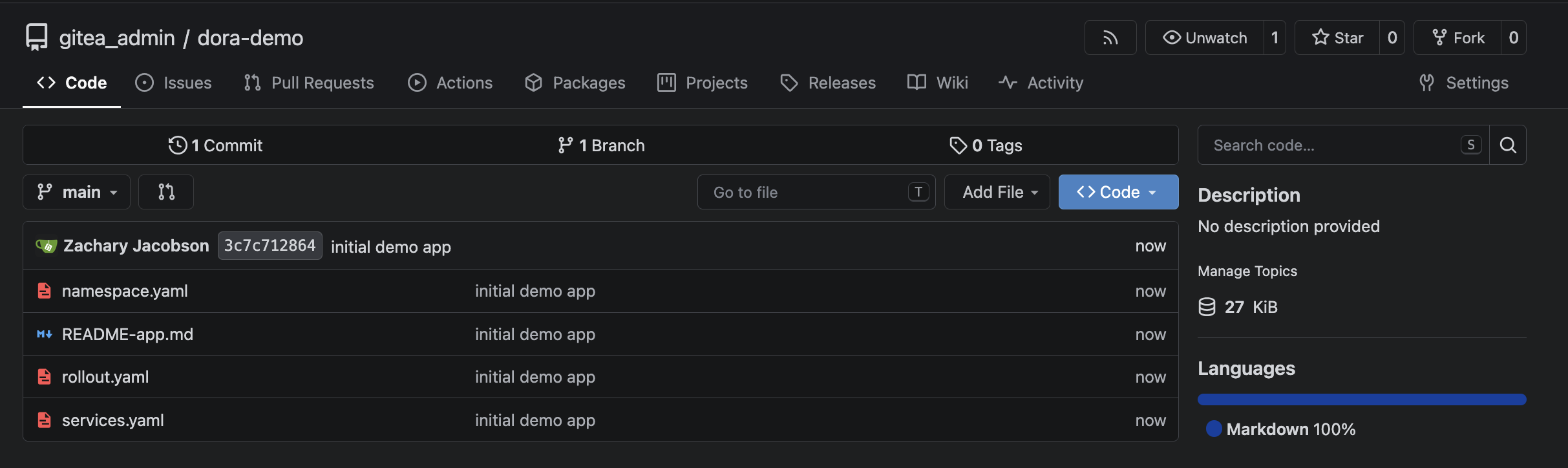
Figure 2: The dora-demo repository the installer seeded
1c. Check the demo app in Argo CD. The install script registered the dora-demo repository with Argo CD and created an Argo CD Application (platform/argocd/dora-demo-app.yaml) that syncs the repository onto the cluster. Every change merged to main is synced automatically. The ship.sh script commits the new image tag and commit SHA to the repository, and Argo CD rolls it out. Open https://localhost:8443 and sign in as admin to see the Application.
Note: This demo runs Argo CD in the cluster because the managed Amazon EKS capability for Argo CD requires AWS IAM Identity Center and can’t reach the demo’s in-cluster Gitea server.
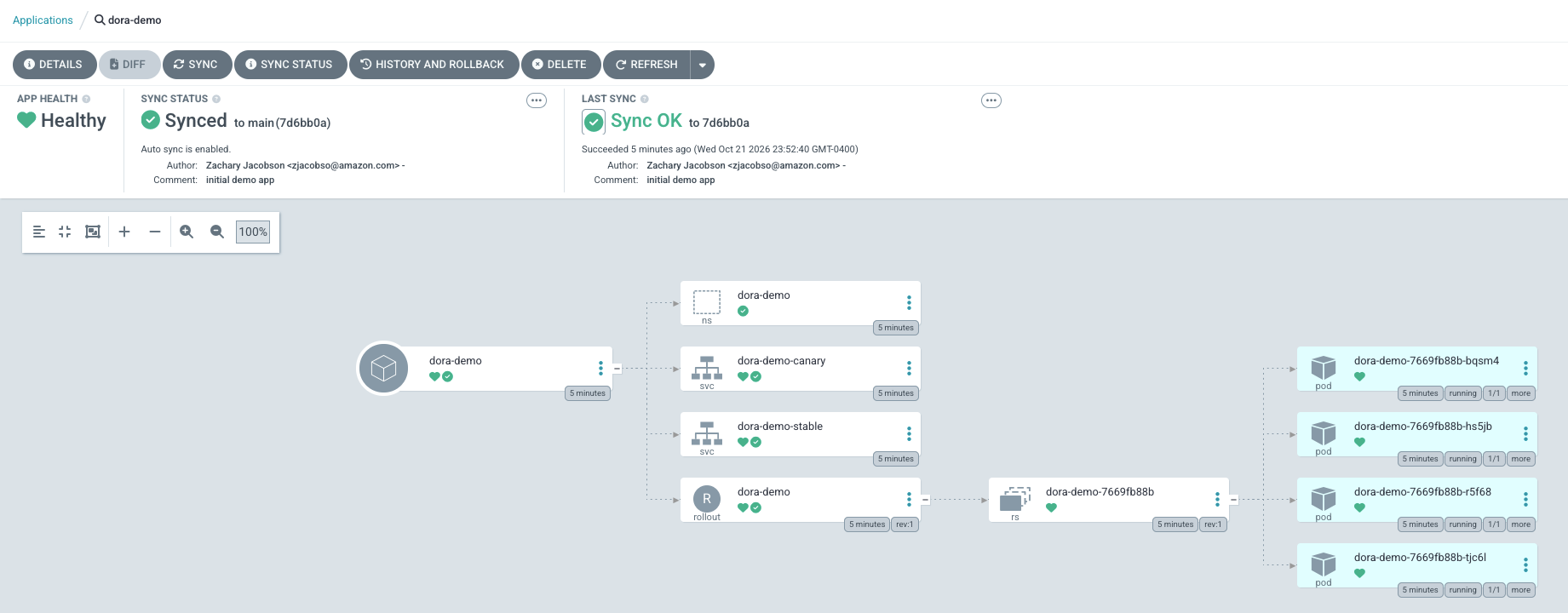
Figure 3: The dora-demo Application in Argo CD
1d. Find the DevLake project. DevLake groups all records for a repository under a project. The install script created the project with DORA metrics enabled, provisioned an incoming webhook connection, and attached it to the project’s blueprint. It also stored the shared credentials in a Kubernetes secret so the Gitea webhook workflows can reuse them. Find it under Projects at http://localhost:4000 (Exit out of the “Connect your First Repository” Prompt).
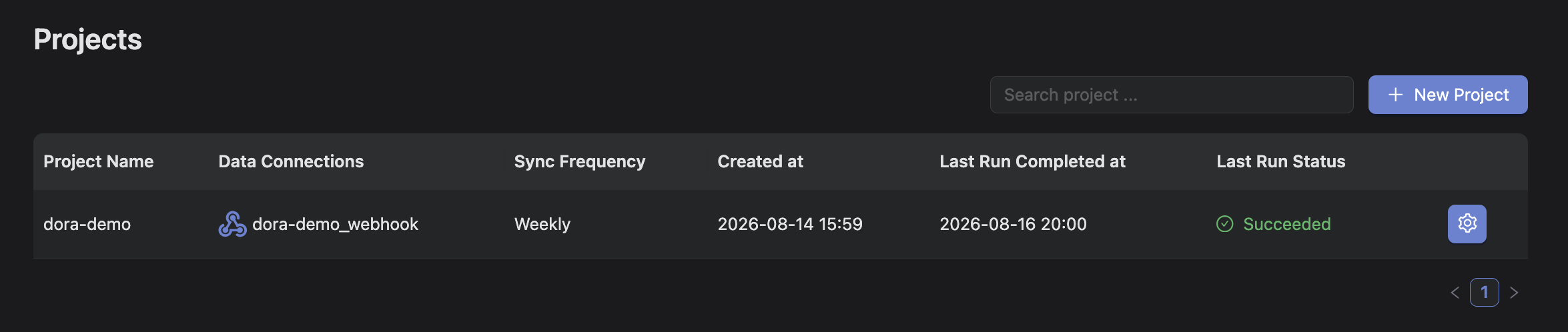
Figure 4: The dora-demo project in DevLake’s config UI, with the webhook connection attached to its blueprint
1e. See how events reach DevLake. Two paths feed the webhook connection: one for issues and pull requests, and one for deployments. For the issues and pull requests path, the install script registered a webhook on the dora-demo repository that posts to an Argo Events EventSource. A Sensor routes each event to an Argo Workflow that transforms the payload into a DevLake record. You can see the webhook under the repository’s Settings in Gitea. For deployments, the install script configured the Argo Rollouts notification engine to push a record to DevLake whenever the Rollout state changes. Reaching Healthy posts a SUCCESS deployment, and going Degraded or Aborted posts a FAILURE.
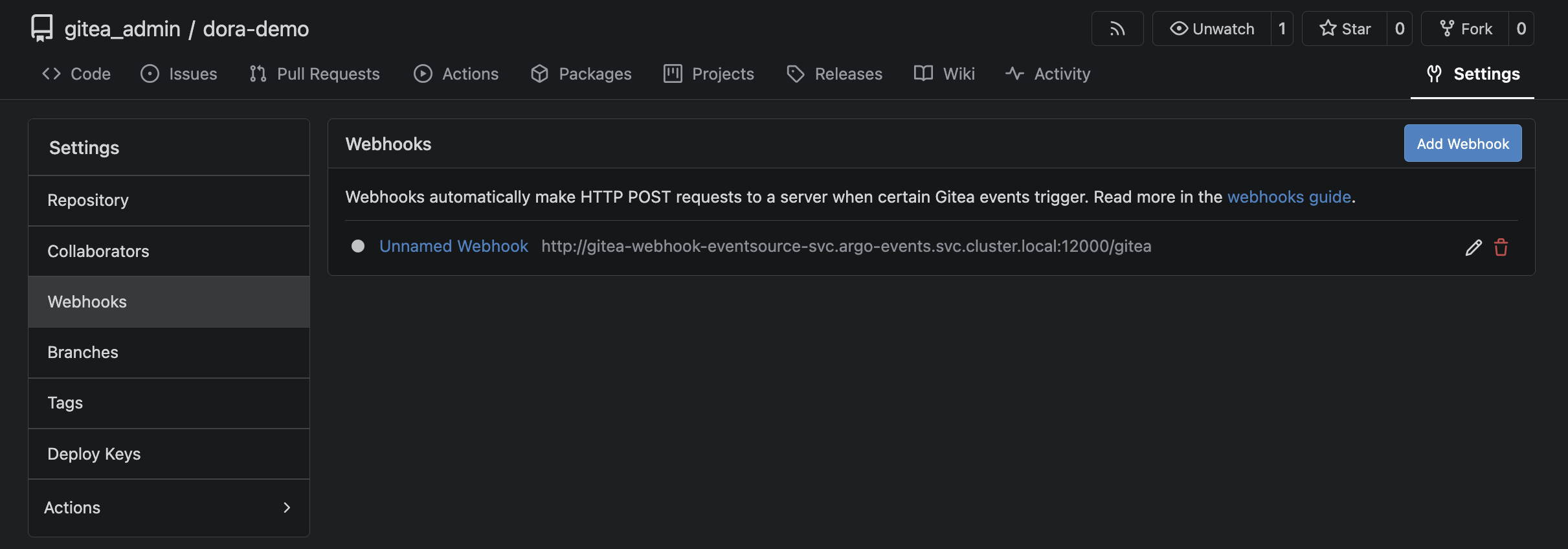
Figure 5: The Gitea webhook that sends issue and pull request events to Argo Events
You now have a cluster where every deployment and all Gitea issues and pull requests are captured by DevLake, then processed by the DevLake blueprint. Throughout the exercises below, recalculate the metrics on demand with:
View them in Grafana at http://localhost:4000/grafana. Sign in as admin then open the DORA dashboard.
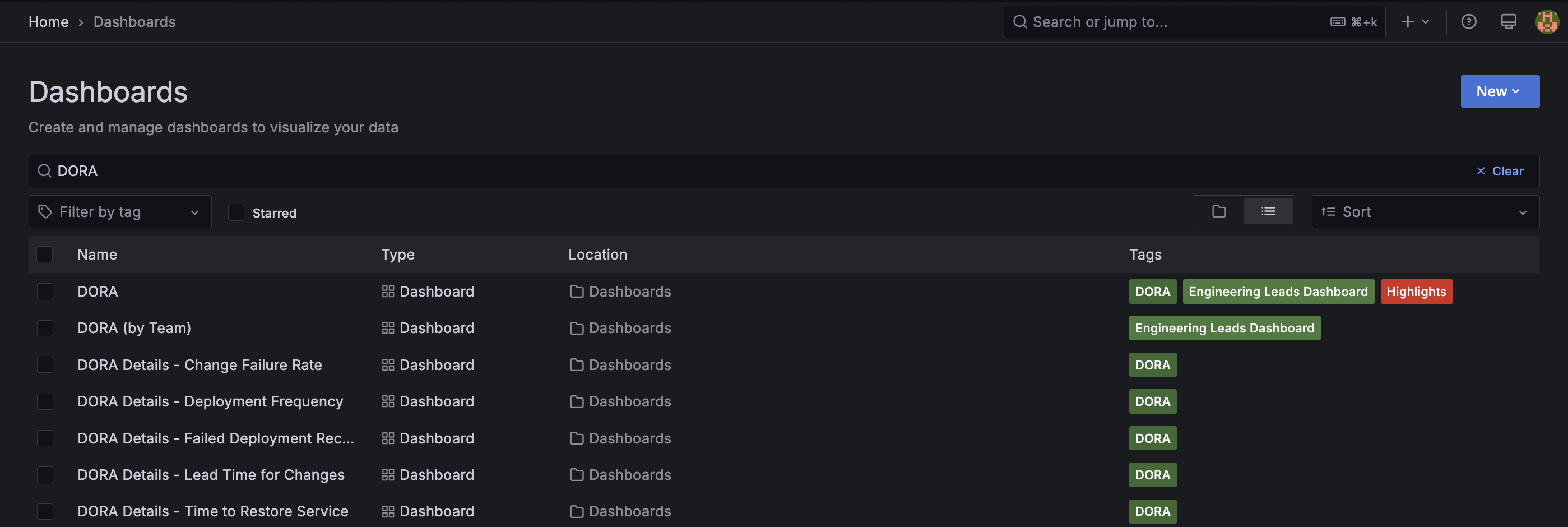
Figure 6: List of DORA-related dashboards in Grafana
2. Deployment Frequency
In this exercise you will drive the Deployment Frequency metric by shipping a version and promoting it through the canary. When the Rollout reaches Healthy, DevLake records a successful deployment.
First, kick off a new version. The ship.sh script commits the new image tag to the Rollout manifest in the dora-demo repository and has Argo CD sync it. It also stamps the current commit SHA which you’ll use for Lead Time. Any image tag works (blue, green, red, orange, purple, yellow).
The canary sends 20 percent of traffic to the new version, pauses for 30 seconds, increases traffic to 50%, waits for manual promotion, and then moves to 100 percent. Watch the process:
At the 50 percent manual pause, promote the rollout the rest of the way:
Expected output:
Repeat a few times with different tags to build a trend:
Now compute the metrics and open Grafana:
The Deployment Frequency detail page now shows one row per promoted rollout:
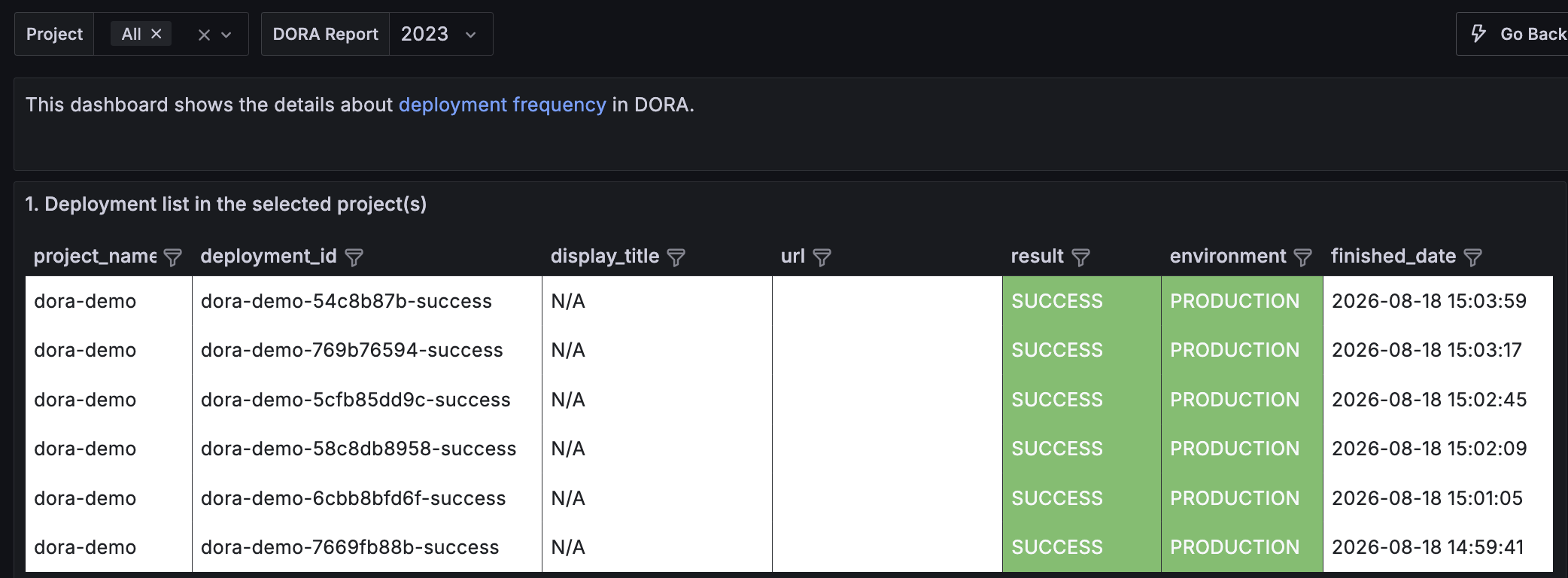
Figure 7: Deployment Frequency details, one row per successful production deployment
3. Lead Time for Changes
In this walkthrough, lead time starts when a pull request is opened rather than at its first commit. DevLake doesn’t have a native Gitea integration, so the demo sends pull requests through DevLake’s webhook endpoint. With a native integration such as GitHub, GitLab, or Bitbucket, DevLake collects each pull request’s commits and measures lead time from the first one. DevLake links each pull request to its deployment by matching the merge commit to the deployment commit with the same SHA.
To test lead time, create a branch, commit a change, open and merge a pull request, and then ship the merge commit.
./scripts/ship-pr.sh runs the flow in one command:
The script does the following:
- Branches, commits, and pushes a change to your
dora-democlone. - Opens a pull request to main from the new branch and merges it using the Gitea API. Merging fires the Gitea webhook, which records the pull request in DevLake with its createdDate, mergedDate, and merge commit SHA.
- Ships the pull request’s merge commit with
ship.sh green <merge_sha>, so the deployment commit SHA matches the pull request’s merge commit. - Waits for the canary’s manual pause, then promotes.
Recompute and check Grafana:
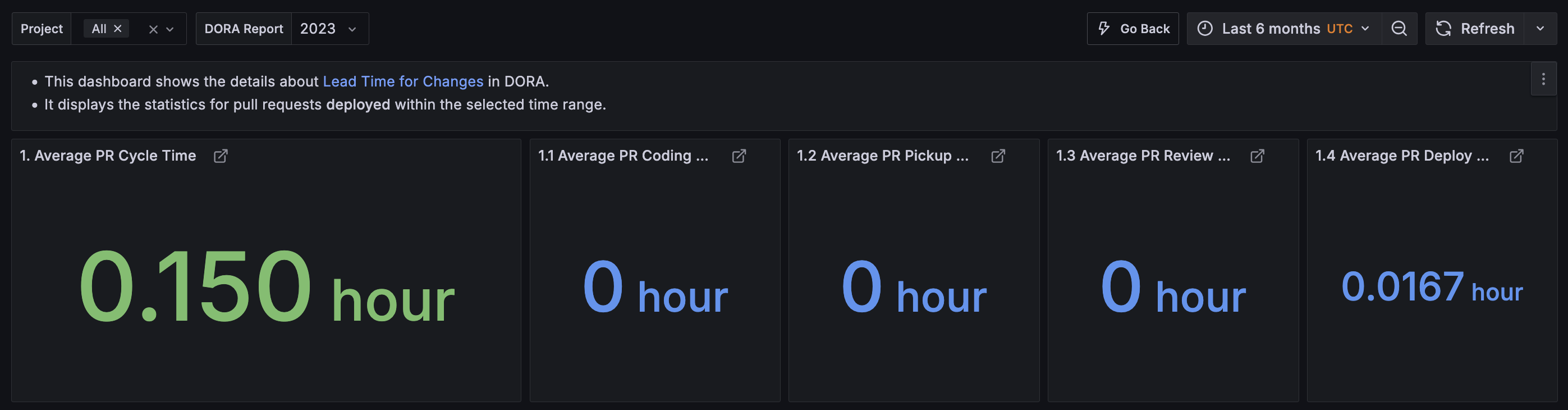
Figure 8: Lead Time for Changes details, mean time from pull request opened to deployment
4. Change Failure Rate
Change Failure Rate captures the share of deployments that cause a failure in production. In this demo, every Gitea issue counts as an incident, and DevLake links each incident to the most recent deployment before it. In production, filter incidents by type or label so that only real incidents count.
To test it, ship a “bad” version, promote it, and then open an issue against the repository.
./scripts/ship-with-incident.sh runs the flow in one command:
The script does the following:
- Ships and promotes a version to Healthy, recording the deployment.
- Opens a Gitea issue after the deploy. That fires the issues webhook, which posts the issue to DevLake as an INCIDENT (type=INCIDENT, createdDate = now). Because the incident’s timestamp is later than the deployment’s finish time, DevLake attributes it to that deployment and marks it a failed change.
The script output shows the issue number, which you’ll use to close the issue in section 5 for recovery time.
Recompute the metrics:

Figure 9: Change Failure Rate details, with each deployment that caused an incident
5. Failed Deployment Recovery Time
Failed Deployment Recovery Time measures how long it takes to restore service after a deployment causes a failure in production. DevLake uses the same incident-to-deployment link as Change Failure Rate and measures from the linked deployment’s finish to the incident’s resolution. In this demo, closing the incident stands in for recovery. This exercise picks up where section 4 left off: with an incident on record, you restore service by shipping the known-good version, promoting it, and then closing the issue.
Run the following commands:
Then close the incident issue from section 4. Use the issue number that ./scripts/ship-with-incident.sh printed (substitute it for <N>):
Closing fires the issues webhook again, which updates the incident with its resolutionDate (the close time).
Recompute the metrics one more time:
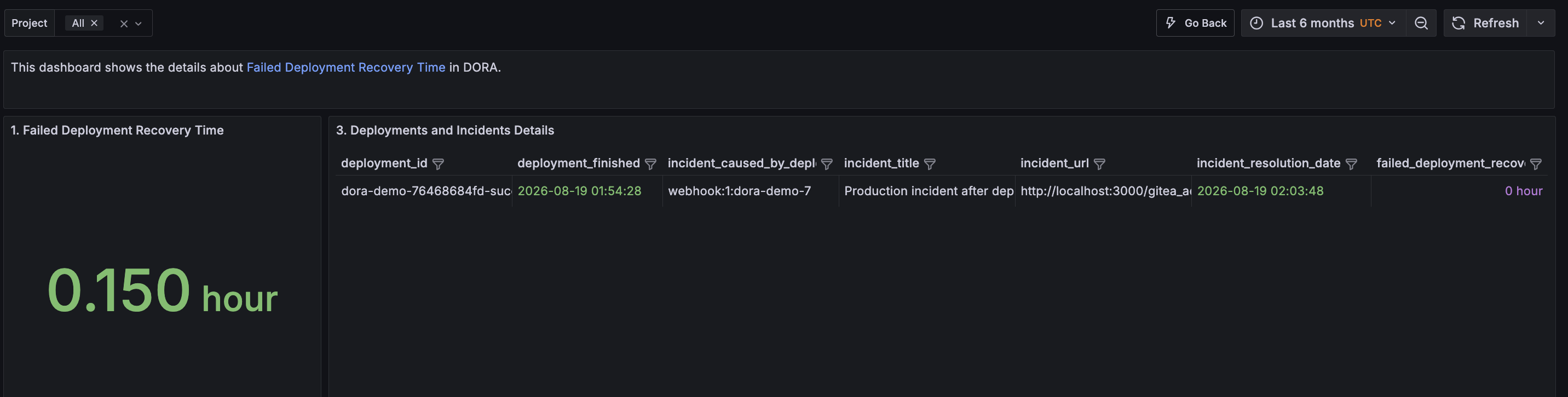
Figure 10: Failed Deployment Recovery Time details, median recovery time and each incident’s resolution
Run the fail-then-restore cycle two or three times to add more data.
Clean up
When you’re done, tear the environment down so it stops accruing charges.
After eksctl reports success, verify on the AWS Management Console that:
- The AWS CloudFormation stack
eksctl-<cluster>-clusteris deleted (notDELETE_FAILED). - No orphan Amazon EBS volumes remain in the Region (tag filter
kubernetes.io/cluster/<cluster>). - No leftover Elastic IPs are attached to the deleted virtual private cloud (VPC).
Try it yourself: The Platform Engineering on EKS Workshop
Everything in this post is also available as a facilitator-led module in the Platform Engineering on EKS Workshop. The workshop goes further than this walkthrough. You build an internal developer platform with Backstage, Argo CD, Argo Workflows, Argo Rollouts, and Argo Events. You then onboard an application with a Backstage template that provisions a CI/CD pipeline with DORA metric collection built in. Finally, you run canary deployments with metric-driven rollback and watch each DORA metric update in Grafana as you push code and open and close incidents.
Conclusion
In this post, we demonstrated how to measure software delivery performance with DORA metrics and why internal developer platforms on Amazon EKS are well suited to collecting them. Deployments, rollouts, and pipeline runs already emit the events the metrics need. By integrating Argo CD, Argo Rollouts, Argo Events, Argo Workflows, Apache DevLake, and Grafana into your platform, you can track all four DORA metrics over time. This shows leadership the return on the platform investment.
A platform is a product, and like any product, it needs a feedback loop. DORA metrics give platform teams, developers, and leadership a shared, data-based view of whether the platform is helping. Even a few weeks of DORA data gives you a baseline and a clear answer the next time someone asks whether your platform is working.
For more information, see the following resources:
- Platform Engineering on EKS Workshop: Hands-on experience with DORA metrics on EKS.
- Deep dive: Streamlining GitOps with Amazon EKS capability for Argo CD: A walkthrough for using the EKS Capability for Argo CD.
- Balance Deployment Speed and Stability with DORA Metrics: AWS DevOps blog post on DORA with AWS CodePipeline and Amazon EventBridge.
- Measuring IDP Success: AWS Prescriptive Guidance on measuring internal developer platform success.
- DevOps Research and Assessment: The four key metrics and the research behind them.
- Apache DevLake: Open source development data platform for engineering metrics.