Since launching the AWS Transform service in May 2025, we’ve heard from .NET customers who want a conversational agent they can work alongside of throughout the transformation process. In this post, I’ll give you a tour of the new Visual Studio IDE experience featuring a conversational AI assistant as I walk you through a complex transformation.
The new .NET agent is a game changer: It’s conversational and interactive, partnering with you to transform. It’s capable and supports many use cases, giving you options. It’s flexible and fully customizable, simply tell it what you want. And it’s iterative, allowing you to review and refine transformations until satisfied. The walkthrough highlights these features.
Prerequisites
To transform with the new experience, you’ll need the following:
Walkthrough
The workload I’ll transform in this walkthrough is CryptoCoin, a blockchain and wallet suite for a fictional cryptocurrency, shown in Figure 1. This is a sample application, but it’s a substantial one: 16 projects, .NET Framework 4.7.2 and 4.8, a mix of VB.NET and C# projects, using older NuGet packages. Altogether, it’s 274k lines of code, 43k of which is .NET code.
I’ll transform this Windows application to cross-platform .NET 10, ready to run on Linux. This won’t be a simple modernization: the solution includes a Web Forms project, WCF services, and an ASMX service, which don’t have direct equivalents on modern .NET.
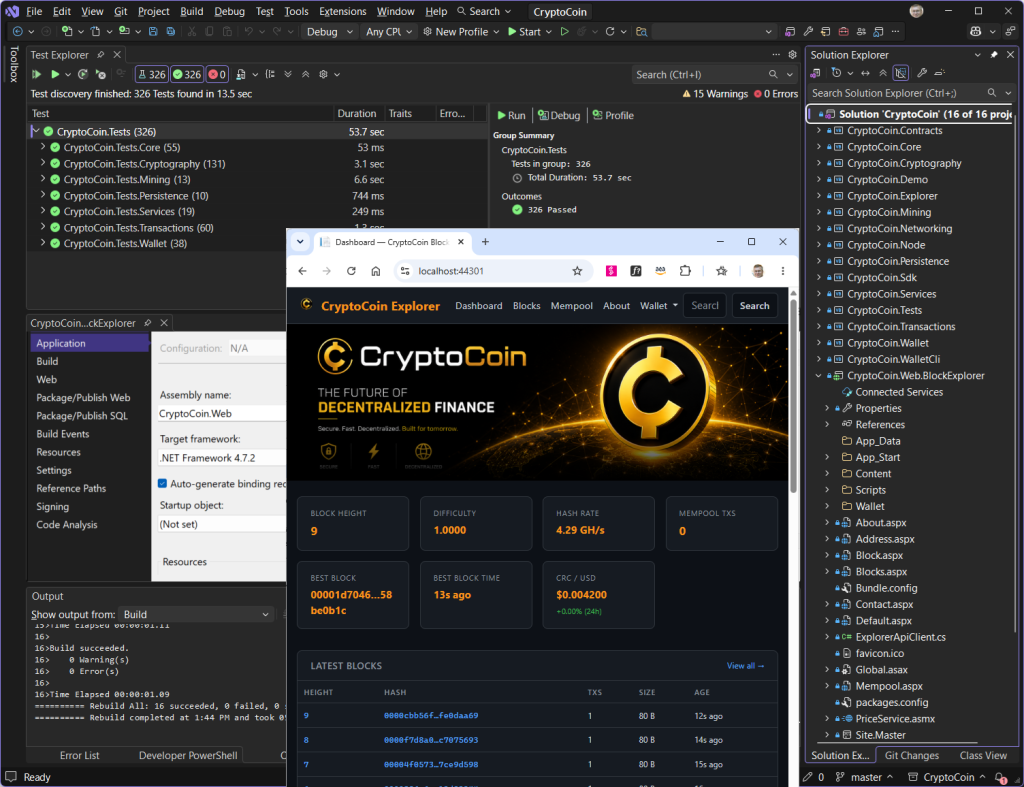
Figure 1: CryptoCoin sample application
Figure 2 shows the architecture. CryptoCoin is mostly class libraries and services. The “node” console application starts a blockchain, memory pool, miner, JSON-RPC server, Explorer API, WCF services, and structured logging—all in one process. There is block explorer web UI and a CLI for wallet operations.
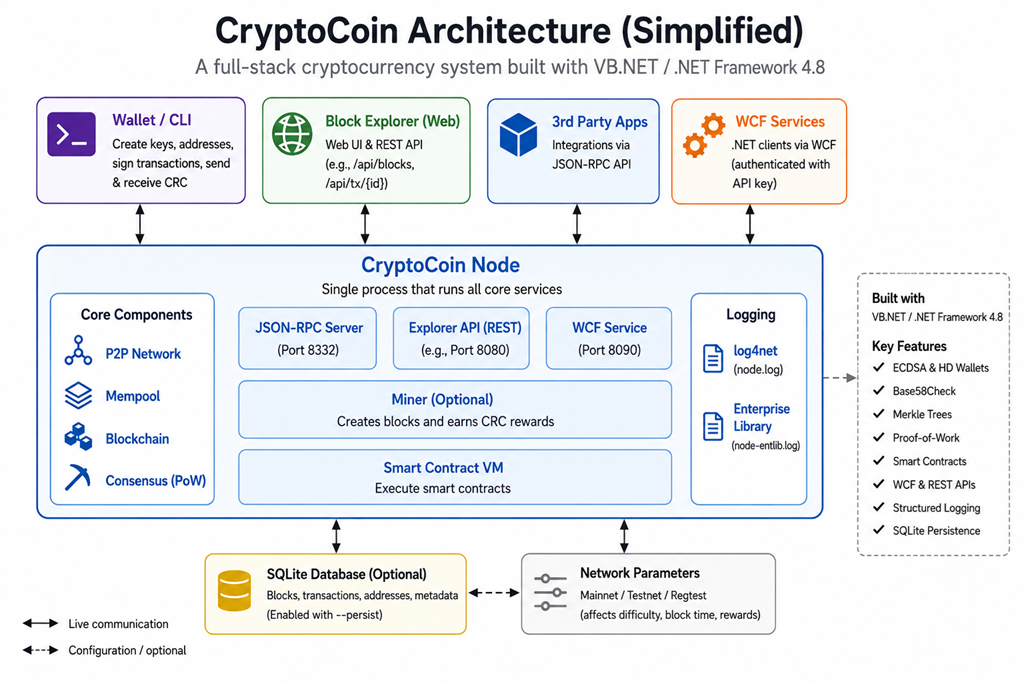
Figure 2: CryptoCoin Architecture
I invite you to follow along the walkthrough using your own workload. This is the flow:
1. Start a transformation
2. Assessment
3. Review and revise the transformation plan
4. Transform, review, and refine projects
5. Local build
6. End of transformation
There’s one additional step. It’s typical after transformation to hand-off to an AI code companion to validate and finalize the transformed application. I’ll cover that aspect in a future post.
Step 1: Start transformation
In this step, I start a job to transform my solution. If you’ve previously used AWS Transform from Visual Studio, you’ll notice an improved flow with fewer steps to start transforming.
1. Open solution. To prepare for transformation, I open my solution in Visual Studio 2026.
2. Sign in. Next, I need to sign in to AWS Transform with my assigned credentials. I navigate to the Getting Started page at Extensions > AWS Toolkit > Getting Started and sign in on the AWS Transform panel. After signing in, the AWS Transform panel shows Connected with IAM Identity Center.
3. Confirm region and workspace. After signing in, I arrive at a new landing page, the AWS Transform Dashboard (Figure 3). From here, I confirm the AWS Profile (region) and workspace I want to work in. The dashboard displays existing jobs in that workspace and their status, with links to view any job in the web console.
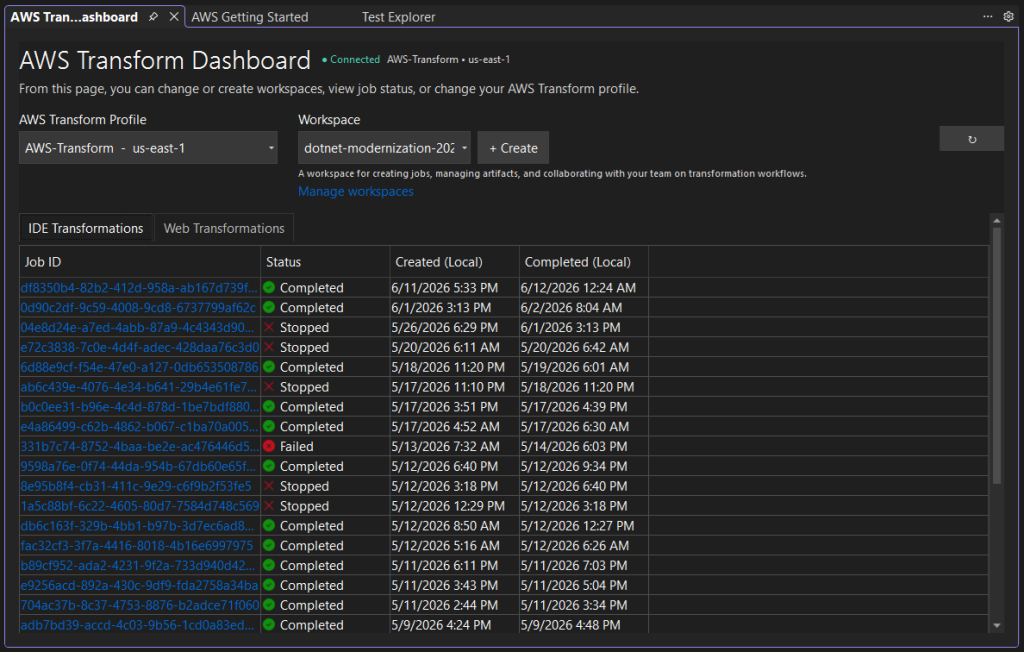
Figure 3: AWS Transform Dashboard
4. Start a transformation. To initiate a transformation, I select my solution in Solution Explorer and choose Port solution with AWS Transform from the context menu. The Port solution with AWS Transform dialog appears (Figure 4), and I specify a target of .NET 10.
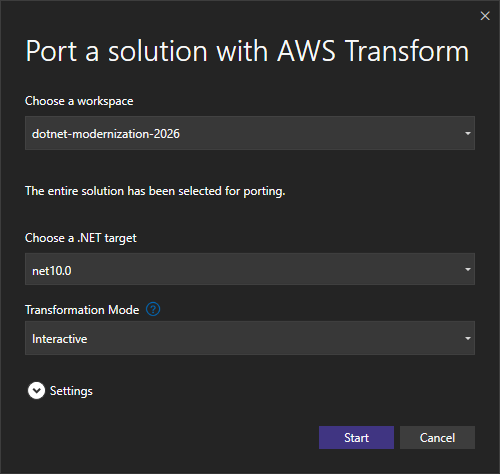
Figure 4: Port solution dialog
There’s something new here: a transformation mode setting. I can choose interactive mode, and the agent will frequently pause to review progress and let me request changes; or autonomous mode, where the agent will perform the entire transformation unattended (suitable for long-running transformations such as overnight jobs). Even in autonomous mode, I’ll still have an opportunity at the end of transformation to review results and ask for changes.
Transform in autonomous mode
or interactive mode
I want to work interactively, so I select interactive mode and choose the Start button. During transformation, I can freely switch between modes whenever I wish.
5. Transformation windows. Soon, I see confirmation that the job has started and several windows open, named AWS Transform Chat, AWS Transform Worklogs, and AWS Transform Job Plan (Figure 5).
- The Chat window is the conversational interface. This is the primary way I’ll be interacting with the agent.
- The Worklog window logs service activity in natural language. I can tell at a glance what is currently happening.
- The Job Plan window is job progress and control. It shows me steps and substeps as the transformation proceeds. This is where I can view time remaining, download and upload artifacts such as transformation plans, and review results as projects are transformed.
At the bottom of the Job Plan window is a reminder that this is an in-place upgrade: transformed code will be applied automatically, overwriting existing code.
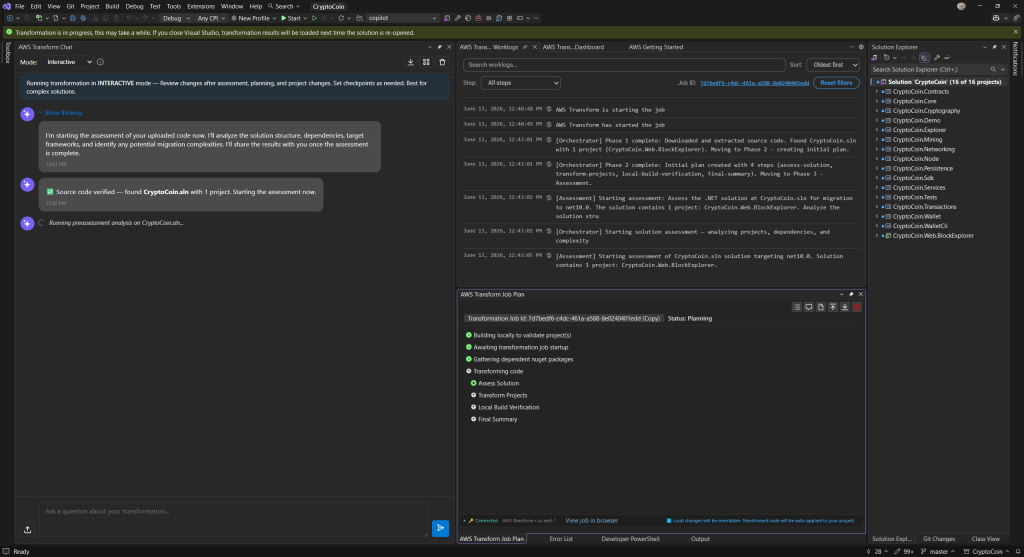
Figure 5: AWS Transform Chat, Worklog, and Job Plan windows
The chat window tells me the assessment is starting, and that it may take a few minutes depending on workload size. A good time for a coffee break.
Step 2: Assessment
In this step, I review the assessment findings and discuss them with the agent. From this point forward, I’ll be chatting with the agent regularly.
Interact with the agent
through chat conversations
1. Review assessment report and transformation plan. About 30 minutes later, a combined assessment summary and transformation plan appears in the chat window, shown in Figure 6. The assessment summary tells me about CryptoCoin’s 16 projects: project type, language, complexity, and lines of code. The Node project uses some NuGet packages which don’t exist for modern .NET.
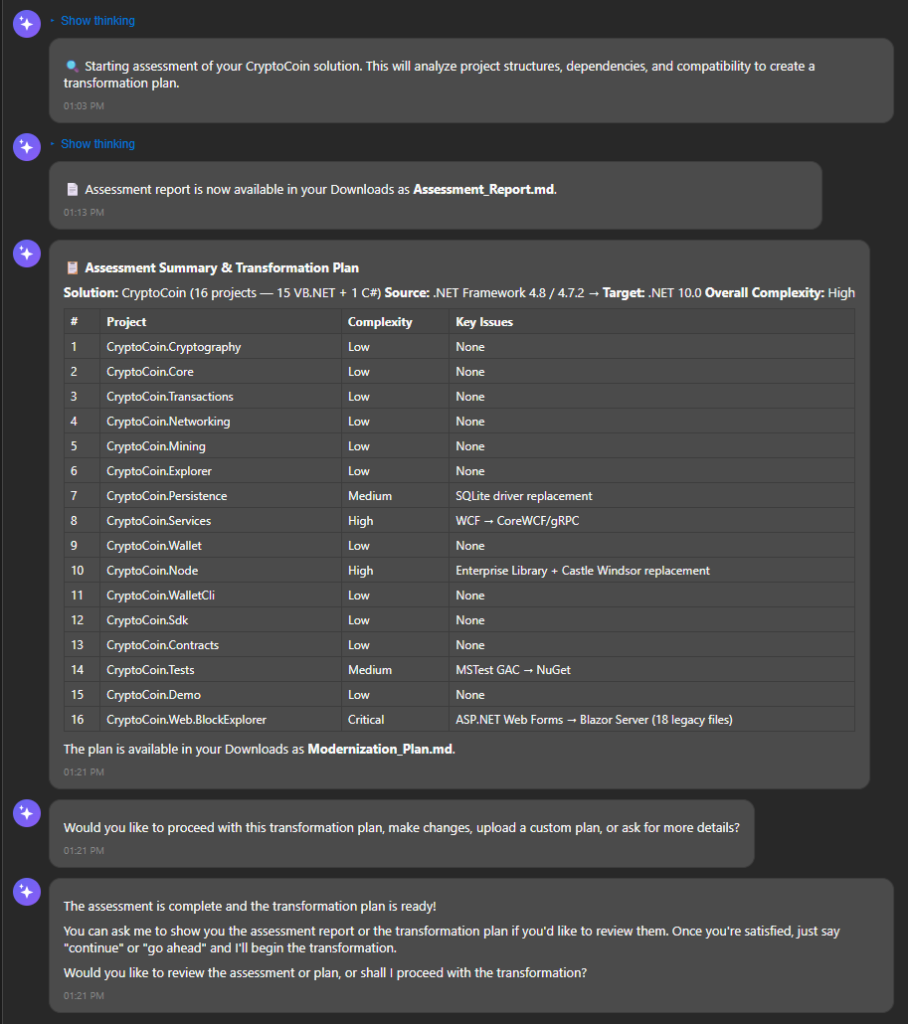
Figure 6: Assessment and transformation plan in chat
The assessment reveals that 11 of the VB.NET projects are of low complexity and will be trivial to transform, but 2 projects are medium complexity, 2 are high, and the Web Forms project is critical. I’d like to know more, so I ask what are the key findings?
The key findings (Figure 7) indicate the Web Forms project is the biggest challenge. It must be rewritten, because Web Forms does not have an equivalent on ASP.NET Core. Likewise, WCF does not have a direct equivalent on ASP.NET Core, but one option is to convert to the open source CoreWCF framework. The Node project uses package Castle.Windsor for dependency injection and EnterpriseLibrary for logging, both of which need replacement with modern equivalents.
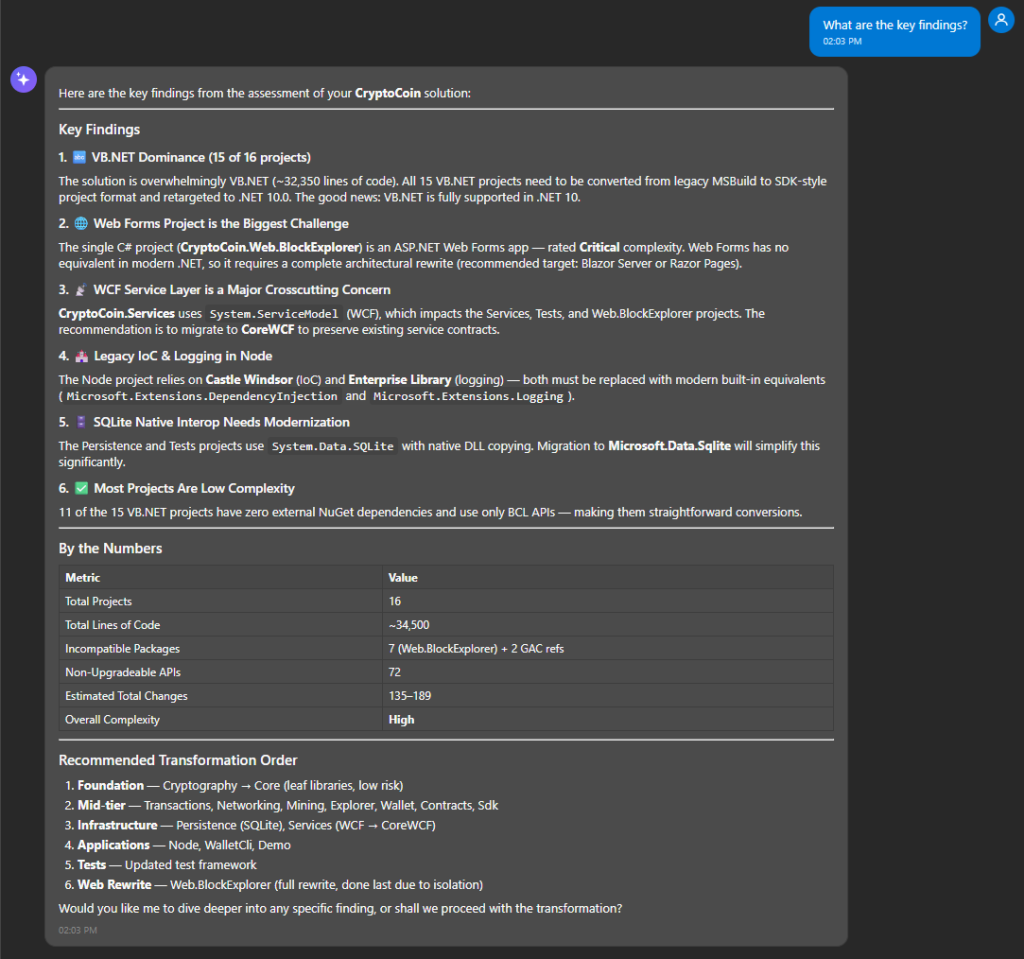
Figure 7: Key findings
In addition to chatting about the assessment report I can also work with it as a markdown file. From the Job Plan window, I can open it in the code editor with the Show assessment report button or download it. Listing 1 shows the assessment report in markdown.
# Assessment Report: CryptoCoin

## Solution Overview

| Attribute | Value |
|-----------|-------|
| **Solution Name** | CryptoCoin |
| **Total Projects** | 16 |
| **Languages** | VB.NET (15 projects), C# (1 project) |
| **Source Framework** | .NET Framework 4.8 / 4.7.2 |
| **Target Framework** | net10.0 |
| **Total Lines of Code** | ~34,508 (32,353 VB + 2,155 C#) |
| **Overall Complexity** | High |
| **Total NuGet Packages** | 20 (unique across solution) |
| **Incompatible Packages** | 7 (in Web.BlockExplorer) + 2 GAC refs |
| **Non-Upgradeable APIs** | 72 |

## Executive Summary

The **CryptoCoin** solution is a full-featured cryptocurrency platform implemented primarily in VB.NET (.NET Framework 4.8) with a single C# ASP.NET Web Forms front-end (.NET Framework 4.7.2). The solution consists of 16 projects totaling approximately 34,500 lines of code across 192 VB source files and ~30 C#/ASPX files.

### Key Statistics

- **15 VB.NET projects** targeting .NET Framework 4.8 - require SDK-style project conversion and TFM change to net10.0
- **1 C# ASP.NET Web Forms project** targeting .NET Framework 4.7.2 - requires complete architectural rewrite
- **WCF Service Layer** (CryptoCoin.Services) uses System.ServiceModel - requires migration to CoreWCF or gRPC
- **SQLite Persistence** uses System.Data.SQLite with native interop - requires migration to Microsoft.Data.Sqlite
- **MSTest** (VS QualityTools UnitTestFramework) - requires migration to modern MSTest SDK packages
- **Castle Windsor IoC** and **Enterprise Library Logging** in Node - require replacement with built-in DI and logging

### Transformation Approach

1. **Phase 1 - Foundation Libraries**: Migrate leaf VB.NET projects (Cryptography, Core) to SDK-style targeting net10.0
2. **Phase 2 - Mid-tier Libraries**: Migrate dependent libraries (Transactions, Networking, Mining, etc.)
3. **Phase 3 - Infrastructure**: Migrate Persistence (SQLite) and Services (WCF)
4. **Phase 4 - Applications**: Migrate Node, WalletCli, Demo executables
5. **Phase 5 - Tests**: Migrate test project with updated test framework
6. **Phase 6 - Web Rewrite**: Rewrite Web.BlockExplorer from Web Forms to Blazor/Razor Pages

## Project Analysis Table

| Project | Language | Framework | Target | LOC | Packages | Incompatible | Complexity |
|---------|----------|-----------|--------|-----|----------|--------------|------------|
| CryptoCoin.Cryptography | VB.NET | v4.8 | net10.0 | 5,702 | 0 | 0 | Low |
| CryptoCoin.Core | VB.NET | v4.8 | net10.0 | 2,964 | 1 | 0 | Low |
| CryptoCoin.Transactions | VB.NET | v4.8 | net10.0 | 2,727 | 0 | 0 | Low |
| CryptoCoin.Networking | VB.NET | v4.8 | net10.0 | 4,866 | 0 | 0 | Low |
| CryptoCoin.Mining | VB.NET | v4.8 | net10.0 | 1,124 | 0 | 0 | Low |
| CryptoCoin.Explorer | VB.NET | v4.8 | net10.0 | 869 | 0 | 0 | Low |
| CryptoCoin.Persistence | VB.NET | v4.8 | net10.0 | 444 | 1 | 1 | Medium |
| CryptoCoin.Services | VB.NET | v4.8 | net10.0 | 741 | 0 (WCF GAC) | 1* | High |
| CryptoCoin.Wallet | VB.NET | v4.8 | net10.0 | 2,789 | 0 | 0 | Low |
| CryptoCoin.Node | VB.NET | v4.8 | net10.0 | 992 | 4 | 2 | High |
| CryptoCoin.WalletCli | VB.NET | v4.8 | net10.0 | 1,428 | 0 | 0 | Low |
| CryptoCoin.Sdk | VB.NET | v4.8 | net10.0 | 1,533 | 1 | 0 | Low |
| CryptoCoin.Contracts | VB.NET | v4.8 | net10.0 | 2,860 | 0 | 0 | Low |
| CryptoCoin.Tests | VB.NET | v4.8 | net10.0 | 3,220 | 2 | 2 | Medium |
| CryptoCoin.Demo | VB.NET | v4.8 | net10.0 | 94 | 0 | 0 | Low |
| CryptoCoin.Web.BlockExplorer | C# | v4.7.2 | net10.0 | 2,155 | 14 | 7 | Critical |

## Cross-Project Package Summary

| Package | Version | Used By | Compatibility | Strategy |
|---------|---------|---------|---------------|----------|
| Newtonsoft.Json | 13.0.3 | Core, Sdk, Web.BlockExplorer | Compatible | Upgrade to 13.0.4 |
| System.Data.SQLite | 1.0.118 | Persistence, Tests | Incompatible | Replace with Microsoft.Data.Sqlite |
| log4net | 2.0.15 | Node | Compatible | Replace with Microsoft.Extensions.Logging |
| Castle.Core | 4.4.1 | Node | Compatible | Replace with built-in DI |
| Castle.Windsor | 5.1.2 | Node | Compatible | Replace with Microsoft.Extensions.DependencyInjection |
| EnterpriseLibrary.Common | 6.0.1304.0 | Node | Incompatible | Remove and replace |
| EnterpriseLibrary.Logging | 6.0.1304.0 | Node | Incompatible | Replace with Microsoft.Extensions.Logging |
| MSTest (VS QualityTools) | GAC | Tests | Incompatible | Replace with MSTest NuGet packages |
| Microsoft.AspNet.* (6 pkgs) | various | Web.BlockExplorer | Incompatible | Remove (Blazor rewrite) |
| bootstrap | 5.2.3 | Web.BlockExplorer | Compatible | Upgrade to 5.3.0 |
| jQuery | 3.7.0 | Web.BlockExplorer | Compatible | Keep |

## Cross-Project Dependencies and Transformation Order

Dependency tree (leaf-first order):

1. **CryptoCoin.Cryptography** (leaf - no dependencies)
2. **CryptoCoin.Core** (depends on: Cryptography)
3. **CryptoCoin.Transactions** (depends on: Cryptography, Core)
4. **CryptoCoin.Networking** (depends on: Cryptography, Core, Transactions)
5. **CryptoCoin.Mining** (depends on: Cryptography, Core, Transactions)
6. **CryptoCoin.Explorer** (depends on: Cryptography, Core, Transactions)
7. **CryptoCoin.Persistence** (depends on: Cryptography, Core)
8. **CryptoCoin.Services** (depends on: Cryptography, Core, Transactions)
9. **CryptoCoin.Wallet** (depends on: Cryptography, Core, Transactions)
10. **CryptoCoin.Node** (depends on: 9 projects - all major subsystems)
11. **CryptoCoin.WalletCli** (depends on: Cryptography, Core, Transactions, Wallet)
12. **CryptoCoin.Sdk** (depends on: Cryptography, Core, Transactions)
13. **CryptoCoin.Contracts** (depends on: Cryptography, Core, Transactions)
14. **CryptoCoin.Tests** (depends on: 7 projects)
15. **CryptoCoin.Demo** (depends on: Cryptography)
16. **CryptoCoin.Web.BlockExplorer** (standalone - communicates via WCF)

---

## Per-Project Detailed Analysis

---

# Assessment Report: CryptoCoin

---

### CryptoCoin.Web.BlockExplorer

#### Project Metrics

| Metric | Value |
|--------|-------|
| **Framework** | v4.7.2 |
| **Lines of Code** | 2,155 |
| **NuGet Packages** | 14 |
| **Project References** | 0 |
| **Complexity** | Critical |
| **Estimated Changes** | 32 |

#### Package Compatibility (14 packages, 7 incompatible)

| Package | Version | Compatibility | Recommendation |
|---------|---------|---------------|----------------|
| Antlr | 3.5.0.2 | INCOMPATIBLE | NoRecommendation |
| bootstrap | 5.2.3 | COMPATIBLE | UpgradePackage |
| jQuery | 3.7.0 | COMPATIBLE | KeepPackage |
| Microsoft.AspNet.FriendlyUrls | 1.0.2 | COMPATIBLE | KeepPackage |
| Microsoft.AspNet.FriendlyUrls.Core | 1.0.2 | INCOMPATIBLE | NoRecommendation |
| Microsoft.AspNet.ScriptManager.MSAjax | 5.0.0 | COMPATIBLE | KeepPackage |
| Microsoft.AspNet.ScriptManager.WebForms | 5.0.0 | COMPATIBLE | KeepPackage |
| Microsoft.AspNet.Web.Optimization | 1.1.3 | INCOMPATIBLE | NoRecommendation |
| Microsoft.AspNet.Web.Optimization.WebForms | 1.1.3 | INCOMPATIBLE | NoRecommendation |
| Microsoft.CodeDom.Providers.DotNetCompilerPlatform | 2.0.1 | INCOMPATIBLE | NoRecommendation |
| Microsoft.Web.Infrastructure | 2.0.0 | INCOMPATIBLE | NoRecommendation |
| Modernizr | 2.8.3 | COMPATIBLE | KeepPackage |
| Newtonsoft.Json | 13.0.3 | COMPATIBLE | UpgradePackage |
| WebGrease | 1.6.0 | INCOMPATIBLE | NoRecommendation |

#### Blocking Issues

- Incompatible NuGet package: Microsoft.AspNet.FriendlyUrls
- Incompatible NuGet package: Microsoft.AspNet.FriendlyUrls.Core
- Incompatible NuGet package: Microsoft.AspNet.ScriptManager.MSAjax
- Incompatible NuGet package: Microsoft.AspNet.ScriptManager.WebForms
- Incompatible NuGet package: Microsoft.AspNet.Web.Optimization
- Incompatible NuGet package: Microsoft.AspNet.Web.Optimization.WebForms

#### Legacy Files Inventory (18 files across 6 kinds)

| Kind | Files |
|------|------:|
| `.asax` | 1 |
| `.ascx` | 1 |
| `.asmx` | 1 |
| `.aspx` | 12 |
| `.config` | 1 |
| `.master` | 2 |


#### Migration Analysis

## Migration Strategy

This is the **sole C# project** in a solution of 16 projects (15 VB.NET + 1 C#). It is an **ASP.NET Web Forms application** targeting .NET Framework 4.7.2, which represents the most challenging migration pattern possible — ASP.NET Web Forms has **no equivalent in .NET 10.0** and requires a full architectural rewrite.

### Recommended Approach: Rewrite to ASP.NET Core (Razor Pages or Blazor)

The project must be completely rewritten. The recommended migration path is:

1. **Razor Pages (preferred)** — Best fit for the page-per-feature structure already present (Block.aspx → Block.cshtml, Transaction.aspx → Transaction.cshtml, etc.)
2. **Blazor Server** — Alternative if interactive UI behavior from Web Forms UpdatePanels/ScriptManager is heavily relied upon

### Key Architectural Changes Required

| Current (Web Forms) | Target (ASP.NET Core) |
|---|---|
| .aspx pages with code-behind (.aspx.cs) | Razor Pages (.cshtml + .cshtml.cs) |
| Site.Master / Site.Mobile.Master | _Layout.cshtml with responsive design |
| ViewSwitcher.ascx (user control) | Partial views or View Components |
| Global.asax (application lifecycle) | Program.cs / middleware pipeline |
| BundleConfig.cs (Web.Optimization) | LibraryManager, Webpack, or bundling middleware |
| RouteConfig.cs (FriendlyUrls) | ASP.NET Core attribute/conventional routing |
| PriceService.asmx (ASMX Web Service) | Minimal API or Controller-based API |
| WcfBlockchainClient.cs / WcfWalletClient.cs | CoreWCF client or gRPC/HTTP client |
| Web.config | appsettings.json + Program.cs configuration |

### Critical Risks

1. **Complete framework paradigm shift** — Web Forms lifecycle (Page_Load, ViewState, PostBack model) has zero equivalent in modern ASP.NET Core. Every page must be reimplemented.
2. **WCF Client dependencies** — `WcfBlockchainClient.cs` and `WcfWalletClient.cs` consume WCF services. These must migrate to `System.ServiceModel` client packages for .NET Core (available via `System.ServiceModel.Http` / `System.ServiceModel.Primitives` NuGet packages) or be replaced with REST/gRPC clients.
3. **ASMX Web Service** — `PriceService.asmx` is not supported in .NET Core. Must be replaced with a minimal API endpoint or controller.
4. **Bundle/Optimization infrastructure** — The entire `Microsoft.AspNet.Web.Optimization` stack (including WebForms-specific bundling) must be replaced. Bootstrap 5.2.3 and jQuery 3.7.0 client-side libraries can be preserved but bundling strategy changes.
5. **MSAjax/ScriptManager** — The Microsoft AJAX Library and ScriptManager pattern have no equivalent. Any partial-page update logic must be rewritten using modern approaches (Blazor components, HTMX, or JavaScript fetch calls).

### Cross-Project Impact

- This is the **web frontend** for the solution and likely consumes services exposed by other projects (blockchain and wallet services via WCF). The migration of this project should be coordinated with any service layer changes in the VB.NET projects.
- As the only C# project, it does not have direct VB.NET interop concerns, but if it references shared VB.NET class libraries (none currently listed as project references), those dependencies would need to be migrated first.
- No project references exist — the project communicates with backend services via WCF clients, which provides some architectural decoupling advantage.

### Recommendations

1. **Phase 1**: Create a new ASP.NET Core Razor Pages project targeting net10.0. Set up the layout, static files (Bootstrap/jQuery), and configuration infrastructure.
2. **Phase 2**: Migrate page-by-page, starting with read-only pages (Blocks, Block, Transaction, Address, Mempool) which are simpler display pages.
3. **Phase 3**: Migrate wallet pages (Create, Balance, Send, NewAddress) which likely have form submissions and more complex interaction patterns.
4. **Phase 4**: Replace ASMX PriceService with a minimal API endpoint.
5. **Phase 5**: Replace WCF client proxies with appropriate .NET 10.0-compatible service clients.
6. **Retain client-side assets**: Bootstrap 5.2.3, jQuery 3.7.0, and Modernizr can largely be carried forward as static assets.
7. **Eliminate Mobile Master**: Modern responsive design (already using Bootstrap 5) eliminates the need for a separate mobile master page; the ViewSwitcher control becomes unnecessary.

### Estimated Effort

This is a **critical complexity** migration requiring a near-complete rewrite. The architectural shift from Web Forms to Razor Pages is the most labor-intensive migration pattern in the .NET ecosystem. Estimate significant development effort for the ~11 ASPX pages, 2 master pages, 1 user control, 1 ASMX service, and 2 WCF client classes.

---

## Key Findings

### 1. VB.NET Dominance (93.75% of projects)
The solution is overwhelmingly VB.NET (15 of 16 projects, 32,353 LOC). VB.NET is supported in .NET 10.0 but requires converting all projects from legacy MSBuild to SDK-style format. VB.NET language version 15.5 features are fully supported.

### 2. WCF Service Layer is a Major Crosscutting Concern
CryptoCoin.Services uses System.ServiceModel for WCF, affecting Services, Tests, and Web.BlockExplorer projects. Recommendation: Migrate to CoreWCF to preserve service contracts.

### 3. Castle Windsor + Enterprise Library - Legacy Patterns
The Node project uses Castle Windsor (IoC) and Enterprise Library (logging). These must be replaced with Microsoft.Extensions.DependencyInjection and Microsoft.Extensions.Logging.

### 4. SQLite Native Interop Pattern Change
Persistence and Tests reference System.Data.SQLite with custom native DLL copying. Migration to Microsoft.Data.Sqlite eliminates this complexity.

### 5. Web.BlockExplorer is Architecturally Isolated
The Web Forms project has zero project references and communicates via WCF only. This enables independent rewrite without affecting backend projects.

### 6. Most VB.NET Projects are Low Complexity
11 of 15 VB.NET projects have no external NuGet dependencies and use only BCL APIs. These are straightforward SDK-style project file conversions.

## External Dependencies

| Dependency | Type | Impact |
|-----------|------|--------|
| System.Data.SQLite | DLL reference (lib folder) | Replace with NuGet Microsoft.Data.Sqlite |
| SQLite.Interop.dll | Native interop (x86/x64) | Automatically handled by Microsoft.Data.Sqlite |
| MSTest (VS QualityTools) | GAC reference | Replace with MSTest NuGet packages |
| System.ServiceModel | GAC reference | Replace with CoreWCF NuGet packages |
| Enterprise Library | NuGet (legacy) | Remove and replace with Microsoft.Extensions.Logging |
| Castle Windsor | NuGet | Remove and replace with built-in DI |

## Actionable Next Steps

1. **Start with CryptoCoin.Cryptography** - zero dependencies, lowest risk
2. **Migrate leaf libraries in order**: Cryptography -> Core -> Transactions
3. **Decide WCF strategy early** - CoreWCF vs. gRPC for CryptoCoin.Services
4. **Replace Enterprise Library + Castle Windsor** during Node migration
5. **Coordinate SQLite migration** - Persistence and Tests together
6. **Web.BlockExplorer last** - isolated, requires most effort (full rewrite)

### Estimated Total Effort

| Phase | Projects | Complexity | Estimated Changes |
|-------|----------|-----------|-------------------|
| Phase 1: Foundation | Cryptography, Core | Low | 7-11 |
| Phase 2: Mid-tier | Transactions, Networking, Mining, Explorer, Wallet, Contracts, Sdk | Low | 21-38 |
| Phase 3: Infrastructure | Persistence, Services | Medium-High | 30-45 |
| Phase 4: Applications | Node, WalletCli, Demo | Low-High | 30-43 |
| Phase 5: Tests | Tests | Medium | 15-20 |
| Phase 6: Web Rewrite | Web.BlockExplorer | Critical | 32+ (full rewrite) |
| **Total** | **16 projects** | **Overall: High** | **135-189 changes** |
Listing 1: Assessment report
2. Ask questions. I’d like more information about some of the assessment details, so I have a discussion in chat. This helps me understand the challenges.
Ask questions about the assessment
to set expectations
My first question is about packages: What NuGet package upgrades are needed? (Figure 8). I’ve already been told about some of them but I want a complete understanding. Over 20 packages need special consideration. 7 of those are in the Web Forms project that is going to be rewritten and will use different packages. The others are in the library and console projects, and can be replaced with other packages, sometimes requiring architectural changes. The agent seems to have a good idea of what to do with these packages, so I decided to follow its lead.
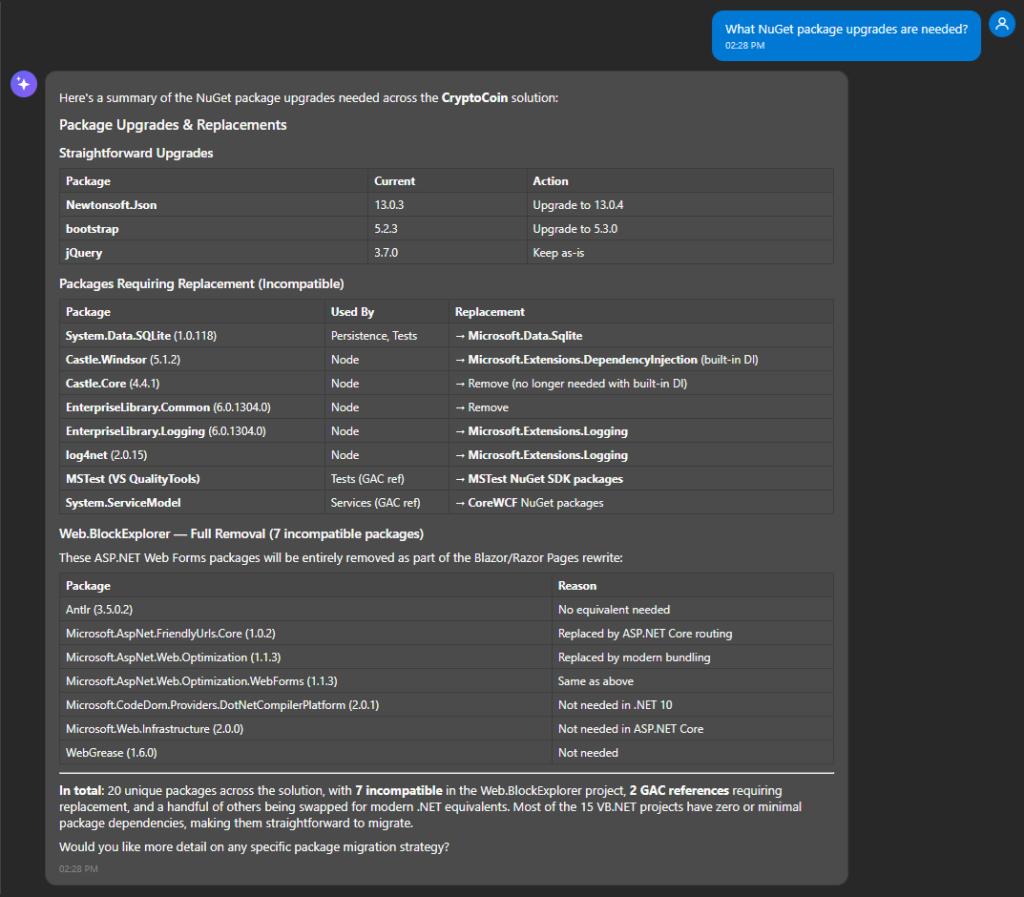
Figure 8: Asking about NuGet packages
Next, I’m curious about the Web Forms project, which was listed as Critical complexity in the assessment and includes an old ASMX web service. The project needs a rewrite because Web Forms UI isn’t available on ASP.NET Core. I ask, What is your confidence level in the Web Forms project rewrite? From the response (Figure 9) I learn the agent has moderate confidence and it explains why. The rewrite to another UI framework, the WCF service clients, and old ASMX service will likely need manual attention after transformation.
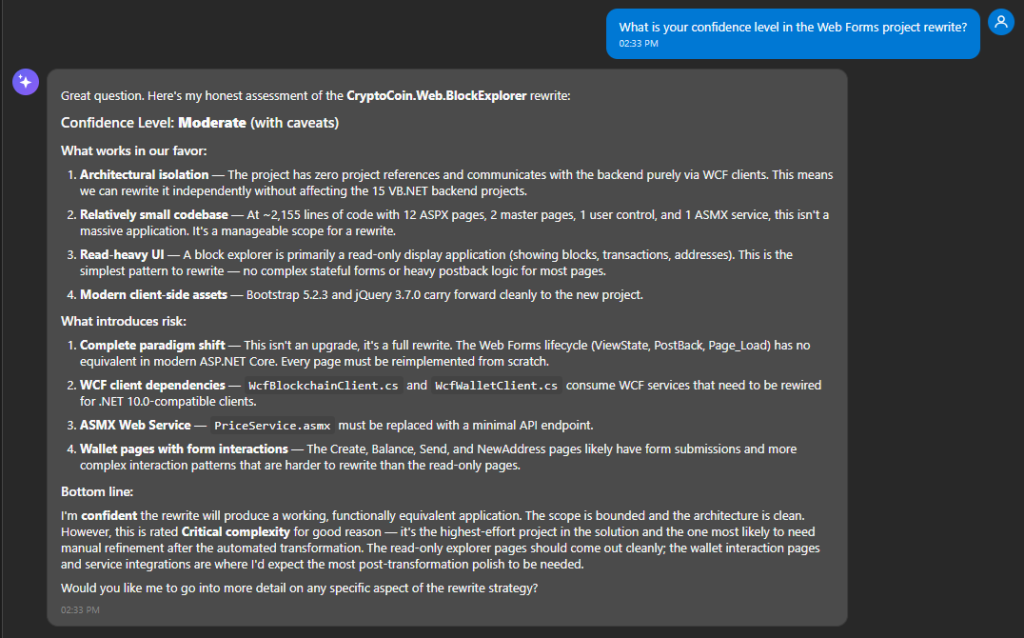
Figure 9: Asking about confidence
From reviewing the assessment, I sense that the agent is very capable but is also aware of its limitations. It knows what to do with the Web Forms project and the old web services and even offers more than one way to transform them. When it is not fully confident, it tells me why.
The agent supports many use cases
I now know which parts of the transformation are going to need extra attention. With my expectations set, I turn my attention to the transformation plan.
Step 3: Review and revise the transformation plan
In this step, I review and modify the transformation plan. This will highlight the agent’s flexibility as I customize the plan.
1. Review transformation plan. I have a sense of what the agent has in mind from the chat interactions, but I want details. I view the transform plan as a markdown file by choosing Show transform plan in the Job Plan window. Listing 2 shows the complete plan.
# Transformation Plan: CryptoCoin

- **Solution Path**: 5f87df2a-c612-4a85-a906-3dfafb951036_extracted/sourceCode/CryptoCoin.sln
- **Created**: 2025-01-27T12:00:00Z
- **Default Target Framework**: net10.0

## Projects

### 1. CryptoCoin.Cryptography

- **Path**: src/CryptoCoin.Cryptography/CryptoCoin.Cryptography.vbproj
- **Current Framework**: v4.8
- **Target Framework**: net10.0

#### Migration Overview

- **Complexity**: low
- **Summary**: Migration of CryptoCoin.Cryptography from .NET Framework 4.8 to net10.0. Core cryptographic library.
- **Estimated Changes**: 5
- **Blocking Issues**:
  - None
- **Notes**: Base library with no dependencies.

#### Dependencies

- None

#### NuGet Packages

- None

#### Migration Risks

- None

### 2. CryptoCoin.Core

- **Path**: src/CryptoCoin.Core/CryptoCoin.Core.vbproj
- **Current Framework**: v4.8
- **Target Framework**: net10.0

#### Migration Overview

- **Complexity**: low
- **Summary**: Migration of CryptoCoin.Core from .NET Framework 4.8 to net10.0. Core domain model library.
- **Estimated Changes**: 5
- **Blocking Issues**:
  - None
- **Notes**: Depends on Cryptography.

#### Dependencies

- CryptoCoin.Cryptography

#### NuGet Packages

- None

#### Migration Risks

- None

### 3. CryptoCoin.Transactions

- **Path**: src/CryptoCoin.Transactions/CryptoCoin.Transactions.vbproj
- **Current Framework**: v4.8
- **Target Framework**: net10.0

#### Migration Overview

- **Complexity**: low
- **Summary**: Migration of CryptoCoin.Transactions from .NET Framework 4.8 to net10.0. Transaction handling library.
- **Estimated Changes**: 5
- **Blocking Issues**:
  - None
- **Notes**: Depends on Core and Cryptography.

#### Dependencies

- CryptoCoin.Core
- CryptoCoin.Cryptography

#### NuGet Packages

- None

#### Migration Risks

- None

### 4. CryptoCoin.Networking

- **Path**: src/CryptoCoin.Networking/CryptoCoin.Networking.vbproj
- **Current Framework**: v4.8
- **Target Framework**: net10.0

#### Migration Overview

- **Complexity**: low
- **Summary**: Migration of CryptoCoin.Networking from .NET Framework 4.8 to net10.0. Networking layer library.
- **Estimated Changes**: 5
- **Blocking Issues**:
  - None
- **Notes**: Depends on Core.

#### Dependencies

- CryptoCoin.Core

#### NuGet Packages

- None

#### Migration Risks

- None

### 5. CryptoCoin.Mining

- **Path**: src/CryptoCoin.Mining/CryptoCoin.Mining.vbproj
- **Current Framework**: v4.8
- **Target Framework**: net10.0

#### Migration Overview

- **Complexity**: low
- **Summary**: Migration of CryptoCoin.Mining from .NET Framework 4.8 to net10.0. Mining algorithm library.
- **Estimated Changes**: 5
- **Blocking Issues**:
  - None
- **Notes**: Depends on Core and Cryptography.

#### Dependencies

- CryptoCoin.Core
- CryptoCoin.Cryptography

#### NuGet Packages

- None

#### Migration Risks

- None

### 6. CryptoCoin.Explorer

- **Path**: src/CryptoCoin.Explorer/CryptoCoin.Explorer.vbproj
- **Current Framework**: v4.8
- **Target Framework**: net10.0

#### Migration Overview

- **Complexity**: low
- **Summary**: Migration of CryptoCoin.Explorer from .NET Framework 4.8 to net10.0. Block explorer library.
- **Estimated Changes**: 5
- **Blocking Issues**:
  - None
- **Notes**: Depends on Core and Transactions.

#### Dependencies

- CryptoCoin.Core
- CryptoCoin.Transactions

#### NuGet Packages

- None

#### Migration Risks

- None

### 7. CryptoCoin.Persistence

- **Path**: src/CryptoCoin.Persistence/CryptoCoin.Persistence.vbproj
- **Current Framework**: v4.8
- **Target Framework**: net10.0

#### Migration Overview

- **Complexity**: medium
- **Summary**: Migration of CryptoCoin.Persistence from .NET Framework 4.8 to net10.0. Data persistence layer using SQLite.
- **Estimated Changes**: 12
- **Blocking Issues**:
  - Incompatible NuGet package: System.Data.SQLite (replace with Microsoft.Data.Sqlite)
- **Notes**: SQLite driver replacement required.

#### Dependencies

- CryptoCoin.Core
- CryptoCoin.Transactions

#### NuGet Packages

| Package | Current Version | Recommended Version | Compatible |
|---------|----------------|--------------------:|:----------:|
| System.Data.SQLite | 1.0.118 | 8.0.0 | no |

#### Migration Risks

- None

### 8. CryptoCoin.Services

- **Path**: src/CryptoCoin.Services/CryptoCoin.Services.vbproj
- **Current Framework**: v4.8
- **Target Framework**: net10.0

#### Migration Overview

- **Complexity**: high
- **Summary**: Migration of CryptoCoin.Services from .NET Framework 4.8 to net10.0. WCF service layer.
- **Estimated Changes**: 20
- **Blocking Issues**:
  - WCF System.ServiceModel not available (replace with CoreWCF or gRPC)
- **Notes**: WCF service contracts need migration.

#### Dependencies

- CryptoCoin.Core
- CryptoCoin.Transactions
- CryptoCoin.Persistence

#### NuGet Packages

- None

#### Migration Risks

- None

### 9. CryptoCoin.Wallet

- **Path**: src/CryptoCoin.Wallet/CryptoCoin.Wallet.vbproj
- **Current Framework**: v4.8
- **Target Framework**: net10.0

#### Migration Overview

- **Complexity**: low
- **Summary**: Migration of CryptoCoin.Wallet from .NET Framework 4.8 to net10.0. Wallet management library.
- **Estimated Changes**: 8
- **Blocking Issues**:
  - None
- **Notes**: Depends on Core, Cryptography, Transactions, Persistence.

#### Dependencies

- CryptoCoin.Core
- CryptoCoin.Cryptography
- CryptoCoin.Transactions
- CryptoCoin.Persistence

#### NuGet Packages

- None

#### Migration Risks

- None

### 10. CryptoCoin.Node

- **Path**: src/CryptoCoin.Node/CryptoCoin.Node.vbproj
- **Current Framework**: v4.8
- **Target Framework**: net10.0

#### Migration Overview

- **Complexity**: high
- **Summary**: Migration of CryptoCoin.Node from .NET Framework 4.8 to net10.0. Node application with Castle Windsor IoC and Enterprise Library.
- **Estimated Changes**: 25
- **Blocking Issues**:
  - Enterprise Library incompatible with .NET 10.0
  - Castle Windsor IoC needs replacement
- **Notes**: Heavy use of Enterprise Library and Castle Windsor DI container.

#### Dependencies

- CryptoCoin.Core
- CryptoCoin.Cryptography
- CryptoCoin.Networking
- CryptoCoin.Mining
- CryptoCoin.Transactions
- CryptoCoin.Persistence
- CryptoCoin.Services

#### NuGet Packages

| Package | Current Version | Recommended Version | Compatible |
|---------|----------------|--------------------:|:----------:|
| Castle.Windsor | 5.1.2 | 6.0.0 | yes |
| EnterpriseLibrary.Common | 6.0.1304 | - | no |
| EnterpriseLibrary.Logging | 6.0.1304 | - | no |

#### Migration Risks

- None

### 11. CryptoCoin.WalletCli

- **Path**: src/CryptoCoin.WalletCli/CryptoCoin.WalletCli.vbproj
- **Current Framework**: v4.8
- **Target Framework**: net10.0

#### Migration Overview

- **Complexity**: low
- **Summary**: Migration of CryptoCoin.WalletCli from .NET Framework 4.8 to net10.0. Console application.
- **Estimated Changes**: 5
- **Blocking Issues**:
  - None
- **Notes**: Console application depending on Wallet.

#### Dependencies

- CryptoCoin.Wallet
- CryptoCoin.Core

#### NuGet Packages

- None

#### Migration Risks

- None

### 12. CryptoCoin.Sdk

- **Path**: src/CryptoCoin.Sdk/CryptoCoin.Sdk.vbproj
- **Current Framework**: v4.8
- **Target Framework**: net10.0

#### Migration Overview

- **Complexity**: low
- **Summary**: Migration of CryptoCoin.Sdk from .NET Framework 4.8 to net10.0. SDK library.
- **Estimated Changes**: 5
- **Blocking Issues**:
  - None
- **Notes**: Depends on Core and Services.

#### Dependencies

- CryptoCoin.Core
- CryptoCoin.Services

#### NuGet Packages

- None

#### Migration Risks

- None

### 13. CryptoCoin.Contracts

- **Path**: src/CryptoCoin.Contracts/CryptoCoin.Contracts.vbproj
- **Current Framework**: v4.8
- **Target Framework**: net10.0

#### Migration Overview

- **Complexity**: low
- **Summary**: Migration of CryptoCoin.Contracts from .NET Framework 4.8 to net10.0. Contract definitions.
- **Estimated Changes**: 5
- **Blocking Issues**:
  - None
- **Notes**: Depends on Core and Transactions.

#### Dependencies

- CryptoCoin.Core
- CryptoCoin.Transactions

#### NuGet Packages

- None

#### Migration Risks

- None

### 14. CryptoCoin.Tests

- **Path**: src/CryptoCoin.Tests/CryptoCoin.Tests.vbproj
- **Current Framework**: v4.8
- **Target Framework**: net10.0

#### Migration Overview

- **Complexity**: medium
- **Summary**: Migration of CryptoCoin.Tests from .NET Framework 4.8 to net10.0. Unit test project.
- **Estimated Changes**: 10
- **Blocking Issues**:
  - MSTest GAC reference needs NuGet package replacement
- **Notes**: Test project depending on multiple solution projects.

#### Dependencies

- CryptoCoin.Core
- CryptoCoin.Cryptography
- CryptoCoin.Transactions
- CryptoCoin.Persistence
- CryptoCoin.Mining

#### NuGet Packages

| Package | Current Version | Recommended Version | Compatible |
|---------|----------------|--------------------:|:----------:|
| MSTest.TestFramework | - | 3.1.1 | yes |
| MSTest.TestAdapter | - | 3.1.1 | yes |

#### Migration Risks

- None

### 15. CryptoCoin.Demo

- **Path**: src/CryptoCoin.Demo/CryptoCoin.Demo.vbproj
- **Current Framework**: v4.8
- **Target Framework**: net10.0

#### Migration Overview

- **Complexity**: low
- **Summary**: Migration of CryptoCoin.Demo from .NET Framework 4.8 to net10.0. Demo application.
- **Estimated Changes**: 5
- **Blocking Issues**:
  - None
- **Notes**: Console application demonstrating SDK usage.

#### Dependencies

- CryptoCoin.Core
- CryptoCoin.Sdk

#### NuGet Packages

- None

#### Migration Risks

- None

### 16. CryptoCoin.Web.BlockExplorer

- **Path**: src/CryptoCoin.Web.BlockExplorer/CryptoCoin.Web.BlockExplorer.csproj
- **Current Framework**: v4.7.2
- **Target Framework**: net10.0

#### Migration Overview

- **Complexity**: critical
- **Summary**: Migration of CryptoCoin.Web.BlockExplorer from v4.7.2. ASP.NET Web Forms to Blazor rewrite. 6 incompatible NuGet packages.
- **Estimated Changes**: 32
- **Blocking Issues**:
  - Incompatible NuGet package: Microsoft.AspNet.FriendlyUrls
  - Incompatible NuGet package: Microsoft.AspNet.FriendlyUrls.Core
  - Incompatible NuGet package: Microsoft.AspNet.ScriptManager.MSAjax
  - Incompatible NuGet package: Microsoft.AspNet.ScriptManager.WebForms
  - Incompatible NuGet package: Microsoft.AspNet.Web.Optimization
  - Incompatible NuGet package: Microsoft.AspNet.Web.Optimization.WebForms
- **Notes**: Complete Web Forms to Blazor Server rewrite. 18 legacy files.

#### Dependencies

- CryptoCoin.Core
- CryptoCoin.Explorer
- CryptoCoin.Transactions

#### NuGet Packages

| Package | Current Version | Recommended Version | Compatible |
|---------|----------------|--------------------:|:----------:|
| bootstrap | 5.2.3 | 5.3.0 | yes |
| jQuery | 3.7.0 | 3.7.0 | yes |
| Microsoft.AspNet.FriendlyUrls | 1.0.2 | - | no |
| Microsoft.AspNet.FriendlyUrls.Core | 1.0.2 | - | no |
| Microsoft.AspNet.ScriptManager.MSAjax | 5.0.0 | - | no |
| Microsoft.AspNet.ScriptManager.WebForms | 5.0.0 | - | no |
| Microsoft.AspNet.Web.Optimization | 1.1.3 | - | no |
| Microsoft.AspNet.Web.Optimization.WebForms | 1.1.3 | - | no |
| Modernizr | 2.8.3 | 2.8.3 | yes |
| Newtonsoft.Json | 13.0.3 | 13.0.4 | yes |

#### Migration Risks

- None
Listing 2: Transformation plan
2. Upload steering documents. I can provide steering documents to help the agent understand the application better or how my organization likes to do things—such as technology stack decisions, package preferences, conventions, or coding pattern examples. I have a README.md file for CryptoCoin that describes its architecture and how the projects relate, which I upload in the chat window and then explain to the agent (Figure 10).
Upload steering documents
for a tailored transformation plan
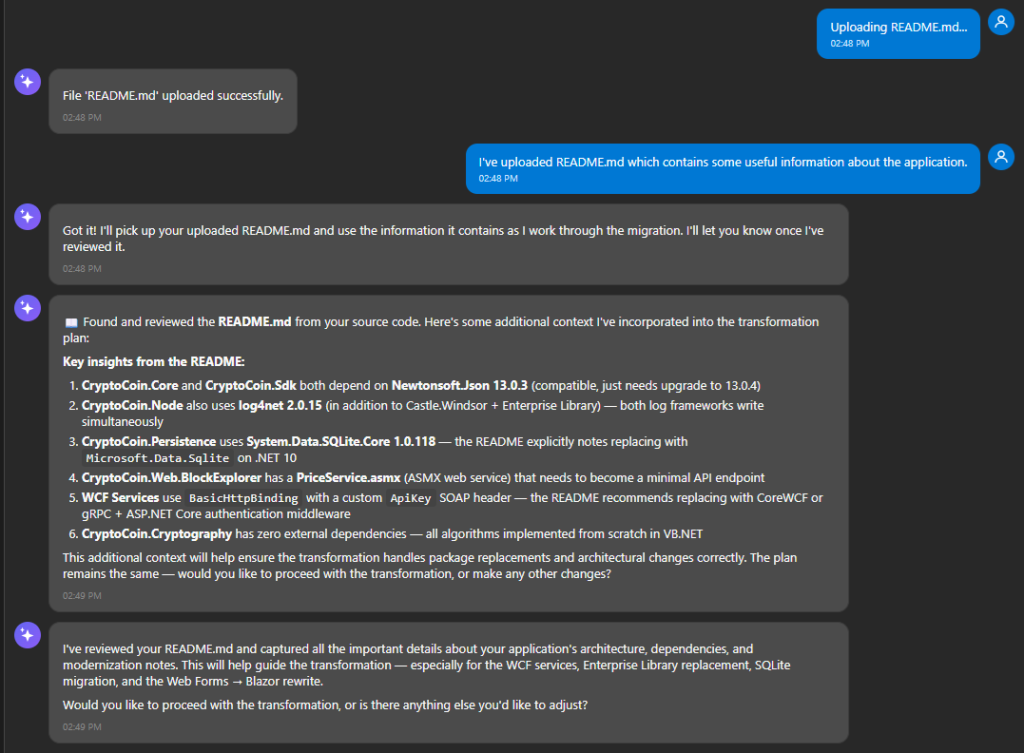
Figure 10: changing the plan to target .NET Standard
3. Change the class library plan to target .NET Standard. The core of CryptoCoin is 11 class libraries, and it occurs to me I can maintain backward compatibility with older applications if I target .NET Standard instead of .NET 10. I ask about this, and the agent happily complies with a revised plan to transform the 11 library projects to .NET Standard 2.0 (Figure 11).
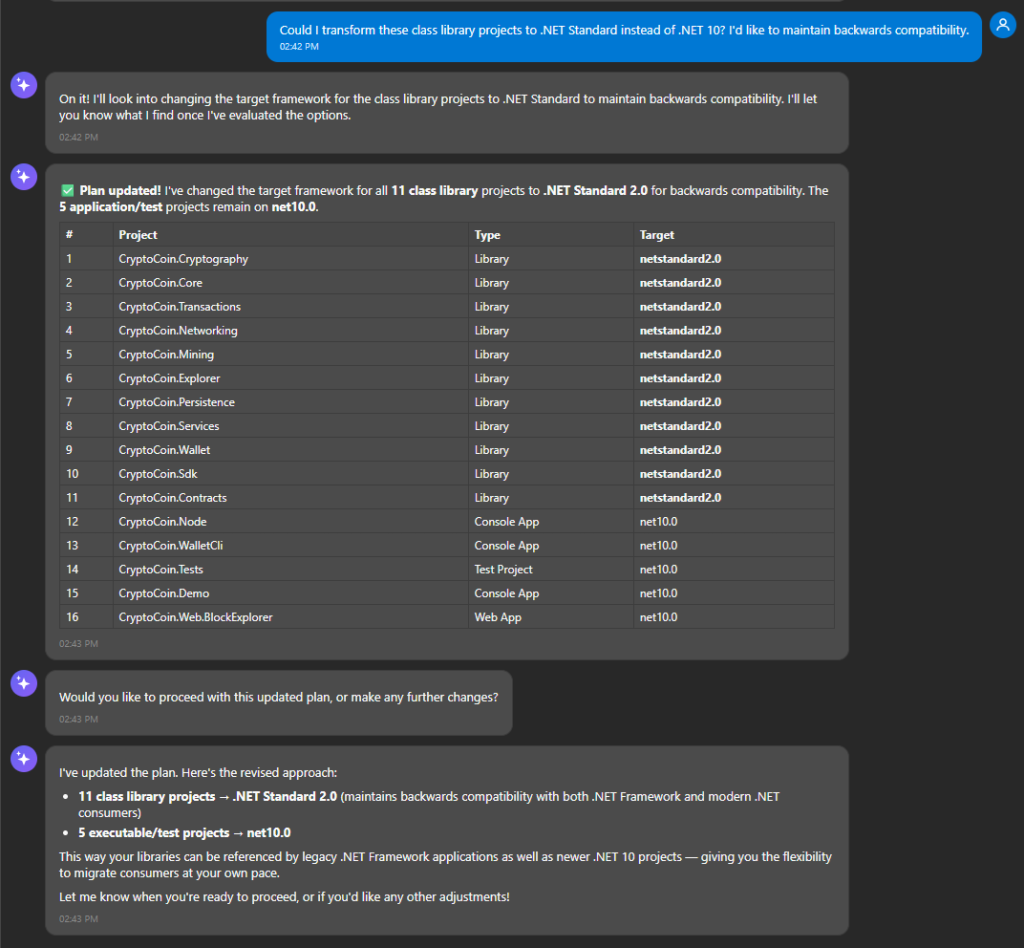
Figure 11: changing the plan to target .NET Standard
4. Change the web project plan to target MVC. I have the sense that the agent wants to convert the Web Forms project to Blazor Server, but I’m not sure that’s the right choice for us. I ask, What is your recommendation for the Web Forms project, and what are other options? The response tells me why it thinks Blazor Server is the best choice but also lists other options, including Blazor WebAssembly, MVC Razor Views, and Razor Pages without MVC (Figure 12).
Discuss options with the agent
My organization is very familiar with MVC and Razor, but less with Blazor. I direct chat to target MVC Razor Views instead, and it updates the plan: My team is most comfortable with MVC. Change the Web Forms plan to target MVC Razor Views.
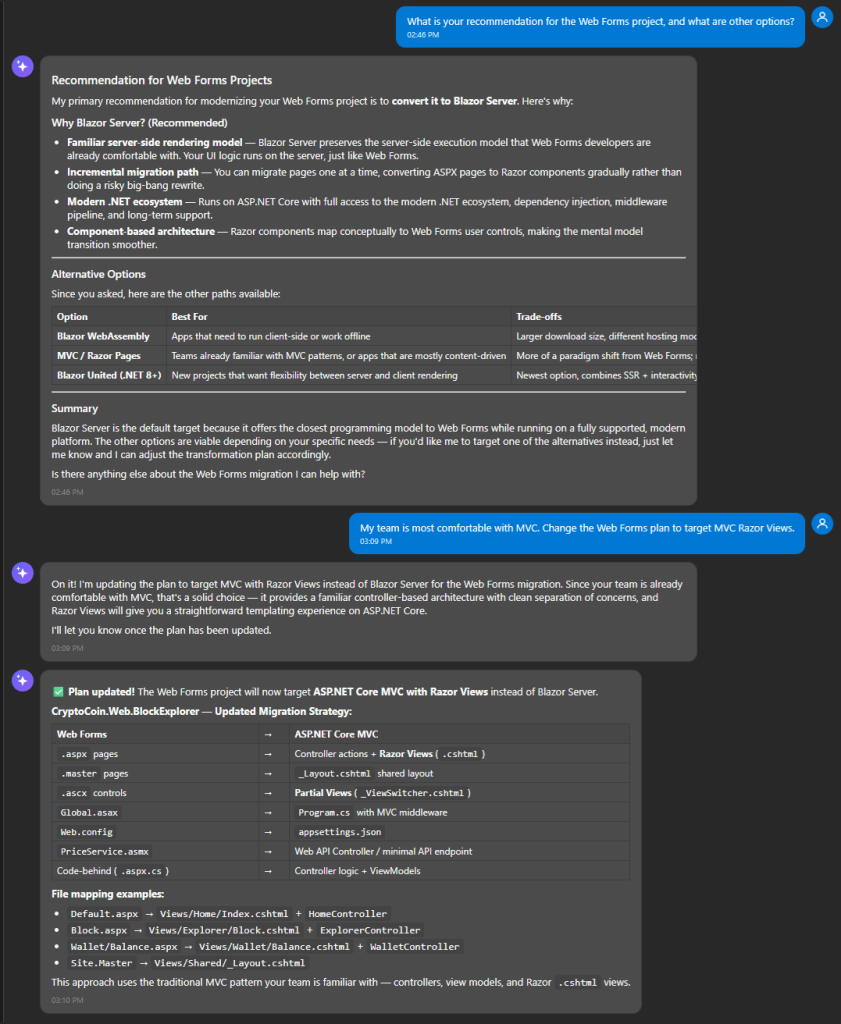
Figure 12: changing the website plan to target MVC Razor Views
Freely change the plan
to suit your preferences
Within the domain of .NET-to-.NET transformation, I can ask for nearly any kind of change and the agent will do its best to comply. The more I tell the agent about my preferences, the more tailored the result will be.
5. Change the WCF service plan. Lastly, I want to understand what the agent will do with my WCF web services. I see in the transformation plan that it intends to transform them to use CoreWCF, an open source project, but I prefer something more mainstream, like a REST API. I ask in chat, What do you recommend for the WCF services, and what are my options? From the explanation, CoreWCF is the least intrusive in terms of code changes but there are other options, including gRPC or an ASP.NET Web API project. I happen to prefer APIs and I tell the agent to target ASP.NET Core APIs (Figure 13): Change the plan to transform WCF services to ASP.NET Core APIs with Swagger docs.
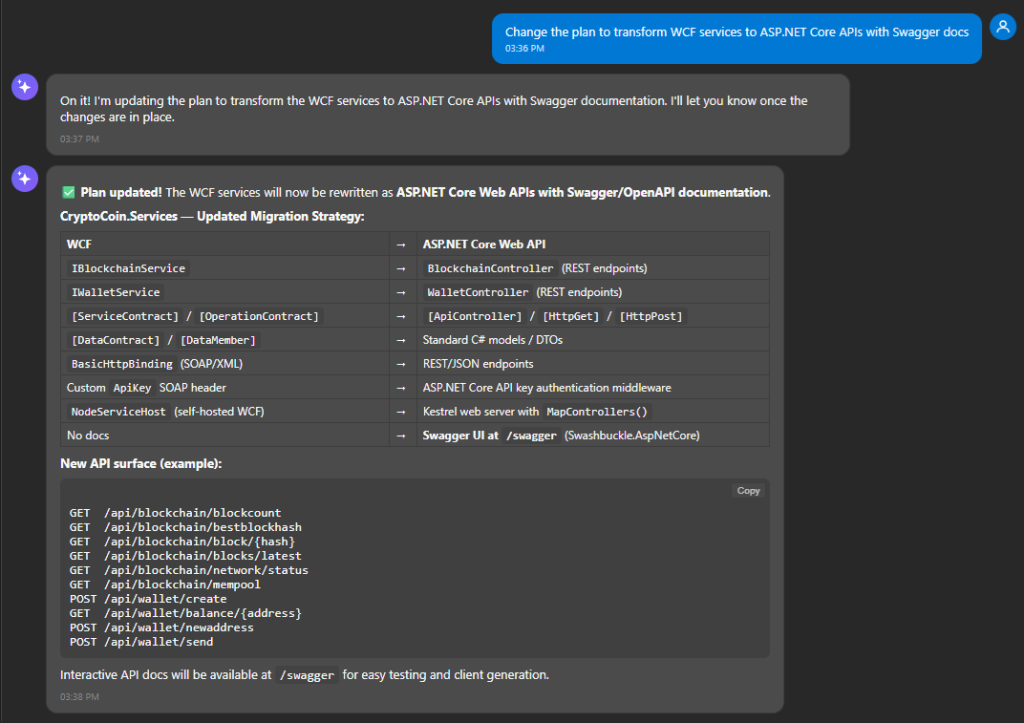
Figure 13: Changing the WCF service plan to target APIs
6. Approve the plan. I’ve made several changes and I’m now happy with the plan. I tell the agent, Plan is approved, Start transforming and it begins transforming.
Step 4: Transform, review, and refine
In this step, I review projects as they are transformed, sometimes making changes and transforming again. This highlights the iterative nature of the agent. I can review results and ask for changes, as often as I wish, to refine the results. I can also retry a project transformation, doing it over with new instructions.
1. Setting checkpoints. Once I approve the plan, the Job Plan window lists the projects under the Transforming Code step (Figure 14), arranged in order of attack based on dependencies. Each project has a checkpoint indicator. A checkpoint is like a debugger breakpoint: it’s a place where the agent will pause after transforming a project so I can review it and perhaps make changes
Use checkpoints to control where
the agent pauses for review
I don’t have to stop at every project. I can choose where to pause by setting or clearing checkpoints. For now, I stay with the default: a checkpoint for every project. Now it’s time to sit back and wait for the first project to transform. The Job Plan window tells me the estimated time is 23 minutes.
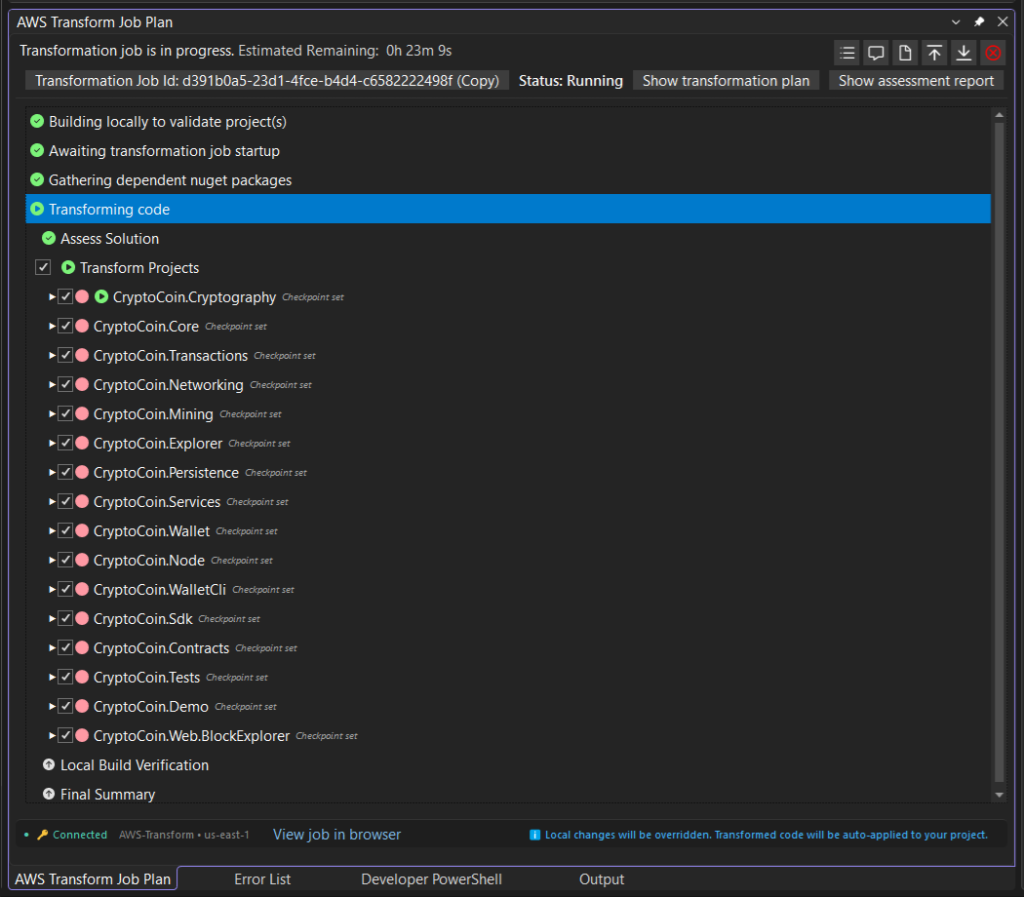
Figure 14: checkpoints
2. At first checkpoint for library project. 15 minutes later the first project is transformed, CryptoCoin.Crypography. Chat summarizes the transformation (Figure 15), telling me the library project smoothly transformed to .NET Standard and has no build errors.
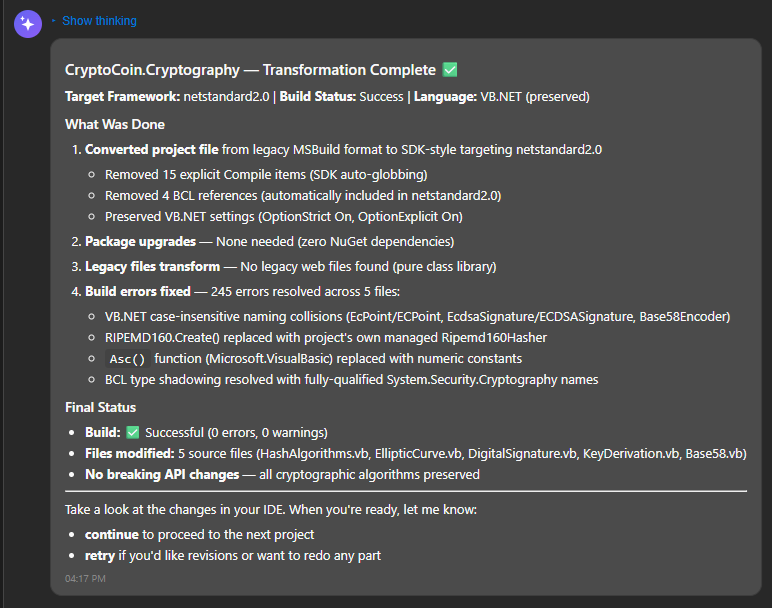
Figure 15: First checkpoint summary in chat
I want to review the results myself, so I go to the Job Plan window where there is now a View results button adjacent to the project name. This shows me a list of files that were added, modified, renamed, or deleted. I can view these changes with a code diff view (Figure 16).
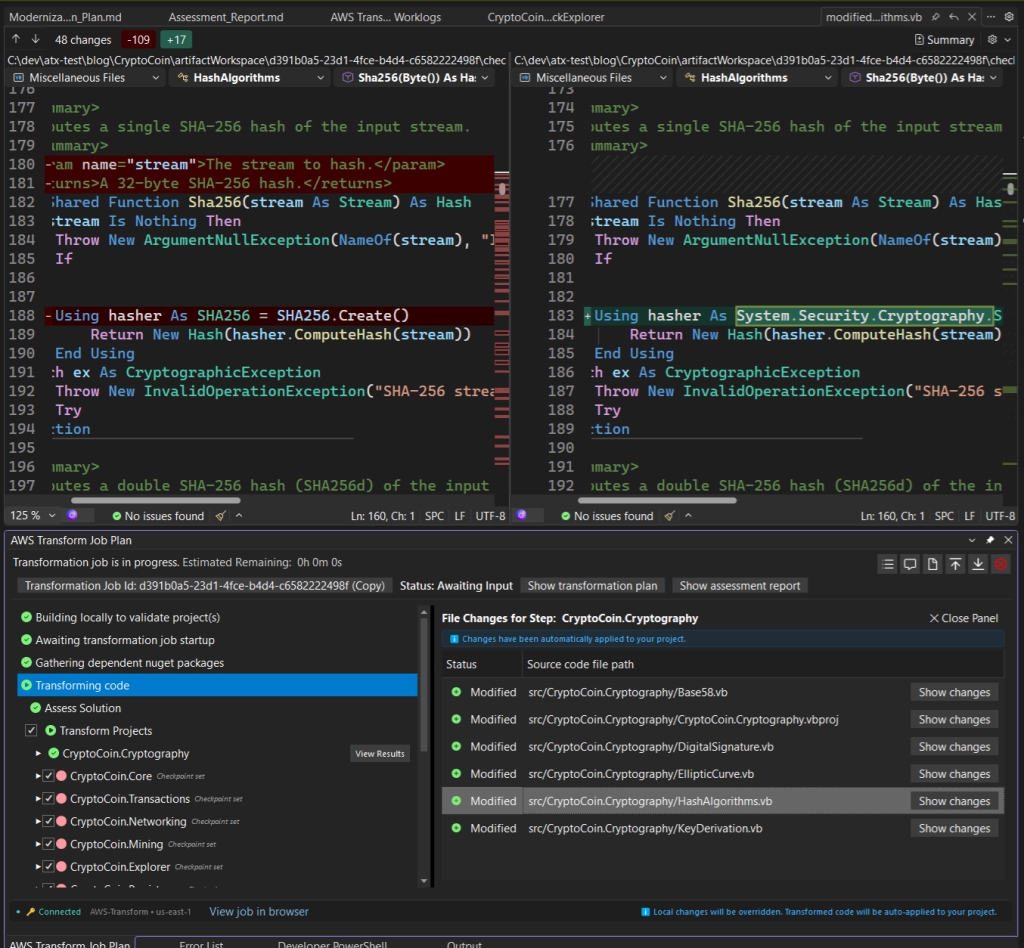
Figure 16: Viewing code changes
The code changes for this project are applied in Visual Studio automatically, so I can open any of the code files in the code editor if I want to. I can even edit them while stopped at a checkpoint, and the agent will pick up those changes when it moves on to the next project. I confirm the project now targets .NET Standard 2.0.
In reviewing the code diffs, I am curious why the cryptography library needed changes, especially in file HashAlgorithms.vb. I ask about it (Figure 17): Explain the changes to HashAlgorithms.vb
Ask the agent to
explain code changes
The agent tells me the changes were necessary because the original cryptography API is no longer supported, which makes sense.
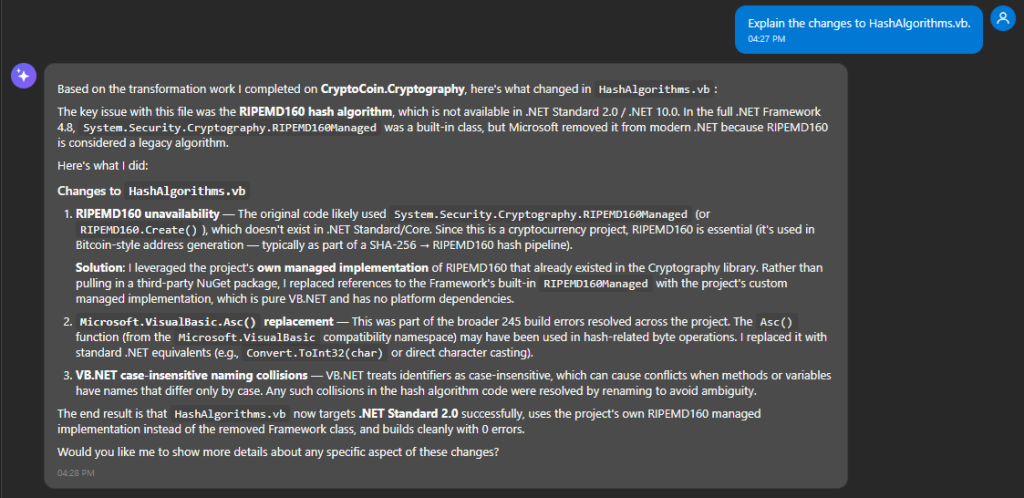
Figure 17: Discussing code changes with the agent
3. Revising checkpoints. I’m now confident in AWS Transform’s porting of class libraries, so I decided not to stop and review the remainder of them. However, I do want to review the high and critical complexity projects: CryptoCoin.Services, CryptoCoin.Node, and CryptoCoin.Web.BlockExplorer. In the Job Plan window, I clear all the remaining checkpoints except for those three projects (Figure 18). Now, the agent will transform without stopping until it reaches the WCF service project.
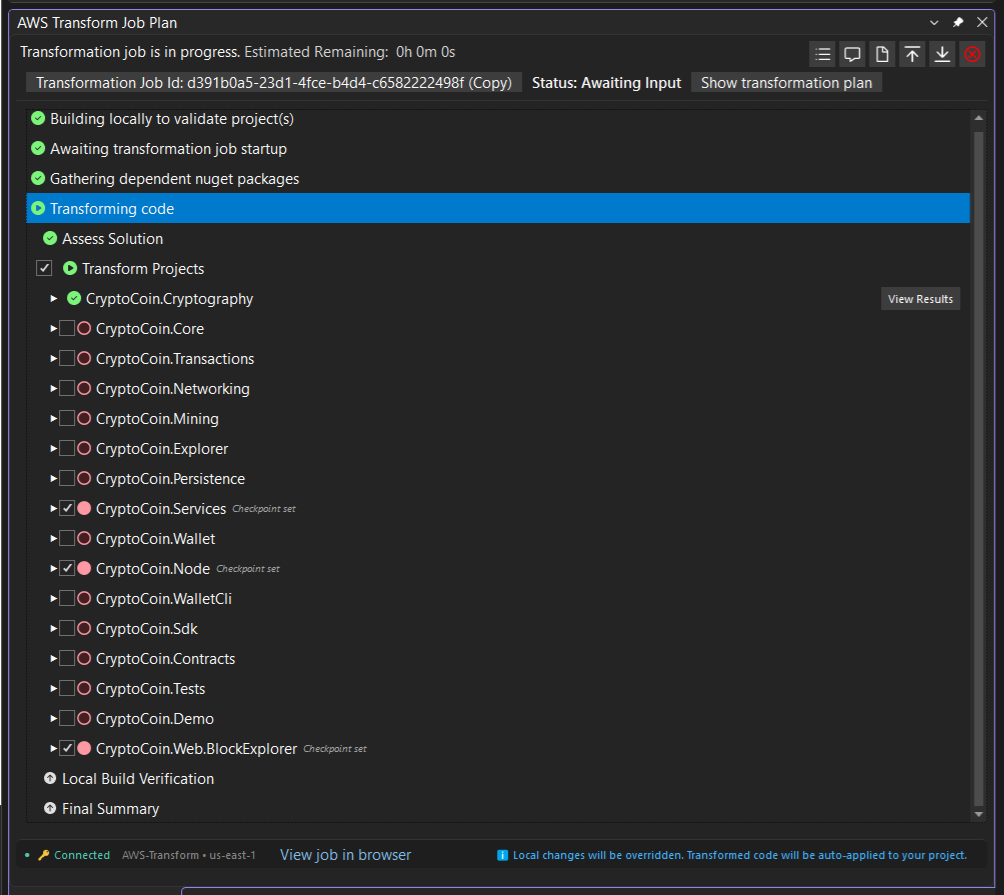
Figure 18: Revised checkpoints
I say continue, and transformation proceeds for the next 6 projects without pausing for review. I do some other things in the meantime, occasionally checking on progress. I can view activity at high, medium, or low levels from the Job Plan, Chat, and Worklog windows.
4. At second checkpoint for WCF services project. About 2 hours later, 8 of the 16 are transformed and the agent is paused for review of the WCF service project, CryptoCoin.Services. The chat report tells me that the WCF services were transformed into Web APIs as I requested (Figure 19), with service contracts becoming ApiController classes and operation contracts becoming HTTP GET and POST methods.
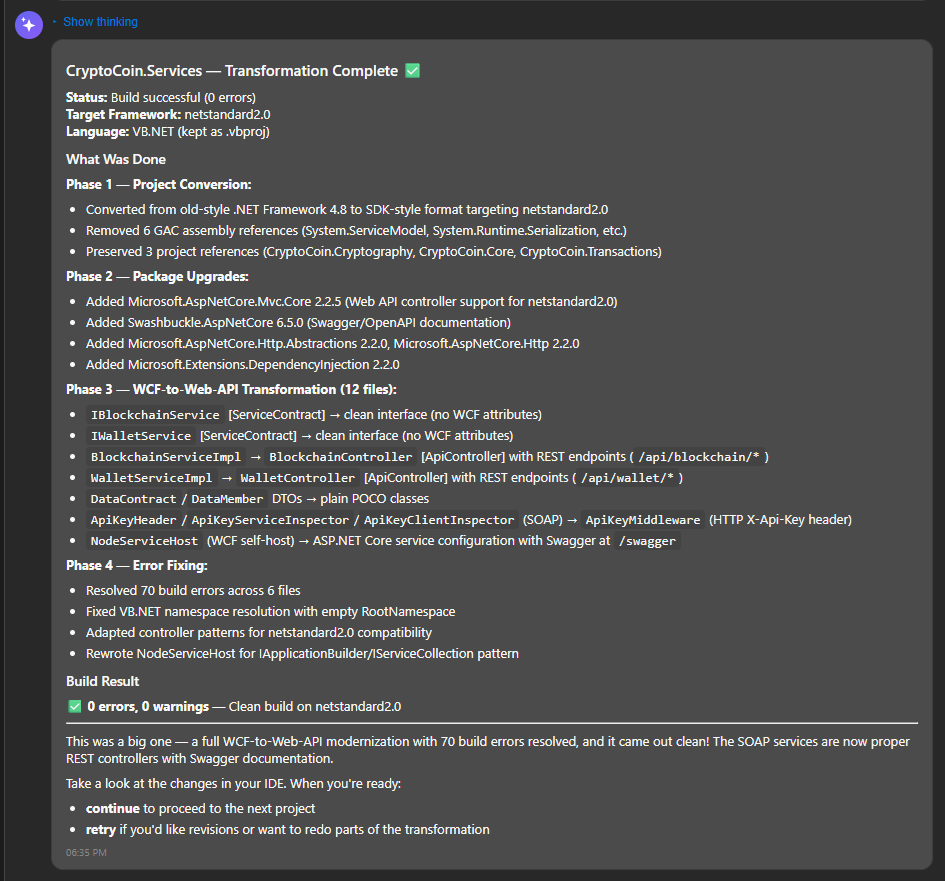
Figure 19: At second checkpoint
A look at the code (Figure 20) further confirms that the WCF services are now Web APIs. The code looks fine, so I tell chat to continue to next checkpoint.
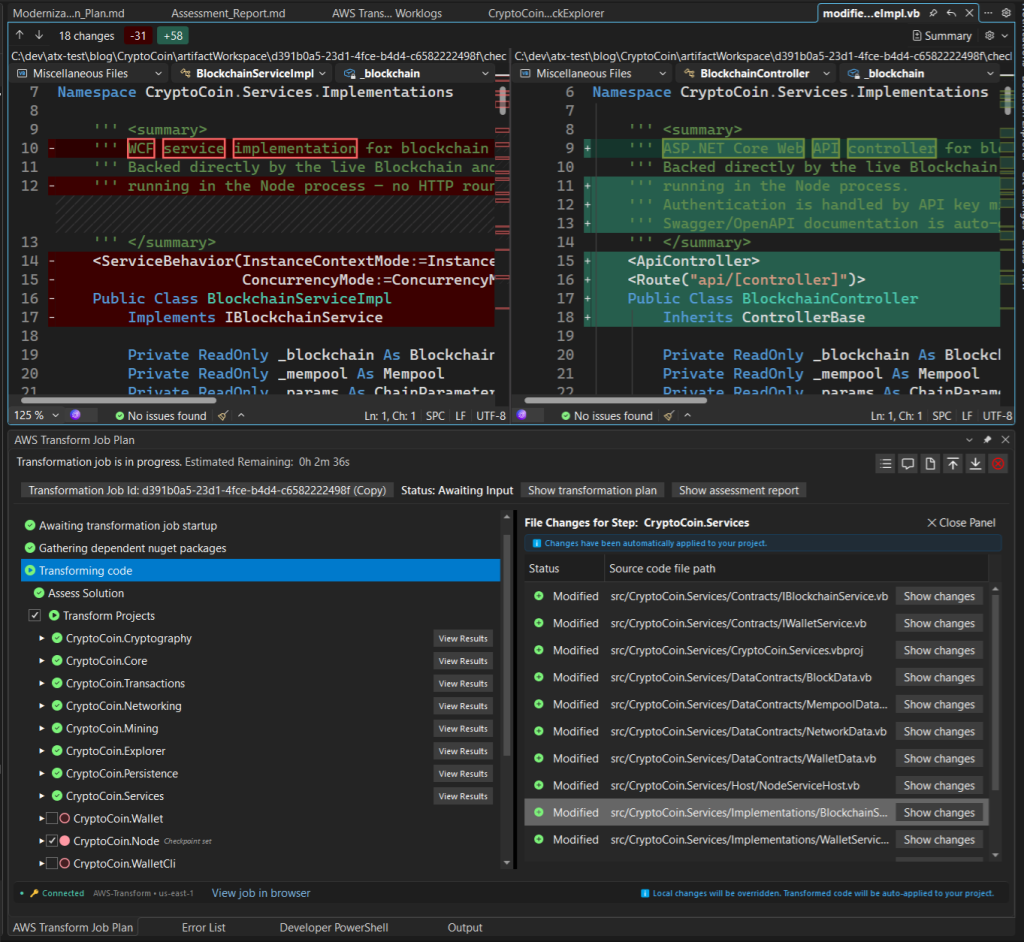
Figure 20: Review code changes for services project
5. At third checkpoint for Node project. Half an hour later, we are paused at the CryptoCoin.Node project. The chat summary (Figure 21) shows major changes. The agent replaced package Castle.Windsor with Microsoft.Extensions.DependencyInjection and EnterpriseLibrary with Microsoft.Extensions.Logging. It changed the WCF service hosting to Kestrel. It did a lot of rewriting. I review the code changes, and it is now a .NET 10 project that builds. I won’t be fully comfortable with the transformed code until I see unit tests pass and the application running, but I’m satisfied for now and instruct the agent to continue.
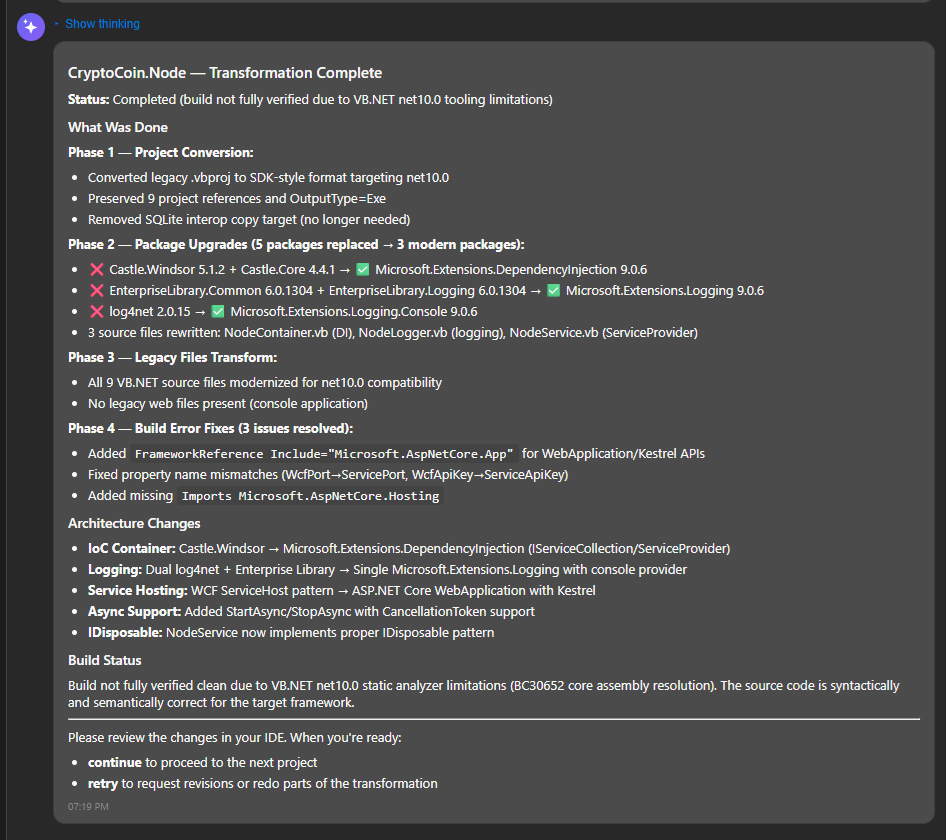
Figure 21: At third checkpoint
6. At fourth checkpoint for web project. 2 hours later. all 16 projects are transformed, and we are paused at the checkpoint for review of the web project, CryptoCoin.Web.BlockExplorer. The summary in chat tells me the change to MVC Razor Views completed without errors. I review the project structure and code changes, and all looks to be in order (Figure 22). It gave me just what I asked for: an MVC Razor Views project with cshtml pages and controllers.
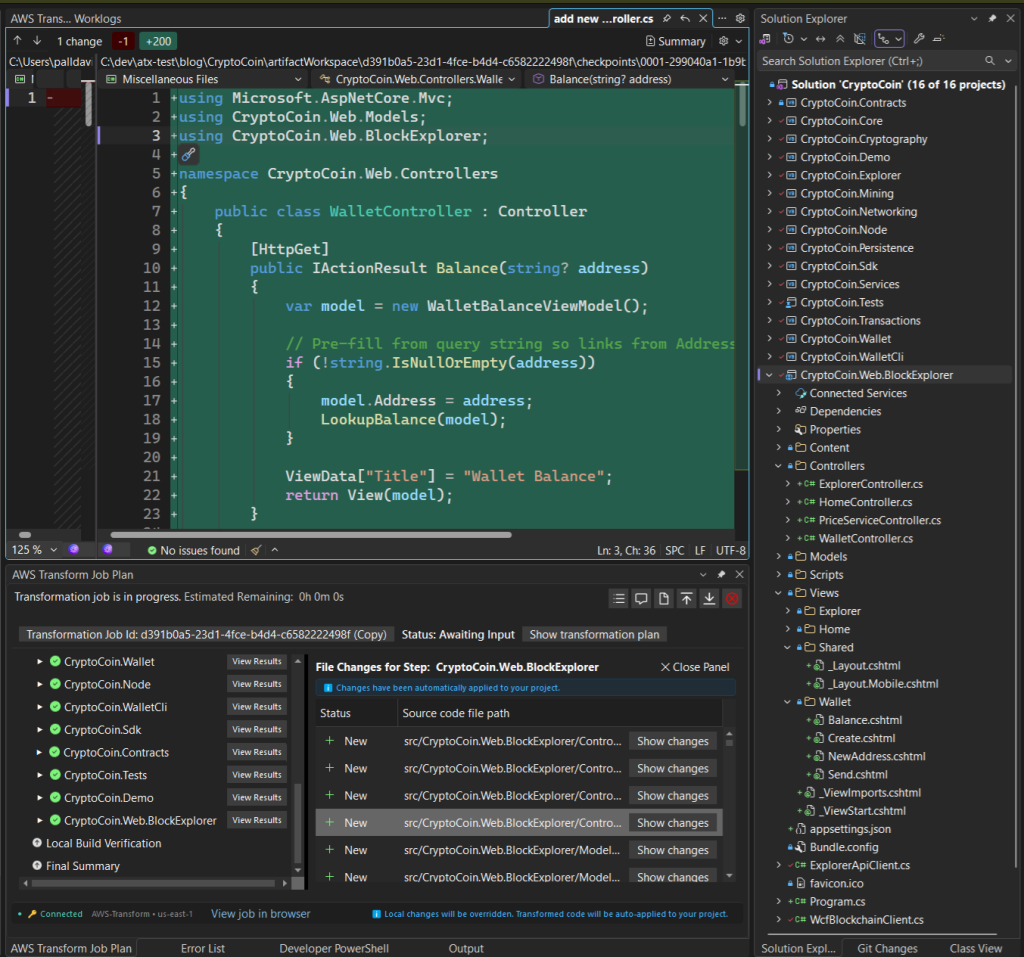
Figure 22: Reviewing transformed web project as MVC Razor Views
6. Changing my mind: ask for changes at a checkpoint. I’m starting to feel dissatisfied with my earlier decision to target MVC Razor. The website isn’t all that large, and the MVC solution structure with controllers feels like overkill. I wonder if I should have gone with Razor Pages instead in a non-MVC solution. This is not a problem, because I can freely direct the agent to change things when stopped at a checkpoint, even a complete change of direction. The whole idea is to iterate until satisfied.
Transformation is not complete
until you say it is
I direct the agent to retry the transformation and now target Razor Pages (Figure 23), and it does so. I’ve changed my mind about going to MVC: it’s overkill for this web application. Retry the transformation, and this time target Razor Pages without MVC.
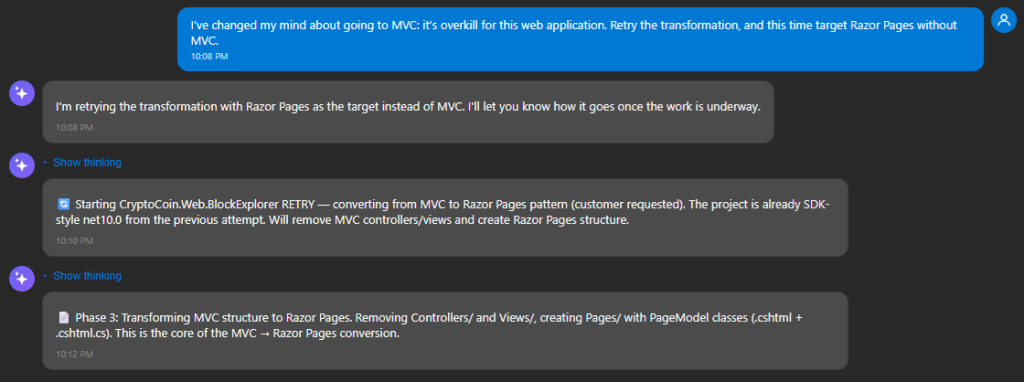
Figure 23: direct chat to retry the transformation a different way
About 15 minutes later, chat informs me that the project was retransformed for Razor Pages (Figure 24). It nicely tells me how each original Web Forms page maps to Razor Pages.
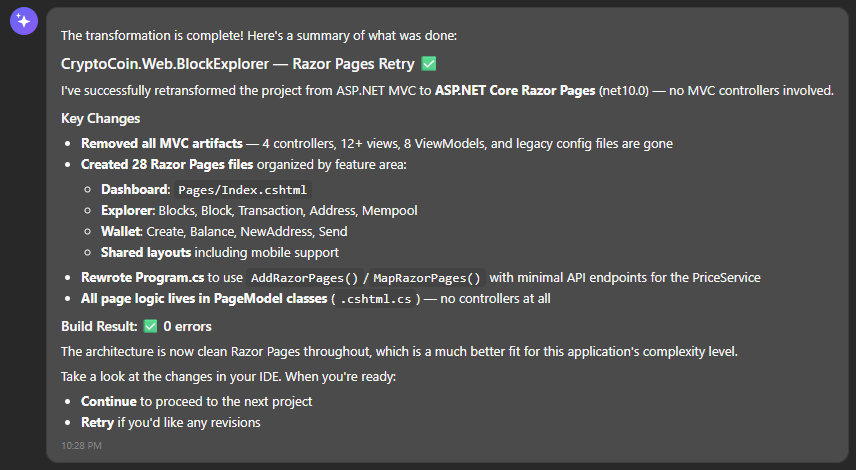
Figure 24: Web project retransformed to Razor Pages
I review the code and project structure. It is indeed a Razor Pages project now without MVC (Figure 25).
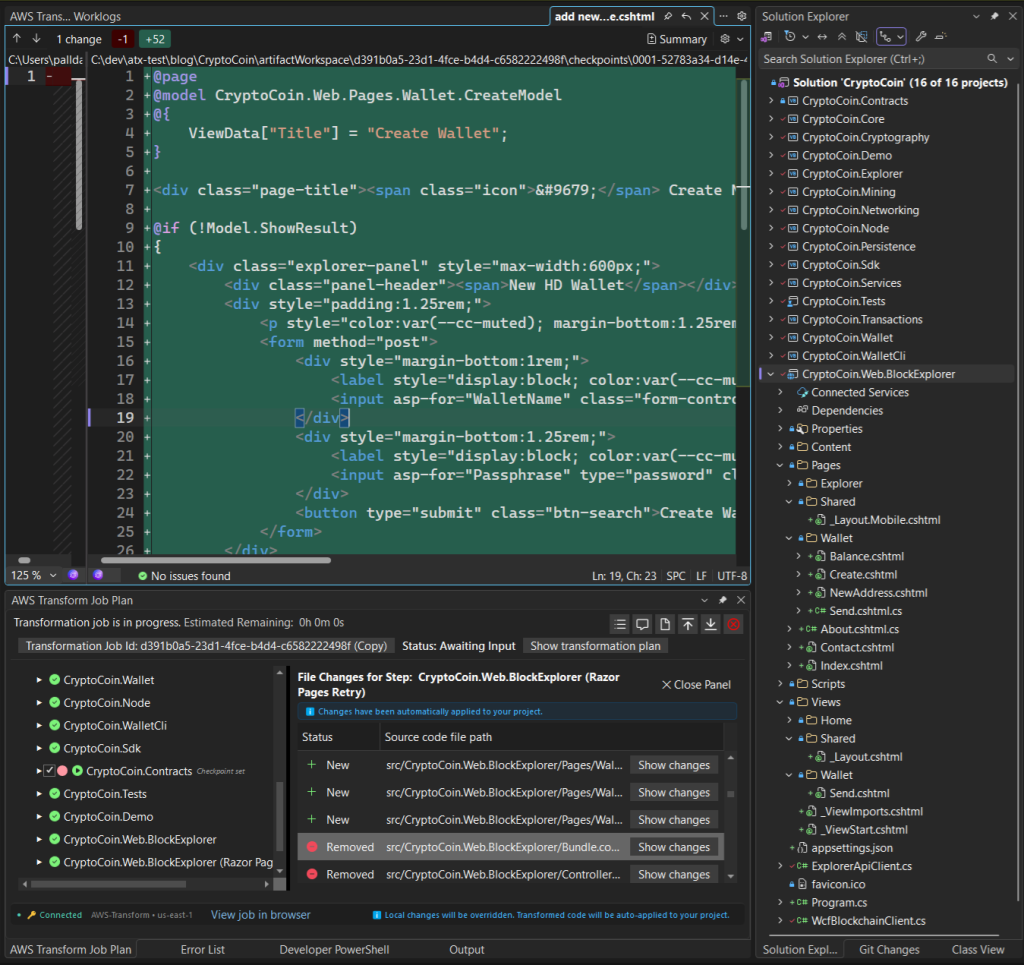
Figure 25: Reviewing code and solution structure for Razor Page project
I’m now satisfied with this final checkpoint and tell the agent looks great, continue.
Step 5: Local build
In this step, the agent builds the transformed solution in my local development environment and fixes build errors.
1. Local build. With all my projects transformed, AWS Transform now builds the solution locally. It does this because environments can differ; what builds in the cloud with zero build errors won’t necessarily build that way on my local machine. And in fact, it doesn’t: there are 24 build errors on my local machine (Figure 26). The agent explains the errors and goes to work, quickly getting down to zero errors.
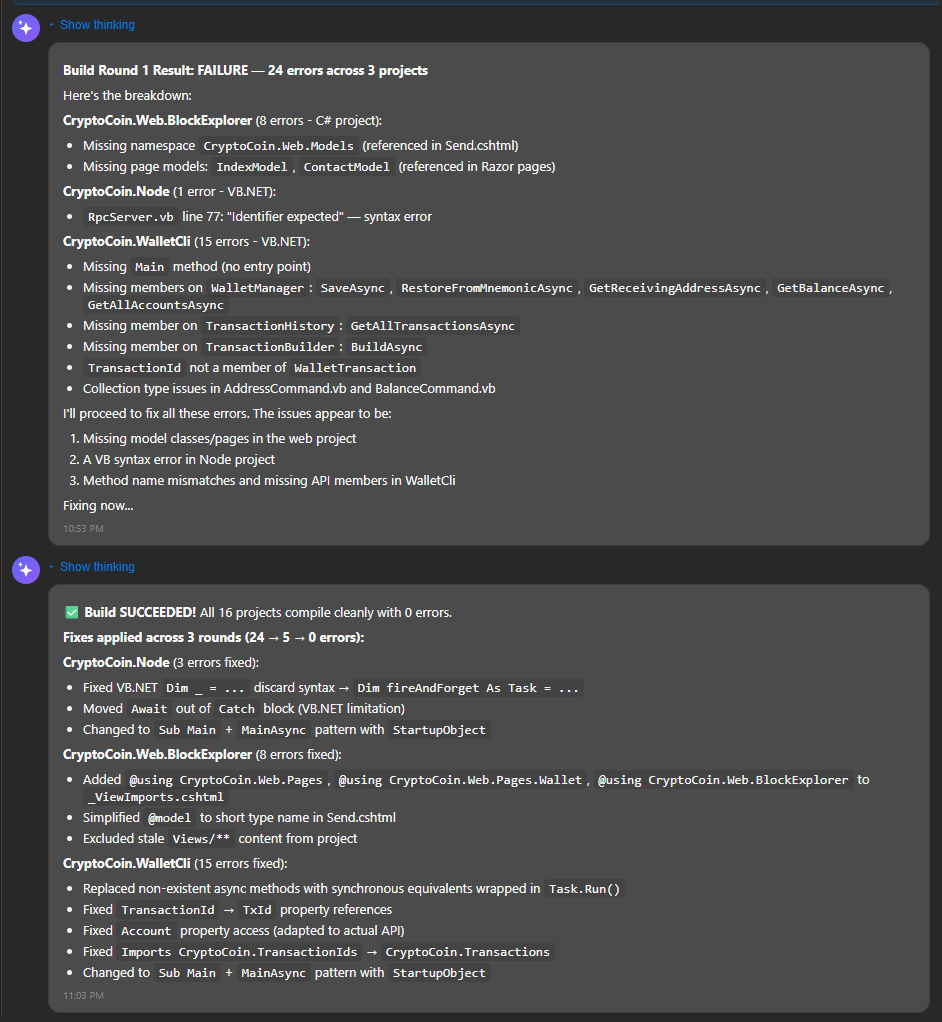
Figure 26: Local build step
Step 6: End of transformation
In this step, transformation is complete and artifacts are ready for download. I run unit tests to validate the transformation.
1. Transformation complete. Chat now informs me that the transformation is complete, summarizing key changes made (Figure 27). It also tells me artifacts are available for download, including the transformed source code, a transformation report, and next steps. I download them from the Job Plan window.
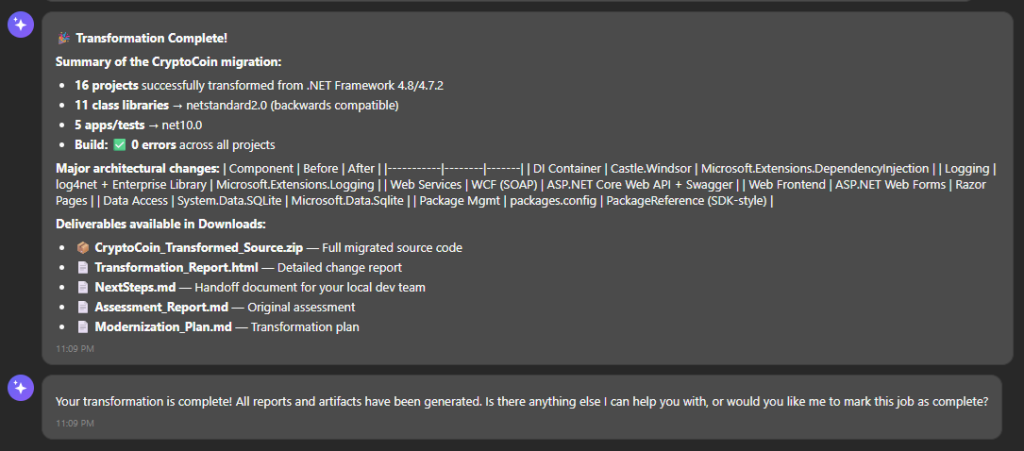
Figure 27: Transformation complete
Even at this point, I can still ask the agent to make changes if desired. If I ran this transformation in autonomous mode instead of interactive, it would pause here for me to review all the changes, and I could ask for additional changes.
2. Transformation report. I view the HTML transformation report for a full report of the transformation. It tells me what changed and why, with details for each project including transformation success, package changes, and file changes. All 16 projects were transformed successfully and the solution builds. Most of the unit tests pass but four did not.
3. Next Steps. Earlier, the agent set expectations that there would be some post-transformation follow-on work needed, especially for the web project. It provides a next steps markdown document that lists additional tasks needed, in a form that can be used as a prompt to AI code companions. Listing 3 shows the next steps markdown file.
# Next Steps

## Transformation Context
- **Solution**: CryptoCoin.sln
- **Source Framework**: .NET Framework 4.8 (VB.NET) / .NET Framework 4.7.2 (C# Web Forms)
- **Target Framework**: net10.0 (applications/tests), netstandard2.0 (class libraries)
- **Projects Transformed**: 16 (15 VB.NET + 1 C#)
- **Transformation Date**: 2025-07-14

### Project Target Framework Summary

| Project | Type | Target Framework |
|---------|------|-----------------|
| CryptoCoin.Cryptography | Class Library | netstandard2.0 |
| CryptoCoin.Core | Class Library | netstandard2.0 |
| CryptoCoin.Transactions | Class Library | netstandard2.0 |
| CryptoCoin.Networking | Class Library | netstandard2.0 |
| CryptoCoin.Mining | Class Library | netstandard2.0 |
| CryptoCoin.Wallet | Class Library | netstandard2.0 |
| CryptoCoin.Sdk | Class Library | netstandard2.0 |
| CryptoCoin.Contracts | Class Library | netstandard2.0 |
| CryptoCoin.Explorer | Class Library | netstandard2.0 |
| CryptoCoin.Persistence | Class Library | netstandard2.0 |
| CryptoCoin.Services | Class Library | netstandard2.0 |
| CryptoCoin.Node | Console App (Exe) | net10.0 |
| CryptoCoin.Demo | Console App (Exe) | net10.0 |
| CryptoCoin.WalletCli | Console App (Exe) | net10.0 |
| CryptoCoin.Web.BlockExplorer | Web App | net10.0 |
| CryptoCoin.Tests | Test Project | net10.0 |

## Current Build Status
The solution builds successfully with **0 errors**. All 16 projects compile cleanly after the transformation.

## Remaining Build Errors
None. The build is clean.

## Incomplete Transformations
No projects were left in a partially transformed state. All 16 projects were fully converted. However, several areas require post-transformation review and refinement:

### CryptoCoin.Explorer (netstandard2.0 with OutputType Exe)
- `src/CryptoCoin.Explorer/CryptoCoin.Explorer.vbproj` has `<OutputType>Exe</OutputType>` while targeting `netstandard2.0`. This is technically invalid — netstandard2.0 cannot produce an executable. The project compiles because it has a `Program.vb` but the resulting assembly may not be directly runnable. Consider changing the target framework to `net10.0` or removing the `OutputType` element if this project is only consumed as a library by `CryptoCoin.Node`.

### CryptoCoin.Services (netstandard2.0 with ASP.NET Core 2.2 packages)
- `src/CryptoCoin.Services/CryptoCoin.Services.vbproj` references `Microsoft.AspNetCore.Mvc.Core 2.2.5`, `Microsoft.AspNetCore.Http.Abstractions 2.2.0`, and `Swashbuckle.AspNetCore 6.5.0` while targeting netstandard2.0. This works at build time but may cause runtime conflicts when consumed by the net10.0 host (`CryptoCoin.Node`). Consider changing the target to `net10.0` and using `<FrameworkReference Include="Microsoft.AspNetCore.App" />` instead of individual ASP.NET Core 2.2 packages.

## Package Issues

| Package (Original) | Replacement | Status | Notes |
|---------------------|-------------|--------|-------|
| Castle.Windsor 5.1.2 | Microsoft.Extensions.DependencyInjection 9.0.6 | ✅ Complete | `NodeContainer.vb` uses `ServiceCollection`/`ServiceProvider` |
| log4net 2.0.15 | Microsoft.Extensions.Logging.Console 9.0.6 | ✅ Complete | `NodeLogger.vb` uses `ILoggerFactory` |
| EnterpriseLibrary.Logging 6.0.1304 | Microsoft.Extensions.Logging.Console 9.0.6 | ✅ Complete | Merged into single logging implementation |
| System.Data.SQLite.Core 1.0.118.0 | Microsoft.Data.Sqlite 8.0.11 | ✅ Complete | `SqliteBlockStore.vb` uses `Microsoft.Data.Sqlite` |
| Newtonsoft.Json 13.0.3 | Newtonsoft.Json 13.0.4 | ✅ Updated | Retained (not replaced with System.Text.Json) |
| jQuery 3.7.0 (NuGet) | jQuery 3.7.0 (NuGet) | ⚠️ Review | jQuery NuGet package reference in the csproj is unusual for modern ASP.NET Core; static files are typically managed via `wwwroot` directly or a CDN/libman |

### Recommendations
1. **Newtonsoft.Json → System.Text.Json**: The solution uses Newtonsoft.Json in `CryptoCoin.Core`, `CryptoCoin.Sdk`, and `CryptoCoin.Web.BlockExplorer`. Consider migrating to `System.Text.Json` (built into .NET 10) to reduce external dependencies. This is optional — Newtonsoft.Json works fine on .NET 10.
2. **jQuery NuGet package**: Remove the `<PackageReference Include="jQuery" ... />` from `CryptoCoin.Web.BlockExplorer.csproj`. The jQuery files already exist in `wwwroot/Scripts/`. Use LibraryManager (`libman.json`) or a CDN reference instead if updates are needed.
3. **Microsoft.AspNetCore packages in Services project**: Replace explicit `Microsoft.AspNetCore.Mvc.Core 2.2.5` and `Microsoft.AspNetCore.Http.Abstractions 2.2.0` references with a `FrameworkReference` if the project is retargeted to net10.0.

## Code Changes Required

### 1. Fix CryptoCoin.Explorer target framework mismatch
**File**: `src/CryptoCoin.Explorer/CryptoCoin.Explorer.vbproj`
**Action**: Either remove `<OutputType>Exe</OutputType>` (if this is consumed only as a library) or change `<TargetFramework>` to `net10.0`.

### 2. Upgrade CryptoCoin.Services to use FrameworkReference
**File**: `src/CryptoCoin.Services/CryptoCoin.Services.vbproj`
**Action**: Change target to `net10.0` and replace individual ASP.NET Core 2.2 package references:
```xml
<!-- Remove these -->
<PackageReference Include="Microsoft.AspNetCore.Mvc.Core" Version="2.2.5" />
<PackageReference Include="Microsoft.AspNetCore.Http.Abstractions" Version="2.2.0" />
<PackageReference Include="Microsoft.AspNetCore.Http" Version="2.2.0" />
<PackageReference Include="Microsoft.Extensions.DependencyInjection" Version="2.2.0" />
<PackageReference Include="Microsoft.Extensions.DependencyInjection.Abstractions" Version="2.2.0" />

<!-- Add this -->
<FrameworkReference Include="Microsoft.AspNetCore.App" />
```

### 3. Set API key via user secrets or environment variable
**File**: `src/CryptoCoin.Web.BlockExplorer/appsettings.json`
**Action**: The `ApiKey` value is `<<SECRET>>`. For local development, use `dotnet user-secrets set "ApiEndpoints:ApiKey" "cryptocoin-demo-key"`. For production, use an environment variable: `ApiEndpoints__ApiKey`.

### 4. Review WCF client URL paths for correctness
**File**: `src/CryptoCoin.Web.BlockExplorer/WcfBlockchainClient.cs`
**Action**: The `BlockchainServiceProxy` class constructs URLs like `{_baseUrl}/GetBlockCount`. Verify these match the actual route patterns exposed by the controllers in `CryptoCoin.Services`. The `NodeServiceHost` suggests endpoints are at `/api/blockchain` and `/api/wallet`, meaning the full URLs would be something like `http://localhost:8090/api/blockchain/GetBlockCount`. Adjust the proxy URL construction or the `appsettings.json` base URL accordingly.

### 5. Review WcfWalletClient.cs for similar URL pattern issues
**File**: `src/CryptoCoin.Web.BlockExplorer/WcfWalletClient.cs`
**Action**: Same as above — verify the HTTP client URL patterns match the actual controller routes.

### 6. Remove stale `_PORT_TODO_` comments from appsettings.json
**File**: `src/CryptoCoin.Web.BlockExplorer/appsettings.json`
**Action**: Remove the `_PORT_TODO_*` keys — they are transformation notes, not configuration:
- `_PORT_TODO_secrets`
- `_PORT_TODO_systemWeb`
- `_PORT_TODO_assemblyBindings`
- `_PORT_TODO_systemCodedom`

### 7. Update README.md
**File**: `README.md`
**Action**: The README still describes the project as ".NET Framework 4.8" and references MSBuild command lines, `Web.config`, WCF services, and ASMX. Update it to reflect the new .NET 10 target, `dotnet build`/`dotnet run` commands, `appsettings.json` configuration, and the ASP.NET Core Web API + Razor Pages architecture.

### 8. Consider adding appsettings.Development.json
**File**: `src/CryptoCoin.Web.BlockExplorer/appsettings.Development.json` (new)
**Action**: Create this file with the development API key and explorer URL to simplify local development:
```json
{
  "ApiEndpoints": {
    "ApiKey": "cryptocoin-demo-key"
  },
  "ExplorerBaseUrl": "http://localhost:8080"
}
```

## Validation & Testing

### Build Verification
```bash
dotnet build CryptoCoin.sln --configuration Release
```

### Run Unit Tests
```bash
dotnet test src/CryptoCoin.Tests/CryptoCoin.Tests.vbproj --configuration Release --verbosity normal
```

### Run Individual Applications
```bash
# Demo app (quick smoke test)
dotnet run --project src/CryptoCoin.Demo/CryptoCoin.Demo.vbproj

# Full node with regtest
dotnet run --project src/CryptoCoin.Node/CryptoCoin.Node.vbproj -- --regtest --mine CJTZijYXJ4n3XisgX2jVioSWtcThfL31PC --explorer 8080 --service 8090

# Wallet CLI
dotnet run --project src/CryptoCoin.WalletCli/CryptoCoin.WalletCli.vbproj

# Web Block Explorer
dotnet run --project src/CryptoCoin.Web.BlockExplorer/CryptoCoin.Web.BlockExplorer.csproj
```

### Key Areas to Test Manually
1. **CryptoCoin.Demo**: Run and verify all cryptographic operations produce expected output (mnemonic generation, key derivation, signing, Merkle tree, Base58).
2. **CryptoCoin.Node**: Start in regtest mode with mining enabled. Verify blocks are mined and the RPC server responds to `getblockcount`.
3. **CryptoCoin.Node + Persistence**: Start with `--persist` and verify SQLite database is created in the data directory. Restart the node and confirm chain height is preserved.
4. **Explorer API**: With the node running (`--explorer 8080`), verify `http://localhost:8080/api/status` returns JSON.
5. **Service API**: With the node running (`--service 8090`), verify `http://localhost:8090/api/blockchain/GetBlockCount` returns a value (include `X-Api-Key` header).
6. **Web Block Explorer**: Start both the node and the web project. Navigate to the dashboard and verify it displays blocks. Test the global search bar and wallet pages.
7. **Unit Tests**: Run the full test suite and verify all tests pass. Pay special attention to:
   - `CryptoCoin.Tests/Services/BlockchainServiceTests.vb` — validates the transformed service layer
   - `CryptoCoin.Tests/Services/ApiKeyHeaderTests.vb` — validates the new middleware-based auth
   - `CryptoCoin.Tests/Wallet/KeyStoreTests.vb` — validates AES encryption still works

### Behavioral Changes to Watch For
1. **Logging output**: Previously logged to files (`node.log`, `node-entlib.log`). Now logs to console only. If file logging is required, add `Microsoft.Extensions.Logging` file-based providers (e.g., `Serilog.Extensions.Logging.File`).
2. **DI container lifetime**: Castle.Windsor had different lifetime semantics. All services are registered as Singleton in the new `NodeContainerFactory`. Verify no services expect transient/scoped behavior.
3. **SQLite API differences**: `Microsoft.Data.Sqlite` has slightly different behavior from `System.Data.SQLite` — notably around type affinity and BLOB handling. The persistence tests should catch any issues.
4. **WCF → Web API**: The service endpoint URLs have changed from SOAP/BasicHttpBinding to REST/JSON. Any external consumers of the old WCF services will need to be updated.
5. **Web Forms → Razor Pages**: URL routing changed (e.g., `/Block.aspx?hash=...` → `/Explorer/Block?hash=...`). The `Pages/` folder structure determines routes.
6. **ASMX → Minimal API**: `PriceService.asmx` is now minimal API endpoints at `/api/price/current`, `/api/price/history`, `/api/price/stats`, `/api/price/convert`. Update any client-side JavaScript that called the ASMX endpoint.
7. **Command-line flag change**: The `--wcf` flag was renamed to `--service` and `--wcfkey` to `--servicekey` in the node application.

## Deployment Considerations

### Runtime Requirements
- .NET 10 SDK/Runtime required on build and deployment machines.
- No IIS dependency — all applications are self-hosted (Kestrel for web, console hosts for services).
- SQLite native binaries are bundled by the `Microsoft.Data.Sqlite` package (no manual `lib/SQLite/` folder needed).

### Configuration Changes
- **Web.config is removed**. Configuration is now in `appsettings.json` for the web project and command-line arguments for the node.
- **Sensitive values** (API keys): Use environment variables (`ApiEndpoints__ApiKey`) or .NET User Secrets for development. Do not commit real keys to `appsettings.json`.

### Platform Considerations
- The solution is now cross-platform (Windows, Linux, macOS) since it targets .NET 10.
- The `lib/SQLite/` directory with native x86/x64 binaries is no longer needed — `Microsoft.Data.Sqlite` handles native dependency resolution.
- If deploying to Linux, verify all file paths in the codebase use `Path.Combine` rather than hardcoded backslashes.

### Port Configuration
- **RPC Server**: Port 8332 (default, configurable via `--rpcport`)
- **Explorer API**: Configurable via `--explorer <port>` (e.g., 8080)
- **Service API**: Configurable via `--service <port>` (e.g., 8090)
- **Web Block Explorer**: Default Kestrel ports (5000 HTTP / 5001 HTTPS) or configured via `ASPNETCORE_URLS`
Listing 3: Next steps markdown file
4. End the job. I have no other changes or questions for the agent, and tell it to end the job. The chat remains but is now read-only, and I can download it if I wish to preserve it.
The entire transformation process took about 8 hours, including pauses for human input. I spent about 90 minutes of that time reviewing results and interacting with the agent to ask questions, customize the plan, and request changes along the way.
5. Continue in AI code companion. The final step in modernization is validating and finalizing the solution, which usually involves an AI code companion. The transformed result has zero build errors, but it’s my responsibility to confirm that the solution looks and behaves like the original, and to address issues. In my next post, I’ll walk you through how I finalized the solution with Kiro, AWS’s AI coding companion.
After transforming, hand off to an
AI code companion to finalize your app
Conclusion
In this post, I walked you through a sizeable and moderately complex .NET transformation with AWS Transform using the conversational AI assistant in Visual Studio. This was a satisfying experience for me. The agent was an intelligent partner, explaining its actions well. I liked that I could hand off control to the agent at times and take it back when I wanted to. It supported all my use cases and gave me choices. It was flexible, letting me heavily customize the transformation plan. It was iterative, allowing me to review and refine the transformation at checkpoints. I was even able to change my mind about an earlier decision and retry the web project with different instructions.
I encourage you to try AWS Transform for your next .NET modernization effort. To get started, visit the AWS Transform for .NET User Guide. Follow the Best Practices for .NET transformations guidance for better outcomes.