.NET on AWS Blog
Securing .NET Microservices with Entra ID on AWS
Introduction
In modern distributed systems, microservices need to communicate securely with each other while maintaining strict security boundaries. Implementing secure app-to-app communication at scale requires a standardized approach for both authentication and authorization. OAuth 2.0 provides this standardization, letting services verify each other’s identity and control access to protected resources.
Consider a typical e-commerce scenario where a user places an order through your UI, the request flows from the UI to an Order Service (Service A), which then calls an Inventory Service (Service B) to check stock levels. The Inventory Service may need to call a Pricing Service (Service C) to calculate final costs. Each of these service-to-service calls requires secure authentication and authorization, ensuring that only legitimate services can access protected endpoints.
This blog post shows how to implement enterprise-grade service-to-service authentication using Microsoft Entra ID (formerly Azure AD) with the OAuth 2.0 client credentials flow for .NET microservices running on AWS container services.
Architecture Overview
Our architecture shows a microservices communication pattern deployed on AWS container services, secured with Microsoft Entra ID authentication and authorization. We register each microservice in our system as an application in Entra ID, creating a clear identity for every service component. Service A (the Order Service), Service B (the Inventory Service), and Service C (the Pricing Service) each have their own registrations with unique client IDs and credentials. The end-to-end communication flow is as follows.
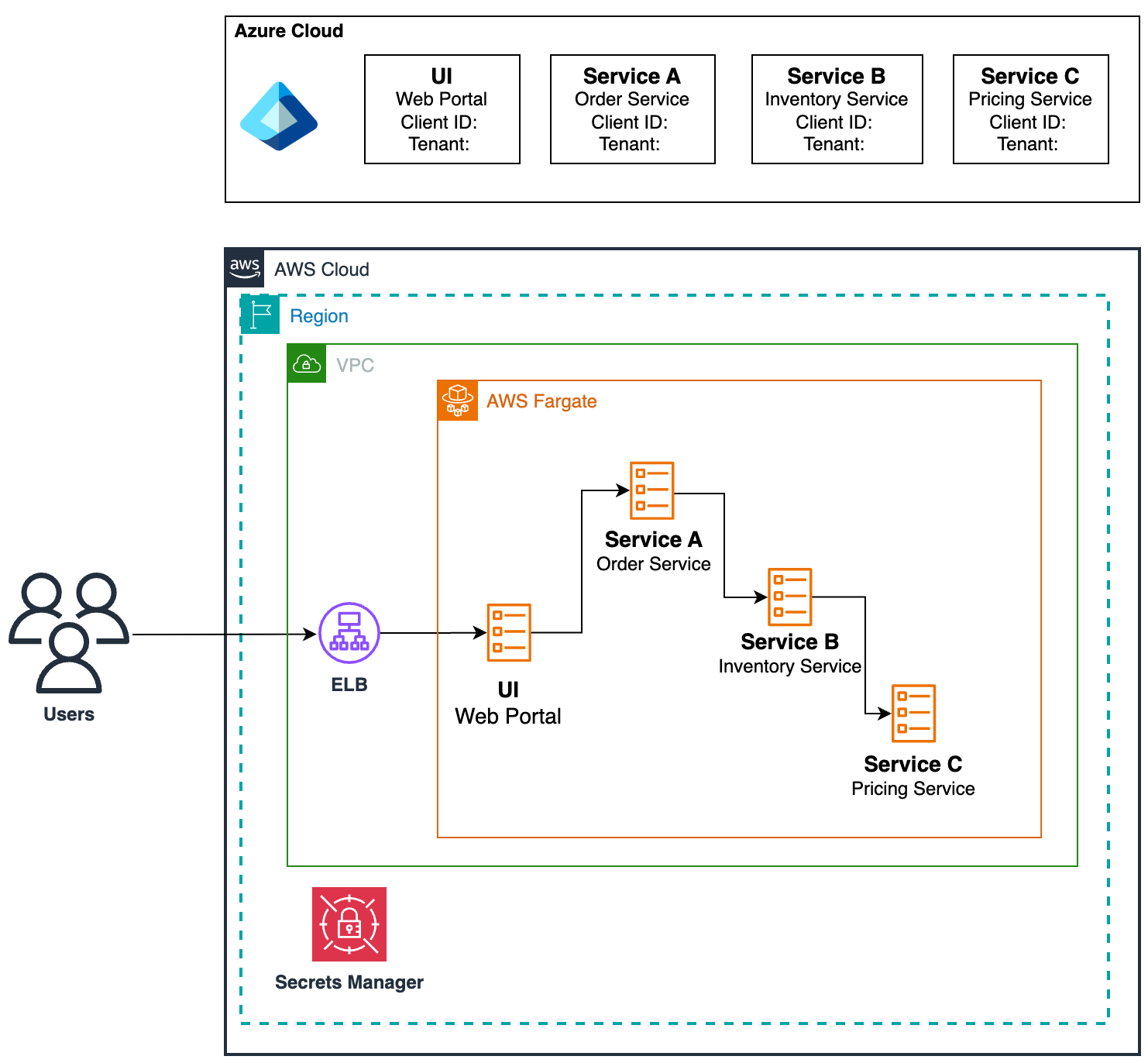
Figure 1: High level Architecture
- User Request: An end user interacts with the UI, which sends a request to Service A.
- Service A to Service B: Service A then requests an access token from Entra ID using its client credentials. Entra ID validates these credentials and issues a token specifically scoped for accessing Service B’s API. Service A, then calls Service B with the token in the Authorization header.
- Token Validation: Service B validates the incoming token with Entra ID and processes the request.
- Service B to Service C: Service B follows the same pattern, getting its own token to call Service C.
- Response Chain: Responses flow back through the chain to the user.
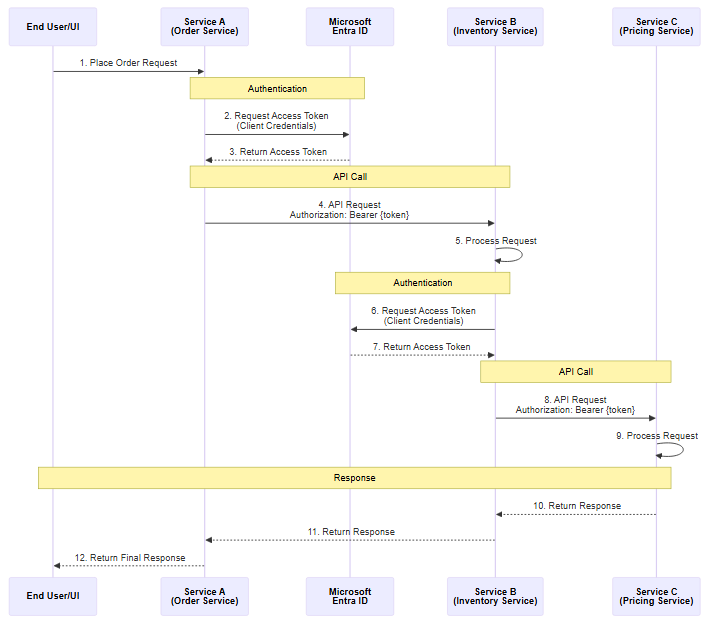
Figure 2: High level Authorization Flow
Authentication in this architecture is the process of verifying service identity. When Service A presents its Client ID and Secret to Entra ID, it proves “who it is.” When Service B receives a request with an access token, it validates that token with Entra ID to confirm the caller’s identity is legitimate. This mutual verification ensures only registered, trusted services take part in the communication chain.
Access tokens are designed for authorization. Their primary purpose is to grant access to protected resources and APIs. When Service A obtains an access token, that token is only for the resource server (Service B) that will validate and use it. The token contains information about what the caller is allowed to do, typically expressed as scopes or permissions. Access tokens are part of the core OAuth 2.0 specification and can technically be in any format, though they’re mostly implemented as JWTs (JSON Web Tokens).
Prerequisites
Before implementing this solution, ensure you have:
Development Requirements:
- .NET 8.0 or later SDK installed.
- Visual Studio, VS Code, or preferred IDE.
- Basic understanding of ASP.NET Core Web APIs.
- Docker for containerization (optional).
Azure/Microsoft Requirements:
- An active Microsoft Entra ID (Azure AD) tenant.
- Administrative access to register applications in Entra ID.
- Understanding of OAuth 2.0 protocol.
AWS Requirements:
- AWS account with permissions to deploy container workloads such as Amazon Elastic Container Service (Amazon ECS) or Amazon Elastic Kubernetes Service (Amazon EKS).
- Familiarity with AWS container services.
- VPC and networking configuration for inter-service communication.
Entra ID Configuration Walkthrough
Each microservice needs its own identity in Entra ID, represented as an app registration. These registrations establish trust relationships and define which services can access which APIs. The configuration process involves three key components:
- Register Service A in Microsoft Entra ID. A client ID is generated for the registration, and you must create a client secret. If you want to implement role-based authorization, refer to Add app roles to your application and receive them in the token.
- Store the client ID and secret in an AWS Secrets Manager secret.
- Repeat steps 1 and 2 for Services B and C.
- Register Service A as a client for Service B and Service B as a client for Service C.
- The last step is to grant Service A permission to access Service B’s API. In Service A’s app registration, you’ll add an API permission for Service B, specifically selecting application permissions. Refer to Configure app permissions for a web API.
- Repeat step 5 for Service B to access Service C.
After completing the configuration, you will have several critical values that your services need at runtime. Each service knows its own client ID. Service A and Service B have client secrets; all services share the same tenant ID, and each client knows the scopes for the APIs it needs to call. These values will be stored in the AWS Secrets Manager secrets and supplied to the application during runtime.
When Service A needs to call Service B, it invokes the sample TokenAcquisitionService class (in the following code snippet) to obtain an access token. The service first checks if it has a cached token that’s still valid. Token caching is crucial for performance because requesting a new token for every API call will create an unnecessary load on Entra ID and add latency to your service calls. The implementation caches tokens and reuses them until they’re within five minutes of expiration (a configurable setting) at which point it requests a fresh token.
If a new token is needed, the service constructs a POST request to Entra ID’s token endpoint. The request includes the client ID, client secret, grant type (always “client_credentials” for this flow), and the scope representing Service B’s API. The scope follows the format api://<SERVICE_B_CLIENT_ID>/.default, telling Entra ID that Service A wants a token for accessing all permissions granted for Service B’s API. The token endpoint returns a JSON response containing the access token, token type, expiration time, and granted scopes.
public class TokenAcquisitionService
{
private readonly IConfiguration _configuration;
private readonly HttpClient _httpClient;
private string? _cachedToken;
private DateTime _tokenExpiry = DateTime.MinValue;
public TokenAcquisitionService(IConfiguration configuration)
{
_configuration = configuration;
_httpClient = new HttpClient();
}
public async Task<string> GetAccessTokenAsync()
{
// Check if we have a valid cached token
if (!string.IsNullOrEmpty(_cachedToken) && DateTime.UtcNow < _tokenExpiry.AddMinutes(-5))
{
return _cachedToken;
}
var clientId = _configuration["AzureAd:ClientId"];
var clientSecret = _configuration["AzureAd:ClientSecret"];
var tenantId = _configuration["AzureAd:TenantId"];
var scope = _configuration["ServiceB:Scope"];
var requestBody = new FormUrlEncodedContent(new[]
{
new KeyValuePair<string, string>("client_id", clientId!),
new KeyValuePair<string, string>("client_secret", clientSecret!),
new KeyValuePair<string, string>("scope", scope!),
new KeyValuePair<string, string>("grant_type", "client_credentials")
});
var tokenEndpoint = $"https://login.microsoftonline.com/{tenantId}/oauth2/v2.0/token";
try
{
var response = await _httpClient.PostAsync(tokenEndpoint, requestBody);
response.EnsureSuccessStatusCode();
var content = await response.Content.ReadAsStringAsync();
var tokenResponse = System.Text.Json.JsonSerializer.Deserialize<TokenResponse>(content);
_cachedToken = tokenResponse!.access_token;
_tokenExpiry = DateTime.UtcNow.AddSeconds(tokenResponse.expires_in);
return _cachedToken;
}
catch (Exception ex)
{
throw new InvalidOperationException($"Failed to acquire access token: {ex.Message}", ex);
}
}
}
With the token acquisition handled, Service A will use a standard HTTP client, adding an access token to the Authorization header to access Service B.
public async Task<string> GetDataFromServiceBAsync()
{
var token = await _tokenService.GetAccessTokenAsync();

_httpClient.DefaultRequestHeaders.Clear();
_httpClient.DefaultRequestHeaders.Authorization =
new System.Net.Http.Headers.AuthenticationHeaderValue("Bearer", token);

var serviceBUrl = _configuration["ServiceB:BaseUrl"];

try
{
var response = await _httpClient.GetAsync(serviceBUrl);
response.EnsureSuccessStatusCode();

return await response.Content.ReadAsStringAsync();
}
catch (HttpRequestException ex)
{
throw new InvalidOperationException($"Failed to call Service B: {ex.Message}", ex);
}
}
Service B’s implementation focuses on receiving and validating access tokens from calling services. Token validation happens automatically with each request, but you control how the application responds to validation results through authorization policies.
The simplest approach is to use the [Authorize] attribute on controllers or individual endpoints. This attribute requires a valid token to access the endpoint, blocking any unauthenticated requests.
[Authorize]
[ApiController]
[Route("[controller]")]
public class ServiceAController(ILogger<ServiceAController> logger) : ControllerBase
{
...
}
This concludes setting up authentication and authorization in the microservices pattern. As a best practice, always plan to rotate your client secrets and automatically update them in your AWS Secrets Manager secrets.
Conclusion
Implementing robust app-to-app authentication with Microsoft Entra ID provides enterprise-grade security for microservices architectures running on AWS. The OAuth 2.0 Client Credentials flow enables secure, passwordless authentication between services while maintaining clear security boundaries and audit trails. Fine-grained authorization enables precise control over which services can access which endpoints and operations, with the flexibility to adjust permissions without redeploying services.
Call to Action
To deploy to AWS Fargate, you can utilize the AWS Toolkit for Visual Studio, which provides an explorer window for several AWS services, including container services, and wizards that help build and publish applications into the AWS cloud. These wizards support the deployment of .NET and .NET Framework applications to AWS Elastic Beanstalk, Amazon Elastic Container Service (Amazon ECS), Amazon Elastic Container Registry (Amazon ECR), and AWS Fargate from within Visual Studio.