AWS Global Infrastructure and Sustainability Blog
How to use Sustainability Insights Framework on AWS
Traditionally, organizations have faced a complex, labor-intensive, and error-prone process of manually tracking their carbon footprint and generating climate-related reports. The process typically involves employees spending countless hours gathering data from disparate sources including utility bills, fuel consumption records, procurement documents, travel receipts, and facility operations logs. Large teams have to manually input this data into spreadsheets, often dealing with inconsistent formats and units that require careful conversion and validation. The process is particularly challenging for multinational organizations dealing with different regional standards, reporting requirements, and emission factors. Staff need to manually calculate Scope 1 emissions (direct emissions from owned sources), Scope 2 emissions (indirect emissions from purchased electricity), and the even more complex Scope 3 emissions (all other indirect emissions in the value chain). Each calculation requires careful application of appropriate emission factors, which themselves needed to be regularly updated as standards evolve.
To address these concerns, AWS has introduced the Sustainability Insights Framework (SIF) in the AWS Solutions Library, a flexible and scalable software platform that helps organizations of all sizes build applications that automatically track carbon footprints and create climate-related reports on AWS. Through its modular architecture, which includes specialized components for calculations, pipeline processing, and reference datasets, SIF enables organizations to create sophisticated applications that can process vast amounts of sustainability data while maintaining accuracy and consistency across all calculations and reports.
While the framework’s effectiveness ultimately depends on the quality of input data and estimation methods—and all outputs require independent verification for regulatory compliance and official disclosures—SIF’s automated approach delivers three critical advantages: it dramatically reduces the risk of human error through automated data processing and calculations, it dynamically scales to handle growing reporting requirements, and it readily adapts to evolving sustainability standards and regulations. SIF includes multiple modules that each serve a specific purpose. These modules handle access management, impact management (emissions factor management), reference dataset management, calculations, and data pipelines.
Key features of SIF
- Account management – Set up organizational reporting boundaries. Control user access, roles, and permissions within the framework.
- Impacts – Create a catalog of activity impacts, like GHG emission factors. Add emission factors from published sources, or create your own custom factors.
- Reference datasets – Add custom datasets to your data pipelines to improve your data quality.
- Calculations – Use a low-code approach to create custom calculations.
- Metrics (KPIs) – Set up metrics that automatically aggregate processed activities. Align these with your organizational reporting boundaries and time periods.
- Data ingestion pipelines – Import data from CSV files, AWS Clean Rooms, or other sources using the input data connector framework. Apply calculations to transform data into the outputs you need.
- Auditability – Track and repeat all calculations and results with full transparency.
- Multi-tenancy – Work in single tenant or multi-tenant modes. Support organizations that want to calculate their own emissions and those building SaaS offerings. Share data securely between isolated tenants when needed. For example, when you build a SaaS offering, top-tier customers can access pre-defined calculations like industry-specific formulas. A central tenant stores these calculations for centralized management. Top-tier tenants get permission to access and use these calculations remotely.
Solution Architecture
SIF consists of multiple modules that each focus on specific features. The architecture diagram below shows how these modules work together.
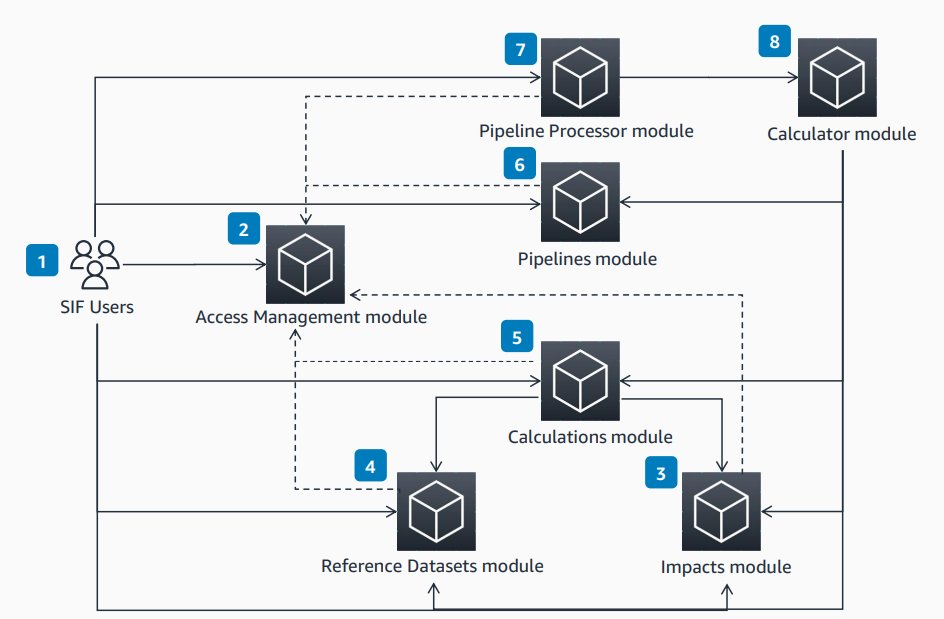
SIF Solution Architecture Modules
Users work with SIF through REST APIs.
- The Access Management module manages users and permissions and separates resources by groups.
- The Impacts module helps users manage resources like impact factors during data processing calculations. You can reference these from the Calculations and Pipelines modules.
- The Reference Datasets module helps users manage datasets like lookup tables. You can reference these datasets from the Calculations and Pipelines modules.
- The Calculations module helps users create and manage equations or functions. You can reference these in other modules for data processing calculations.
- The Pipelines module helps users set up data processing pipelines for calculations.
- The Pipeline Processor module manages pipelines and performs pipeline aggregations.
- The Calculator module runs operations in a pipeline as a backend component. This includes arithmetic operations and resource lookups.
SIF works as layers of modules built on AWS services. Each module handles specific features. Let’s look at each component:
Access Management Module
The Access Management Module uses users and groups to manage permissions and separate resources within SIF. You can create users and groups through an external REST API. Other SIF modules call the Access Management module to check permissions. Each tenant gets their own copy of the Access Management infrastructure.
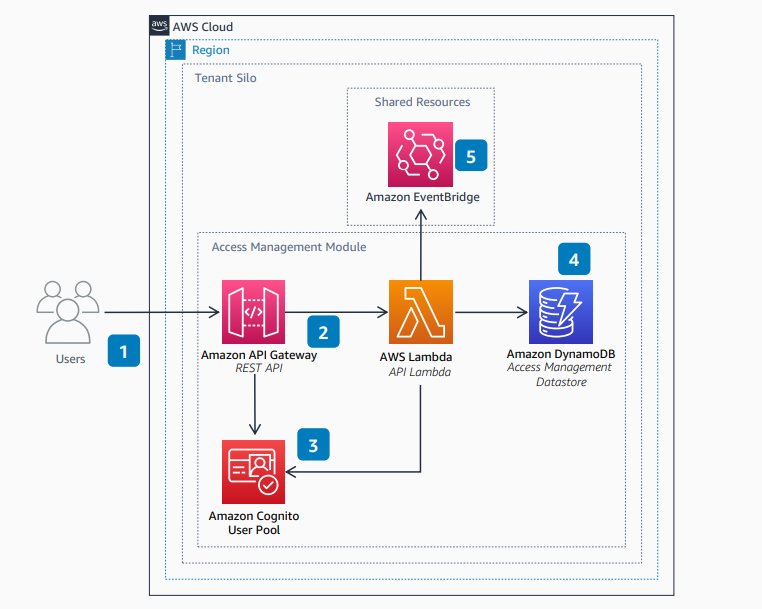
SIF Access Management Module Diagram
Impacts Module
The Impacts Module helps you manage impact-related resources. You can reference these resources from the Calculations and Pipelines modules during data processing calculations like emissions tracking. An example Impact might be the carbon dioxide equivalent (CO2e) of mobile diesel fuel consumption. The Impacts module can create many Impact resources at once through an Impact Tasks API. All impacts include version tracking for transparency.
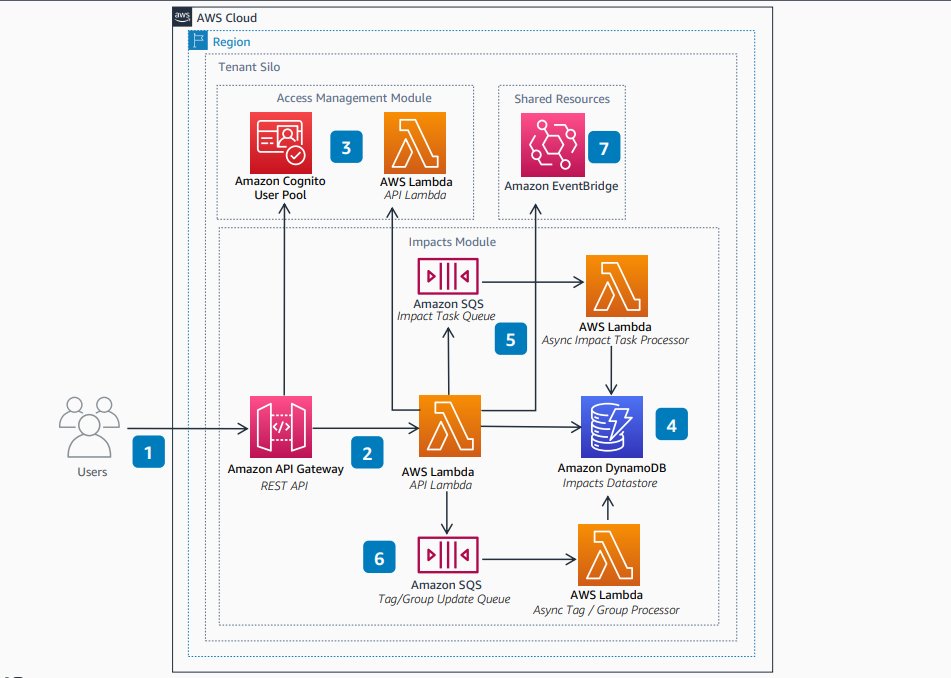
SIF Impacts Module Diagram
Reference Datasets Module
The Reference Datasets Module helps you manage datasets like lookup tables. You can reference these datasets from the Calculations and Pipelines modules during data processing calculations like emissions tracking. An example Reference Dataset is a table that shows the electricity generation mix (coal, nuclear, wind) for a specific location. All Reference Datasets include version tracking for transparency.
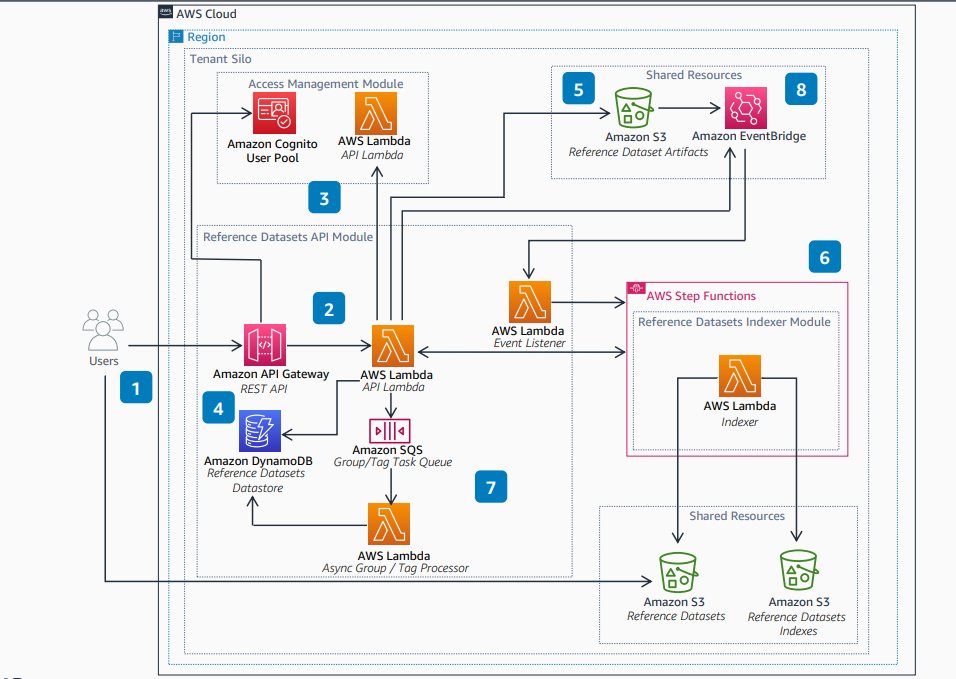
SIF Reference Datasets Module
Calculations Module
The Calculations Module helps you create and manage equations or functions. You can reference these calculations in other Calculations or Pipelines modules during data processing calculations like emissions tracking. Calculations can be simple (like unit conversions) or complex (like business-specific emissions calculations). All calculations include version tracking for transparency.
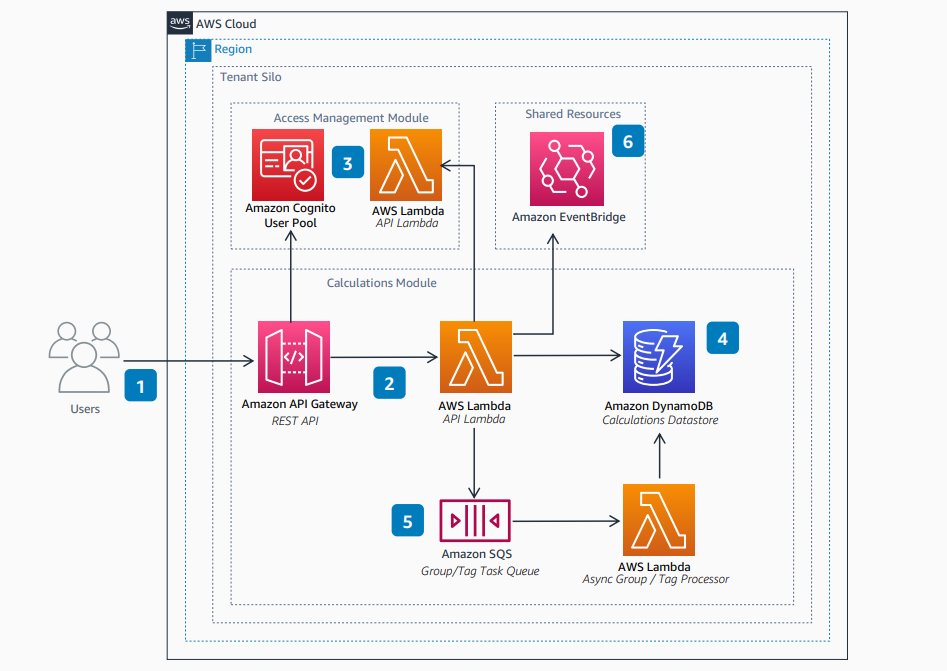
SIF Calculations Module
Pipelines Module
The Pipelines Module helps you manage Pipeline configurations. These configurations set up data processing pipelines for calculations like emissions tracking. You can configure a Pipeline to combine outputs across executions and group them into metrics. Metrics capture key performance indicators (KPIs) like total emissions over time. You can request a dry run of a Pipeline configuration to process it through the Calculator and check for errors before creation. All pipeline configurations include version tracking for transparency.
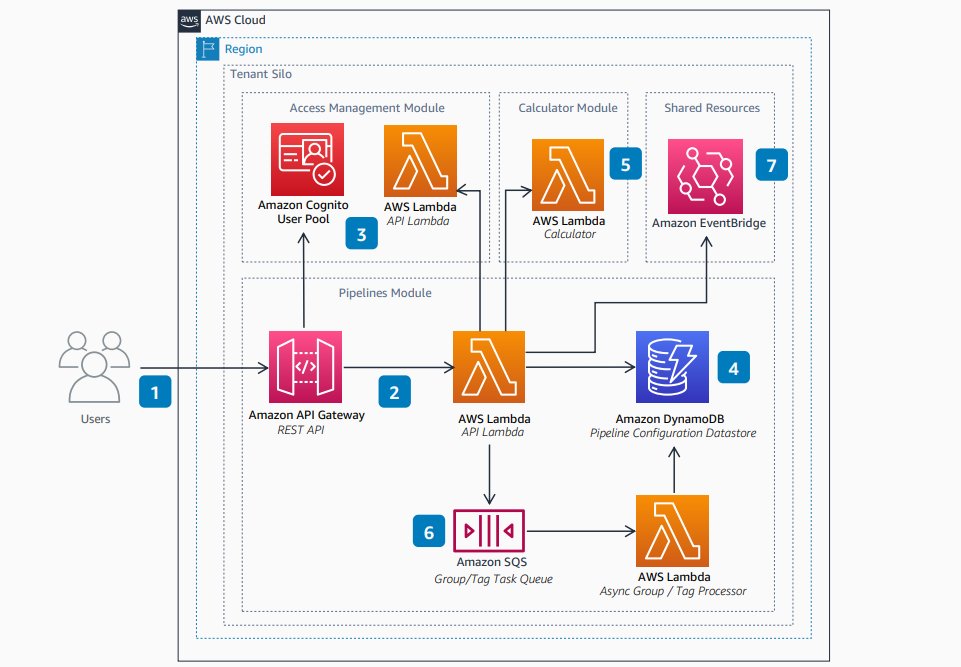
SIF Pipelines Module
Pipeline Processor Module
The Pipeline Processor Module manages Pipeline operations. This includes starting pipeline execution when you provide input files and performing aggregations defined in the pipeline configuration. The Pipeline Processor module also shows the status of pipeline executions.
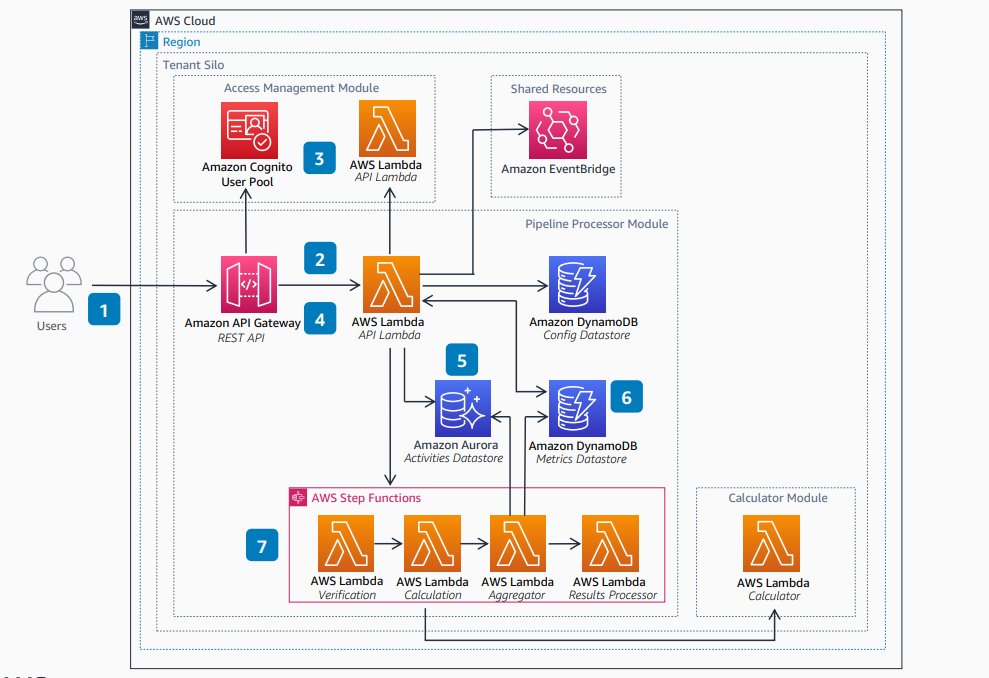
Pipeline Processor Module
Calculator Module
The Calculator Module works as a backend component that reads and runs operations defined in a pipeline. This includes arithmetic operations and lookups of resources like Reference Datasets and Impacts. The Calculator also creates an audit log of all pipeline operations, including input values and the version of each resource (Reference Datasets, Impacts, Calculations) used in the execution.
You can find details for different modules here: Architecture diagrams for SIF on AWS
The U.S. Environmental Protection Agency (EPA) uses AWS and the Sustainability Insights Framework (SIF) to manage and report greenhouse gas emissions under Subpart W regulations. SIF provides a comprehensive, scalable, and secure platform that makes data collection, analysis, and reporting easier. This improves compliance and supports environmental sustainability. Learn more about this use case here: Streamlining U.S. EPA Subpart W Greenhouse Gas Reporting with AWS and Sustainability Insights Framework.

SIF Calculator Module
Benefits of SIF
SIF provides these benefits:
- Operational Efficiency and Automation: Reduces manual work from data collection to automated emissions calculation and reporting.
- Transparency and Auditability: All data sources, calculation formulas, and results are version-controlled and logged. This creates traceability that supports audits.
- Standardized Data Model: Enables data integration and quality assurance, plus reusability of reports and advanced data analysis.
- High Flexibility and Scalability: Easily add or modify emission factors, workflows, and calculation formulas. This enables flexible responses to future needs.
- Security and Consistency: Follows AWS security best practices, including data encryption and the principle of least privilege.
Steps to Deploy the Guidance
You can find the SIF source code on GitHub: Guidance for AWS sustainability insights framework. You have two deployment options:
- Deploy manually using CDK
- Deploy using sif-cli. The SIF Command Line Interface (sif-cli) is an open-source tool that helps you interact with SIF components through command-line commands. With minimal setup, sif-cli simplifies many complexities of managing SIF. It also includes features that ensure compatibility between your deployed version and the latest SIF release.
After you complete deployment and want to move SIF to production, check Considerations of running SIF in production.
Customization guidance (for different customers)
SIF adapts flexibly to meet diverse customer requirements.
- Emission Factor Customization by Industry and Region: Manage emission factors according to industry (like manufacturing or transportation) or by region (like the United States or Japan).
- Addition of Customer-Specific KPIs and Reporting Formats: Use SIF’s customizable calculation formulas and report template features to support unique metrics and customized reporting outputs.
- Integration with Existing Data Lakes and Systems: Connect SIF seamlessly with your existing data infrastructure through APIs and AWS service integrations.
- Optimization for Organizational Structure and Security Requirements: Use SIF’s multi-tenant architectures to separate operations among multiple divisions or group companies. Set up detailed access control as needed.
Next Steps
Ready to get started with SIF? Here’s what we recommend:
For first-time users:
- Explore the GitHub repository – Review the Guidance for AWS sustainability insights framework to understand the codebase and requirements
- Set up your development environment – Ensure you have the necessary AWS CLI, CDK, and permissions configured
- Start with a pilot deployment – Deploy SIF in a development environment using the sif-cli tool for the simplest setup experience
- Review the EPA use case – Study how the U.S. Environmental Protection Agency implemented SIF for Subpart W reporting to understand real-world applications
For organizations ready to implement:
- Assess your data sources – Identify the systems and data formats you’ll need to integrate with SIF
- Define your emission factors – Determine which industry-specific or regional emission factors you’ll need to configure
- Plan your organizational structure – Decide whether you need single-tenant or multi-tenant architecture based on your reporting boundaries
- Review production considerations – Read through the “Considerations of running SIF in production” documentation before deploying to production environments
Get support:
- Join the AWS Sustainability community for best practices and peer support
- Consider AWS Professional Services for implementation guidance and customization support
- Review AWS documentation for the underlying services SIF uses
Start small with a pilot project to validate your approach, then scale up as you gain experience with the platform.
Conclusion
The AWS Sustainability Insights Framework (SIF) is a valuable tool built on AWS. It offers foundational software components that speed up the design and implementation of applications for automated carbon footprint tracking. SIF consists of different independent modules that work together to provide benefits like automation, customization flexibility, scalability, cost-effectiveness, and security.