The Internet of Things on AWS – Official Blog
Build smart agriculture with AWS IoT Greengrass and Strands Agents
Monitoring plant health across a greenhouse or farm requires frequent inspection of soil conditions, visual assessment of crops, and tracking of device performance. Manual inspection is slow, inconsistent, and doesn’t scale across multiple growing sites. Cloud-based monitoring adds network latency and depends on constant connectivity, a constraint that’s impractical in many agricultural environments.
An AI agent running directly on the device can read sensors, analyze plant images, and respond to queries in real time, without routing every decision through the cloud.
In this post, you will learn how to deploy Strands Agents as AWS IoT Greengrass components on a Raspberry Pi 5 to build an edge AI system for smart agriculture. The solution combines camera-based plant analysis through Amazon Bedrock, real-time soil moisture sensing, device monitoring, and a local web dashboard, all orchestrated by an AI agent running on the device.
Why manual crop monitoring doesn’t scale
Growers and greenhouse operators spend hours each day on repetitive manual tasks: walk the rows to visually inspect plants, check soil moisture by hand, read sensor displays, and log observations in a notebook or spreadsheet. Each task requires a different tool, a different location, and a different set of expertise.
Scaling this process across multiple greenhouses or farm sites compounds the problem. Hiring trained agronomists for every location is expensive. Relying on periodic inspections means issues like early-stage disease, pest damage, or irrigation failures go undetected between visits. By the time a problem is visible to the human eye, crop damage might already be significant.
Cloud-based monitoring systems address some of these challenges, but they introduce their own constraints. Every sensor read and every image analysis requires a network round-trip. In rural agricultural environments with limited or intermittent connectivity, this dependency creates blind spots, exactly when ongoing monitoring matters most. The latency between capturing an image and receiving an analysis result can make real-time decision-making impractical.
Why run AI agents at the edge
AI agents that interact with the physical world need to run where the sensors are. A cloud-hosted agent can’t read a GPIO pin, capture a camera frame, or check CPU temperature. It depends on network connectivity for every interaction, and it adds latency to every decision.
Strands Agents is an open source Python SDK for building AI agents. It provides a tool-based architecture where each agent capability is a Python function decorated with @tool. The agent decides which tools to call based on the user’s query, chains multiple tool calls together, and formats the response, all within a local orchestration loop.
Running Strands on AWS IoT Greengrass provides the following capabilities:
- Direct hardware access: Agent tools read GPIO sensors, capture camera frames, and monitor system metrics directly on the device.
- Local orchestration: The agent routes queries to the correct tool without a cloud round-trip. Only foundation model (FM) inference calls go to Amazon Bedrock, which is a call routed to AWS.
- Managed deployment: Greengrass handles component lifecycle, over-the-air updates, and credential management through the Token Exchange Service (TES).
- MQTT integration: The agent listens on AWS IoT Core MQTT topics and responds to queries from any MQTT client.
Solution overview
The following diagram shows how the two Greengrass components interact on the Raspberry Pi. The Strands agent handles natural language queries and routes them to specialized sub-agents, while the web dashboard provides the camera feed and user interface.

The solution deploys two Greengrass components on a Raspberry Pi 5:
com.example.GGStrands – The Strands AI agent with three specialized sub-agents:
- Device Health Assistant monitors CPU, memory, and disk usage through
psutil. - Plant Health Assistant captures camera images and sends them to Claude on Amazon Bedrock for vision-based analysis.
- Soil Moisture Assistant reads a digital moisture sensor through GPIO and provides trend analysis.
An orchestrator agent, powered by an FM on Amazon Bedrock, receives natural language queries and routes them to the correct sub-agent.
com.example.GGWebDashboard – A local web dashboard built with Python aiohttp that provides:
- A chat interface for sending queries to the agent and viewing responses in real time.
- A live MJPEG camera feed from the Raspberry Pi camera.
- A
/snapshotHTTP endpoint that the Strands agent uses to request camera frames for plant analysis.
Camera sharing between components
The dashboard component owns the Pi camera exclusively. When the Strands agent needs an image for plant analysis, it sends an HTTP request to localhost:8080/snapshot instead of opening the camera directly. This design helps prevent “device busy” errors that occur when two processes try to access the same camera.
Communication flow
Each query follows a four-step path from the user to the agent and back, with orchestration happening locally on the device.
- A user sends a natural language query through the dashboard chat or an MQTT message to
gg/monitor/request. - The orchestrator agent receives the query and routes it to the appropriate sub-agent.
- The sub-agent runs its tools (reads a sensor, requests a camera snapshot, calls Amazon Bedrock) and returns a response.
- The agent publishes the response to
gg/monitor/responseand forwards it to the browser through WebSocket.
How Strands Agents interact with hardware
Strands Agents uses a tool-based architecture. Each hardware interaction is a Python function decorated with @tool:
read_soil_moisture()– Reads GPIO pin 17 throughgpioand returns a DRY or WET status with a timestamp.capture_plant_image()– Requests a JPEG snapshot from the dashboard’s/snapshotendpoint through HTTP.analyze_plant_health_with_claude()– Sends the captured image to Claude on Amazon Bedrock for vision analysis.get_cpu_utilization(),get_memory_info(),get_disk_info()– Read system metrics throughpsutil.
The orchestrator agent accesses these tools through three sub-agents, each with its own system prompt and tool set. This multi-agent pattern keeps each sub-agent focused on its domain while the orchestrator handles routing.
The orchestration loop runs locally on the Raspberry Pi. Sensor reads, image captures, and response formatting happen on-device. Only the FM inference calls travel to Amazon Bedrock over the network to AWS.
Greengrass component packaging
A Greengrass recipe defines each component, a YAML file that specifies dependencies, access control policies, install steps, and the run command.
The Strands agent recipe:
- Declares a dependency on the Greengrass Token Exchange Service for AWS credentials.
- Installs a Python virtual environment with
strands-agents,Boto3,psutil, andawsiotsdk. - Grants MQTT publish and subscribe permissions on the
gg/monitor/*topics. - Targets
linux/aarch64(Raspberry Pi 5).
The dashboard recipe:
- Installs
aiohttp,picamera2, andawsiotsdk. - Serves the web application on port 8080.
- Adds the
ggc_userto the video group for camera access.
The Strands agent has a SOFT dependency on the dashboard component. This tells Greengrass to start the dashboard first so the camera is ready when the agent needs a snapshot. If the dashboard isn’t running, the agent continues to handle device health and soil moisture queries, but it can’t capture plant images.
Prerequisites
To deploy this solution, you need:
- An AWS account with appropriate permissions (see Required AWS permissions in the following section).
- A Raspberry Pi 5 (4 GB or 8 GB RAM) running Raspberry Pi OS (64-bit).
- A Raspberry Pi Camera Module (v2 or v3).
- A digital soil moisture sensor (such as HiLetgo LM393) connected to GPIO pin 17.
- AWS IoT Greengrass Core software installed on the Raspberry Pi.
- An AWS account with access to Amazon Simple Storage Service (Amazon S3) and Amazon Bedrock FMs (Claude Sonnet).
- An Amazon S3 bucket for storing component artifacts.
- The AWS Command Line Interface (AWS CLI) v2.0 or later installed and configured with appropriate credentials.
- Python 3.9 or newer installed on the Raspberry Pi.
- Terminal or SSH access to the Raspberry Pi.
Important: This solution creates billable AWS resources. Amazon Bedrock model invocations incur charges per request. Follow the Clean up section at the end of this post to avoid ongoing charges. For detailed estimates, use the AWS Pricing Calculator.
Required AWS permissions
The Greengrass Token Exchange Service (TES) role attached to your Greengrass core device must have permissions for:
- Amazon Bedrock operations (
bedrock:InvokeModel,bedrock:InvokeModelWithResponseStream) scoped to the Claude model ARN. - Amazon S3 read access to the artifact bucket for component deployment.
- AWS IoT Core operations (
iot:Publish,iot:Subscribe,iot:Connect) scoped to thegg/monitor/*topic namespace. - Amazon CloudWatch Logs (
logs:CreateLogGroup,logs:CreateLogStream,logs:PutLogEvents) for component logging.
Important: Verify AWS Region consistency. Verify that the following are all configured to use the same AWS Region: your AWS CLI default region, the Region where you have enabled Amazon Bedrock model access, and the Region where your Greengrass core device is registered.
Deploy the solution
Note: Both deployment options in the following section require AWS IoT Greengrass Core to be installed and running on your Raspberry Pi before you begin.
Step 1: Install Greengrass Core on the Raspberry Pi
Follow the AWS IoT Greengrass V2 getting started guide to install and configure Greengrass Core v2 on your Raspberry Pi 5. After installation, verify the device appears on AWS:
Make sure ggc_user has access to the camera and GPIO:
Before the first deployment, enable the camera and verify hardware on the Raspberry Pi:
Option 1: Automated deployment
Step 1: Clone GitHub Repository
Step 2: Navigate to sample-smart-agriculture-agent-greengrass Directory
Step 3: Configure AWS Credentials
Step 4: A single script creates the S3 bucket, adds Amazon Bedrock permissions to the TES role, uploads artifacts, and deploys both components:
Arguments:
- smart-agriculture-pi — your IoT Thing name (created during Greengrass installation)
- GreengrassV2TokenExchangeRole — the TES role name (created during Greengrass installation. Find it with:
aws iam list-roles --query "Roles[?contains(RoleName,'Greengrass')].RoleName") - us-west-2 — AWS Region.
Option 2: Step-by-step deployment
The following steps run the same deployment manually, which gives you control over each resource.
Step 1: Clone GitHub Repository
Step 2: Navigate to sample-smart-agriculture-agent-greengrass Directory
Step 3: Configure AWS Credentials
Step 4: Deploy CloudFormation stack
This creates the S3 artifact bucket and adds Bedrock and S3 permissions to the existing Greengrass TES role.
Step 5: Upload artifacts
Step 6: Update S3 URIs in recipes
Edit the URI field in both recipe files to point to your bucket:
Agent/recipe.yaml→s3://amzn-s3-demo-bucket/artifacts/gg_integrated_monitor.py.Web App/recipe.yaml→s3://amzn-s3-demo-bucket/artifacts/gg_web_dashboard.zip.
Step 7: Create component versions
Step 8: Deploy to the Raspberry Pi
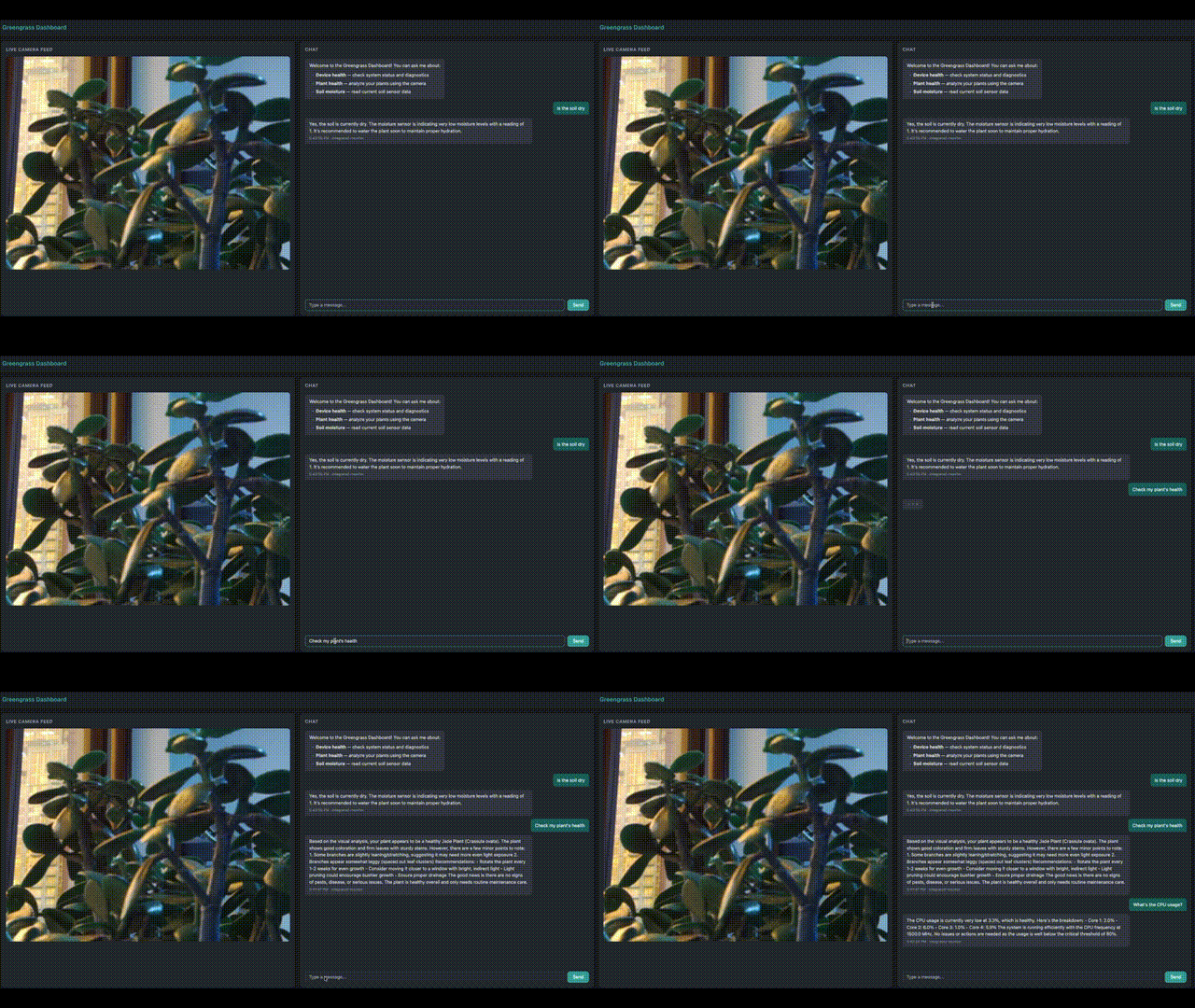
Access the dashboard
Open http://<pi-ip>:8080 in a browser on the same network. You can also send MQTT messages to gg/monitor/request from the AWS IoT Core console or any MQTT client.
Example queries:
- “Check my plant’s health”
- “Is the soil dry?”
- “What’s the CPU usage?”
- “How is everything doing?”
Security considerations
When you deploy AI agents with access to hardware sensors and cloud services, follow these practices to protect your device, data, and AWS resources.
- Credentials: The Greengrass Token Exchange Service (TES) provides temporary AWS credentials to components at runtime. Don’t store long-lived AWS access keys on the device. Rotate the TES role’s trust policy if a device is decommissioned.
- IAM roles: Apply least privilege policies to the Greengrass TES role. Scope
bedrock:InvokeModelpermissions to the specific model ARN used for plant analysis. Restrictiot:Publishandiot:Subscribeto thegg/monitor/*topic namespace. - Network security: Restrict the dashboard’s HTTP port (8080) to the local network. Don’t expose it to the public internet. Use AWS IoT Core mutual TLS authentication for all MQTT connections between the device and the cloud.
- Device hardening: Run Greengrass components as a non-root user (
ggc_user). Limit GPIO and camera access to the specific component that needs it through Linux group permissions. Enable disk encryption on the Raspberry Pi to protect sensor data and cached images at rest. - MQTT message validation: Validate incoming MQTT payloads before passing them to the Strands agent. Reject messages that exceed expected length or contain unexpected characters to help prevent unintended prompt input through the
gg/monitor/requesttopic. - Logging and auditing: Enable CloudWatch Logs for Greengrass components to maintain an audit trail of agent queries and responses. Enable Amazon Bedrock model invocation logging to track every FM call, including the plant images sent for analysis.
Clean up
To avoid incurring charges, delete the Greengrass deployment, remove the component versions, and delete the CloudFormation stack:
Scaling to enterprise grade
When scaling to a production agricultural deployment across multiple greenhouses or farm sites, consider the following enhancements:
- Amazon Bedrock Guardrails: Add content filtering and prompt validation detection to protect against unexpected input through MQTT messages. Configure denied topics to help prevent the agent from providing guidance outside its agricultural monitoring domain.
- MQTT message security: Enable AWS IoT Core message broker policies to restrict which clients can publish to
gg/monitor/request. Use AWS IoT Device Defender to audit device-side MQTT configurations and detect anomalous messaging patterns across your fleet. - Fleet-wide deployment: Use AWS IoT Greengrass deployment targets to roll out agent updates across device groups, for example by greenhouse, farm site, or crop type. Greengrass continuous deployments automatically push new component versions to devices as they come online.
- Observability and alerting: Configure Amazon CloudWatch alarms for agent error rates, Amazon Bedrock invocation latency, and sensor read failures. Use Amazon CloudWatch Logs from Greengrass components to monitor agent behavior across devices. Enable Amazon Bedrock model invocation logging for audit trails on plant analysis requests.
- Data lifecycle: Implement S3 lifecycle policies to archive historical plant images and soil moisture readings. Use S3 Intelligent-Tiering for cost-effective storage of seasonal crop analysis data that is accessed frequently during growing season but rarely during off-season.
- Offline resilience: Configure Greengrass stream manager to buffer sensor readings and agent responses when network connectivity is lost. Queue MQTT messages locally and sync to AWS IoT Core when the connection is restored, critical for remote agricultural sites with intermittent connectivity.
- Multi-Region deployment: For agricultural operations spanning multiple geographies, deploy Greengrass core devices in each Region with Amazon Bedrock model access configured for the nearest available AWS Region to minimize inference latency.
Architecture benefits
The edge AI architecture built on Strands Agents and AWS IoT Greengrass combines local autonomy, cloud-scale intelligence, and managed operations for agricultural environments.
Reduced latency through edge-first orchestration
By running the Strands agent directly on the Raspberry Pi, sensor reads, tool routing, and response formatting happen on device without a cloud round-trip. Only FM inference calls travel to Amazon Bedrock. This means soil moisture checks and device health queries return in milliseconds. Plant analysis completes in the time it takes for a single Amazon Bedrock API call. This speed is critical during time-sensitive growing periods, where delayed irrigation or pest detection can damage a crop cycle.
Managed deployment and lifecycle with AWS IoT Greengrass
AWS IoT Greengrass handles component packaging, over-the-air updates, and credential management through the Token Exchange Service. When you need to update the agent’s system prompt, add a new sensor tool, or upgrade the FM, you deploy a new component version from the cloud. Greengrass rolls it out to every device in the target group. This removes the need to SSH into individual Raspberry Pi devices across greenhouses or farm sites, reducing operational overhead as the fleet grows.
Flexible AI model selection
The Strands Agents SDK is model-agnostic. Each sub-agent can use a different FM on Amazon Bedrock based on the task complexity. The Device Health and Soil Moisture assistants can run on a smaller, lower-cost model for sensor queries, while the Plant Health assistant uses a vision-capable model like Claude Sonnet for image analysis. Switching models requires changing a single parameter in the agent configuration, no architectural changes needed.
Resilience for remote agricultural sites
Agricultural environments often have intermittent or limited network connectivity. Because the agent orchestration loop runs locally, the device continues to read sensors and serve the local web dashboard even when the network is down. MQTT messages queue locally through AWS IoT Greengrass and sync to AWS IoT Core when connectivity is restored. Only plant image analysis, which requires Amazon Bedrock, is unavailable during an outage, while soil moisture monitoring and device health checks continue uninterrupted.
Cost efficiency at scale
The solution incurs Amazon Bedrock inference costs only when the agent processes queries that require FM reasoning. Routine sensor reads and device health checks use local Python tools with no cloud cost. For a fleet of devices across multiple greenhouses, this consumption-based model means you pay proportionally to the number of AI-assisted queries, not for idle infrastructure. Combining this with model tiering (smaller models for straightforward queries, larger models for vision analysis) further reduces cost per interaction.
Extensible tool architecture
The Strands Agents @tool decorator pattern makes it routine to add new capabilities without infrastructure changes. Adding a new sensor (such as a temperature or humidity probe), integrating with an irrigation controller, or connecting to a weather API requires writing a single Python function and registering it with the appropriate sub-agent. The orchestrator agent automatically discovers and routes to new tools based on the user’s natural language query.
Conclusion
In this post, you learned how to deploy Strands Agents as AWS IoT Greengrass components on a Raspberry Pi 5 for smart agriculture monitoring. The solution runs an AI agent directly on the device, where it reads sensors, captures camera images, and routes queries locally. FM inference on Amazon Bedrock provides vision-based plant analysis and natural language responses. A local web dashboard delivers live camera streaming and a chat interface, all without cloud round-trips for orchestration.
This architecture applies beyond agriculture. Use cases such as industrial monitoring, building automation, and robotics, where AI agents interact with the physical world, can use the same pattern: Strands Agents for local orchestration, Greengrass for managed deployment, and Amazon Bedrock for cloud AI on demand.
The source code is available on GitHub. To learn more about the services used in this post, visit the AWS IoT Greengrass and Strands Agents documentation.
If you have questions or feedback about this post, leave a comment in the comments section.