Migration & Modernization
Anonymizing AWS Transform Discovery Tool Exports for Regulated Customers
Introduction
AWS Transform is an AI-powered service that accelerates enterprise modernization of VMware workloads, Windows, mainframe, and application code. It provides two key offerings for VMware migration planning:
- AWS Transform Assessments generates a complimentary, data-driven business case for your VMware infrastructure, including cost analysis, right-sizing recommendations, and migration planning.
- AWS Transform for VMware automates the migration process through AI-powered wave planning, network conversion, and server migration.
Both services require accurate infrastructure data. To collect this data, AWS provides the AWS Transform discovery tool, an Open Virtual Appliance (OVA) that you deploy in your VMware environment. The discovery tool operates as a self-contained application that runs entirely on-premises without requiring cloud connectivity. It collects server inventory, performance utilization, network connections, and VMware vCenter metadata, then exports the data in an AWS Transform format as a zip file.
This architecture makes the discovery tool well suited for regulated industries and organizations with strict data governance requirements. Data is collected and stored locally on the virtual appliance. No data is transmitted to AWS unless you choose to upload the exported data.
The Challenge
However, some customers face a challenge: the discovery tool export contains sensitive infrastructure metadata. Server names, hostnames, IP addresses, DNS names, MAC addresses, and database names are all present in the exported CSV and JSON files. For organizations subject to regulatory requirements (such as internal security policies), this data may be considered sensitive and cannot leave the organization without anonymization.
Manual anonymization of these exports is not a viable option. A typical discovery tool export contains thousands of rows across multiple CSV files and a deeply nested JSON file with VMware vCenter data. Manually replacing sensitive values is time-consuming, error-prone, and difficult to reverse when the assessment results come back from AWS Transform.
In a previous blog post, I provided a Python script to anonymize Migration Evaluator collector exports. That script addressed a simpler data format (a single Excel workbook). The AWS Transform discovery tool export is significantly more complex: it contains multiple CSV files across two directories, plus a deeply nested JSON file with server entries containing hostnames, IP addresses, MAC addresses, and DNS names at multiple nesting levels.
Solution Overview
The Discovery Tool Anonymizer is a Python CLI tool that solves this problem. It reads an AWS Transform discovery tool export zip file, replaces all sensitive values with consistent anonymized equivalents, and writes an anonymized zip file that is fully compatible with AWS Transform. A bidirectional mapping file is saved alongside the output, enabling full de-anonymization of the assessment results.
The tool handles the following sensitive data categories:
| Category | Original Example | Anonymized Example |
|---|---|---|
| Hostnames and FQDNs | PROD-WEB-01.corp.net |
server-0001.domain-001.local |
| IPv4 addresses | 192.168.1.10 |
10.1.0.10 (subnet-preserving) |
| IPv6 addresses | 2001:db8::1 |
fd00:a1b2:c3d4:... |
| Server IDs | d-server-01a2b3c4d5e6 |
Deterministic UUID v5 |
| MAC addresses | 00:50:56:aa:bb:cc |
02:1f:0e:fc:62:c8 |
| Database names | CustomerDB_Prod |
database-0001 |
| DNS names | vcsa.testlab.local |
server-1025.domain-005.local |
| ESXi hosts | esxi-70-node1.lab.local |
server-1024.domain-004.local |
Key design decisions:
- Subnet relationships are preserved. Two IP addresses on the same /24 network in the original data will share the same anonymized /24 prefix. This ensures that network topology analysis in AWS Transform remains valid.
- Consistency across files. The same original value always maps to the same anonymized value, regardless of which file it appears in. A hostname that appears in both
server_info.csvandvmware_data_full.jsonwill have the same anonymized replacement in both. - FQDN splitting. Fully qualified domain names are split into hostname and domain parts, each anonymized independently. This preserves the structural relationship between hosts on the same domain.
- Bidirectional mapping. The mapping file records both forward (original to anonymized) and reverse (anonymized to original) mappings, enabling complete de-anonymization of assessment results.
- Consistency validation. After anonymization, the tool validates that every mapping is a 1:1 bijection (no collisions, no ambiguity) and fails with a clear error if any violation is detected.
Walkthrough
Prerequisites
- Python 3.9 or later
- The
openpyxllibrary (installed automatically with the tool) - An AWS Transform discovery tool export zip file
Step 1: Install the tool
Download the Discovery Tool Anonymizer package from AWS samples GitHub repository and install it:
pip install -e .This installs the collector-anonymizer command and its single dependency (openpyxl).
Step 2: Export data from the discovery tool
In the AWS Transform discovery tool interface, navigate to the Discovered Inventory page and select Download Inventory.
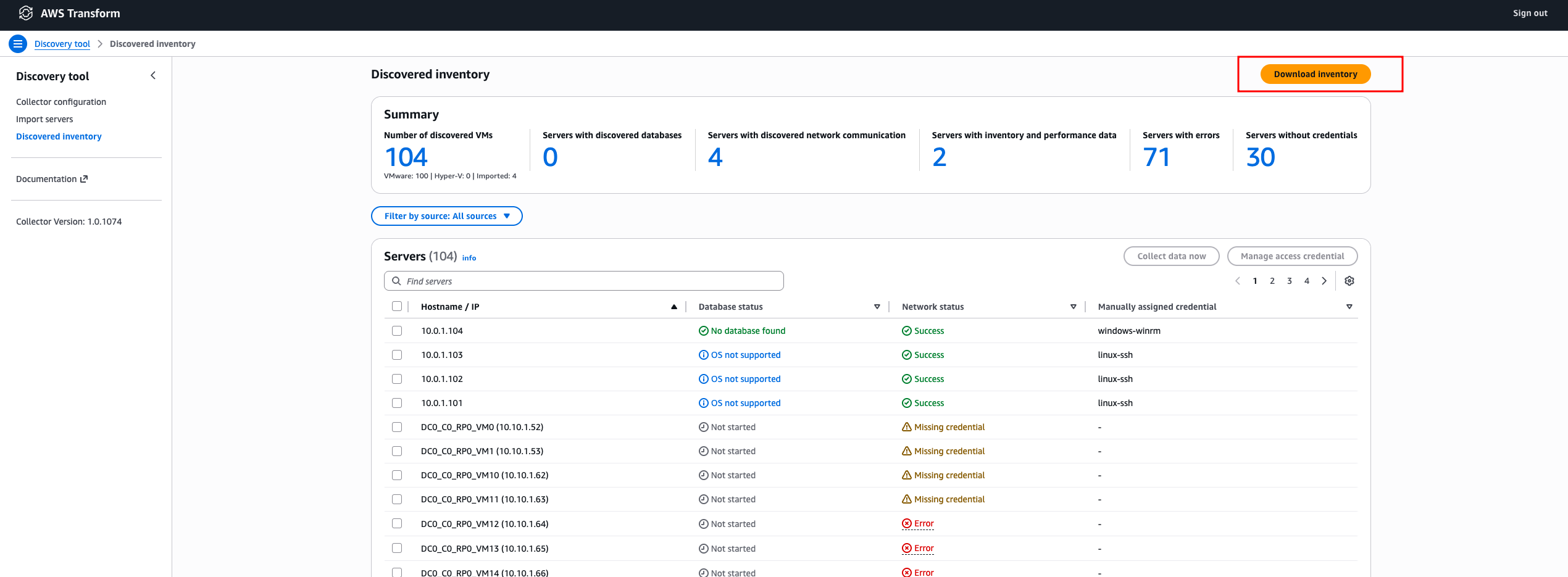
Figure 1. The AWS Transform discovery tool interface
Step 3: Anonymize the export
Run the anonymizer against the exported zip file (assuming the downloaded filename is: discovery_tool_export.zip):
collector-anonymizer anonymize --input discovery_tool_export.zipThe tool produces two output files:
discovery_tool_export_anonymized.zipcontaining the anonymized dataSENSITIVE_discovery_tool_export_mapping.jsoncontaining the bidirectional mapping
The console output shows a summary of what was anonymized:
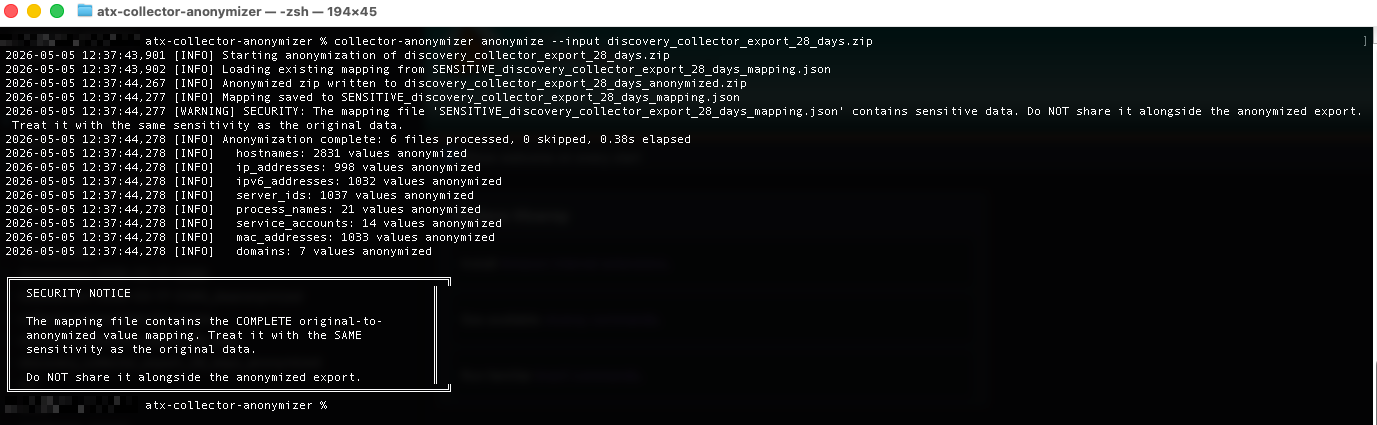
Figure 2. Example console output from the anonymize command.
Important: Store the mapping file securely. It contains the complete original-to-anonymized value mapping and is required for de-anonymization. Do not share it alongside the anonymized export.
Step 4: Upload the anonymized export to AWS Transform Assessments
Log in to the AWS Transform console. Create a new assessment workspace, or use an existing one. Upload the anonymized zip file as the data source.
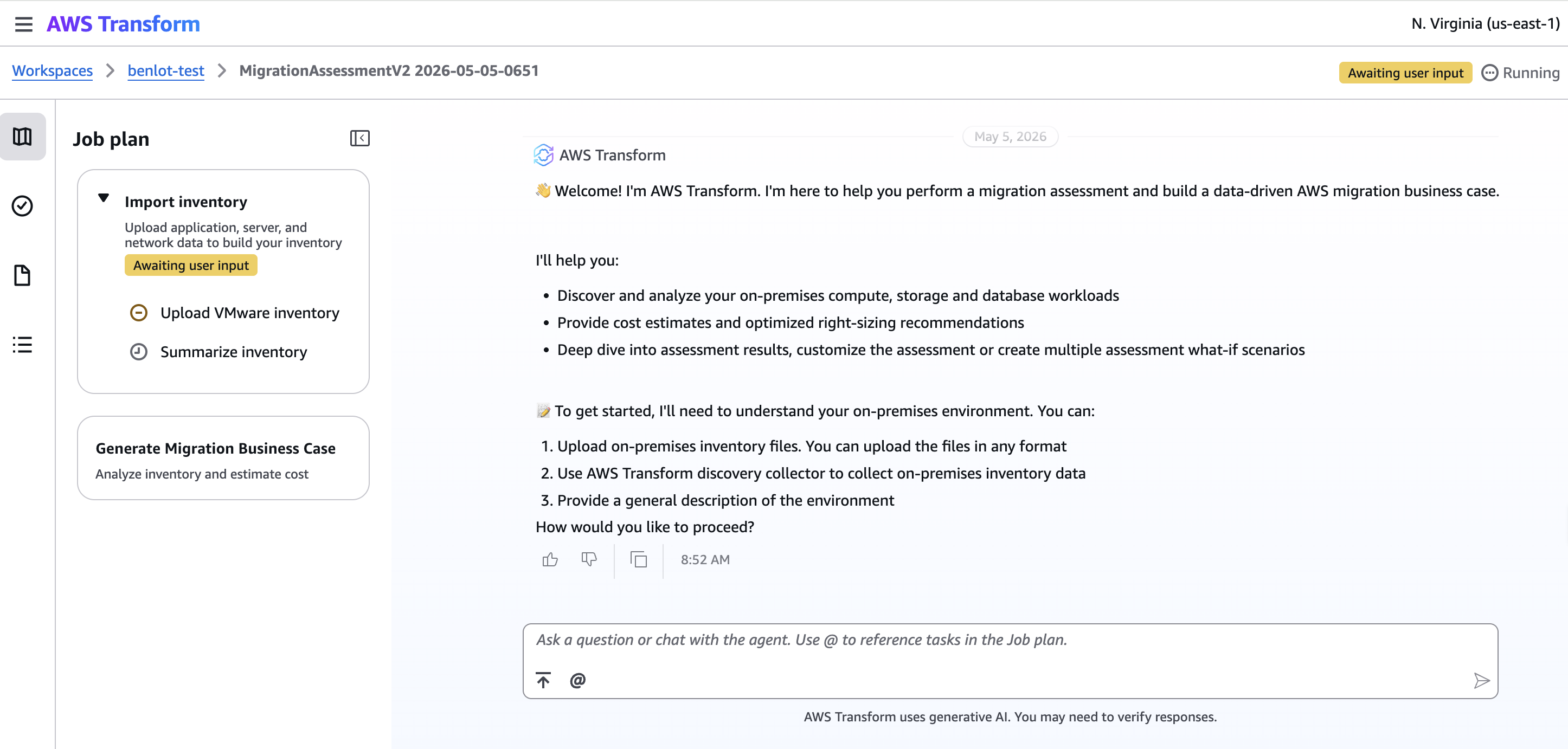
Figure 3. The AWS Transform Assessments console data upload screen
AWS Transform Assessments will process the anonymized data and generate the business case, right-sizing recommendations, and cost analysis. The assessment results will contain anonymized server names and IP addresses.
Step 5: Download the assessment results
Once the assessment is complete, download the results. AWS Transform Assessments produces a zip file containing an Excel workbook (analysis.xlsx), a PDF report, and a PowerPoint business case.
Step 6: De-anonymize the results
Extract the analysis.xlsx file from the assessment results zip, then run the de-anonymizer:
collector-anonymizer deanonymize \
  --input analysis.xlsx \
  --mapping SENSITIVE_discovery_tool_export_mapping.json
The tool scans every cell across all worksheets in the Excel file, replaces anonymized values (including those embedded within surrounding text) with the original values, and saves the result as analysis_deanonymized.xlsx.
You can also de-anonymize an anonymized discovery tool zip directly:
collector-anonymizer deanonymize \
  --input discovery_tool_export_anonymized.zip \
  --mapping SENSITIVE_discovery_tool_export_mapping.json
Conclusion
AWS Transform Assessments provides a complimentary, data-driven business case for migrating VMware workloads to AWS, including cost analysis, right-sizing recommendations, and migration wave planning. For organizations in highly regulated industries, the Discovery Tool Anonymizer removes the data sensitivity barrier that can prevent teams from taking advantage of this service.
In this post, I showed how to anonymize an AWS Transform discovery tool export, upload the anonymized data to AWS Transform Assessments, and then de-anonymize the assessment results to restore original server names, hostnames, and IP addresses.
If you are planning a VMware migration and your organization has data governance requirements that have prevented you from using AWS Transform Assessments, this tool is for you. Get started by deploying the AWS Transform discovery tool in your VMware environment, exporting your collection data, and running the Discovery Tool Anonymizer before uploading to AWS Transform. Within a few minutes, you will have a detailed business case with right-sizing recommendations and cost projections, all without exposing sensitive infrastructure metadata.
To learn more about AWS Transform and start your assessment, visit the AWS Transform page or contact your AWS account team.