Migration & Modernization
Modernize ASP.NET Apps with Bedrock AgentCore Gateway and Strands Agents
Organizations running ASP.NET applications face a common dilemma: adding AI capabilities typically means significant refactoring or building entirely new systems. Your existing REST APIs contain years of valuable business logic, but there’s no straightforward path to make them AI-accessible without a rewrite. What if you could keep your code and add intelligence on top?
In this post, we walk through adding a conversational AI layer to your existing ASP.NET applications using Amazon Bedrock AgentCore Gateway and Strands Agents, turning your current API endpoints into tools an AI agent can discover and invoke autonomously. You use Amazon Bedrock AgentCore Gateway to expose your .NET back-end APIs as AI-agent-compatible tools, and the Strands Agents SDK to build an AI agent that delivers a conversational experience on top of your application.
For this walkthrough, we use a sample application called Octank Hotels — a fictional hotel chain that provides reservation and concierge services. The application consists of two components: an ASP.NET Blazor front end and a .NET 8 REST API back end. By the end of this post, you transform the traditional UI-driven experience into a conversational interface that helps hotel guests make reservations, request concierge services, and get answers — all through natural language.
Note – A companion blog post demonstrates this same pattern with a Java application. This post adapts the approach for the .NET ecosystem, addressing ASP.NET-specific considerations such as Swashbuckle/OpenAPI generation, controller-based routing, and .NET deployment patterns on AWS.
Why this matters for .NET applications
If you’re running ASP.NET applications that have been in production for years, you already have valuable business logic exposed through well-structured RESTful APIs. Adding AI capabilities traditionally means significant refactoring or building entirely new systems from scratch. But what if you could make your existing APIs AI-ready without rewriting them?
How it works
You start by extracting your existing business logic into AWS Lambda functions and deploying them behind Amazon Bedrock AgentCore Gateway as MCP tools. Each Lambda function encapsulates a single operation — book a hotel, check availability — without changing the underlying business logic. Your ASP.NET controllers already expose these operations over HTTP; now the same capabilities become discoverable by an AI agent.
What changes is how those capabilities get invoked. Instead of a UI calling POST /api/bookings directly, the agent discovers that capability through MCP and invokes it from natural language — turning a user’s intent into the right tool call automatically (see Figure 1).
Discovery is what makes this dynamic. Each tool definition registered with AgentCore Gateway includes a description and a typed input schema, so the agent knows what the tool does and what parameters it needs. At runtime, a Strands Agent connects to the gateway and discovers all registered tools automatically — so when you add a new Lambda function, the agent picks it up with no code changes and no redeployment.
The reasoning happens in the agent layer, driven by Strands — an open-source Python framework that implements the agent reasoning loop. When a user sends a message from the Blazor frontend, the Strands agent forwards it to a foundation model on Amazon Bedrock. The model reads the tool definitions and decides which tools to call and in what order, building an execution plan for multi-step workflows. The agent executes that plan — invoking tools, chaining their outputs, and returning one natural-language response to the UI. The .NET frontend only sends and receives chat messages; the orchestration stays entirely behind it.
The key insight is how little has to change. Most of your code stays untouched: the business logic that powers your ASP.NET Core APIs moves to Lambda with minimal modification, and your core algorithms, validation rules, and data access patterns remain the same. On the front end, you replace direct API calls with a conversational interface that routes requests through the agent — and the rest of your application carries forward as-is.
How the architecture works
Adding an agentic AI layer to your application involves two components:
1. Backend — You expose your .NET Lambda functions so an AI agent can discover and invoke them, using MCP as the standard interface.
2. Frontend — You build an AI agent that acts as an MCP client, receiving natural language requests and fulfilling them by calling your APIs through the MCP server.
The following diagram shows the target architecture:
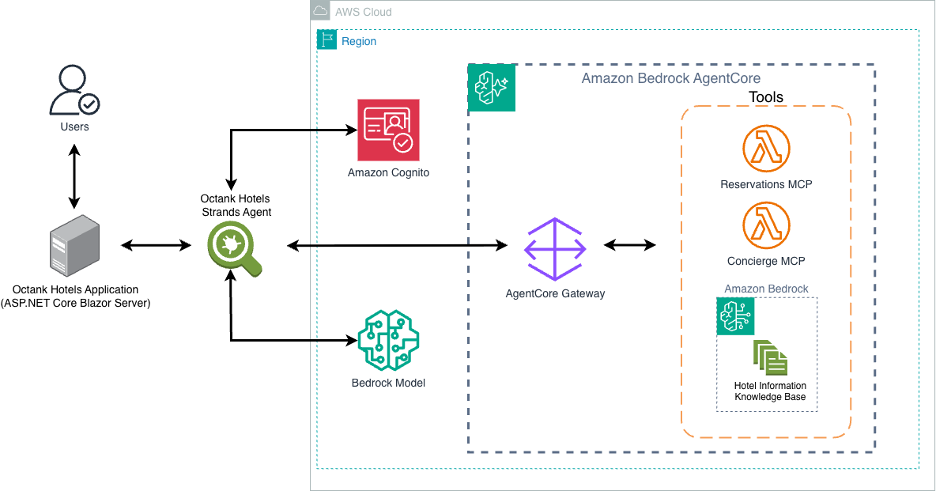
Target architecture. You interact with the AI agent using natural language. The agent invokes Amazon Bedrock for reasoning, then calls your ASP.NET application’s APIs through AgentCore Gateway using MCP. Your application code remains unchanged.
In this solution, we use Amazon Cognito with OAuth 2.0 to authenticate the Strands Agent when it connects to the AgentCore Gateway. The agent obtains an access token from Cognito and includes it with each request, ensuring that only authorized agents can discover and invoke your MCP tools.
Amazon Cognito is one of several options for securing traffic between the agent and the gateway. Depending on your organization’s requirements, you can also use AWS Identity and Access Management (IAM) roles, mutual TLS (mTLS), or API keys managed through Amazon API Gateway. Choose the approach that best aligns with your existing identity and access management strategy.
For production implementations, we also recommend securing the communication between the Blazor application and the Strands Agent. In this walkthrough, the Blazor front end communicates with the agent over localhost for simplicity. In production, enforce HTTPS and token-based authentication on this path as well — for example, using the Amazon Bedrock AgentCore .NET SDK with IAM or Cognito credentials to authenticate application-to-agent requests.
The sample application: Octank Hotels
You can download the complete sample application from GitHub:
https://github.com/aws-samples/dotnet-genai-samples/tree/dotnet-agenticai/src/Amazon.GenAI
The application is a .NET 8 Blazor server solution with a MudBlazor UI.
The ReservationAgent.razor (src/Amazon.GenAI) page provides the conversational interface to interact with the Reservation Agent. The .NET code is minimal — it sends a JSON payload with the user’s message and conversation history to the Strands Agent, and renders the response:
var client = HttpClientFactory.CreateClient("StrandsAgent"); var payload = new StringContent( JsonSerializer.Serialize(new { message = text, history }), Encoding.UTF8, "application/json"); var response = await client.PostAsync("/chat", payload); Reservation Agent – (src/Amazon.GenAI.StrandsAgent) – A Python-based Strands Agent powers the Octank Hotels reservation system. It connects to two MCP tools registered behind the Amazon AgentCore Gateway — HotelDealsLambda and ConciergeLambda. The agent helps guests by finding special deals, checking room availability, making reservations, and acting as a concierge.
The backend consists of two AWS Lambda functions (.NET) deployed via AWS SAM:
HotelDealsLambda — Handles GetHotelSpecialDeals, GetAvailableRooms, and BookHotelRoom operations for the three hotel locations (Chicago, San Francisco, London).
ConciergeLambda — Handles the SearchHotelKnowledgeBase operation, querying the Bedrock Knowledge Base for hotel amenities, policies, and FAQs.
These Lambda functions are exposed through AgentCore Gateway as MCP tools. The Strands Agent discovers them at connection time and calls them as needed during conversations.
| Endpoint | Method | Description |
| /api/rooms | GET | Search available rooms by location, date, and guests |
| /api/rooms/{id} | GET | Get hotel special deals |
| /api/bookings | POST | Create a new booking |
| /api/bookings/{id} | GET | Retrieve booking details |
In summary, the Blazor frontend sends HTTP requests to a Python Strands Agent (running on localhost:5100), which connects to AgentCore Gateway via MCP. The agent discovers tools dynamically, reasons about which to call, and orchestrates multi-step booking workflows — all while the .NET application simply sends and receives chat messages.
The intelligence — tool selection, API orchestration, conversation management — lives entirely in the Strands Agent and AgentCore Gateway. The .NET application remains a standard Blazor Server app with no AI-specific dependencies beyond an HTTP client.
Solution walkthrough
Part 1: Create the MCP server with AgentCore Gateway (backend)
In this section, you configure AgentCore Gateway to serve as a managed MCP server for your ASP.NET application’s APIs.
Step 1a: Prepare your OpenAPI specification
If your ASP.NET application uses Swashbuckle (the default for .NET Web API projects), your OpenAPI spec is already available. Export it from your running application: Note: Starting with .NET 10, ASP.NET Core includes built-in OpenAPI support via Microsoft.AspNetCore.OpenApi, removing the Swashbuckle dependency. The approach shown here applies to .NET 8 and .NET 9 projects. curl https://my-octank-travel.com/swagger/v1/swagger.json -o openapi.json Important: The quality of your OpenAPI specification directly impacts how well the AI agent understands and uses your APIs. Make sure your controllers have clear XML documentation comments:
These descriptions become the tool descriptions that the AI agent sees when deciding which API to call. Well-documented endpoints lead to better agent decisions. To include XML comments in your generated spec, add the following to your .csproj file: <GenerateDocumentationFile>true</GenerateDocumentationFile>
Then wire up SwaggerGen to read the XML file in Program.cs:
Update the servers section in your exported OpenAPI spec to point to your application’s URL. For details on compatibility requirements, see OpenAPI schema targets for AgentCore Gateway in the AWS documentation.
Step 1b: Create the gateway
1. Open the Amazon Bedrock AgentCore console (https://console.aws.amazon.com/bedrock-agentcore/). From the left navigation pane, choose Gateways, then choose Create gateway. Enter a name (for example, octank-travel-gateway) and a description.
2. In the Inbound Auth configurations section, select Quick create configurations with Cognito. This creates a new identity provider that controls authentication from the agent to Gateway. We recommend this option because it provides token-based authentication out of the box, supports scoped access control, and integrates natively with other AWS services.
Note: While this walkthrough uses Cognito with OAuth 2.0, AgentCore Gateway also supports IAM-based authentication and API keys for downstream targets. Choose the option that aligns with your organization’s security requirements. Add Link
3. In the Permissions section, choose Create and use a new service role.
4. For Target, select REST API as the target type and OpenAPI schema as the type. Upload your openapi.json file or choose Define an inline schema. The gateway uses this schema to generate MCP tool definitions that the agent discovers at runtime.
5. For Downstream authentication, select OAuth client.
6. Choose Create.
When the gateway status shows Ready, you receive a Gateway resource URL. This is your MCP server endpoint:
https://octank-travel-xx.gateway.bedrock-agentcore.us-east-1.amazonaws.com/mcp
Step 1c: Note your OAuth credentials
Before leaving the console, navigate to Amazon Cognito → Application → App clients. Under App client information, copy the Client ID and Client secret. Your agent needs these credentials to authenticate with Gateway.
That’s it for the backend. You’ve created an MCP server with MCP tools that expose your ASP.NET application’s APIs — without writing any conversion code or managing any infrastructure.
Part 2: Build the AI agent with Strands Agents SDK (frontend)
In this section, you build an AI agent using the Strands Agents SDK that acts as an MCP client, connecting to the Gateway you created in
Part 1.
Step 1a: Install the Strands Agents SDK
Install the Strands Agents SDK and its dependencies:
pip install strands-agents mcp requests flask
Tip – You can use AI-assisted developer tools like Kiro or Claude Code to scaffold the agent boilerplate from a natural language prompt, saving setup time.
Step 1b: Create the agent
You can create the agent in one of two ways:
Option A: Use the pre-built agent from the repository
The sample repository includes a ready-to-use agent. Navigate to the following file:
src/Amazon.GenAI.StrandsAgent/simple_agent.py
This file contains the complete agent implementation with MCP client configuration, Cognito authentication, tool discovery, and the agentic loop. You can use it directly or customize it for your use case.
Option B: Generate the agent using an AI coding assistant
If you prefer to scaffold the agent from scratch, use an AI-assisted developer tool such as Kiro or Claude Code with the following prompt:
Create a Python file for your agent (or use the pre-built version at src/Amazon.GenAI.StrandsAgent/simple_agent.py from the GitHub repository). If using an AI-assisted tool, you can prompt it with:
Use AWS Strands Agent SDK to write a simple terminal-based AI agent that connects
to MCP tools available at this endpoint:
https://octank-travel-xx.gateway.bedrock-agentcore.us-east-1.amazonaws.com/mcp
This generates the agent code with proper MCP client configuration, Cognito authentication, tool discovery, and the agentic loop.
Step 1c: Configure authentication
Configure the OAuth 2.0 Client Credentials flow for Cognito authentication. Here is how the sample application implements this:
def get_token():resp = requests.post(f"https://{COGNITO_DOMAIN}.auth.us-east-1.amazoncognito.com/oauth2/token",data={"grant_type": "client_credentials", "scope": COGNITO_SCOPE},auth=(COGNITO_CLIENT_ID, COGNITO_CLIENT_SECRET))return resp.json()["access_token"]
The agent caches the token and refreshes it automatically before expiry. The token is passed as a Bearer header when connecting to the Gateway MCP endpoint.
Step 1d: Test the agent
Run the agent:python3 simple_agent.py
You can now interact with your ASP.NET application conversationally:
| You: | Show me parking facilities for Octank hotel in Chicago |
| Agent: |
Octank Hotels Chicago offers the following parking options: • Self-parking garage — $35/night for hotel guests Would you like to check room availability or book a stay? |
| You: | Yes, check availability for next Friday for 2 guests |
| Agent: |
I found availability at Octank Hotels Chicago for Friday, May 16: 1. Standard Room — $189/night All rates are for 2 guests. Would you like to book one of these? |
The agent analyzed your natural language request, called the SearchHotelKnowledgeBase tool through Gateway for hotel information, then called GetAvailableRooms and BookHotelRoom when you asked — all without any modification to the .NET Lambda functions.
.NET-specific considerations
When you apply this pattern to your ASP.NET applications, keep these points in mind:
Swashbuckle and NSwag output works directly — The OpenAPI specs generated by these libraries are compatible with AgentCore Gateway.
Both minimal APIs and controller-based APIs work — Gateway consumes the OpenAPI spec regardless of your routing pattern. What matters is the quality of the spec.
Authentication patterns — If your ASP.NET app uses ASP.NET Identity, JWT bearer tokens, or API keys, configure Gateway’s downstream authentication accordingly.
Multiple microservices — If your .NET solution consists of multiple microservices, you can create separate Gateway targets for each service’s OpenAPI spec, or consolidate them into a single spec.
What’s next
Deploy and test
Follow these steps to deploy the complete solution:
1. Clone the repository and navigate to the project directory:git clone https://github.com/aws-samples/dotnet-genai-samples.gitcd dotnet-genai-samples/src/Amazon.GenAI
2. Deploy the backend infrastructure using AWS SAM:cd infrasam buildsam deploy --guided
The SAM template provisions both Lambda functions, the Amazon Cognito user pool, and the required IAM roles.
3. Create the AgentCore Gateway by following the steps in Part 1 of this post.
4. Configure environment variables. Create a .env file and add your Cognito credentials and Gateway URL:
COGNITO_CLIENT_ID=<your-client-id>
COGNITO_CLIENT_SECRET=<your-client-secret>
COGNITO_DOMAIN=<your-cognito-domain>
GATEWAY_URL=<your-gateway-mcp-endpoint>
5. Start the Strands Agent:python3 src/Amazon.GenAI.StrandsAgent/simple_agent.py
6. Launch the Blazor application:dotnet run --project src/Amazon.GenAI
The agent now allows you to interact with your ASP.NET application conversationally..
After you build your basic AI agent, you can extend it further:
Deploy as a managed agent — Use Amazon Bedrock AgentCore Runtime to deploy your agent to AWS as a fully managed service.
Add conversation memory — Use AgentCore Memory to give your agent the ability to remember previous interactions.
Monitor and observe — Use AgentCore Observability to track agent-to-API interactions.
Conclusion
In this post, you added agentic AI capabilities to an existing .NET application using Amazon Bedrock AgentCore Gateway and the Strands Agents SDK. You used AgentCore Gateway to expose your .NET Lambda functions as MCP-compatible tools — no custom conversion code, no infrastructure to manage. On the frontend, you built an AI agent with the Strands Agents SDK that authenticates via Cognito, discovers tools dynamically, and orchestrates multi-step workflows conversationally.
If your ASP.NET application has an OpenAPI spec (and most do), you’re already most of the way to adding an AI agent layer. This pattern works with your existing code, your existing deployment, and your existing APIs. You add intelligence on top — you don’t rebuild from the ground up. Even though your actual application may be more complex, the intent of this walkthrough is to show you what’s possible and to help your team start the discussion on introducing AI into existing .NET systems.