Migration & Modernization
Reimagine mainframe workloads with a highly automated workflow using AWS Transform and Devin
This post is co-written with Brian Smitches and James Scarr from Cognition.
A mainframe application that has been in production for decades encodes thousands of business rules that were never documented, poorly documented, or now outdated, and the people who understood them have often retired or moved on. Manually recovering that logic, then hand-building the new services, tests and migration scripts, commonly takes years, which is why modernization projects stall or get shelved. General-purpose AI agents can speed up the coding, but the documentation they produce has no traceability back to source, so the business still can’t verify the new system matches the old one.
Together, AWS Transform and Devin, the autonomous software engineer operated by Cognition, address both halves of that problem. Getting off the mainframe isn’t just translating one language into another, it’s a business transformation, so the first job is recovering the business rules and behavior in a form the business can read and approve. AWS Transform for mainframe reverse-engineers the business logic embedded in COBOL, PL/I, and JCL. It discovers business functions, extracts business rules with source-line traceability, and writes technology-agnostic requirements in a structured format.
Once requirements are documented, an agentic coding platform can carry on the work with forward engineering. This post walks through how a team can use Devin to turn AWS Transform’s output into cloud-native services: setting up Devin’s workspace and instructions, generating and approving application specifications, turning those specifications into a Jira backlog, and generating code from that backlog with tests and traceability intact.
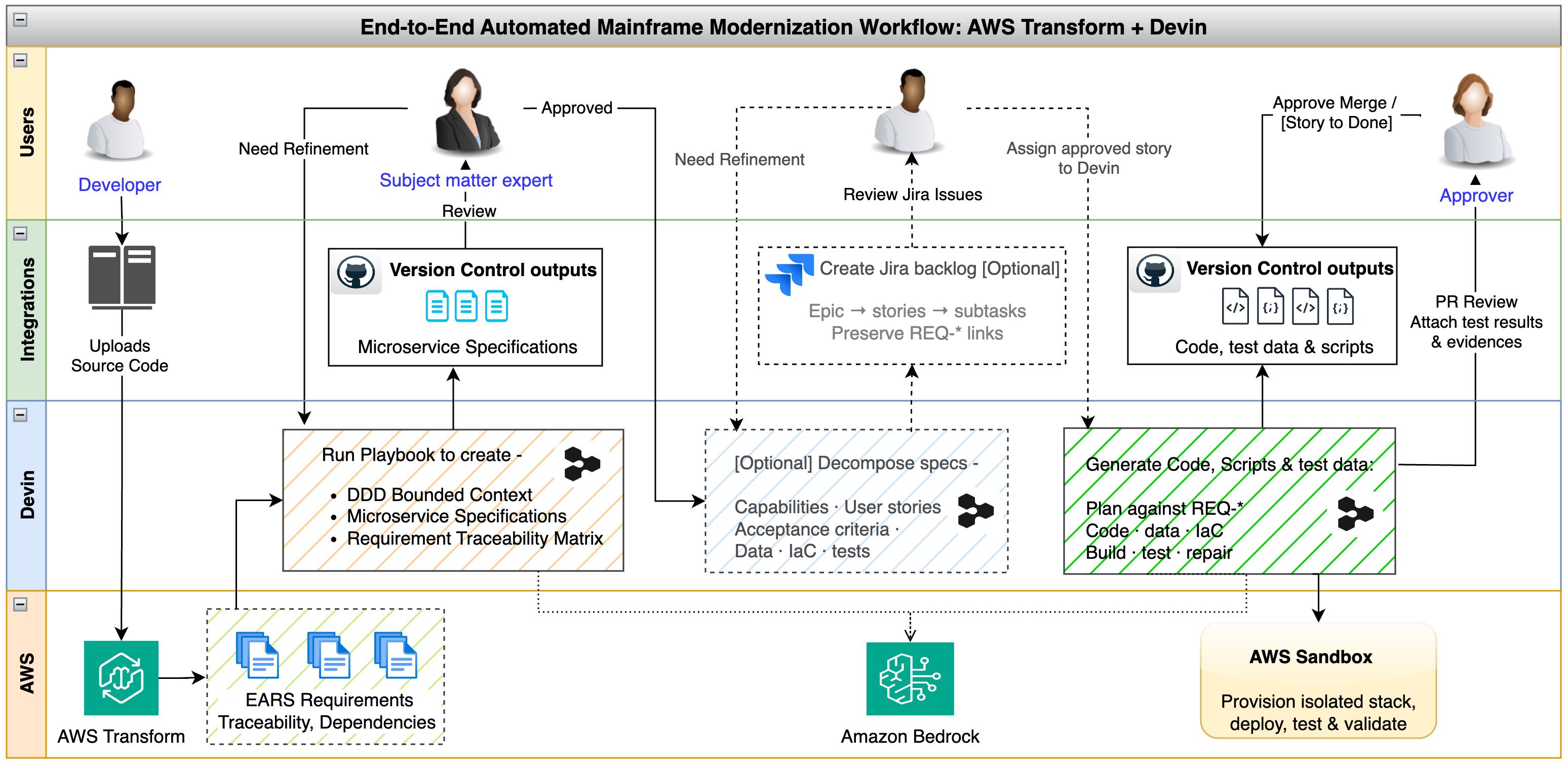
Figure 1: Reimagine workflow, from reverse engineering with AWS Transform to forward engineering and validation with Devin
The Reimagine workflow
AWS Transform analyzes the mainframe codebase and produces a business function catalog, extracted business rules, and requirements written to be technology-agnostic, and every requirement points back to the source lines it came from.
Devin reads those requirements, proposes a decomposition into domain-aligned services, and, once architects and subject matter experts have approved the specifications, generates the code, tests, migration scripts and infrastructure definitions for each service. Each piece of work arrives as a pull request that the team reviews.
The team validates the result against the original requirements. Acceptance criteria become automated tests, traceability checks confirm that every requirement landed in a specification and in code, and deployment to AWS goes through the team’s normal pipeline.
The requirements coming out of AWS Transform are evidence about how the mainframe behaves today, and a business owner confirms they are the intended behavior before anything is built on them. The code outputs from Devin are iterations towards future state implementation, and Devin’s work is trusted following review on the evidence gathered from automated testing and human review activities. When there is ambiguity or constraints on the design or implementation of the new system, such as eventual versus strict consistency, the business decides how the modernized system should behave.
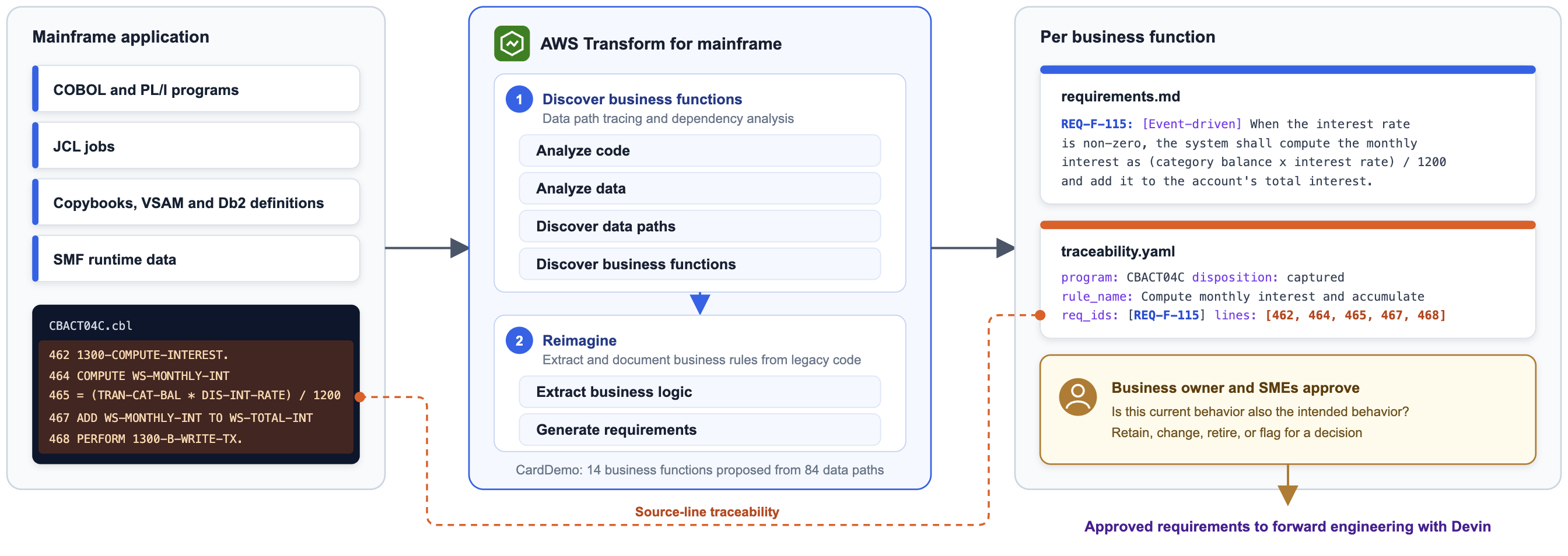
Figure 2: Reverse engineering with AWS Transform for mainframe
What AWS Transform produces
For each business function, AWS Transform generates a requirements.md file, and each requirement carries a numbered identifier (REQ-F-001, for example), the business rule in plain language, and acceptance criteria written in EARS format (Easy Approach to Requirements Syntax), the structured “when this condition, the system shall do that” form. A traceability.yaml file records which source lines and programs each requirement was derived from. The Specification-Driven Mainframe Modernization with AI Agents post describes the format in detail.
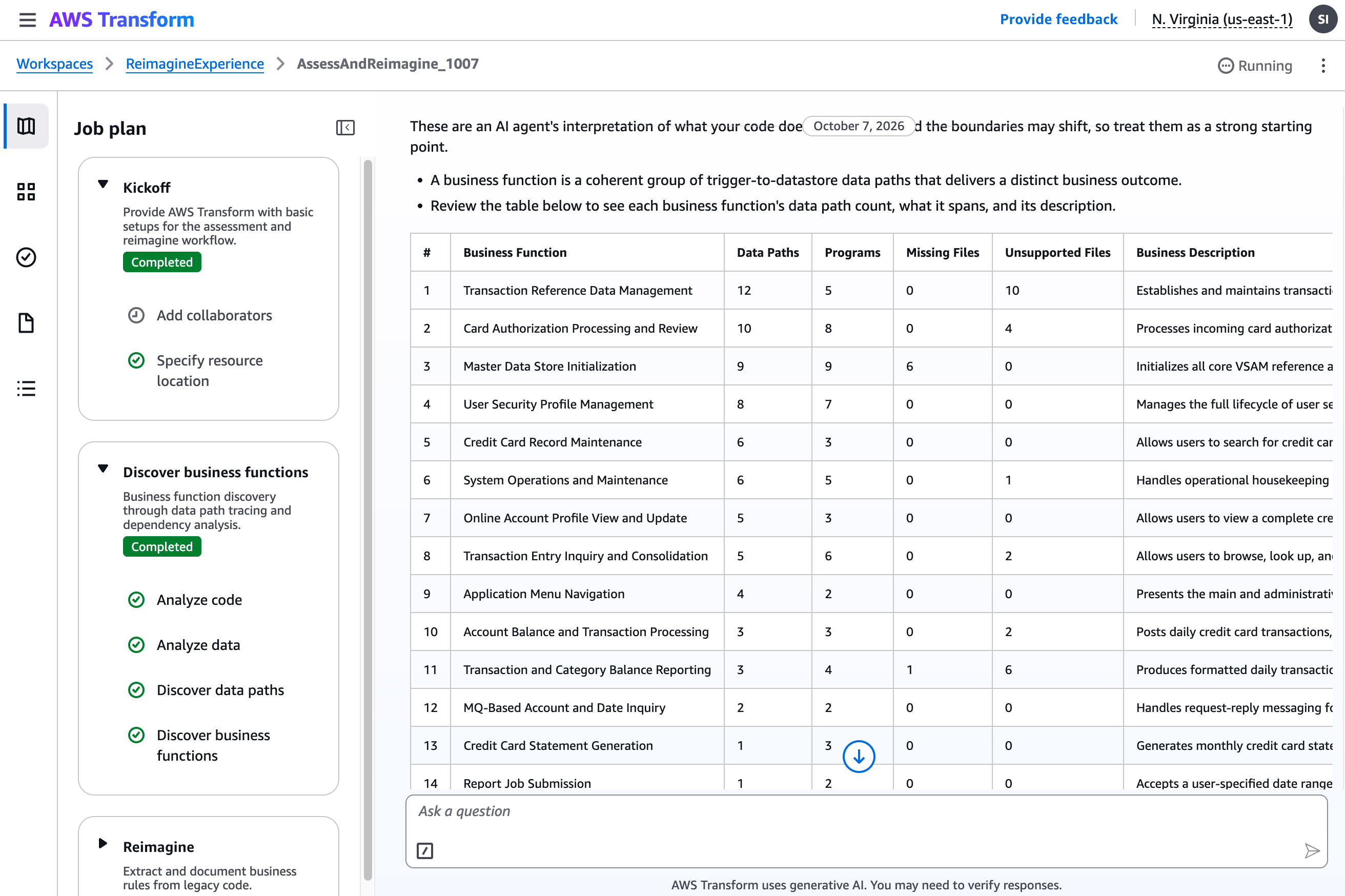
Figure 3: A sample view of the business functions for a bank teller application generated in AWS Transform
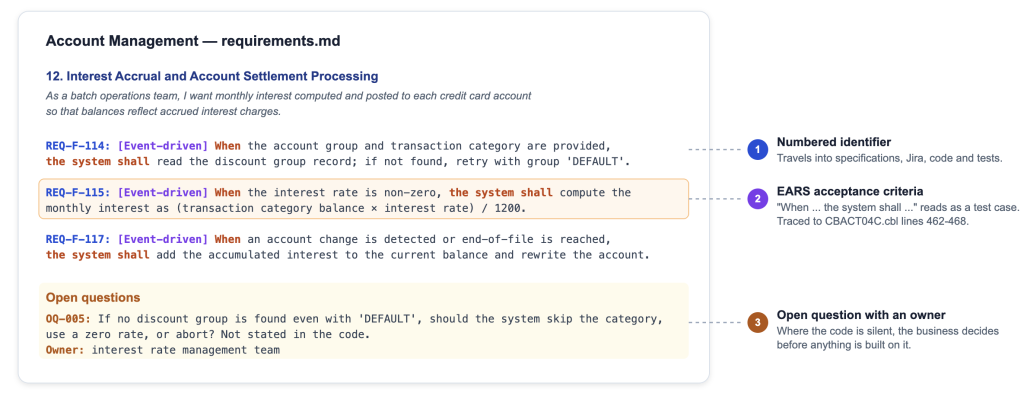
Figure 4: Requirements for Account Management business function
The identifiers make the rest of the workflow auditable. They travel from the requirements into the service specifications, from the specifications into Jira, and from Jira into the code and tests, so any line of the modernized system can be traced back to the COBOL statement that motivated it.
Setting up Devin
Devin’s workspace
Devin runs in its own cloud virtual machine with a shell, a code editor and a browser. Engineers, analysts, and project managers alike can assign asynchronous tasks to Devin from many sources, including:
- The in-browser Devin web app
- Slack or Microsoft Teams messages to Devin
- Jira tickets labeled for Devin
- From the terminal
- From the Devin Desktop application
Customers work with Devin by delegating full units of work to the autonomous AI engineering agent. Devin plans the work, writes the code, runs the build and tests, and opens a pull request with the evidence the team needs to review and merge it.
Devin’s VM starts from an upfront snapshot created by an environment blueprint where you declare and configure the development toolchain (the JDK, Maven or Gradle, the AWS CDK, Docker, the database client) and the cloned git repositories (the source, target, and internal development frameworks/packages). This guarantees every future session boots from a known-good state, allowing Devin to focus on the migration work instead of re-establishing the toolchain each time.
Plugins and Dynamic Workflows
Devin takes standing instructions from files committed to the repository, and an AGENTS.md file at the repository root carries the setup commands and conventions Devin reads before it starts coding. Skills are SKILL.md files under .agents/skills/ that describe a repeatable procedure step by step, following the open Agent Skills standard, and Devin loads the relevant one when a task matches its description. For this workflow the team commits skills for the target stack and coding standards, the build, test and cdk synth commands, and the traceability rule that every generated file and test carries the REQ-* identifiers it implements. “REQ-*” denotes the family of requirement identifiers from AWS Transform (e.g., REQ-F-001). The team also commits a REVIEW.md file with the review rules Devin checks pull requests against before a human reviews them.
Once you have a set of these prompt files and MCP server configurations that you want to bundle together to share across your organization, you can leverage Plugins in Devin to distribute and discover these configurations.
Additionally, if you have a large task that you want to delegate to Devin, you can leverage Dynamic Workflows to orchestrate a sequence or batch of parallel Devin Cloud sessions.
Integrations
Devin connects to GitHub, GitLab, Bitbucket and other DevOps tools for source control, Slack and Microsoft Teams for communication platforms, and Jira and Linear for issue tracking. Beyond these integrations, customers can also plumb together further integrations through standard MCP or API servers to provide context/tools/resources to Devin or build custom event sources for automations.
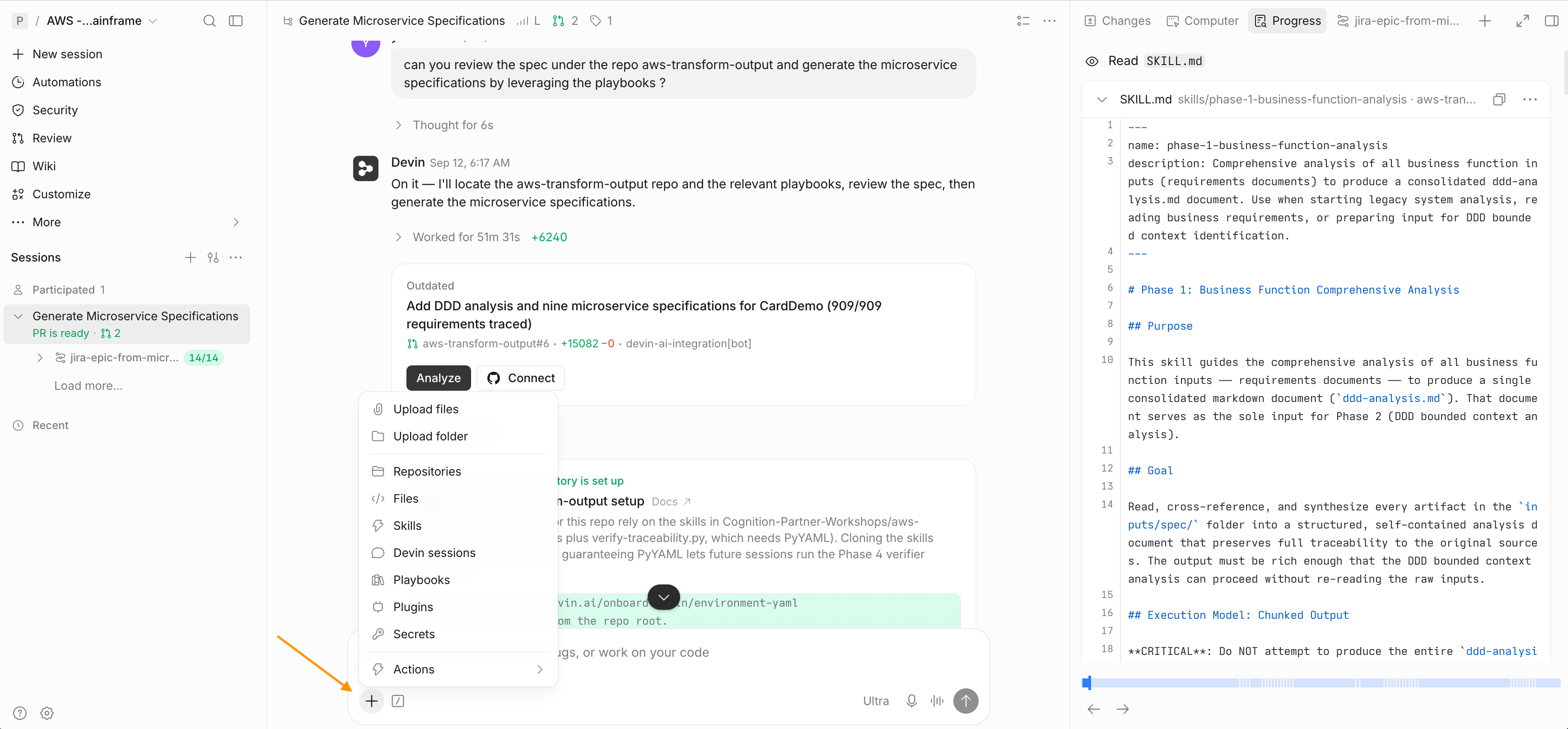
Figure 5: A sample Devin Web App interface running forward engineering
Generating application specifications
Domain-driven decomposition
A team working with Devin for decomposition points Devin at the AWS Transform output stored in a source-control repo, so Devin can read the business functions and their requirements, group related requirements, and identify bounded contexts, aggregates, entities, value objects and domain events. Devin’s next output becomes a set of service specifications: service boundaries and responsibilities, data ownership, API contracts, event schemas and database schemas for each bounded context, with the domain events that cross service boundaries named explicitly.
Each specification keeps the REQ-* identifiers of the requirements it implements, so a reviewer can open any service definition and follow it back to the business rule and the source lines behind it.
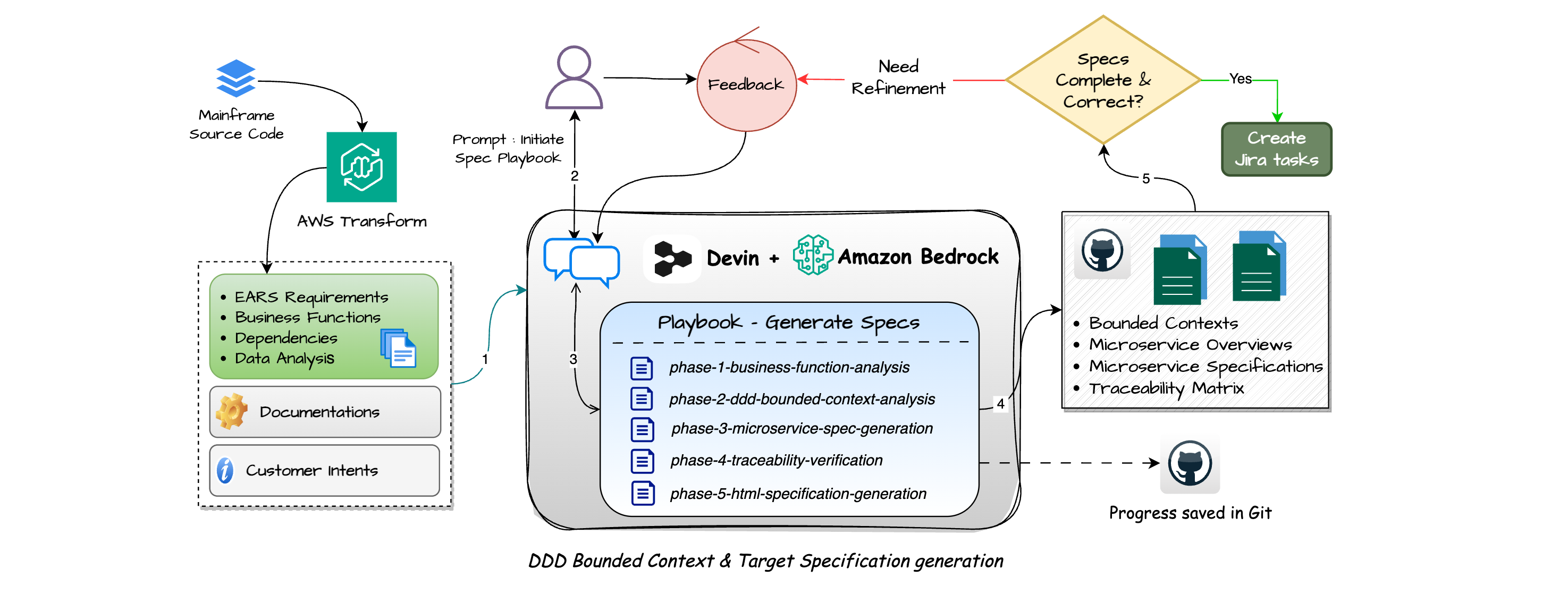
Figure 6: Generate microservice specifications using AWS Transform outputs
Traceability check
Before anyone reviews those specifications, a deterministic script can check that every REQ-* identifier in the AWS Transform output appears in at least one specification and lists the missing items. Once the check passes or fails, Devin follows the task specification (from playbook or Skill) and reports the result. Architects focus on the requirements that are missing a service mapping or that have critical impact.
Review and approval
Architects and subject matter experts review the specifications and approve the service boundaries and the described behavior. When AWS Transform finds a rule nobody on the team can explain, the spec records the question and names the business owner who has to answer it, and that part of the backlog waits until confirmation is received. This way, everything downstream, from the backlog to the generated code, can strictly follow the approved specifications.
From specifications to a Jira backlog
A capability is a discrete piece of functionality a service exposes to deliver one or more requirements, tagged with an identifier such as [CAP-01] that traces back to the REQ-* requirement(s) it delivers. With the specifications approved, the team runs the backlog playbook, which creates Jira issues in a fixed hierarchy: each bounded context becomes an Epic, and each capability within it becomes a Story tagged with its capability identifier. Each Story gets Subtasks for the implementation work, including service code, tests, data migration scripts, API and event contracts, non-functional requirements, and deployment, tagged with both the capability and a work-type ([CAP-01][CODE], [CAP-01][TESTS]) so the team can filter the backlog by either.
The acceptance criteria travel with the work, so each Story and Subtask description carries the EARS criteria from its REQ-* requirements, which gives Devin a definition of done when it later picks up the issue and gives the team the test cases that verify it.
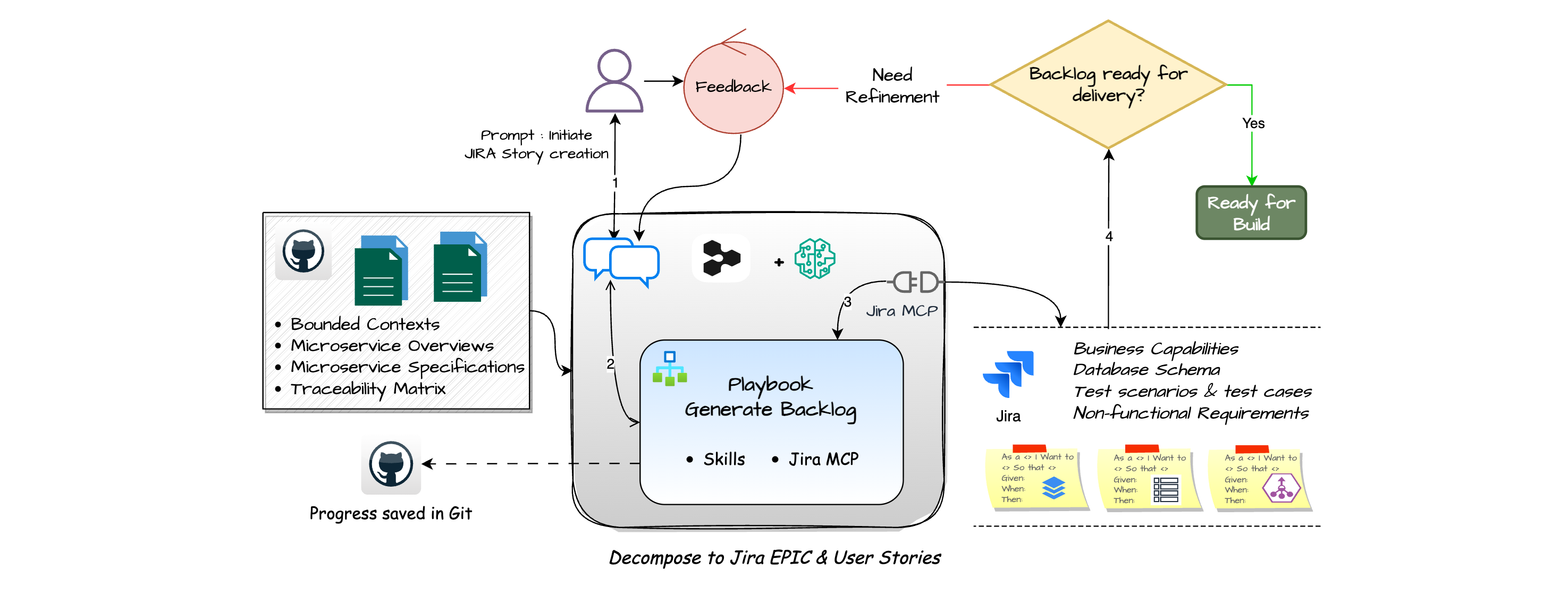
Figure 7: Devin creates JIRA Epic and User Stories from microservice specifications
Generating code from Jira
Working from a Jira issue
A Devin session can start when someone assigns a task to Devin in Jira, adds a label, or mentions @Devin in a comment. The team can also configure custom automation triggers so that events emitted from Jira with Devin-ready work can initiate sessions automatically, with human review still gating the resulting changes. Devin reads the description, the acceptance criteria and the linked specification, plans the implementation, writes the code, builds and tests it in its VM locally, and opens a pull request. Devin can also integrate with your AWS account to run tests in a sandbox environment. This uses scoped, least-privilege access into a customer-controlled sandbox, consistent with the AWS shared-responsibility model.
Once Devin completes a pull request associated with the ticket, Devin can add a link on the Jira issue as a comment and users can provide follow-up instructions through @Devin comments on the same issue, in Devin, or through PR Comments.
The team chooses the task granularity before assigning work to Devin. Assigning individual Subtasks keeps each pull request small and reviewable, whereas assigning a whole Story lets Devin coordinate the code, the tests and the migration for one capability in a single pass.
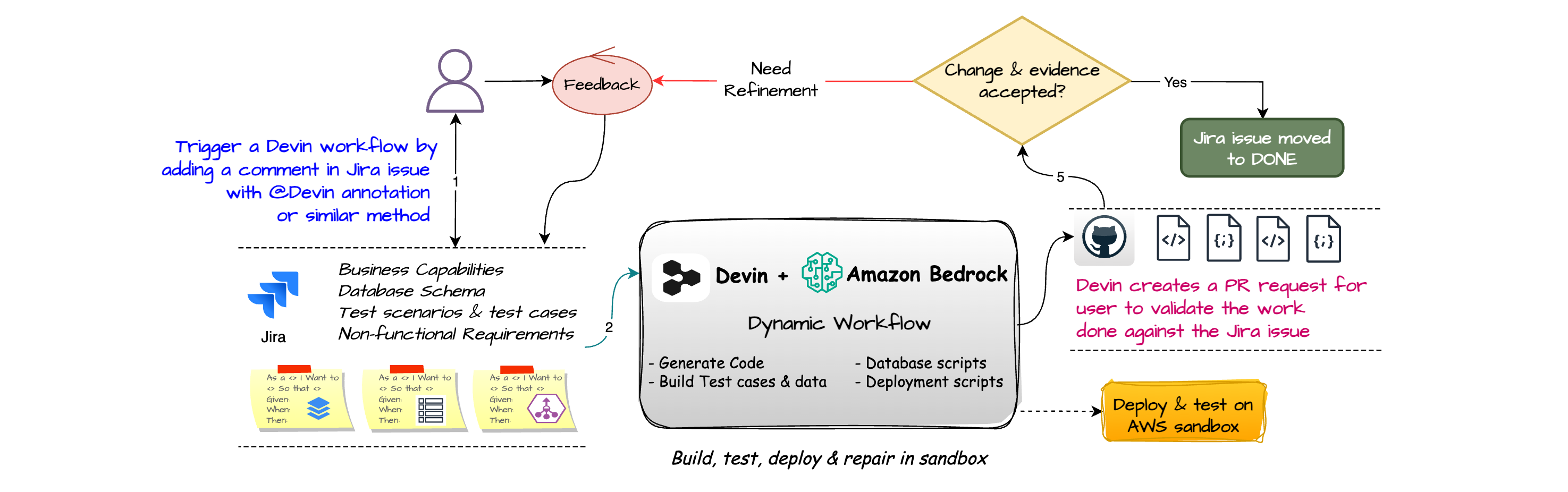
Figure 8: Build, test and create pull request against the Jira stories
Build, test and fix
As a part of the development loop, Devin compiles the code, runs the tests, reads the failures, fixes them and runs again. This ensures that when the reviewer opens a pull request, the code already builds and passes the test suite. When an opened pull request later fails a CI check, Devin automatically listens to that event and continues its work to push a fix on the same branch until CI passes, all without a human in the loop for the fix cycle itself while merge still requires human review.
Additionally, if advised, Devin can also review the pull request against the repository’s REVIEW.md and AGENTS.md rules, flag bugs and optionally cause a build/review loop (with AutoFix) until all issue findings are resolved. Beyond improving autonomy of the development lifecycle, this helps direct the reviewer’s attention to the highest-priority review components of a given Pull Request.
Parallel execution
A modernization backlog often contains many independent Subtasks, and Devin works on them in parallel. If you assign a Devin Session to orchestrate work, it will break down the work into Subtasks and delegate each task to a child session managed by Devin, running in its own VM. The Devin orchestration agent then monitors progress, resolves conflicts and consolidates the results into one final deliverable. This illustrates a general principle for working with Devin: you choose the scope of each task to balance autonomy against human-in-the-loop review, trading off quality and speed as needed.
An example prompt for this could be “Implement every Subtask in Epic PAYMENTS-12 in parallel, one managed Devin session per Subtask, each on its own branch, and report back which ones need a human decision. Use Dynamic Workflows to ensure all work is done in a structured order”. This fan-out gives finer granularity for any later audit or review/fix step.
Validation and review
Every pull request is reviewed against the rules the team committed to the repository: examples such as the REQ-* traceability annotations are present, no service reaches into another service’s database, and every API contract is versioned. Devin Review flags the violations, and the team’s engineers approve the merge.
The test specifications are generated from the application specifications, so Devin generates unit and integration tests from them, and property-based tests where a rule holds across a range of inputs. Each test names the REQ-* identifier it verifies. A failing test therefore points at a business requirement, and the team knows whether the fault lies in the generated code or in a requirement the business needs to reconsider.
For teams that run Devin from their pipelines, the API and SDK create sessions headlessly, so a scheduled job can regenerate tests when a specification changes or run the traceability check across the whole repository.
Conclusion
AWS Transform recovers what the mainframe does and writes it down as requirements the business can approve, while architects and subject matter experts decide what the modernized system should do. Devin builds and tests the application, keeping the chain from source line to requirement to specification to code intact. This allows architects and subject matter experts to spend their time on the approvals that need judgment: the service boundaries, the business rules, the pull requests.
To get started, launch an Assess and Reimagine job in the AWS Transform console on a mainframe application, review the generated requirements, and hand the approved set to Devin.