Networking & Content Delivery
Best Practices for TCP Connection Management on EC2
With sixth-generation Nitro (Nitro V6) instances, launched in June 2025, the default TCP connection tracking idle timeout changed from 432,000 seconds (5 days) to 350 seconds. Applications that hold idle connections open for long periods, such as database connection pools, Internet of Things (IoT) telemetry, and persistent microservice connections, may experience unexpected connection drops after migrating to these instances. This post explains why we made this change, how to configure timeouts explicitly, and how to implement keepalives and connection lifecycle management that keep your workloads reliable across any instance generation.
Why the default changed
Connection tracking (conntrack) maintains state for active network connections and powers Security Groups, VPC Flow Logs, and network metering. Your conntrack allowance has finite capacity based on available Nitro resources. Under the previous 5-day default, idle and orphaned connections (those that never receive FIN or RST packets) remained tracked for up to 5 days. As these accumulated, they could exhaust your allowance. When the allowance is consumed, the instance cannot accept new connections until an existing entry closes or times out. You’ll see connection timeouts, connection refused errors, or 504 errors from load balancers when backend connections fail to establish. You can detect this through ethtool conntrack metrics, application-level connection errors, increased retry rates, or TCP_ELB_Reset_Count on NLBs. Non-TCP flows such as UDP use much shorter timeouts (30–180 seconds) and are unlikely to accumulate at scale.
To give you control over this, we previously introduced configurable idle timeouts in November 2023, allowing customers to set TCP established idle timeouts from 60 to 432,000 seconds per ENI across all Nitro instance generations. The 350-second default on Nitro V6 aligns EC2 with AWS networking services such as Network Load Balancer, NAT Gateway, and Gateway Load Balancer, reducing timeout mismatches that create half-open connections, where one side considers the connection alive while the other has dropped it.
How to configure timeouts
You can set TCP idle timeouts at the ENI level through the AWS CLI, Launch Templates, the AWS Management Console, or infrastructure-as-code tools such as AWS CloudFormation and Terraform. The CLI operation is ModifyNetworkInterfaceAttribute. If your workload requires longer idle timeouts, configure them explicitly rather than relying on defaults.
For step-by-step instructions and examples, see our previous blog post on configurable idle timeout.
Implement TCP keepalives and application heartbeats
TCP keepalives are the primary recommendation for managing long-lived connections. They send periodic probe packets on idle connections, which prevents the connection from reaching an “idle” state at any infrastructure layer (Amazon EC2, load balancers, NAT gateways) and protects against timeout-related drops regardless of configured values. Keepalives operate at the transport layer and can be enabled at the kernel level or per application. They are disabled by default in most operating systems because they add network overhead that not all workloads need, and the kernel default interval (2 hours on Linux) is too long to prevent cloud infrastructure timeouts.
Configure keepalives to send probes well before your expected timeout period. If your ENI timeout is 350 seconds, set keepalives to start at 240 seconds (4 minutes) or less. This provides a buffer and keeps connections active.
On Linux, you can configure TCP keepalives at the kernel level:
On Windows, configure equivalent settings through the registry keys KeepAliveTime and KeepAliveInterval under HKLM\SYSTEM\CurrentControlSet\Services\Tcpip\Parameters.
See TCP/IP registry settings for Windows for details.
Per-application keepalive settings let applications override the kernel defaults for specific connections. Most database drivers, HTTP clients, and messaging libraries support them. PostgreSQL provides tcp_keepalives_idle, tcp_keepalives_interval, and tcp_keepalives_count connection parameters. Redis offers the tcp-keepalive option with a default of 300 seconds.
Application-level heartbeats are messages your application sends to confirm the remote side is still responsive. While TCP keepalives prevent infrastructure from timing out connections, heartbeats detect when the remote application has become unresponsive even if the TCP connection remains intact. Many workloads benefit from running both.
Close idle connections explicitly
Idle connections can consume conntrack entries unnecessarily. Design your applications with explicit connection lifecycle management rather than relying on infrastructure timeouts to clean up connections.
For connection pools in databases, set maxIdleTime or equivalent parameters to close connections that have been idle beyond your application’s needs. Configure maxLifetime to rotate connections periodically. Implement health checks to validate connection liveness before use. Size pools appropriately based on actual concurrency requirements.
Connections should be either active (with keepalives) or closed, not indefinitely idle. If a connection will sit idle for extended periods, close it and reopen when needed rather than holding it open.
If you’re building a service where clients may leave connections idle indefinitely (public-facing APIs, database servers, or anywhere you can’t dictate client behavior), lower your ENI timeout. A shorter timeout (closer to the 350-second default, or shorter) keeps idle client connections from accumulating and exhausting your connection allowance. Keeping connections open indefinitely risks service degradation when the conntrack allowance is exceeded.
Consider timeout alignment across your stack
When connections traverse multiple infrastructure layers (application, Amazon EC2, load balancer, target), mismatched timeouts cause connection drops and retries. For example, if your Network Load Balancer has its TCP idle timeout configured to 1800 seconds but your EC2 ENI timeout is 350 seconds, the load balancer keeps the connection open while EC2 drops the conntrack entry after 350 seconds. The client sees a working connection that suddenly fails.
A safer pattern is to configure your application to close idle connections before any infrastructure layer’s timeout fires. With the load balancer at 1800 seconds, ENI at 350 seconds, and your application closing idle connections after 60 seconds, the application’s FIN propagates outward through the ENI and load balancer before either layer can drop the connection silently.
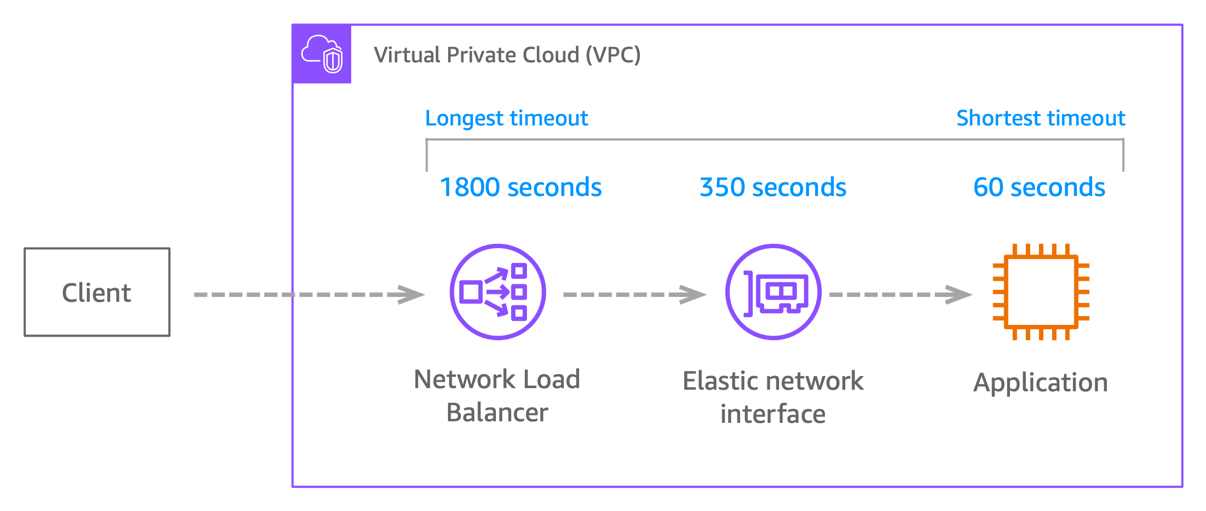
Figure 1. Timeout values along the connection path. The application closes idle connections first, so the close signal propagates outward before any infrastructure layer times out.
Document all timeout values in your architecture: application timeouts, load balancer settings, NAT gateway behavior, and EC2 ENI configuration. The most reliable approach is to implement keepalives shorter than the shortest timeout in the chain, which keeps connections active at every layer and sidesteps the alignment problem.
Test before production deployment
Always test new instance generations with representative workloads before production migration. Use realistic idle periods, not just continuous load, to surface timeout-related issues. Some problems only appear after hours of operation:
- Connection pool behavior drifts over time.
- Retry and backoff logic that works for 10 connections may fail at 10,000.
- Resource consumption (file descriptors, memory, conntrack entries) accumulates until something breaks.
- Timeout interactions across infrastructure layers surface only under sustained load.
Roll out gradually with canary or blue-green deployments so you can watch connection metrics during migration and revert quickly if something goes wrong. Monitor available conntrack resources, connection error rates, and application metrics (latency, retry counts, connection pool utilization) throughout the rollout.
Migrating to Nitro V6
AWS services such as Karpenter, and EC2 Auto Scaling groups using attribute-based instance type selection can place workloads on the latest instance generations automatically. This means your application may start running on Nitro V6 without any change from you, and the first indication can be unexpected connection failures after a node refresh or scaling event.
Whether the migration is intentional or automatic, the steps are the same:
- Implement TCP keepalives in your applications (set probes to start at 240 seconds or less).
- If your workload requires idle connections longer than 240 seconds, set an explicit ENI timeout in your Launch Template.
- Validate timeout alignment across your stack (application, ENI, load balancer, NAT gateway).
- Roll out gradually and monitor connection error rates.
Running Nitro V5 and Nitro V6 together
Mixed fleets work reliably if you set explicit timeouts on both generations, or (better) use TCP keepalives, which makes the default timeout irrelevant. You don’t need to maintain separate pools.
Running Nitro V5 only
No immediate action is required. V5 instances retain their existing timeout behavior. Implementing keepalives now makes any future migration a non-event.
Monitoring connection behavior
Track conntrack usage with ethtool metrics: ethtool -S eth0 | grep conntrack. Key metrics include conntrack_allowance_available (remaining capacity) and conntrack_allowance_exceeded (packets dropped because the allowance was exceeded).
A sudden jump in conntrack_allowance_available means many connections closed at once, often after a timeout event. A spike in conntrack_allowance_exceeded means packets are being dropped because you’ve hit your instance’s conntrack limit. Also monitor your application logs for connection errors, retries, and timeouts. For production monitoring, publish these metrics to CloudWatch via the unified CloudWatch agent so you can graph trends and set alerts. Both metrics require a recent ENA driver, available since January 2023.
For more information, see Monitoring EC2 Connection Tracking utilization using a new network performance metric.
Conclusion
The shift to a 350-second default TCP idle timeout on Nitro V6 is a change worth understanding, but it is not something you need to react to under pressure if your application handles connections correctly. Workloads that implement TCP keepalives, configure explicit ENI timeouts when they need them, and close idle connections cleanly behave the same on any Nitro generation.
A resilient approach operates at three layers:
- Application layer: Implement TCP keepalives or application-level heartbeats.
- Infrastructure layer: Configure ENI timeout values to match your workload, and validate alignment with upstream load balancers and NAT gateways.
- Monitoring layer: Track
conntrack_allowance_availableandconntrack_allowance_exceededalongside connection error rates.
Applications built this way stay resilient across any Nitro generation and any layer of infrastructure.
For detailed configuration instructions, see Introducing configurable idle timeout for connection tracking and the EC2 connection tracking documentation.
About the authors

John Pangle
John is a Principal Product Manager in the EC2 core team at Amazon Web Services. John focuses on instance networking, solving problems and building solutions to improve the instance-to-instance experience. In his free time, he enjoys catching a sports game, working on his golf game, trying new restaurants, exploring the outdoors, and spending time with his friends and family.

Matt Lehwess
Matt Lehwess is a Senior Principal Solutions Architect on the Amazon EC2 service team at Amazon Web Services. He works on EC2 strategy and customer engagement with AWS’s largest customers. Originally from Australia and now based in San Francisco, Matt enjoys surfing, climbing, and long-distance hiking in the California wilderness.