Networking & Content Delivery
Building Resiliency For AWS Direct Connect Maintenance Events To Mitigate Downtime
Building resilient network architectures that can withstand both planned and unplanned maintenance events is critical for organizations that rely on Amazon Web Services (AWS) Direct Connect for their hybrid connectivity. When your business depends on consistent, reliable connectivity between on-premises environments and AWS, understanding how to architect for maintenance activities becomes essential.
This 300-level content provides advanced technical depth and builds upon an assumption of your familiarity with fundamental concepts and hands-on experience with AWS Direct Connect and BGP routing protocols. If you’re new to Direct Connect, then start with the Direct Connect Getting Started Guide.
Key learning outcomes from this post include:
- Defining resiliency
- Descriptive guidance on how to build resilient network to minimize impact during maintenance events
- Optimize resiliency posture in current network
- Types of Direct Connect maintenance activities
- Overview of what happens during maintenance activities
- Communication of maintenance activities
- Architecting for resiliency during maintenance
- Preparing for maintenance
- Validating resiliency
The best practices guidance being discussed in this blogpost on crafting resiliency can enable you to architect your Direct Connect environment to minimize disruptions during both planned and emergent maintenance activities.
Defining resiliency
1) Introduction
When considering resiliency, you must understand that resiliency and redundancy are not the same. Having redundancy, such as an active and backup Direct Connect connection, does not necessarily equate to being resilient. Although redundancy (backup systems) contributes to resilience, resiliency encompasses more than just redundancy. True resilience involves the ability to prepare for and detect failures, respond effectively when failures occur, recover and continue operating during failures or maintenance activities, and learn from these experiences to ensure production workloads remain protected throughout the lifecycle.
2) Understanding scenarios where maintenance may cause disruption
Adequate network resiliency planning is essential to prevent costly downtime and business disruptions. To implement effective protective measures, it is important to first understand your specific application needs and business requirements. To demonstrate this, we consider two hypothetical business scenarios:
- Scenario A: You are hosting a critical livestreaming event that has a global visibility and your organization’s role is to provide uninterrupted broadcasting service for the end users without causing any performance issues. For such real time content distribution, any potential interruption or outages may cause a significant business impact if required resiliency is not configured.
- Scenario B: You operate a financial trading platform where low latency and maximum availability are critical. For this scenario, any outages must be limited to the shortest possible duration.
3) Implementation best practices
You should model both failure and maintenance activities to determine whether the remaining capacity during these scenarios provides you with the necessary comfort to operate.
For example, in Scenario A, you may not afford to tolerate even brief outages since livestreaming events has a global visibility, and any possible interruptions may result in negative customer experience. To ensure enough resiliency in place, you need to account for additional set of connections per location to handle the seamless failover operation. Similarly, in Scenario B, you may need to account for the impact of even a minor latency increase caused by a failure, because lack of resiliency could significantly disrupt your business operations. For this reason, you would need a second circuit, and possibly even a third at each location to provide operational comfort during a single connection failure, without risking the increased latency when failing over to the second location.
The key takeaway is that while redundancy is an important component of resiliency, the specific resiliency requirements are driven by the unique needs of your application and business. Carefully analyzing these requirements is essential to designing an appropriately resilient architecture. Thoroughly understanding your specific resiliency needs allows you to work backward to design a solution that delivers the appropriate level of redundancy and resiliency. This tailored approach, rather than a one-size-fits-all solution, is crucial to making sure that the architecture meets the unique requirements of each application and business.
What happens during Direct Connect maintenance?
Direct Connect maintenance is divided in two types: Planned Maintenance and Emergency Maintenance. To learn more about the types of maintenance, refer to the Direct Connect Maintenance documentation.
During planned maintenance on a Direct Connect endpoint, AWS shifts traffic from the affected endpoint in two phases:
- AS-Path prepend: AWS adds three more AS path copies to the BGP path attribute, which makes the route less desirable. This is done to allow your network to react to the upcoming route withdrawal. Direct Connect also deprioritize those routes received from your on-premises networking device toward the internal AWS network at this phase.
- Route withdrawal: After a 60-second wait, AWS withdraws all routes advertised to your on-premises networking device. This makes sure that your network can respond before maintenance activities begin. In this phase, Direct Connect also withdraws routes received from your on-premises networking device toward the internal AWS network. During maintenance, other than during times of device reboot, you should expect BGP to stay up. AWS keeps BGP peers established without route exchange during maintenance for monitoring.
AWS captures the device state through comprehensive pre-checks to analyze the state of the device prior to any changes being made. These pre-checks include traffic checks to make sure that the device is not carrying customer traffic before implementing changes on the endpoint.
During maintenance windows, network endpoints undergo necessary updates including configuration changes and system maintenance which may result in temporary connectivity interruptions as the systems process these changes and complete required reboots. Customer’s traffic will continue to remain on alternative paths if configured. When AWS has applied all changes to the endpoint, a series of post checks are performed and compared to the pre-checks to make sure that the change did not have any undesired effects and that the device is ready to be returned to service.
AWS initiates the shift operation in reverse of the shift away procedure described previously where we first advertise a less preferred route before advertising the preferred route with a wait of 60 seconds between phases. Again, this procedure applies both to routes advertised to your on-premises network, and routes advertised to the AWS internal network.
AWS performs more post checks to make sure that the endpoint is processing traffic and that it is operating as expected. During the maintenance window, the traffic is returned to the endpoint, and you would see a restoration of your traffic before AWS sends out the completion notice.
When all steps are completed, AWS marks the change as completed and the system sends out a completion notice using AWS Health Dashboard, informing you that the maintenance activity has been completed. To understand maintenance notification schedule, please visit AWS Direct Connect Maintenance.
For emergency maintenance where only a component of an endpoint is impacted, a traffic shift is not feasible. In these cases, you can expect a more abrupt termination of your connection during the maintenance event.
How should customers architect for maintenance
To make sure that production workloads continue functioning during both planned maintenance and unplanned impairments, Direct Connect recommends that you configure connectivity based on the Maximum Resilience topology. In this approach, you spread connections across at least two Direct Connect locations, with connecting to two unique physical endpoints within each Direct Connect location.
The goal of the Maximum Resilience topology is to provide redundancy and high availability (HA) for your connections. Diversifying the physical Direct Connect locations and endpoints means that the architecture reduces the risk of a single point of failure impacting connectivity. This helps maintain business continuity even when planned maintenance or unplanned events occur.
The Maximum Resilience topology for Direct Connect provides multiple layers of redundancy to maintain connectivity during both planned maintenance and unplanned impairments. Having dual connections terminating on separate endpoints within each Direct Connect location enables the architecture to make sure a failure on a single endpoint keeps the traffic local to that Direct Connect location. This avoids adding more latency that could occur if the traffic had to failover to the second Direct Connect location.
In a more severe scenario where an entire Direct Connect location is impacted or impaired, as depicted in Figure 1, your workloads can seamlessly shift to traverse the second Direct Connect location. This offers you resiliency beyond just a single Direct Connect location, providing another level of redundancy to protect against widespread outages.
The key benefit of the Maximum Resilience approach is that it enables you to maintain business continuity by avoiding service disruptions, even in the face of endpoint failures or complete Direct Connect location outages. This robust connectivity design is a recommended best practice to make sure that production workloads can withstand a variety of potential failure scenarios.
Figure 1: Direct Connect location failure scenario. This figure shows how traffic automatically fails over from a failed colocation facility to a secondary Direct Connect location, maintaining connectivity through geographically diverse paths. The architecture shows redundant connections across two locations, each with dual endpoints for Maximum Resilience.
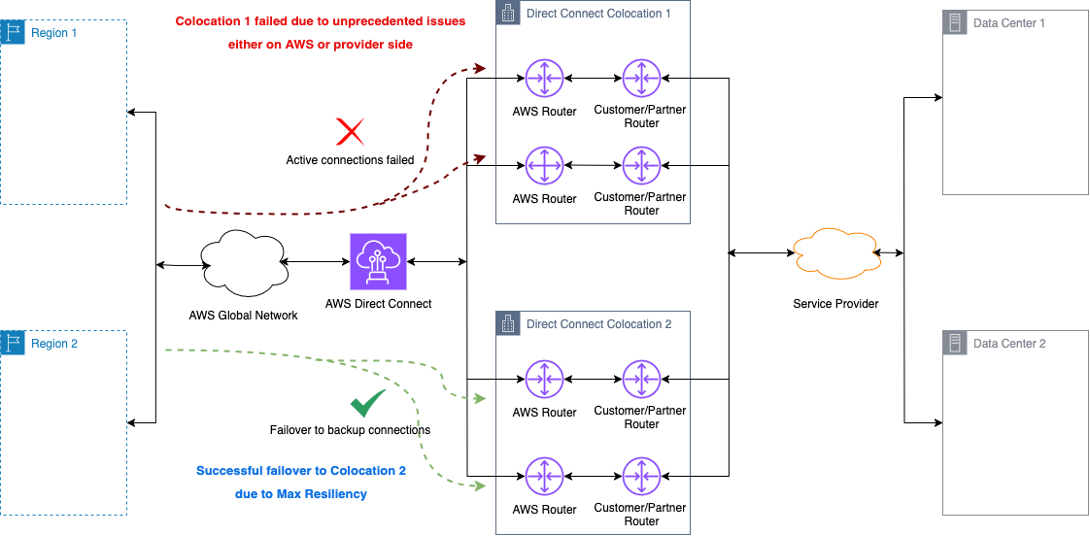
Figure 1: Colocation 1 failed due to unprecedented issues
You can configure your Direct Connect connections in either active/passive or active/active configuration across both colocations. However, you must take special care when using an active/active setup to avoid potential congestion issues during failure events.
In an active/active configuration, as shown in Figure 2, both connections are actively carrying traffic. Although this provides more overall bandwidth capacity, it also means that if one connection fails, the remaining connection must be able to handle the full traffic load without becoming congested. To prevent this, you must make sure that the usage on the active/active links does not exceed the available bandwidth of the remaining capacity during a failure scenario. Exceeding the bandwidth of the surviving connection could lead to performance degradation or service disruptions.
Careful monitoring and capacity planning is needed to configure active/active connections successfully. You need to ensure that the connections with adequate bandwidth are provisioned and continuously evaluate usage to avoid congestion if a failure occurs on one of the links. You can configure Amazon CloudWatch alarms to track the usage and get real time notifications if usage crosses the set threshold value.
Figure 2: Connections overutilization during failure scenarios. This figure shows how inadequate capacity planning in active/active configurations can lead to congestion when one link fails. The remaining connection must handle the full traffic load, which potentially causes performance degradation if not properly sized. The diagram shows the ability to failover to the redundant site to address congestion on the primary set of connections.
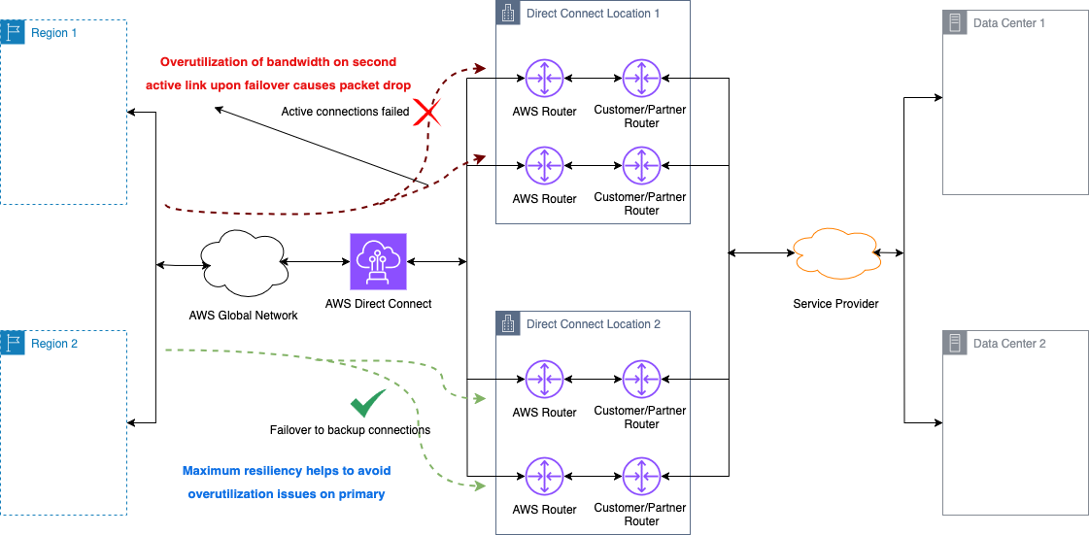
Figure 2: Link overutilization upon failover to secondary link
When a failure or maintenance event in the AWS network coincides with a failure or maintenance event on your network or your partner’s network, you benefit from the Maximum Resilience design. This architecture enables traffic to failover seamlessly to a second Direct Connect location, as shown in Figure 3.
Figure 3: Concurrent maintenance scenario handling. This architecture diagram shows how the Maximum Resilience topology maintains connectivity when both AWS and user/partner maintenance activities occur simultaneously. This shows the importance of geographic and endpoint diversity.
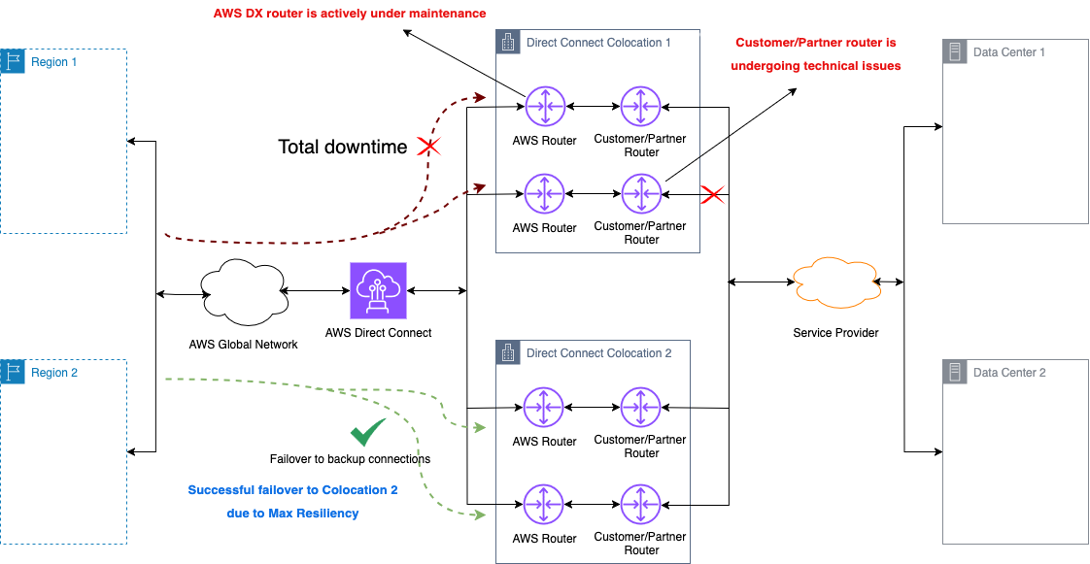
Figure 3: Concurrent maintenance on AWS router and partner or customer routers
How can customers prepare for maintenance
If you have a well-architected, resilient network design, then you typically do not need to take any preemptive actions during planned Direct Connect maintenance activities. During the maintenance, AWS doesn’t carry customer traffic from the endpoint undergoing work, which forces the traffic over your remaining connections.
In the first phase of the traffic shift, your endpoints still have a valid route to allow traffic to be forwarded. This gives your network time of 60 seconds to converge before AWS finally withdraws the routes from the Direct Connect endpoint.
A resilient network design helps you avoid disruptions during planned maintenance. You can avoid disruptions during planned maintenance. The redundant connections and automated failover capabilities built into your architecture enable traffic rerouting without the need for manual intervention. This shows why incorporating a practice of designing for high availability from the start pays off. If you have invested in a robust, resilient network topology, then you can weather planned maintenance events with minimal to no impact on your operations.
You may want to control when traffic moves between your redundant Direct Connect connections prior to planned maintenance. To do so, you can use the Local Preference BGP communities to signal to the Direct Connect endpoint to change the local preference value applied to routes learned from your endpoint. This controls how Direct Connect routes traffic back to your on-premises network.
For example, you can make a configuration change during a maintenance window of your choosing, prior to the planned Direct Connect maintenance. This could involve flipping the priority of your active/passive connections, or transitioning from an active/active to an active/passive setup. This makes sure that the link planned for maintenance does not carry traffic leading up to the scheduled work.
Taking these steps allows you to maintain greater control over your traffic flows and avoid disruptions during planned Direct Connect maintenance activities.
For unplanned emergent maintenance where traffic shifting is not feasible, and advanced notice is unavailable, you may experience several minutes of packet loss. This extended loss could be due to the way the Direct Connect connection is delivered to your device, with a layer 2 appliance such as a switch placed between your endpoint and the Direct Connect endpoint.
In this scenario, a failure of the link to the Direct Connect endpoint is not replicated on your endpoint. Therefore, your BGP session remains up until the hold timer lapses, delaying the detection and withdrawal of routes. This delayed convergence in the network path can prolong the service disruption.
To minimize packet loss during unplanned emergent maintenance events, AWS recommends that you configure your Virtual Interfaces with Bidirectional Forwarding Detection (BFD), as described in the Direct Connect Bidirectional Forwarding Detection documentation.
Enabling BFD improves the responsiveness of the BGP sessions between your endpoint and Direct Connect endpoints. Instead of the default 180-second BGP session timeout, BFD can reduce the failure detection time to sub-millisecond. This rapid failure detection allows BGP to quickly tear down the session and withdraw routes, enabling faster network convergence.
Without BFD, the delayed BGP session teardown can result in several minutes of packet loss when a link fails. Reducing the detection time from minutes to seconds allows BFD to help your workloads recover more quickly from failed TCP sessions during unplanned outages or emergent maintenance.
Implementing this BFD configuration is a recommended best practice to mitigate the impact of delayed convergence and minimize service disruptions during unplanned Direct Connect events.
How can users build confidence in their resiliency posture?
The shared nature of Direct Connect connections underscores the importance of validating your resiliency posture.
One side of the link is owned by AWS and the other by you (or through a Direct Connect Partner), thus there is inherently less visibility into the full configuration and behavior of the end-to-end connection. This lack of full transparency can create some uncertainty about how the network reacts during a failure or maintenance event.
To address this, it is a best practice for you to periodically test your redundant connections by shifting traffic during an approved maintenance window. This allows application owners to validate functionality and performance, making sure that everything continues to work as expected even when the backup links are in use.
You can use the AWS communities for local preference to control how traffic is routed back to you. A recommended approach is to flip the active/passive status of the redundant connections on a quarterly basis during a planned maintenance. This fully exercises the backup links and verifies correct route exchange and acceptance on both the AWS and your sides. Alternatively, you can perform periodic failover tests of your connections using the Direct Connect Failover Test through the AWS console.
You can also use Amazon CloudWatch Network Synthetic Monitor to provide active monitoring for your Direct Connect connections.
Proactively validating your resiliency gives you greater confidence in the reliability of your Direct Connect setup, despite the shared nature of the connection. Regular testing helps identify and resolve any potential issues before they impact production workloads during a real failure or maintenance scenario.
The shared ownership model demonstrates the need for you to take an active role in making sure of the resilience of your Direct Connect architecture. Periodic validation is a critical step to mitigate the risks inherent in this shared connectivity model.
Conclusion
In this post, we demonstrated how AWS Direct Connect maintenance works and how to architect your network for resilience during both planned and emergent maintenance activities. Implementing the Maximum Resilience topology with connections across multiple Direct Connect locations, configuring BFD for faster failure detection, and regularly testing your failover capabilities all help make sure that your critical workloads maintain connectivity during both planned maintenance windows and unexpected events. In turn, this supports your business continuity requirements.
Remember these key takeaways:
- Architect for Maximum Resilience with at least two Direct Connect connections per location
- Enable BFD to reduce failure detection time from minutes to seconds
- Regularly test your redundant connections to validate your resiliency posture
- Consider your specific business requirements when designing for appropriate resilience
To learn more about Direct Connect best practices, visit the Direct Connect documentation or explore our Networking and Content Delivery channel for more resources.
About the authors

Harold Lotz is a Senior Network Development Engineer at AWS. With more than two decades of networking experience, he supports the operation and design of all AWS Direct Connect infrastructure globally to help us deliver the highest standards for safety and security for our customers.

Mandar Sawant is a Senior Solutions Architect having a broad experience in AWS Core Networking Services to help customers design Well-Architected solutions. He is passionate about networking technologies and loves to innovate and help solve complex customer problems. Mandar holds a Master’s degree in Computer Networking from University of Missouri, Kansas City. Mandar is based out of Seattle and enjoys outdoor photography.