Networking & Content Delivery
How Betsson Services Limited elevated AWS hybrid connectivity to new heights with AWS Cloud WAN
Betsson Services Limited (or Betsson Group) is a leading global sports betting and gaming operator, delivering entertainment to millions of players through more than 20 award-winning brands, including its flagship brand, Betsson. With a proprietary technology stack and a diverse product offering, Betsson serves customers both directly (B2C) and indirectly (B2B).
At Betsson, our vision is to provide the best customer experience in the industry, with innovation, sustainability, and responsibility at the core of our strategy. Operating in Europe, South America, Asia, and North America with a team of more than 2,500 employees, we are committed to delivering a secure, scalable, and seamless gaming experience.
As part of this commitment, we leveraged AWS to build our global network spread across multiple continents. In this post, we explore the challenges we faced, and how we successfully implemented our AWS networking journey.
Building the AWS Cloud WAN Infrastructure
The current Betsson AWS network is based AWS Cloud WAN and AWS Network Firewall. This article describes why Betsson decided to use AWS Cloud WAN and how we implemented the network architecture, including the migration from AWS Transit Gateway to AWS Cloud WAN, the setup for egress and east-west inspection using AWS Network Firewall and the failures and lessons learned throughout the journey. The final AWS Cloud WAN setup is presented in Figure:
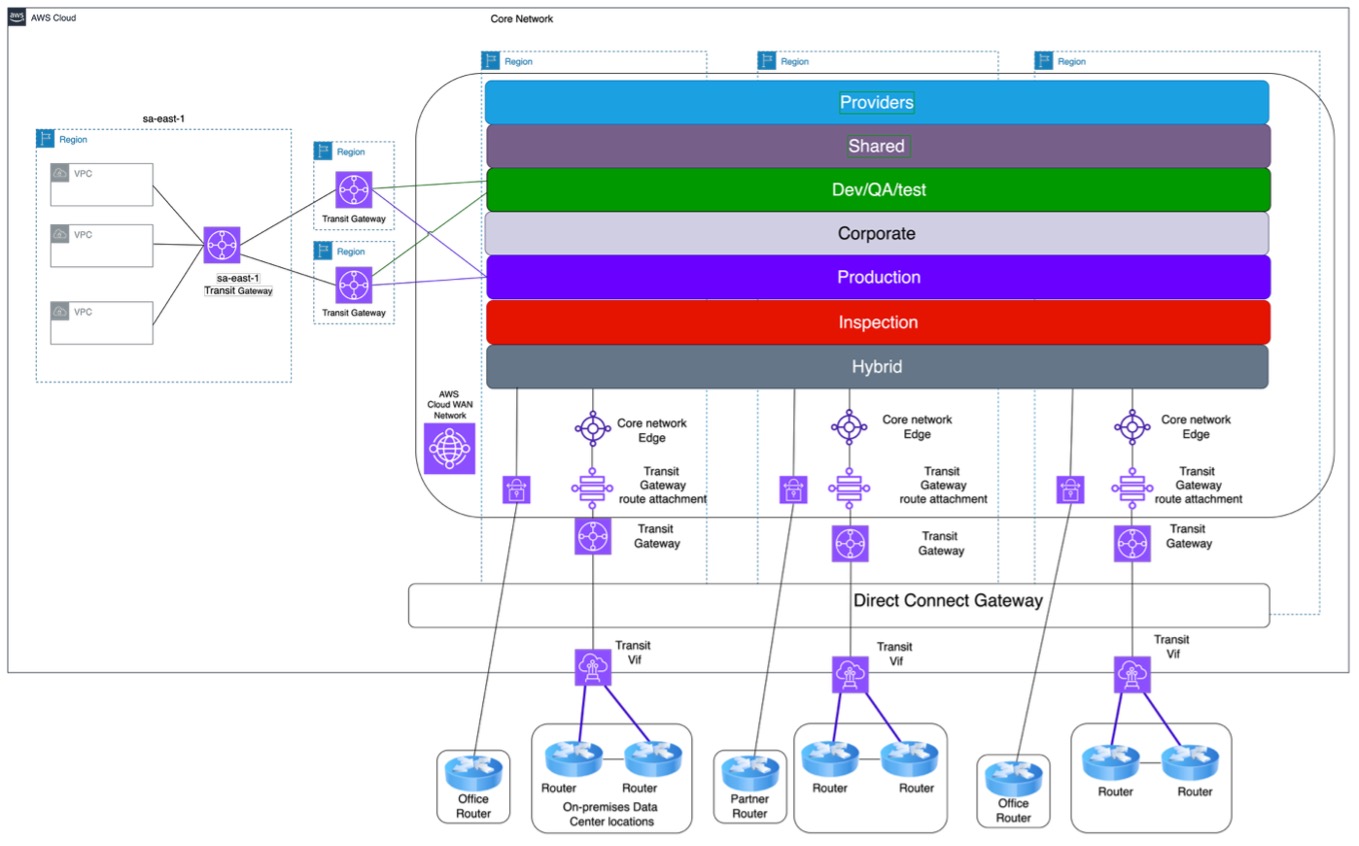
Figure 1: Final AWS Cloud WAN setup
Why we chose AWS Cloud WAN?
Betsson operates in three different continents and deploys their workloads in different AWS Regions. The initial network architecture was based on AWS Transit Gateway and due to rapid scaling, there were some overheads which were making the maintenance of the network infrastructure complex. A couple of issues that had to be tackled, were the complexity of a full mesh network topology, routing complexity for Active/Active Hub & Spoke topology and increase costs of the extra number of AWS Direct Connect links and AWS Transit Gateways. Betsson decided to integrate AWS Cloud WAN to tackle these issues by using:
- Automatic full mesh peering with dynamic routing out of the box
- A single AWS Cloud WAN core network using multiple segments extended to multiple regions
- Easy integration with other AWS services such as AWS Network Firewall
Planning and preparation phase
Due to 24×7 operations and presence in markets across different continents, it was very important for Betsson to migrate from AWS Transit Gateway to AWS Cloud WAN with zero downtime. The planning steps to achieve that were the following:
- Determine BGP ASN Ranges by documenting existing allocations/peering
- Determine IP addresses Allocations used by documenting existing allocations/peering
- Determine the security policies needed
- Determine the Segment sharing/routing policies needed
- Determine tag attachment policies/segments/isolation needed by classifying VPCs environment and security levels
- of the VPC routing table and updating of network diagrams, including IP CIDR address allocations and subnet route tables per VPC
- Migration steps
- Testing plans
AWS Cloud WAN BGP planning
Having unique BGP ASN number helped Betsson avoid having connectivity issues. The original design of BGP AS number allocations was based on region and per environment.
An inventory of all the BGP ASN used was conducted for both the on-premises setups and all the AWS Network environment. All the findings were and any network diagrams were updated to reflect the findings. For AWS Cloud WAN, a new unique sequential BGP ASN range was defined and used.
AWS Cloud WAN Routing, sharing and Security Policy used
Since AWS Cloud WAN supports multiple segments, it gave us the very useful option to integrate multiple environments on the same AWS Cloud WAN global network while maintaining the security posture needed. The routing/security policy chosen were as follows:
- Any sensitive VPCs within a segment must use attachment isolation and must pass through a firewall
- Any communication between the different segments must pass through a firewall
- Any traffic to and from on-premises must pass through a firewall. (Hybrid Segment)
- Any external traffic within AWS Cloud WAN to the Internet must pass through the central egress environment
- All Regions must have local inspection and are not dependent on other regions
- At the time of the migration, AWS Cloud WAN was not supported in sa-east-1 region, so we resorted to a set of AWS Transit Gateways using multiple routing domains. Each AWS Transit Gateway must be attached to the appropriate segment to keep the same trust level
- Inspection segment was shared with all the other segments
AWS Cloud WAN attachment policy
- The requirements used for the attachment classification was the following:
- Auto-approve VPC attachments for all segments except for the production segment
- Any external connectivity integrating with AWS Cloud WAN such as AWS Site-to-Site VPN attachment, Connect Attachments and for AWS Direct Connect Gateway are mapped to the Hybrid segment
- AWS Transit Gateway route table attachments used to integrate multiple AWS Cloud WAN
- AWS Transit Gateway route table attachments used to integrate sa-east-1 region
- Automatically mapping attachments to the appropriate segment, depending on the attachment type. This was done by using tag values and attachment types
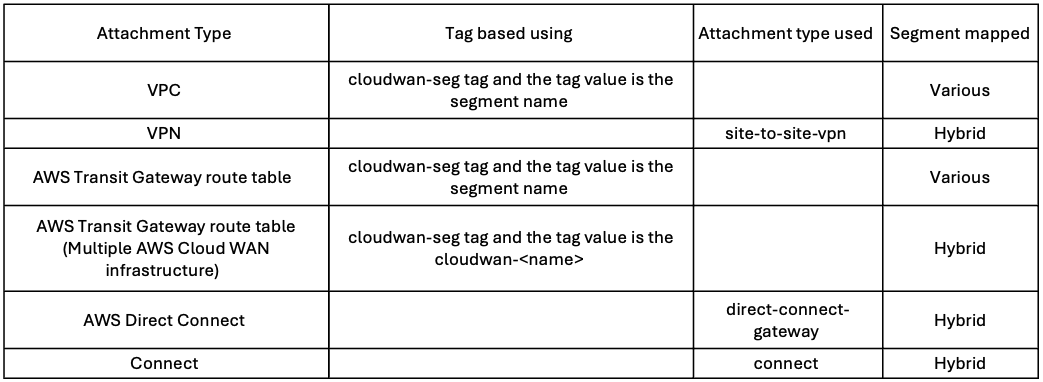
Handling Regions without Cloud WAN support
Betsson operates in multiple countries and use an AWS Region which was not supported by AWS Cloud WAN during the migration. The approach adopted was to connect multiple environments using a single AWS Transit Gateway per Region to optimize cost. AWS Transit Gateway supports multiple routing domains and all of them are mapped with the respective AWS Cloud WAN segment. One was deployed in the unsupported region, whilst another one was configured in the supported one and AWS Transit Gateway peering was used between the two gateways. The different AWS Transit Gateway routing domain was attached to the AWS Cloud WAN respective segment using the route table attachment. For High availability purposes multiple regions were used to interconnect the sa-east-1 region as presented in Figure 2.
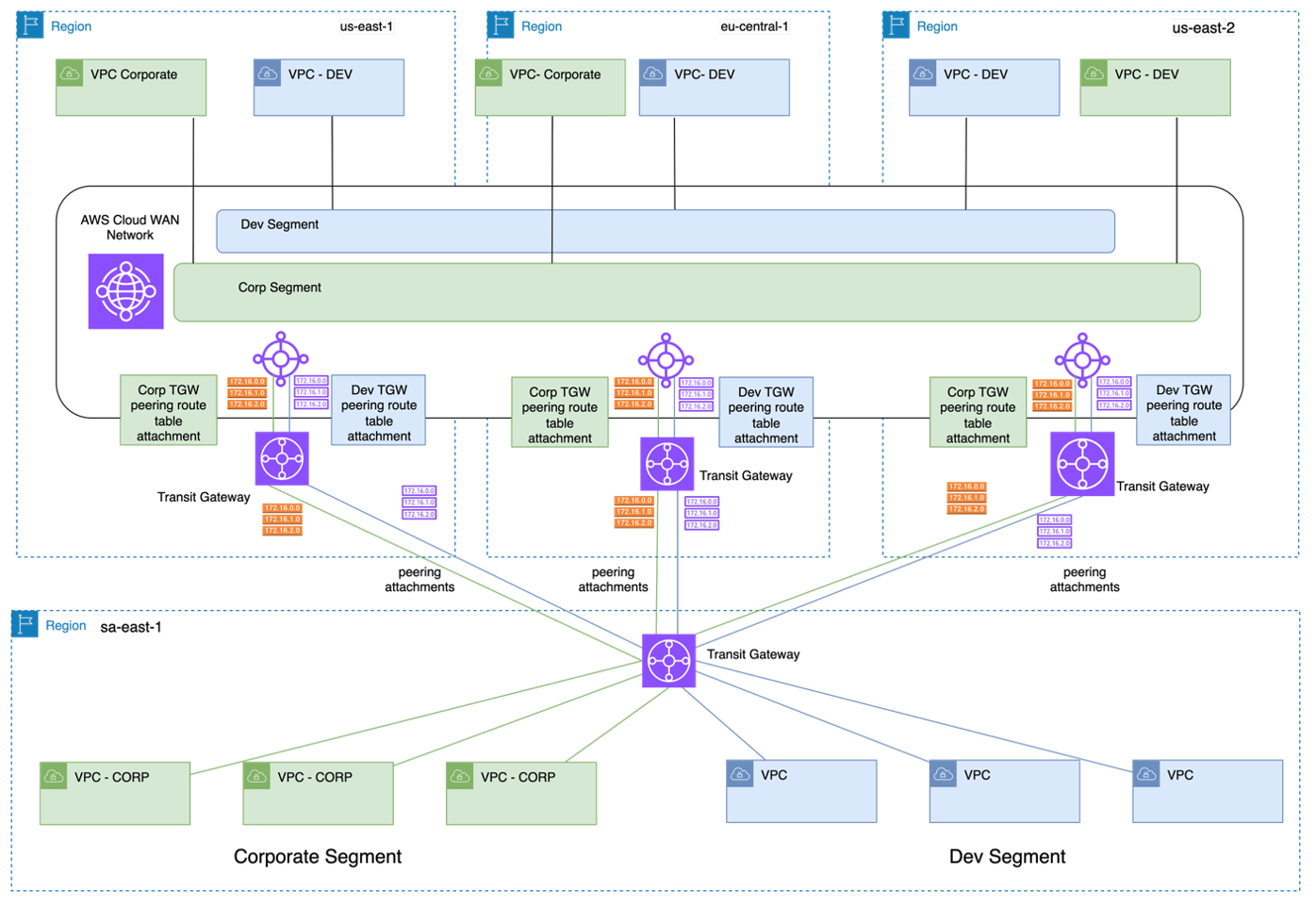
Figure 2: Integrating sa-east-1 region to AWS Cloud WAN using AWS Transit Gateway
Building the actual AWS Cloud WAN
A standard deployment was used to build the AWS Cloud WAN infrastructure using the official documentation. For our network setup, the following AWS Cloud WAN segments were used:
- Production
- Test
- Dev
- Corporate
- Shared Services
- Inspection
- Hybrid
In preparation for the migration all the VPNs needed were created beforehand and all the AWS Transit Gateways were peered with AWS Cloud WAN beforehand. The egress VPCs and Inspection VPC were also created beforehand. Following the best practices, the egress/inspection VPC subnets were deployed in 3 Availability Zones.
Migration Steps
VPC migration to AWS Cloud WAN
The actual changes to migrate from AWS Transit Gateway to AWS Cloud WAN, were all done using Infrastructure as Code via Terraform. All the VPC needed were attached to the appropriate segments in AWS Cloud WAN beforehand. The VPC route table for the private subnets were changed from transit gateway (tgw-*) to Cloud WAN (*core-network*) as described in Figure 3.

Figure 3: VPC Route Tables
For existing VPCs, the AWS NAT Gateway entry in the private subnets was kept due to IP allowlisting issues but for all the new VPCs created traffic from the private subnets was routed to AWS Cloud WAN forwarded to the egress VPC and all outgoing traffic will be inspected by AWS Network Firewall.
VPN migration to AWS Cloud WAN
To achieve zero downtime migration for all the site-to-site IPSEC VPNs, a new set of VPNs were deployed from the on-premises equipment to AWS Cloud WAN. The actual migration for the VPN attachments was straight forward as the configuration was done by routing the traffic from the AWS Transit Gateway VPN to the AWS Cloud WAN VPN instead. This was possible because BGP routing was used. AS-Prepends and local preference BGP attributes were used to reroute the traffic from the on-premises routers.
AWS Transit Gateway/Direct Connect Gateway attachment
When the migration was done, there was no direct integration for AWS Direct Connect Gateway with AWS Cloud WAN, so we used the AWS Transit Gateway route-table peering to interconnect the AWS Direct Connect gateway to AWS Cloud WAN.
Testing plans
A concise test plan was used to validate that everything was working as expected before the actual migration was done. The steps done were as follows:
- Connectivity
- Testing connectivity within each segment across regions by using test VPCs
- Testing connectivity within each segment across regions from on-premises by using test VPNs and dummy direct connects
- Testing connectivity from the regions not supported by AWS Cloud WAN supported
- Observability
- Monitoring of all attachments to include throughput graphs with alarms thresholds
- Monitoring of AWS Network Manager events for
- Blackhole route and no route
- Topology changes
- Administrative tasks such as policies changes
- Failover
- Simulate VPN failures
- Simulate Direct Connect failures by using AWS Direct Connect Resiliency Toolkit failover test
- Performance
- Testing throughput by running Iperf between Amazon EC2 instances across segments and Regions and comparing results with the same tests done on the AWS Transit Gateway directly and with the AWS Network Firewall Inspection. The required outcome was to avoid having any performance degradation while using the new setup. The results that we got, confirmed no performance penalty and at some cases we got even lower latency.
- Validating the migration from AWS Transit Gateway to AWS Cloud WAN process
- Execute connectivity scripts to test connectivity. Manual scripts and AWS Reachability Analyzer were used to perform the connectivity scripts
- For each VPC after the migration was done
- For each transit gateway peering VPCs
- For each AWS Direct Connect connection
- Execute connectivity scripts to test connectivity. Manual scripts and AWS Reachability Analyzer were used to perform the connectivity scripts
Results and next steps
The migration project from AWS Transit Gateway to AWS Cloud WAN was successfully implemented, and fully achieved the primary goals:
- Migration done with zero downtime
- Reduce the overall costs which was achieved by 10-15%
- Ability to deploy to a new AWS region in a few minutes rather than hours
- Improved latency between regions up to 100 ms in some use cases
The next steps for the AWS Cloud WAN infrastructure are as follows:
At the time of the migration, Network function groups and service insertion were not available. These will be implemented soon to improve the AWS Cloud WAN inspection architecture. Currently inspection was implemented in two regions. With service insertion inspection will be implemented in all regions
Similarly to service insertion, AWS Direct Connect attachment direct integration was not available during the migration and as such will be deployed accordingly. The final network architecture after the successful migration to AWS Cloud WAN is depicted in Figure 4 (we are showing only QA/Test/Dev and Corporate segments for simplicity reasons).
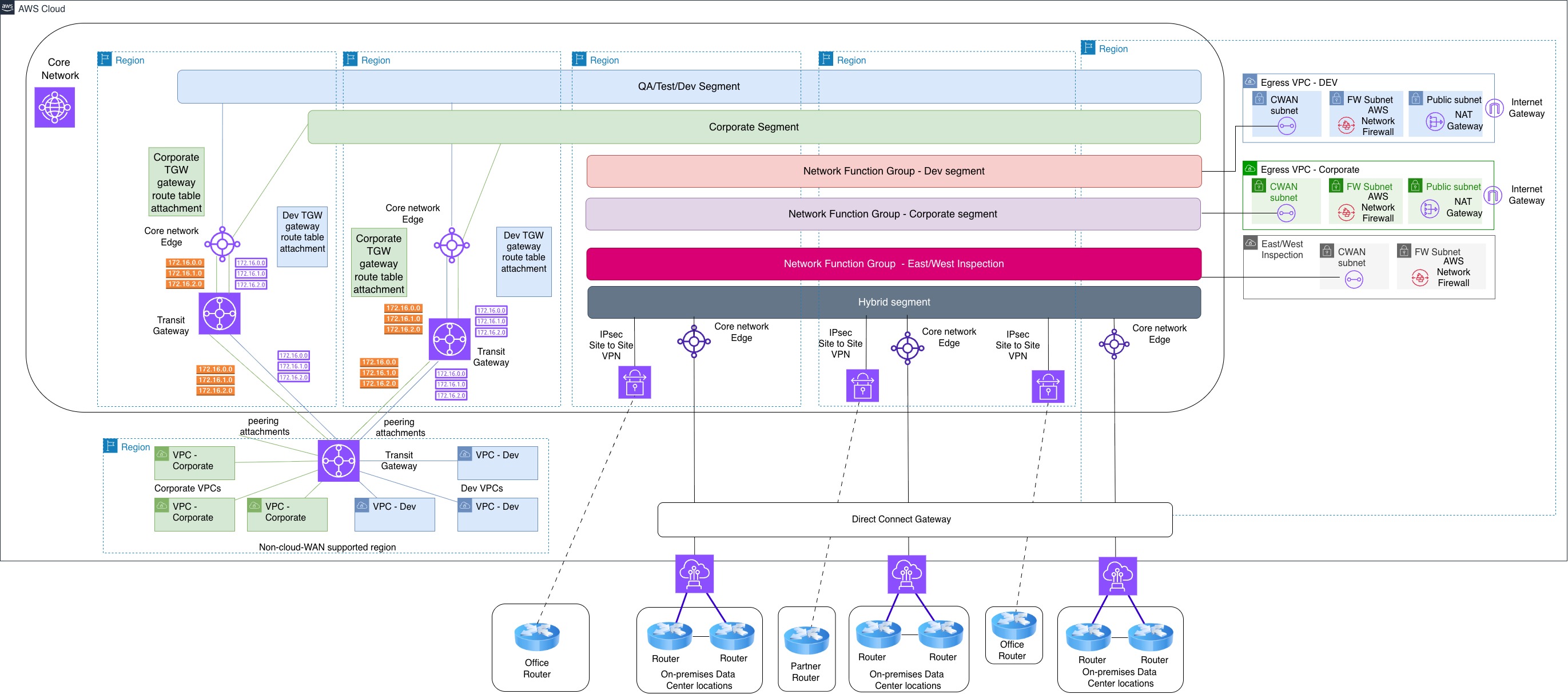
Figure 4: Network Architecture after AWS Cloud WAN migration
Conclusion
AWS Cloud WAN was the right choice for us for our AWS environment. With AWS Cloud WAN, we improved the time to market in different regions, the ability to inspect traffic using AWS Network Firewall and the reduction of latency between spoke regions due to the automatic AWS Cloud WAN full mesh capabilities for Core Network Edges. Finally, we also managed to achieve considerable cost savings.
About the authors

Dimitrios Papageorgiou
Dimitrios Papageorgiou is a Senior Solutions Architect at Amazon Web Services, where he assists customers in designing scalable, robust, and secure systems ready to support global markets. He is particularly passionate about data engineering and its applications in addressing customers’ business needs. Additionally, he enjoys tweaking, writing, and improving the code of large, high-performance backend systems.

Kenneth Attard (Guest)
Kenneth Attard is an Enterprise Architect at Betsson Group, where he leads architecture initiatives across on-premises and AWS cloud networking, AWS cloud security, and AWS cloud governance. He specializes in designing secure, resilient, and highly scalable AWS networking environments that support complex, enterprise-grade platforms. Kenneth is also an AWS Community Hero, and the Malta AWS User Group leader and is the primary organizer of the Malta AWS Community Day. He is also a seasoned public speaker, and has presented at numerous AWS events.