AWS Security Blog
How to customize your response to layer 7 DDoS attacks using AWS WAF Anti-DDoS AMR
Over the first half of this year, AWS WAF introduced new application-layer protections to address the growing trend of short-lived, high-throughput Layer 7 (L7) distributed denial of service (DDoS) attacks. These protections are provided through the AWS WAF Anti-DDoS AWS Managed Rules (Anti-DDoS AMR) rule group. While the default configuration is effective for most workloads, you might want to tailor the response to match your application’s risk tolerance.
In this post, you’ll learn how the Anti-DDoS AMR works, and how you can customize its behavior using labels and additional AWS WAF rules. You’ll walk through three practical scenarios, each demonstrating a different customization technique.
How the Anti-DDoS AMR works at a high level
The Anti-DDoS AMR establishes a baseline of your traffic and uses it to detect anomalies within seconds. As shown in Figure 1, when the Anti-DDoS AMR detects a DDoS attack, it adds the event-detected label to all incoming requests, and the ddos-request label to incoming requests that are suspected of contributing to the attack. It also adds an additional confidence-based label, such as high-suspicion-ddos-request, when the request is suspected of contributing to the attack. In AWS WAF, a label is metadata added to a request by a rule when the rule matches the request. After being added, a label is available for subsequent rules, which can use it to enrich their evaluation logic. The Anti-DDoS AMR uses the added labels to mitigate the DDoS attack.
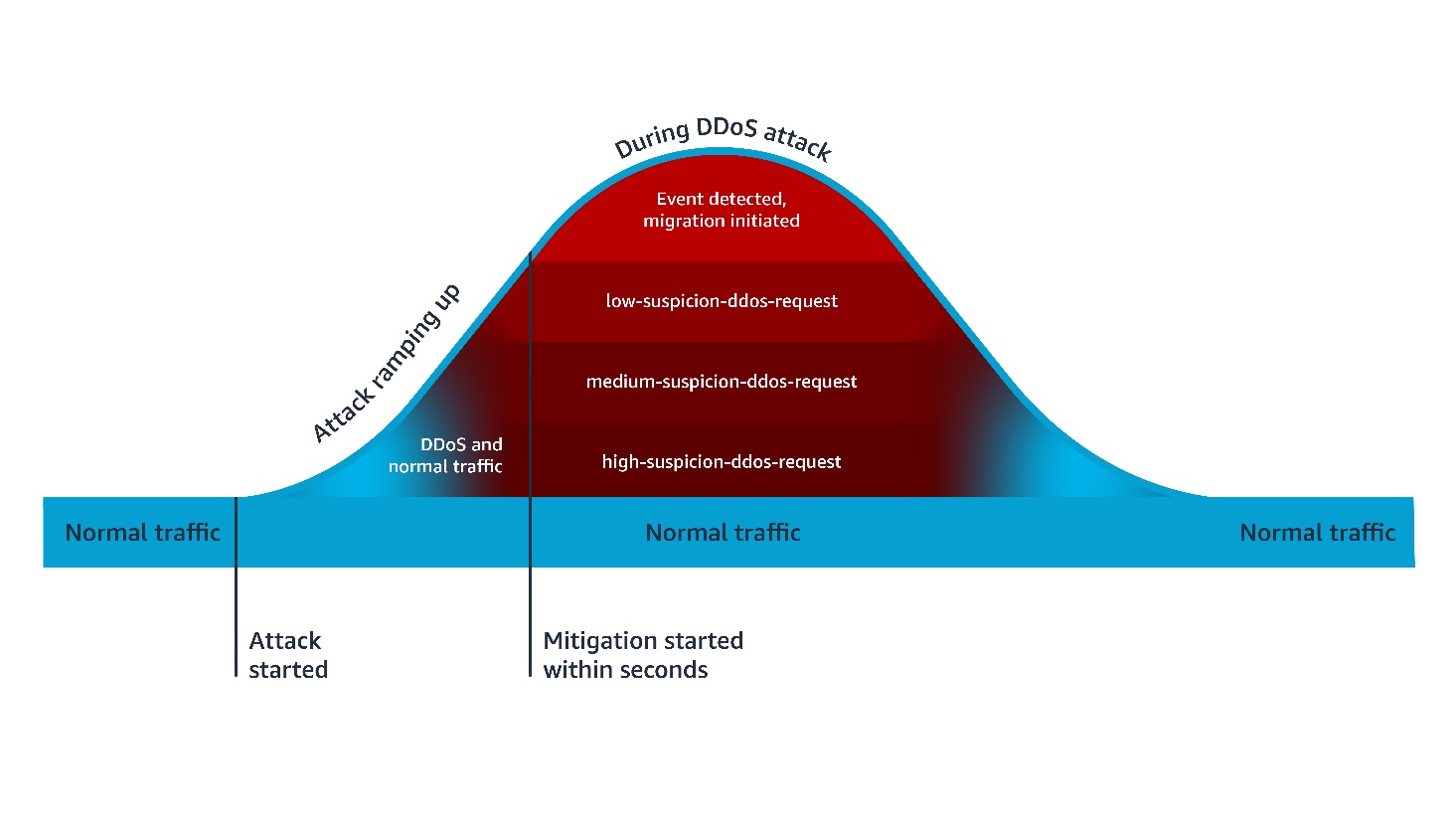
Figure 1 – Anti-DDOS AMR process flow
Default mitigations are based on a combination of Block and JavaScript Challenge actions. The Challenge action can only be handled properly by a client that’s expecting HTML content. For this reason, you need to exclude the paths of non-challengeable requests (such as API fetches) in the Anti-DDoS AMR configuration. The Anti-DDoS AMR applies the challengeable-request label to requests that don’t match the configured challenge exclusions. By default, the following mitigation rules are evaluated in order:
- ChallengeAllDuringEvent, which is equivalent of the following logic: IF
event-detectedANDchallengeable-requestTHEN challenge. - ChallengeDDoSRequests, which is equivalent to the following logic: IF (
high-suspicion-ddos-requestORmedium-suspicion-ddos-requestORlow-suspicion-ddos-request) ANDchallengeable-requestTHEN challenge. Its sensitivity can be changed to match your needs, such as only challenge medium and high suspicious DDoS requests. - DDoSRequests, which is equivalent to the following logic: IF
high-suspicion-ddos-requestTHEN block. Its sensitivity can be changed to match your needs, such as block medium in addition to high suspicious DDoS requests.
Customizing your response to layer 7 DDoS attacks
This customization can be done using two different approaches. In the first approach, you configure the Anti-DDoS AMR to take the action you want, then you add subsequent rules to further harden your response under certain conditions. In the second approach, you change some or all the rules of the Anti-DDoS AMR to count mode, then create additional rules that define your response to DDoS attacks.
In both approaches, the subsequent rules are configured using conditions you define, combined with conditions based on labels applied to requests by the Anti-DDoS AMR. The following section includes three examples of customizing your response to DDoS attacks. The first two examples are based on the first approach, while the last one is based on the second approach.
Example 1: More sensitive mitigation outside of core countries
Let’s suppose that your main business is conducted in two main countries, the UAE and KSA. You are happy with the default behavior of the Anti-DDoS AMR in these countries, but you want to block more aggressively outside of these countries. You can implement this using the following rules:
- Anti-DDoS AMR with default configurations
- A custom rule that blocks if the following conditions are met: Request is initiated from outside of UAE or KSA AND request has
high-suspicion-ddos-requestormedium-suspicion-ddos-requestlabels
Configuration
After adding your Anti-DDoS AMR with default configuration, create a subsequent custom rule with the following JSON definition.
Note: You need to use the AWS WAF JSON rule editor or infrastructure-as-code (IaC) tools (such as AWS CloudFormation or Terraform) to define this rule. The current AWS WAF console doesn’t allow creating rules with multiple AND/OR logic nesting.
Similarly, during an attack, you can more aggressively mitigate requests from unusual sources, such as requests labeled by the Anonymous IP managed rule group as coming from web hosting and cloud providers.
Example 2: Lower rate-limiting thresholds during DDoS attacks
Suppose that your application has sensitive URLs that are compute heavy. To protect the availability of your application, you have applied a rate limiting rule to these URLs configured with a 100 requests threshold over 2 mins window. You can harden this response during a DDoS attack by applying a more aggressive threshold. You can implement this using the following rules:
- An Anti-DDoS AMR with default configurations
- A rate-limiting rule, scoped to sensitive URLs, configured with a 100 requests threshold over a 2-minute window
- A rate-limiting rule, scoped to sensitive URLs and to the
event-detectedlabel, configured with a 10 requests threshold over a 10-minute window
Configuration
After adding your Anti-DDoS AMR with default configuration, and your rate-limit rule for sensitive URLs, create a subsequent new rate limiting rule with the following JSON definition.
Example 3: Adaptive response according to your application scalability
Suppose that you are operating a legacy application that can safely scale to a certain threshold of traffic volume, after which it degrades. If the total traffic volume, including the DDoS traffic, is below this threshold, you decide not to challenge all requests during a DDoS attack to avoid impacting user experience. In this scenario, you’d only rely on the default block action of high suspicion DDoS requests. If the total traffic volume is above the safe threshold of your legacy application to process traffic, then you decide to use the equivalent of Anti-DDoS AMR’s default ChallengeDDoSRequests mitigation. You can implement this using the following rules:
- An Anti-DDoS AMR with
ChallengeAllDuringEventandChallengeDDoSRequestsrules configured in count mode. - A rate limiting rule that counts your traffic and is configured with a threshold corresponding to your application capacity to normally process traffic. As action, it only counts requests and applies a custom label—for example,
CapacityExceeded—when its thresholds are met. - A rule that mimics
ChallengeDDoSRequestsbut only when theCapacityExceededlabel is present: Challenge ifddos-request,CapacityExceeded, andchallengeable-requestlabels are present
Configuration
First, update your Anti-DDoS AMR by changing Challenge actions to Count actions.
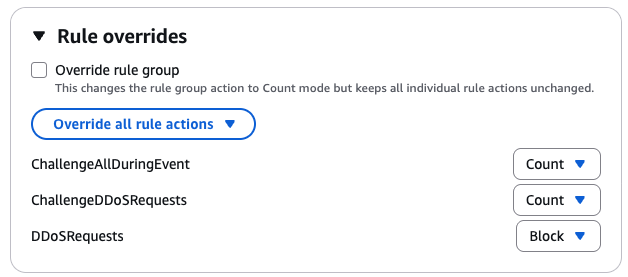
Figure 2 – Updated Anti-DDoS AMR rules in example 3
Then create the rate limit capacity-exceeded-detection rule in count mode, using the following JSON definition:
Finally, create the challenge-if-ddos-and-capacity-exceeded challenge rule using the following JSON definition:
Conclusion
By combining the built-in protections of the Anti-DDoS AMR with custom logic, you can adapt your defenses to match your unique risk profile, traffic patterns, and application scalability. The examples in this post illustrate how you can fine-tune sensitivity, enforce stronger mitigations under specific conditions, and even build adaptive defenses that respond dynamically to your system’s capacity.
You can use the dynamic labeling system in AWS WAF to implement customization granularly. You can also use AWS WAF labels to exclude costly logging of DDoS attack traffic.
If you have feedback about this post, submit comments in the Comments section below.