AWS Storage Blog
Accelerate development workflows with Amazon EBS Volume Clones
Providing a copy of production data to developers, testers, or disaster recovery (DR) teams quickly is a common operational challenge our customers face. Whether it’s a daily database refresh for a support environment, a one-time troubleshooting session that requires real-world data, or a disaster recovery drill that needs to run against a current replica, the underlying requirement is the same: create a usable copy of an existing volume and do it fast. Until now, the standard approach has been to create an Amazon Elastic Block Store (Amazon EBS) snapshot of the source volume and then restore it into a new volume. This workflow is reliable, but it introduces latency, operational overhead, and wait times that can stretch into hours for large volumes. For teams that need copies frequently or on short notice, this friction adds up. It delays development cycles, limits the frequency of DR testing, and often results in teams working with stale data or skipping validation steps entirely because the cost of getting a fresh copy is too high.
Amazon EBS Volume Clones address this by making it possible to create an instant copy of an EBS volume. The resulting clone is a point-in-time copy that is immediately available and can be attached to an instance and used the moment it is created.
In this post, we discuss how EBS Volume Clones can transform your workflows.
Overview of EBS Volume Clones
EBS Volume Clones provide a fast way to create instant point-in-time copies of your EBS volumes within the same Availability Zone. When you create a Volume Clone, the new volume is available instantly, so you can attach it to an instance and start using it. Volume Clones are crash-consistent, capturing data blocks written to the source volume the moment the clone operation begins. You don’t need to wait for data transfer to complete before accessing your cloned volume; you get immediate access with single-digit millisecond latency.
Although the cloned volume is immediately usable, EBS copies data blocks from the source volume in the background through an initialization process. During this phase, the clone delivers baseline performance that is sufficient for most workloads. When initialization is complete, the cloned volume delivers its full provisioned performance, whether that’s the IOPS and throughput of gp3, io2, or other volume types. Importantly, the clone operation doesn’t affect the performance of your source volume. You can continue using it normally throughout the process.
Refreshing development environments with production data
Teams running large production databases such as Oracle, SQL Server, PostgreSQL, MySQL, or InterSystems IRIS often need to regularly refresh copies of that data into development, quality assurance (QA), and support environments. Before Volume Clones, this meant snapshot-and-restore cycles that could take hours for multi-terabyte databases—during which time teams were either waiting or working with stale data.
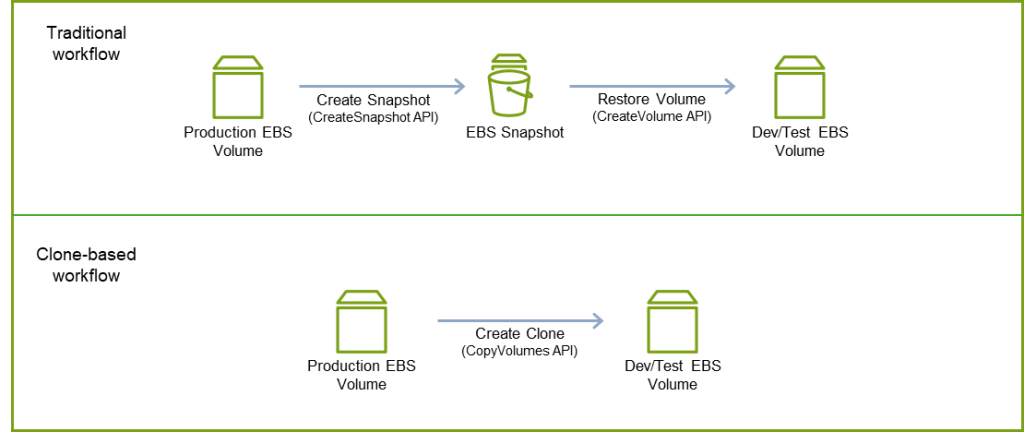
For example, a healthcare organization serving over 1 million members uses Volume Clones to refresh their Electronic Health Record (EHR) support environments daily. They manage approximately 118 TiB of data across multiple volumes, and their previous snapshot-based workflow took approximately 12 hours. After they built automation using Volume Clones, that daily process now completes in around 54 minutes, a 93% reduction with no impact to their production systems, freeing their technical teams to focus on improving healthcare delivery rather than managing infrastructure.
The following diagram compares the organization’s traditional workflow with a clone-based workflow.
Beyond dev/test: How customers are using Volume Clones
Refreshing development environments is the most common starting point for Volume Clones, but the feature applies wherever you need a fast copy of an existing volume. In this section, we discuss additional workflows where customers are using Volume Clones.
Disaster recovery testing
Most organizations know they should test their DR procedures more frequently than they do. The barrier is operational: standing up a test environment against real data, running the test, and then rolling back to resume normal operations is complex enough that teams often test only when compliance requires it.
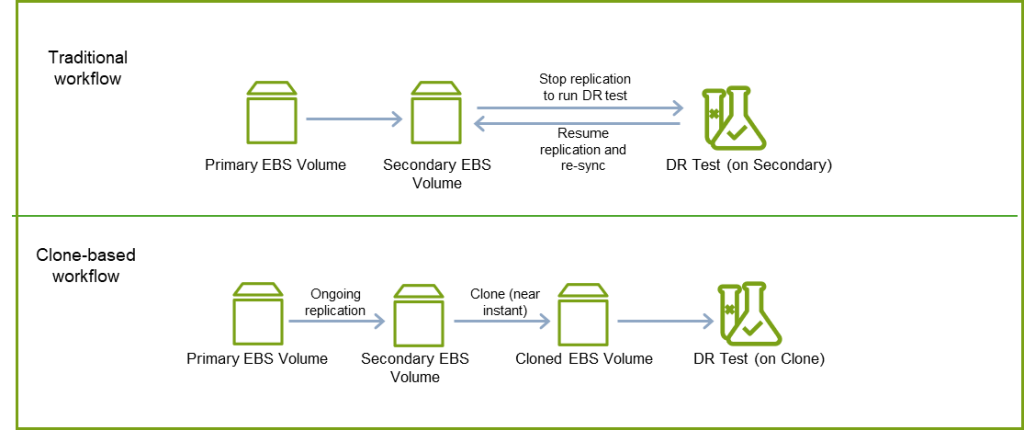
EPS Strategies, a company that delivers mainframe performance optimization through their Pivotor reporting software, previously had to interrupt their ongoing replication process every time they wanted to run a DR drill. With Volume Clones, they now create a clone of their secondary volume and test against it—without disrupting their replication or recovery posture.
“Volume Clones reduce our operational overhead significantly,” says the CTO of EPS Strategies. “Previously, our DR testing required stopping replication, moving volumes, testing, and complex rollback procedures. Now we simply create a clone of our secondary volume and test without disrupting our ongoing DR readiness. The feature also provides an additional safety net during actual DR scenarios by maintaining an original copy from the start of DR activation, avoiding time-consuming recoveries from S3 backups if needed.”
The following diagram compares the company’s traditional workflow with a clone-based workflow.
Blue/green deployments
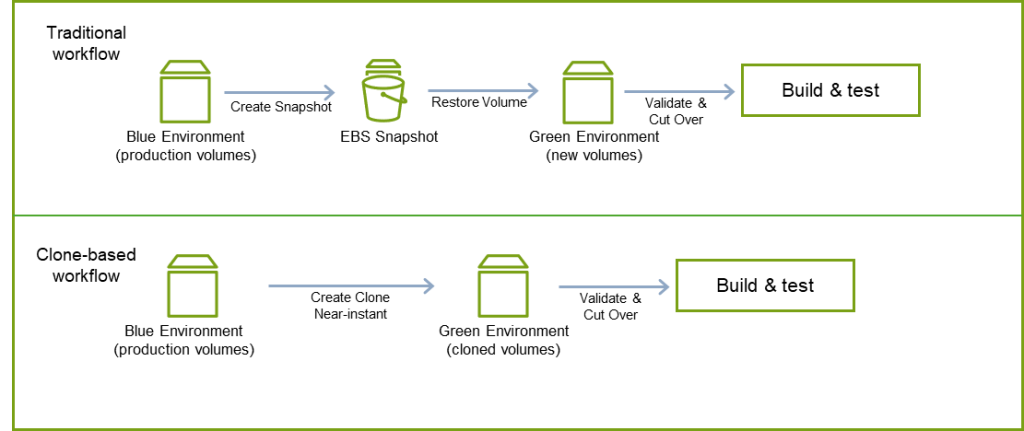
In a blue/green deployment, the speed at which you can stand up the green environment directly determines how quickly and safely you can release. For stateful components such as databases, caches, and persistent application volumes, creating the green environment has traditionally required snapshot-based volume duplication with associated wait times and warm-up latency. Volume Clones help teams create instant, data-consistent copies of production volumes to seed the green environment, validate the deployment, and cut over with confidence. For organizations operating large fleets where a single deployment may involve cloning dozens or hundreds of volumes in parallel, this translates directly into shorter release cycles and reduced deployment risk.
The following diagram compares the traditional workflow using blue/green deployment with a clone-based workflow.
CI/CD pipelines
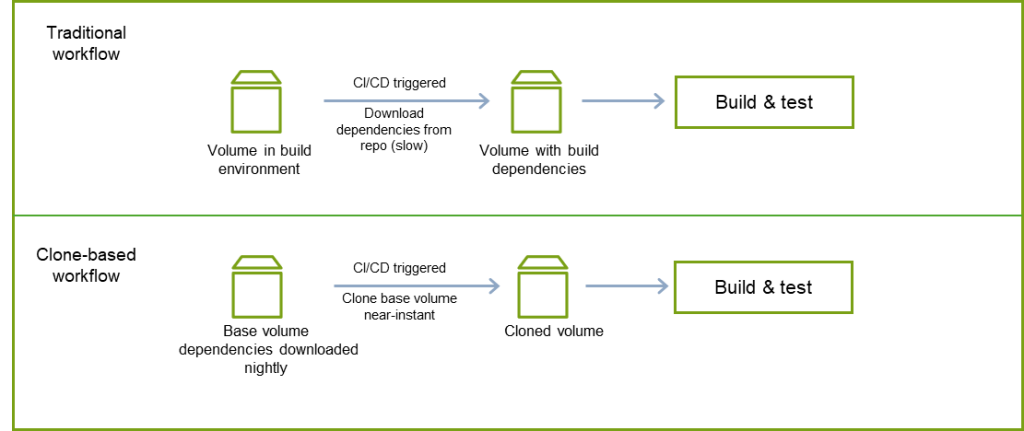
Customers are using Volume Clones to seed continuous integration and delivery (CI/CD) build environments with prepopulated dependencies, package caches, or test datasets. The process involves maintaining a base volume with a regularly updated set of build artifacts, cloning it at the start of each pipeline run, building against the clone, and deleting it when the job is complete.
A customer who builds mobile games adopted this approach after iterating through several alternatives, including remote repository downloads, Docker layer caching, and EBS snapshots. With Volume Clones, they reduced their end-to-end build time from over 12 minutes to under 4, a 60% reduction.
The following diagram compares the company’s traditional workflow with a clone-based workflow.
Operational maintenance and patching
Customers are using Volume Clones as a safety mechanism for routine maintenance. One pattern involves cloning root volumes before applying system patches, validating the patch against the clone, and proceeding to production only after confirmation. If an issue occurs, the original volume is untouched. When automated through AWS Lambda, this turns monthly patching from a critical maintenance window into a routine operation with a built-in rollback path.
Getting started with EBS Volume Clones
Creating Volume Clones is straightforward and can be accomplished through the AWS Management Console, the AWS Command Line Interface (AWS CLI) copy-volumes command, AWS SDKs, or infrastructure as code (IaC) tools like AWS CloudFormation.
Using the AWS Management Console
On the Amazon Elastic Compute Cloud (Amazon EC2) console, complete the following steps:
1. On the Amazon EC2 console, choose Volumes under Elastic Block Store in the navigation pane.
2. Select your source volume, and on the Actions dropdown menu, choose Copy volume.
3. Configure your desired volume parameters (type, size, IOPS, throughput), and choose Copy volume.
The cloned volume becomes available within seconds.
Using the AWS CLI
For programmatic access or automation, use the copy-volumes command:
aws ec2 copy-volumes \
--source-volume-id vol-01234567890abcdef \
--volume-type gp3 \
--size 100 \
--iops 3000 \
--throughput 250
This example creates a clone of volume vol-01234567890abcdef with gp3 volume type, 100 GiB size, 3,000 IOPS, and 250 MiBps throughput. The cloned volume becomes immediately available for attachment to EC2 instances in the same Availability Zone.
Integration with Amazon EKS
Volume Clones integrate with the Amazon EBS Container Storage Interface (CSI) driver, so you can clone persistent volumes for containerized applications running on Amazon Elastic Kubernetes Service (Amazon EKS).
Conclusion
Amazon EBS Volume Clones change how organizations approach data copy workflows. By reducing wait times and delivering immediate access to production-identical data, teams can move faster—refreshing development databases, accelerating CI/CD pipelines, validating disaster recovery procedures, or troubleshooting production issues without disruption. We encourage you to explore how EBS Volume Clones can transform your workflows. Start with your most time-consuming data refresh process and experience the difference.
For detailed documentation and advanced configuration options, refer to Copy an Amazon EBS volume.
FAQs
1. Can I use a Volume Clone immediately after it is created?
Yes, a Volume Clone is instantly available and can be attached to an instance right away.
2. What performance can I expect from a clone while it is still initializing?
During initialization, a clone delivers baseline performance equal to the lowest of 3,000 IOPS / 125 MiB/s, the source volume’s provisioned performance, or the clone’s own provisioned performance; it can exceed that baseline if the source volume has unutilized capacity.
3. Can I use EBS Volume Clones with containerized workloads on Amazon EKS?
Yes, EBS Volume Clones integrate with the Amazon EBS Container Storage Interface (CSI) driver, allowing you to clone persistent volumes for applications running on Amazon Elastic Kubernetes Service (Amazon EKS).