AWS Storage Blog
Implementing Persistent Storage for AWS Fargate and Amazon EBS
Users love the simplicity of AWS Fargate for running containerized workloads without managing servers, scaling infrastructure, or worrying about underlying compute capacity. As users expand their Fargate adoption, they increasingly want to run applications that require block data storage – content management systems like WordPress that retain uploaded media and plugin configurations, retail applications that need persistent product catalogs and customer data, and data processing pipelines. Amazon Elastic Block Store (EBS) integration with Fargate bridges this gap by providing high-performance, block storage that attaches directly to Fargate tasks.
In this blog post, we demonstrate how to implement block storage for your Fargate workloads using native EBS volume integration, enabling you to run applications with the same operational ease you expect from Fargate.
The Challenge of Container Ephemerality
As organizations mature their containerized application portfolios, they want to leverage Fargate’s serverless benefits for increasingly sophisticated workloads.
Customers seek to run:
- Content management systems that need reliable storage for user-generated content, media files, and configuration data
- Data processing applications that require intermediate data persistence across processing stages and job restarts
- Machine learning workloads that want to maintain model checkpoints, training data, and inference results
- Database applications that need consistent, high-performance storage with predictable I/O characteristics
Native EBS integration with Fargate eliminates this complexity by providing dedicated block storage that seamlessly integrates with the container lifecycle.
Architecture Overview
The solution implements a multi-tier architecture that combines serverless containers with block storage across multiple Availability Zones (AZ) for high availability.
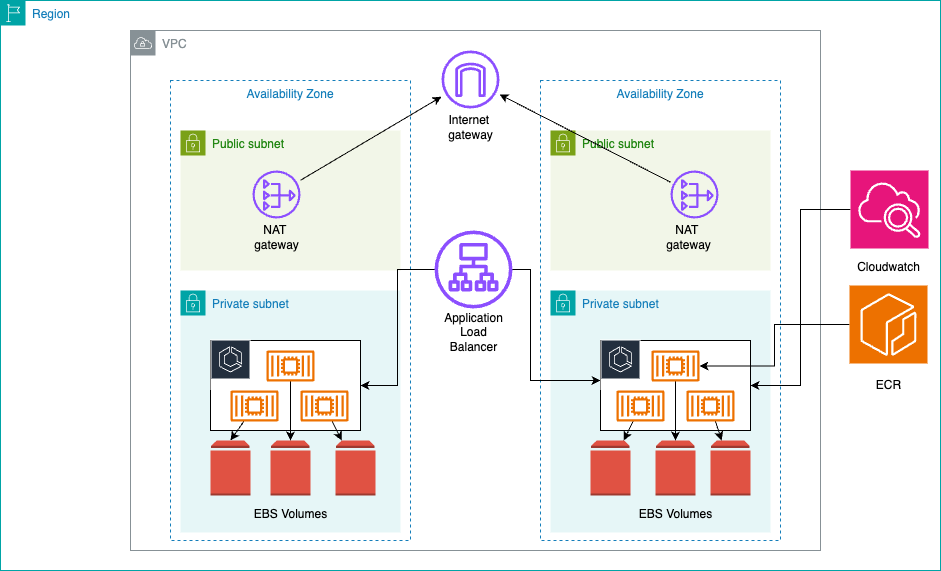
Each task has a dedicated EBS volume providing io2 or gp3 storage with consistent performance and encryption at rest. Security groups control traffic flow while Amazon CloudWatch logs provide capabilities for debugging purposes.
Important: EBS Zonal Characteristics
EBS is a zonal service – each EBS volume exists within a single AZ and can only attach to EC2 instances or Fargate tasks in that same zone. This design makes EBS integration particularly well-suited for zone-isolated applications such as development and testing environments where workloads don’t require cross-zone redundancy, batch processing jobs that operate on localized datasets within a specific zone, content management systems serving region-specific content, and data analytics workloads that process zone-resident data.
For applications requiring cross-AZ data availability:
- Leverage enterprise and open source Multi-AZ solutions such as Veritas Alta for enterprise backup/recovery, Distributed Replicated Block Device (DRBD) for real-time block device replication, or legacy solutions like Sun Network Data Replicator (SNDR) for existing infrastructure integration
- Use Amazon EFS (Elastic File System) for shared storage accessible across multiple AZs
- Design stateless applications with external data stores (RDS, DynamoDB) for shared state
- Consider EBS snapshot-based backup and restore procedures for disaster recovery. Additionally, you can also consider recently launched feature of EBS such as time-based copy and Provisioned Rate for Volume Initialization.
For zone-isolated applications:
- Each Fargate task receives its own EBS volume within its deployment AZ
- Data remains highly available within the zone but requires backup strategies for cross-zone recovery
Prerequisites
Before beginning, you need to have the following:
Development Tools
- AWS CDK version 2.0+ – Setup Guide
- Node.js 14.x+ – Download
- Docker Engine – Installation Guide
- Python 3.8+ – Download
- AWS account with appropriate permissions
Environment Setup
Install the AWS CDK globally and configure your AWS credentials:
# Install AWS CDK globally
npm install -g aws-cdk

# Set default account for CDK
export CDK_DEFAULT_ACCOUNT=$(aws sts get-caller-identity --query Account --output text)

# Verify CDK installation
cdk --version
Building the Infrastructure
Establishing the Network Foundation
We recommend setting up a network foundation using an Amazon Virtual Private Cloud (VPC) configured with a multi-Availability Zone architecture that has at least two AZs, preferably three, incorporating both public and private subnets with /24 CIDR blocks to provide 256 IP addresses per subnet for scalability.
Configuring ECS with EBS Volumes and Persistence Management
The ECS cluster and task definition incorporate EBS volume configuration with specific considerations for maintaining data persistence during service interruptions, updates, and scaling events:
// Create ECS cluster with Container Insights enabled
const cluster = new ecs.Cluster(this, 'Cluster', {
  vpc,
  containerInsights: true // Enable CloudWatch Container Insights
});


// Create Fargate task definition with EBS volume
const taskDefinition = new ecs.FargateTaskDefinition(this, 'TaskDef', {
  memoryLimitMiB: 512, // 512MB memory allocation
  cpu: 256, // 0.25 vCPU allocation
  volumes: [volumeConfiguration] // Attach EBS volume configuration
});
The container configuration mounts the EBS volume at a specific path, making block storage available to the application:
// Add container to task definition
const container = taskDefinition.addContainer('app', {
  image: ecs.ContainerImage.fromAsset('./app'), // Build from local Dockerfile
  logging: ecs.LogDrivers.awsLogs({
    streamPrefix: 'ecs-ebs',
    logRetention: logs.RetentionDays.ONE_WEEK // Log retention policy
  }),
  environment: {
    STORAGE_PATH: '/data' // Environment variable for storage path
  },
  healthCheck: {
    command: ['CMD-SHELL', 'curl -f http://localhost:5000/health || exit 1'],
    interval: Duration.seconds(30),
    timeout: Duration.seconds(5),
    retries: 3
  }
});

// Mount EBS volume to container filesystem
container.addMountPoints({
  sourceVolume: 'ebs-volume', // Reference to volume configuration
  containerPath: '/data', // Mount point in container
  readOnly: false // Allow read/write operations
});

// Expose container port for load balancer
container.addPortMappings({
  containerPort: 5000,
  protocol: ecs.Protocol.TCP
});
Configuring Load Balancing
The Application Load Balancer configuration includes health checks and HTTPS listeners for secure communication:
// Create Application Load Balancer
const loadBalancer = new elbv2.ApplicationLoadBalancer(this, 'ALB', {
  vpc: vpc,
  internetFacing: true, // Public-facing load balancer
  securityGroup: albSecurityGroup,
  loadBalancerName: 'fargate-ebs-alb'
});

// Create target group for Fargate tasks
const targetGroup = new elbv2.ApplicationTargetGroup(this, 'TargetGroup', {
  vpc: vpc,
  port: 5000, // Container port
  protocol: elbv2.ApplicationProtocol.HTTP,
  targetType: elbv2.TargetType.IP, // Required for Fargate
  healthCheck: {
    path: '/health', // Health check endpoint
    healthyHttpCodes: '200',
    interval: Duration.seconds(30),
    timeout: Duration.seconds(5),
    healthyThresholdCount: 2,
    unhealthyThresholdCount: 3
  },
  deregistrationDelay: Duration.seconds(30) // Fast deregistration for development
});

// HTTPS listener with SSL certificate
const httpsListener = loadBalancer.addListener('HttpsListener', {
  port: 443,
  certificates: [certificate], // SSL certificate from ACM
  defaultAction: elbv2.ListenerAction.forward([targetGroup])
});

// Redirect HTTP to HTTPS
loadBalancer.addListener('HttpListener', {
  port: 80,
  defaultAction: elbv2.ListenerAction.redirect({
    protocol: 'HTTPS',
    port: '443',
    permanent: true
  })
});
Deploying the Fargate Service
The Fargate service configuration brings together all components with auto-scaling capabilities:
// Create Fargate service
const fargateService = new ecs.FargateService(this, 'FargateService', {
  cluster: cluster,
  taskDefinition: taskDefinition,
  desiredCount: 2, // Start with 2 tasks for high availability
  assignPublicIp: false, // Tasks run in private subnets
  securityGroups: [ecsSecurityGroup],
  vpcSubnets: {
    subnetType: ec2.SubnetType.PRIVATE_WITH_EGRESS // Deploy in private subnets
  },
  healthCheckGracePeriod: Duration.seconds(60), // Allow time for startup
  serviceName: 'fargate-ebs-service'
});

// Attach service to target group
fargateService.attachToApplicationTargetGroup(targetGroup);

// Configure auto-scaling
const scaling = fargateService.autoScaleTaskCount({
  minCapacity: 2, // Minimum tasks for availability
  maxCapacity: 10 // Maximum tasks for cost control
});

// Scale based on CPU utilization
scaling.scaleOnCpuUtilization('CpuScaling', {
  targetUtilizationPercent: 70, // Scale out at 70% CPU
  scaleInCooldown: Duration.minutes(5), // Wait 5 minutes before scaling in
  scaleOutCooldown: Duration.minutes(2) // Wait 2 minutes before scaling out
});

// Scale based on memory utilization
scaling.scaleOnMemoryUtilization('MemoryScaling', {
  targetUtilizationPercent: 80, // Scale out at 80% memory
  scaleInCooldown: Duration.minutes(5),
  scaleOutCooldown: Duration.minutes(2)
});
Application Implementation
In this flask application, we are demonstrating a non production example of file upload. For best practices, we recommend adding a health check in the application to be invoked from the Application Load Balancer:
from flask import Flask, jsonify, request, send_file
import os
import logging
from datetime import datetime
import boto3

# Configure logging
logging.basicConfig(level=logging.INFO)
logger = logging.getLogger(__name__)

app = Flask(__name__)


# Get storage path from environment variable
STORAGE_PATH = os.environ.get('STORAGE_PATH', '/data')

@app.route('/health')
def health():
    """Basic health check endpoint for load balancer"""
    return jsonify({'status': 'healthy', 'timestamp': datetime.utcnow().isoformat()})

@app.route('/files', methods=['GET'])
def list_files():
    """List all files in the block storage"""
    try:
        if not os.path.exists(STORAGE_PATH):
            return jsonify({'error': 'Storage path does not exist'}), 404

        files = []
        for filename in os.listdir(STORAGE_PATH):
            filepath = os.path.join(STORAGE_PATH, filename)
            if os.path.isfile(filepath):
                stat = os.stat(filepath)
                files.append({
                    'name': filename,
                    'size': stat.st_size,
                    'modified': datetime.fromtimestamp(stat.st_mtime).isoformat()
                })

        return jsonify({
            'files': files,
            'count': len(files),
            'storage_path': STORAGE_PATH
        })

    except Exception as e:
        logger.error(f"Failed to list files: {str(e)}")
        return jsonify({'error': str(e)}), 500

@app.route('/upload', methods=['POST'])
def upload_file():
    """Upload a file to block storage"""
    if 'file' not in request.files:
        return jsonify({'error': 'No file provided'}), 400

    file = request.files['file']
    if file.filename == '':
        return jsonify({'error': 'No selected file'}), 400

    try:
        # Ensure storage directory exists
        os.makedirs(STORAGE_PATH, exist_ok=True)

        # Save file to block storage
        filepath = os.path.join(STORAGE_PATH, file.filename)
        file.save(filepath)

        # Get file information
        stat = os.stat(filepath)

        logger.info(f"File uploaded successfully: {file.filename}")

        return jsonify({
            'message': 'File uploaded successfully',
            'filename': file.filename,
            'size': stat.st_size,
            'path': filepath
        })

    except Exception as e:
        logger.error(f"Failed to upload file: {str(e)}")
        return jsonify({'error': str(e)}), 500

if __name__ == '__main__':
    # Create storage directory if it doesn't exist
    os.makedirs(STORAGE_PATH, exist_ok=True)

    # Start Flask application
    app.run(host='0.0.0.0', port=5000, debug=False)
Handling Task Interruptions and Updates
When running applications on Fargate with EBS volumes, one of the most critical operational challenges is maintaining data continuity during service lifecycle events.
Fargate tasks can be replaced due to various scenarios:
- Service updates when deploying new application versions
- Infrastructure maintenance performed by AWS on the underlying compute
- Spot interruptions when using Fargate Spot pricing
- Auto-scaling events that terminate and create new tasks
- Health check failures that trigger task replacement
When a task terminates, its attached EBS volume becomes orphaned — and the replacement task still needs access to that data. You can address this challenge by creating a snapshot of the orphaned volume and restoring it to a new volume for the replacement task. We recommend implementing event-driven volume management: when ECS service events occur (updates, scaling, or interruptions), Amazon CloudWatch Events trigger a AWS Lambda function that orchestrates the full volume persistence lifecycle.
To prevent an infinite loop — where AWS Lambda launching a replacement task generates new ECS events that re-trigger the function — the solution must include loop-prevention safeguards. When AWS Lambda starts a replacement task, it tags it with a marker (e.g., managed-by: ebs-lifecycle-lambda). The function checks for this tag at the start of every invocation and skips processing if it is present. Additionally, a DynamoDB idempotency check ensures that a volume/task combination is processed at most once, even under retries or concurrent invocations. The CloudWatch Events rule is also scoped to specific clusters, services, or task definition families to avoid triggering on unrelated task state changes.
Service Update Scenario
- ECS initiates a rolling deployment of the new task definition
- CloudWatch detects task state changes (
TASK_STOPPINGorTASK_STOPPED) and triggers the AWS Lambda function - AWS Lambda checks for the
managed-by: ebs-lifecycle-lambdatag — if present, processing is skipped to prevent re-entry - AWS Lambda checks DynamoDB to confirm the volume/task combination has not already been processed (idempotency check)
- AWS Lambda identifies the EBS volumes attached to terminating tasks
- AWS Lambda retrieves volume details and creates a snapshot
- The snapshot reference is recorded in an Amazon DynamoDB table
- AWS Lambda creates individual task definitions tailored to each required volume configuration, tagging all replacement tasks with
managed-by: ebs-lifecycle-lambda
For services requiring DesiredCount=N, the architecture supports either N separate services each with DesiredCount=1, or a transition to ECS Standalone Tasks instead of ECS Services.
This volume persistence strategy provides operational advantages that enhance the reliability and manageability of applications on Fargate. Application deployments proceed without data loss, enabling continuous delivery practices for applications designed as single-instance services. This pattern works best for single-task services or applications that can be decomposed into multiple single-task services, rather than traditional multi-replica service deployments. We recommend implementing proper snapshot lifecycle management rather than leaving cleanup as an afterthought. Orphaned snapshots without lifecycle policies create unnecessary costs and operational overhead.
Important Note on EBS Snapshots for Distributed Systems: When using EBS snapshots for backup and restore in distributed environments, be aware that ad-hoc snapshots do not automatically maintain application or crash consistency across multiple volumes, requiring manual coordination to ensure data integrity. Additionally, snapshot restoration is a best effort operation with indeterminate time. To optimize performance, consider leveraging AWS’s new provisioned volume hydration rate feature to accelerate restoration and minimize recovery point objectives while balancing storage costs and operational complexity.
Testing and Validation
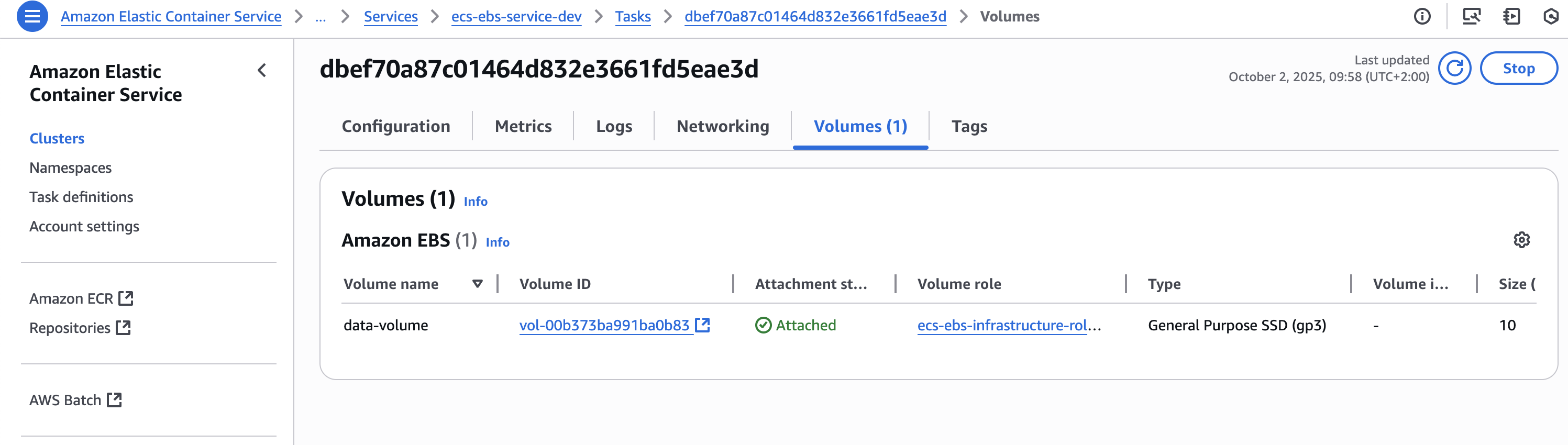
Before running your tests, ensure your EBS volumes are attached to your Fargate tasks. You can verify this in the AWS Console by navigating to ECS > Clusters > Tasks > Volumes tab.
Step 1: Retrieve Load Balancer URL
After deployment, validate the implementation by testing various endpoints and operations. First, retrieve the Application Load Balancer URL from the CloudFormation outputs:
# Get ALB DNS name from CloudFormation outputs
ALB_URL=$(aws cloudformation describe-stacks \
  --stack-name EcsEbsStack \
  --query 'Stacks[0].Outputs[?OutputKey==`LoadBalancerDNS`].OutputValue' \
  --output text)

echo "Application Load Balancer URL: https://${ALB_URL}"

# Verify ALB is responding
curl -I https://${ALB_URL}/health
Step 2: Test File Operations Upload a test file to verify write operations:
# Create a test file
echo "This is a test file for EBS persistence validation" > test.txt
echo "Created at: $(date)" >> test.txt

# Upload test file
echo "Uploading test file..."
curl -X POST -F "file=@test.txt" https://${ALB_URL}/upload

# List files to confirm upload
echo "Listing files in block storage..."
curl -s https://${ALB_URL}/files | jq '.'

# Download the file to verify content
echo "Downloading uploaded file..."
curl -o downloaded-test.txt https://${ALB_URL}/download/test.txt

# Verify file content
echo "Verifying downloaded file content..."
cat downloaded-test.txt
This testing sequence validates both the EBS volume attachment and the application’s ability to perform read and write operations on the block storage.
Cost Analysis
The following table breaks down monthly costs for a typical deployment in the us-east-1 region with two tasks running continuously:
| Category | Monthly Cost |
|---|---|
| Compute (Fargate) | $35.55 |
| Storage (EBS) | $1.60 |
| Total Estimated Cost | $37 |
Clean Up
Remove all resources to avoid ongoing charges with proper verification:
# Step 1: Delete the CDK stack
echo "Initiating stack deletion..."
cdk destroy --force

# Step 2: Verify deletion progress
echo "Monitoring deletion progress..."
aws cloudformation describe-stacks \
  --stack-name EcsEbsStack \
  --query 'Stacks[0].StackStatus' \
  --output text

# Step 3: Check for any remaining resources
echo "Checking for orphaned resources..."

# List any remaining EBS volumes
aws ec2 describe-volumes \
  --filters "Name=tag:aws:cloudformation:stack-name,Values=EcsEbsStack" \
  --query 'Volumes[*].[VolumeId,State]' \
  --output table

# List any remaining security groups
aws ec2 describe-security-groups \
  --filters "Name=tag:aws:cloudformation:stack-name,Values=EcsEbsStack" \
  --query 'SecurityGroups[*].[GroupId,GroupName]' \
  --output table
Production Considerations
For production deployments, implement these additional considerations to ensure reliability, security, and operational excellence:
- A multi-region configuration which includes cross-region deployment for disaster recovery, enabling automatic failover, and data replication across geographically distributed AWS regions.
- A backup and recovery strategy implementation to include automated EBS snapshot creation and deletion, cross-region backup replication, and point-in-time recovery capabilities.
- Disaster recovery procedures with defined recovery time objectives (RTO) and recovery point objectives (RPO) to ensure business continuity and data protection against various failure scenarios.
Conclusion
Native EBS volume integration with AWS Fargate provides a robust solution for block storage requirements in containerized applications. This implementation demonstrates how to combine serverless container execution with dedicated block storage while maintaining security and operational standards.
Ready to modernize your containerized storage strategy? Start integrating EBS volumes with your AWS Fargate workloads today. Explore the AWS documentation to get started, or reach out to your AWS solutions architect to design a storage architecture tailored to your application’s needs.