背景与需求
在语音转写(ASR)落地过程中,最常见的矛盾来自两类业务诉求:一类强调低延迟与交互体验,例如在线会议字幕、客服实时辅助、直播转写等,希望请求发出后尽快返回文本;另一类更关注吞吐与削峰填谷,例如长音频离线转写、媒体内容归档、质检与审核批处理等,允许以异步方式获取结果,但要求在高峰期也能稳定接住大量任务。因此,一个可生产化的 ASR 服务通常需要同时兼顾“实时响应”和“批量处理”的能力,并能够在不同负载形态下保持可预测的成本与稳定性。我们选择 Fast-Whisper(基于 faster-whisper)作为推理引擎,主要原因在于它在推理速度与资源效率方面表现突出:在相同硬件条件下能够以更高吞吐完成转写,同时对 GPU 显存与算力的利用更友好,适合在云上进行规模化部署与弹性扩缩。为了减少自建推理平台的运维复杂度,并在安全与可观测层面满足生产要求,我们采用 Amazon SageMaker Hosting 托管推理端点。SageMaker 提供端到端的模型托管能力,便于通过 IAM 进行细粒度访问控制,并可按需接入 VPC 实现私网部署;同时结合 CloudWatch 日志与指标,可以更快速地定位容器启动、网络访问与推理性能等问题,实现从部署、调用到监控的一体化闭环。
总体架构
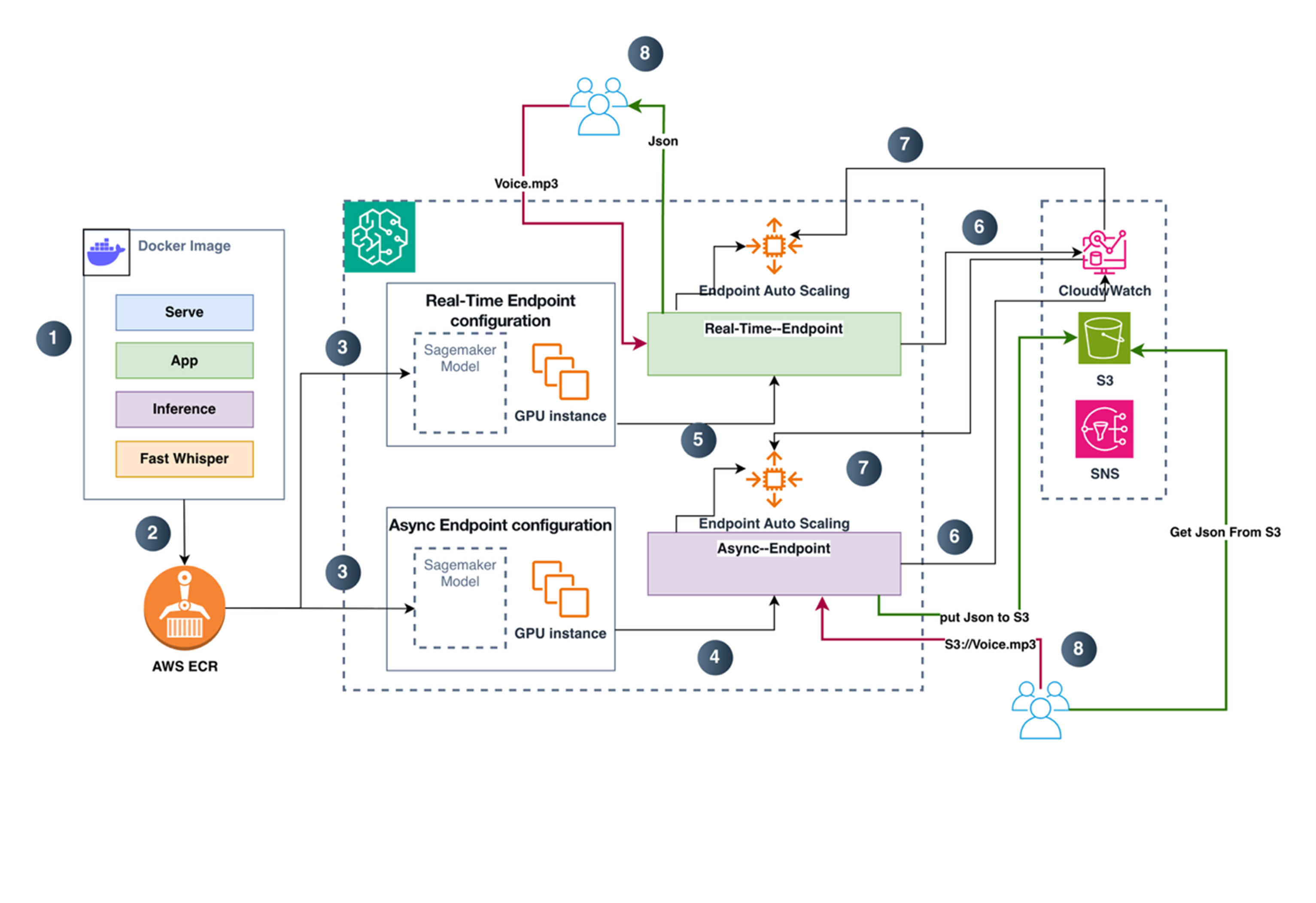
对比 SageMaker Real-time endpoint与 Async endpoint两种推理链路。Real-time 模式下,客户端通过 AWS SDK/CLI 调用 InvokeEndpoint,请求在通过 SigV4 鉴权后被转发到推理端点实例,容器内的 Web 服务在 /invocations 接收音频数据并完成转写计算,随后在同一次 HTTP 响应中直接返回结果。这种链路端到端同步,适合对交互时延敏感的场景。Async 模式则将“提交请求”和“获取结果”解耦:客户端先把输入音频上传到 S3 指定路径,再调用 InvokeEndpointAsync 仅传入 InputLocation(S3 URI)触发异步处理。端点在后台从 S3 读取输入并执行推理,最终将结果写回到 S3 的 Output 路径;如处理失败,则输出错误信息到 Failure 路径。与 Real-time 的最大差异在于,Async 调用返回的是 OutputLocation 而非转写文本本身,结果天然落盘、可追踪、便于重试与审计,也更适合长音频与批量任务的削峰填谷处理。
结合上图,分步说明如下:
- 本地构建推理镜像
在本地构建推理 Docker 镜像时,需要把完整的推理运行环境和服务代码一起打包进镜像:由 serve 作为容器启动入口负责拉起 Web Server,app.py 提供对外的 HTTP 接口并实现 /ping 健康检查与 /invocations 推理调用路由,inference.py 负责加载模型并基于 faster-whisper/CTranslate2 完成音频处理与转写、输出 JSON 结果,同时还需包含 CUDA/cuDNN、ffmpeg 以及相关 Python 依赖等运行时组件,确保镜像在 GPU 实例上可直接启动并完成推理。(具体代码见后文)
- 推送镜像到 ECR
推送镜像到 ECR 仓库,作为 SageMaker 托管时拉取的镜像来源。
- 创建 Model 并生成real time和Async 两种endpoint配置
在 SageMaker 中基于 ECR 镜像创建 Model(绑定 IAM Execution Role、Environment、等)。然后分别创建两类 Endpoint Configuration(它们都引用同一个Model):Real-time Endpoint Configuration:指定生产Variants(ModelName、实例类型、实例数、权重等)Async Endpoint Configuration:同样指定生产Variants,并额外指定 AsyncInferenceConfig(S3 输出/失败路径、并发控制、可选通知等)
- 创建异步推理 Endpoint
使用 Async Endpoint Configuration 创建 Async Endpoint,该 Endpoint 接收异步请求、在 GPU 实例上执行推理,并将结果写入指定的 S3 输出路径。
- 创建实时推理 Endpoint
使用 Real-time Endpoint Configuration 创建 Real-time Endpoint。该 Endpoint 接收在线请求并同步返回推理结果(通常直接返回 JSON)。
- 日志、指标与输出落地
CloudWatch Metrics:SageMaker Endpoint 运行指标(调用量、延迟、错误率、队列/积压等)。S3:Async:推理结果写到 S3OutputPath,失败写到 S3FailurePath。
- 基于指标的自动扩缩容
对Real-time Endpoint 和Async Endpoint 分别配置自动扩缩容策略,根据 CloudWatch 中的 Endpoint 指标触发扩缩容(比如调用压力、延迟、Async 积压/backlog 等)。扩缩容对象是SageMaker Endpoint 的实例数。
- 客户执行ASR转换操作
Real-time:客户端直接调用 endpoint(上传音频或传 S3 URL/Key),同步拿到 JSON 响应。Async:客户端提交异步请求后,通过以下方式取结果:根据返回的 OutputLocation 到 S3 读取结果 JSON,或通过通知机制(如 SNS)接收完成/失败事件后,再去 S3 取结果。
部署Fast-Whisper到 SageMaker 推理端点(BYOC)
文件目录结果如下:
(base) lijing@LideMacBook-Pro Demo % tree -L 2 sagemaker-faster-whisper
sagemaker-faster-whisper
├── app.py
├── Dockerfile
├── Dockerfile.gpu
├── inference.py
├── requirements.txt
├── sagemaker-role-policy.json
└── serve
目录结构说明,用 Dockerfile 把 serve + app.py + inference.py + requirements.txt 打进镜像;SageMaker 起 Endpoint 时运行 serve,它启动 Web 服务并暴露 app.py 的 /ping 与 /invocations;/invocations 内部调用 inference.py 做 faster-whisper 推理;部署后你用 invoke_loop.sh / invoke_async_loop.sh 验证 real-time/async 的调用;整个过程中 SageMaker 访问 ECR/S3/日志所需权限由 sagemaker-role-policy.json 提供参考。
代码具体内容如下:
Serve:
#!/bin/bash
set -euo pipefail

# 重要:大模型 + GPU,一般建议 workers=1,避免多进程重复占用显存
exec gunicorn \
  --bind 0.0.0.0:${PORT:-8080} \
  --workers 1 \
  --threads 4 \
  --timeout 0 \
  --graceful-timeout 30 \
  app:app
说明:使用 gunicorn 启动 Web 的优势在于更适合生产环境:可通过多 worker 提升并发与吞吐,主进程可监控并自动重启异常 worker,支持超时控制与优雅退出,日志与信号处理更规范,从而提升服务稳定性与可维护性。
app.py
import base64
import json
import os
import threading
from flask import Flask, Response, request

from inference import ModelService, BadRequest

app = Flask(__name__)

_service = ModelService()
_ready = False
_ready_lock = threading.Lock()

def _load_in_background():
    global _ready
    try:
        _service.load()  # download + init model
        with _ready_lock:
            _ready = True
    except Exception as e:
        # 保留异常,/ping 会持续返回 503,便于你在 CloudWatch Logs 排障
        app.logger.exception("Model failed to load: %s", e)

# 启动即加载(推荐:让 endpoint creation 阶段完成下载/初始化)
threading.Thread(target=_load_in_background, daemon=True).start()

@app.route("/ping", methods=["GET", "POST"])
def ping():
    with _ready_lock:
        if _ready:
            return Response(response="OK", status=200, mimetype="text/plain")
    return Response(response="LOADING", status=503, mimetype="text/plain")

@app.route("/invocations", methods=["POST"])
def invocations():
    with _ready_lock:
        if not _ready:
            return Response(
                response=json.dumps({"error": "model_not_ready"}),
                status=503,
                mimetype="application/json",
            )

    # 支持两种输入:
    # 1) JSON:{"s3_uri":"s3://bucket/key.mp3", ...}
    # 2) 直接音频 bytes(不推荐大文件;realtime 有 25MB payload 限制)
    try:
        content_type = request.content_type or ""
        if "application/json" in content_type:
            payload = request.get_json(force=True)
        else:
            # bytes -> base64
            raw = request.get_data()
            payload = {"audio_b64": base64.b64encode(raw).decode("utf-8")}

        result = _service.transcribe(payload)
        return Response(response=json.dumps(result, ensure_ascii=False),
                        status=200, mimetype="application/json")

    except BadRequest as e:
        return Response(response=json.dumps({"error": str(e)}),
                        status=400, mimetype="application/json")
    except Exception as e:
        app.logger.exception("Invocation failed: %s", e)
        return Response(response=json.dumps({"error": "internal_error"}),
                        status=500, mimetype="application/json")
说明:app.py 用 Flask 实现了一个符合 SageMaker 推理容器约定的 Web 服务。启动时先创建 ModelService,并用后台线程执行 _service.load() 下载并初始化模型;通过 _ready 与锁控制“是否就绪”。/ping 用于健康检查:模型加载完成返回 200,否则返回 503,方便 Endpoint 在创建阶段等待并在 CloudWatch 中排障。/invocations 是推理入口:若未就绪直接 503;就绪后支持两种输入——JSON(如包含 s3_uri)或直接上传音频 bytes(转成 base64 放入 audio_b64),再调用 transcribe() 返回 JSON 结果;对参数错误返回 400,其它异常记录日志并返回 500。
inference.py:
import base64
import os
import tempfile
import threading
from dataclasses import dataclass
from typing import Any, Dict, Optional, Tuple

import boto3
from huggingface_hub import snapshot_download
from faster_whisper import WhisperModel

class BadRequest(Exception):
    pass

def _parse_s3_uri(s3_uri: str) -> Tuple[str, str]:
    if not s3_uri.startswith("s3://"):
        raise BadRequest("s3_uri must start with s3://")
    parts = s3_uri[5:].split("/", 1)
    if len(parts) != 2 or not parts[0] or not parts[1]:
        raise BadRequest("invalid s3_uri")
    return parts[0], parts[1]

@dataclass
class ModelConfig:
    model_id: str
    device: str
    compute_type: str
    hf_home: str
    model_cache_dir: str
    max_concurrent: int
    return_segments: bool
    default_vad_filter: bool

class ModelService:
    def __init__(self):
        self.cfg = ModelConfig(
            model_id=os.getenv("MODEL_ID", "Systran/faster-whisper-large-v3"),
            device=os.getenv("DEVICE", "cuda"),
            compute_type=os.getenv("COMPUTE_TYPE", "float16"),
            hf_home=os.getenv("HF_HOME", "/opt/ml/model/hf_cache"),
            model_cache_dir=os.getenv("MODEL_CACHE_DIR", "/opt/ml/model/model_cache"),
            max_concurrent=int(os.getenv("MAX_CONCURRENT", "1")),
            return_segments=os.getenv("RETURN_SEGMENTS", "true").lower() == "true",
            default_vad_filter=os.getenv("DEFAULT_VAD_FILTER", "true").lower() == "true",
        )
        self._model: Optional[WhisperModel] = None
        self._sem = threading.Semaphore(self.cfg.max_concurrent)

    def load(self) -> None:
        os.makedirs(self.cfg.hf_home, exist_ok=True)
        os.makedirs(self.cfg.model_cache_dir, exist_ok=True)

        # 检查预下载的模型路径
        prebuilt_model_dir = os.path.join(self.cfg.model_cache_dir, self.cfg.model_id.replace("/", "__"))

        if os.path.exists(prebuilt_model_dir) and os.listdir(prebuilt_model_dir):
            # 使用预下载的模型
            local_dir = prebuilt_model_dir
        else:
            # 运行时下载模型(fallback)
            local_dir = snapshot_download(
                repo_id=self.cfg.model_id,
                cache_dir=self.cfg.hf_home,
                local_dir=prebuilt_model_dir,
            )

        # 2) 初始化 faster-whisper
        #    注意:Systran/faster-whisper-large-v3 是 CTranslate2 格式模型,直接给目录即可
        self._model = WhisperModel(
            local_dir,
            device=self.cfg.device,
            compute_type=self.cfg.compute_type,
        )

        # 可选:做一次轻量 warmup(避免首请求抖动)
        # self._model.transcribe("path/to/short.wav", beam_size=1)

    def _ensure_model(self) -> WhisperModel:
        if self._model is None:
            raise RuntimeError("model is not loaded")
        return self._model

    def _download_s3_to_tmp(self, s3_uri: str) -> str:
        bucket, key = _parse_s3_uri(s3_uri)
        s3 = boto3.client("s3")
        fd, path = tempfile.mkstemp(prefix="audio_", suffix=os.path.splitext(key)[-1] or ".bin")
        os.close(fd)
        s3.download_file(bucket, key, path)
        return path

    def _b64_to_tmp(self, b64: str, suffix: str = ".bin") -> str:
        raw = base64.b64decode(b64)
        fd, path = tempfile.mkstemp(prefix="audio_", suffix=suffix)
        os.close(fd)
        with open(path, "wb") as f:
            f.write(raw)
        return path

    def transcribe(self, payload: Dict[str, Any]) -> Dict[str, Any]:
        """
        JSON 入参建议:
        {
          "s3_uri": "s3://bucket/path/audio.mp3",
          "task": "transcribe" | "translate",
          "language": "zh" | "en" | null,
          "beam_size": 5,
          "vad_filter": true,
          "return_segments": true
        }
        或者:
        { "audio_b64": "<base64>", "audio_suffix": ".mp3", ... }
        """
        model = self._ensure_model()

        s3_uri = payload.get("s3_uri")
        audio_b64 = payload.get("audio_b64")

        if not s3_uri and not audio_b64:
            raise BadRequest("either s3_uri or audio_b64 is required")

        task = payload.get("task", "transcribe")
        language = payload.get("language")
        beam_size = int(payload.get("beam_size", 5))
        vad_filter = bool(payload.get("vad_filter", self.cfg.default_vad_filter))
        return_segments = bool(payload.get("return_segments", self.cfg.return_segments))
        audio_suffix = payload.get("audio_suffix", ".bin")

        # 控制并发(GPU 大模型建议先从 1 开始)
        with self._sem:
            tmp_path = None
            try:
                if s3_uri:
                    tmp_path = self._download_s3_to_tmp(s3_uri)
                else:
                    tmp_path = self._b64_to_tmp(audio_b64, suffix=audio_suffix)

                segments, info = model.transcribe(
                    tmp_path,
                    task=task,
                    language=language,
                    beam_size=beam_size,
                    vad_filter=vad_filter,
                )

                text_parts = []
                seg_list = []
                for seg in segments:
                    text_parts.append(seg.text)
                    if return_segments:
                        seg_list.append({
                            "start": float(seg.start),
                            "end": float(seg.end),
                            "text": seg.text
                        })

                out = {
                    "text": "".join(text_parts).strip(),
                    "detected_language": getattr(info, "language", None),
                    "duration": getattr(info, "duration", None),
                }
                if return_segments:
                    out["segments"] = seg_list
                return out

            finally:
                if tmp_path and os.path.exists(tmp_path):
                    try:
                        os.remove(tmp_path)
                    except Exception:
                        pass
说明:inference.py实现了 Faster-Whisper 推理的“服务层”。先定义 BadRequest 与 _parse_s3_uri 用于参数校验,随后用 ModelConfig 从环境变量读取模型 ID、设备(cuda/cpu)、精度(float16 等)、HF 缓存目录、模型本地缓存目录、最大并发数等配置。ModelService.load() 会优先检查 model_cache_dir 下是否已有预下载模型目录,存在则直接复用;否则通过 snapshot_download 从 Hugging Face 下载到本地,并用 WhisperModel 初始化 CTranslate2 格式模型。transcribe() 支持两种输入:S3 地址或 base64 音频;会先把音频下载/解码写入临时文件,再调用 model.transcribe() 执行转写或翻译,并按需返回整段文本、检测语言、时长以及分段时间戳。通过 Semaphore 限制并发(尤其适合 GPU 场景避免争抢),最后在 finally 中清理临时文件,降低磁盘占用与泄漏风险。
requirements.txt:
flask==3.0.3
gunicorn==22.0.0
boto3==1.34.162
huggingface-hub==0.25.2

# faster-whisper pulls ctranslate2 and audio deps (av, etc.)
faster-whisper==1.2.1
Dockerfile:
FROM nvidia/cuda:12.4.1-cudnn-runtime-ubuntu22.04

ENV DEBIAN_FRONTEND=noninteractive \
    PYTHONDONTWRITEBYTECODE=1 \
    PYTHONUNBUFFERED=1 \
    PORT=8080

# System deps: python, ffmpeg libs (for audio decode), tini
RUN apt-get update && apt-get install -y --no-install-recommends \
      python3 python3-pip python3-dev \
      ffmpeg \
      libsndfile1 \
      ca-certificates curl git \
      tini \
    && rm -rf /var/lib/apt/lists/*

# App dir
WORKDIR /opt/program

# Python deps
COPY requirements.txt /opt/program/requirements.txt
RUN python3 -m pip install --upgrade pip \
 && python3 -m pip install --no-cache-dir -r requirements.txt

# Default runtime env (你可以在 create_model 的 Environment 覆盖这些)
ENV MODEL_ID="Systran/faster-whisper-large-v3" \
    DEVICE="cuda" \
    COMPUTE_TYPE="float16" \
    HF_HOME="/opt/ml/model/hf_cache" \
    MODEL_CACHE_DIR="/opt/ml/model/model_cache" \
    MAX_CONCURRENT="1" \
    RETURN_SEGMENTS="true" \
    DEFAULT_VAD_FILTER="true"

# Pre-download model during build
RUN mkdir -p /opt/ml/model/hf_cache /opt/ml/model/model_cache && \
    python3 -c "from huggingface_hub import snapshot_download; import os; \
    snapshot_download( \
        repo_id='Systran/faster-whisper-large-v3', \
        cache_dir='/opt/ml/model/hf_cache', \
        local_dir='/opt/ml/model/model_cache/Systran__faster-whisper-large-v3' \
    )"

# Copy code
COPY app.py inference.py serve /opt/program/
#COPY app.py inference.py /opt/program/
RUN chmod +x /opt/program/serve
ENV PATH="/opt/program:${PATH}"

EXPOSE 8080

ENTRYPOINT ["/usr/bin/tini", "--"]
CMD ["serve"]
说明:这里为了加快启动速度,将faster-whisper-large-v3 模型提前下载到镜像中,同时这里说明 serve 是Sagemaker inference endpoint 的入口程序。所有代码,可以参考这里: Fast Whisper on SageMaker
SageMaker endpoint生成
结合 SageMaker 推理 Endpoint 的托管与弹性伸缩特性,本文选择 Async Endpoint 作为示例,介绍从镜像与模型创建、异步调用链路到 S3 输出落盘的端到端部署方法,并基于压测结果说明其 Auto Scaling 的工作机制:通过在途请求/队列压力触发实例扩缩容,以提升吞吐并加速消化积压,同时端到端时延会显著受到排队等待时间的影响。
- 采用如下命令生成 SageMaker Model :
aws sagemaker create-model \
–model-name “Fast-Whisper-On-SageMaker” \
–primary-container Image=”XXXXXXX.dkr.ecr.us-west-2.amazonaws.com/sgfastwhispter:0101-4″ \
–execution-role-arn “arn:aws:iam::XXXXXXX:role/service-role/AmazonSageMaker-ExecutionRole-20241208T160872” \
–region us-west-2
- 生成SageMaker endpoint configuration:
aws sagemaker create-endpoint-config \
–endpoint-config-name “async-fast-whisper-configuration” \
–production-variants ‘[{
“VariantName”: “AllTraffic”,
“ModelName”: “Fast-Whisper-On-SageMaker”,
“InitialInstanceCount”: 1,
“InstanceType”: “ml.g6.2xlarge”,
“InitialVariantWeight”: 1,
“ManagedInstanceScaling”: {
“Status”: “ENABLED”,
“MinInstanceCount”: 1,
“MaxInstanceCount”: 4
}
}]’ \
–async-inference-config ‘{
“OutputConfig”: {
“S3OutputPath”: “s3://XXXXX/output/”
}
}’ \
–region us-west-2
- 使用生成 endpoint configuration 配置生成end point
aws sagemaker create-endpoint \
–endpoint-name “async-fast-whisper-endpoint” \
–endpoint-config-name “async-fast-whisper-configuration” \
–region us-west-2
{
“EndpointArn”: “arn:aws:sagemaker:us-west-2:XXXXXXXXX:endpoint/async-fast-whisper-endpoint”
}
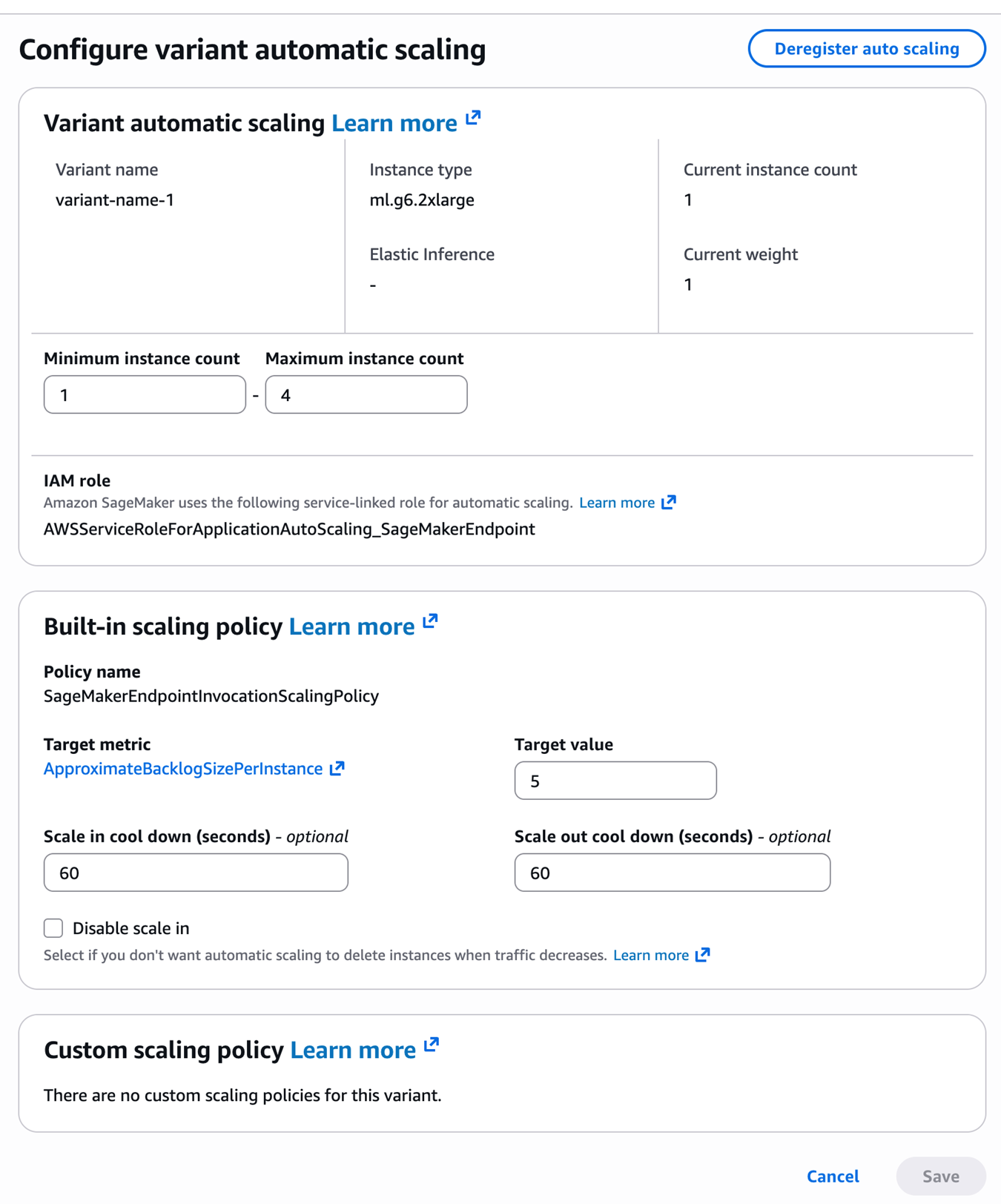
- 配置endpoint 的自动缩放机制,这里采用默认的ApproximateBacklogSizePerInstance 进行配置。
aws application-autoscaling register-scalable-target \
–service-namespace sagemaker \
–resource-id endpoint/async-fast-whisper-endpoint/variant/AllTraffic \
–scalable-dimension sagemaker:variant:DesiredInstanceCount \
–min-capacity 1 \
–max-capacity 4 \
–region us-west-2
aws application-autoscaling put-scaling-policy \
–service-namespace sagemaker \
–resource-id endpoint/async-fast-whisper-endpoint/variant/AllTraffic \
–scalable-dimension sagemaker:variant:DesiredInstanceCount \
–policy-name “SageMakerEndpointInvocationScalingPolicy” \
–policy-type TargetTrackingScaling \
–target-tracking-scaling-policy-configuration ‘{
“TargetValue”: 30.0,
“PredefinedMetricSpecification”: {
“PredefinedMetricType”: “SageMakerVariantInvocationsPerInstance”
},
“ScaleInCooldown”: 100,
“ScaleOutCooldown”: 100
}’ \
–region us-west-2
最终形成的结果如下图所示:
测试与验证
异步推理测试
功能验证测试,,测试代码程序 test_async_endpoint.py:
import boto3
import json
import time
from datetime import datetime

print("Initializing AWS clients...", flush=True)
# Initialize clients
sagemaker_runtime = boto3.client('sagemaker-runtime', region_name='us-west-2')
s3 = boto3.client('s3')

print("\n" + "="*60, flush=True)
print("? STEP 1: SUBMITTING AUDIO FILE FOR INFERENCE", flush=True)
print("="*60, flush=True)

# Record start time
start_time = datetime.now()

# Invoke async endpoint
response = sagemaker_runtime.invoke_endpoint_async(
    EndpointName='async-whisper',
    InputLocation='s3://XXXXXXX/demo-call-1.mp3'
)

output_location = response['OutputLocation']
print(f"✅ Inference request submitted successfully!", flush=True)
print(f"? Submission time: {start_time.strftime('%Y-%m-%d %H:%M:%S')}", flush=True)
print(f"? Input file: s3://XXXXXXX/demo-call-1.mp3", flush=True)
print(f"? Output location: {output_location}", flush=True)

# Extract bucket and key from output location
bucket = output_location.split('/')[2]
key = '/'.join(output_location.split('/')[3:])

print(f"\n? Now monitoring S3 for output file generation...", flush=True)
print(f"? Bucket: {bucket}", flush=True)
print(f"? Key: {key}", flush=True)

print("\n" + "="*60, flush=True)
print("⏳ STEP 2: WAITING FOR INFERENCE COMPLETION", flush=True)
print("="*60, flush=True)

# Poll for result
attempt = 0
while True:
    attempt += 1
    try:
        print(f"? Checking for output file... (attempt {attempt})", flush=True)
        result = s3.get_object(Bucket=bucket, Key=key)

        # Calculate inference time
        file_modified_time = result['LastModified'].replace(tzinfo=None)
        inference_duration = (file_modified_time - start_time).total_seconds()

        output = json.loads(result['Body'].read().decode('utf-8'))

        print("\n" + "="*60, flush=True)
        print("? INFERENCE COMPLETED!", flush=True)
        print("="*60, flush=True)
        print(f"⏱️  Total Inference Duration: {inference_duration:.1f} seconds", flush=True)
        print(f"? Audio Duration: {output.get('duration', 'N/A')} seconds", flush=True)
        print(f"? Detected Language: {output.get('detected_language', 'N/A')}", flush=True)
        print(f"? File Generated: {file_modified_time.strftime('%Y-%m-%d %H:%M:%S')}", flush=True)
        print("\n? TRANSCRIPTION:", flush=True)
        print("-" * 60, flush=True)
        print(output.get('text', 'No text found'), flush=True)
        print("-" * 60, flush=True)
        break

    except s3.exceptions.NoSuchKey:
        if attempt > 60:  # Stop after 30 minutes
            print("⚠️  Timeout reached. Inference may still be running.", flush=True)
            break
        print("⏳ File not ready yet, waiting 30 seconds...", flush=True)
        time.sleep(30)
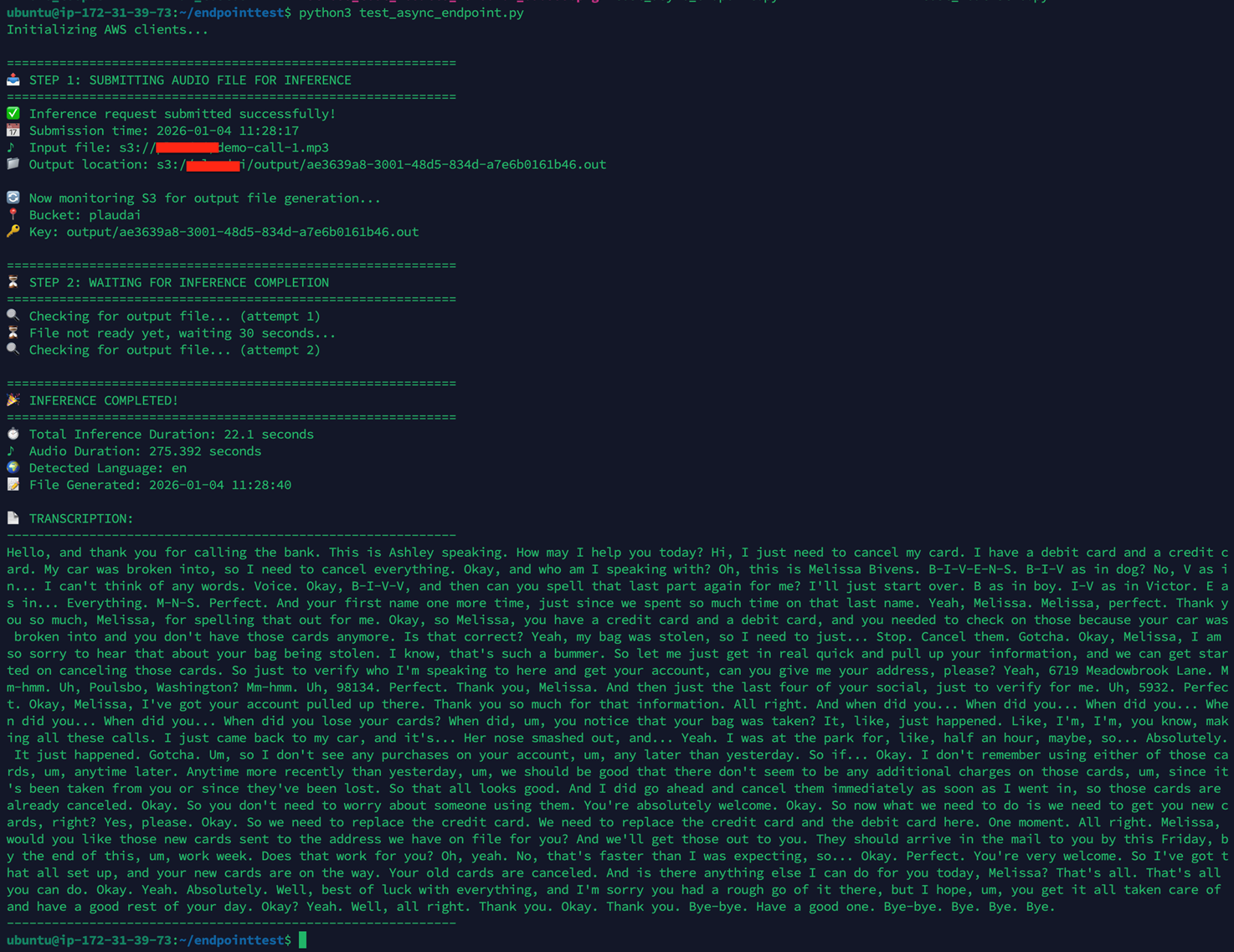
代码运行输出,如下:
注意,测试用音频长度275 秒,单次推理耗时 22秒,这个值和使用Docker 在本地同规格的GPU实例上进行推理的耗时是一致的。
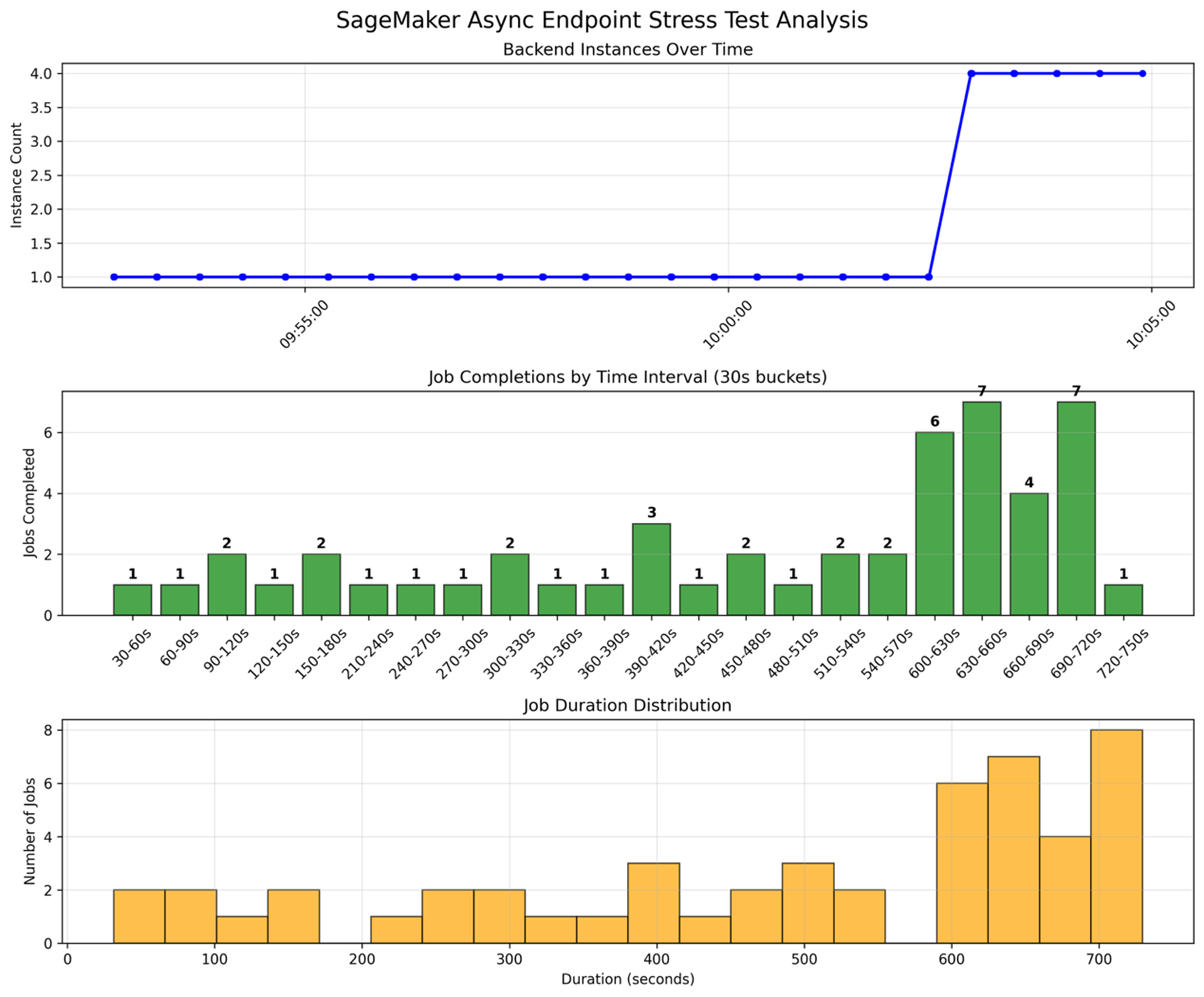
压力测试以及Async endpoint 底层节点的扩容。 测试逻辑是一次性向 Async endpoint 提交50个推理任务,短期造成BacklogSizePerInstance,突破设定的临界值,触发底层 GPU 实例开始扩容。
使用如下命令可以观察到 endpoint 节点后端节点数量的变化以及backlog Size的变化。
aws cloudwatch get-metric-statistics
–namespace AWS/SageMaker
–metric-name ApproximateBacklogSizePerInstance
–dimensions Name=EndpointName,Value=async-whisper
–start-time $(date -u -d ‘5 minutes ago’ +%Y-%m-%dT%H:%M:%S)
–end-time $(date -u +%Y-%m-%dT%H:%M:%S)
–period 60
–statistics Average
–region us-west-2
aws sagemaker describe-endpoint
–endpoint-name async-whisper
–region us-west-2
从同一时间轴看,本次 SageMaker Async Endpoint 压测在前半段基本维持 1 个后端推理实例,期间每 30 秒完成的任务数较低且波动不大,多数区间仅 1–2 个,说明在负载较轻或队列尚未明显堆积时,单实例还能“勉强跟上”。随后随着请求持续进入、排队压力增大,自动伸缩开始生效,实例数在约 10 分钟量级的时间点从 1 快速拉升到 4 并保持稳定,对应的单位时间完成量也出现明显跃升,在部分 30 秒桶内达到 6–7 个完成,体现扩容对吞吐的直接提升。任务耗时分布则呈现明显长尾:既有几十秒到百秒级的较短任务,也有大量集中在 600–720 秒区间的高耗时任务,通常反映了队列等待时间叠加推理时间的综合结果;即便扩容后吞吐提升,前期积压仍会拉高整体时延,需要结合队列深度/在途请求等指标进一步优化伸缩触发与并发配置。
总结
本文围绕“将 Fast-Whisper 以 BYOC 方式托管到 Amazon SageMaker 推理端点”展开,系统给出从本地构建 GPU 推理镜像、推送 ECR、创建 Model/Endpoint Configuration,到部署Async Endpoint 的完整流程,并以压测结果客观呈现 Async 模式下实例扩缩容对吞吐与端到端时延的影响机制。其可推广价值在于:一方面沉淀了符合 SageMaker 容器规范的工程化模板(/ping 就绪、/invocations 推理入口、模型预下载与缓存、并发控制、日志与指标闭环),可直接复用到其他 ASR/LLM/视觉模型的托管部署;另一方面明确了 Async“请求与结果解耦、S3 落盘可追踪”以及基于 backlog/调用指标进行 Auto Scaling 的通用方法,为批处理、削峰填谷与成本可预测的生产化推理提供可借鉴的实现路径。
*前述特定亚马逊云科技生成式人工智能相关的服务目前在亚马逊云科技海外区域可用。亚马逊云科技中国区域相关云服务由西云数据和光环新网运营,具体信息以中国区域官网为准。
本篇作者
AWS 架构师中心: 云端创新的引领者
探索 AWS 架构师中心,获取经实战验证的最佳实践与架构指南,助您高效构建安全、可靠的云上应用

|
 |