AWS Open Source Blog
Introducing Pizza Bot, an open source inbox for AI agents that work in the background
Give an agent a task actually worth delegating and you’ll be waiting a while. Ask it what needs your attention this morning and it has to read your mail, your messages, and your task list before it can answer. Then it stops halfway, because one step needs your approval. Meanwhile you’re watching a chat window (or terminal) scroll. That is babysitting, not collaboration. Today we’re releasing Pizza Bot, an open source application that runs AI agents in the background and gives their work an inbox, so the agent comes back to you when it’s finished or when it’s stuck, and not before.
You don’t send an email and then sit watching the outbox until the reply lands. Pizza Bot is shaped like an email client for the same reason: a thread is a unit of work you come back to rather than a session you have to attend. Live chat assumes both parties are present, which holds for a quick exchange and breaks the moment a task takes several minutes, waits on your approval, or runs on a schedule while you’re away. Pizza Bot treats an agent the way you’d treat a colleague who has gone off to do the work: it comes back when there’s something to read, or something only you can decide.
You start a task yourself, put it on a schedule, or let a webhook start it. The agent works while you do something else. Finished work lands in Unread, and anything waiting on your decision lands in Action.
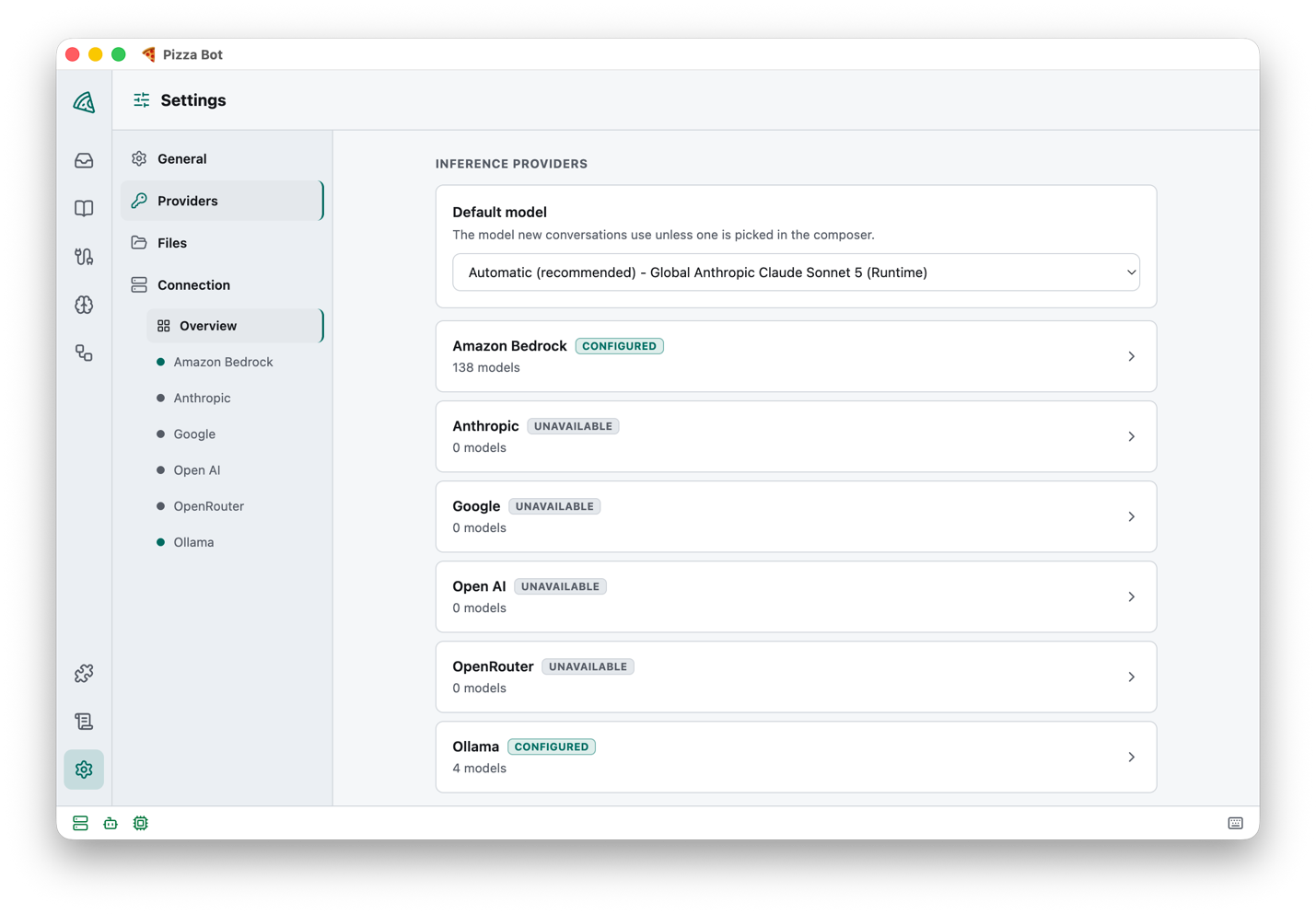
A hosted assistant runs on somebody else’s infrastructure, with the model and the data boundary that come with it. Pizza Bot is self-hosted and has no telemetry. It runs on your own machine, with the model provider you choose: Anthropic, Amazon Bedrock, Google Gemini, OpenAI, OpenRouter, or even a local model through Ollama.
Pizza Bot began inside Amazon, where more than 2,000 people used earlier versions for meeting preparation and follow-ups, email drafting, Slack summaries, CRM logging, day prioritization, and web research. (The name comes from Amazon’s two-pizza teams, small teams with broad ownership.) We rebuilt it from the ground up as an open source project, something coding agents made practical for a small team.
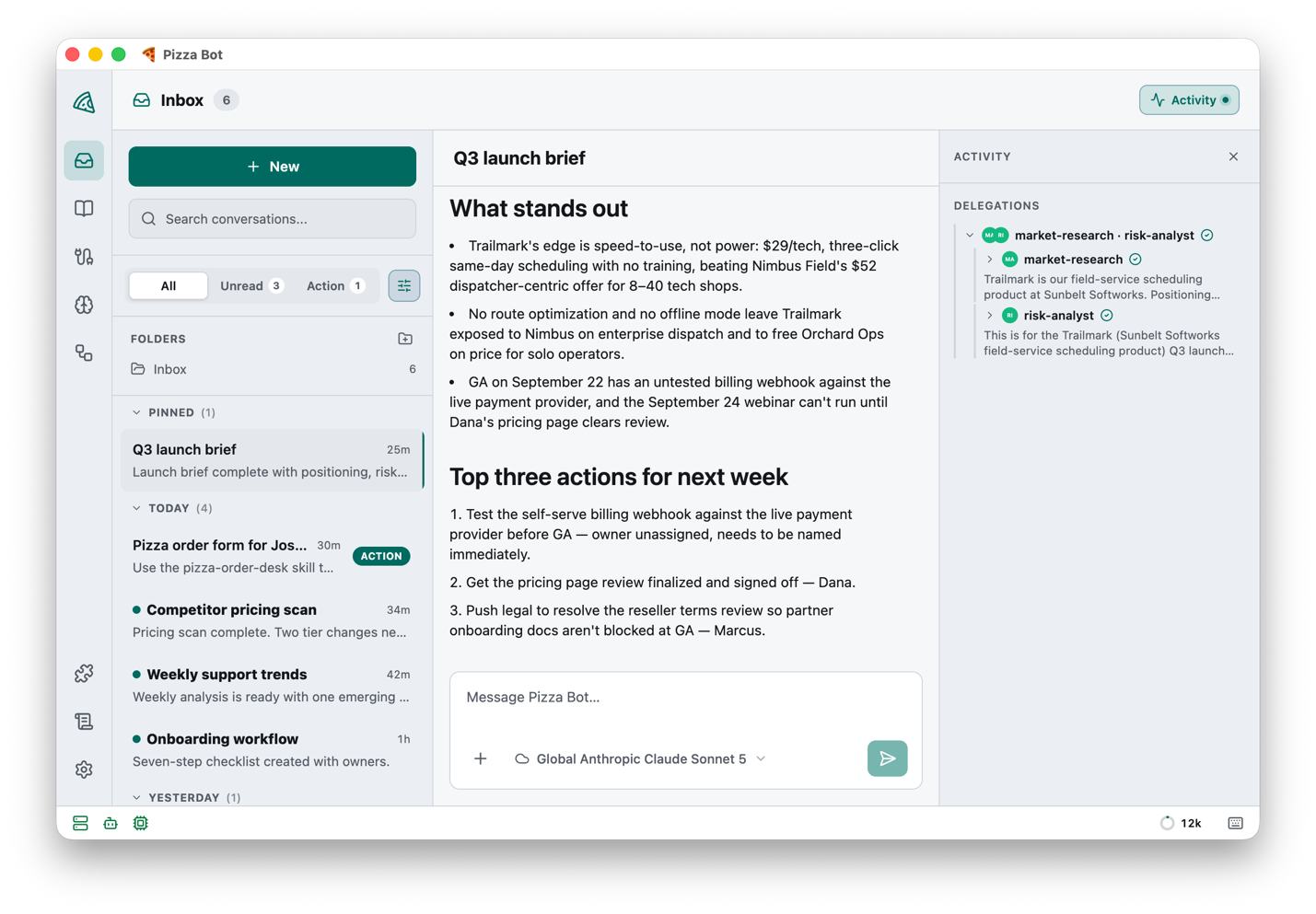
The following screenshot shows the result: finished work and one approval request in the thread list, a completed brief open, and the Activity panel listing the specialists the main agent handed work to.
Why background agents need an inbox
Coding agents were already paying off for programmers, and we wanted the same for knowledge work. Across every workflow we built, the same four requirements kept coming up: inspect several sources, prepare a result in the background, ask before taking a consequential action, and come find the person who asked once it was done. None of those describe how anyone uses a chat window. They describe how people already work with each other.
Email gave us a model that needs no explanation: threads, unread state, search, pinning, and notifications. So the inbox is where background work surfaces, as three queues you already know how to read:
- All is the thread history.
- Unread is completed work you haven’t looked at yet.
- Action is work that’s paused, waiting on your approval or your answer.
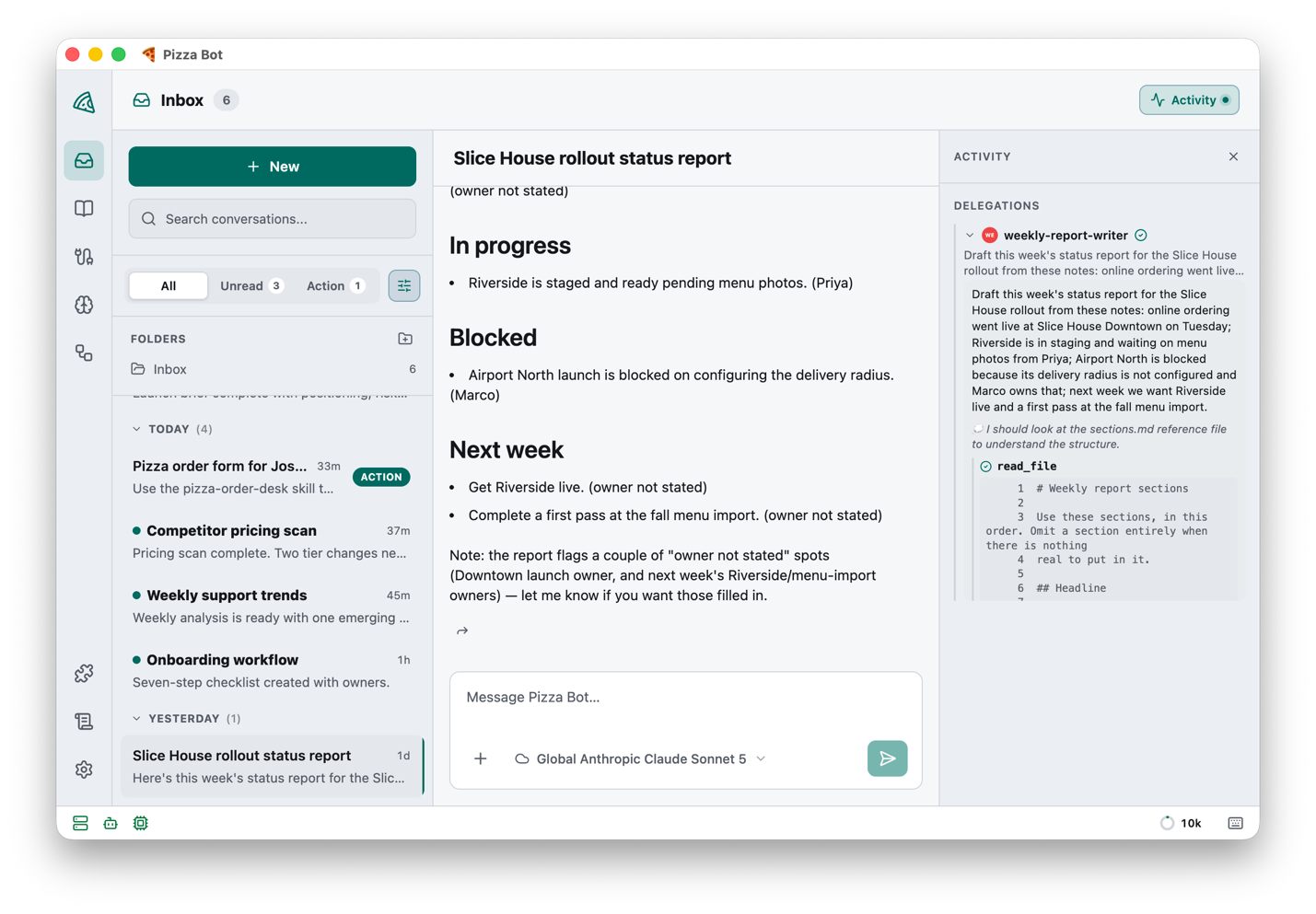
Alongside them, an Activity panel shows work the main agent handed to a specialist, including that specialist’s own transcript. A long task stays legible while it’s still running. The following screenshot shows one delegated worker expanded, with its own tool calls beside the main thread.
Where Pizza Bot fits
A lot has shipped since we started building Pizza Bot. There are SDKs for building your own agent, and many hosted assistants now offer some form of background task, so it’s fair to ask what Pizza Bot adds.
Most agent tooling is aimed at people who are building something. Pizza Bot is for people who just need the work done, so it’s a finished application aimed at the rest of the day’s work rather than at writing software. These are the commitments behind it:
The interface assumes you are not watching. Nothing else we’ve seen starts there, and that one assumption is what buys you pauses that outlast the session that created them, notifications worth acting on, and scheduled work that produces threads instead of logs.
Your existing tools and skills carry over. Pizza Bot didn’t invent an extension format. It connects to Model Context Protocol (MCP) servers for tools, and works with Agent Skills, the Markdown convention Anthropic introduced, for packaging what a specialist knows. You can continue to use the tools and skills you’ve already written.
Nothing leaves your machine unless you send it there. Pizza Bot listens only on your own machine until you tell it otherwise, and everything it stores stays in a folder you own. The model provider is your choice, and so is every tool the agent can reach.
How Pizza Bot works
Pizza Bot is a server and a client. The server runs the agent, owns its state, and answers over HTTP. The client is whatever you’re looking at: the Electron desktop application, a browser, or a terminal. The desktop application wraps both, starting a local server of its own and connecting to it the same way a client on another machine would.
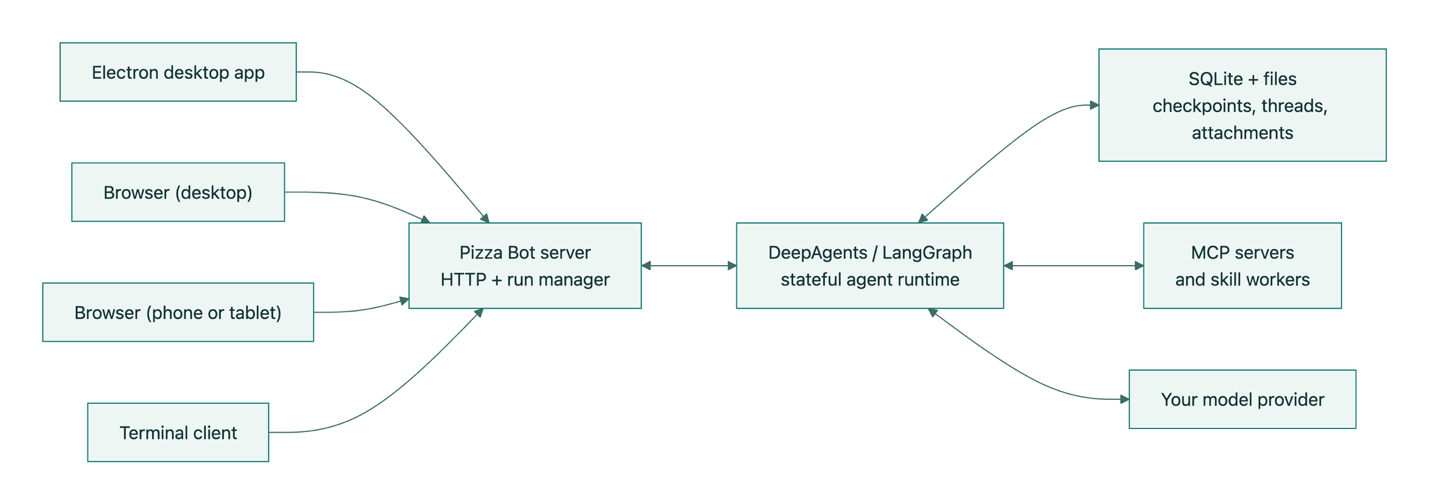
Because the work lives on the server, a run keeps going when you close the thread, reload the page, or switch devices, and a client that reconnects catches up on what it missed. Put the server on a machine that’s always on, or in a container, and you can reach the same threads from a laptop, a phone, or a terminal; the desktop application can point at that server instead of starting one of its own.
Quitting the desktop application stops the server it started, which ends that server’s runs. Because the run is checkpointed as it goes, you lose the step in flight rather than the thread.
Where your data lives
A thread is the durable home for a conversation and the agent state that goes with it. Underneath, DeepAgents builds the agent on LangGraph, an open source framework for stateful agents, which checkpoints a run as it proceeds, so the messages, the tool activity, and a pause waiting on your approval are on disk rather than in memory.
All of it stays in one folder you control: threads, checkpoints, memories, attachments, settings, and logs, as SQLite databases and ordinary files. One folder holds everything worth backing up. Copy it with the server stopped, or with a tool that understands a live SQLite database.
You control what leaves the machine. Pizza Bot sends prompts and attachments to the model provider you chose, and tool calls to the MCP servers you enabled. Those servers can act on your behalf, which is worth remembering when you install one. Pizza Bot hands provider credentials to the operating system’s secret store rather than leaving them in a plaintext configuration file, and never sends them to a browser client. A deployment that isn’t local-only requires an API token and an explicit list of allowed origins, and Pizza Bot won’t serve a remote client without both. SECURITY.md documents the full boundary and how to report a vulnerability privately.
What the agent can already do
Out of the box Pizza Bot can already do real work. The agent can list, read, write, edit, and search files in a scratch space of its own, delegate through task, and run a sandboxed JavaScript interpreter with no network and no host filesystem for arithmetic, parsing, and delegating several tasks at once. The Activity panel is where that delegation shows up.
Your disk stays out of reach until you grant access to a folder, and each grant is read-only or read and write, your choice. Memories are opt-in too. Switch them on and /memories/ persists across threads, editable in the application, so something worth remembering outlives the run that learned it.
Everything past that comes from an MCP server, and skills are how you decide who gets to call what.
Skills
The main agent you talk to in a thread is a generalist. Specialists come from skills, one SKILL.md file apiece. An enabled skill can become a worker the main agent delegates to, with its own instructions and its own short list of MCP tools.
A meeting-preparation skill might get calendar, CRM, and document tools. The browser-automation skill that ships with Pizza Bot gets a browser and no other MCP tools. Keeping each specialist’s list short is the point: it keeps a delegated task focused, and it makes the agent’s reach reviewable at a glance.
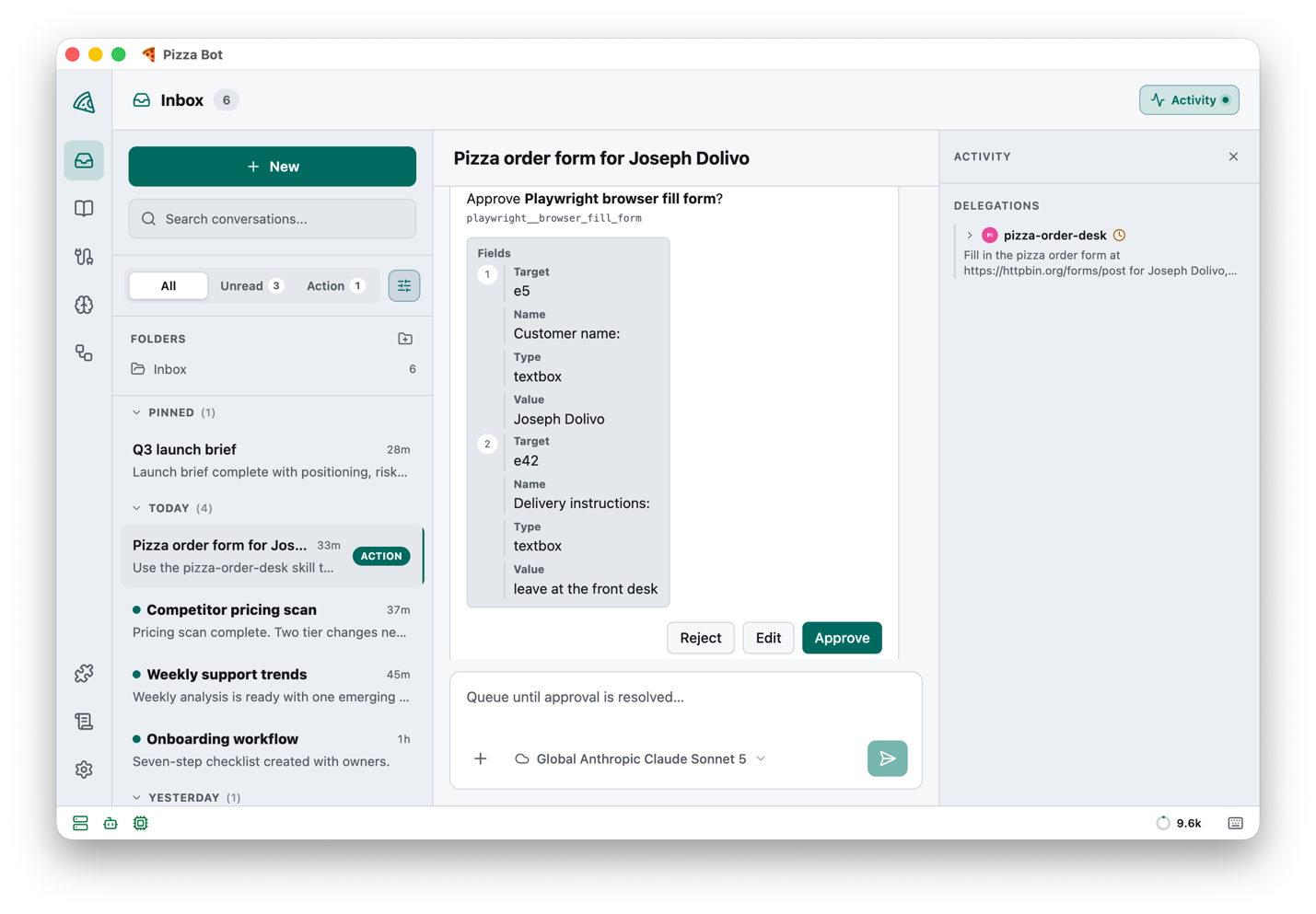
A skill can also require your approval before specific tools run, and it decides which answers you’re allowed to give. That pause is durable, so you can answer an hour later, from a different device, from the Action queue. The following screenshot shows an approval card holding a run open until you decide.
Automations
Pizza Bot runs cron schedules and secret-protected webhooks from an Automations screen, once you switch it on in Settings. The server owns the scheduler and records every occurrence. When it starts up after being off or asleep, it runs a schedule it slept through once rather than replaying every occurrence it missed, so a machine that spent a month switched off gives you one result instead of thirty.
Scheduled work and work you typed share everything downstream: the same persistence, the same approvals, the same notifications, the same inbox.
Get started
Download a build for macOS, Windows, or Linux from the releases page, open it (only Mac builds are signed so far, so your operating system may ask you to confirm), and configure a model provider under Settings > Providers. The following screenshot shows the provider settings.
Two skills ship with Pizza Bot. The browser-automation skill above relies on the Playwright MCP server to drive a web browser you already have installed. The second, pizza-bot-guide, answers questions about Pizza Bot itself, which is a reasonable first thing to ask it.
Two things to know before you commit a workflow to it. Pizza Bot is a community project rather than an AWS service, so there’s no AWS support or service-level agreement behind it; keeping Pizza Bot running, backed up, and up to date is yours.
It’s also young in a particular way. Most of Pizza Bot’s day-one usefulness inside Amazon came from an internal marketplace of ready-made skills and MCP servers for the systems people already worked in. Those were built against Amazon’s own tools and wouldn’t be much use to anyone outside it, so they came out during the rebuild. Replacing them with skills and MCP servers for the systems you use is where we most need help, and we’d rather build that with you than guess at it.
Extend Pizza Bot with skills and MCP
Skills, MCP servers, and plugins are managed in the application, and a Claude Code-compatible .mcp.json you already have drops straight in. A skill only becomes callable once the servers and tools it declares are actually available, and the Skills screen shows you which ones are not. The ones you write live in skills/ inside your data folder, which defaults to ~/.pizza-bot-oss; docs/EXTENDING.md covers plugins, catalog precedence, and the rest. The following screenshot shows the Skills screen, including one skill that cannot run yet because an MCP server it declares is missing.
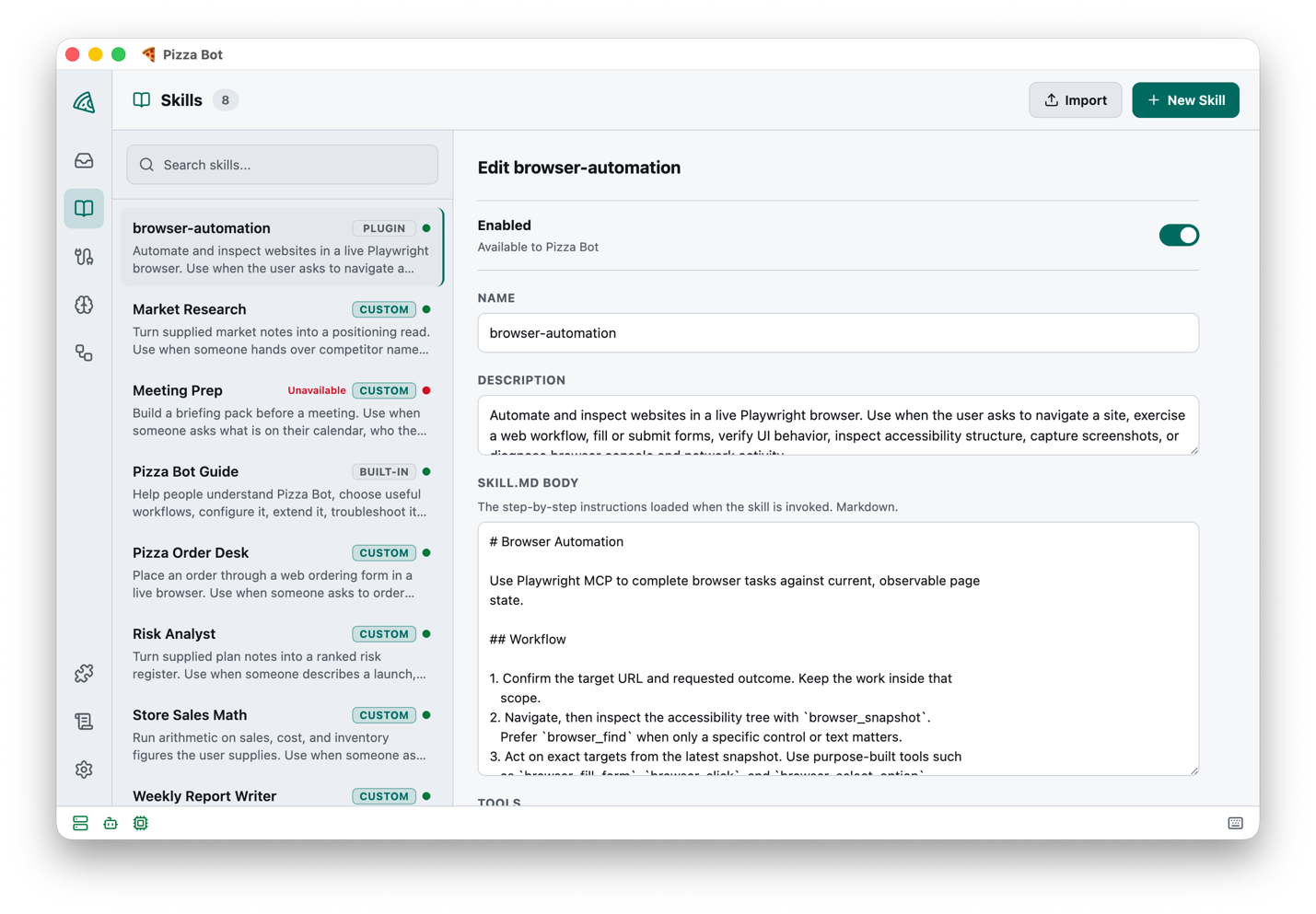
Writing a skill means writing an ordinary SKILL.md, which Pizza Bot reads with two additions. tools is the list of MCP tools the specialist may call. interruptOn is a per-tool approval policy, where allowedDecisions sets the buttons you get; edit is the one worth noticing, because it lets you correct what the agent proposed rather than rejecting it and starting the run over. Installing an MCP server or a plugin means running code with your permissions, so Pizza Bot makes that an explicit decision at install time rather than a side effect.
Join the Pizza Bot community
Pizza Bot is open source under the Apache License 2.0, and our roadmap is a set of principles rather than a release schedule:
- You own your data. It stays on your machine until you allow otherwise.
- Bring your own model. Whatever fits the job, including a local one when the data shouldn’t leave at all.
- Build what’s missing. The skills you write load the same way the built-in ones do, so anything we can add, you can.
We know the inbox works for the workflows we built it for. Whether it holds for the ones we never thought of is what building in the open will tell us.
Start at the repository. CONTRIBUTING.md covers building and submitting a change, and the running guide covers putting the server on an always-on machine so schedules fire when your own computer is off.
If something’s missing, the fastest path is usually to build it yourself as a skill or an MCP server, then share it so the next person doesn’t have to. What we most want to hear about is the other kind of gap, the one where the application itself gets in your way and no skill can fix it.
Pizza Bot was built with the help of Flávio Schuindt, Jacob Wert, Michael Karachewski, and Itzik Paz. The team calls itself “Chefs,” in keeping with the two-pizza theme.
Pizza Bot is a trademark of Amazon.com, Inc. or its affiliates.