AWS Architecture Blog
Cyber recovery on AWS: A reference approach for recovering from ransomware and destructive events
October 2026: This post was reviewed and updated for accuracy.
Ransomware and other destructive events can compromise not just your production environment but the backups, credentials, and infrastructure you depend on for recovery. Cyber recovery addresses this case: restoring workloads to a known-good state when you cannot trust your own recovery inputs. In this post, we share a reference approach for recovering critical workloads on AWS after a destructive event.
This approach uses two deployment models. Model 1 operates within a single AWS Organization. Model 2 uses Multi-party approval to place the authority to approve recovery in a separate AWS Organization, so recovery does not depend on the trustworthiness of the vault-owning organization.
Isolating recovery from production
The core architectural idea in cyber resilience is that the recovery environment, including its identities, keys, and network paths, should not share a trust boundary with the environment being recovered. If production identity is compromised, recovery must be able to proceed without depending on it. You can achieve this by using separate AWS accounts. The vault itself does not require a separate account: the workload account can own the logically air-gapped vault, an optional recovery or backup account can add governance separation at the cost of a second copy, and a separate Isolated Recovery Environment provides the clean room for restore and rebuild.
Production accounts
The production (workload) account is where workloads run and, by default, owns the logically air-gapped vault. If a cyber event is confirmed, this account is isolated for investigation. Recovery work does not happen in production, because in some scenarios remediation in place might not fully restore trust.
Recovery account (optional)
By default, place the logically air-gapped vault in the workload account itself using primary backup. This keeps a single copy in the same account and Region, with no extra storage cost. The recovery points are stored in AWS service-owned accounts, which provides the isolation. A separate recovery or backup account is optional. It can add governance separation and give you more control-plane separation. Placing the vault in a different account than the workload copies the recovery points into that account, which is a second copy in the same Region and adds cost. The isolation benefit comes from the service-owned storage, not from a separate account.
Isolated Recovery Environment (IRE)
The IRE is where backups are restored, validated, and the new production environment is rebuilt before cutover. It is kept separate from the production account so that if a restored backup still contains the threat, it has nowhere to spread. It has no trust relationship to the production account, no VPC peering to it, and no internet-facing resources, so a tainted restore discovered during validation stays contained inside the IRE. Infrastructure deployment in the IRE uses VPC endpoints (AWS PrivateLink) to reach AWS service APIs without internet connectivity or VPC peering to production.
The AWS Backup logically air-gapped vault
The AWS Backup logically air-gapped vault is the primary AWS-native option for protecting backup storage from deletion, and it is the foundation of both models in this post. It is locked in Compliance mode, so recovery points cannot be deleted by any principal, including the account root user or a compromised administrator, within the retention period. This deletion protection is the first line of defense for all workloads. Whether a recovery point is safe to use is determined by the validation pipeline described later.
Recovery points are stored in AWS service-owned accounts. You can encrypt them with an AWS owned key or an AWS Key Management Service (AWS KMS) customer managed key. Back up fully managed resources such as Amazon Simple Storage Service (Amazon S3), Amazon DynamoDB, and Amazon Elastic File System (Amazon EFS) directly to the vault. Other resource types use an orchestration path where the service creates and transfers a temporary snapshot. Support depends on the resource type and changes over time, so check Primary backups to logically air-gapped vaults and Feature availability by resource for the current list.
The logically air-gapped vault protects backups from deletion within the account and Region where it resides. Surviving the loss of an entire AWS Region is a different concern from the deletion protection this post covers. If you have disaster recovery or compliance requirements, AWS recommends also keeping a copy in another AWS Region. You can do this by copying backups cross-Region or by replicating the primary resource cross-Region.
Some S3 data cannot be backed up by AWS Backup, such as SSE-C encrypted objects, objects in Glacier Flexible Retrieval or Deep Archive, and directory buckets. For that data, S3 Object Lock in Compliance mode with S3 Versioning provides equivalent immutability. It does not provide the account isolation a logically air-gapped vault provides, because the data stays in your bucket in your own account. For S3 data that AWS Backup does support, the logically air-gapped vault remains the primary path.
Model 1: Single AWS Organization (without Multi-party approval)
In this model, the Production (workload) account owns the logically air-gapped vault using primary backup, and a separate Isolated Recovery Environment provides the clean room for restore and rebuild, both inside a single AWS Organization. Recovery points are stored in AWS service-owned accounts. The Production account shares the vault with the IRE using AWS Resource Access Manager (AWS RAM), and the IRE can then access and initiate restores from the recovery points. A separate recovery or backup account is optional and adds governance separation, but it copies the recovery points into a second copy at additional cost.
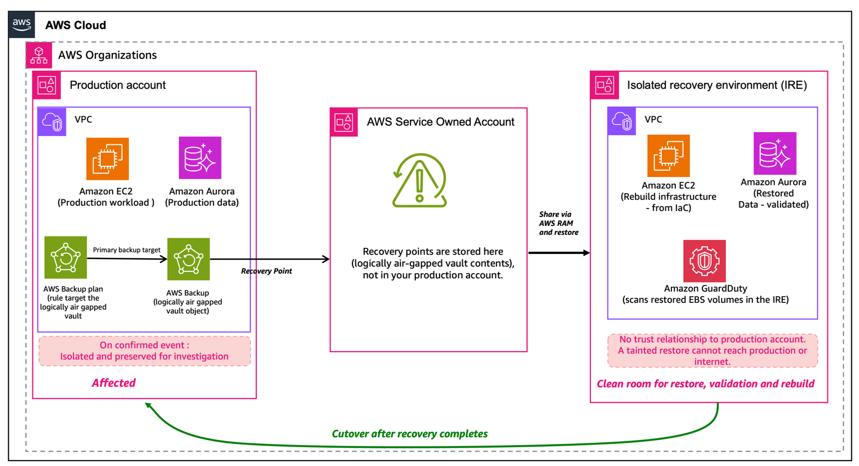
Figure 1. Single AWS Organization, RAM-based vault sharing.
Within a single AWS Organization, the Production (workload) account owns the logically air-gapped vault and is isolated after a confirmed event. Recovery points are stored in AWS service-owned accounts. The vault is shared with the IRE using AWS RAM. A separate recovery account is optional and, if used, holds a copy of the recovery points at additional cost. The IRE has no trust relationship or network path to production.
A single AWS Organization with the account isolation described earlier aligns with AWS best practices and is a complete model for operational recovery. Model 1 does not use Multi-party approval. Multi-party approval is an optional control you can add later, and it does not require a second organization. The next section describes how it works.
Model 2: Two AWS Organizations (with Multi-party approval)
Model 1 protects your backups from deletion and tampering and covers operational recovery within a single AWS Organization. Multi-party approval (MPA) is an add-on that raises the level of threat protection. MPA is a capability of AWS Organizations that requires a threshold of approvers to authorize the creation of a restore access backup vault. For the cyber-recovery scenarios in this post, we recommend the two-organization pattern, which AWS Backup calls the Organizations recovery pattern. It keeps the approval authority independent of the environment being recovered and protects your backups even when an entire AWS Organization, including its management account or identity provider, is compromised.
AWS Backup documents Multi-party approval in two patterns. In the AWS account recovery pattern, the approval team lives in a separate account within the same organization, which protects against compromise of the vault-owning account. In the AWS Organizations recovery pattern, the approval team lives in a separate organization, which protects against compromise of the entire organization, including its management account or identity provider. Because the scenarios in this post assume you cannot fully trust the organization itself, we focus on the AWS Organizations (two-organization) pattern.
Two-organization reference architecture
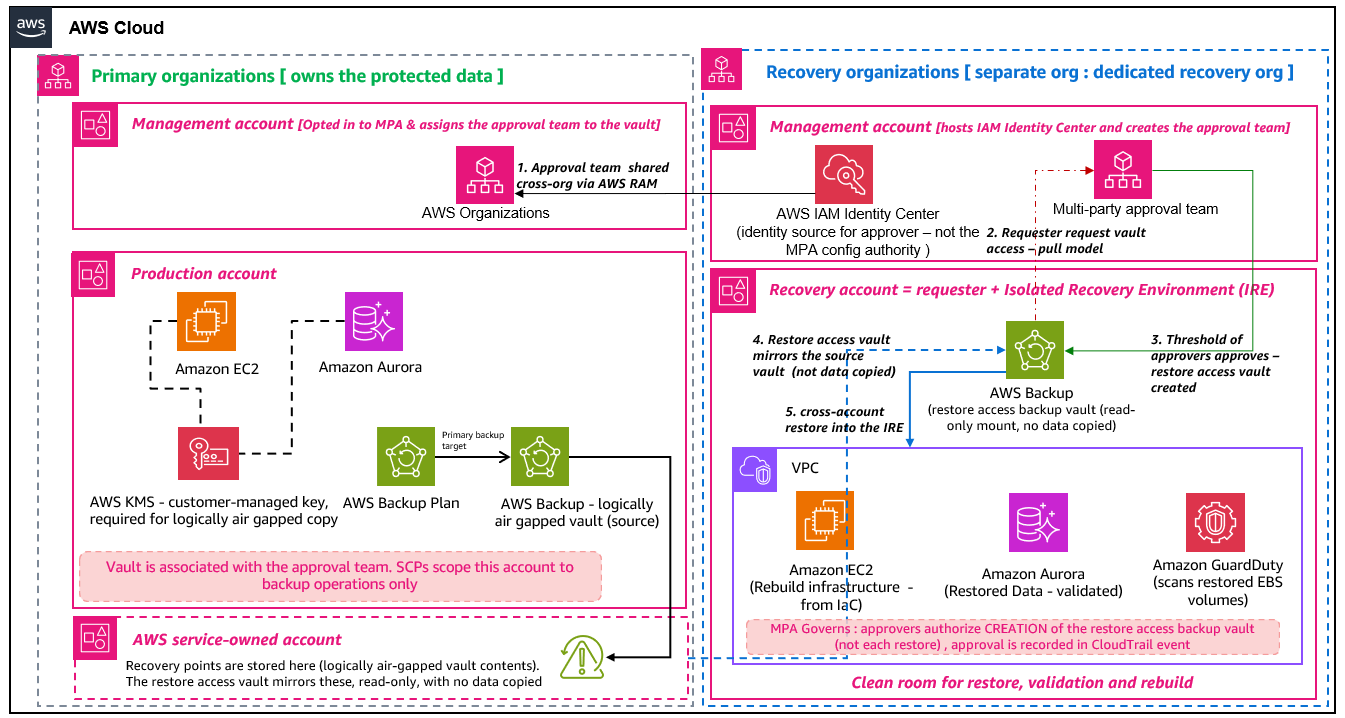
Figure 2. Two AWS Organizations with Multi-party approval.
This reference architecture implements the AWS Organizations recovery pattern for critical workloads. The primary organization owns the logically air-gapped vault in its Production (workload) account, and recovery points are stored in AWS service-owned accounts. The recovery organization manages the Multi-party approval team and a single recovery account that serves as both the requester and the Isolated Recovery Environment. This account requests vault access using the pull model, and approvers authorize creation of a restore access backup vault, not individual restores. The restore access vault is a read-only mount of the source vault, so no data is copied.
| Component | Location |
| Logically air-gapped vault (source) | Primary organization: Production (workload) account |
| Recovery points | AWS service-owned accounts |
| Approval team (defined through IAM Identity Center) | Recovery organization: management account |
| Restore access backup vault (created on approval) | Recovery organization: recovery account (also the requester + Isolated Recovery Environment). Read-only mount of the source vault, no data copied |
| MPA opt-in (management account) and vault-team association (vault owner / Backup admin) | Primary organization: management account |
How Model 2 builds on Model 1: recovery posture and threat protection
The following table shows how each posture builds on the previous one, and the threat protection each one adds.
| Recovery posture | AWS Organizations | Threat protection added | Model |
| Logically air-gapped vault, shared with AWS RAM | Single organization | Protects backups from deletion and tampering. Supports operational recovery when you can still trust identity within your organization | Model 1 |
| Add Multi-party approval, cross-organization (AWS Organizations recovery pattern) | Two organizations, with an independent identity provider | Adds protection when the entire organization (management account or shared identity provider) is compromised | Model 2 (recommended) |
Why the recommended MPA pattern uses two organizations
The security guarantee of MPA depends on the approval team being organizationally independent from the vault owner. If the approval team lived in the same AWS Organization as the vault owner, a compromise of that organization’s management account can disable or bypass the approval requirement, defeating the purpose of the control. The documented best practice places the approval team in a separate AWS Organization (a dedicated recovery organization or a third-party organization) while the primary organization owns the logically air-gapped vault.
The management account in the primary organization is opted in to MPA and assigns an approval team to the vault. The approval team members are defined using AWS IAM Identity Center in the recovery organization. IAM Identity Center is the identity source for approvers. It is not what MPA is configured through. The configuration authority is AWS Organizations. The vault-owning account in the primary organization owns the logically air-gapped vault and associates it with the approval team, which is what binds the primary organization’s vault to the approvers defined in the recovery organization.
How MPA works: vault access authorization, not per-restore approval
MPA does not gate each individual restore. What MPA approvers authorize is the creation of a restore access backup vault in the requester account in the recovery organization. After a threshold of approvers responds through the MPA portal, the restore access vault is created and restores proceed from it without per-restore approval. The recovery (requester) account is also the Isolated Recovery Environment. The restore access vault is created in that account, and the cross-account restore lands in that same account, where the data is validated and the environment is rebuilt. You do not need a separate requester account and a separate IRE account. The access request expires if it is not acted on within the approval session window. This is a pull model: the requester account initiates the request, and the approval team grants or denies it. This is the inverse of RAM-based sharing, where the vault owner pushes the share. The approval action is recorded as an AWS CloudTrail management event.
Recommendation
Adopt Model 2 when the authority to approve recovery needs to live outside your primary organization. This protects recovery when the primary account or organization might be compromised. You set it up once. The operational overhead at recovery time is a single vault access request, not a per-restore workflow.
Validation pipeline (applies to both models)
A successful restore confirms that the backup was readable. Validation confirms that it is safe to use. No single check catches everything, which is why validation combines several layers. A malware scan on the restored volume catches known encryption tools and indicators. Workload-specific checks, such as a database consistency check, an application invariant, or a configuration diff against a known-good baseline, catch changes an attacker made that look normal to a scanner. Log and audit review across the backup window catches unexpected identity or configuration changes.
| Layer | Capability | What it provides |
| AWS native | AWS Backup Restore Testing | Automated verification that backups are recoverable, with custom hooks through the PutRestoreValidationResult API |
| AWS native | Amazon GuardDuty Malware Protection for Backup; Malware Protection for EC2 | Malware Protection for Backup scans recovery points at creation time, and it covers Amazon Elastic Block Store (Amazon EBS), Amazon Elastic Compute Cloud (Amazon EC2), and S3 recovery point types — so S3 recovery points written to a logically air-gapped vault through primary backup are scanned, but other resource types are not. Malware Protection for EC2 scans restored Amazon EBS volumes post-restore in the IRE. Because scanning is tied to creation time and to these resource types rather than to on-demand scans of the RAM-shared vault mount, scanning runs against restored volumes in the IRE for coverage that creation-time scanning does not provide. |
| AWS Partner | AWS Marketplace partner solutions | Content-level ransomware scanning inside backup contents without a full restore |
| Workload-specific | Integrity and consistency checks | Database consistency, application invariants, and configuration diffs against known-good baselines |
| Cross-cutting | Log and audit review | Identify unexpected identity or configuration changes across the backup window using AWS CloudTrail and workload logs |
Validation happens in the IRE so that if any check detects a problem, the affected restore is contained inside the IRE and does not reach production.
Selecting a safe recovery point (applies to both models)
For most operational recoveries, the most recent backup is the right one. For cyber events, the most recent working copy is often a better target: if an adversary was present before detection, backups taken during that window might carry the same issues.
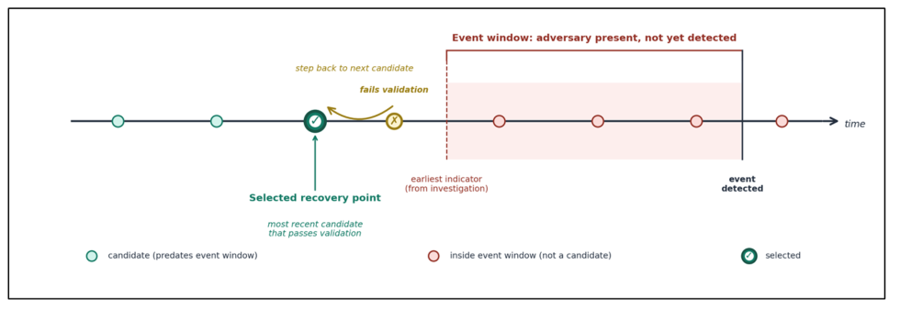
Figure 3. Candidates are evaluated in reverse chronological order starting from the most recent backup that predates the event boundary, with each passing through the validation pipeline before approval.
Build an investigation timeline from AWS CloudTrail, Amazon Virtual Private Cloud (Amazon VPC) Flow Logs, Amazon GuardDuty, AWS Security Hub, and workload logs to identify the earliest plausible indicator of the event. Evaluate candidates in reverse chronological order from the most recent backup that predates the event window. If validation fails, step back to the next candidate. Configure backup retention to include recovery points that predate realistic detection windows for your organization.
Recovery workflow (applies to both models)
Recovery has five stages. Three run at the same time because the slowest path determines how long the business is down. Investigation and validation run in parallel with infrastructure rebuild, and we wait to restore data because restoring untrusted data defeats the validation.
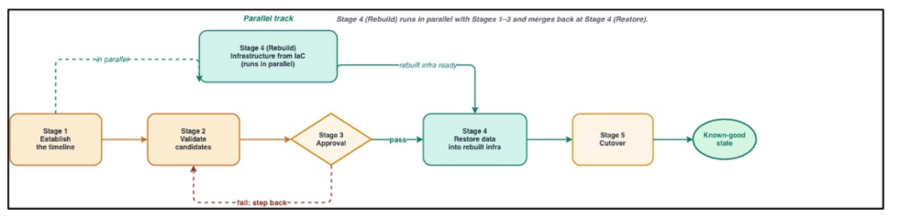
Figure 4. Stages 1, 2, and 4 (investigation, validation, and infrastructure rebuild) run in parallel. Stage 3 (approval) is the gate before validated data is restored into the rebuilt environment.
Stage 1: Establish the timeline
Query AWS CloudTrail, Amazon VPC Flow Logs, Amazon GuardDuty findings, AWS Security Hub, and workload logs to identify the earliest indicator of the event. That timestamp becomes the event boundary. Only recovery points created before it are candidates. AWS Security Incident Response can provide coordinated triage and response support.
Stage 2: Validate candidates
Run the validation pipeline against recovery points that predate the event window, in reverse chronological order. This stage runs in parallel with Stage 1.
Stage 3: Approval
Approve only recovery points that pass all validation checks. Document the rationale for recovery point selection, including investigation findings and validation results, in your incident management process. If you use Model 2 (two organizations with Multi-party approval), vault access is pre-authorized through the creation of a restore access backup vault. You typically request this at the start of the workflow, in parallel with Stages 1 and 2, so it is not on the critical path here. Restores then proceed without per-restore approval. See Model 2.
Stage 4: Rebuild and restore
Rebuild infrastructure in the IRE from infrastructure as code (IaC) templates in a separate, version-controlled repository, in parallel with Stages 1 and 2. After Stage 3, restore the validated data from the logically air-gapped vault into the rebuilt infrastructure. Apply credential rotation during this stage.
Stage 5: Cutover
Move production traffic from the affected environment to the rebuilt one using DNS records with health checks. Before cutover, identify and update cross-account references that point to the original Production Account: IAM role trust policies, resource-based policies, AWS KMS key grants, and service integrations. Keep the affected Production Account isolated until the investigation is complete.
The Rebuild-Restore-Rotate framework (applies to both models)
Cyber recovery requires sorting what gets rebuilt from code, restored from backup, and generated fresh. Infrastructure is code. Data is backup. Credentials are new.
| Category | Examples | Why |
| Rebuild from code | IAM policies and roles, Security Groups, Amazon EC2, Amazon VPC, AWS Lambda, CI/CD pipeline definitions | Configurations come from reviewed, version-controlled templates rather than from a backup that might have been affected |
| Restore from backup | Amazon Aurora, Amazon EFS, Amazon EBS, Amazon FSx | Business data cannot be recreated from code and must come from validated, immutable backups |
| Rotate or re-issue | IAM access keys, database passwords, API keys, certificates, OAuth tokens, SSH keys | Any secret that might have been exposed during the event window is replaced, not carried forward from backup |
Some services sit across two categories: Amazon S3 buckets and Amazon DynamoDB tables have both configuration (rebuilt from code) and data (restored from backup). Some credentials are re-issued by AWS rather than rotated by you, such as service-linked roles and AWS Security Token Service (AWS STS) session tokens. Derived data stores (search indexes, analytics tables, caches, materialized views) regenerate from restored data and are sequenced after it in the runbook. The framework assumes your source of configuration was not itself the target of the attack. If it was, recovery starts upstream with a trusted copy of source.
Next steps
The following steps form the operational foundation for the recovery workflow described in this post.
-
Create the logically air-gapped vault in the workload account using primary backup. Establish an Isolated Recovery Environment as a separate clean-room account. A separate recovery or backup account is optional and adds a second copy at additional cost if you choose it for governance separation.
-
Establish the IRE in advance, with no trust relationship to production and no network path into it. Use service control policies (SCPs) to enforce isolation.
-
Enable AWS Backup Restore Testing on a regular schedule. Enable Amazon GuardDuty Malware Protection for Backup to scan recovery points at creation time, and Malware Protection for EC2 to scan restored volumes in the IRE. Malware Protection for Backup does not support scheduled scans of recovery points copied into a logically air-gapped vault through primary backup. Scanning restored volumes in the IRE covers that gap.
-
Define workload-specific integrity checks (database consistency, application invariants, configuration diffs).
-
Confirm the credential rotation process works end-to-end and can be invoked as part of recovery. AWS Secrets Manager rotation provides the automation framework for database passwords and API keys.
-
Map cross-account dependencies (IAM role trust policies, resource-based policies, AWS KMS key grants, service integrations) in your recovery runbook.
-
Exercise the full workflow (investigation, validation, rebuild, restore, cutover) on a regular schedule.
For Model 2: extend to two AWS Organizations and configure Multi-party approval. Opt the primary organization’s management account into MPA, define the approval team through IAM Identity Center in the recovery organization, share the team cross-organization with AWS RAM, and associate the team with the vault.
Conclusion
Cyber recovery on AWS builds on the services customers already use for recovery, with additions for the case where the production environment, the backups, or the recovery path might not be trustworthy after an event. Choose the model that matches what you need to protect against. A single AWS Organization without Multi-party approval protects your backups from deletion and tampering. It supports recovery when you can still trust identity within your organization. Two AWS Organizations with Multi-party approval add an approval authority outside the primary organization. Use this when the primary account or organization might itself be compromised.