AWS News Blog
Amazon Bedrock introduces new advanced prompt optimization and migration tool

|
Today, we’re announcing Amazon Bedrock Advanced Prompt Optimization, a new tool that you can use to optimize your prompts for any model on Amazon Bedrock, while comparing your original prompts to optimized prompts across up to 5 models simultaneously. With the new prompt optimization, you can migrate to a new model or improve performance from your current model. You can test them to make sure they see no regressions on known use cases and also improve on underperforming tasks.
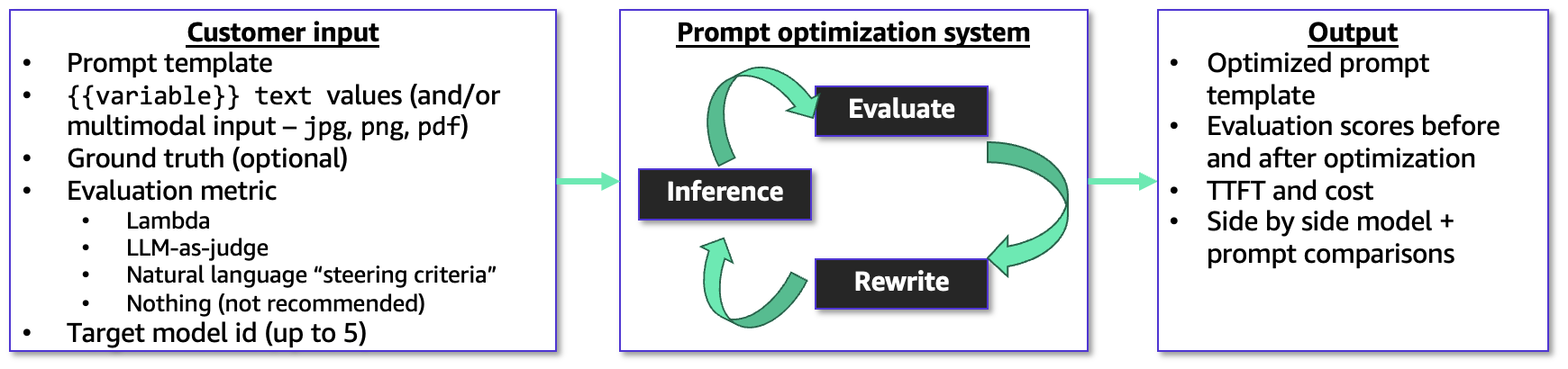
The new prompt optimizer takes in your prompt template, example user inputs for the variable values, ground truth answers, and an evaluation metric to use as a guide. You can even use this with multimodal user inputs – it supports png, jpg, and pdf as inputs to your prompt templates so you can optimize prompts for tasks like document and image analysis.
You can also provide an AWS Lambda function, LLM-as-a-judge rubric, or a short natural language description to guide the optimization. The prompt optimizer works in a metric-driven feedback loop to optimize the prompt and resulting model responses for the evaluation metric, and outputs the original and final prompt templates with evaluation scores, cost estimates, and latency.
Bedrock Advanced Prompt Optimization in action
To get started with the new prompt optimization, choose Create prompt optimization on the Advanced Prompt Optimization page of Amazon Bedrock console.
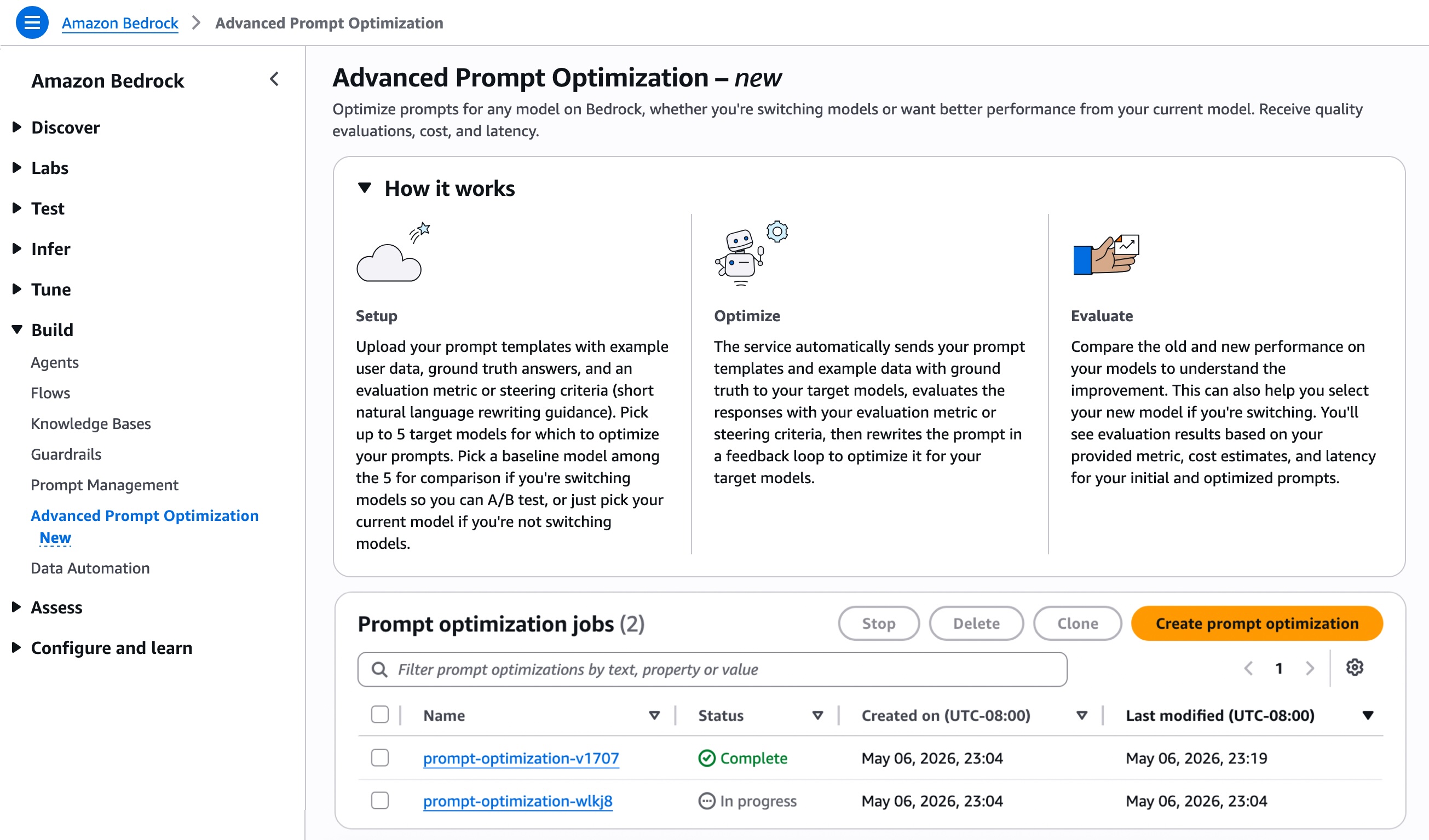
Pick up to 5 inference models for which to optimize your prompts. You can use this if you are migrating to a new model or just want to get better performance on their current model. If you’re changing models, you can select your current model as a baseline and up to 4 other models. If you aren’t changing models, then just select your current model to see before and after optimization.
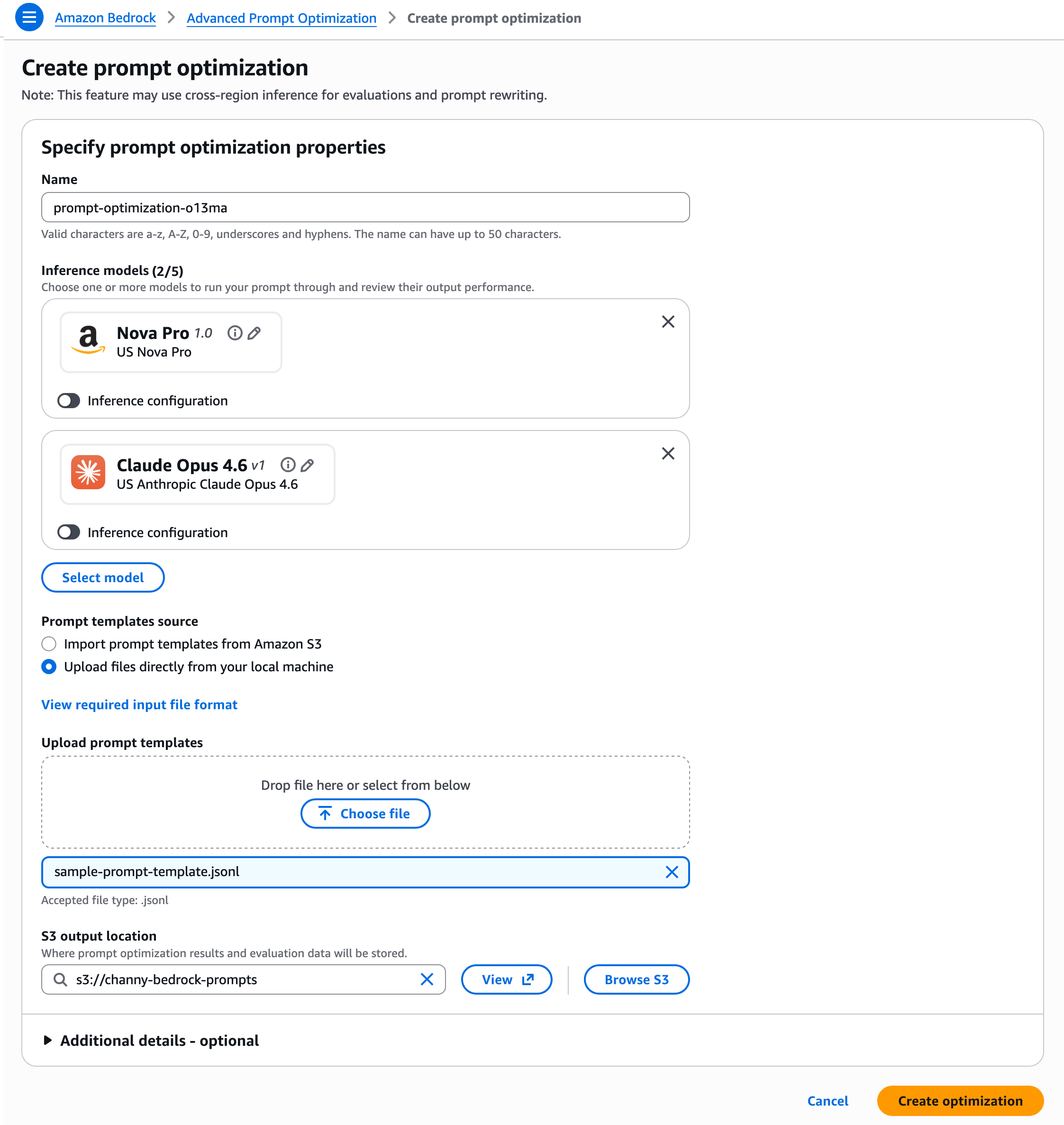
You should prepare your prompt templates in JSONL format with example user data, ground truth answers, and an evaluation metric or rewriting guidance. For .jsonl files, each JSON object must be on a single line.
{
    "version": "bedrock-2026-05-14",           // required; Fixed value
    "templateId": "string",                    // required
    "promptTemplate": "string",                // required
    "steeringCriteria": ["string"],            // optional
    "customEvaluationMetricLabel": "string",   // required if customLLMJConfig or evaluationMetricLambdaArn is used
    "customLLMJConfig": {                      // optional
        "customLLMJPrompt": "string",          // required if customLLMJConfig present
        "customLLMJModelId": "string"          // required if customLLMJConfig present
    },
    "evaluationMetricLambdaArn": "string",     // optional
    "evaluationSamples": [                     // required
        {
            "inputVariables": [                // required
                {
                    "variableName1": "string",
                    "variableName2": "string"
                }
            ],
            "referenceResponse": "string"      // optional
            "inputVariablesMultimodal": [      // optional
                {
                "Arbitrary_Name": {            // required for your multimodal variable.
                    "type": "string",          // choose from "PDF" or "IMAGE". Acceptable filetypes for IMAGE = png, jpg,
                    "s3Uri": "string"          // input the S3 path of the file
                }
            ]
        }
    ]
}
You can upload files directly or import prompt templates from Amazon Simple Storage Service (Amazon S3) and set an S3 output location where prompt optimization results and evaluation data will be stored. Then, choose Create optimization.
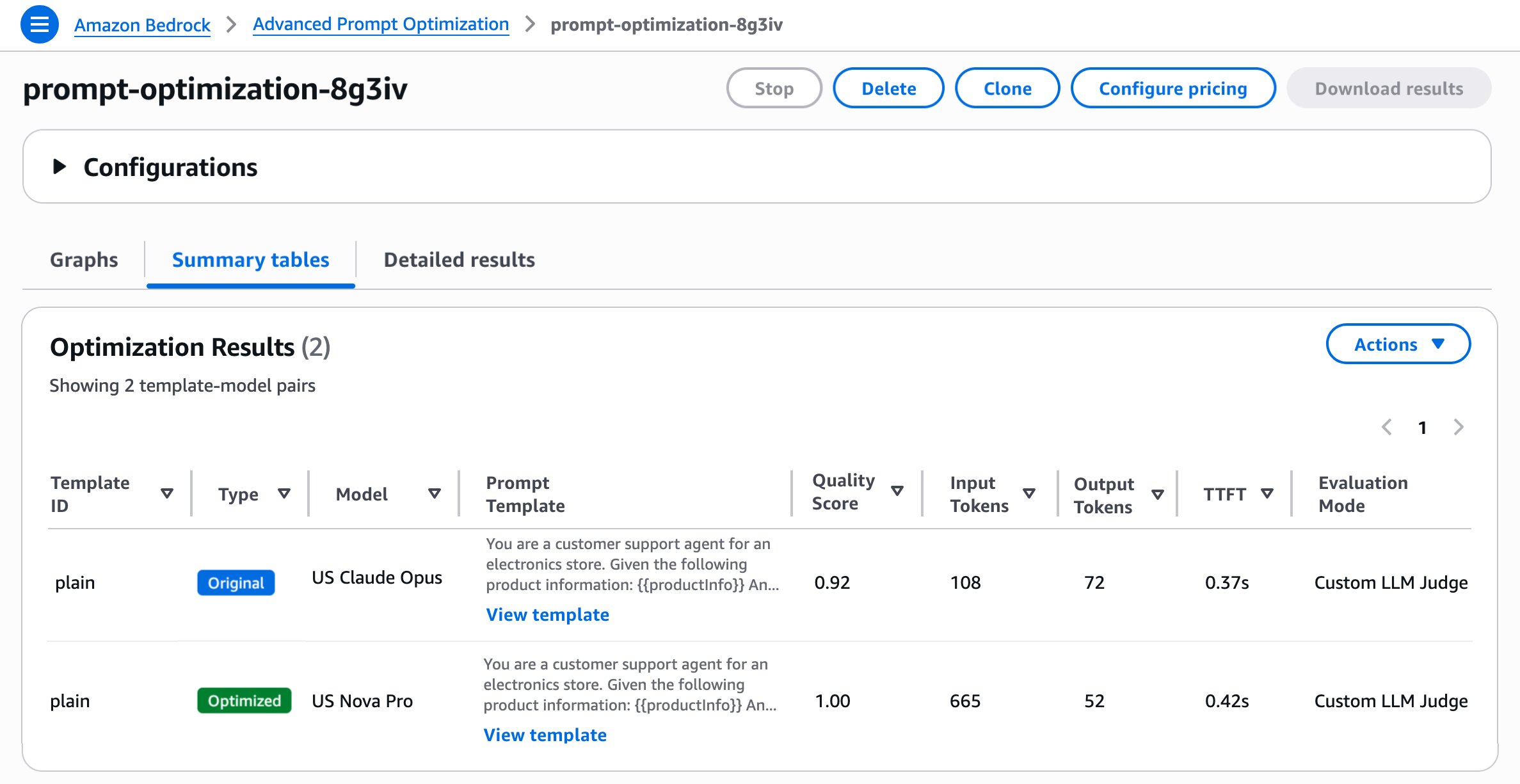
Amazon Bedrock automatically sends your prompt templates and example data with optional ground truth to your inference models, evaluates the responses with your evaluation metric, then rewrites the prompt in a feedback loop to optimize it for your inference models. You’ll see evaluation results based on your provided metric and your final optimized prompts.
As you noted, you can evaluate prompt quality in three ways: a Lambda function with your own Python scoring logic, LLM-as-a-Judge with a custom rubric, or natural-language steering criteria. You can just choose one per prompt template, but can do multiple prompt templates in a job, so they can use a different method for each prompt template if they want.
- Lambda function: If you have a concrete metric (accuracy, F1, execution accuracy, structured-JSON match, etc.), you can deploy a Lambda function containing your custom scoring logic and configure
evaluationMetricS3Urifield of the prompt template. Inside the Lambda, the core is a compute_score implementation that programmatically compares model outputs against reference responses. - LLM-as-a-Judge: If your task is open-ended (summarization, generation, reasoning explanations) and you want a rubric-based score, you can configure the S3 config file in the
customLLMJConfigfield of the prompt template to define named metrics with structured instructions and a rating scale. A Bedrock judge model evaluates each prompt-response pair and returns a score with reasoning. The default model is Claude Sonnet 4.6 and you can also select your own from a list of judge models. - Steering criteria: If you know the qualities you want (brand voice, format, safety constraints) but don’t want to author a full judge prompt, you can define criteria in the input dataset through the
steeringCriteriaarray of the prompt template. Instead of structured metrics with rating scales, you provide free-form natural language criteria that the LLM judge evaluates holistically. If you use this option, then a default LLM-as-a-judge prompt will evaluate the responses and incorporate your steering criteria into the judge prompt. The judge model in this case is Anthropic Claude Sonnet 4.6.
To learn more about how to use the advanced prompt optimization and migration, visit the advanced prompt optimization in Bedrock guide and the sample codes in Github.
Now available
Amazon Bedrock Advanced Prompt Optimization is available today in US East (N. Virginia, Ohio), US West (Oregon), Asia Pacific (Mumbai, Seoul, Singapore, Sydney, Tokyo), Canada (Central), Europe (Frankfurt, Ireland, London, Zurich), and South America (São Paulo) Regions. You are charged based on the Bedrock model-inference tokens consumed during optimization, at the same per-token rates as regular Bedrock inference. To learn more, visit the Amazon Bedrock pricing page.
Give the advanced prompt optimization a try in the Amazon Bedrock console or with CreateAdvancedPromptOptimizationJob API today and send feedback to AWS re:Post for Amazon Bedrock or through your usual AWS Support contacts.
— Channy