AWS for SAP
How AMOREPACIFIC brought AI-driven development to SAP ECC with Kiro
Overview
This post was originally published in Korean on the AWS Korea Tech Blog. Read the Korean version.
AMOREPACIFIC’s ERP Platform Planning team brought AI-driven development to ABAP and SAPUI5 on SAP ECC 6.0, using Kiro spec-driven development, an MCP server, and Steering files. Across four projects, the team measured productivity gains of up to 72% and cut documentation time by 80%.
In this post, you will see how the team connected Kiro to a legacy SAP system and configured it to follow the team’s coding standards. You will also see how Kiro fit into the team’s Jira-based workflow, and the results the team measured.
AMOREPACIFIC is a global cosmetics company. Its brands include Sulwhasoo, AESTURA, LANEIGE, HERA, and IOPE. Its markets include Korea, Asia, the Americas, and Europe. It sells through its own stores, through AMOREMALL, and through an official online mall for each brand. Those commerce channels keep growing, and they keep changing.
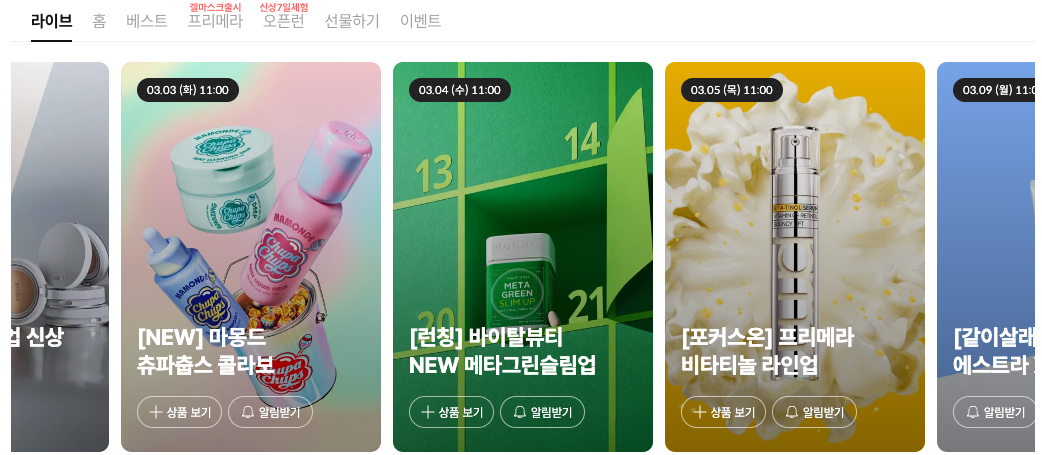
Figure 1: The AMOREMALL live commerce channel, one of AMOREPACIFIC’s online sales channels.
Behind that brand portfolio and commerce infrastructure sits an SAP ERP system built up over decades. It carries most of the business. As AI changes how software gets written, AMOREPACIFIC’s ERP Platform Planning team asked one question:
Can AI-assisted development work in a legacy SAP environment?
Background
AMOREPACIFIC runs SAP ECC (ERP Central Component) 6.0 EHP7 on NetWeaver 7.40. In addition to core modules such as FI, CO, SD, and MM, the team runs extended ERP functions and a SAPUI5 front end. Developers write the ABAP backend in SAP GUI and the SAPUI5 front end in NWDS (NetWeaver Developer Studio).
These tools had served the team well for years. The team wanted to keep pace with the AI trend and use AI tools to raise developer productivity. So it started a project with AWS to define an AI-DLC (AI-Driven Development Life Cycle) framework. The project ran from August 2025 to March 2026.
The team compared several AI coding tools and selected Kiro. The deciding factor was spec-driven development. Kiro first creates a structured specification covering requirements, design, and an implementation plan. It then generates code from that specification. SAP development already works in that order: developers write an FS/TS (functional specification / technical specification) before they write code. That let the team adopt AI without changing its Jira-based workflow. To give Kiro access to the SAP system, the team used an SAP-specific MCP server built by AWS solutions architects. The team judged it the best fit for stability and long-term maintenance.
Before the project, the team’s own analysis estimated a productivity gain of 20% to 30% from AI coding tools alone, without SAP context or the team’s conventions.
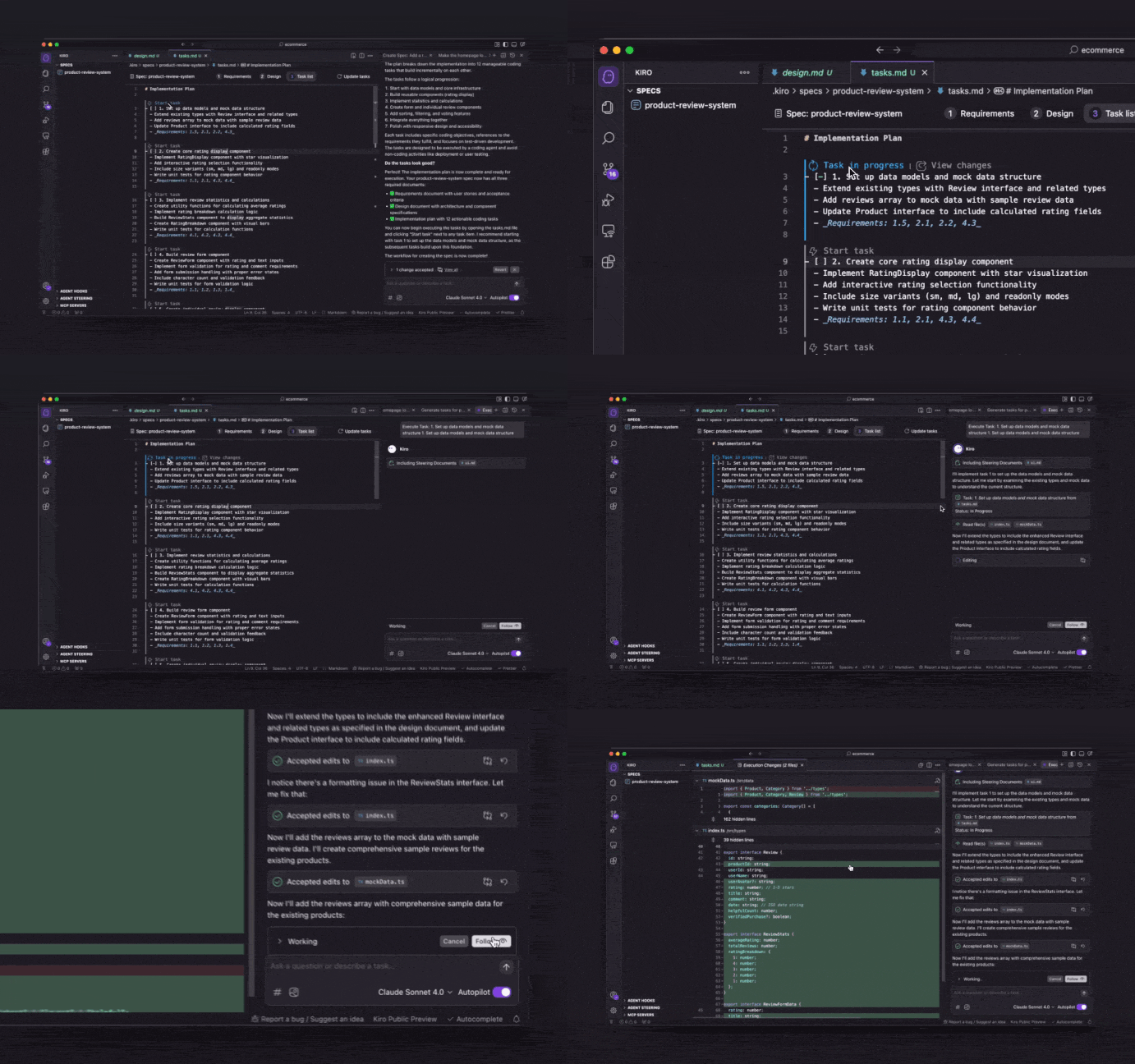 Figure 2: Kiro’s spec-driven development: requirements, design, and implementation plan before any code.
Challenges of applying AI to SAP development
1. A GUI-based environment
SAP development happens in SAP GUI, not in a web browser. More importantly, much of SAP development is not coding at all. It is configuration through the GUI: creating tables in SE11, settings in SPRO, authorizations in PFCG. That work cannot be automated by an AI coding tool.
Most AI coding tools also assume source code sitting in a file system. ABAP code lives inside the SAP server, and it is not available as local files. Without source integration, an AI coding tool has nothing to work on.
2. No MCP server, and limited ADT support
For an AI tool to understand an SAP system, it needs an MCP (Model Context Protocol) server. When the project started in August 2025, there was no official MCP server for SAP. There was no way to pass the team’s custom RFC function modules, its ABAP naming rules, or its SAPUI5 framework patterns to the model.
SAP ECC 6.0 on NetWeaver 7.40 also has limited support for SAP ADT (ABAP Development Tools) compared with SAP S/4HANA. An AI tool can read table structures and RFC function modules from the system. Writing generated code back into the system is technically constrained.
3. A non-standard SAPUI5 front end
SAPUI5 development ran in a more complex environment than ABAP. The team does not use standard SAP Fiori. It runs Portal Application Standalone projects on NWDI (NetWeaver Developer Infrastructure).
| Area | ABAP backend | SAPUI5 front end |
|---|---|---|
| Development tool | SAP GUI | Portal Application in NWDS |
| Coding style | Standard SAP ABAP | In-house custom framework |
| Barrier to AI | GUI-based, limited source integration | Non-standard framework, many internal conventions |
4. The conventions the model has to know
Getting a model to generate ordinary ABAP or SAPUI5 code is not difficult. The real task is getting it to generate code the way this team writes it.
On the ABAP side, the team has years of accumulated standards: TOP, F01, and C01 Include program patterns, ALV report skeletons, and selection screen definitions. The SAPUI5 side adds a custom framework, the IIFE (immediately invoked function expression) pattern, and an FS/TS documentation system managed against Jira tickets.
Solution
Simply installing an AI coding tool is not enough. To address these challenges, the team first had to bring in system context through an MCP server and coding standards through Steering. Solving both with AWS is how the project started.
AI-DLC: applying AI to SAP development
The AI-DLC framework the team designed with AWS does not replace the existing development tools. It integrates AI into the existing workflow, across design, coding, and documentation.
| Development paradigm | Before | With Kiro and AI-DLC |
|---|---|---|
| Developer’s role | Writes the code | Defines requirements and reviews generated code |
| Design-to-code link | Reads the FS/TS and translates it mentally | Kiro structures the FS/TS into spec documents |
| Repetitive boilerplate | Written by hand every time, with autocomplete | Generated from established patterns |
| Coding standards | Remembered and applied by each developer | Applied automatically from Steering files |
| Documentation | A separate task after development finishes | Spec documents stay in sync as code is generated |
| Knowledge dependency | Concentrated in experienced developers | Context comes from Kiro and spreads across the team |
The point was to change the way the team works, not its tools. In a traditional SDLC (software development life cycle), people lead and tools assist. AI-DLC moves the center of gravity: people decide, and AI accelerates execution.
The framework rests on three components: Kiro, an MCP server, and Steering.
1. Kiro: design-first development
Kiro is an AI-powered development environment from AWS that supports spec-driven development. The team used Kiro’s two modes selectively, depending on the work in front of it.
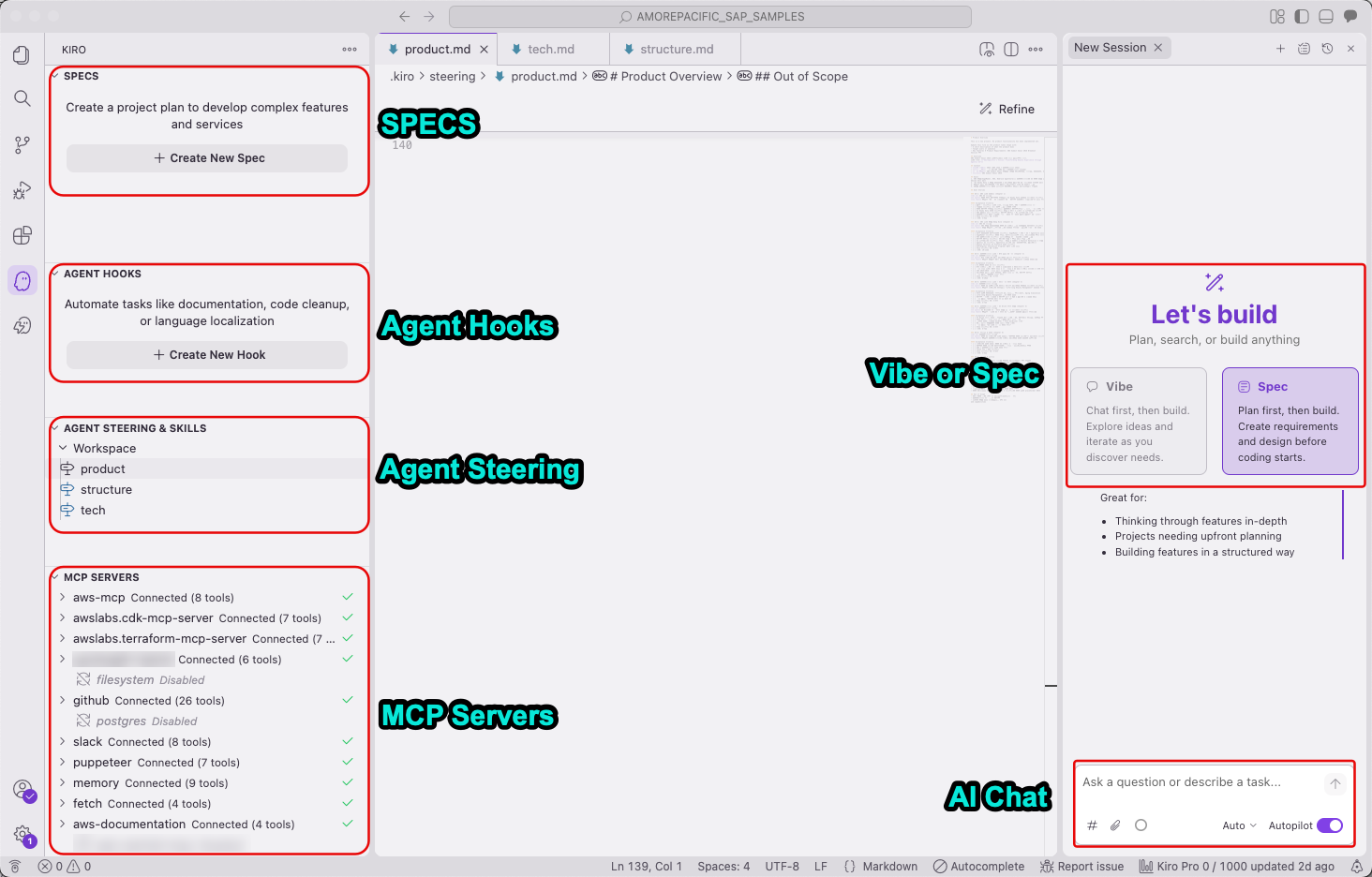 Figure 3: The Kiro IDE showing Spec and Vibe mode selection, Steering configuration, and the MCP server connection.
Spec mode: structured new development. Spec mode suits new projects and complex functions. Kiro runs a three-stage design process: requirements, then system design, then implementation plan.
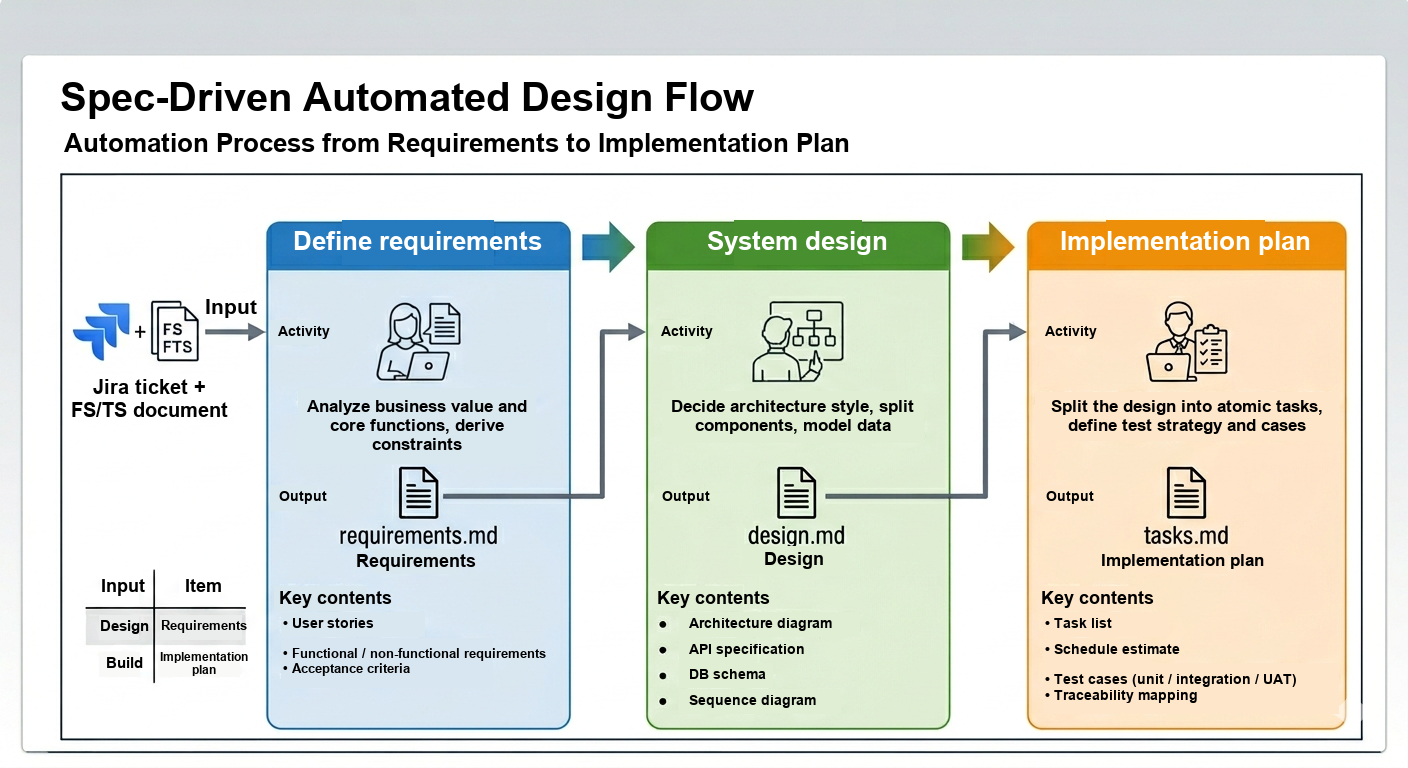 Figure 4: Spec mode automated design flow, from requirements to implementation plan.
Vibe mode: fast iteration in chat. Vibe mode changes code quickly through conversation, on projects where the spec documents already exist. A developer describes the change in natural language. Kiro references the existing spec documents to make a change that fits the context.
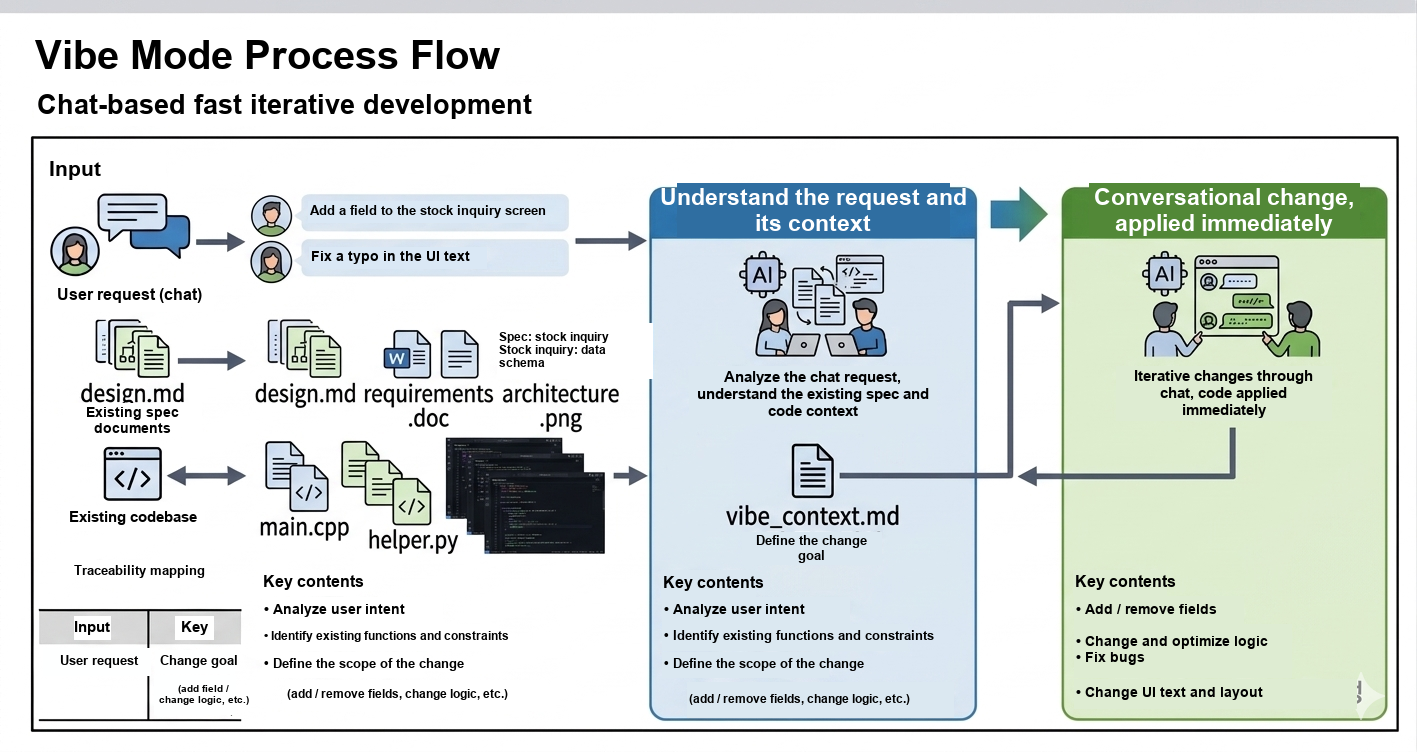 Figure 5: Vibe mode process flow: chat-based iterative development.
Spec or Vibe: when to use which mode?
| Area | Spec mode | Vibe mode |
|---|---|---|
| Suited to | New programs, complex new functions | Changes to existing programs, bug fixes |
| Prerequisite | Jira ticket plus an FS/TS document or requirements | A spec document already exists |
| How Kiro works | Three structured stages: requirements → design → tasks | Conversational changes in chat |
| Speed | Design takes time up front, then development is systematic | Immediate code changes |
| Output | Three spec documents, ABAP or SAPUI5 code, DDIC* | Updated code and updated spec documents |
| Typical scenarios | New report; new interface; complex business logic | Add or remove a field; logic change; UI text change; bug fix |
*DDIC (SAP Data Dictionary): the SAP metadata repository that defines tables, structures, and domains.
The core experiment was whether Spec mode for new requirements and Vibe mode for changes could deliver initial design quality and maintenance agility at the same time.
Note: The team used Kiro IDE 0.x, where you choose a Spec or Vibe session when you start a chat. In Kiro IDE 1.0, sessions start with a general-purpose agent that works like Vibe mode, and Spec is a built-in workflow you can start at any time. For details, see the Kiro IDE 0.x reference.
2. MCP: the context bridge between Kiro and SAP
MCP is an open protocol for sharing context between an AI IDE and external systems. It connects Kiro to existing code, data structures, and business logic in the SAP system so that Kiro can read and reference them.
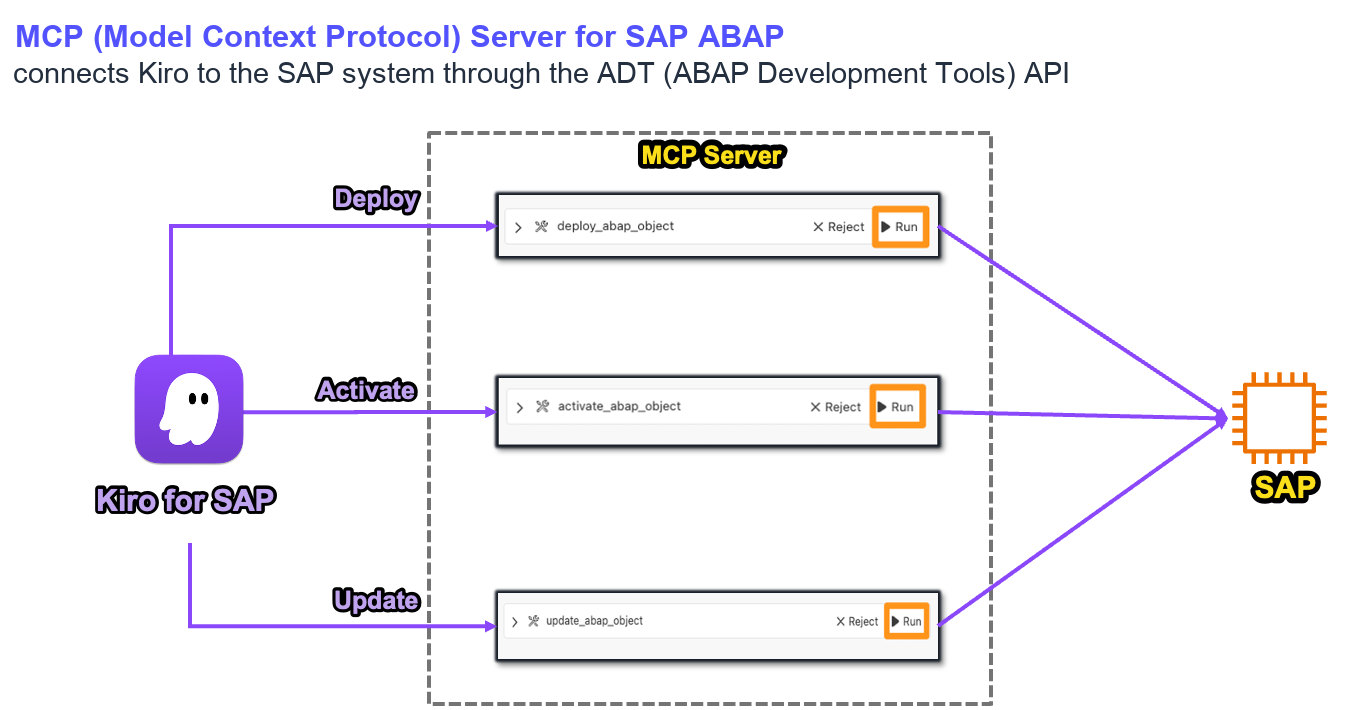 Figure 6: Kiro performing SAP tasks through the MCP server.
A general-purpose model knows how to program, but not the custom RFC function modules, table structures, and business logic in this SAP system. The MCP server passes that context to the model. Ask Kiro to generate code that calls the ZXXX_GET_EMPLOYEE_DATA RFC function, and the MCP server supplies the function’s parameter structure, return values, and usage examples along with the request.
The team configured the MCP server once at user level, in ~/.kiro/settings/mcp.json, so that it analyzes both ABAP RFC function modules and the SAPUI5 backend RFCs. That configuration applies to every Kiro project for AMOREPACIFIC’s SAP developers, so there is no environment to rebuild for each new project.
Note: AWS has since published Kiro sample agents for SAP. They include Steering files with more than 80 pre-built rules, generate functional and technical specifications, and automate ABAP code conversion and unit testing. On top of ABAP, there are Kiro agents for SAP BW to SAP BDC (Business Data Cloud) conversion, and SAP PI/PO to SAP Integration Suite conversion. To get started, read Accelerate your SAP modernization with Kiro, and register for access to the sample agents’ GitHub repository.
3. Steering: teaching Kiro how AMOREPACIFIC writes code
Steering is a set of documents that guide the model’s behavior. Kiro references the files in ~/.kiro/steering/ automatically whenever it generates code. The team’s coding standards end up in the code without anyone writing a prompt for them.
A general-purpose model will not follow this team’s variable naming rules, Include structure, error handling patterns, or g.get() framework usage on its own. Steering files close that gap. Once the team documents how it writes code, everything Kiro generates follows those standards without a detailed prompt.
The team prepared Steering files for ABAP and SAPUI5 separately.
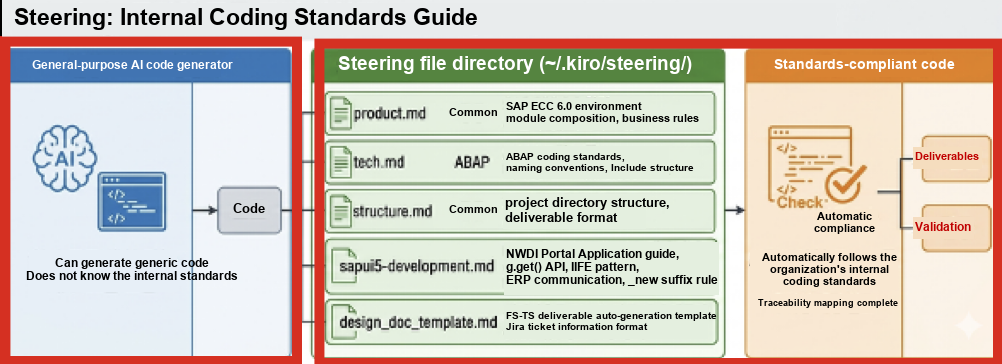 Figure 7: Steering as the organization’s coding standards guide: a general-purpose code generator follows internal standards by referencing the Steering files.
| Steering file | Scope | What it carries |
|---|---|---|
product.md |
Common | SAP ECC 6.0 environment, module composition, business rules |
tech.md |
ABAP | ABAP coding standards, naming conventions, Include structure |
structure.md |
Common | Project directory structure, deliverable format |
sapui5-development.md |
SAPUI5 | NWDI Portal Application guide, g.get() API, IIFE pattern, ERP communication pattern, _new suffix rule |
design_doc_template.md |
Common | FS/TS deliverable template, Jira ticket fields |
Architecture: from Jira to SAP
To work around the ECC 6.0 write-back constraint, Kiro writes generated code to a shared folder, and the developer moves it into SAP. Figure 8 shows the whole flow, from the Jira ticket to the SAP system.
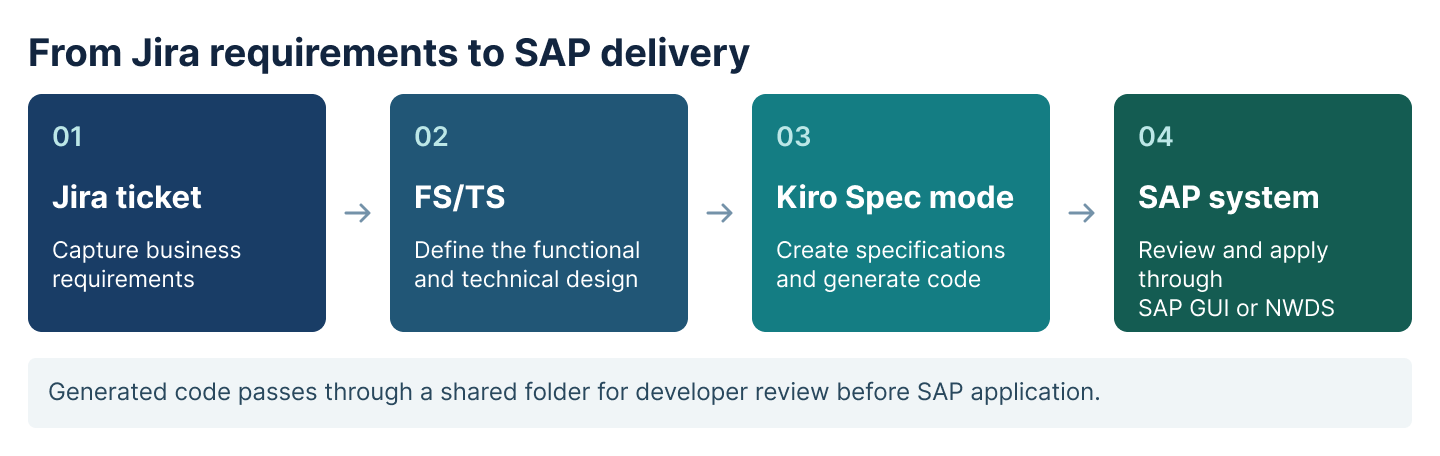 Figure 8: Architecture from the Jira ticket through Kiro and the shared folder to SAP GUI and NWDS.
This is where the FS/TS maps onto Spec mode. Requirements in the Jira ticket become requirements.md, the FS/TS design document becomes design.md, and the work breakdown becomes tasks.md. Because of that mapping, the team could work with Kiro without major changes to its existing process. Jira-based requirements management and AI code generation are now connected.
ABAP goes into SAP through SAP GUI (SE38 for the ABAP Editor, SE11 for the ABAP Dictionary), and SAPUI5 through NWDS. The approach works on any SAP release, and it builds in a review step: a developer checks the generated code before it reaches the system.
The AI-DLC process for ABAP and SAPUI5
The team’s AI-DLC framework runs as the following process, and it applies to the ABAP backend and the SAPUI5 front end alike:
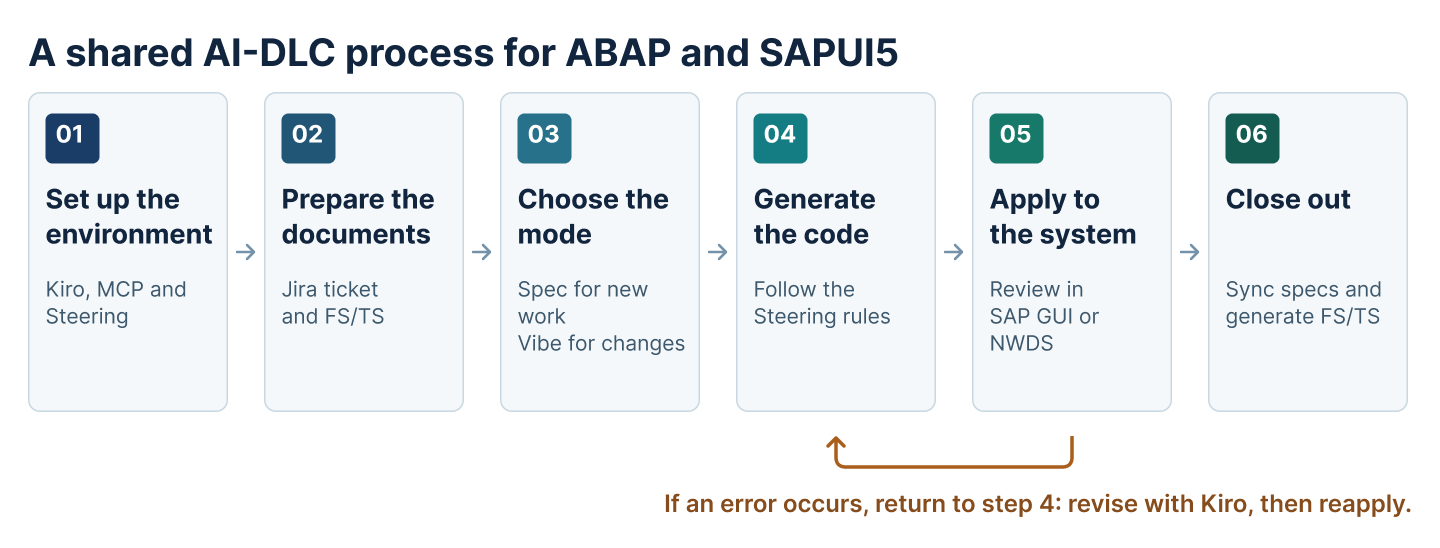 Figure 9: The six-step AI-DLC process for ABAP and SAPUI5.
Step 5 loops back to step 4: when an error appears, the developer works with Kiro to correct the code and reapplies it.
| Step | Key activity | Output |
|---|---|---|
| 1. Set up the environment | Install Kiro, connect the MCP server, place the Steering files | Working development environment |
| 2. Prepare the documents | Check the Jira ticket, save the existing FS/TS in the docs/ folder |
requirements.md, with Jira details carried in automatically |
| 3. Choose the mode | New development → Spec; changes → Vibe | None |
| 4. Generate the code | Kiro generates code that follows the Steering rules | ABAP (.abap), SAPUI5 (controller and view), DDIC (TSV) |
| 5. Apply to the system | Move the generated code into SAP through SAP GUI or NWDS | Activated objects, transport request |
| 6. Close out | Sync the spec documents, generate the FS/TS deliverable | FS/TS deliverable (.md or .html) linked to the Jira ticket |
One principle holds the process together: when the code changes, the documents the change was based on change with it. Code and spec documents always move together, which removes design-to-code drift at the source.
Results
Over roughly eight months, the team applied this way of working to four projects: one ABAP backend project and three SAPUI5 front-end projects. Before the project, the team’s own analysis had estimated a productivity gain of 20% to 30%. On the team’s own measurement across the four projects, the AI-DLC framework and the MCP server raised productivity by as much as 72%. Deliverables and source code also stayed current, and design and code stayed in sync.
Pilot 1: the ABAP backend, new development in Spec mode
Goal: Validate the AI-DLC framework by applying Kiro’s spec-driven development to a new requirement.
Project: A new SAP report (Jira ticket ERP-101).
Outcome: The existing flow was simple but repetitive. A Jira ticket opened, the developer wrote the FS/TS, wrote the code, and took it to review. Kiro changed that flow. Spec mode converts the FS/TS into requirements.md, design.md, and tasks.md. It also generates boilerplate, including TOP and F01 includes and an ALV report skeleton, along with a DDIC TSV file. With the repetitive work gone, the developer could concentrate on validating requirements and implementing business logic.
Pilot 2: the SAPUI5 front end, Spec mode and Vibe mode together
Goal: Test whether AI-DLC extends to the SAPUI5 environment, using Spec mode for new development and Vibe mode for changes.
Projects: HR time-management screen improvements (ERP-102), HR approval process change (ERP-103), and a new HR mobile view (ERP-104).
Outcome: SAPUI5 Portal Application development carries NWDI’s particular folder structure (ui.pdk.{code}, _comp/dist/mvc/), a custom framework, the IIFE pattern, and file management rules. Experienced developers still make mistakes in it. Adding one Steering file, sapui5-development.md, applied all of those rules automatically.
Documentation changed as well. FS/TS deliverables are now generated from design_doc_template.md, which cut documentation time by 80%. The Jira ticket number, title, and requester are carried in automatically, which gave the team 100% requirement traceability.
What the two pilots improved
| Area | Before | With AI-DLC | Effect |
|---|---|---|---|
| Jira ticket to code | Write the FS/TS, then code by hand | Kiro Spec mode structures it | Less time interpreting requirements |
| Repetitive boilerplate | Written by hand every time | Generated by Kiro | Less initial coding time |
| Coding standards | Checked by hand at review | Applied automatically from Steering | Shorter code review cycles |
| DDIC definitions (ABAP) | Entered by hand in SE11 | Pasted from a generated TSV | Less time creating DDIC objects |
| FS/TS deliverables | Written by hand after development | Generated by Kiro | 80% less documentation time |
| Barrier between stacks | ABAP and SAPUI5 kept separate | One framework across both | Developers can move between stacks |
| Spec-to-code sync | Frequently out of step | In sync, at 100% | Lower maintenance cost over time |
Qualitative results
The change that mattered more than the numbers is what developers now do. Since AI-DLC, a developer spends less time typing code line by line and more time validating requirements and reviewing what Kiro generates.
Steering also lowered the barrier between technology stacks. An ABAP developer can now read the structure of an SAPUI5 Portal Application and change it directly. One developer from the ABAP pilot went on to contribute to the second pilot, which was SAPUI5.
For new developers, the main obstacles used to be the custom framework’s call structure and NWDI’s complex folder layout. Steering absorbs that learning curve. Developers now spend that time on development rather than on working out the structure. As a result, the team expects onboarding time for new developers to fall.
All four projects kept spec documents and code 100% in sync, because the specification is written first and the code is generated from it. The separate stages of Jira ticket, FS/TS, coding, and documentation are now one flow: Jira ticket → Kiro Spec mode → generated code → generated FS/TS deliverable.
What’s next
AMOREPACIFIC is treating this project as a starting point, and is preparing the next steps:
1. GitLab repository integration. The team plans to store the Kiro project folders (.kiro/specs/, ABAP_Code/, ui.pdk.{code}/, docs/) in AMOREPACIFIC’s GitLab for version control and collaboration. Managing spec documents (.md), generated code, and FS/TS deliverables in Git gives the team change history and makes sharing across the team routine.
2. Jira and Confluence MCP integration, for end-to-end automation. Today a developer copies ticket details from the Jira web interface into Kiro. Once the Jira MCP integration is in place, Kiro can query Jira issues directly from chat and carry them into the spec documents. Ask Kiro to create the spec documents from the requirements in Jira ticket ERP-102, and it retrieves the ticket through the Jira API and generates requirements.md. After development, it uploads the FS/TS deliverable to Confluence. That completes an end-to-end flow: Jira → Kiro → SAP → Confluence.
3. AI coding ambassadors. Pilot developers with the most experience in AI-DLC will guide Steering document authoring, train other teams on the six-step process, and support troubleshooting, to drive adoption across other teams.
Conclusion
AMOREPACIFIC brought AI-driven development to a GUI-based, legacy SAP ECC 6.0 environment that had looked out of reach, and applied it to four ABAP and SAPUI5 projects.
The core of the project is not the new technology. It is the shift in how the team works, from people-centered development to AI-centric development. Kiro’s spec-driven approach, the SAP MCP server built by AWS solutions architects, and Steering documents together let AI follow the organization’s coding standards. On the team’s own measurement, productivity rose by as much as 72%, against a pre-project estimate of 20% to 30%. Deliverables and source code stay current, and design and code stay in sync. Because spec-driven development matched SAP’s existing FS/TS design culture, developers adopted it with little resistance.
We hope AMOREPACIFIC’s experience is useful to enterprise development teams that are hesitating over AI adoption because of the limits of a legacy system. To try this approach:
- Start with Kiro, and read about the AI-Driven Development Life Cycle.
- Learn more about the Kiro sample agents for SAP in Accelerate your SAP modernization with Kiro, and register for access to the sample agents. There are agents for ABAP, BW to SAP BDC conversion, and PI/PO to Integration Suite conversion.
- For another customer story on AI-DLC, see Building Woongjin ThinkBig’s Book Curator AI Agent with AI-DLC (Korean).
To plan AI-driven development for your own SAP estate, contact your AWS account team.
Special thanks to Sejun Kim, formerly an SAP Solutions Architect at AWS, who led this engagement with AMOREPACIFIC from the start and was key to its success.