AWS for SAP
Spec first: spec-driven development for SAP ABAP
AI coding agents can generate ABAP in minutes, but without a spec, the next developer has no record of why the code was built that way. Most ABAP teams today use vibe coding to write and modernize SAP ABAP code. You get results faster, but the development decisions behind the code are lost, making it harder to modify when requirements change.
SAP ABAP teams at customers who are still running SAP ERP Central Component (ECC) face growing pressure to review and modernize custom code before upgrading to RISE with SAP. ABAP code remains long after the developers who wrote it have moved on to other roles, with documentation that is either missing or outdated. Following the same vibe-coding approach to modernize ABAP adds more undocumented code, with no record of what was changed and why.
In this post, we show you how spec-driven development (SDD) works for ABAP, what goes into a good ABAP spec, and how the spec stays useful even after the transport is released. Our examples use AWS Coding Plugin for SAP ABAP, which runs on Kiro CLI, the command line interface for Kiro, an agentic development environment from AWS. To learn what the plugin does and how to install it, refer to Introducing AWS Coding Plugin for SAP ABAP, powered by Kiro.
The problem with vibe coding
Vibe coding lets you build fast, but development teams struggle with complex requirements and large ABAP codebases, where context gets lost and decisions go undocumented. Context windows are finite, and a business rule you mentioned 50 messages ago to an AI coding agent can fall out of scope unnoticed. As conversations grow longer, the agent starts to reinterpret your original intent, shifting direction with each exchange. The code compiles and activates, but it doesn’t do what you meant.
The result is code that looks right but fails in a real business scenario. And when the next developer picks up that program, there is no spec, no design rationale, only the code and a transport description. The developer is back to reading the program line by line to understand the context.
What is spec-driven development?
Spec-driven development puts a specification at the center of the workflow. You define requirements, system design, and implementation decisions before any ABAP code is generated. Key decisions are captured explicitly, making it easier to tackle complex requirements in fewer iterations and giving you a clear record of what was built and why. When requirements change, you update the spec to generate ABAP code again.
In Understanding Spec-Driven-Development: Kiro, spec-kit, and Tessl, Birgitta Böckeler describes three levels in SDD:
- Spec-first: You write the spec before you generate code. ABAP developers know this step as the functional spec.
- Spec-anchored: You keep the spec after the work is done and use it for later changes.
- Spec-as-source: You edit only the spec and never touch the generated code.
SDD suits ABAP development because the spec loads at the start of every session and stays in context. The spec is written in plain language, so a functional consultant or a new developer can review it before the AI coding agent writes a line of code. The agent works from a task definition that you both agreed on, and that definition persists over the conversation.
AWS Coding Plugin for SAP ABAP brings spec-driven development to ABAP through a set of three Markdown (.md) files that capture requirements, design, and tasks.
What goes into an ABAP spec
A good ABAP spec answers the questions that a senior developer asks before starting work. It names the object type, such as a report, class, function module, or Business Add-In (BAdI) implementation. It lists the inputs and outputs and the business rules, and it says what happens when data is missing or a call fails.
The spec spells out SAP decisions that the agent can’t infer from business requirements. If you leave these open, the agent picks something that compiles but doesn’t match your requirements. The spec should name the enhancement technique, whether it’s a BAdI, a user exit, or a new program.
The spec captures what’s unique to this task. Team-wide standards, such as naming conventions, approved libraries, and reusable skills, live in steering files that the agent loads automatically.
The following example shows part of a requirements file for an example ABAP report:
Requirements:

Program type:
Report (executable program)

User story:
As a sales back-office clerk, I want to see open sales orders that are past their requested delivery date, grouped by age, so that I can follow up with the customers.

Input:
Sales organization (required), customer (optional), order date range (optional)

Output:
ALV list using CL_SALV_TABLE (no REUSE_ALV function modules or classic lists), grouped by overdue aging buckets (30 days or less, 31 to 90 days, more than 90 days)

Acceptance criteria:
1. The selection screen requires a sales organization and accepts an optional customer and order date range.
2. The report runs an AUTHORITY-CHECK for the sales organization before it reads any data.
3. Orders are grouped as 30 days or less, 31 to 90 days, and more than 90 days overdue.
4. If no orders match, the report shows an information message and doesn’t display an empty list.
5. Database access uses Open SQL with host variables escaped by @. No SELECT *.
6. After each successful BAPI call, commit with BAPI_TRANSACTION_COMMIT.
7. Exceptions use CX_ROOT subclasses. No MESSAGE statements in methods.
8. ABAP Unit tests cover the grouping logic and use test doubles for database access.
From spec to released transport
The journey from a spec to a released transport from an ABAP perspective follows the AI-Driven Development Lifecycle (AI-DLC), a methodology that structures AI-native development into three phases: Inception, Construction, and Operations, as shown in the following diagram.
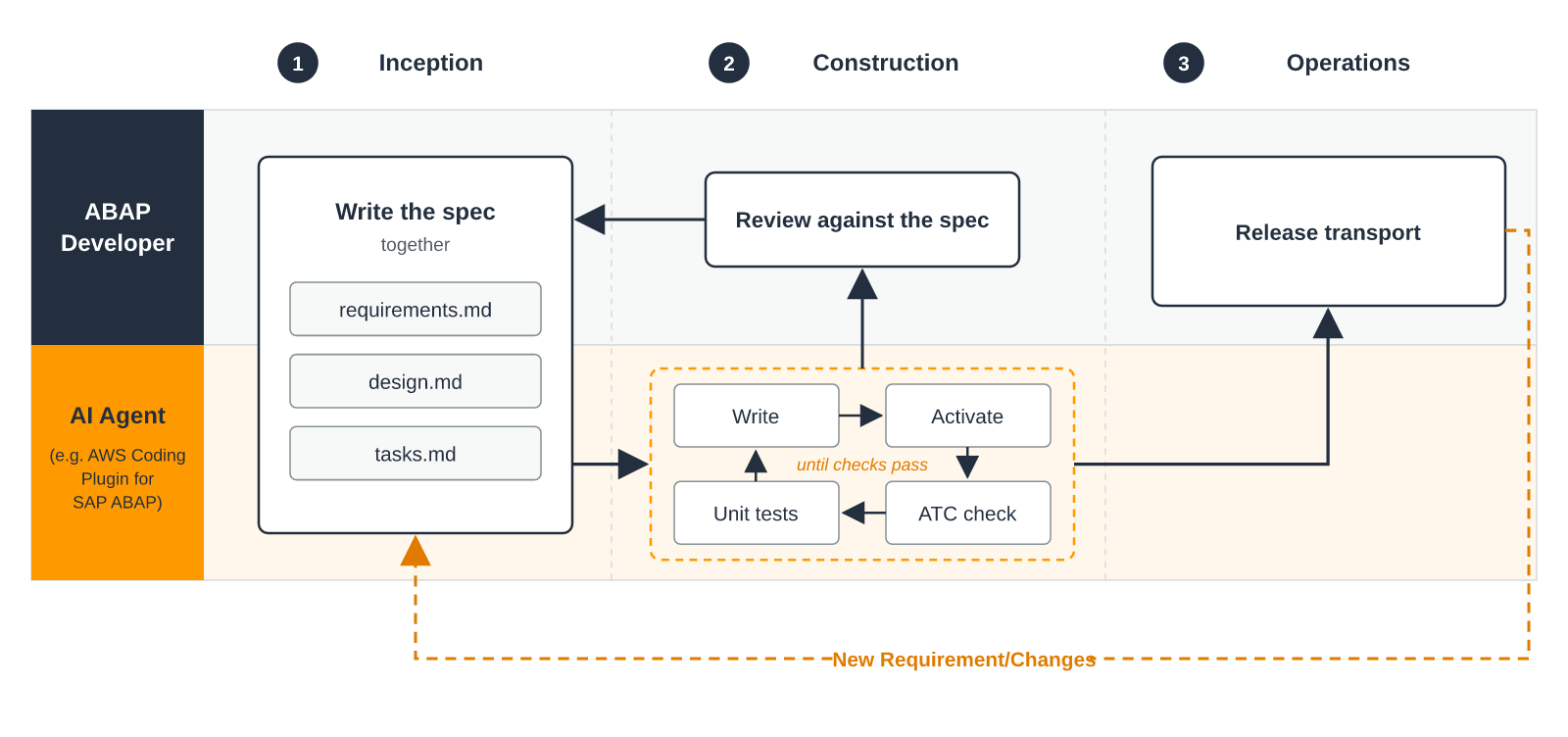
With AWS Coding Plugin for SAP ABAP, each phase works as follows:
- Inception: The agent reads your steering files at the start of the session, applying your team’s standards, best practices, and approved libraries before drafting the spec. You and the agent collaborate to define the requirements and agree on the design. The agent searches the ABAP repository for relevant objects to avoid duplication and follow established patterns. It then suggests edge cases to consider. You validate the findings and bring the business context. The agent then drafts the spec, and you revise and approve it. No code is written before you approve.
- Construction: The agent writes the ABAP code, activates it, and runs ABAP Test Cockpit (ATC) checks against your baseline. It also runs both the new and the existing ABAP Unit tests. It repeats this loop until every check passes. Then it activates the whole transport at once to catch problems across objects and writes the transport long text. The agent works with your SAP user’s authorizations on the SAP development system. You review the code to confirm that the result matches the spec. Treat “all checks pass” as the start of your review, not the end.
- Operations: You import the transport to production. You can also commit the spec to a Git repository, so that the intent behind each change is preserved. The cycle returns to Inception whenever the requirements change or a defect surfaces. Each iteration starts from the existing spec.
In this workflow, when the generated code has issues, look at the kind of failure. Syntax errors, activation errors, and failing tests are the agent’s job to fix in the construction phase. If the code activates and passes all tests but still produces the wrong result, the issue is likely in the spec.
To fix it, make the expected outcome more specific in the spec, add a test case, or point the agent to similar code in your system that already works. If the agent picks the wrong BAPI or class, name the right one in the spec.
When you fix something in the spec that applies beyond this task, such as a BAPI the agent keeps getting wrong, move it into your steering file. The next spec starts with that lesson already built in.
New code and existing code
For new development, the path is straightforward. Write the spec, generate the code, validate, and test.
ABAP activities often involve changing code that already exists, whether it’s modernizing code for SAP S/4HANA, aligning with SAP clean core principles, or adapting to new business requirements.
For these changes, start by asking the agent to summarize what the program does today, and use that summary as the foundation of your spec. Then describe the complete end state you want, including the parts that remain unchanged. A spec that covers only the delta leaves the agent guessing about everything else. After the build, verify that the existing functionality still works as expected.
When you follow this approach, undocumented programs gradually gain a spec through successive changes. Each modification adds to the spec, and after a few iterations, the program has up-to-date documentation that didn’t exist before.
Steering: the standards behind every spec
Every team has standards that apply across ABAP development, such as naming conventions for ABAP objects, output patterns, and transport descriptions. These standards should be included in steering files, which are Markdown files that the agent reads at the start of every session. AWS Coding Plugin for SAP ABAP creates a steering file for each connected SAP system. A typical steering file includes standards such as the following:
ABAP development standards

- Report naming conventions: Z<module>_<description>, for example, ZFI_, ZSD_, ZMM_
- ALV output: CL_SALV_TABLE only, no classic list output
- Exceptions: CX_ROOT or a subclass, errors logged to the application log (SLG1)
- Database access: Open SQL only, host variables escaped with @, no SELECT *
- Testing: 80% coverage for business logic, test doubles for database access
- Transport description: [TICKET-ID] Brief description
You should use the spec for what’s unique to the task, and steering to guide the agent on the standards to follow.
If your organization runs many ABAP projects, steering files and spec templates become reusable assets. A clean core steering file built for one project becomes the starting point for the next.
Getting started
To install AWS Coding Plugin for SAP ABAP, refer to the developer documentation. After you’re set up, try spec-driven development on a small task.
- Connect to a sandbox SAP system from your Eclipse ADT environment.
- Choose a straightforward report where you already know the expected result.
- Write the spec with the agent and approve it before any code is generated.
- Commit the finished spec to Git. When the next change request comes in for that report, start from the spec.
For a step-by-step example of AI-DLC applied to a complete ABAP application on SAP S/4HANA, see SAP ABAP Application Development with AI-DLC (AI-Driven Development Lifecycle).
Conclusion
In this post, we showed how spec-driven development preserves the reasoning behind AI-generated ABAP code. You write requirements, design, and tasks before the agent generates code. You keep shared standards in steering files, and the spec stays after the chat session, providing a clear record of what was built and why. Try it on your next change request with AWS Coding Plugin for SAP ABAP. Share your experience with spec-driven ABAP development in the comments.
AWS Coding Plugin for SAP ABAP is available at no charge. It requires a Kiro CLI subscription, which starts with a free tier (50 credits). Paid plans range from Pro at $20/month to Power at $200/month for higher capacity. For details, see Kiro pricing.
About the authors
Stephan Kremer is a Senior SAP Specialist Solutions Architect at AWS. He works with SAP customers on ABAP modernization and cloud migrations.
Adren D Souza is a Senior SAP Partner Solutions Architect working at AWS. He works with Global System Integrators (GSIs) on SAP Migration and Modernization on AWS.