AWS Marketplace
AWS Marketplace in the AWS European Sovereign Cloud: Register as a seller
Independent software vendors (ISVs) and partners can now leverage AWS Marketplace in the AWS European Sovereign Cloud to reach European public sector organizations and customers in highly regulated industries while meeting those strict sovereignty requirements. The AWS European Sovereign Cloud is a new, independent AWS partition designed to help these organizations address their regulatory and data residency needs. AWS partitions are isolated groupings of AWS Regions and services that operate independently with their own set of endpoints, resource identifiers, and security boundaries.
This post is the first in a three-post series covering how to register as a seller in AWS Marketplace in the AWS European Sovereign Cloud. AWS Marketplace in the AWS European Sovereign Cloud currently supports two product types: software as a service (SaaS) and Amazon Machine Image (AMI) products.
Why list in AWS Marketplace in the AWS European Sovereign Cloud?
Listing your products and services in AWS Marketplace in the AWS European Sovereign Cloud helps you reach public sector organizations and customers in highly regulated industries with evolving sovereignty, data residency, and operational autonomy needs, such as EU government agencies, regulated financial services institutions, and healthcare organizations. The AWS European Sovereign Cloud infrastructure is located within the EU, physically and logically separate from other AWS Regions, and designed to operate without critical dependencies on non-EU infrastructure. By listing in this independent catalog, your customers benefit from familiar AWS Marketplace purchasing and deployment workflows while maintaining their sovereignty requirements.
To list products in AWS Marketplace in the AWS European Sovereign Cloud, you need to register to get access. This post covers the prerequisites and walks you through the registration steps.
What do you need to start?
To get started in the AWS European Sovereign Cloud, you need to have the following prerequisites:
- An AWS Marketplace seller account – You must have an existing AWS account registered as an AWS Marketplace seller in the standard AWS partition. If you aren’t a registered AWS Marketplace seller, review the requirements and considerations and follow the AWS Marketplace seller registration process.
- Euro (EUR) payment capability – If you’re an existing AWS Marketplace seller who creates private offers in EUR, you already meet this requirement. If you’re unsure or don’t currently offer EUR pricing:
- Verify that your bank account can accept EUR disbursements
- If needed, add a new account that supports EUR payments
- Confirm that you’ve set a disbursement preference for EUR currency
- Know Your Customer (KYC) compliance – If your seller account is not KYC compliant, complete the KYC process and bank account verification.
- An AWS European Sovereign Cloud account – Create an AWS European Sovereign Cloud account.
Important: When creating the account, make sure that both the standard AWS account and AWS European Sovereign Cloud account represent the same legal business entity, including the legal business name and billing address.
Understanding the registration workflow
AWS reviews registrations to confirm they’re compliant with the AWS European Sovereign Cloud requirements. The registration process provides you with the capability to select the AWS European Sovereign Cloud catalog as the target catalog and create products for the AWS European Sovereign Cloud. The process has four high-level steps:
- Accessing AWS Partner Central with your standard partition account credentials.
- Submitting a registration request for the AWS European Sovereign Cloud catalog.
- Completing profile and payment information.
- Working with the AWS Marketplace Seller Operations Team to complete onboarding.
Step-by-step registration walkthrough
To request registration for the AWS European Sovereign Cloud, complete the following steps:
- Sign in to AWS Partner Central using your AWS Marketplace seller account.
- In left navigation menu, choose Marketplace settings.
- In the bottom left corner of the account summary section, choose Manage catalogs.
The following screenshot shows the AWS Marketplace Settings page.
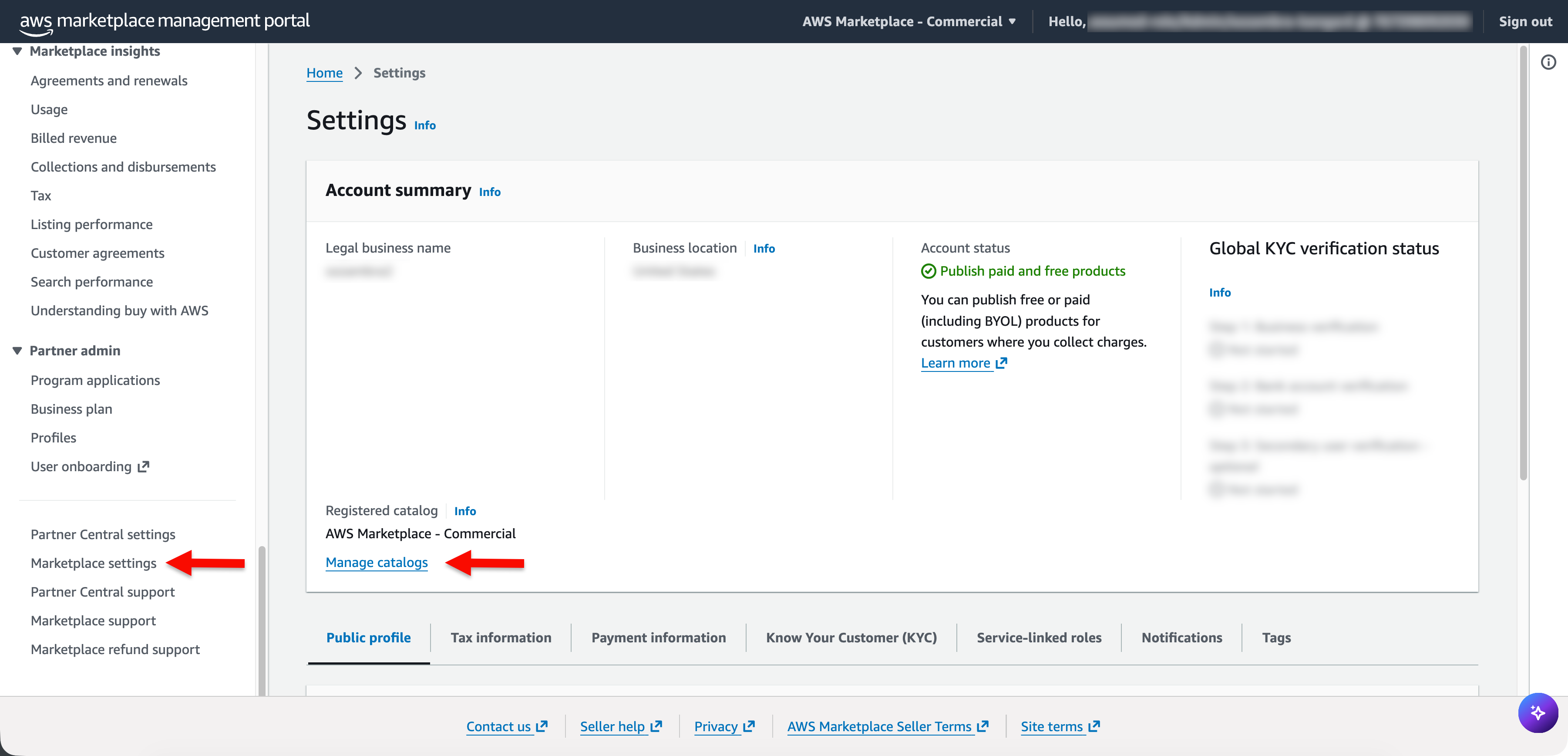
Figure 1: AWS Marketplace settings page
- You should see all catalogs your seller account is registered to. In the upper right corner of the AWS Marketplace catalog registrations section, choose Register for a catalog, as shown in the following screenshot.
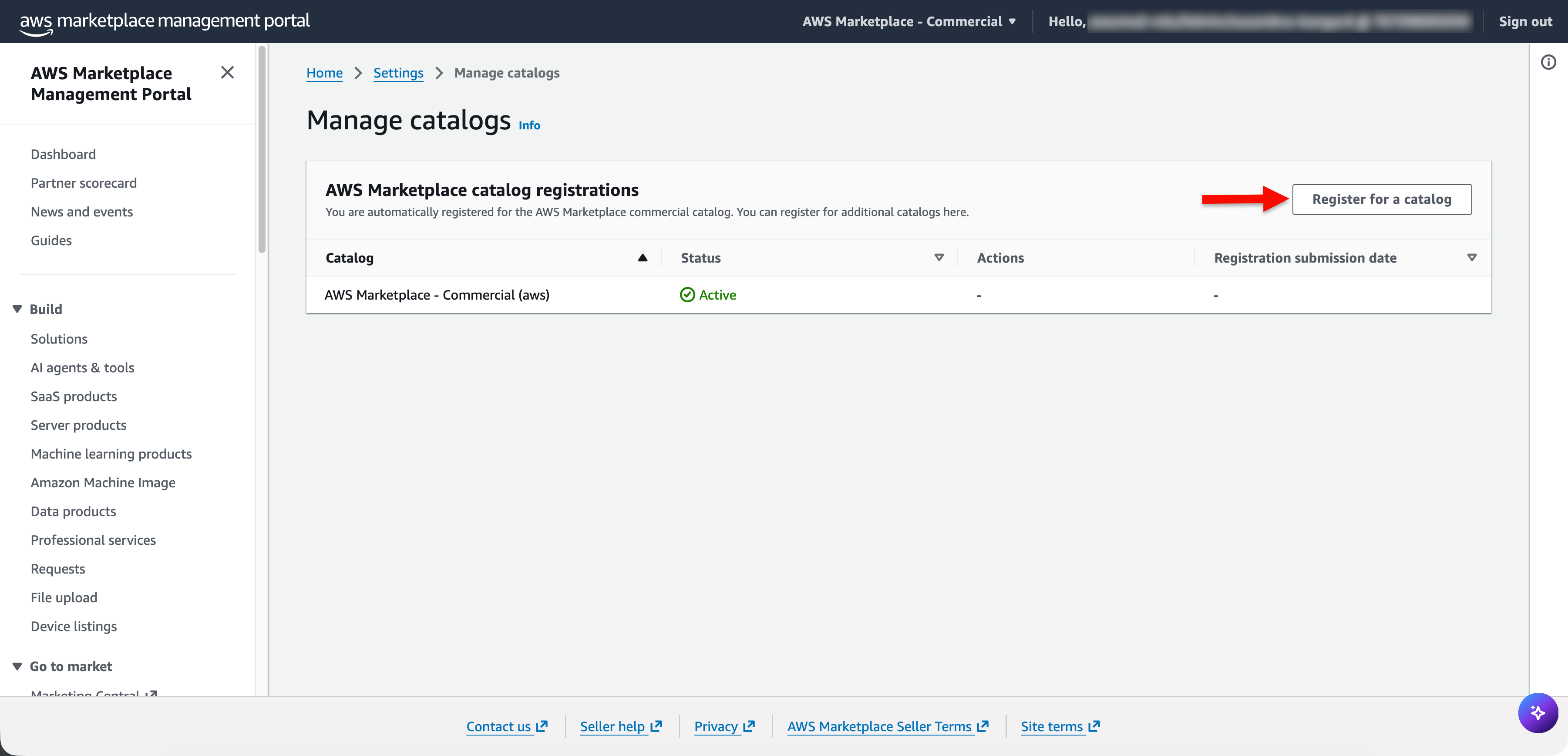
Figure 2: Manage catalogs screen
- In the catalog options section, choose AWS Marketplace – European Sovereign Cloud.
- Scroll down to the bottom of the page and in the lower right corner, choose Submit registration.
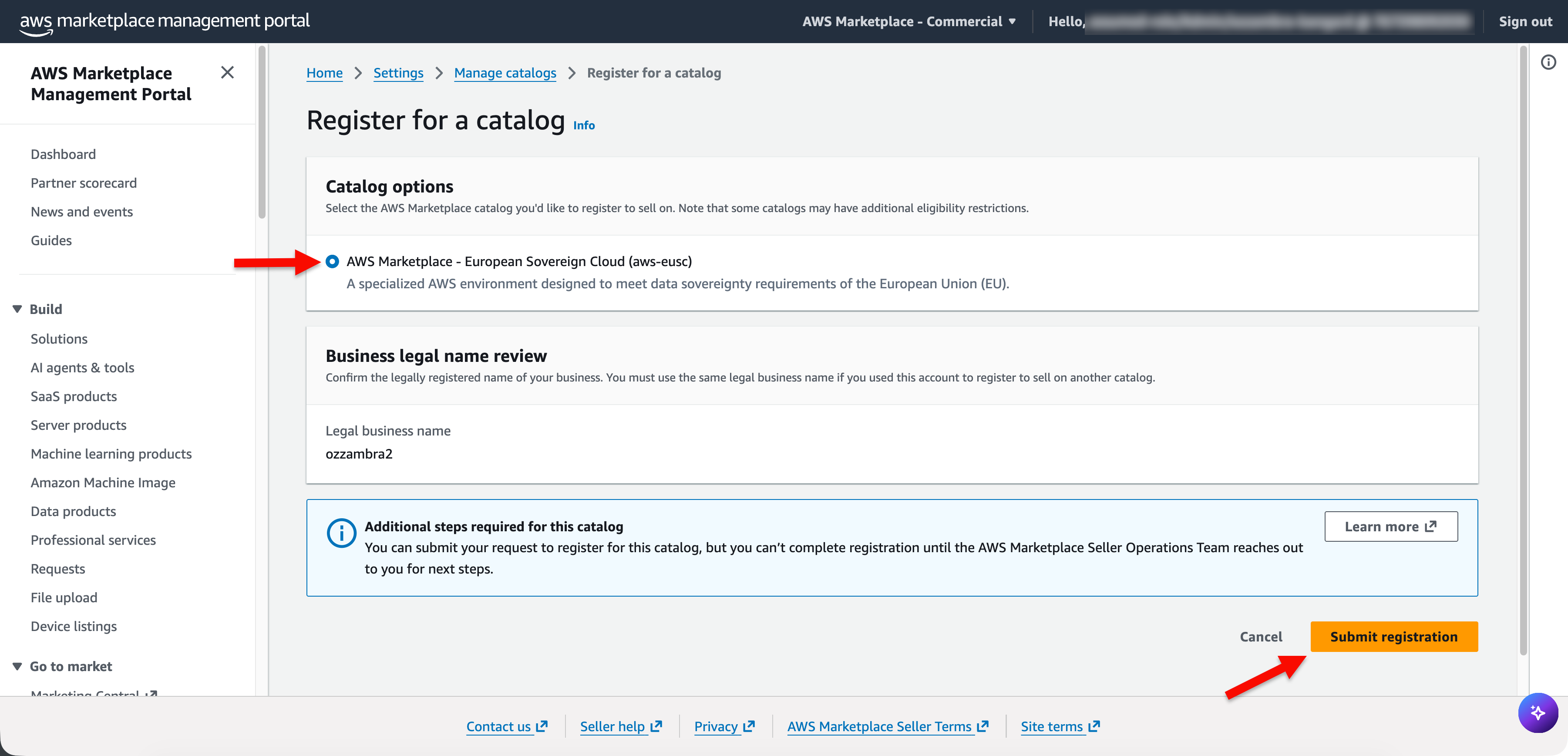
Figure 3: Choose the AWS Marketplace catalog for European Sovereign Cloud
The AWS Marketplace Seller Operations Team will contact your standard AWS account root user email address to request your newly created AWS European Sovereign Cloud account ID. The team will verify that you meet all prerequisites listed in the What do you need to start? section in this post and request written confirmation from your AWS European Sovereign Cloud account root user email address. Approval typically takes 14 calendar days or less.
Important: You must have access to both root user email addresses (standard AWS account and AWS European Sovereign Cloud account) to complete the registration.
If you need help or have questions during the registration process, contact AWS Marketplace Seller Operations through AWS Marketplace support or reach out to your AWS account team.
Verifying you have access to the AWS European Sovereign Cloud catalog and setting up your seller profile
After the AWS Marketplace Seller Operations Team approves your registration, verify your access by checking the catalog dropdown in AWS Partner Central.
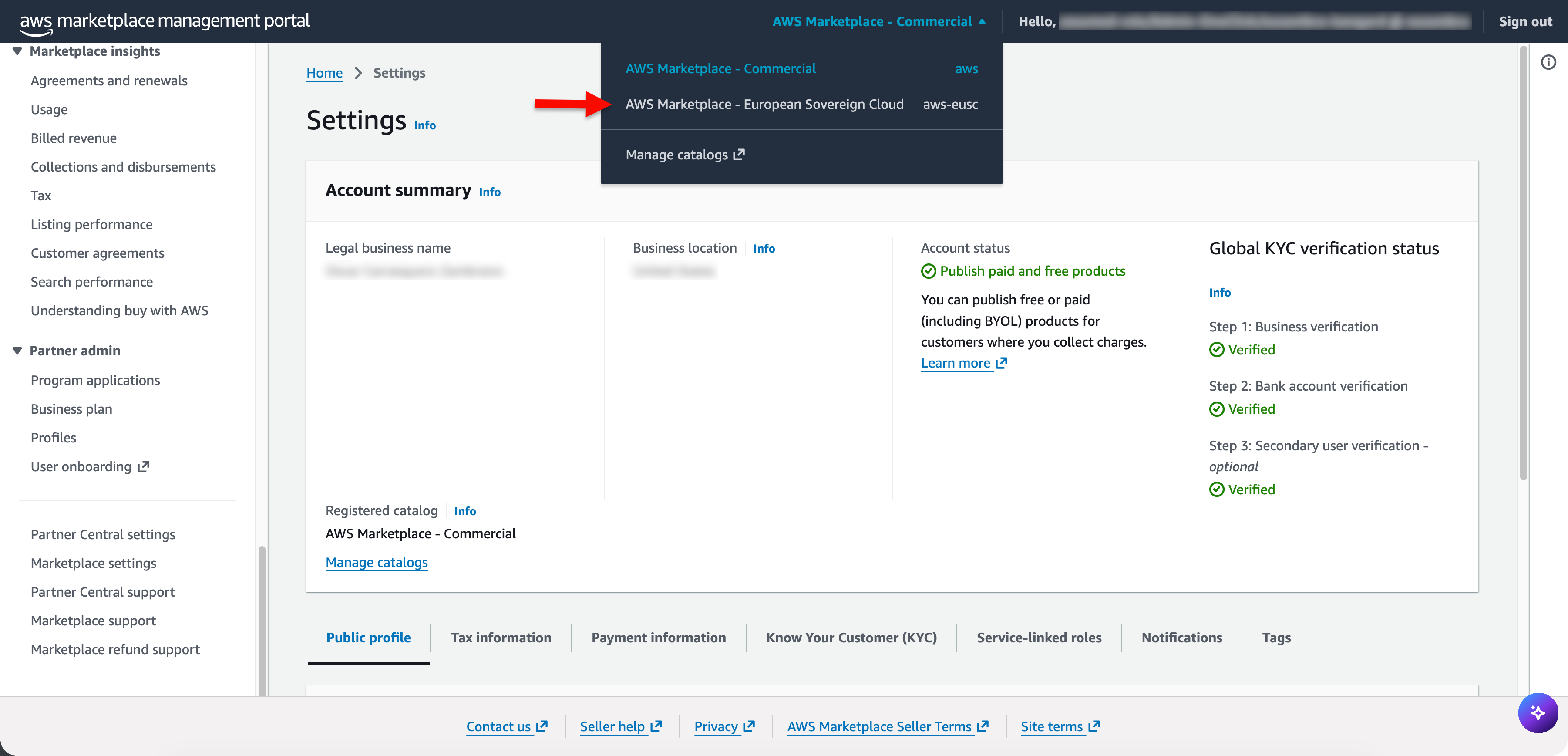
Figure 4: Dropdown showing AWS Marketplace – European Sovereign Cloud
When you verify your access to the AWS European Sovereign Cloud catalog, set up your AWS European Sovereign Cloud seller profile. In the center of the navigation bar, choose AWS Marketplace – European Sovereign Cloud and in the left navigation pane, choose Marketplace settings to begin configuring your AWS European Sovereign Cloud seller profile and payment information. On the Public profile tab, complete your company information, logo, and product description.
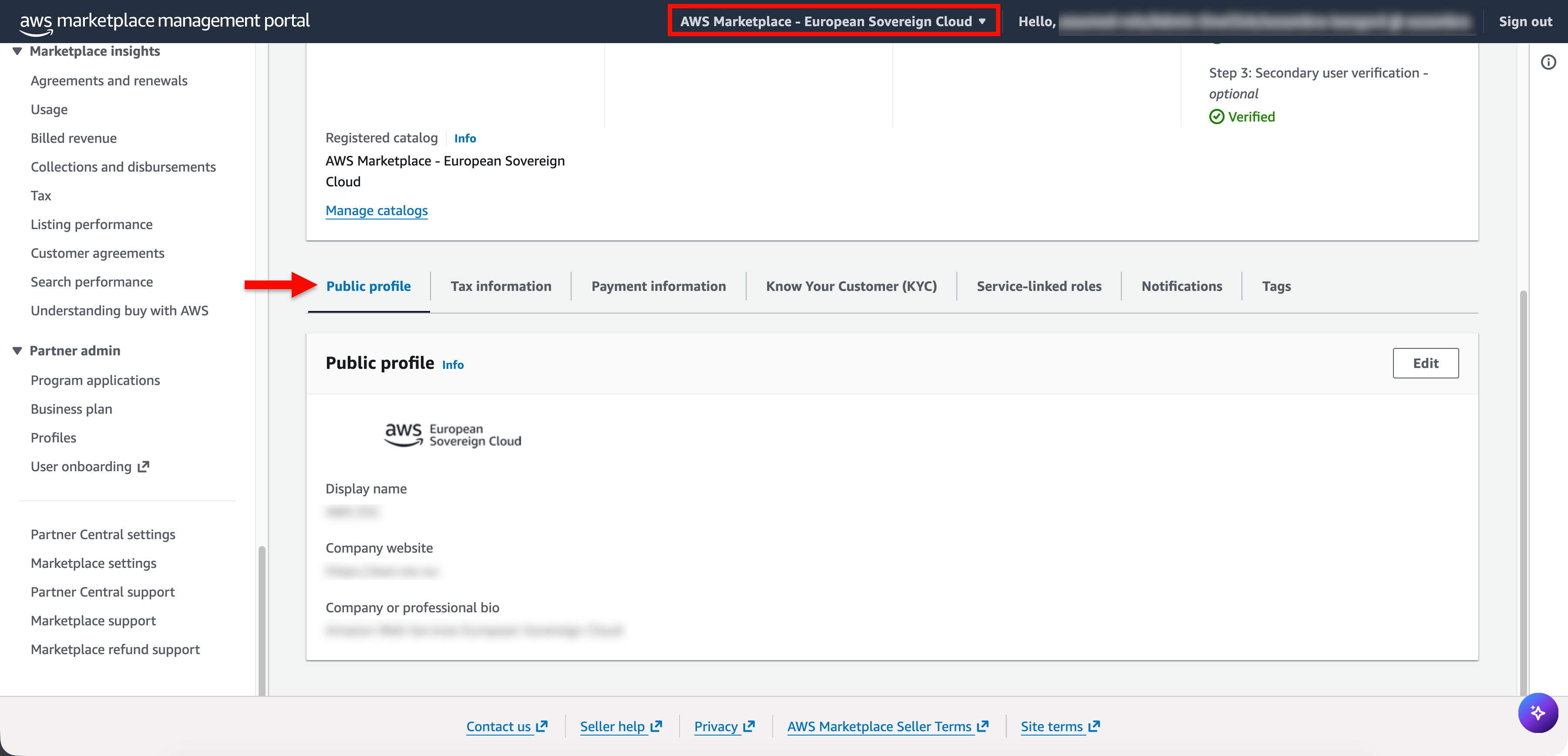
Figure 5: Complete your public profile
On the Payment information tab, add your disbursement preferences. AWS Marketplace in the AWS European Sovereign Cloud supports public pricing and requires disbursements be in EUR:
- Validate that your current bank account added to your AWS Marketplace seller profile can accept EUR disbursements or add an account capable of receiving EUR deposits.
- Define your disbursement preference for EUR.
- If you’re planning to create private offers in United States Dollar (USD), create a disbursement preference for USD too.
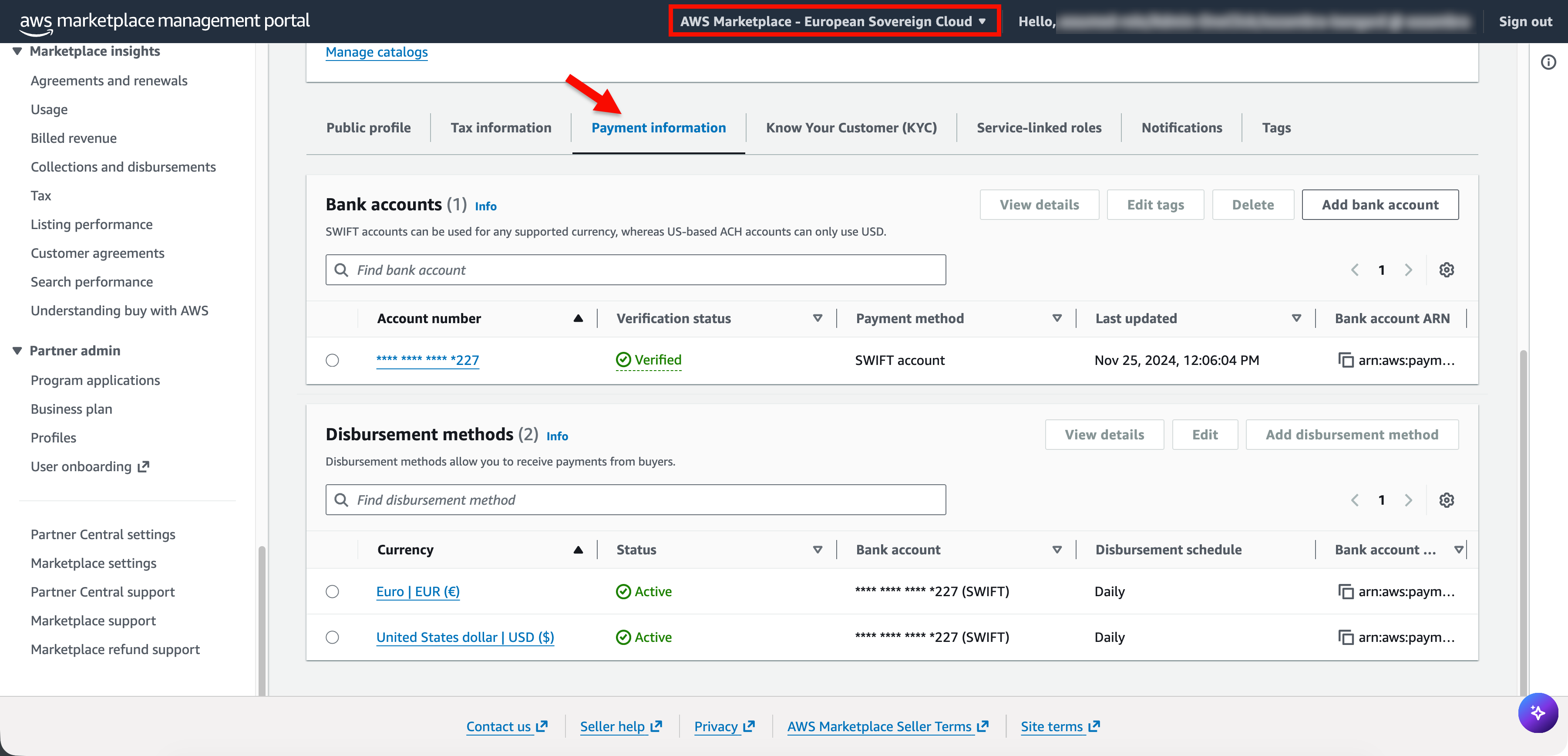
Figure 6: Complete your payment information
You’re ready to publish!
You have completed the registration process and are now ready to begin listing products in AWS Marketplace in the AWS European Sovereign Cloud.
Next steps
In two upcoming blog posts, we will cover how to publish AMI and SaaS products in AWS Marketplace in the AWS European Sovereign Cloud. For more information about AWS European Sovereign Cloud, visit the AWS European Sovereign Cloud documentation.