AWS Business Intelligence Blog
Building a serverless Amazon Quick Suite report delivery solution for non-Quick Sight users
Amazon Quick Sight is the business intelligence and reporting offering in Amazon Quick Suite. Amazon Quick Sight pixel-perfect reports enables the creation and sharing of custom- formatted, personalized reports containing business-critical data with hundreds of thousands of users without requiring infrastructure setup or maintenance, up-front licensing, or long-term commitments. Quick Sight supports built-in scheduling and distribution of pixel-perfect reports as PDF, CSV, or XLS files to users registered in Quick Sight. However, there are scenarios where these reports need to be delivered to users who aren’t registered in Quick Sight. Snapshot APIs from Quick Sight help achieve this use case. The blog post Deliver Amazon Quick Sight pixel-perfect reports to non-Quick Sight users discusses a use case where Quick Sight APIs can be used to achieve this. In this post, we show you how to implement a serverless solution to deliver Quick Sight reports to non-Quick Sight users using AWS services. The solution tracks and persists the snapshot request details and output outside of Quick Sight.
Use case overview
Let’s consider a fictional software as a service (SaaS) startup company—AnyCompany—that provides call center management service to organizations. The company has been using Amazon Quick Sight to generate insights for their customers using anonymous embedding. The company wants to provide a solution to generate scheduled reports or one-time downloads for its customers that can be accessed anytime.
Solution overview
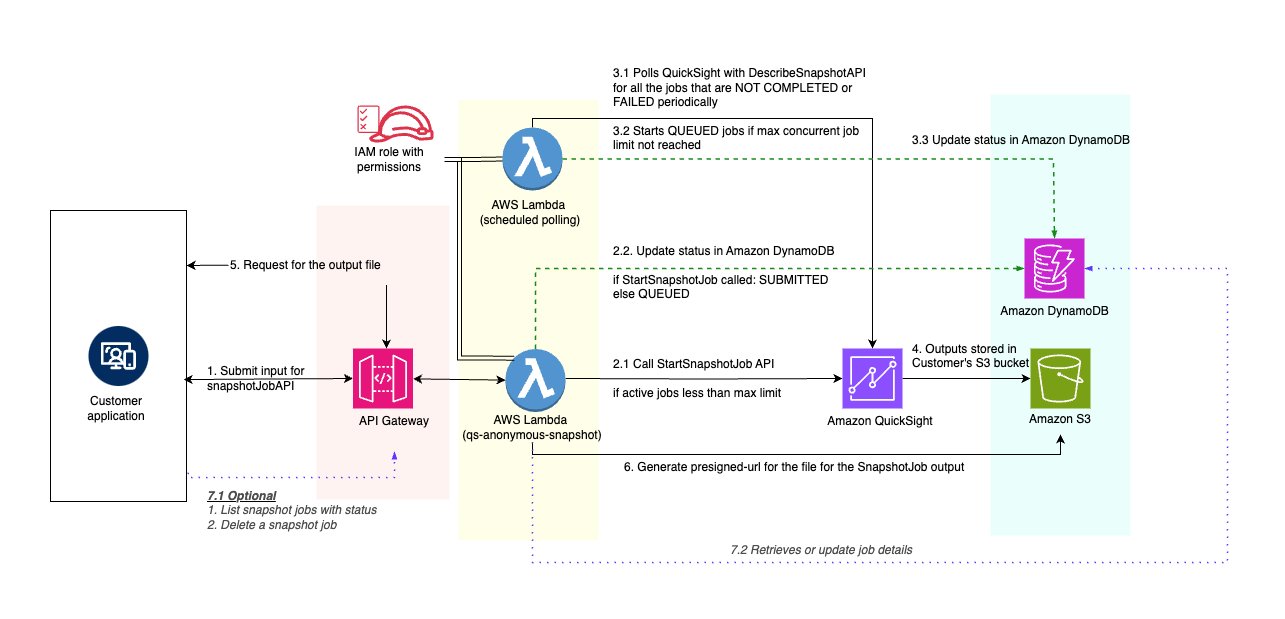
This post explains the architecture and technical implementation of a solution that helps achieve the following using APIs. These APIs can be called from a web application or from a batch process depending on the use case. The figure that follows illustrates the architecture of our serverless report delivery solution. It showcases how various AWS services interact to process report requests, generate reports using Amazon Quick Sight, and deliver them to users. As depicted in the figure, the solution follows these key steps:
- The customer application submits a report request through Amazon API Gateway.
- An AWS Lambda function processes the request and initiates the Quick Sight snapshot job.
- Another Lambda function periodically polls for job status updates. Alternatively, the target Amazon Simple Storage Service (Amazon S3) bucket can be monitored using Amazon EventBridge to detect when a file is uploaded to the S3 bucket.
- When complete, the report is stored in Amazon S3 and made available for download.
Prerequisites
Before you begin, ensure you have the following components in place.
- A mechanism to get inputs from users and make API calls. For one-time reports, this mechanism would typically be a web page with an input form. For batch reports, the inputs are typically stored in a repository and a script fetches the input parameters and makes the API call.
- AWS Command Line Interface (AWS CLI) configured with appropriate permissions.
- AWS Serverless Application Model (AWS SAM) CLI installed using the command
install aws-sam-cli. - Python 3.9 or later.
Solution walkthrough
With the prerequisites in place, you’re ready to start building and using the solution.
Build and deploy
Download the ZIP file from GitHub and extract the contents of the file into a folder. Execute the following commands from the folder sample-serverless-quicksight-report-to-non-quicksight-users-main. By the end of this step, the necessary components will be deployed into the AWS account.
Get API endpoints
After deployment, the AWS CloudFormation outputs will display:
- QSAnonymoustSnapShotAPI: Base API URL
- APIEndpoints: All available endpoints with methods
Get API key value
The API key is automatically created but the value must be retrieved separately. This can be retrieved using the AWS Management Console for API Gateway.
- Go to API Gateway and choose API Keys.
- Search for and select QSAnonymousSnapshotApiKey.
- Choose Show to reveal the key value.
List of APIs
This AWS SAM application will create
- An S3 bucket to store output.
- An Amazon DynamoDB table to store job request details.
- A Lambda function with an API Gateway as an interface to submit, list, and delete snapshot requests and download the output of a successfully completed snapshot job. The following table lists the API endpoints that will be generated.
| API method | API request path | API description |
| GET | https://{api-id}.execute-api.{region}.amazonaws.com/Prod/qs-anonymous-snapshot | List existing shapshot jobs |
| POST | https://{api-id}.execute-api.{region}.amazonaws.com/Prod/qs-anonymous-snapshot | Submit a snapshot job request |
| DELETE | https://{api-id}.execute-api.{region}.amazonaws.com/Prod/qs-anonymous-snapshot/{dashboardId}/{jobId} | Delete the snapshot job after completion |
| GET | https://{api-id}.execute-api.{region}.amazonaws.com/Prod/qs-anonymous-snapshot/describe_job/{dashboardId}/{jobId} | Describe the snapshot job |
| GET | https://{api-id}.execute-api.{region}.amazonaws.com/Prod/qs-anonymous-snapshot/describe_job_result/{dashboardId}/{jobId} | Describe the result of a snapshot job |
| GET | https://{api-id}.execute-api.{region}.amazonaws.com/Prod/qs-anonymous-snapshot/download_output/{dashboardId}/{jobId} | Download the output of the snapshot job |
- A Lambda function to constantly poll Amazon Quick Sight to check for status changes of currently running snapshot jobs.
Submit a snapshot job request
The following are detailed steps with an appropriate sample payload to submit a snapshot request:
- Create a Python job that executes the API call for a snapshot report with a set of parameters.
- Execute the Python job. The following is the typescript definition of the payload and sample of the POST request API call
/qs_anonymous_snapshot.
The below code shows the base url and the structure of the input that needs to be given to the snapshot job and the location where the output needs to go. The bucket prefix, as the name suggests, is the path of an S3 bucket that’s configured at the time of installation. Note that you can’t define the file name of the output because Amazon Quick Sight is designed to enforce that the output file has a unique name and doesn’t accidentally overwrite an existing file in Amazon S3. The input from users is set as parameters.
- The preceding payload details will be used to trigger the
start_dashboard_snapshot_jobAPI call. This job takes the dashboard, the sheet, visual (for an XLS or CSV file), and parameter name and values that are passed as indicated in the following code. You can also optionally pass session tags to apply row-level security. The details of the session tags must be determined by the application to help ensure that users don’t manipulate the row level security. Thestart_dashboard_snapshot_jobjob is an asynchronous job, and so the details of this request need to be available at a later point in time to refer to the job and check the status. To support this, the details of the job are stored in the DynamoDB table. The details stored include dashboard ID, snapshot job ID, and job status (initially set asSUBMITTED).
Queue the snapshot job request
Although Quick Sight can scale automatically, a limited number of concurrent jobs can be submitted on a per account basis. A simple yet robust queuing solution can simplify operations at scale significantly. By adding a queuing solution layer, you can manage user variance in expectation of SLAs for reports and clear the queue if there’s a delay or an exception scenario that invalidates a set of delayed requests.Whenever the number of running jobs exceeds the maximum concurrent jobs limit, the polling function processes the queue and submits the job to Quick Sight when the number of running jobs is below the limit.
Poll and update the status of the running snapshot jobs
A Lambda function is invoked every minute to check the status of snapshot jobs that aren’t complete. The status of the initiated job can be polled by invoking describe_dashboard_snapshot_job by passing in the request_snapshot job ID and the dashboard ID, which can be retrieved from DynamoDB as shown in the following code.
After the job completes with a status of success or failure, the describe_dashboard_snapshot_job_result API is called to retrieve the details. If the job is successful, the Amazon S3 location of the output is stored in DynamoDB. If the job fails, the failure reason is stored in DynamoDB.
List snapshot jobs with status
The following API call returns a list of jobs along with their status.POST https://{api-id}.execute-api.{region}.amazonaws.com/Prod/qs-anonymous-snapshot/:dashboardIdThe preceding API call takes two query string parameters:
dashboardId: The API returns all jobs whendashboardIdisn’t provided. WhendashboardIdis provided, the jobs for that specific dashboard is returned. In this sample implementation, the DynamoDB table is partitioned usingdashboardId.nextToken: This parameter is used to support pagination. It contains the base64-encoded token from the previous request, which is used to navigate to different pages of the results if the number of jobs in the DynamoDB table is more than a single page.
The following is the typescript definition and typical usage:
The following is the code that is executed against the DynamoDB table and returns results. The DynamoDB table is partitioned by dashboard ID. When the dashboard ID is given, then the API returns the list of snapshot jobs that have been invoked for the dashboard along with the details of sheets used as well as statuses.
Download the output
The users who access these reports won’t have AWS credentials to interact directly with Amazon S3 to download the report. So, a pre-signed URL is generated to provide temporary, controlled access to the report stored in Amazon S3. With this change, users can download and view the report, which has been exported as a PDF, XLS, or CSV file. The S3 bucket also enables setting up retention rules for reports using the Amazon S3 lifecycle management tools.The following is the API call to receive the pre-signed URL of the output:
The following is the typescript definition and typical usage:
Following code is executed in lambda to generate the pre-signed URL for the output file of a snapshot job.
Sample Python test script to generate the URL for PDF output
If the number of concurrent invocations is more than the concurrent job limit, the job will be queued as seen in the following status.
Clean up
To avoid ongoing charges, delete the following resources if they’re no longer needed, delete the Cloud Formation stack by using the following AWS SAM command.sam delete --stack-name <your-stack-name>
Conclusion and next steps
This post illustrates how an SaaS startup company can use Amazon Quick Sight to generate scheduled reports or one-time downloads for its customers that can be accessed anytime. Depending on the preferred delivery method, the generated report can also be transferred to other systems using Secure File Transfer Protocol (SFTP) or emailed to permitted users and groups within and outside the company for customers and partners. A separate Amazon S3 bucket per customer or partner can be used to store report outputs to help ensure tighter delineation of output data.By default, the solution implements basic API key-based authorization. Depending on the use case, the authorization can be implemented to suit customers’ preferred authorization method.
To learn more, see Quick Sight pixel-perfect reports.
About the authors
 Vetri Natarajan is a Senior Specialist Solutions Architect for Amazon Quick Suite. Vetri has 15 years of experience implementing enterprise business intelligence (BI) solutions and greenfield data products. Vetri specializes in integration of BI solutions with business applications and enabling data-driven decisions.
 Vaidy Janardhanam is a Specialist Solutions Architect for Amazon Quick Suite. He specializes in empowering customers to transform their analytics landscape, unifying traditional business intelligence dashboards with cutting-edge agentic AI workflows that turn insights into automated action.
 Leona Li is a Specialist Solutions Architect for Amazon Quick Suite. She focuses on enabling data intelligence and helping enterprise customers become more data-driven by designing, building, and modernizing their solutions in the cloud.